radio SUBARU OUTBACK 2016 6.G Owners Manual
[x] Cancel search | Manufacturer: SUBARU, Model Year: 2016, Model line: OUTBACK, Model: SUBARU OUTBACK 2016 6.GPages: 572, PDF Size: 21.79 MB
Page 101 of 572
deploying SRS curtain airbag
–Installation of additional elec-
trical/electronic equipment
such as a mobile two-way
radio on or near the SRS
airbag system components
and/or wiring
–Modifications on or inside the
front door panels for the pur-
pose of a speaker replace-
ment or sound insulation
.The impact sensors, which detect
the pressure of an impact, are
located in the doors. Do not
modify any components of the
doors or door trims, such as the
addition of door speakers for
example. Any modifications to
the doors create a risk of the
airbag system becoming inop-
erative or unintended airbag de-
ployment.
CAUTION
Do not perform any of the following
modifications. Such modifications
can interfere with proper operation
of the SRS airbag system.
.Attachment of any equipment
(bush bar, bullbar, winches, snowplow, skid/sump plate, etc.) other
than genuine SUBARU acces-
sory parts.
.Modification of the suspension
system or front end structure.
.Installation of a tire of different
size and construction from the
tires specified on the vehicle
placard attached to the driver’s
door pillar or specified for indivi-
dual vehicle models in this Own-
er’s Manual.
.Attachment of any equipment
(side steps or side sill protectors,
etc.) other than genuine SUBARU
accessory parts to the side body.
Always consult your SUBARU dealer if
you want to install any accessory parts on
your vehicle.
Seat, seatbelt and SRS airbags/*SRS airbag (Supplemental Restraint System airbag)1-71
Page 107 of 572

–Canada-spec. models
NOTE
This device complies with Industry
Canada licence-exempt RSS standard
(s). Operation is subject to the follow-
ing two conditions: (1) this device may
not cause interference, and (2) this
device must accept any interference,
including interference that may cause
undesired operation of the device.
NOTE
Le présent appareil est conforme aux
CNR d’Industrie Canada applicables
aux appareils radio exempts de licence.
L’exploitation est autorisée aux deux
conditions suivantes: (1) l’appareil ne
doit pas produire de brouillage, et (2)
l’utilisateur de l’appareil doit accepter
tout brouillage radioélectrique subi,
même si le brouillage est susceptible
d’en compromettre le fonctionnement.–Mexico-spec. models
&Security indicator light
Refer to“Security indicator light”F3-29.
&Key replacement
Your key number plate will be required if
you ever need a replacement key made.
Any new key must be registered for use
with your vehicle’s immobilizer system
before it can be used. The maximum
number of keys that can be registered
for use with one vehicle is as follows.
.Four (models without“keyless access
with push-button start system”)
.Seven (models with“keyless access
with push-button start system”)
One key that has already been registered
is required in order to register a new key.
If you lose a key, the lost key’s ID code still
remains in the memory of the vehicle’s
immobilizer system. For security reasons,
the lost key’s ID code should be erased
from the memory. To erase the lost key’s
ID code, all keys that will be used are
required.
For details about new key registration and
erasing the lost key’s ID code, contact
your SUBARU dealer.
Keys and doors/Immobilizer2-5
Page 112 of 572
Keys and doors/Keyless access with push–button start system
Keyless access with push-
button start system (if
equipped)
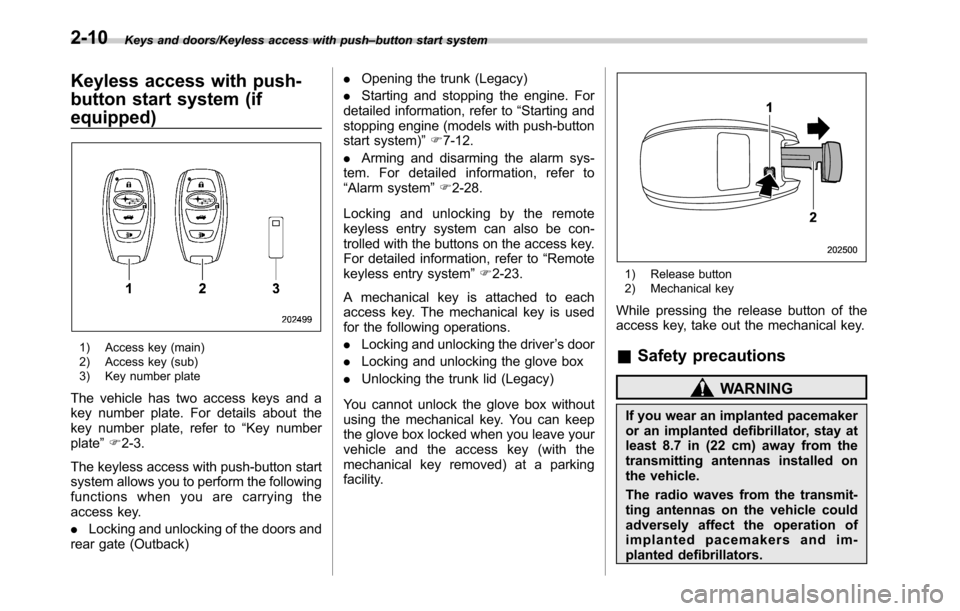
1) Access key (main)
2) Access key (sub)
3) Key number plate
The vehicle has two access keys and a
key number plate. For details about the
key number plate, refer to“Key number
plate”F2-3.
The keyless access with push-button start
system allows you to perform the following
functions when you are carrying the
access key.
.Locking and unlocking of the doors and
rear gate (Outback).Opening the trunk (Legacy)
.Starting and stopping the engine. For
detailed information, refer to“Starting and
stopping engine (models with push-button
start system)”F7-12.
.Arming and disarming the alarm sys-
tem. For detailed information, refer to
“Alarm system”F2-28.
Locking and unlocking by the remote
keyless entry system can also be con-
trolled with the buttons on the access key.
For detailed information, refer to“Remote
keyless entry system”F2-23.
A mechanical key is attached to each
access key. The mechanical key is used
for the following operations.
.Locking and unlocking the driver’s door
.Locking and unlocking the glove box
.Unlocking the trunk lid (Legacy)
You cannot unlock the glove box without
using the mechanical key. You can keep
the glove box locked when you leave your
vehicle and the access key (with the
mechanical key removed) at a parking
facility.
1) Release button
2) Mechanical key
While pressing the release button of the
access key, take out the mechanical key.
&Safety precautions
WARNING
If you wear an implanted pacemaker
or an implanted defibrillator, stay at
least 8.7 in (22 cm) away from the
transmitting antennas installed on
the vehicle.
The radio waves from the transmit-
ting antennas on the vehicle could
adversely affect the operation of
implanted pacemakers and im-
planted defibrillators.
2-10
Page 113 of 572
If you wear electric medical equip-
ment other than an implanted pace-
maker or an implanted defibrillator,
before using the keyless access
with push-button start system, refer
to“Radio waves used for the key-
less access with push-button start
system”mentioned later, and con-
tact the electric medical equipment
manufacturer for more information.
The radio waves from the transmit-
ting antennas on the vehicle could
adversely affect the operation of the
electric medical equipment.
“Radio waves used for the keyless
access with push-button start sys-
tem”
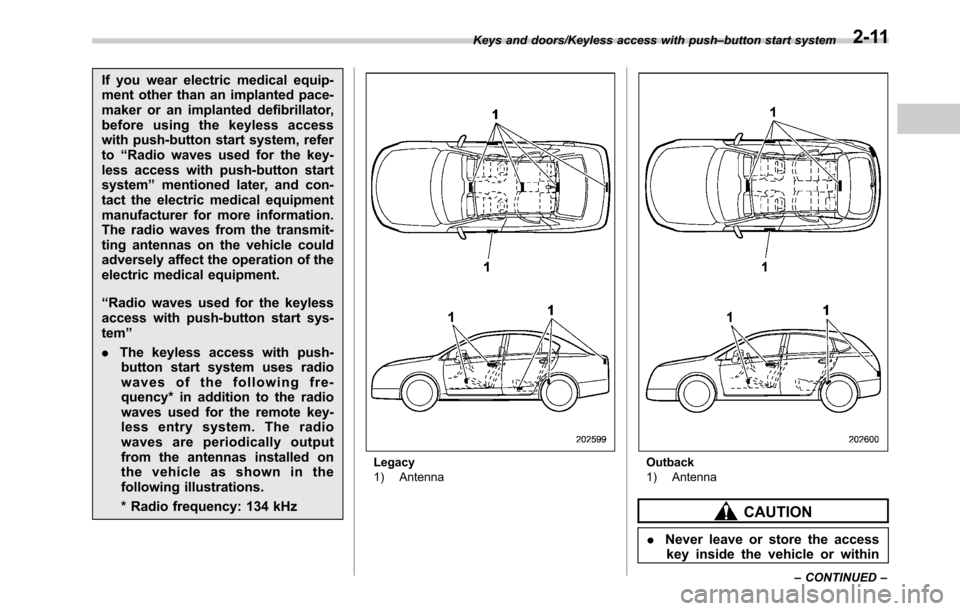
.The keyless access with push-
button start system uses radio
waves of the following fre-
quency* in addition to the radio
waves used for the remote key-
less entry system. The radio
waves are periodically output
from the antennas installed on
the vehicle as shown in the
following illustrations.
* Radio frequency: 134 kHz
Legacy
1) AntennaOutback
1) Antenna
CAUTION
.Never leave or store the access
key inside the vehicle or within
Keys and doors/Keyless access with push–button start system
–CONTINUED–2-11
Page 114 of 572

Keys and doors/Keyless access with push–button start system
6.6 ft (2 m) around the vehicle (e.
g., in the garage). The access key
may be locked inside the vehicle,
or the battery may discharge
rapidly.
.The access key contains electro-
nic components. Observe the
following precautions to prevent
malfunctions.
–Although you can replace the
battery of the access key
yourself, it is recommended
that the battery be replaced by
a SUBARU dealer to avoid the
risk of damage at the time of
replacement.
–Do not get the access key wet.
If the access key gets wet,
wipe it off immediately and let
it dry completely.
–Do not apply strong impacts
to the access key.
–Keep the access key away
from magnetic sources.
–Never leave the access key in
direct sunlight or anywhere
that may become hot, such
as on the dashboard. It may
damage the battery or cause
circuit malfunctions.–Do not wash the access key in
an ultrasonic washer.
–Do not leave the access key in
humid or dusty locations.
Doing so may cause malfunc-
tions.
–Do not leave the access key
near personal computers or
home electric appliances.
Doing so may cause the ac-
cess key to malfunction, re-
sulting in battery discharge.
.If the access key is dropped, the
integrated mechanical key inside
may become loose. Be careful
not to lose the mechanical key.
.When you carry the access key
on an airplane, do not press the
button of the access key while in
the airplane. When any button of
the access key is pressed, radio
waves are sent and may affect
the operation of the airplane.
When you carry the access key
in a bag on an airplane, take
measures to prevent the buttons
of the access key from being
pressed.NOTE
.The operational/non-operational
setting for the keyless access function
can be changed. For the setting proce-
dure, refer to“Disabling keyless ac-
cess function”F2-18. The setting can
also be changed by a SUBARU dealer.
For more details, contact a SUBARU
dealer.
.For detailed information about the
operation method for the push-button
ignition switch while the keyless ac-
cess function is switched to the non-
operational mode, refer to“Access key
–if access key does not operate
properly”F9-18.
.The keyless access with push-but-
ton start system uses weak radio
waves. The status of the access key
and environmental conditions may in-
terfere with the communication be-
tween the access key and the vehicle
under the following conditions, and it
may not be possible to lock or unlock
the doors or start the engine.
–When operating near a facility
where strong radio waves are trans-
mitted, such as a broadcast station
and power transmission lines
–When products that transmit
radio waves are used, such as an
access key or a remote transmitter
2-12
Page 116 of 572
Keys and doors/Keyless access with push–button start system
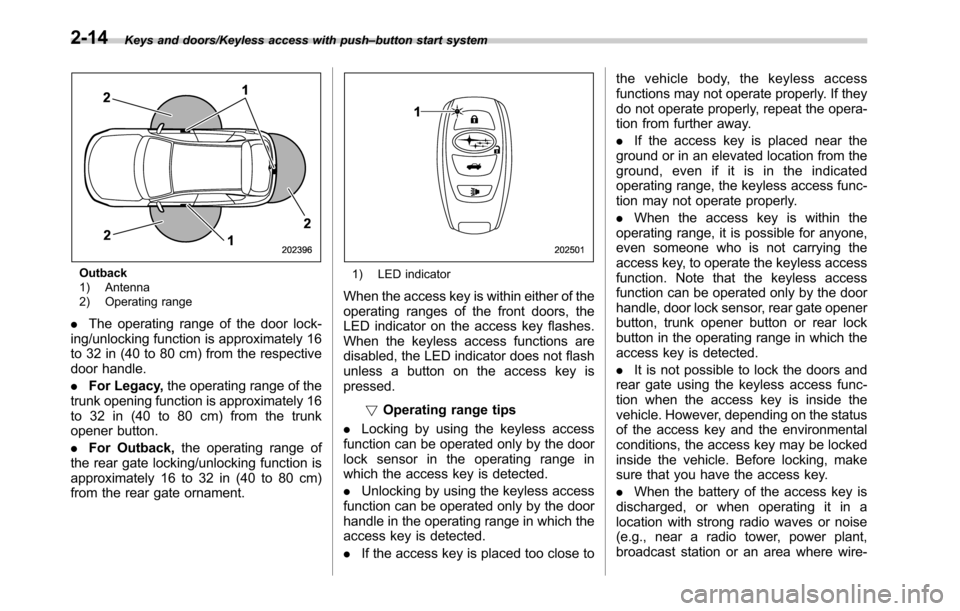
Outback
1) Antenna
2) Operating range
.The operating range of the door lock-
ing/unlocking function is approximately 16
to 32 in (40 to 80 cm) from the respective
door handle.
.For Legacy,the operating range of the
trunk opening function is approximately 16
to 32 in (40 to 80 cm) from the trunk
opener button.
.For Outback,the operating range of
the rear gate locking/unlocking function is
approximately 16 to 32 in (40 to 80 cm)
from the rear gate ornament.
1) LED indicator
When the access key is within either of the
operating ranges of the front doors, the
LED indicator on the access key flashes.
When the keyless access functions are
disabled, the LED indicator does not flash
unless a button on the access key is
pressed.
!Operating range tips
.Locking by using the keyless access
function can be operated only by the door
lock sensor in the operating range in
which the access key is detected.
.Unlocking by using the keyless access
function can be operated only by the door
handle in the operating range in which the
access key is detected.
.If the access key is placed too close tothe vehicle body, the keyless access
functions may not operate properly. If they
do not operate properly, repeat the opera-
tion from further away.
.If the access key is placed near the
ground or in an elevated location from the
ground, even if it is in the indicated
operating range, the keyless access func-
tion may not operate properly.
.When the access key is within the
operating range, it is possible for anyone,
even someone who is not carrying the
access key, to operate the keyless access
function. Note that the keyless access
function can be operated only by the door
handle, door lock sensor, rear gate opener
button, trunk opener button or rear lock
button in the operating range in which the
access key is detected.
.It is not possible to lock the doors and
rear gate using the keyless access func-
tion when the access key is inside the
vehicle. However, depending on the status
of the access key and the environmental
conditions, the access key may be locked
inside the vehicle. Before locking, make
sure that you have the access key.
.When the battery of the access key is
discharged, or when operating it in a
location with strong radio waves or noise
(e.g., near a radio tower, power plant,
broadcast station or an area where wire-
2-14
Page 117 of 572

less equipment is used), or while talking
on a cell phone, the operating ranges may
be reduced, or the keyless access func-
tion may not operate.
In such a case, perform the procedure
described in“Locking and unlocking”F9-
18.
.When an access key is in the operating
range, if the door handle becomes wet
due to exposure to a significant amount of
water when the vehicle is washed or
during heavy rain, the doors may be
locked or unlocked.
.The keyless access function may not
operate properly depending on the status
of the access key and the radio wave
conditions around the vehicle. In such a
case, perform the procedure described in
“Locking and unlocking”F9-18.
!How to use keyless access func-
tions
!Keyless access function tips
.When you lock the doors and rear gate
using the keyless access function, turn the
push-button ignition switch off. It is not
possible to lock the doors and rear gate
using the keyless access function when
the push-button ignition switch is on the
“ACC”or“ON”position. Refer to“Switch-
ing power”F3-6.
.If the door handle is gripped with agloved hand, the door lock may not be
released.
.If the door lock sensor is touched three
times or more repeatedly, the system will
ignore the sensor operation.
.When performing the locking proce-
dure too quickly, locking may not have
been completed. After locking the doors, it
is recommended to pull the REAR door
handles to confirm that the doors have
been locked.
.It is possible to lock the doors even
when one of the doors is open. After
performing the locking procedure, close
the opened door or rear gate to lock it.
.Within 3 seconds after locking the
doors and the rear gate by using the
keyless access function, it is not possible
to unlock doors and/or the rear gate by
using the keyless access function.
.When locking, be sure to carry the
access key to prevent locking the access
key in the vehicle.!Unlocking
Carry the access key, and grip the door
handle.
.When the driver’s door handle is
gripped, only the driver’s door will be
unlocked.
.When the front passenger’s door han-
dle is gripped, all doors (for Outback,
including the rear gate) will be unlocked.
Also, an electronic chirp will sound twice
and the hazard warning flashers will flash
twice.
Keys and doors/Keyless access with push–button start system
–CONTINUED–2-15
Page 120 of 572

Keys and doors/Keyless access with push–button start system
rear gate opener button is pressed.
The factory setting (default setting) is set
as“operational”.
&Selecting audible signal op-
eration
Using an electronic chirp, the system will
give you an audible signal when the doors
are locked or unlocked. If desired, you can
turn the audible signal off by operating the
multi information display. For details, refer
to“Keyless Entry System”F3-42.
Furthermore, the volume setting of the
audible signal can also be changed by a
SUBARU dealer. Consult your SUBARU
dealer for details.
&Selecting hazard warning
flasher operation
Using the hazard warning flasher, the
system will give you a visible signal when
the doors are locked or unlocked. If
desired, you can turn the hazard warning
flashers off by operating the multi informa-
tion display. For details, refer to“Keyless
Entry System”F3-42. The setting can
also be changed by a SUBARU dealer.
Consult your SUBARU dealer for details.
&Warning chimes and warning
indicator
The keyless access with push-button start
system sounds a warning chime and
flashes the access key warning indicator
on the combination meter in order to
minimize improper operations and help
protect your vehicle from theft.
For details, refer to“Warning chimes and
warning indicator of the keyless access
with push-button start system”F3-24.
&Disabling keyless access
function
When the vehicle is not going to be used
for a long time, or when you choose not to
use the keyless access function, the
keyless access function can be disabled.
WARNING
If you have an implanted pacemaker
or an implanted defibrillator, per-
form the procedure“By operating
the driver’s door”F2-19 to disable
the keyless access function. If you
perform the procedure“By operat-
ing the access key”F2-19, the
operation of an implanted pace-
maker or implanted defibrillator
may be affected by the radio waves
from the transmitter antenna.
NOTE
.The locking and unlocking function
by the remote keyless entry system is
not disabled.
.The setting can also be changed at
SUBARU dealers. For more details,
contact a SUBARU dealer.
.To start the engine while the func-
tions are disabled, perform the proce-
dure described in“Starting engine”
F9-19.
.We recommend that you disable the
keyless access functions under the
following conditions.
–When the vehicle is not going to
be used for an extended period of
time
2-18
Page 122 of 572

Keys and doors/Keyless access with push–button start system
7. Within 10 seconds after step 6 is
performed, close and open the driver’s
door once.
8. Within 5 seconds after step 7 is
performed, close the door.
A chirp sound will be heard, and the
functions will be disabled.
NOTE
In steps 4 and 6, press the power door
locking switch slowly. If the switch is
pressed quickly, the functions may not
be disabled.
!Enabling functions
When the procedure to disable the func-
tions is performed again, a chirp sound will
be heard, and the functions are enabled.
NOTE
.The keyless access function will be
enabled only if you perform the proce-
dure in the same manner you disabled
the function (for example, when dis-
abling by operating the driver’s door,
the function will not be enabled even if
you operate the access key).
.Press the push-button ignition
switch if you do not know the proce-
dure in which the keyless access
function was disabled.
–When disabling by operating thedriver’s door: a chirp will not be
heard
–When disabling by operating the
access key: a chirp will be heard
&When access key does not
operate properly
Refer to“Access key–if access key does
not operate properly”F9-18.
&Replacing battery of access
key
Refer to“Replacing battery of access key”
F11-50.
&Replacing access key
Access keys can be replaced at SUBARU
dealers. For more details, contact a
SUBARU dealer.
&Certification for keyless ac-
cess with push-button start
system
.U.S.-spec. models
FCC ID: HYQ14AHC
FCC ID: Y8PFJ14–2
FCC ID: Y8PSSPIMB02
CAUTION
FCC WARNING
Changes or modifications not ex-
pressly approved by the party re-
sponsible for compliance could void
the user’s authority to operate the
equipment.
This device complies with part 15 of the
FCC Rules. Operation is subject to the
following two conditions: (1) This device
may not cause harmful interference, and
(2) this device must accept any interfer-
ence received, including interference that
may cause undesired operation.
.Canada-spec. models
This device complies with Industry
Canada licence-exempt RSS standard
(s). Operation is subject to the following
two conditions: (1) this device may not
cause interference, and (2) this device
must accept any interference, including
interference that may cause undesired
operation of the device.
Le présent appareil est conforme aux
CNR d’Industrie Canada applicables aux
appareils radio exempts de licence. L’ex-
ploitation est autorisée aux deux condi-
tions suivantes: (1) l’appareil ne doit pas
produire de brouillage, et (2) l’utilisateur
2-20
Page 123 of 572
de l’appareil doit accepter tout brouillage
radioélectrique subi, même si le brouillage
est susceptible d’en compromettre le
fonctionnement.
.Mexico-spec. models
IFT
RLVDE1413-2269
14AHC
DENSO
PIN Code Access (models
with“keyless access with
push-button start system”)
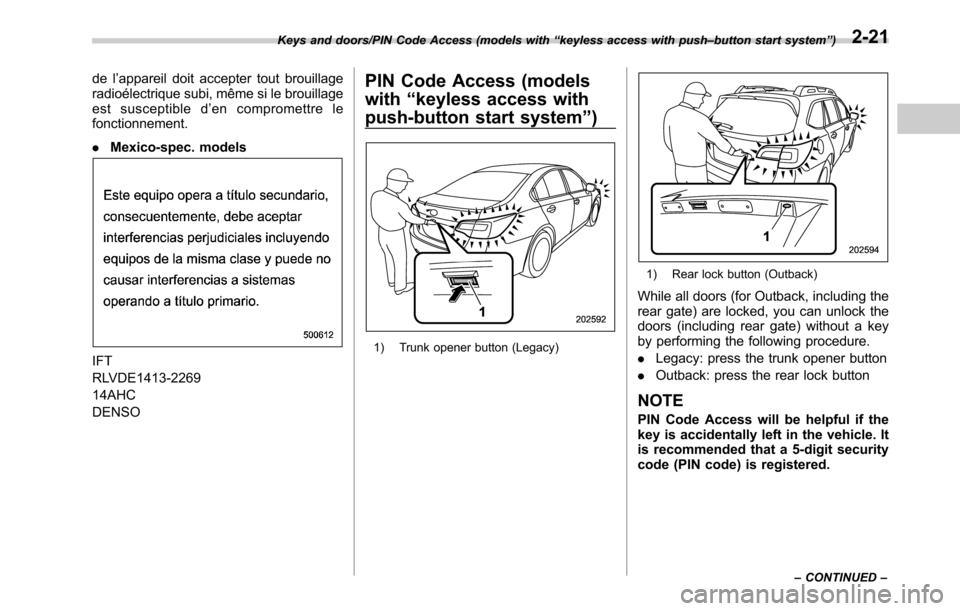
1) Trunk opener button (Legacy)
1) Rear lock button (Outback)
While all doors (for Outback, including the
rear gate) are locked, you can unlock the
doors (including rear gate) without a key
by performing the following procedure.
.Legacy: press the trunk opener button
.Outback: press the rear lock button
NOTE
PIN Code Access will be helpful if the
key is accidentally left in the vehicle. It
is recommended that a 5-digit security
code (PIN code) is registered.
Keys and doors/PIN Code Access (models with“keyless access with push–button start system”)
–CONTINUED–2-21