ESP SUBARU OUTBACK 2017 6.G User Guide
[x] Cancel search | Manufacturer: SUBARU, Model Year: 2017, Model line: OUTBACK, Model: SUBARU OUTBACK 2017 6.GPages: 610, PDF Size: 10.28 MB
Page 88 of 610
nated while the OFF indicator turns off
despite the fact that the actions noted
above have been taken, seat the child/
small adult in the rear seat and im-
mediately contact your SUBARU dealer
for an inspection. Even if the system
has passed the dealer inspection, it is
recommended that on subsequent trips
the child/small adult always take the
rear seat.
Children who have outgrown a child
restraint system should always wear the
seatbelt irrespective of whether the airbag
is deactivated or activated.
!Conditions in which front passen-
ger’s SRS frontal airbag is activated
The front passenger ’s SRS frontal airbag
will be activated for deployment upon
impact when any of the following condi-
tions is met regarding the front passen-
ger ’s seat.
. When the seat is occupied by an adult.
. When a heavy article is placed on the
seat.
CAUTION
When the front passenger ’s seat is
occupied by an adult, observe the
following precautions. Failure to do
so may lessen the load on the front
passenger ’s seat, deactivating the front passenger
’s SRS frontal airbag
despite the fact that the seat is
occupied by an adult. This may
result in personal injury.
. Do not allow the rear seat occu-
pant to lift the front passenger ’s
seat cushion using his/her feet.
. Do not place any article under the
front passenger ’s seat, or
squeeze any article from behind
and under the seat. This may lift
the seat cushion.
. Do not squeeze any article be-
tween the front passenger ’s seat
and side trim/pillar, door or cen-
ter console box. This may lift the
seat cushion.
! If the passenger ’s frontal airbag
OFF indicator illuminates and
the ON indicator turns off even
when the front passenger ’s seat
is occupied by an adult
This can be caused by the adult incor-
rectly sitting in the front passenger ’s seat.
1. Turn the ignition switch to the “LOCK”/
“OFF ”position.
2. Ask the front passenger to set the
seatback to the upright position, sit up
straight in the center of the seat cushion,
correctly fasten the seatbelt, position his/ her legs out forward, and adjust the seat to
the rearmost position.
3. Turn the ignition switch to the
“ON”
position.
If the OFF indicator remains illuminated
while the ON indicator remains off, take
the following actions.
1. Turn the ignition switch to the “LOCK”/
“OFF ”position.
2. Ensure that there is no article, book,
shoe, or other object trapped under the
seat, at the rear of the seat, or on the side
of the seat.
3. Ensure that the backward-forward
position and seatback of front passenger ’s
seat are locked into place securely by
moving the seat back and forth. (Models
equipped with manual seats only)
4. Turn the ignition switch to the “ON”
position and wait 6 seconds to allow the
system to complete self-checking. Follow-
ing the system check, both indicators turn
off for 2 seconds. Now, the ON indicator
should illuminate while the OFF indicator
remains off.
If the OFF indicator still remains illumi-
nated while the ON indicator remains off,
ask the occupant to move to the rear seat
and immediately contact your SUBARU
dealer for an inspection.
Seat, seatbelt and SRS airbags/*SRS airbag (Supplemental Restraint System airbag)
–CONTINUED –1-55
Page 94 of 610
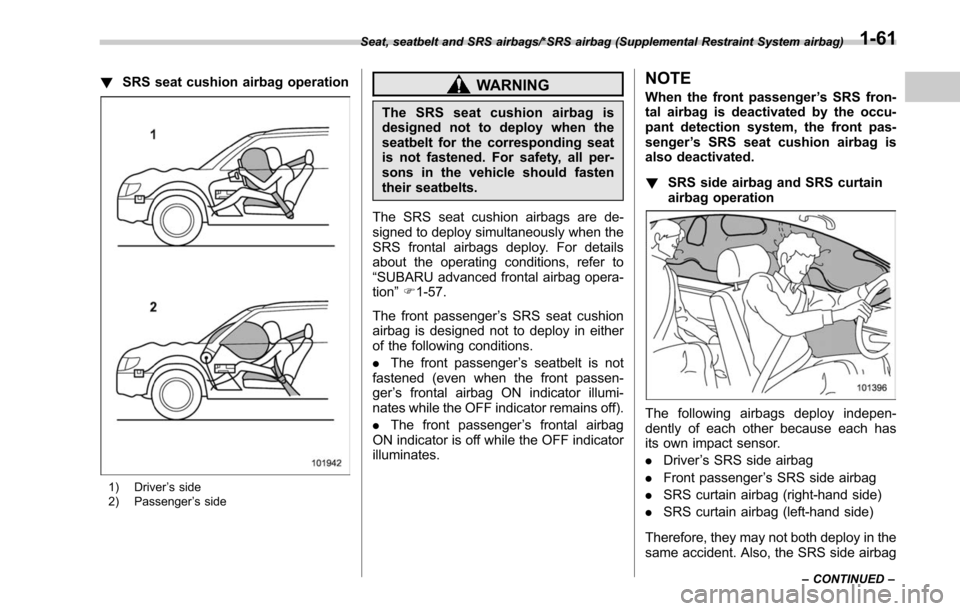
!SRS seat cushion airbag operation
1) Driver ’s side
2) Passenger ’s side
WARNING
The SRS seat cushion airbag is
designed not to deploy when the
seatbelt for the corresponding seat
is not fastened. For safety, all per-
sons in the vehicle should fasten
their seatbelts.
The SRS seat cushion airbags are de-
signed to deploy simultaneously when the
SRS frontal airbags deploy. For details
about the operating conditions, refer to
“SUBARU advanced frontal airbag opera-
tion ”F 1-57.
The front passenger ’s SRS seat cushion
airbag is designed not to deploy in either
of the following conditions.
. The front passenger ’s seatbelt is not
fastened (even when the front passen-
ger ’s frontal airbag ON indicator illumi-
nates while the OFF indicator remains off).
. The front passenger ’s frontal airbag
ON indicator is off while the OFF indicator
illuminates.
NOTE
When the front passenger ’s SRS fron-
tal airbag is deactivated by the occu-
pant detection system, the front pas-
senger ’s SRS seat cushion airbag is
also deactivated.
! SRS side airbag and SRS curtain
airbag operation
The following airbags deploy indepen-
dently of each other because each has
its own impact sensor.
.Driver ’s SRS side airbag
. Front passenger ’s SRS side airbag
. SRS curtain airbag (right-hand side)
. SRS curtain airbag (left-hand side)
Therefore, they may not both deploy in the
same accident. Also, the SRS side airbag
Seat, seatbelt and SRS airbags/*SRS airbag (Supplemental Restraint System airbag)
–CONTINUED –1-61
Page 112 of 610
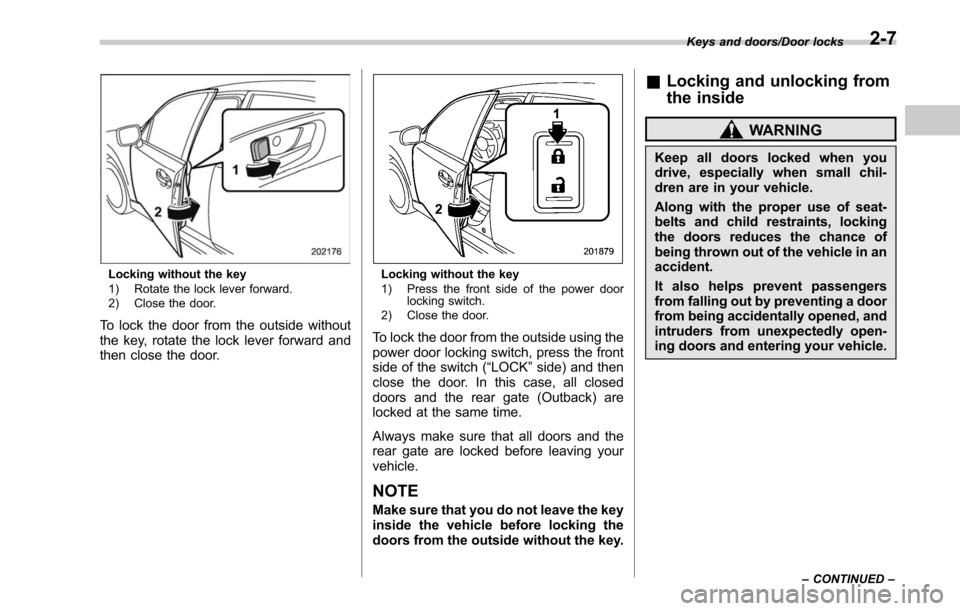
Locking without the key
1) Rotate the lock lever forward.
2) Close the door.
To lock the door from the outside without
the key, rotate the lock lever forward and
then close the door.
Locking without the key
1) Press the front side of the power doorlocking switch.
2) Close the door.
To lock the door from the outside using the
power door locking switch, press the front
side of the switch (“LOCK” side) and then
close the door. In this case, all closed
doors and the rear gate (Outback) are
locked at the same time.
Always make sure that all doors and the
rear gate are locked before leaving your
vehicle.
NOTE
Make sure that you do not leave the key
inside the vehicle before locking the
doors from the outside without the key.
& Locking and unlocking from
the inside
WARNING
Keep all doors locked when you
drive, especially when small chil-
dren are in your vehicle.
Along with the proper use of seat-
belts and child restraints, locking
the doors reduces the chance of
being thrown out of the vehicle in an
accident.
It also helps prevent passengers
from falling out by preventing a door
from being accidentally opened, and
intruders from unexpectedly open-
ing doors and entering your vehicle.
Keys and doors/Door locks
–CONTINUED –2-7
Page 119 of 610
Keys and doors/Keyless access with push–button start system
& Locking and unlocking with
“keyless access ”entry func-
tion
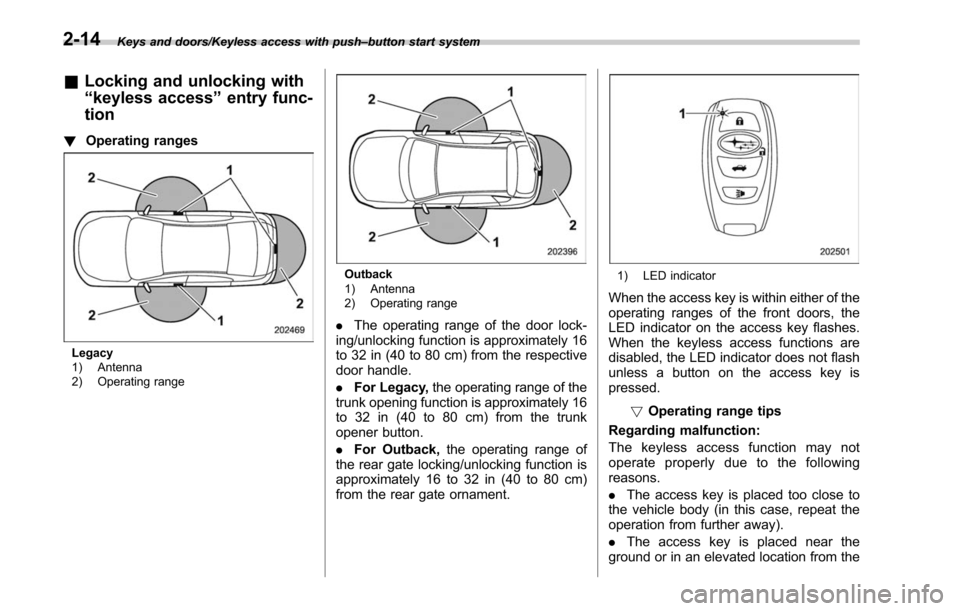
! Operating ranges
Legacy
1) Antenna
2) Operating range
Outback
1) Antenna
2) Operating range
.The operating range of the door lock-
ing/unlocking function is approximately 16
to 32 in (40 to 80 cm) from the respective
door handle.
. For Legacy, the operating range of the
trunk opening function is approximately 16
to 32 in (40 to 80 cm) from the trunk
opener button.
. For Outback, the operating range of
the rear gate locking/unlocking function is
approximately 16 to 32 in (40 to 80 cm)
from the rear gate ornament.
1) LED indicator
When the access key is within either of the
operating ranges of the front doors, the
LED indicator on the access key flashes.
When the keyless access functions are
disabled, the LED indicator does not flash
unless a button on the access key is
pressed.
!Operating range tips
Regarding malfunction:
The keyless access function may not
operate properly due to the following
reasons.
. The access key is placed too close to
the vehicle body (in this case, repeat the
operation from further away).
. The access key is placed near the
ground or in an elevated location from the
2-14
Page 130 of 610
&Operating the access key
NOTE
The remote keyless entry system will
not be activated when the push-button
ignition switch is in any position other
than the “OFF ”position.
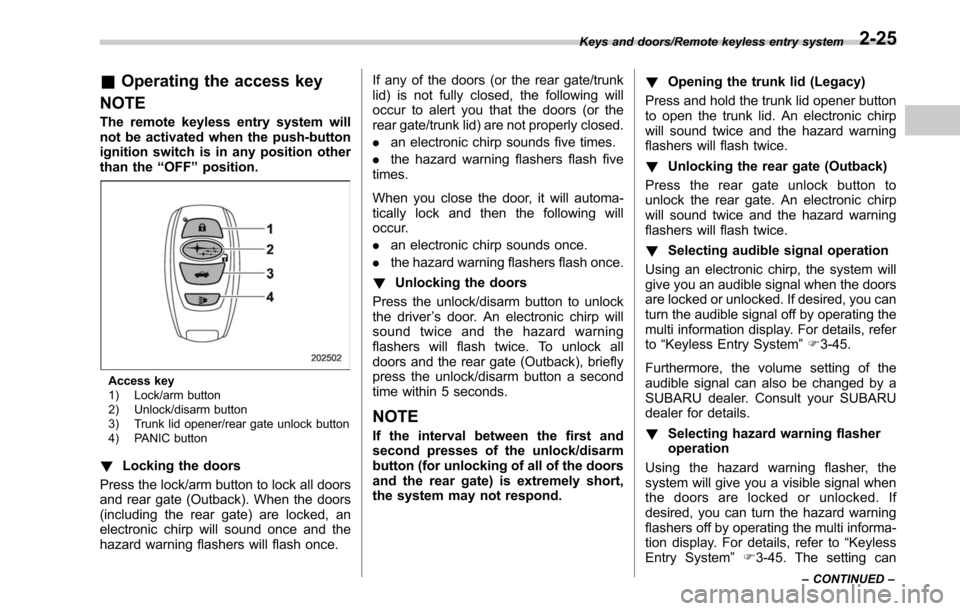
Access key
1) Lock/arm button
2) Unlock/disarm button
3) Trunk lid opener/rear gate unlock button
4) PANIC button
! Locking the doors
Press the lock/arm button to lock all doors
and rear gate (Outback). When the doors
(including the rear gate) are locked, an
electronic chirp will sound once and the
hazard warning flashers will flash once. If any of the doors (or the rear gate/trunk
lid) is not fully closed, the following will
occur to alert you that the doors (or the
rear gate/trunk lid) are not properly closed.
.
an electronic chirp sounds five times.
. the hazard warning flashers flash five
times.
When you close the door, it will automa-
tically lock and then the following will
occur.
. an electronic chirp sounds once.
. the hazard warning flashers flash once.
! Unlocking the doors
Press the unlock/disarm button to unlock
the driver ’s door. An electronic chirp will
sound twice and the hazard warning
flashers will flash twice. To unlock all
doors and the rear gate (Outback), briefly
press the unlock/disarm button a second
time within 5 seconds.
NOTE
If the interval between the first and
second presses of the unlock/disarm
button (for unlocking of all of the doors
and the rear gate) is extremely short,
the system may not respond. !
Opening the trunk lid (Legacy)
Press and hold the trunk lid opener button
to open the trunk lid. An electronic chirp
will sound twice and the hazard warning
flashers will flash twice.
! Unlocking the rear gate (Outback)
Press the rear gate unlock button to
unlock the rear gate. An electronic chirp
will sound twice and the hazard warning
flashers will flash twice.
! Selecting audible signal operation
Using an electronic chirp, the system will
give you an audible signal when the doors
are locked or unlocked. If desired, you can
turn the audible signal off by operating the
multi information display. For details, refer
to “Keyless Entry System ”F 3-45.
Furthermore, the volume setting of the
audible signal can also be changed by a
SUBARU dealer. Consult your SUBARU
dealer for details.
! Selecting hazard warning flasher
operation
Using the hazard warning flasher, the
system will give you a visible signal when
the doors are locked or unlocked. If
desired, you can turn the hazard warning
flashers off by operating the multi informa-
tion display. For details, refer to “Keyless
Entry System ”F3-45. The setting can
Keys and doors/Remote keyless entry system
–CONTINUED –2-25
Page 131 of 610
Keys and doors/Remote keyless entry system
also be changed by a SUBARU dealer.
Consult your SUBARU dealer for details.
!Vehicle finder function
Use this function to find your vehicle
parked among many vehicles in a large
parking lot. Provided you are within 30 feet
(10 meters) of the vehicle, pressing the
lock/arm button three times in a 5-second
period will cause your vehicle’ s horn to
sound once and its hazard warning
flashers to flash three times.
NOTE
If the interval between presses is too
short when you press the lock/arm
button three times, the system may
not respond to the signals from the
remote transmitter.
! Sounding a panic alarm
To activate the alarm, press the “PANIC ”
button once.
The horn will sound and the hazard
warning flashers will flash.
To deactivate the panic alarm, press any
button on the remote transmitter. If a
button on the remote transmitter is not
pressed, the alarm will be deactivated
after approximately 30 seconds.
& Operating the transmitter
NOTE
The remote keyless entry system will
not be activated when the key is
inserted in the ignition switch.
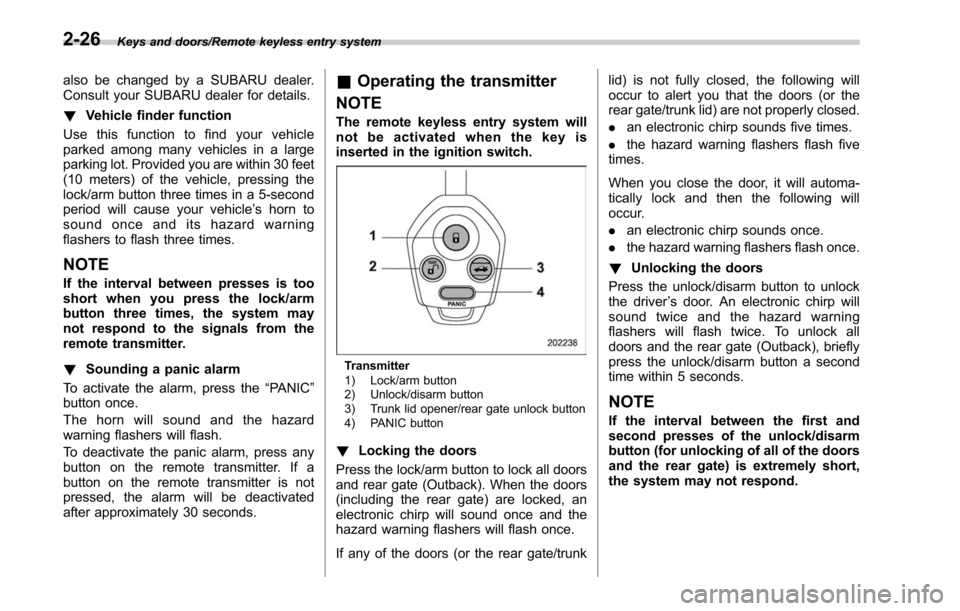
Transmitter
1) Lock/arm button
2) Unlock/disarm button
3) Trunk lid opener/rear gate unlock button
4) PANIC button
! Locking the doors
Press the lock/arm button to lock all doors
and rear gate (Outback). When the doors
(including the rear gate) are locked, an
electronic chirp will sound once and the
hazard warning flashers will flash once.
If any of the doors (or the rear gate/trunk lid) is not fully closed, the following will
occur to alert you that the doors (or the
rear gate/trunk lid) are not properly closed.
.
an electronic chirp sounds five times.
. the hazard warning flashers flash five
times.
When you close the door, it will automa-
tically lock and then the following will
occur.
. an electronic chirp sounds once.
. the hazard warning flashers flash once.
! Unlocking the doors
Press the unlock/disarm button to unlock
the driver ’s door. An electronic chirp will
sound twice and the hazard warning
flashers will flash twice. To unlock all
doors and the rear gate (Outback), briefly
press the unlock/disarm button a second
time within 5 seconds.
NOTE
If the interval between the first and
second presses of the unlock/disarm
button (for unlocking of all of the doors
and the rear gate) is extremely short,
the system may not respond.
2-26
Page 132 of 610
!Opening the trunk lid (Legacy)
Press and hold the trunk lid opener button
to open the trunk lid. An electronic chirp
will sound twice and the hazard warning
flashers will flash twice.
! Unlocking the rear gate (Outback)
Press the rear gate unlock button to
unlock the rear gate. An electronic chirp
will sound twice and the hazard warning
flashers will flash twice.
! Selecting audible signal operation
Using an electronic chirp, the system will
give you an audible signal when the doors
are locked or unlocked.
If desired, the audible signal ON/OFF
setting and the audible signal volume
can be customized by a SUBARU dealer.
Consult your SUBARU dealer for details.
! Selecting hazard warning flasher
operation
Using the hazard warning flasher, the
system will give you a visible signal when
the doors are locked or unlocked. If
desired, you can turn the hazard warning
flashers off by operating the multi informa-
tion display. For details, refer to “Keyless
Entry System ”F 3-45. The setting can
also be changed by a SUBARU dealer.
Consult your SUBARU dealer for details. !
Vehicle finder function
Use this function to find your vehicle
parked among many vehicles in a large
parking lot. Provided you are within 30 feet
(10 meters) of the vehicle, pressing the
lock/arm button three times in a 5-second
period will cause your vehicle’ s horn to
sound once and its hazard warning
flashers to flash three times.
NOTE
If the interval between presses is too
short when you press the lock/arm
button three times, the system may
not respond to the signals from the
remote transmitter.
! Sounding a panic alarm
To activate the alarm, press the “PANIC”
button once.
The horn will sound and the hazard
warning flashers will flash.
To deactivate the panic alarm, press any
button on the remote transmitter. If a
button on the remote transmitter is not
pressed, the alarm will be deactivated
after approximately 30 seconds.
& Replacing the battery
Refer to “Replacing battery ”F 11-50.
& Replacing lost transmitters
If you lose a transmitter or want to
purchase additional transmitters (up to
four can be programmed), you should re-
program all of your transmitters for secur-
ity reasons. For details, contact your
SUBARU dealer and have the transmitters
programmed into the remote keyless entry
system.
&Certification for remote key-
less entry system
. U.S.-spec. models
FCC ID: CWTWB1U811
FCC ID: CWTWD1U848
CAUTION
FCC CAUTION
Changes or modifications not ex-
pressly approved by the party re-
sponsible for compliance could void
the user ’s authority to operate the
equipment.
This device complies with Part 15 of the
FCC Rules. Operation is subject to the
following two conditions: (1) This device
may not cause harmful interference, and
(2) this device must accept any interfer-
ence received, including interference that
Keys and doors/Remote keyless entry system
–CONTINUED –2-27
Page 147 of 610
Keys and doors/Rear gate (Outback)
pull it down holding the handle.
WARNING
.To prevent dangerous exhaust
gas from entering the vehicle,
always keep the rear gate closed
while driving.
. Do not attempt to shut the rear
gate while holding the recessed
grip. Also do not close the rear
gate by pulling the handle from
inside the cargo space. There is a
danger of your hand being
caught and injured.
CAUTION
. Do not jam a plastic bag in or
place cellophane tape on the rear
gate stays or scratch the stays
while loading or unloading cargo.
That could cause leakage of gas
from the stays, which may result
in their inability to hold the rear
gate open.
. Be careful not to hit your head or
face on the rear gate when open-
ing or closing the rear gate and
when loading or unloading car-
go.
& Power rear gate (if equipped)
WARNING
. When operating the power rear
gate, observe the following pre-
cautions. Ignoring the precau-
tions may result in an injury (e.
g., anyone ’s body is hit against
the rear gate or is caught in the
rear gate, etc.)
– Make sure there are no people
around the rear gate.
– Never let anyone get close to
the rear gate.
. When closing the rear gate, be
extremely careful to prevent any-
one ’s fingers, arms, neck, head
or other objects from being
caught in the rear gate. Other-
wise, serious personal injury
may be caused by entrapment.
. After opening the rear gate on a
slope by using the power rear
gate feature, the rear gate may
close. Make sure that the rear
gate has stopped completely
after opening it.
. When leaving the vehicle, always
carry the key for safety and never
allow an unattended child to remain in the vehicle. Failure to
follow this procedure could re-
sult in injury to a child operating
the power rear gate.
. The driver should be aware of
and pay careful attention to his/
her responsibilities.
. Use the power rear gate only
when the area around the rear
gate is clearly visible and when
you have checked that there is
no danger of people being
caught in the gate.
CAUTION
. When closing the rear gate after
opening it, make sure to use the
power rear gate. If you close the
rear gate manually with extra
force, the power rear gate may
be damaged.
. Do not install any accessories
other than genuine SUBARU
parts on the rear gate. If the
weight of rear gate increases
excessively, the rear gate stay
cannot support the rear gate
sufficiently when opening the
rear gate. Also, the power rear
gate may not function properly or
2-42
Page 157 of 610
Instruments and controls
High beam assist warning indicator (yellow) (ifequipped) ......................................................... 3-31
Cruise control indicator ...................................... 3-31
Cruise control set indicator ................................ 3-32
Automatic headlight beam leveler warning light (models with HID headlights) ............................ 3-32
Headlight indicator light ..................................... 3-32
Front fog light indicator light (if equipped) .......... 3-32
X-mode indicator (if equipped) ............................ 3-32
Hill descent control indicator (if equipped) .......... 3-32
Steering responsive fog lights OFF indicator (models with EyeSight system) ......................... 3-32
BSD/RCTA warning indicator (if equipped) .......... 3-32
BSD/RCTA OFF indicator (if equipped) ................ 3-32
Icy road surface warning indicator ...................... 3-32
RAB warning indicator (if equipped) ................... 3-33
RAB OFF indicator (if equipped) ......................... 3-33
Sonar audible alarm OFF indicator (if equipped) ......................................................... 3-33
Information display ............................................ 3-33Clock................................................................. 3-34
Climate control mode indicators ......................... 3-35
Outside temperature indicator ............................ 3-35
Multi information display................................... 3-36Basic operation.................................................. 3-36
Welcome screen and Good-bye screen ............... 3-37
Warning screen .................................................. 3-37
Basic screens .................................................... 3-38
Telltale screen .................................................... 3-40
Menu screens .................................................... 3-41
Light control switch ........................................... 3-46
Headlights......................................................... 3-47
High/low beam change (dimmer) ... ..................... 3-49
Headlight flasher ............................................... 3-53
Daytime running light system ............................. 3-53
Headlight beam leveler (models with HID
headlights) ...................................................... 3-54
Turn signal lever ................................................ 3-54
One-touch lane changer ..................................... 3-55
Illumination brightness control ......................... 3-55Auto dimmer cancel function............................. 3-55
Front fog light switch (if equipped) .................. 3-56
Steering responsive fog lights system (models
with EyeSight system) ..................................... 3-56
Wiper and washer.............................................. 3-57Windshield wiper and washer switches .............. 3-59
Rear window wiper and washer switch (Outback) ........................................................ 3-60
Defogger and deicer .......................................... 3-61
Mirrors ................................................................ 3-63
Inside mirror (without auto-dimming function) (if
equipped) ........................................................ 3-63
Auto-dimming mirror/compass with HomeLink
®(U.S.-spec. models without EyeSight system - if
equipped) ........................................................ 3-63
Auto-dimming mirror with HomeLink
®(except
U.S.-spec. models - if equipped) .. ..................... 3-69
Auto-dimming mirror/compass with HomeLink
®(models with EyeSight system) ... ..................... 3-74
Outside mirrors ................................................. 3-81
Page 168 of 610
Warning and indicator lights
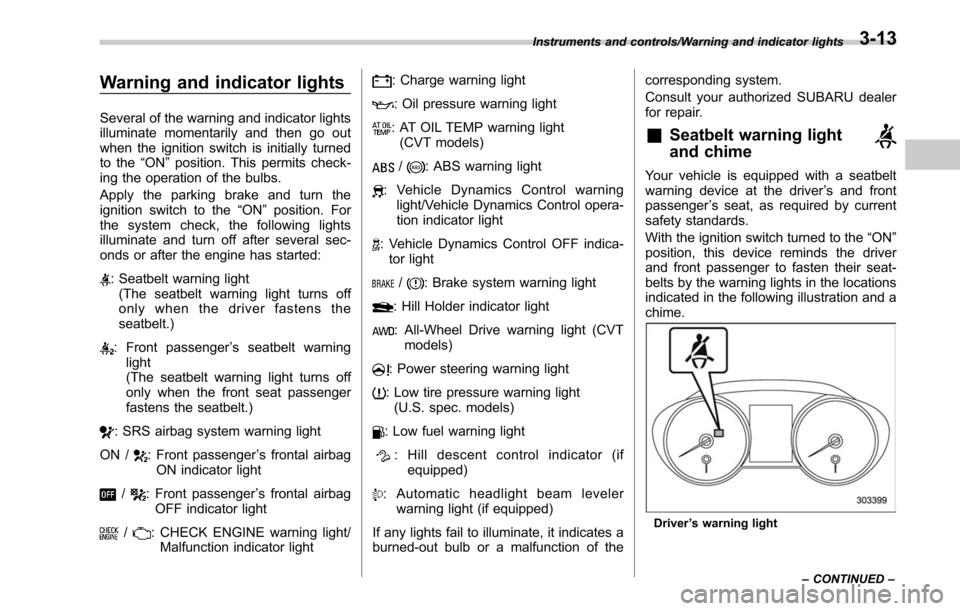
Several of the warning and indicator lights
illuminate momentarily and then go out
when the ignition switch is initially turned
to the“ON ”position. This permits check-
ing the operation of the bulbs.
Apply the parking brake and turn the
ignition switch to the “ON”position. For
the system check, the following lights
illuminate and turn off after several sec-
onds or after the engine has started:
: Seatbelt warning light (The seatbelt warning light turns off
only when the driver fastens the
seatbelt.)
: Front passenger ’s seatbelt warning
light
(The seatbelt warning light turns off
only when the front seat passenger
fastens the seatbelt.)
: SRS airbag system warning light
ON /
: Front passenger ’s frontal airbag
ON indicator light
/: Front passenger ’s frontal airbag
OFF indicator light
/: CHECK ENGINE warning light/ Malfunction indicator light
: Charge warning light
: Oil pressure warning light
: AT OIL TEMP warning light(CVT models)
/: ABS warning light
: Vehicle Dynamics Control warning light/Vehicle Dynamics Control opera-
tion indicator light
: Vehicle Dynamics Control OFF indica-tor light
/: Brake system warning light
: Hill Holder indicator light
: All-Wheel Drive warning light (CVT models)
: Power steering warning light
: Low tire pressure warning light(U.S. spec. models)
: Low fuel warning light
: Hill descent control indicator (if equipped)
: Automatic headlight beam leveler warning light (if equipped)
If any lights fail to illuminate, it indicates a
burned-out bulb or a malfunction of the corresponding system.
Consult your authorized SUBARU dealer
for repair.
&Seatbelt warning light
and chime
Your vehicle is equipped with a seatbelt
warning device at the driver
’s and front
passenger ’s seat, as required by current
safety standards.
With the ignition switch turned to the “ON”
position, this device reminds the driver
and front passenger to fasten their seat-
belts by the warning lights in the locations
indicated in the following illustration and a
chime.
Driver ’s warning light
Instruments and controls/Warning and indicator lights
–CONTINUED –
3-13