navigation system SUBARU OUTBACK 2017 6.G User Guide
[x] Cancel search | Manufacturer: SUBARU, Model Year: 2017, Model line: OUTBACK, Model: SUBARU OUTBACK 2017 6.GPages: 610, PDF Size: 10.28 MB
Page 440 of 610
&Canceling the Reverse Auto-
matic Braking system opera-
tion
The Reverse Automatic Braking system
can be temporarily canceled by any of the
following operation.
. While automatic braking is in operation,
the brake pedal is depressed
. While automatic braking is in operation,
the accelerator pedal is depressed
. The accelerator pedal is depressed
hard (in this case, limited acceleration will
be canceled and the vehicle will continue
reversing)
. The select lever is shifted to a position
other than the “R”position
NOTE
Thesystemwillbecanceledifthe
object is no longer detected.
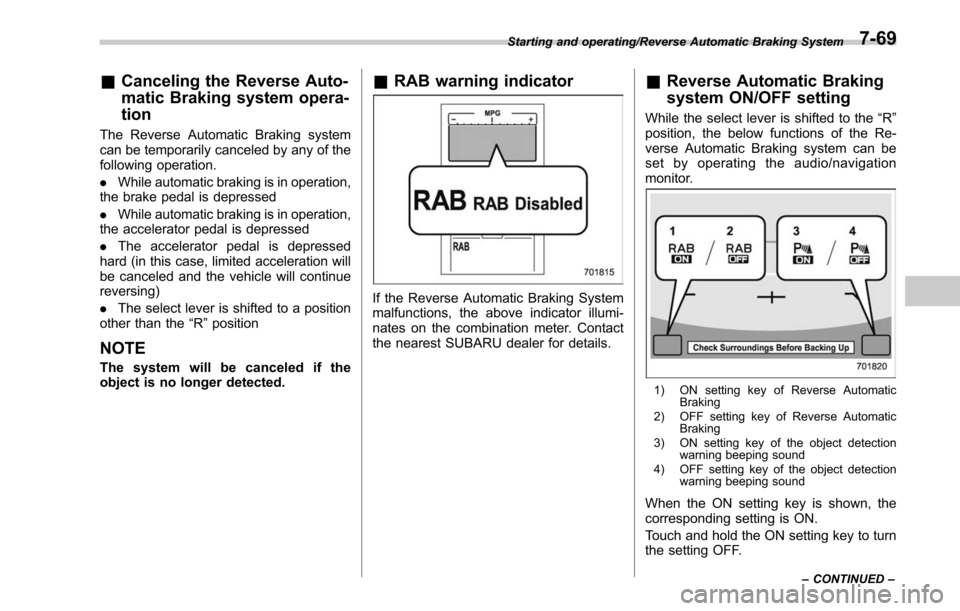
& RAB warning indicator
If the Reverse Automatic Braking System
malfunctions, the above indicator illumi-
nates on the combination meter. Contact
the nearest SUBARU dealer for details.
&Reverse Automatic Braking
system ON/OFF setting
While the select lever is shifted to the “R”
position, the below functions of the Re-
verse Automatic Braking system can be
set by operating the audio/navigation
monitor.
1) ON setting key of Reverse Automatic Braking
2) OFF setting key of Reverse Automatic Braking
3) ON setting key of the object detection warning beeping sound
4) OFF setting key of the object detection warning beeping sound
When the ON setting key is shown, the
corresponding setting is ON.
Touch and hold the ON setting key to turn
the setting OFF.
Starting and operating/Reverse Automatic Braking System
–CONTINUED –7-69
Page 503 of 610
Appearance care/Cleaning the interior
spray lacquer. You will discover that each
leather seat section will develop soft folds
or wrinkles, which is characteristic of
genuine leather.
&Synthetic leather upholstery
The synthetic leather material used on the
SUBARU may be cleaned using mild soap
or detergent and water, after first vacuum-
ing or brushing away loose dirt. Allow the
soap to soak in for a few minutes and wipe
off with a clean, damp cloth. Commercial
foam-type cleaners suitable for synthetic
leather materials may be used when
necessary.
CAUTION
Strong cleaning agents such as
solvents, paint thinners, window
cleaner or gasoline must never be
used on leather or synthetic interior
materials. Doing so could damage
the surface and cause the color to
deteriorate.
&Climate control panel, audio
panel, instrument panel,
console panel, switches,
combination meter, and other
plastic surface
Use a soft, damp cloth to clean the climate
control panel, audio equipment, instru-
ment panel, center console, combination
meter panel, and switches.
CAUTION
. Do not use organic solvents such
as paint thinners or gasoline, or
strong cleaning agents that con-
tain those solvents. Doing so
could damage the surface and
cause the color to deteriorate.
. Do not use chemical solvents
that contain silicone on the vehi-
cle audio system, electrical com-
ponents of the air-conditioner or
any switches. If silicone adheres
to these parts, it may cause
damage to electrical compo-
nents.
& Monitor (if equipped)
To clean the audio/navigation monitor,
wipe it with a silicone cloth or with a soft
cloth. If the monitor is extremely dirty,
clean it with a soft cloth moistened with
neutral detergent then carefully wipe off
any remaining detergent.
CAUTION
. Do not spray neutral detergent
directly onto the monitor. Doing
so could damage the monitor ’s
components.
. Do not wipe the monitor with a
hard cloth. Doing so could
scratch the monitor.
. Do not use cleaning fluid that
contains thinner, gasoline, or any
other volatile substance. Such
cleaning fluid could erase the
lettering on the switches at the
bottom of the monitor.
10-6