sensor SUBARU OUTBACK 2017 6.G Owner's Manual
[x] Cancel search | Manufacturer: SUBARU, Model Year: 2017, Model line: OUTBACK, Model: SUBARU OUTBACK 2017 6.GPages: 610, PDF Size: 10.28 MB
Page 138 of 610
NOTE
For models with“keyless access with
push-button start system ”, if the ac-
cess key battery is discharged, perform
the procedure described in “Switching
power status ”F9-18. In such a case,
replace the battery immediately. Refer
to “Replacing battery of access key ”
F 11-50.
& Valet mode
When you choose the valet mode, the
alarm system does not operate. In valet
mode, the access key/remote transmitter
is used only for locking and unlocking the
doors and rear gate (Outback) and panic
activation.
To enter the valet mode, change the
setting of your vehicle’ s alarm system for
deactivation mode. Refer to “Activating
and deactivating the alarm system ”F 2-
29. The security indicator light will con-
tinue to flash once every 3 seconds
indicating that the system is in the valet
mode.
To exit valet mode, change the setting of
your vehicle’ s alarm system for activation
mode. Refer to “Activating and deactivat-
ing the alarm system ”F 2-29.
& Tripped sensor identification
The security indicator light flashes when
the alarm system has been triggered.
Also, the number of flashes indicates the
location of unauthorized intrusion or the
severity of impact on the vehicle.
When the ignition switch is turned to the
“ON ”position, the indicator light will
illuminate for 1 second and then flash as
follows:
. When a door or rear gate (Outback)
was opened: 5 times
. When the trunk (Legacy) was opened:
4 times
. When a strong impact or multiple
impacts were sensed: twice (only models
with shock sensors (dealer option))
. When a light impact was sensed: once
(only models with shock sensors (dealer
option))
& Shock sensors (dealer op-
tion)
The shock sensors trigger the alarm
system when they sense impacts applied
to the vehicle and when any of their
electric wires is cut. The alarm system
causes the horn to sound and the hazard
warning flashers to flash for a short time
when the sensed impact is weak, but it
warns of a strong impact or multiple impacts by sounding the horn and flashing
the hazard warning flashers, both lasting
approximately 30 seconds.
If you desire, your SUBARU dealer can
connect them and set them for activation
or deactivation.
NOTE
.
The shock sensors are not always
able to sense impacts caused by break-
ing in, and cannot sense an impact that
does not cause vibration (such as
breaking the glass using a rescue
hammer).
. The shock sensors may sense vi-
bration like those shown in the follow-
ing examples and trigger the alarm
system. Select the settings of the alarm
system and shock sensors appropri-
ately depending on where you usually
park your vehicle.
Examples:
–Vibration from construction site
– Vibration in multistory car park
– Vibration from trains
. You can have the sensitivity of the
shock sensors adjusted to your pre-
ference by your SUBARU dealer.
Keys and doors/Alarm system2-33
Page 152 of 610
CAUTION
.If the reverse function is operated
3 times consecutively, automatic
opening and closing of the power
rear gate function will be can-
celed and the rear gate will stop
opening or closing suddenly.
However, the rear gate may open
or close depending on the rear
gate height when automatic op-
eration is ceased. Be careful that
the rear gate does not hit any-
one ’s head or face, etc. and that
fingers and baggage, etc. are not
caught in it.
. Take care not to damage the
touch sensors. Otherwise, the
reverse function may cease to
operate.
If, while opening or closing using power
rear gate, the rear gate catches persons
or baggage or hits an obstacle, an
electronic chirp will sound 3 times and
the rear gate will operate as follows.
When opening the rear gate: The rear
gate will automatically close.
When closing the rear gate: The rear
gate will automatically open.
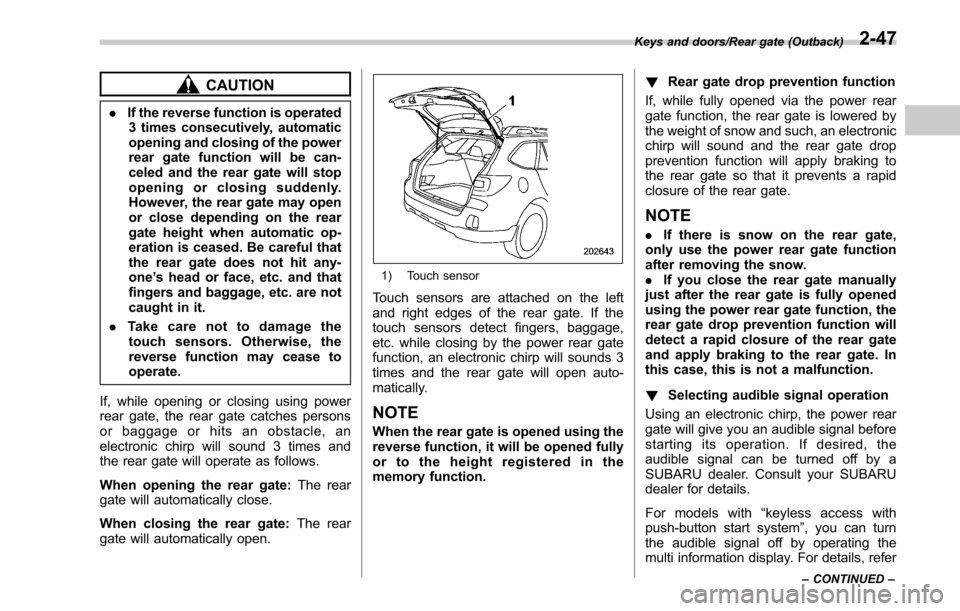
1) Touch sensor
Touch sensors are attached on the left
and right edges of the rear gate. If the
touch sensors detect fingers, baggage,
etc. while closing by the power rear gate
function, an electronic chirp will sounds 3
times and the rear gate will open auto-
matically.
NOTE
When the rear gate is opened using the
reverse function, it will be opened fully
or to the height registered in the
memory function. !
Rear gate drop prevention function
If, while fully opened via the power rear
gate function, the rear gate is lowered by
the weight of snow and such, an electronic
chirp will sound and the rear gate drop
prevention function will apply braking to
the rear gate so that it prevents a rapid
closure of the rear gate.
NOTE
. If there is snow on the rear gate,
only use the power rear gate function
after removing the snow.
. If you close the rear gate manually
just after the rear gate is fully opened
using the power rear gate function, the
rear gate drop prevention function will
detect a rapid closure of the rear gate
and apply braking to the rear gate. In
this case, this is not a malfunction.
! Selecting audible signal operation
Using an electronic chirp, the power rear
gate will give you an audible signal before
starting its operation. If desired, the
audible signal can be turned off by a
SUBARU dealer. Consult your SUBARU
dealer for details.
For models with “keyless access with
push-button start system ”, you can turn
the audible signal off by operating the
multi information display. For details, refer
Keys and doors/Rear gate (Outback)
–CONTINUED –2-47
Page 173 of 610
Instruments and controls/Warning and indicator lights
inflated. Accordingly, when the low tire
pressure telltale illuminates, you should
stop and check your tires as soon as
possible, and inflate them to the proper
pressure. Driving on a significantly under-
inflated tire causes the tire to overheat and
can lead to tire failure. Under-inflation also
reduces fuel efficiency and tire tread life,
and may affect the vehicle’s handling and
stopping ability.
Please note that the TPMS is not a
substitute for proper tire maintenance,
and it is the driver ’s responsibility to
maintain correct tire pressure, even if
under-inflation has not reached the level
to trigger illumination of the TPMS low tire
pressure telltale.
Your vehicle has also been equipped with
a TPMS malfunction indicator to indicate
when the system is not operating properly.
The TPMS malfunction indicator is com-
bined with the low tire pressure telltale.
When the system detects a malfunction,
the telltale will flash for approximately one
minute and then remain continuously
illuminated. This sequence will continue
upon subsequent vehicle start-ups as long
as the malfunction exists. When the
malfunction indicator is illuminated, the
system may not be able to detect or signal
low tire pressure as intended. TPMS
malfunctions may occur for a variety of reasons, including the installation of re-
placement or alternate tires or wheels on
the vehicle that prevent the TPMS from
functioning properly. Always check the
TPMS malfunction telltale after replacing
one or more tires or wheels on your
vehicle to ensure that the replacement or
alternate tires and wheels allow the TPMS
to continue to function properly.
Should the warning light illuminate stea-
dily after blinking for approximately one
minute, have the system inspected by
your nearest SUBARU dealer as soon as
possible.
WARNING
If this light does not illuminate
briefly after the ignition switch is
turned ON or the light illuminates
steadily after blinking for approxi-
mately one minute, you should have
your Tire Pressure Monitoring Sys-
tem checked at a SUBARU dealer as
soon as possible.
If this light illuminates while driving,
never brake suddenly. Instead, per-
form the following procedure. Other-
wise an accident involving serious
vehicle damage and serious perso-
nal injury could occur.
1) Keep driving straight ahead while gradually reducing speed.
2) Slowly pull off the road to a safe place.
If this light still illuminates while
driving after adjusting the tire pres-
sure, a tire may have significant
damage and a fast leak that causes
the tire to lose air rapidly. If you have
a flat tire, replace it with a spare tire
as soon as possible.
When a spare tire is mounted or a
wheel rim is replaced without the
original pressure sensor/transmitter
being transferred, the Low tire pres-
sure warning light will illuminate
steadily after blinking for approxi-
mately one minute. This indicates
the TPMS is unable to monitor all
four road wheels. Contact your
SUBARU dealer as soon as possible
for tire and sensor replacement and/
or system resetting. If the light
illuminates steadily after blinking
for approximately one minute,
promptly contact a SUBARU dealer
to have the system inspected.
CAUTION
The tire pressure monitoring system
is NOT a substitute for manually
3-18
Page 182 of 610
Inside warningchime Outside warning
chime Operation indicator
on push-button
ignition switch Status Action
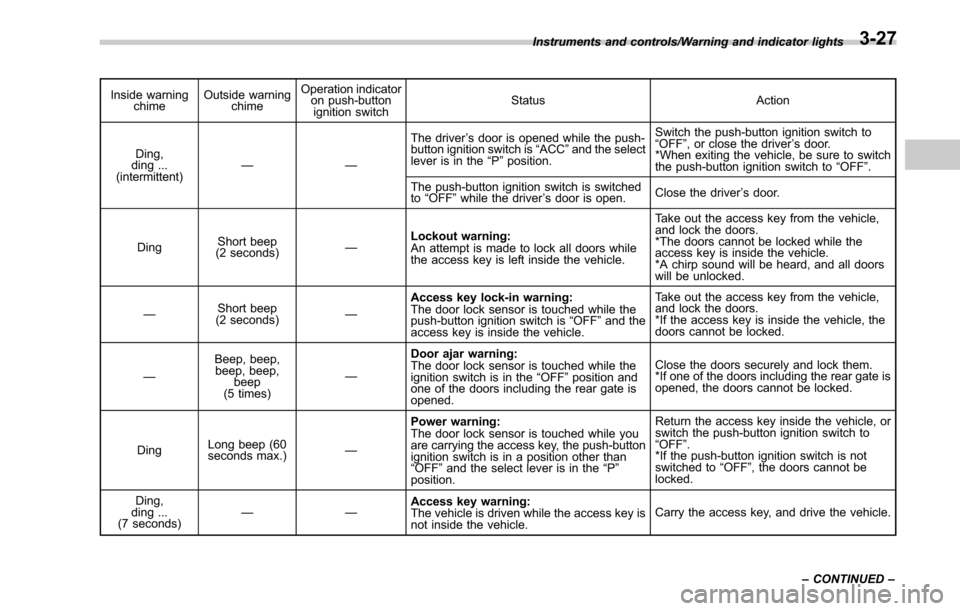
Ding,
ding ...
(intermittent) —— The driver
’s door is opened while the push-
button ignition switch is “ACC ”and the select
lever is in the “P ”position. Switch the push-button ignition switch to
“
OFF” , or close the driver ’s door.
*When exiting the vehicle, be sure to switch
the push-button ignition switch to “OFF ”.
The push-button ignition switch is switched
to “OFF ”while the driver ’s door is open. Close the driver
’s door.
Ding Short beep
(2 seconds) —Lockout warning:
An attempt is made to lock all doors while
the access key is left inside the vehicle. Take out the access key from the vehicle,
and lock the doors.
*The doors cannot be locked while the
access key is inside the vehicle.
*A chirp sound will be heard, and all doors
will be unlocked.
— Short beep
(2 seconds) —Access key lock-in warning:
The door lock sensor is touched while the
push-button ignition switch is
“OFF ”and the
access key is inside the vehicle. Take out the access key from the vehicle,
and lock the doors.
*If the access key is inside the vehicle, the
doors cannot be locked.
— Beep, beep,
beep, beep,
beep
(5 times) —Door ajar warning:
The door lock sensor is touched while the
ignition switch is in the
“OFF ”position and
one of the doors including the rear gate is
opened. Close the doors securely and lock them.
*If one of the doors including the rear gate is
opened, the doors cannot be locked.
Ding Long beep (60
seconds max.)
—Power warning:
The door lock sensor is touched while you
are
carrying the access key, the push-button
ignition switch is in a position other than
“ OFF ”and the select lever is in the “P ”
position. Return the access key inside the vehicle, or
switch the push-button ignition switch to
“
OFF” .
*If the push-button ignition switch is not
switched to “OFF ”, the doors cannot be
locked.
Ding,
ding ...
(7 seconds) ——
Access key warning:
The vehicle is driven while the access key is
not inside the vehicle. Carry the access key, and drive the vehicle.
Instruments and controls/Warning and indicator lights
–CONTINUED –
3-27
Page 188 of 610
NOTE
.The outside temperature indicator
shows the temperature in the area
around the sensor. Therefore, the tem-
perature indication may differ from the
actual outside air temperature.
. The icy road surface warning indi-
cator should be treated only as a guide.
Be sure to check the condition of the
road surface before driving.
. Once the icy road surface warning
indicator appears, it will not disappear
unless the outside temperature has
increased to 41 8F(5 8C) or higher.
&RAB warning
indicator (if equipped)
This indicator illuminates if the Reverse
Automatic Braking System malfunctions.
Refer to “Reverse Automatic Braking
System ”F 7-63.
&RAB OFF indicator (if
equipped)
This indicator illuminates when the Re-
verse Automatic Braking System is turned
OFF, or when the Reverse Automatic
Braking System is suspended temporarily.
Refer to “Reverse Automatic Braking
System ”F 7-63.
&Sonar audible alarm
OFF indicator (if
equipped)
This indicator illuminates when the sonar
audible alarm is turned OFF. For the
setting procedure, refer to “Sonar Audible
Alarm” F3-45.
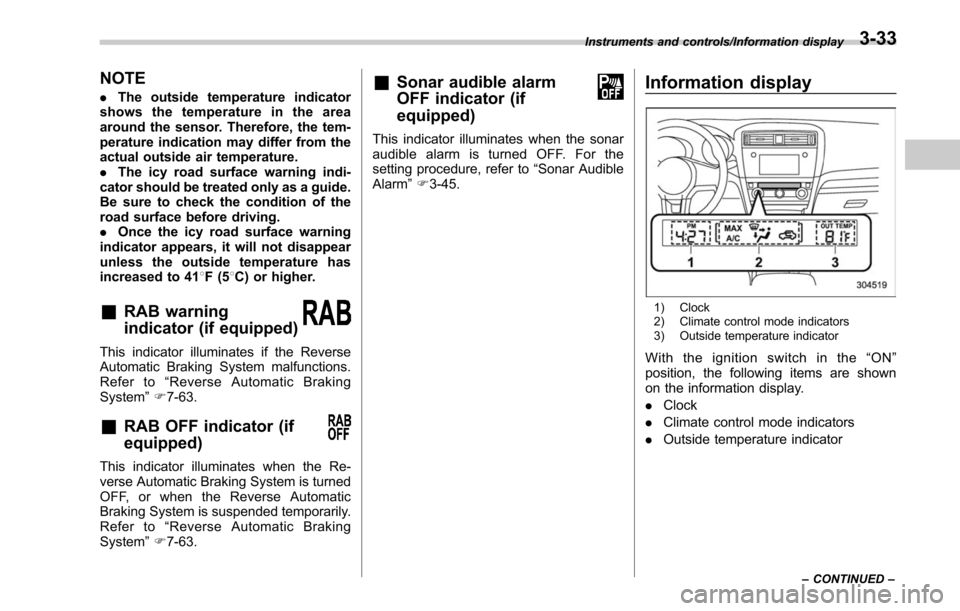
Information display
1) Clock
2) Climate control mode indicators
3) Outside temperature indicator
With the ignition switch in the “ON ”
position, the following items are shown
on the information display.
. Clock
. Climate control mode indicators
. Outside temperature indicator
Instruments and controls/Information display
–CONTINUED –3-33
Page 204 of 610
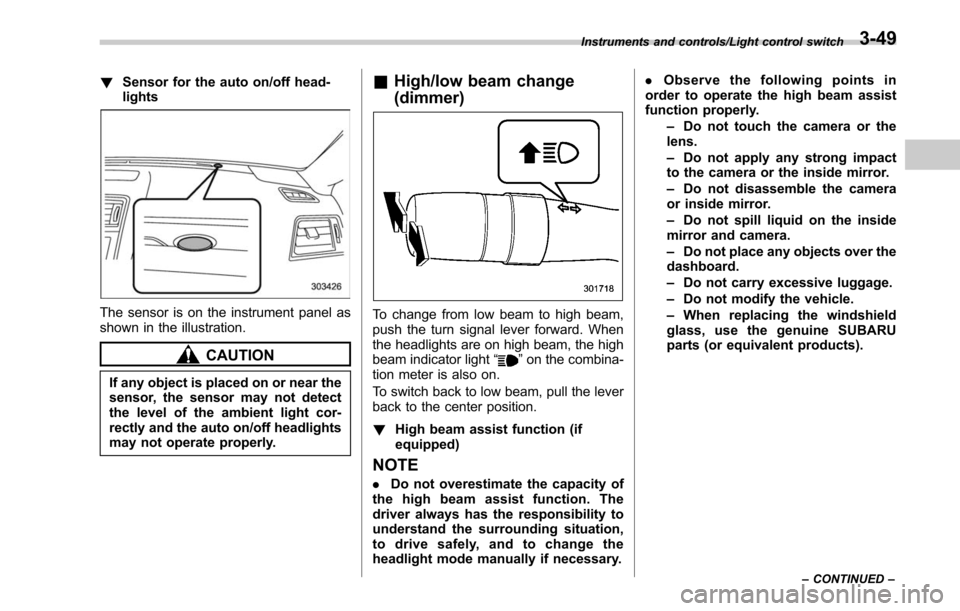
!Sensor for the auto on/off head-
lights
The sensor is on the instrument panel as
shown in the illustration.
CAUTION
If any object is placed on or near the
sensor, the sensor may not detect
the level of the ambient light cor-
rectly and the auto on/off headlights
may not operate properly.
&High/low beam change
(dimmer)
To change from low beam to high beam,
push the turn signal lever forward. When
the headlights are on high beam, the high
beam indicator light “
”on the combina-
tion meter is also on.
To switch back to low beam, pull the lever
back to the center position.
! High beam assist function (if
equipped)
NOTE
.Do not overestimate the capacity of
the high beam assist function. The
driver always has the responsibility to
understand the surrounding situation,
to drive safely, and to change the
headlight mode manually if necessary. .
Observe the following points in
order to operate the high beam assist
function properly.
–Do not touch the camera or the
lens.
– Do not apply any strong impact
to the camera or the inside mirror.
– Do not disassemble the camera
or inside mirror.
– Do not spill liquid on the inside
mirror and camera.
– Do not place any objects over the
dashboard.
– Do not carry excessive luggage.
– Do not modify the vehicle.
– When replacing the windshield
glass, use the genuine SUBARU
parts (or equivalent products).
Instruments and controls/Light control switch
–CONTINUED –3-49
Page 218 of 610
Mirrors
Always check that the inside and outside
mirrors are properly adjusted before you
start driving.
&Inside mirror (without auto-
dimming function) (if
equipped)
The mirror has a day and night position.
Pull the tab at the bottom of the mirror
toward you for the night position. Push it
away for the day position. The night
position reduces glare from headlights.
&Auto-dimming mirror/com-
pass with HomeLink
®(U.S.-
spec. models without
EyeSight system - if
equipped)
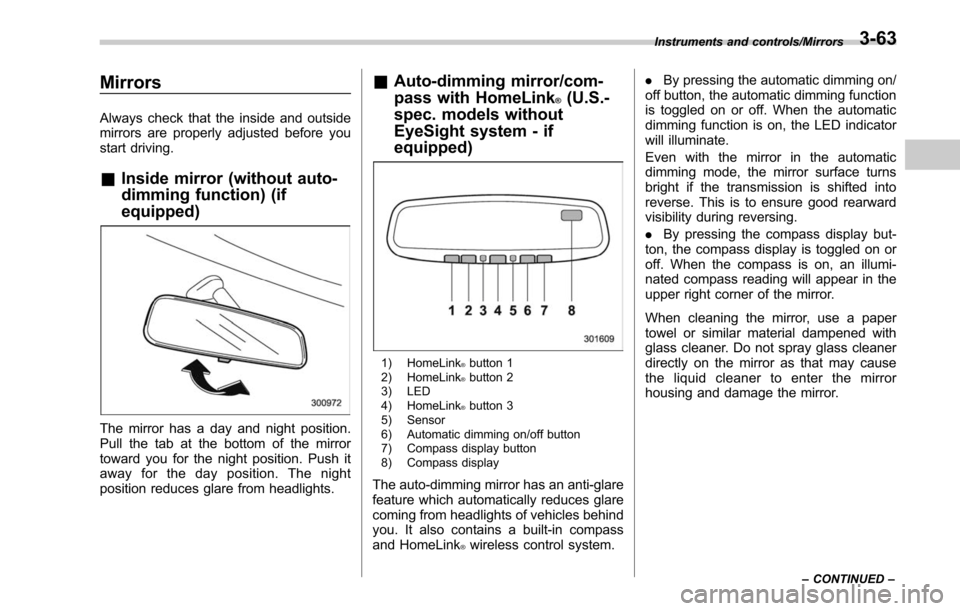
1) HomeLink®button 1
2) HomeLink®button 2
3) LED
4) HomeLink
®button 3
5) Sensor
6) Automatic dimming on/off button
7) Compass display button
8) Compass display
The auto-dimming mirror has an anti-glare
feature which automatically reduces glare
coming from headlights of vehicles behind
you. It also contains a built-in compass
and HomeLink
®wireless control system. .
By pressing the automatic dimming on/
off button, the automatic dimming function
is toggled on or off. When the automatic
dimming function is on, the LED indicator
will illuminate.
Even with the mirror in the automatic
dimming mode, the mirror surface turns
bright if the transmission is shifted into
reverse. This is to ensure good rearward
visibility during reversing.
. By pressing the compass display but-
ton, the compass display is toggled on or
off. When the compass is on, an illumi-
nated compass reading will appear in the
upper right corner of the mirror.
When cleaning the mirror, use a paper
towel or similar material dampened with
glass cleaner. Do not spray glass cleaner
directly on the mirror as that may cause
the liquid cleaner to enter the mirror
housing and damage the mirror.
Instruments and controls/Mirrors
–CONTINUED –3-63
Page 219 of 610
Instruments and controls/Mirrors
!Photosensors
The mirror has a photosensor attached on
both the front and back sides. During
nighttime driving, these sensors detect
distracting glare from vehicle headlights
behind you and automatically dim the
mirror to eliminate glare and preserve
your vision. For this reason, use care not
to cover the sensors with stickers, or other
similar items. Periodically wipe the sen-
sors clean using a piece of dry soft cotton
cloth or an applicator. !
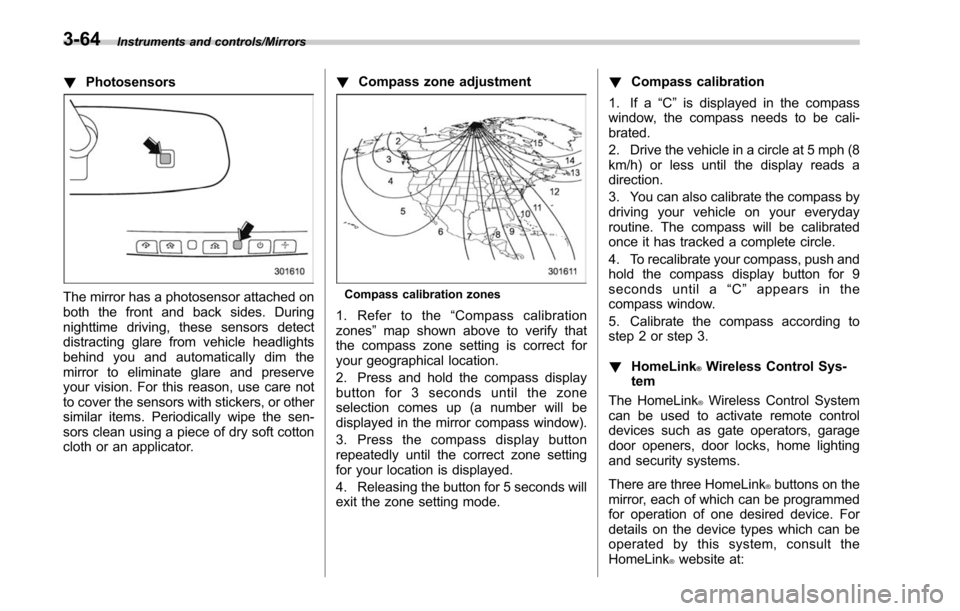
Compass zone adjustmentCompass calibration zones
1. Refer to the “Compass calibration
zones” map shown above to verify that
the compass zone setting is correct for
your geographical location.
2. Press and hold the compass display
button for 3 seconds until the zone
selection comes up (a number will be
displayed in the mirror compass window).
3. Press the compass display button
repeatedly until the correct zone setting
for your location is displayed.
4. Releasing the button for 5 seconds will
exit the zone setting mode. !
Compass calibration
1. If a “C”is displayed in the compass
window, the compass needs to be cali-
brated.
2. Drive the vehicle in a circle at 5 mph (8
km/h) or less until the display reads a
direction.
3. You can also calibrate the compass by
driving your vehicle on your everyday
routine. The compass will be calibrated
once it has tracked a complete circle.
4. To recalibrate your compass, push and
hold the compass display button for 9
seconds until a “C ” appears in the
compass window.
5. Calibrate the compass according to
step 2 or step 3.
! HomeLink
®Wireless Control Sys-
tem
The HomeLink
®Wireless Control System
can be used to activate remote control
devices such as gate operators, garage
door openers, door locks, home lighting
and security systems.
There are three HomeLink
®buttons on the
mirror, each of which can be programmed
for operation of one desired device. For
details on the device types which can be
operated by this system, consult the
HomeLink
®website at:
3-64
Page 224 of 610
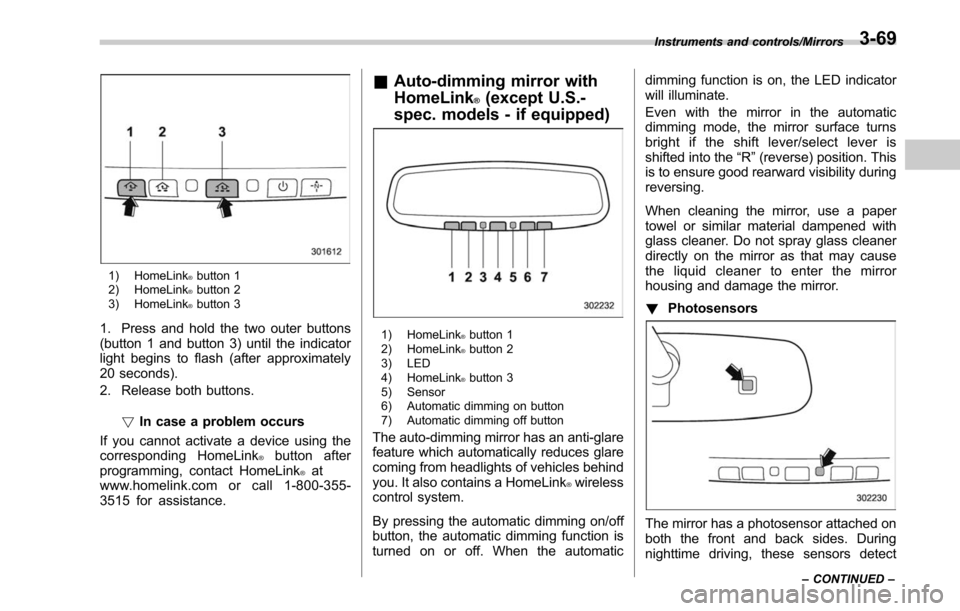
1) HomeLink®button 1
2) HomeLink®button 2
3) HomeLink®button 3
1. Press and hold the two outer buttons
(button 1 and button 3) until the indicator
light begins to flash (after approximately
20 seconds).
2. Release both buttons.
!In case a problem occurs
If you cannot activate a device using the
corresponding HomeLink
®button after
programming, contact HomeLink®at
www.homelink.com or call 1-800-355-
3515 for assistance.
& Auto-dimming mirror with
HomeLink
®(except U.S.-
spec. models - if equipped)
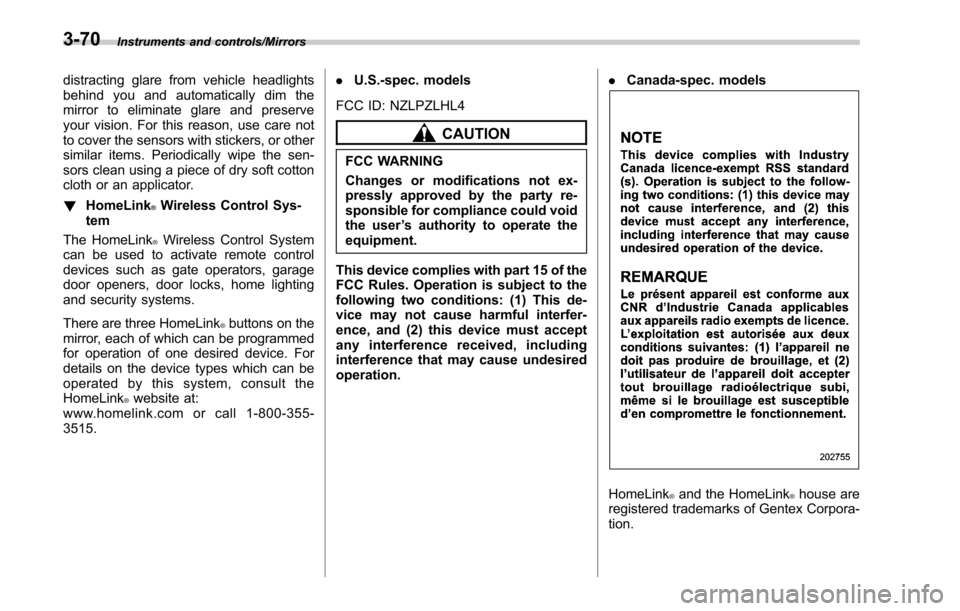
1) HomeLink®button 1
2) HomeLink®button 2
3) LED
4) HomeLink
®button 3
5) Sensor
6) Automatic dimming on button
7) Automatic dimming off button
The auto-dimming mirror has an anti-glare
feature which automatically reduces glare
coming from headlights of vehicles behind
you. It also contains a HomeLink
®wireless
control system.
By pressing the automatic dimming on/off
button, the automatic dimming function is
turned on or off. When the automatic dimming function is on, the LED indicator
will illuminate.
Even with the mirror in the automatic
dimming mode, the mirror surface turns
bright if the shift lever/select lever is
shifted into the
“R ”(reverse) position. This
is to ensure good rearward visibility during
reversing.
When cleaning the mirror, use a paper
towel or similar material dampened with
glass cleaner. Do not spray glass cleaner
directly on the mirror as that may cause
the liquid cleaner to enter the mirror
housing and damage the mirror.
! Photosensors
The mirror has a photosensor attached on
both the front and back sides. During
nighttime driving, these sensors detect
Instruments and controls/Mirrors
–CONTINUED –3-69
Page 225 of 610
Instruments and controls/Mirrors
distracting glare from vehicle headlights
behind you and automatically dim the
mirror to eliminate glare and preserve
your vision. For this reason, use care not
to cover the sensors with stickers, or other
similar items. Periodically wipe the sen-
sors clean using a piece of dry soft cotton
cloth or an applicator.
!HomeLink
®Wireless Control Sys-
tem
The HomeLink
®Wireless Control System
can be used to activate remote control
devices such as gate operators, garage
door openers, door locks, home lighting
and security systems.
There are three HomeLink
®buttons on the
mirror, each of which can be programmed
for operation of one desired device. For
details on the device types which can be
operated by this system, consult the
HomeLink
®website at:
www.homelink.com or call 1-800-355-
3515. .
U.S.-spec. models
FCC ID: NZLPZLHL4
CAUTION
FCC WARNING
Changes or modifications not ex-
pressly approved by the party re-
sponsible for compliance could void
the user ’s authority to operate the
equipment.
This device complies with part 15 of the
FCC Rules. Operation is subject to the
following two conditions: (1) This de-
vice may not cause harmful interfer-
ence, and (2) this device must accept
any interference received, including
interference that may cause undesired
operation. .
Canada-spec. models
HomeLink®and the HomeLink®house are
registered trademarks of Gentex Corpora-
tion.
3-70