ECU SUBARU OUTBACK 2017 6.G Owner's Guide
[x] Cancel search | Manufacturer: SUBARU, Model Year: 2017, Model line: OUTBACK, Model: SUBARU OUTBACK 2017 6.GPages: 610, PDF Size: 10.28 MB
Page 132 of 610
!Opening the trunk lid (Legacy)
Press and hold the trunk lid opener button
to open the trunk lid. An electronic chirp
will sound twice and the hazard warning
flashers will flash twice.
! Unlocking the rear gate (Outback)
Press the rear gate unlock button to
unlock the rear gate. An electronic chirp
will sound twice and the hazard warning
flashers will flash twice.
! Selecting audible signal operation
Using an electronic chirp, the system will
give you an audible signal when the doors
are locked or unlocked.
If desired, the audible signal ON/OFF
setting and the audible signal volume
can be customized by a SUBARU dealer.
Consult your SUBARU dealer for details.
! Selecting hazard warning flasher
operation
Using the hazard warning flasher, the
system will give you a visible signal when
the doors are locked or unlocked. If
desired, you can turn the hazard warning
flashers off by operating the multi informa-
tion display. For details, refer to “Keyless
Entry System ”F 3-45. The setting can
also be changed by a SUBARU dealer.
Consult your SUBARU dealer for details. !
Vehicle finder function
Use this function to find your vehicle
parked among many vehicles in a large
parking lot. Provided you are within 30 feet
(10 meters) of the vehicle, pressing the
lock/arm button three times in a 5-second
period will cause your vehicle’ s horn to
sound once and its hazard warning
flashers to flash three times.
NOTE
If the interval between presses is too
short when you press the lock/arm
button three times, the system may
not respond to the signals from the
remote transmitter.
! Sounding a panic alarm
To activate the alarm, press the “PANIC”
button once.
The horn will sound and the hazard
warning flashers will flash.
To deactivate the panic alarm, press any
button on the remote transmitter. If a
button on the remote transmitter is not
pressed, the alarm will be deactivated
after approximately 30 seconds.
& Replacing the battery
Refer to “Replacing battery ”F 11-50.
& Replacing lost transmitters
If you lose a transmitter or want to
purchase additional transmitters (up to
four can be programmed), you should re-
program all of your transmitters for secur-
ity reasons. For details, contact your
SUBARU dealer and have the transmitters
programmed into the remote keyless entry
system.
&Certification for remote key-
less entry system
. U.S.-spec. models
FCC ID: CWTWB1U811
FCC ID: CWTWD1U848
CAUTION
FCC CAUTION
Changes or modifications not ex-
pressly approved by the party re-
sponsible for compliance could void
the user ’s authority to operate the
equipment.
This device complies with Part 15 of the
FCC Rules. Operation is subject to the
following two conditions: (1) This device
may not cause harmful interference, and
(2) this device must accept any interfer-
ence received, including interference that
Keys and doors/Remote keyless entry system
–CONTINUED –2-27
Page 135 of 610
Keys and doors/Alarm system
&Arming the system
NOTE
. The system can be armed even if the
engine hood, the windows and/or
moonroof are open. Always make sure
that they are fully closed before arming
the system.
. When arming the system, if any of
the doors or the rear gate/trunk lid is
not fully closed, an electronic chirp
sounds five times, the hazard warning
flashers flash five times to alert you
that the doors (or the rear gate/trunk
lid) are not properly closed. When you
close the door, doors will automatically
lock and the system will automatically
arm in 30 seconds.
. The 30-second standby time can be
eliminated if you prefer. Have it per-
formed by your SUBARU dealer.
. For Legacy, if you open the trunk
using the access key/remote transmit-
ter ’s “
”button in the surveillance
state (or the standby state), the system
will be temporarily placed in a standby
state. The system will go back to the
surveillance state in 30 seconds upon
locking the trunk.
. The system is in the standby state
for a 30-second period before arming
the system. The security indicator light
will flash at short intervals during this period.
.
If any of the following actions is
done during the standby period, the
system will not switch to the surveil-
lance state.
–Doors (including the rear gate/
trunk lid) are unlocked using the
access key/remote transmitter.
– Doors (including the rear gate/
trunk lid) are unlocked using the
keyless access function (models
with “keyless access with push-
button start system ”).
– Any door (including the rear gate/
trunk lid) is opened.
– The ignition switch is turned to
the “ON ”position (models without
“ keyless access with push-button
start system ”).
– Push-button ignition switch is
turned to the “ACC ”position (mod-
els with “keyless access with push-
button start system ”).
! To arm the system using the access
key/remote transmitter
1. Close all windows and the moonroof (if
equipped).
2. Remove the key from the ignition
switch (models without “keyless access
with push-button start system ”)/turn the
push-button ignition switch to the “OFF”position (models with
“keyless access with
push-button start system ”).
3. Open the doors and get out of the
vehicle.
4. Make sure that the engine hood is
locked.
5. Close all doors and the rear gate/trunk
lid.
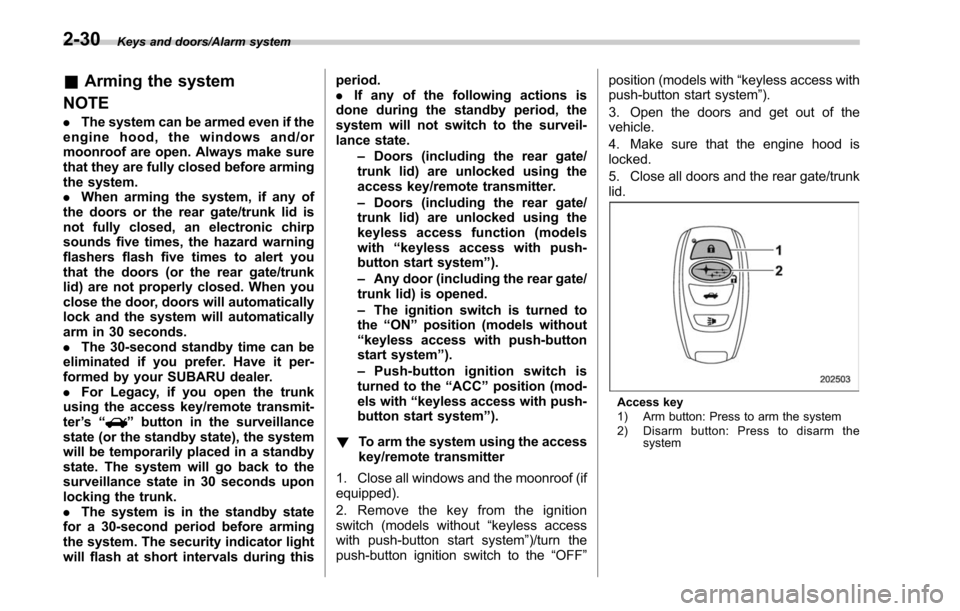
Access key
1) Arm button: Press to arm the system
2) Disarm button: Press to disarm the system
2-30
Page 136 of 610
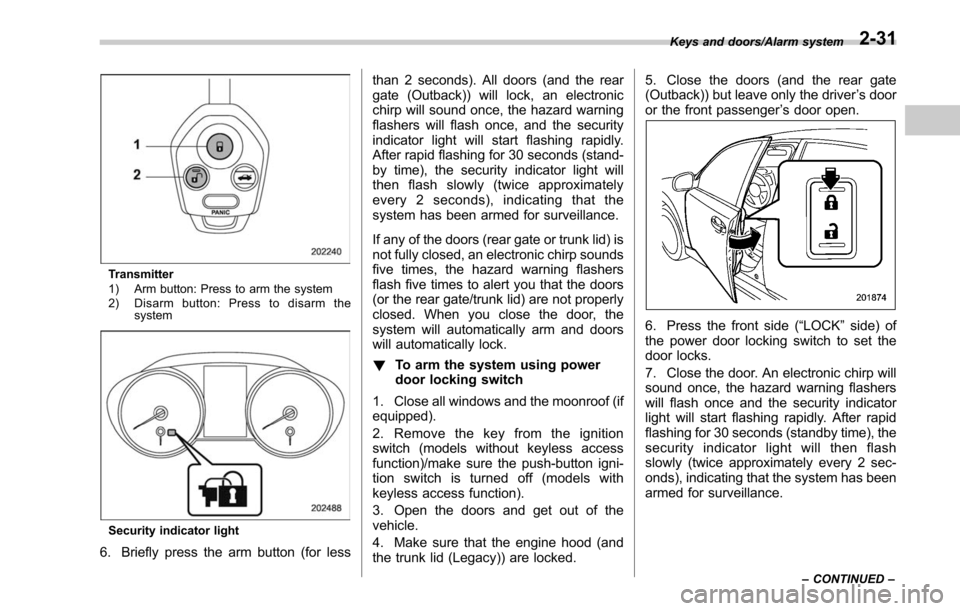
Transmitter
1) Arm button: Press to arm the system
2) Disarm button: Press to disarm thesystem
Security indicator light
6. Briefly press the arm button (for less than 2 seconds). All doors (and the rear
gate (Outback)) will lock, an electronic
chirp will sound once, the hazard warning
flashers will flash once, and the security
indicator light will start flashing rapidly.
After rapid flashing for 30 seconds (stand-
by time), the security indicator light will
then flash slowly (twice approximately
every 2 seconds), indicating that the
system has been armed for surveillance.
If any of the doors (rear gate or trunk lid) is
not fully closed, an electronic chirp sounds
five times, the hazard warning flashers
flash five times to alert you that the doors
(or the rear gate/trunk lid) are not properly
closed. When you close the door, the
system will automatically arm and doors
will automatically lock.
!
To arm the system using power
door locking switch
1. Close all windows and the moonroof (if
equipped).
2. Remove the key from the ignition
switch (models without keyless access
function)/make sure the push-button igni-
tion switch is turned off (models with
keyless access function).
3. Open the doors and get out of the
vehicle.
4. Make sure that the engine hood (and
the trunk lid (Legacy)) are locked. 5. Close the doors (and the rear gate
(Outback)) but leave only the driver
’s door
or the front passenger ’s door open.
6. Press the front side (“LOCK” side) of
the power door locking switch to set the
door locks.
7. Close the door. An electronic chirp will
sound once, the hazard warning flashers
will flash once and the security indicator
light will start flashing rapidly. After rapid
flashing for 30 seconds (standby time), the
security indicator light will then flash
slowly (twice approximately every 2 sec-
onds), indicating that the system has been
armed for surveillance.
Keys and doors/Alarm system
–CONTINUED –2-31
Page 137 of 610
Keys and doors/Alarm system
!To arm the system using the key-
less access function (if equipped)
1. Close all windows and the moonroof (if
equipped)
2. Turn the push-button ignition switch to
the “OFF ”position.
3. Open the doors and get out of the
vehicle.
4. Make sure that the engine hood is
locked.
5. Close all doors and the rear gate/trunk
lid.
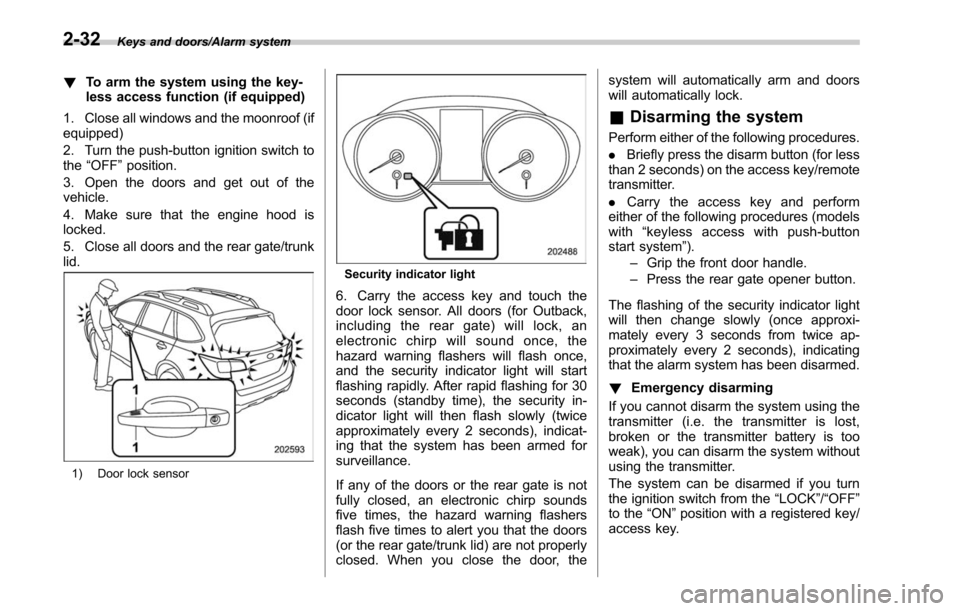
1) Door lock sensor
Security indicator light
6. Carry the access key and touch the
door lock sensor. All doors (for Outback,
including the rear gate) will lock, an
electronic chirp will sound once, the
hazard warning flashers will flash once,
and the security indicator light will start
flashing rapidly. After rapid flashing for 30
seconds (standby time), the security in-
dicator light will then flash slowly (twice
approximately every 2 seconds), indicat-
ing that the system has been armed for
surveillance.
If any of the doors or the rear gate is not
fully closed, an electronic chirp sounds
five times, the hazard warning flashers
flash five times to alert you that the doors
(or the rear gate/trunk lid) are not properly
closed. When you close the door, the system will automatically arm and doors
will automatically lock.
&
Disarming the system
Perform either of the following procedures.
. Briefly press the disarm button (for less
than 2 seconds) on the access key/remote
transmitter.
. Carry the access key and perform
either of the following procedures (models
with “keylessaccesswithpush-button
start system ”).
– Grip the front door handle.
– Press the rear gate opener button.
The flashing of the security indicator light
will then change slowly (once approxi-
mately every 3 seconds from twice ap-
proximately every 2 seconds), indicating
that the alarm system has been disarmed.
! Emergency disarming
If you cannot disarm the system using the
transmitter (i.e. the transmitter is lost,
broken or the transmitter battery is too
weak), you can disarm the system without
using the transmitter.
The system can be disarmed if you turn
the ignition switch from the “LOCK”/“OFF”
to the “ON ”position with a registered key/
access key.
2-32
Page 138 of 610
NOTE
For models with“keyless access with
push-button start system ”, if the ac-
cess key battery is discharged, perform
the procedure described in “Switching
power status ”F9-18. In such a case,
replace the battery immediately. Refer
to “Replacing battery of access key ”
F 11-50.
& Valet mode
When you choose the valet mode, the
alarm system does not operate. In valet
mode, the access key/remote transmitter
is used only for locking and unlocking the
doors and rear gate (Outback) and panic
activation.
To enter the valet mode, change the
setting of your vehicle’ s alarm system for
deactivation mode. Refer to “Activating
and deactivating the alarm system ”F 2-
29. The security indicator light will con-
tinue to flash once every 3 seconds
indicating that the system is in the valet
mode.
To exit valet mode, change the setting of
your vehicle’ s alarm system for activation
mode. Refer to “Activating and deactivat-
ing the alarm system ”F 2-29.
& Tripped sensor identification
The security indicator light flashes when
the alarm system has been triggered.
Also, the number of flashes indicates the
location of unauthorized intrusion or the
severity of impact on the vehicle.
When the ignition switch is turned to the
“ON ”position, the indicator light will
illuminate for 1 second and then flash as
follows:
. When a door or rear gate (Outback)
was opened: 5 times
. When the trunk (Legacy) was opened:
4 times
. When a strong impact or multiple
impacts were sensed: twice (only models
with shock sensors (dealer option))
. When a light impact was sensed: once
(only models with shock sensors (dealer
option))
& Shock sensors (dealer op-
tion)
The shock sensors trigger the alarm
system when they sense impacts applied
to the vehicle and when any of their
electric wires is cut. The alarm system
causes the horn to sound and the hazard
warning flashers to flash for a short time
when the sensed impact is weak, but it
warns of a strong impact or multiple impacts by sounding the horn and flashing
the hazard warning flashers, both lasting
approximately 30 seconds.
If you desire, your SUBARU dealer can
connect them and set them for activation
or deactivation.
NOTE
.
The shock sensors are not always
able to sense impacts caused by break-
ing in, and cannot sense an impact that
does not cause vibration (such as
breaking the glass using a rescue
hammer).
. The shock sensors may sense vi-
bration like those shown in the follow-
ing examples and trigger the alarm
system. Select the settings of the alarm
system and shock sensors appropri-
ately depending on where you usually
park your vehicle.
Examples:
–Vibration from construction site
– Vibration in multistory car park
– Vibration from trains
. You can have the sensitivity of the
shock sensors adjusted to your pre-
ference by your SUBARU dealer.
Keys and doors/Alarm system2-33
Page 145 of 610
Keys and doors/Trunk lid (Legacy)
WARNING
Never allow any child to get in the
trunk and play with the release
handle. If the driver starts the vehi-
cle without knowing that a child is
inside the trunk and the child opens
the lid using the release handle, the
child could fall out and be killed or
seriously injured.
CAUTION
.Do not close the lid while grip-
ping the release handle. The
handle may be damaged.
. Do not use the handle as a hook
to fasten straps or ropes to
secure your cargo in the trunk.
Such use may result in damage
of the handle.
. Load the trunk so that cargo
cannot strike the release handle.
If the cargo hits the handle while
the vehicle is being driven, the
handle may be pulled and the
trunk lid may open. That may
cause cargo to fall out of the
trunk, which could create a traffic
safety hazard. !
Inspection
Perform the following steps at least twice
a year to check the release handle for
correct operation.
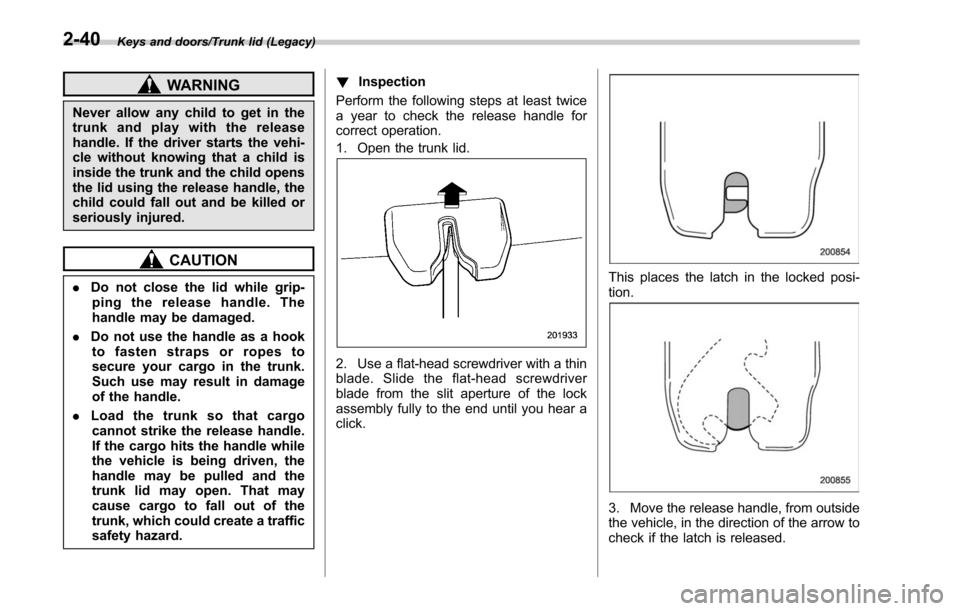
1. Open the trunk lid.
2. Use a flat-head screwdriver with a thin
blade. Slide the flat-head screwdriver
blade from the slit aperture of the lock
assembly fully to the end until you hear a
click.
This places the latch in the locked posi-
tion.
3. Move the release handle, from outside
the vehicle, in the direction of the arrow to
check if the latch is released.
2-40
Page 152 of 610
CAUTION
.If the reverse function is operated
3 times consecutively, automatic
opening and closing of the power
rear gate function will be can-
celed and the rear gate will stop
opening or closing suddenly.
However, the rear gate may open
or close depending on the rear
gate height when automatic op-
eration is ceased. Be careful that
the rear gate does not hit any-
one ’s head or face, etc. and that
fingers and baggage, etc. are not
caught in it.
. Take care not to damage the
touch sensors. Otherwise, the
reverse function may cease to
operate.
If, while opening or closing using power
rear gate, the rear gate catches persons
or baggage or hits an obstacle, an
electronic chirp will sound 3 times and
the rear gate will operate as follows.
When opening the rear gate: The rear
gate will automatically close.
When closing the rear gate: The rear
gate will automatically open.
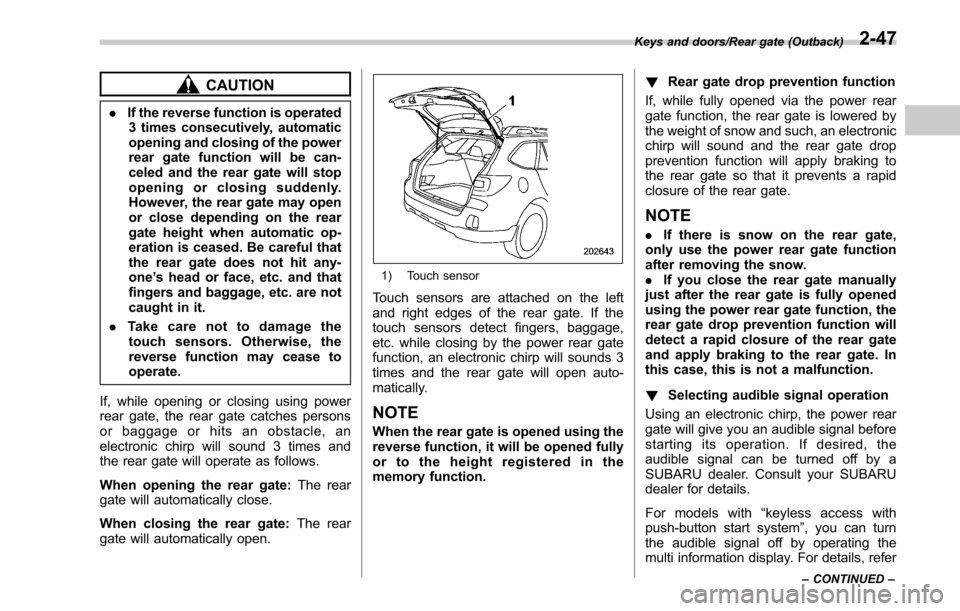
1) Touch sensor
Touch sensors are attached on the left
and right edges of the rear gate. If the
touch sensors detect fingers, baggage,
etc. while closing by the power rear gate
function, an electronic chirp will sounds 3
times and the rear gate will open auto-
matically.
NOTE
When the rear gate is opened using the
reverse function, it will be opened fully
or to the height registered in the
memory function. !
Rear gate drop prevention function
If, while fully opened via the power rear
gate function, the rear gate is lowered by
the weight of snow and such, an electronic
chirp will sound and the rear gate drop
prevention function will apply braking to
the rear gate so that it prevents a rapid
closure of the rear gate.
NOTE
. If there is snow on the rear gate,
only use the power rear gate function
after removing the snow.
. If you close the rear gate manually
just after the rear gate is fully opened
using the power rear gate function, the
rear gate drop prevention function will
detect a rapid closure of the rear gate
and apply braking to the rear gate. In
this case, this is not a malfunction.
! Selecting audible signal operation
Using an electronic chirp, the power rear
gate will give you an audible signal before
starting its operation. If desired, the
audible signal can be turned off by a
SUBARU dealer. Consult your SUBARU
dealer for details.
For models with “keyless access with
push-button start system ”, you can turn
the audible signal off by operating the
multi information display. For details, refer
Keys and doors/Rear gate (Outback)
–CONTINUED –2-47
Page 156 of 610
Ignition switch (models without push-button start system) ......................................... 3-4
LOCK.................................................................. 3-4
ACC.................................................................... 3-5
ON...................................................................... 3-5
START ................................................................ 3-5
Key reminder chime ............................................ 3-5
Ignition switch light ............................................. 3-5
Push-button ignition switch (models with
push-button start system) ............................... 3-6
Safety precautions.............................................. 3-6
Operating range for push-button start system ...... 3-6
Switching power status ....................................... 3-7
When access key does not operate properly ........ 3-8
Hazard warning flasher....................................... 3-8
Meters and gauges. ............................................. 3-8
Combination meter illumination ........................... 3-8
Canceling the function for meter/gauge needle movement upon turning on the ignition
switch ............................................................... 3-9
Speedometer ....................................................... 3-9
Odometer ............................................................ 3-9
Double trip meter ............................................... 3-10
Tachometer ........................................................ 3-10
Fuel gauge ......................................................... 3-11
Temperature gauge ............................................ 3-12
ECO gauge ........................................................ 3-12
Warning and indicator lights ............................. 3-13
Seatbelt warning light and chime ........................ 3-13
SRS airbag system warning light ........................ 3-15Front passenger
’s frontal airbag ON and OFF
indicators ........................................................ 3-15
CHECK ENGINE warning light/Malfunction indicator light .................................................. 3-16
Charge warning light .......................................... 3-16
Oil pressure warning light .................................. 3-16
Engine low oil level warning indicator ................ 3-17
AT OIL TEMP warning light (CVT models) ........... 3-17
Low tire pressure warning light (U.S. spec. models) ........................................................... 3-17
ABS warning light .............................................. 3-19
Brake system warning light ................................ 3-19
Electronic parking brake indicator light .............. 3-21
Hill Holder indicator light ................................... 3-22
Low fuel warning light ....................................... 3-22
Door open indicator ........................................... 3-23
Windshield washer fluid warning indicator .......... 3-23
All-Wheel Drive warning light (CVT models) ... ..... 3-23
Power steering warning light .............................. 3-23
Vehicle Dynamics Control warning light/Vehicle Dynamics Control operation indicator light .. ..... 3-24
Vehicle Dynamics Control OFF indicator light ..... 3-25
Warning chimes and warning indicator of the keyless access with push-button start system (if
equipped) ........................................................ 3-25
Security indicator light ....................................... 3-30
Select lever/gear position indicator ..................... 3-31
Turn signal indicator lights ................................. 3-31
High beam indicator light ................................... 3-31
High beam assist indicator (green) (if equipped) ........................................................ 3-31
Instruments and controls
3
Page 160 of 610
while turning it (all models) and the select
lever is in the“P ”position (CVT models).
& ACC
In this position the electrical accessories
(radio, accessory power outlet, etc.) can
be used.
&ON
This is the normal operating position after
the engine is started.
&START
CAUTION
Do not turn the ignition switch to the
“START ”position while the engine
is running.
The engine is started in this position. The
starter cranks the engine to start it. When
the key is released (after the engine has
started), the key automatically returns to
the “ON ”position.
If the engine does not start with your
registered key, pull out the key once (at
this time, the security indicator light will
blink), reinsert the key in the ignition
switch and then try to start the engine
again.
NOTE
The engine may not start in the follow-
ing cases:
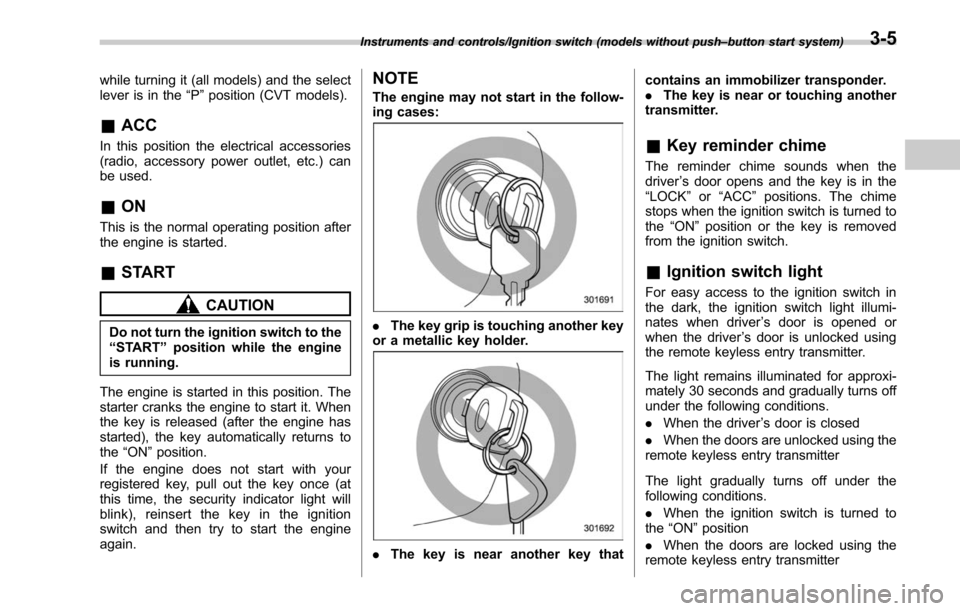
. The key grip is touching another key
or a metallic key holder.
. The key is near another key that contains an immobilizer transponder.
.
The key is near or touching another
transmitter.
& Key reminder chime
The reminder chime sounds when the
driver ’s door opens and the key is in the
“LOCK ”or “ACC ”positions. The chime
stops when the ignition switch is turned to
the “ON”position or the key is removed
from the ignition switch.
& Ignition switch light
For easy access to the ignition switch in
the dark, the ignition switch light illumi-
nates when driver ’s door is opened or
when the driver ’s door is unlocked using
the remote keyless entry transmitter.
The light remains illuminated for approxi-
mately 30 seconds and gradually turns off
under the following conditions.
. When the driver ’s door is closed
. When the doors are unlocked using the
remote keyless entry transmitter
The light gradually turns off under the
following conditions.
. When the ignition switch is turned to
the “ON ”position
. When the doors are locked using the
remote keyless entry transmitter
Instruments and controls/Ignition switch (models without push –button start system)3-5
Page 169 of 610
Instruments and controls/Warning and indicator lights
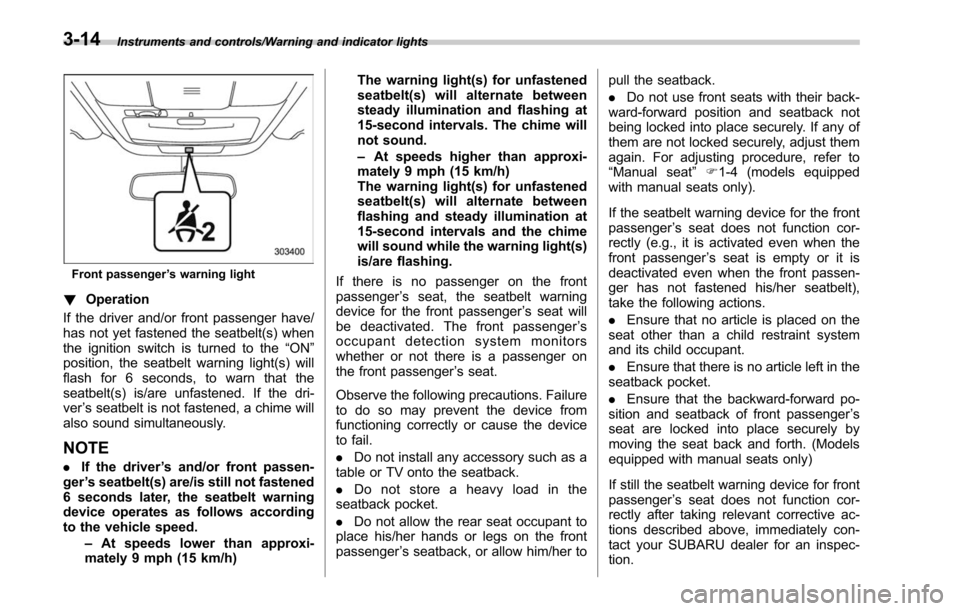
Front passenger’s warning light
! Operation
If the driver and/or front passenger have/
has not yet fastened the seatbelt(s) when
the ignition switch is turned to the “ON”
position, the seatbelt warning light(s) will
flash for 6 seconds, to warn that the
seatbelt(s) is/are unfastened. If the dri-
ver ’s seatbelt is not fastened, a chime will
also sound simultaneously.
NOTE
. If the driver ’s and/or front passen-
ger ’s seatbelt(s) are/is still not fastened
6 seconds later, the seatbelt warning
device operates as follows according
to the vehicle speed.
–At speeds lower than approxi-
mately 9 mph (15 km/h) The warning light(s) for unfastened
seatbelt(s) will alternate between
steady illumination and flashing at
15-second intervals. The chime will
not sound.
–
At speeds higher than approxi-
mately 9 mph (15 km/h)
The warning light(s) for unfastened
seatbelt(s) will alternate between
flashing and steady illumination at
15-second intervals and the chime
will sound while the warning light(s)
is/are flashing.
If there is no passenger on the front
passenger ’s seat, the seatbelt warning
device for the front passenger ’s seat will
be deactivated. The front passenger ’s
occupant detection system monitors
whether or not there is a passenger on
the front passenger ’s seat.
Observe the following precautions. Failure
to do so may prevent the device from
functioning correctly or cause the device
to fail.
. Do not install any accessory such as a
table or TV onto the seatback.
. Do not store a heavy load in the
seatback pocket.
. Do not allow the rear seat occupant to
place his/her hands or legs on the front
passenger ’s seatback, or allow him/her to pull the seatback.
.
Do not use front seats with their back-
ward-forward position and seatback not
being locked into place securely. If any of
them are not locked securely, adjust them
again. For adjusting procedure, refer to
“ Manual seat ”F1-4 (models equipped
with manual seats only).
If the seatbelt warning device for the front
passenger ’s seat does not function cor-
rectly (e.g., it is activated even when the
front passenger ’s seat is empty or it is
deactivated even when the front passen-
ger has not fastened his/her seatbelt),
take the following actions.
. Ensure that no article is placed on the
seat other than a child restraint system
and its child occupant.
. Ensure that there is no article left in the
seatback pocket.
. Ensure that the backward-forward po-
sition and seatback of front passenger ’s
seat are locked into place securely by
moving the seat back and forth. (Models
equipped with manual seats only)
If still the seatbelt warning device for front
passenger ’s seat does not function cor-
rectly after taking relevant corrective ac-
tions described above, immediately con-
tact your SUBARU dealer for an inspec-
tion.
3-14