wheel SUBARU OUTBACK 2017 6.G Workshop Manual
[x] Cancel search | Manufacturer: SUBARU, Model Year: 2017, Model line: OUTBACK, Model: SUBARU OUTBACK 2017 6.GPages: 610, PDF Size: 10.28 MB
Page 385 of 610
Starting and operating/Starting and stopping engine (models with push–button start system)
& Stopping engine
1. Stop the vehicle completely.
2. Move the select lever to the “P ”
position.
3. Press the push-button ignition switch.
The engine will stop, and the power will be
switched off.
WARNING
. Do not touch the push-button
ignition switch during driving.
When the push-button ignition
switch is operated as follows,
the engine will stop.
– The switch is pressed and held
for 3 seconds or longer.
– The switch is pressed briefly 3
times or more in succession.
When the engine stops, the brake
booster will not function. A great-
er foot pressure will be required
on the brake pedal.
The power steering system will
not operate either. A greater
force will be required to steer,
and it may result in an accident.
. If the engine stops during driving,
do not operate the push-button
ignition switch or open any of the doors until the vehicle is stopped
in a safe location. It is dangerous
because the steering lock may be
activated. Stop the vehicle in a
safe place, and contact a
SUBARU dealer immediately.
CAUTION
.
Do not stop the engine while the
select lever is in a position other
than the “P ” position.
. If the engine is stopped while the
select lever is in a position other
than the “P ” position, the power
will be in “ACC ”. If the vehicle is
left in this condition, the battery
may be discharged.
NOTE
Although you can stop the engine by
operating the push-button ignition
switch, do not stop the engine during
driving except in an emergency.
& When access key does not
operate properly
Refer to “Access key –if access key does
not operate properly ”F 9-18.
& Steering lock
After stopping the engine and the driver ’s
door is open, the steering wheel will be
locked due to the steering lock function.
When the engine is restarted, the steering
lock will be automatically canceled.
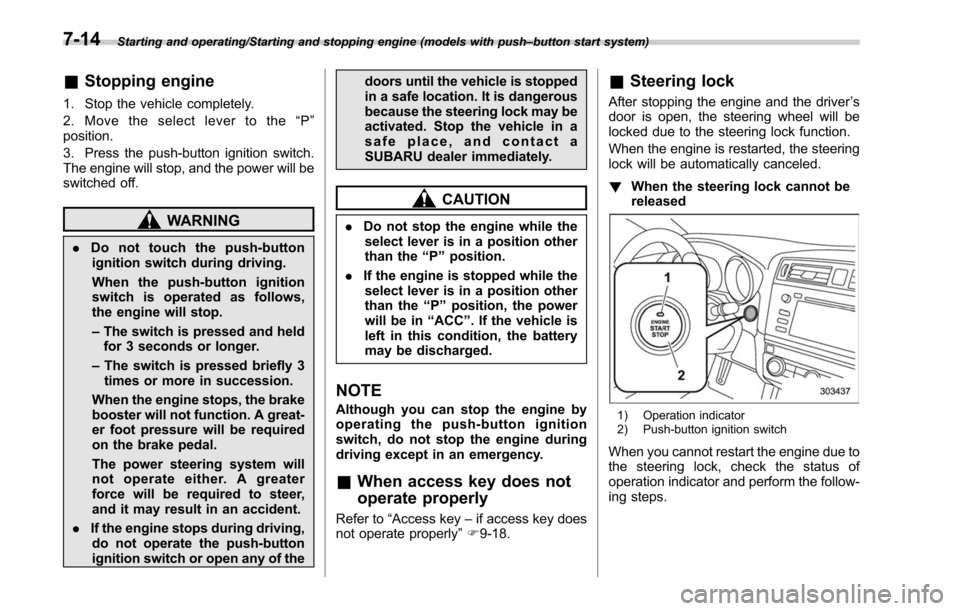
! When the steering lock cannot be
released
1) Operation indicator
2) Push-button ignition switch
When you cannot restart the engine due to
the steering lock, check the status of
operation indicator and perform the follow-
ing steps.
7-14
Page 386 of 610
!Operation indicator flashing in
green
1. Check that the select lever is set in the
“P ”position.
2. Depress the brake pedal and keep it.
3. Press the push-button ignition switch
while turning the steering wheel left and
right.
! Operation indicator flashing in
orange
There may be a malfunction in the
steering lock function. Immediately con-
tact your nearest SUBARU dealer.Remote engine start system
(dealer option)
WARNING
. There are some general precau-
tions when starting the engine.
Carefully read the precautions
described in “General precau-
tions when starting/stopping en-
gine” F7-9.
. Do not remote start a vehicle in
an enclosed environment (e.g.
closed garage). Prolonged opera-
tion of a motor vehicle in an
enclosed environment can cause
a harmful build-up of Carbon
Monoxide. Carbon Monoxide is
harmful to your health. Exposure
to high levels of Carbon Monox-
ide can cause headaches, dizzi-
ness or in extreme cases uncon-
sciousness and/or death.
. Before performing any servicing
of the vehicle, temporarily place
the remote engine start system in
service mode to prevent the
system from unexpectedly start-
ing the engine.
The remote engine start system allows you to start the engine from outside the
vehicle. In addition, the remote engine
start system can activate the heater or air
conditioner, providing you with a comfor-
table cabin upon entry.NOTE
Thelengthoftimeforwhichitis
acceptable to allow the engine to
remain idling may be bound by local
laws and regulations. Check the local
rules when using the remote engine
start system.
Starting and operating/Remote engine start system (dealer option)
–CONTINUED –7-15
Page 395 of 610
Starting and operating/Manual transmission
&Shifting speeds
! Recommended shifting speeds
The best compromise between fuel econ-
omy and vehicle performance during
normal driving is ensured by shifting up
at the speeds listed in the following table.
Shift up mph (km/h)
1st to 2nd 15 (24)
2nd to 3rd 25 (40)
3rd to 4th 40 (64)
4th to 5th 45 (72)
5th to 6th 50 (80)
!
Maximum allowable speeds
WARNING
When shifting down a gear, ensure
that the vehicle is not travelling at a
speed exceeding the Maximum Al-
lowable Speed for the gear which is
about to be selected. Failure to
observe this precaution can lead to
engine over-revving and this in turn
can result in engine damage.
In addition, sudden application of
engine brakes when the vehicle is
travelling on a slippery surface can
lead to wheel locking; as a conse- quence, control of the vehicle may
be lost and the risk of an accident
increased.
The following table shows the maximum
speeds that are possible with each differ-
ent gear. The tachometer ’s needle will
enter the red area if these speeds are
exceeded.
With the exception of cases where sudden
acceleration is required, the vehicle
should not be driven with the tachometer ’s
needle inside the red area. Failure to
observe this precaution can lead to
excessive engine wear and poor fuel
economy.
mph (km/h)
Gear Legacy Outback
1st 30 (49) 30 (48)
2nd 57 (92) 56 (90)
3rd
Legal speed limit
(Posted limit speed)
4th
5th
6th
NOTE
Never exceed posted speed limits.
&
Driving tips
NOTE
If the accelerator and brake pedals are
depressed at the same time, driving
torque may be restrained. This is not a
malfunction.
Do not drive with your foot resting on the
clutch pedal and do not use the clutch to
hold your vehicle at a standstill on an
upgrade. Either of those actions may
cause clutch damage.
Do not drive with your hand resting on the
shift lever. This may cause wear on the
transmission components.
When it is necessary to reduce vehicle
speed due to slow traffic, turning corners,
or driving up steep hills, downshift to a
lower gear before the engine starts to
labor.
On steep downgrades, downshift the
transmission to 5th, 4th, 3rd or 2nd gear
as necessary; this helps to maintain a safe
speed and to extend brake pad life.
In this way, the engine provides a braking
effect. Remember, if you “ride”(over use)
the brakes while descending a hill, they
may overheat and not work properly.
The engine may, on rare occasions, knock
when the vehicle rapidly accelerates or
7-24
Page 396 of 610
rapidly pulls away from a standstill. This
phenomenon does not indicate a problem.Continuously variable trans-
mission
The continuously variable transmission is
electronically controlled and provides an
infinite number of forward speeds and 1
reverse speed. It also has a manual mode.
WARNING
Do not shift from the“P ” or “N ”
position into the “D ” or “R ” position
while depressing the accelerator
pedal. This may cause the vehicle
to lurch forward or backward.
CAUTION
. Observe the following precau-
tions. Failure to observe these
precautions could cause damage
to the transmission.
– Shift into the “P ” or “R ” posi-
tion only after the vehicle has
completely stopped.
– Do not shift from the “D ”
position into the “R ” position
or vice versa until the vehicle
has completely stopped.
. Do not race the engine for more
than 5 seconds in any position except the
“N ” or “P ” position
when the brake is applied or
when chocks are used in the
wheels. This may cause the
transmission fluid to overheat.
. Never move the vehicle rearward
by inertia with the select lever set
in a forward driving position or
move the vehicle forward by
inertia with the select lever set
in the “R ” position. Doing so may
result in an unexpected accident
or malfunction.
. When parking the vehicle, first
securely apply the parking brake
and then place the select lever in
the “P ” position. Do not park for
a long time with the select lever
in any other position as doing so
could result in a dead battery.
NOTE
. When the engine coolant tempera-
ture is still low, the transmission will
upshift to higher engine speeds than
when the coolant temperature is suffi-
ciently high in order to shorten the
warm-up time and improve driveability.
The gearshift timing will automatically
shift to the normal timing after the
engine has warmed up.
Starting and operating/Continuously variable transmission
–CONTINUED –7-25
Page 398 of 610
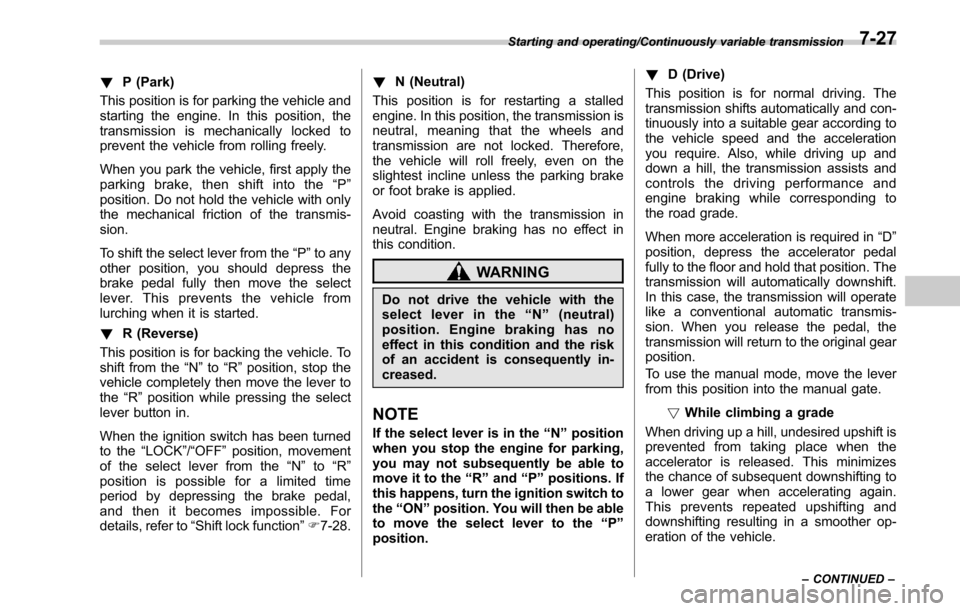
!P (Park)
This position is for parking the vehicle and
starting the engine. In this position, the
transmission is mechanically locked to
prevent the vehicle from rolling freely.
When you park the vehicle, first apply the
parking brake, then shift into the “P ”
position. Do not hold the vehicle with only
the mechanical friction of the transmis-
sion.
To shift the select lever from the “P”to any
other position, you should depress the
brake pedal fully then move the select
lever. This prevents the vehicle from
lurching when it is started.
! R (Reverse)
This position is for backing the vehicle. To
shift from the “N”to “R”position, stop the
vehicle completely then move the lever to
the “R”position while pressing the select
lever button in.
When the ignition switch has been turned
to the “LOCK”/ “OFF ”position, movement
of the select lever from the “N”to “R”
position is possible for a limited time
period by depressing the brake pedal,
and then it becomes impossible. For
details, refer to “Shift lock function ”F 7-28. !
N (Neutral)
This position is for restarting a stalled
engine. In this position, the transmission is
neutral, meaning that the wheels and
transmission are not locked. Therefore,
the vehicle will roll freely, even on the
slightest incline unless the parking brake
or foot brake is applied.
Avoid coasting with the transmission in
neutral. Engine braking has no effect in
this condition.
WARNING
Do not drive the vehicle with the
select lever in the “N ” (neutral)
position. Engine braking has no
effect in this condition and the risk
of an accident is consequently in-
creased.
NOTE
If the select lever is in the “N ” position
when you stop the engine for parking,
you may not subsequently be able to
move it to the “R ” and “P ” positions. If
this happens, turn the ignition switch to
the “ON ”position. You will then be able
to move the select lever to the “P ”
position. !
D (Drive)
This position is for normal driving. The
transmission shifts automatically and con-
tinuously into a suitable gear according to
the vehicle speed and the acceleration
you require. Also, while driving up and
down a hill, the transmission assists and
controls the driving performance and
engine braking while corresponding to
the road grade.
When more acceleration is required in “D”
position, depress the accelerator pedal
fully to the floor and hold that position. The
transmission will automatically downshift.
In this case, the transmission will operate
like a conventional automatic transmis-
sion. When you release the pedal, the
transmission will return to the original gear
position.
To use the manual mode, move the lever
from this position into the manual gate.
!While climbing a grade
When driving up a hill, undesired upshift is
prevented from taking place when the
accelerator is released. This minimizes
the chance of subsequent downshifting to
a lower gear when accelerating again.
This prevents repeated upshifting and
downshifting resulting in a smoother op-
eration of the vehicle.
Starting and operating/Continuously variable transmission
–CONTINUED –7-27
Page 401 of 610
Starting and operating/Continuously variable transmission
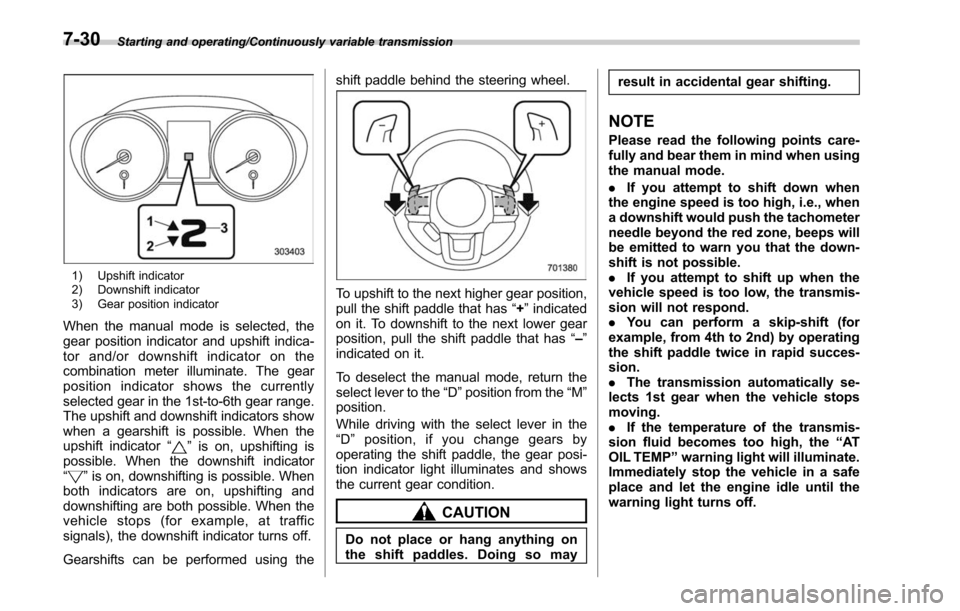
1) Upshift indicator
2) Downshift indicator
3) Gear position indicator
When the manual mode is selected, the
gear position indicator and upshift indica-
tor and/or downshift indicator on the
combination meter illuminate. The gear
position indicator shows the currently
selected gear in the 1st-to-6th gear range.
The upshift and downshift indicators show
when a gearshift is possible. When the
upshift indicator“
”is on, upshifting is
possible. When the downshift indicator
“
” is on, downshifting is possible. When
both indicators are on, upshifting and
downshifting are both possible. When the
vehicle stops (for example, at traffic
signals), the downshift indicator turns off.
Gearshifts can be performed using the shift paddle behind the steering wheel.
To upshift to the next higher gear position,
pull the shift paddle that has
“+”indicated
on it. To downshift to the next lower gear
position, pull the shift paddle that has “–”
indicated on it.
To deselect the manual mode, return the
select lever to the “D”position from the “M”
position.
While driving with the select lever in the
“ D ” position, if you change gears by
operating the shift paddle, the gear posi-
tion indicator light illuminates and shows
the current gear condition.
CAUTION
Do not place or hang anything on
the shift paddles. Doing so may result in accidental gear shifting.
NOTE
Please read the following points care-
fully and bear them in mind when using
the manual mode.
.
If you attempt to shift down when
the engine speed is too high, i.e., when
a downshift would push the tachometer
needle beyond the red zone, beeps will
be emitted to warn you that the down-
shift is not possible.
. If you attempt to shift up when the
vehicle speed is too low, the transmis-
sion will not respond.
. You can perform a skip-shift (for
example, from 4th to 2nd) by operating
the shift paddle twice in rapid succes-
sion.
. The transmission automatically se-
lects 1st gear when the vehicle stops
moving.
. If the temperature of the transmis-
sion fluid becomes too high, the “AT
OIL TEMP ”warning light will illuminate.
Immediately stop the vehicle in a safe
place and let the engine idle until the
warning light turns off.
7-30
Page 402 of 610
&Driving tips
NOTE
If the accelerator and brake pedals are
depressed at the same time, driving
torque may be restrained. This is not a
malfunction.
. On a road surface where there is a risk
of wheelspin (for example, a snow- or
gravel-covered road), you can pull away
from a standstill safely and easily by first
selecting the 2nd gear of the manual
mode.
. Always apply the foot or parking brake
when the vehicle is stopped in the “D”or
“R ”position.
. Make sure to apply the parking brake
when parking your vehicle. Do not hold
the vehicle with only the transmission.
. Do not keep the vehicle in a stationary
position on an uphill grade by using the
“D ”position. Use the brake instead.
. The engine may, on rare occasions,
knock when the vehicle rapidly acceler-
ates or rapidly pulls away from a standstill.
This phenomenon does not indicate a
malfunction.
. A slight reduction in output torque may
occur in the models with a 3.6 L engine
before the engine warms up.
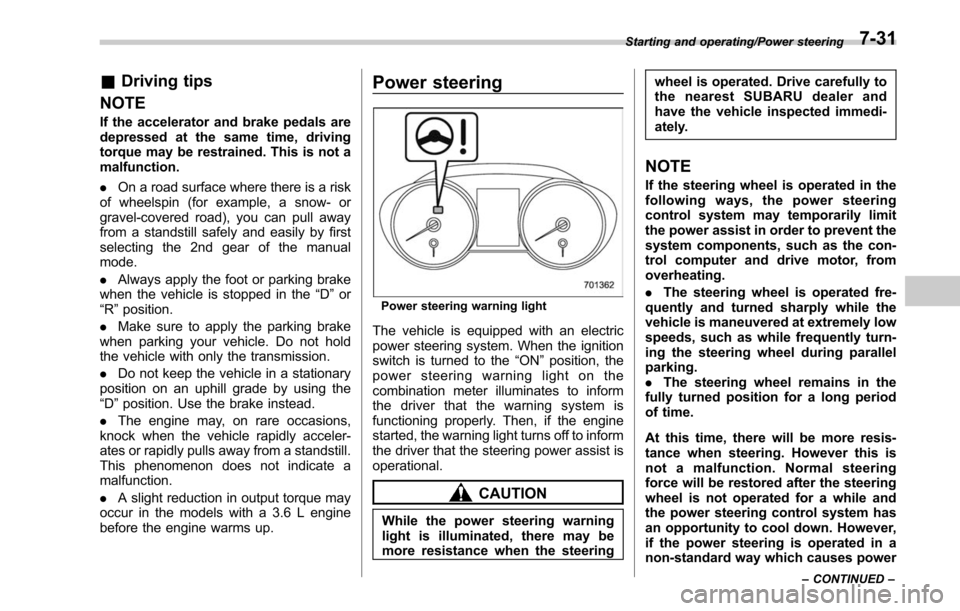
Power steering
Power steering warning light
The vehicle is equipped with an electric
power steering system. When the ignition
switch is turned to the “ON”position, the
power steering warning light on the
combination meter illuminates to inform
the driver that the warning system is
functioning properly. Then, if the engine
started, the warning light turns off to inform
the driver that the steering power assist is
operational.
CAUTION
While the power steering warning
light is illuminated, there may be
more resistance when the steering wheel is operated. Drive carefully to
the nearest SUBARU dealer and
have the vehicle inspected immedi-
ately.
NOTE
If the steering wheel is operated in the
following ways, the power steering
control system may temporarily limit
the power assist in order to prevent the
system components, such as the con-
trol computer and drive motor, from
overheating.
.
The steering wheel is operated fre-
quently and turned sharply while the
vehicle is maneuvered at extremely low
speeds, such as while frequently turn-
ing the steering wheel during parallel
parking.
. The steering wheel remains in the
fully turned position for a long period
of time.
At this time, there will be more resis-
tance when steering. However this is
not a malfunction. Normal steering
force will be restored after the steering
wheel is not operated for a while and
the power steering control system has
an opportunity to cool down. However,
if the power steering is operated in a
non-standard way which causes power
Starting and operating/Power steering
–CONTINUED –7-31
Page 405 of 610
Starting and operating/Electronic Brake Force Distribution (EBD) system
pump the brake pedal since
doing so may defeat the opera-
tion of the ABS.
The ABS prevents the lock-up of wheels
which may occur during sudden braking or
braking on slippery road surfaces. This
helps prevent the loss of steering control
and directional stability caused by wheel
lock-up.
When the ABS is operating, you may hear
a chattering noise or feel a slight vibration
in the brake pedal. This is normal when
the ABS operates.
The ABS will not operate when the vehicle
speed is below approximately 6 mph (10
km/h).
& ABS self-check
You may feel a slight shock in the brake
pedal and hear the operating noise of the
ABS from the engine compartment just
after the vehicle is started. This is caused
by an automatic functional test of the ABS
being carried out and does not indicate
any abnormal condition.
&ABS warning light
Refer to “ABS warning light ”F 3-19.
Electronic Brake Force Dis-
tribution (EBD) system
The EBD system maximizes the effective-
ness of the brakes by allowing the rear
brakes to supply a greater proportion of
the braking force. It functions by adjusting
the distribution of braking force to the rear
wheels in accordance with the vehicle’ s
loading condition and speed.
The EBD system is an integral part of the
ABS and uses some of the ABS compo-
nents to perform its function of optimizing
the distribution of braking force. If any of
the ABS components used by the EBD
function fails, the EBD system also stops
working.
When the EBD system is operating, you
may hear a chattering noise or feel a slight
vibration in the brake pedal. This is normal
and does not indicate a malfunction.
& Steps to take if EBD system
malfunctions
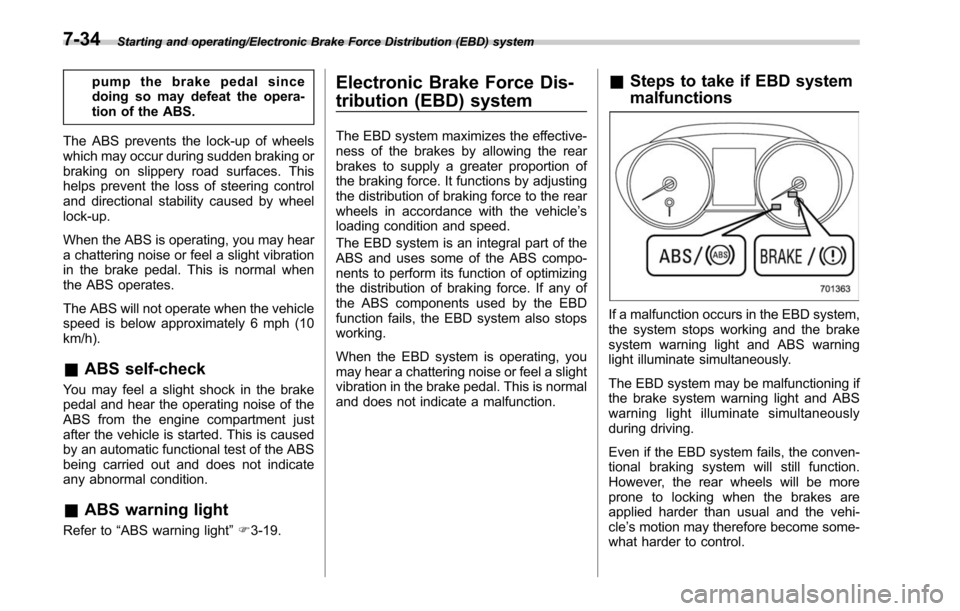
If a malfunction occurs in the EBD system,
the system stops working and the brake
system warning light and ABS warning
light illuminate simultaneously.
The EBD system may be malfunctioning if
the brake system warning light and ABS
warning light illuminate simultaneously
during driving.
Even if the EBD system fails, the conven-
tional braking system will still function.
However, the rear wheels will be more
prone to locking when the brakes are
applied harder than usual and the vehi-
cle’s motion may therefore become some-
what harder to control.
7-34
Page 407 of 610
Starting and operating/Vehicle Dynamics Control system
namics Control is no guarantee
that full vehicle control will be
maintained at all times and under
all conditions, its activation
should be seen as a sign that
the speed of the vehicle should
be reduced considerably.
. Whenever suspension compo-
nents, steering components, or
an axle are removed from a
vehicle equipped with the Vehicle
Dynamics Control system, have
an inspection of that system
performedbyanauthorized
SUBARU dealer.
. The following precautions should
be observed in order to ensure
that the Vehicle Dynamics Con-
trol system is operating properly.
– All four wheels should be
fitted with tires of the same
size, type, and brand. Further-
more, the amount of wear
should be the same for all
four tires.
– Keep the tire pressure at the
proper level as shown on the
vehicle placard attached to
the driver ’s side door pillar.
– Use only the specified tem-
porary spare tire to replace a flat tire. With a temporary
spare tire, the effectiveness
of the Vehicle Dynamics Con-
trol system is reduced and
this should be taken into ac-
count when driving the vehi-
cle in such a condition.
. If non-matching tires are used,
the Vehicle Dynamics Control
system may not operate cor-
rectly.
In the event of wheelspin and/or skidding
on a slippery road surface and/or during
cornering and/or an evasive maneuver,
the Vehicle Dynamics Control system
adjusts the engine ’s output and the
wheels’ respective braking forces to help
maintain traction and directional control.
. Traction Control Function
The traction control function is designed to
prevent spinning of the driving wheels on
slippery road surfaces, thereby helping to
maintain traction and directional control.
Activation of this function is indicated by
flashing of the Vehicle Dynamics Control
operation indicator light.
. Skid Suppression Function
The skid suppression function is designed
to help maintain directional stability by
suppressing the wheels’ tendency to slidesideways during steering operations. Acti-
vation of this function is indicated by
flashing of the Vehicle Dynamics Control
operation indicator light.
NOTE
.
The Vehicle Dynamics Control sys-
tem may be considered normal when
the following conditions occur.
–Slight twitching of the brake
pedal is felt.
– The vehicle or steering wheel
shakes to a small degree.
– An operating noise from the en-
gine compartment is heard briefly
when starting the engine and when
driving off after starting the engine.
– The brake pedal seems to jolt
when driving off after starting the
engine.
. In the following circumstances, the
vehicle may be less stable than it feels
to the driver. The Vehicle Dynamics
Control System may therefore operate.
Such operation does not indicate a
system malfunction.
–on gravel-covered or rutted
roads
– on unfinished roads
– when the vehicle is towing a
trailer
– when the vehicle is fitted with
7-36
Page 408 of 610
snow tires or winter tires
. Activation of the Vehicle Dynamics
Control system will cause operation of
the steering wheel to feel slightly
different compared to that for normal
conditions.
. It is always important to reduce
speed when approaching a corner,
even if the vehicle is equipped with
Vehicle Dynamics Control.
. Always turn off the engine before
replacing a tire as failure to do so may
render the Vehicle Dynamics Control
system unable to operate correctly.
& Vehicle Dynamics Control
system monitor
Refer to “Vehicle Dynamics Control warn-
ing light/Vehicle Dynamics Control opera-
tion indicator light ”F 3-24 and “Vehicle
Dynamics Control OFF indicator light ”F 3-
25.
& Vehicle Dynamics Control
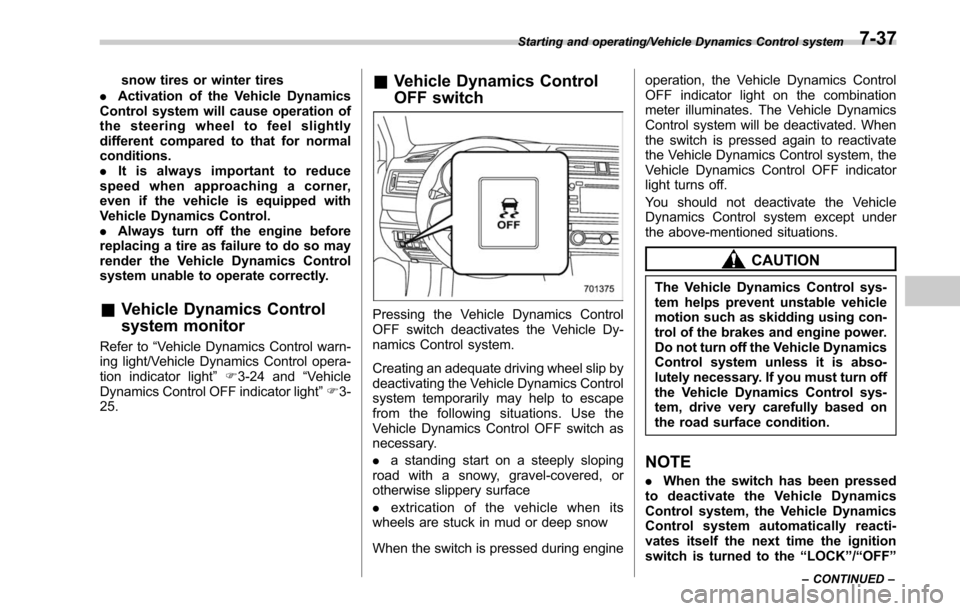
OFF switch
Pressing the Vehicle Dynamics Control
OFF switch deactivates the Vehicle Dy-
namics Control system.
Creating an adequate driving wheel slip by
deactivating the Vehicle Dynamics Control
system temporarily may help to escape
from the following situations. Use the
Vehicle Dynamics Control OFF switch as
necessary.
. a standing start on a steeply sloping
road with a snowy, gravel-covered, or
otherwise slippery surface
. extrication of the vehicle when its
wheels are stuck in mud or deep snow
When the switch is pressed during engine operation, the Vehicle Dynamics Control
OFF indicator light on the combination
meter illuminates. The Vehicle Dynamics
Control system will be deactivated. When
the switch is pressed again to reactivate
the Vehicle Dynamics Control system, the
Vehicle Dynamics Control OFF indicator
light turns off.
You should not deactivate the Vehicle
Dynamics Control system except under
the above-mentioned situations.
CAUTION
The Vehicle Dynamics Control sys-
tem helps prevent unstable vehicle
motion such as skidding using con-
trol of the brakes and engine power.
Do not turn off the Vehicle Dynamics
Control system unless it is abso-
lutely necessary. If you must turn off
the Vehicle Dynamics Control sys-
tem, drive very carefully based on
the road surface condition.
NOTE
.
When the switch has been pressed
to deactivate the Vehicle Dynamics
Control system, the Vehicle Dynamics
Control system automatically reacti-
vates itself the next time the ignition
switch is turned to the “LOCK ”/“ OFF ”
Starting and operating/Vehicle Dynamics Control system
–CONTINUED –7-37