air conditioning SUBARU OUTBACK 2017 6.G Owners Manual
[x] Cancel search | Manufacturer: SUBARU, Model Year: 2017, Model line: OUTBACK, Model: SUBARU OUTBACK 2017 6.GPages: 610, PDF Size: 10.28 MB
Page 240 of 610
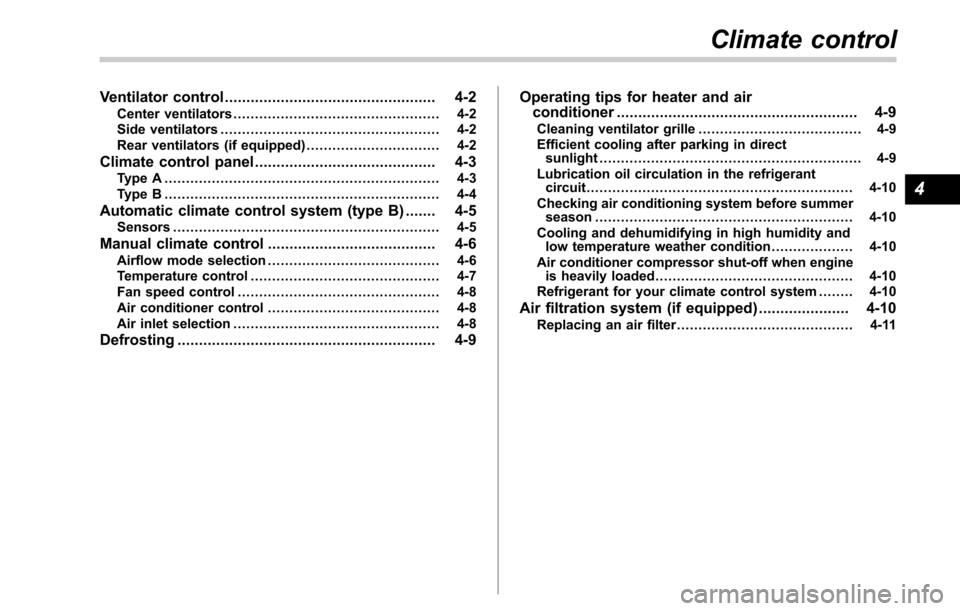
Ventilator control................................................. 4-2
Center ventilators ................................................ 4-2
Side ventilators ................................................... 4-2
Rear ventilators (if equipped) ............................... 4-2
Climate control panel.......................................... 4-3
Type A ................................................................ 4-3
Type B ................................................................ 4-4
Automatic climate control system (type B) ....... 4-5Sensors.............................................................. 4-5
Manual climate control ....................................... 4-6Airflow mode selection........................................ 4-6
Temperature control ............................................ 4-7
Fan speed control ............................................... 4-8
Air conditioner control ........................................ 4-8
Air inlet selection ................................................ 4-8
Defrosting............................................................ 4-9 Operating tips for heater and air
conditioner ........................................................ 4-9
Cleaning ventilator grille ...................................... 4-9
Efficient cooling after parking in direct sunlight ............................................................. 4-9
Lubrication oil circulation in the refrigerant circuit .............................................................. 4-10
Checking air conditioning system before summer season ............................................................ 4-10
Cooling and dehumidifying in high humidity and low temperature weather condition ................... 4-10
Air conditioner compressor shut-off when engine is heavily loaded .............................................. 4-10
Refrigerant for your climate control system ... ..... 4-10
Air filtration system (if equipped)..................... 4-10Replacing an air filter......................................... 4-11
Climate control
4
Page 249 of 610
Climate control/Air filtration system
allow outside air to circulate into the
heated interior. This results in quicker
cooling by the air conditioner. Keep the
windows closed during the operation of
the air conditioner for maximum cooling
efficiency.
&Lubrication oil circulation in
the refrigerant circuit
Operate the air conditioner compressor at
a low engine speed (at idle or low driving
speeds) a few minutes each month during
the off-season to circulate its oil.
&Checking air conditioning
system before summer sea-
son
Check the air conditioner unit for refriger-
ant leaks, hose conditions, and proper
operation each spring. Have the air con-
ditioning system checked by your
SUBARU dealer.
&Cooling and dehumidifying in
high humidity and low tem-
perature weather condition
Under certain weather conditions (high
relative humidity, low temperatures, etc.) a
small amount of water vapor emission
from the air outlets may be noticed. This
condition is normal and does not indicate any problem with the air conditioning
system.
&
Air conditioner compressor
shut-off when engine is
heavily loaded
To improve acceleration and gas mileage,
the air conditioner compressor is designed
to temporarily shut off during air condi-
tioner operation whenever the accelerator
is fully depressed such as during rapid
acceleration or when driving on a steep
upgrade.
&Refrigerant for your climate
control system
Your air conditioner uses ozone friendly
refrigerant HFO-1234yf. Therefore, the
method of adding, changing or checking
the refrigerant is different from the method
for CFC12 (freon) or HFC134a. Consult
your SUBARU dealer for service. Repairs
needed as a result of using the wrong
refrigerant are not covered under war-
ranty.
Air filtration system (if
equipped)
Your vehicle’ s air conditioning system is
equipped with an air filtration system.
Replace the air filter element according
to the replacement schedule shown in the
following table. This schedule should be
followed to maintain the filter ’sdust
collection ability. Under extremely dusty
conditions, the filter should be replaced
more frequently. Have your filter checked
or replaced by your SUBARU dealer. For
replacement, use only a genuine
SUBARU air filter kit. For the replacement
schedule, refer to the “Warranty and
Maintenance Booklet ”.
CAUTION
Contact your SUBARU dealer if the
following occurs, even if it is not yet
time to change the filter.
.Reduction of the airflow through
the vents.
. Windshield gets easily fogged or
misted.
NOTE
The filter can influence the air condi-
tioning, heating and defroster perfor-
4-10
Page 259 of 610
Audio/Audio set
!CD player and disc
. This CD player is intended for use with
4.7 in. (12 cm) discs only.
. Extremely high temperatures can keep
the CD player from working. On hot days,
use the air conditioning system to cool the
inside of the vehicle before using the
player.
. Bumpy roads or other vibrations may
make the CD player skip.
. If moisture gets into the CD player, the
discs may not be able to be played.
Remove the discs from the player and
wait until it dries.
WARNING
CD players use an invisible laser
beam which could cause hazardous
radiation exposure if directed out-
side the unit. Be sure to operate the
player correctly.
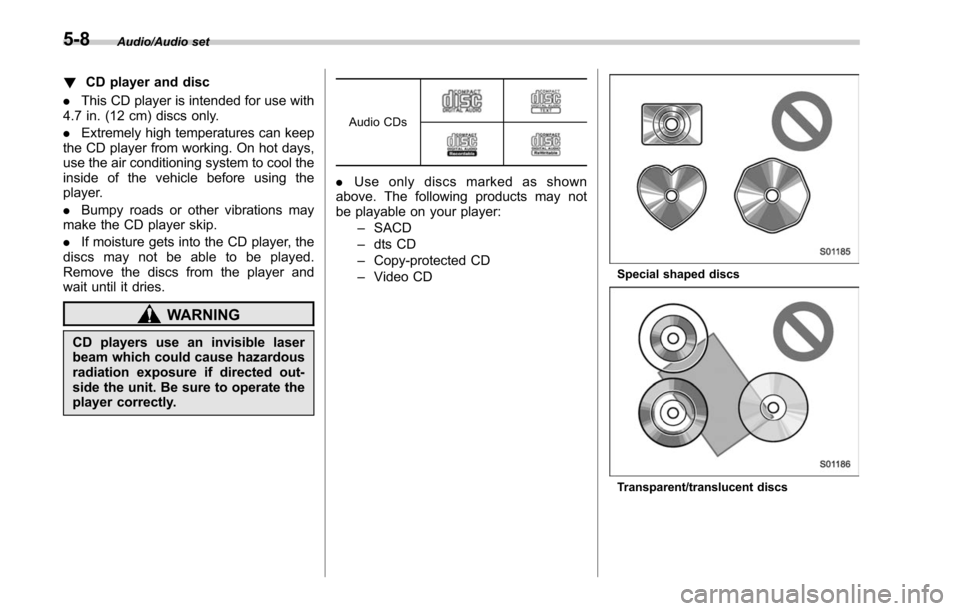
Audio CDs
. Use only discs marked as shown
above. The following products may not
be playable on your player:
–SACD
– dts CD
– Copy-protected CD
– Video CD
Special shaped discs
Transparent/translucent discs
5-8
Page 322 of 610
Hands-free phone system
The hands-free system enables calls to be
made and received without having to take
your hands off the steering wheel.
This system supports Bluetooth. Bluetooth
is a wireless data system that enables cell
phones to be used without being con-
nected by a cable or placed in a cradle.
The operating procedure of the phone is
explained here.
WARNING
.While driving, do not use a cell
phone or connect the Bluetooth
phone. Doing so may result in
loss of control of your vehicle
and cause an accident or serious
injury.
. Your audio unit is fitted with
Bluetooth antennas. People with
implantable cardiac pacemakers,
cardiac resynchronization ther-
apy-pacemakers or implantable
cardioverter defibrillators should
maintain a reasonable distance
between themselves and the
Bluetooth antennas. The radio
waves may affect the operation
of such devices. .
Before using Bluetooth devices,
users of any electrical medical
device other than implantable
cardiac pacemakers, cardiac re-
synchronization therapy-pace-
makers or implantable cardiover-
ter defibrillators should consult
the manufacturer of the device
for information about its opera-
tion under the influence of radio
waves. Radio waves could have
unexpected effects on the opera-
tion of such medical devices.CAUTION
Do not leave your cell phone in the
vehicle. The temperature inside may
rise to a level that could damage the
phone.
NOTE
. If your cell phone does not support
Bluetooth, this system cannot function.
. In the following conditions, the sys-
tem may not function:
–The cell phone is turned off.
– The current position is outside
the communication area.
– The cell phone is not connected.
– The cell phone has a low battery. .
When using the hands free function
and other Bluetooth functions at the
same time, the following problems may
occur:
–The Bluetooth connection may
be cut.
– Noise may be heard when play-
ing back voice with the Bluetooth
function.
. The other party’ s voice will be heard
from the front speakers. The audio/
visual system will be muted during
phone calls or when hands-free voice
commands are used.
. Talk alternately with the other party
on the phone. If both parties speak at
the same time, the other party may not
hear what has been said. (This is not a
malfunction.)
. Keep call volume down. Otherwise,
the other party’ s voice may be audible
outside the vehicle and voice echo may
increase. When talking on the phone,
speak clearly towards the microphone.
. The other party may not hear you
clearly when:
–Drivingonanunpavedroad.
(Making excessive traffic noise.)
– Driving at high speeds.
– The moonroof or windows are
open.
– The air conditioning vents are
Audio/Hands –free phone system
–CONTINUED –5-71
Page 323 of 610
Audio/Hands–free phone system
pointed towards the microphone.
– The sound of the air conditioning
fan is loud.
– Thereisanegativeeffecton
sound quality due to the phone
and/or network being used.
. When another phone is connected,
the following registered data cannot be
read:
–Contact data
– Call history data
– All phone settings
. When selling or disposing of the
vehicle, initialize the data. Refer to
“ Unit settings ”F 5-19.
. Once initialized, the data and set-
tings will be erased. Take extra caution
when initializing the data.
. The voice command system sup-
ports phone commands, so dialing a
phone number using your voice is
possible. Refer to “Vo i c e c o m m a n d
system ”F 5-81.
. The images shown in this Owner ’s
Manual are sample images. The actual
images may vary depending on the
market and specifications of your ve-
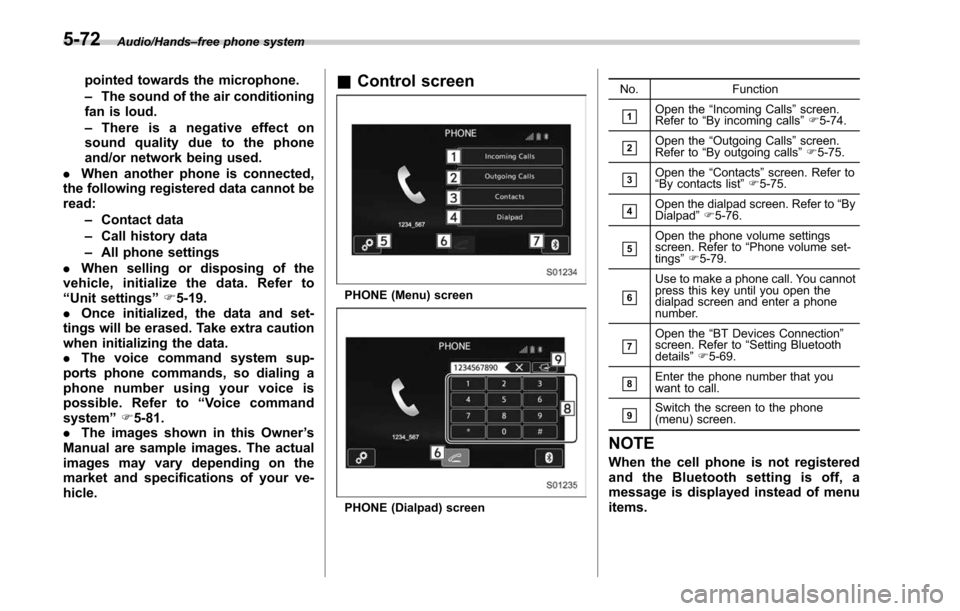
hicle.& Control screen
PHONE (Menu) screen
PHONE (Dialpad) screen No. Function
&1Open the
“Incoming Calls ”screen.
Refer to “By incoming calls ”F 5-74.
&2Open the “Outgoing Calls ”screen.
Refer to “By outgoing calls ”F 5-75.
&3Open the “Contacts ”screen. Refer to
“ By contacts list ”F 5-75.
&4Open the dialpad screen. Refer to “By
Dialpad ”F 5-76.
&5Open the phone volume settings
screen. Refer to “Phone volume set-
tings ”F 5-79.
&6
Use to make a phone call. You cannot
press this key until you open the
dialpad screen and enter a phone
number.
&7Open the “BT Devices Connection ”
screen. Refer to “Setting Bluetooth
details ”F 5-69.
&8Enter the phone number that you
want to call.
&9Switch the screen to the phone
(menu) screen.
NOTE
When the cell phone is not registered
and the Bluetooth setting is off, a
message is displayed instead of menu
items.
5-72
Page 333 of 610
Audio/Voice command system
open.
–Passengers are talking while
voice commands are spoken.
– The air conditioning speed is set
high.
– The air conditioning vents are
turned towards the microphone.
. In the following conditions, the sys-
tem may not recognize the command
properly and using voice commands
may not be possible:
–The command is incorrect or
unclear. Note that certain words,
accents or speech patterns may be
difficult for the system to recognize.
– There is excessive background
noise, such as wind noise.& Voice command system op-
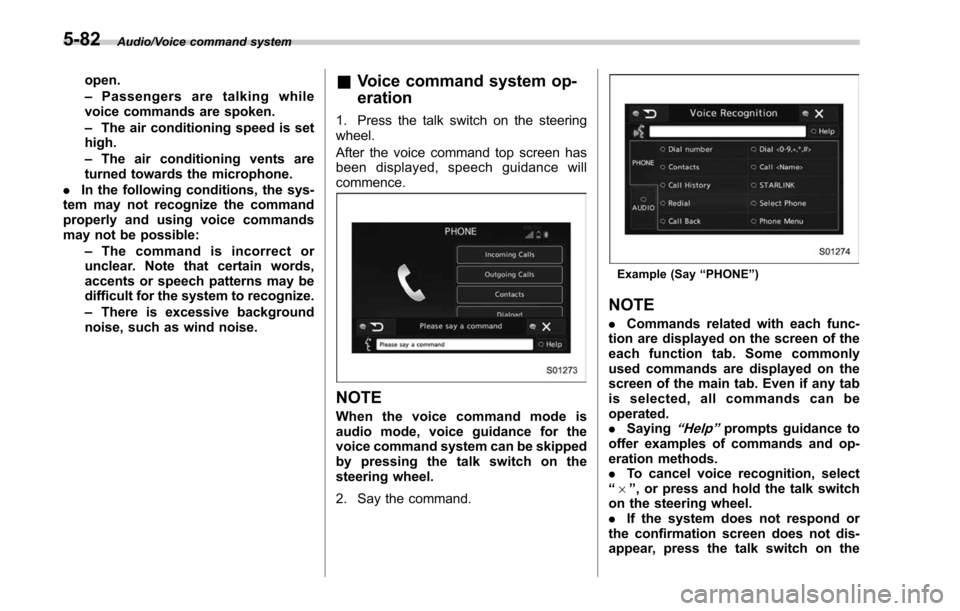
eration
1. Press the talk switch on the steering
wheel.
After the voice command top screen has
been displayed, spe ech guidance will
commence.
NOTE
When the voice command mode is
audio mode, voice guidance for the
voice command system can be skipped
by pressing the talk switch on the
steering wheel.
2. Say the command.
Example (Say “PHONE ”)
NOTE
. Commands related with each func-
tion are displayed on the screen of the
each function tab. Some commonly
used commands are displayed on the
screen of the main tab. Even if any tab
is selected, all commands can be
operated.
. Saying
“Help ”prompts guidance to
offer examples of commands and op-
eration methods.
. To cancel voice recognition, select
“ 6 ”, or press and hold the talk switch
on the steering wheel.
. If the system does not respond or
the confirmation screen does not dis-
appear, press the talk switch on the
5-82
Page 391 of 610
Starting and operating/Remote engine start system (dealer option)
&Entering the vehicle while it
is running via remote start
1. Unlock the vehicle doors using the
keyless access function (if equipped) or
remote keyless entry system, then open
the door(s). If the vehicle ’s doors are
unlocked manually using the key, the
vehicle’ s alarm system will trigger when
a door is opened (if the alarm system is
armed prior to activating the remote
engine start system) and the engine will
turn off. Perform either of the following
procedures to disarm the alarm system.
Refer to “Alarm system ”F 2-28.
. Insert the key into the ignition switch
and turn it to the “ON ”position (models
without “keyless access with push-
button start system ”)
. Push the push-button ignition switch
to the “ACC”or “ON ”position (models
with “keyless access with push-button
start system ”)
. Press any button on the access key/
remote keyless entry transmitter.
2. Enter the vehicle.
3. The engine will shut down when any
door or rear gate is opened.
4. For models without “keyless access
with push-button start system ”, insert the
key into the ignition switch and turn to the
“START ”position to restart the engine. For models with
“keyless access with push-
button start system ”, press the push-
button ignition switch while depressing
the brake pedal to restart the engine.
& Entering the vehicle follow-
ing remote engine start shut-
down
An alarm trigger may occur if the vehicle is
opened by the remote keyless entry
system/keyless access function within a
few seconds immediately following remote
engine start shutdown.
&Pre-heating or pre-cooling
the interior of the vehicle
Before exiting the vehicle, set the tem-
perature controls to the desired setting
and operation. After the system starts the
engine, the heater or air conditioning will
activate and heat or cool the interior to
your setting.
&Service mode (models with-
out “keyless access with
push-button start system ”)
In service mode, the remote engine start
function is temporarily disabled to prevent
the system from unexpectedly starting the
engine while being serviced. To engage or disengage service mode:
1. Enter the vehicle and close all vehicle
doors and the rear gate/trunk lid.
2. Verify that the select lever is in the
“P ”
position (CVT models)
3. Depress and hold the brake pedal
4. Turn the ignition switch to the “ON”
position
5. Press and release the remote engine
start transmitter “
”button three times.
The system will honk the vehicle ’s horn
each time the button is pressed.
6. The system will pause for 1 second
then honk the vehicle’ s horn three times to
indicate that the service mode has been
engaged or honk one time to indicate that
the service mode has been disengaged.
NOTE
When taking your vehicle in for service,
it is recommended that you inform the
service personnel that your vehicle is
equipped with a remote engine start
system.
& Remote transmitter program
(models without “keyless ac-
cess with push-button start
system ”)
New transmitters can be programmed to
the remote engine start system in the
7-20
Page 397 of 610
Starting and operating/Continuously variable transmission
.Immediately after transmission fluid
is replaced, you may feel that the
transmission operation is somewhat
unusual. This results from invalidation
of data which the on-board computer
has collected and stored in memory to
allow the transmission to shift at the
most appropriate times for the current
condition of your vehicle. Optimized
shifting will be restored as the vehicle
continues to be driven for a while.
. When driving under continuous hea-
vy load conditions such as towing a
camper or climbing a long, steep hill,
the engine speed, vehicle speed and air
conditioning system cooling perfor-
mance may automatically be reduced.
This is not a malfunction. This phe-
nomenon results from the engine con-
trol function maintaining the cooling
performance of the vehicle. The engine
and vehicle speed will return to a
normal speed when the engine is able
to maintain the optimum cooling per-
formance after the heavy load de-
creases. Driving under a heavy load
must be performed with extreme care.
Do not try to pass a vehicle in front
when driving on an uphill slope while
towing.
. The continuously variable transmis-
sion is a chain type system that
provides superior transmission effi- ciency for maximum fuel economy. At
times, depending on varying driving
conditions, a chain operating noise
may be heard that is characteristic of
this type of system.
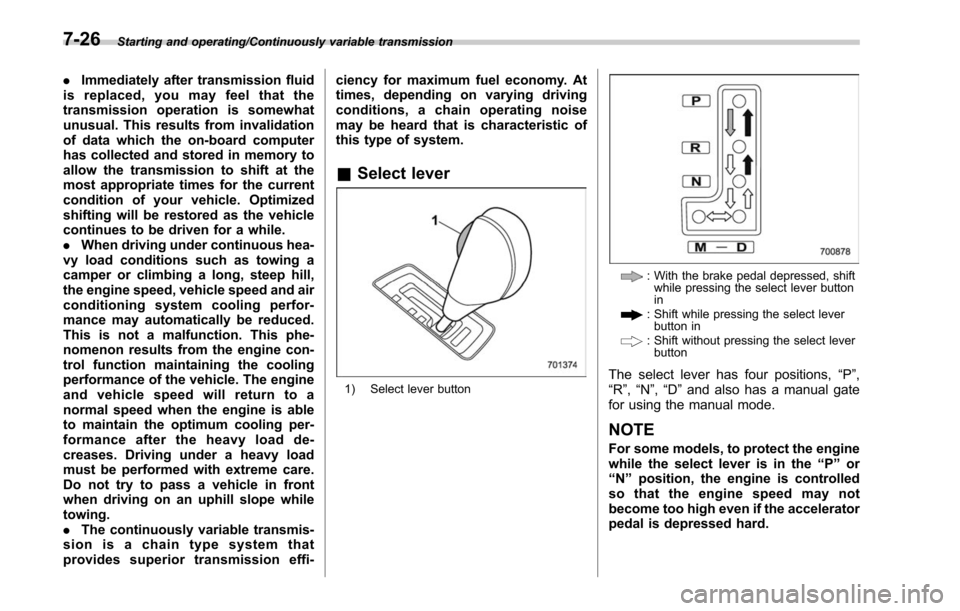
&
Select lever
1) Select lever button
: With the brake pedal depressed, shift
while pressing the select lever button
in
: Shift while pressing the select leverbutton in
: Shift without pressing the select leverbutton
The select lever has four positions, “P”,
“R ”,“N ”,“D ”and also has a manual gate
for using the manual mode.
NOTE
For some models, to protect the engine
while the select lever is in the “P ” or
“ N ” position, the engine is controlled
sothattheenginespeedmaynot
become too high even if the accelerator
pedal is depressed hard.
7-26
Page 465 of 610
Driving tips/Trailer towing (Legacy)
Trailer towing (Legacy)
Your vehicle is neither designed nor
intended to be used for trailer towing.
Therefore, never tow a trailer with your
vehicle.
SUBARU assumes no responsibility for
injuries or vehicle damage that may result
from trailer towing, from any trailer towing
equipment or from any errors or omissions
in the instructions accompanying such
equipment. SUBARU warranties do not
apply to vehicle damage or malfunction
caused by trailer towing.
Trailer towing (Outback)
Your vehicle is designed and intended to
be used primarily as a passenger-carrying
vehicle. Towing a trailer puts additional
loads on your vehicle’s engine, drivetrain,
brakes, tires and suspension and has an
adverse effect on fuel economy and air
conditioning system cooling performance.
If you do decide to tow a trailer, your safety
and satisfaction depend upon proper use
of correct equipment and cautious opera-
tion of your vehicle. Seek the advice of
your SUBARU dealer to assist you in
purchasing a hitch and other necessary
towing equipment appropriate for your
vehicle. Do not use towing equipment
other than genuine SUBARU towing
equipment. In addition, be sure to follow
the instructions on correct installation and
use provided by SUBARU.
SUBARU assumes no responsibility for
injuries or vehicle damage that result from
trailer towing equipment, or from any
errors or omissions in the instructions
accompanying such equipment or for your
failure to follow the proper instructions.
Regularly check that the hitch mounting
bolts and nuts are tightened securely.
& Warranties and maintenance
SUBARU warranties do not apply to
vehicle damage or malfunction caused
by trailer towing. If you use your vehicle to
tow a trailer, more frequent maintenance
will be required due to the additional load.
(Refer to “Maintenance schedule under
severe driving conditions ”in the “Warranty
and Maintenance Booklet ”.)
Under no circumstances should a trailer
be towed with a new vehicle or a vehicle
with any new powertrain component (en-
gine, transmission, differential, wheel
bearings, etc.) for the first 1,000 miles
(1,600 km) of driving.
& Maximum load limits
WARNING
Never exceed the maximum load
limits explained in the following.
Exceeding the maximum load limits
could cause personal injury and/or
vehicle damage.
CAUTION
. Adequate size trailer brakes are
required when the trailer and its
cargo exceed 1,000 lbs (453 kg)
8-22
Page 579 of 610
Consumer information and Reporting safety defects/Tire information
rubber compounds.
.Cracking
Any parting within the tread, side-
wall, or inner liner of the tire
extending to cord material.
.Curb weight
The weight of a motor vehicle with
standard equipment including the
maximum capacity of fuel, oil and
coolant, and if so equipped, air
conditioning and additional weight
optional engine.
.Extra load tire
A tire designed to operate at higher
loads and higher inflation pressure
than the corresponding standard
tire.
.Groove
The space between two adjacent
tread ribs.
.Innerliner
The layer(s) forming the inside sur-
face of a tubeless tire that contains
the inflating medium within the tire.
.Innerliner separation
The parting of the innerliner from
cord material in the carcass.
.Intended outboard sidewall
(1)The sidewall that contains a
whitewall, bears white lettering
or bears manufacturer, brand,
and/or model name molding that
is higher or deeper than the
same molding on the other side-
wall of the tire, or
(2)The outward facing sidewall
of an asymmetrical tire that has
a particular side that must al-
ways face outward when mount-
ing on a vehicle.
.Light truck (LT) tire
A tire designated by its manufac-
turer as primarily intended for use
on lightweight trucks or multipur-
pose passenger vehicles.
.Load rating
The maximum load that a tire is
rated to carry for a given inflation
pressure.
.Maximum inflation pressure
The maximum cold inflation pres-
sure to which a tire may be inflated.
.Maximum load rating
The load rating for a tire at the maximum permissible inflation
pressure for that tire.
.Maximum loaded vehicle weight
The sum of:
(a)Curb weight
(b)Accessory weight
(c)Vehicle capacity weight
(d)Production options weight.Maximum permissible inflation
pressure
The maximum cold inflation pres-
sure to which a tire may be inflated.
.Measuring rim
The rim on which a tire is fitted for
physical dimension requirements.
.Normal occupant weight
150 lbs (68 kg) times the number of
occupants specified in the second
column of Table 1 that is appended
to the end of this section.
.Occupant distribution
Distribution of occupants in a vehi-
cle as specified in the third column
of Table 1 that is appended to the
end of this section.
.Open splice
Any parting at any junction of tread,
13-6