key SUBARU OUTBACK 2017 6.G Repair Manual
[x] Cancel search | Manufacturer: SUBARU, Model Year: 2017, Model line: OUTBACK, Model: SUBARU OUTBACK 2017 6.GPages: 610, PDF Size: 10.28 MB
Page 159 of 610
Instruments and controls/Ignition switch (models without push–button start system)
Ignition switch (models with-
out push-button start sys-
tem)
WARNING
. Never turn the ignition switch to
“ LOCK” while the vehicle is
being driven or towed because
that will lock the steering wheel,
preventing steering control. And
when the engine is turned off, it
takes a much greater effort than
usual to steer.
. Before leaving the vehicle, al-
ways remove the key from the
ignition switch for safety and
never allow an unattended child
to remain in the vehicle. Failure
to follow this procedure could
result in injury to a child or
others. Children could operate
the power windows, the moon-
roof or other controls or even
make the vehicle move.
CAUTION
Do not attach a large key holder or
key case to either key. If it banged against your knees or hands while
you are driving, it could turn the
ignition switch from the
“ON ”posi-
tion to the “ACC ”or “LOCK ”posi-
tion, thereby stopping the engine.
Also, if the key is attached to a
keyholder or to a large bunch of
other keys, centrifugal force may act
on it as the vehicle moves, resulting
in unwanted turning of the ignition
switch.
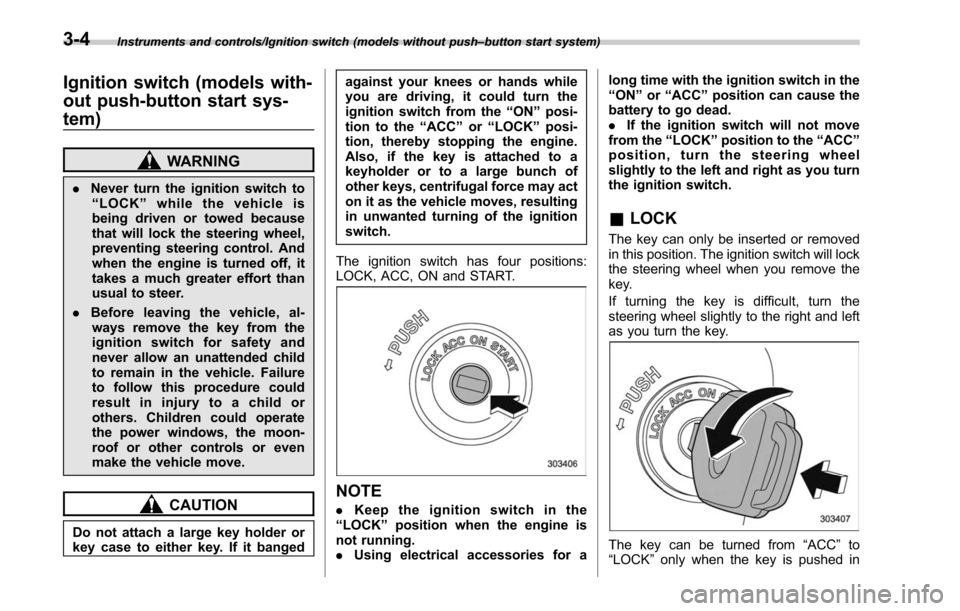
The ignition switch has four positions:
LOCK, ACC, ON and START.
NOTE
. Keep the ignition switch in the
“ LOCK ”position when the engine is
not running.
. Using electrical accessories for a long time with the ignition switch in the
“
ON ”or “ACC ”position can cause the
battery to go dead.
. If the ignition switch will not move
from the “LOCK ”position to the “ACC ”
position, turn the steering wheel
slightly to the left and right as you turn
the ignition switch.
& LOCK
The key can only be inserted or removed
in this position. The ignition switch will lock
the steering wheel when you remove the
key.
If turning the key is difficult, turn the
steering wheel slightly to the right and left
as you turn the key.
The key can be turned from “ACC”to
“LOCK ”only when the key is pushed in
3-4
Page 160 of 610
while turning it (all models) and the select
lever is in the“P ”position (CVT models).
& ACC
In this position the electrical accessories
(radio, accessory power outlet, etc.) can
be used.
&ON
This is the normal operating position after
the engine is started.
&START
CAUTION
Do not turn the ignition switch to the
“START ”position while the engine
is running.
The engine is started in this position. The
starter cranks the engine to start it. When
the key is released (after the engine has
started), the key automatically returns to
the “ON ”position.
If the engine does not start with your
registered key, pull out the key once (at
this time, the security indicator light will
blink), reinsert the key in the ignition
switch and then try to start the engine
again.
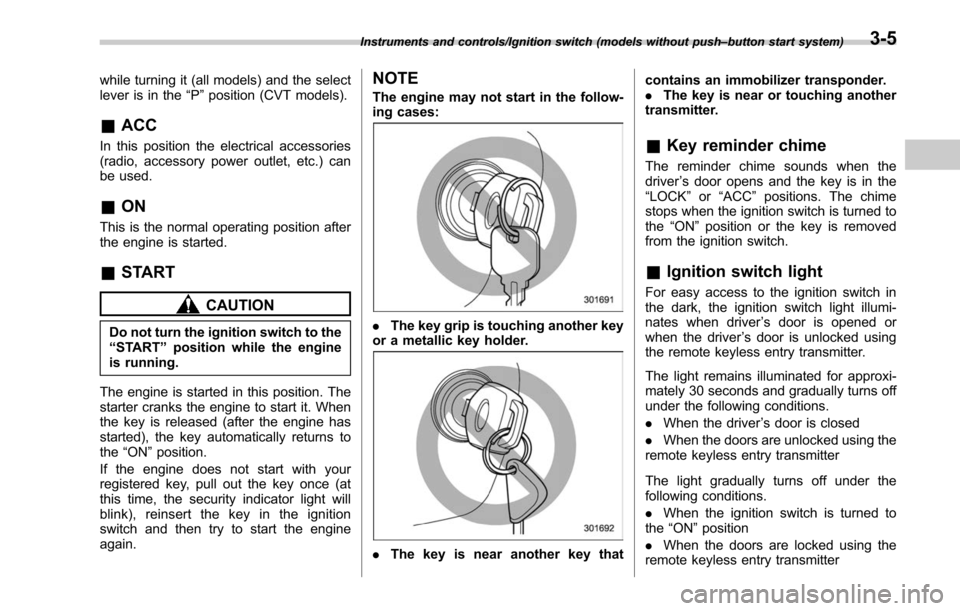
NOTE
The engine may not start in the follow-
ing cases:
. The key grip is touching another key
or a metallic key holder.
. The key is near another key that contains an immobilizer transponder.
.
The key is near or touching another
transmitter.
& Key reminder chime
The reminder chime sounds when the
driver ’s door opens and the key is in the
“LOCK ”or “ACC ”positions. The chime
stops when the ignition switch is turned to
the “ON”position or the key is removed
from the ignition switch.
& Ignition switch light
For easy access to the ignition switch in
the dark, the ignition switch light illumi-
nates when driver ’s door is opened or
when the driver ’s door is unlocked using
the remote keyless entry transmitter.
The light remains illuminated for approxi-
mately 30 seconds and gradually turns off
under the following conditions.
. When the driver ’s door is closed
. When the doors are unlocked using the
remote keyless entry transmitter
The light gradually turns off under the
following conditions.
. When the ignition switch is turned to
the “ON ”position
. When the doors are locked using the
remote keyless entry transmitter
Instruments and controls/Ignition switch (models without push –button start system)3-5
Page 161 of 610
Instruments and controls/Push–button ignition switch (models with push –button start system)
Push-button ignition switch
(models with push-button
start system)
& Safety precautions
Refer to “Safety precautions ”F 2-11.
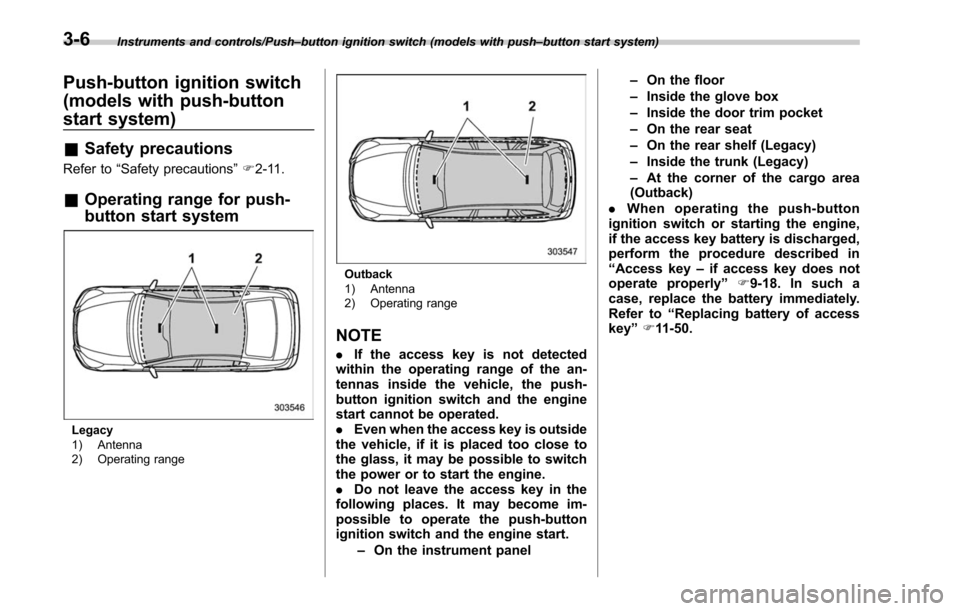
& Operating range for push-
button start system
Legacy
1) Antenna
2) Operating range
Outback
1) Antenna
2) Operating range
NOTE
. If the access key is not detected
within the operating range of the an-
tennas inside the vehicle, the push-
button ignition switch and the engine
start cannot be operated.
. Even when the access key is outside
the vehicle, if it is placed too close to
the glass, it may be possible to switch
the power or to start the engine.
. Do not leave the access key in the
following places. It may become im-
possible to operate the push-button
ignition switch and the engine start.
–On the instrument panel –
On the floor
– Inside the glove box
– Inside the door trim pocket
– On the rear seat
– On the rear shelf (Legacy)
– Inside the trunk (Legacy)
– At the corner of the cargo area
(Outback)
. When operating the push-button
ignition switch or starting the engine,
if the access key battery is discharged,
perform the procedure described in
“ Access key –if access key does not
operate properly ”F9-18. In such a
case, replace the battery immediately.
Refer to “Replacing battery of access
key ”F 11-50.
3-6
Page 162 of 610
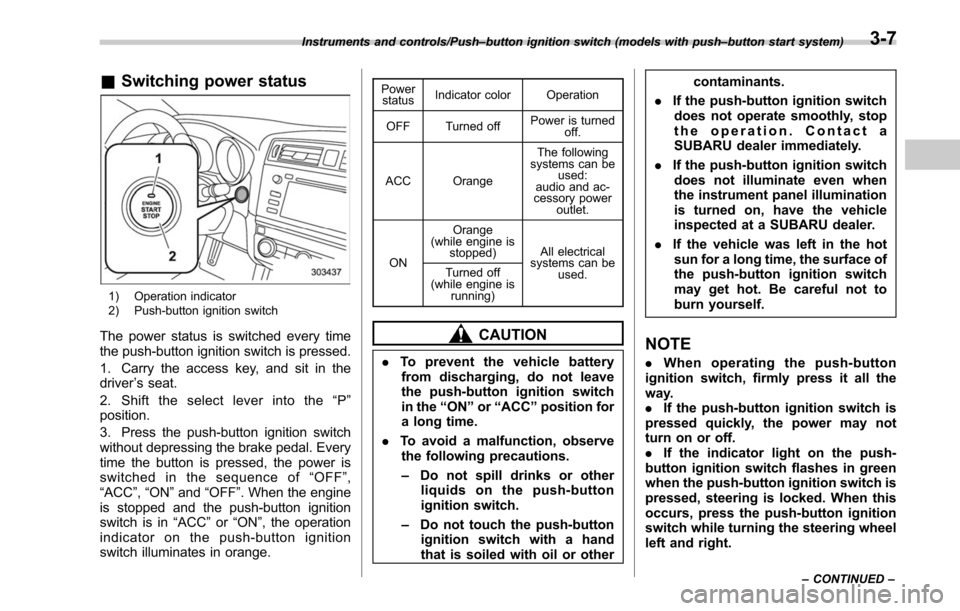
&Switching power status
1) Operation indicator
2) Push-button ignition switch
The power status is switched every time
the push-button ignition switch is pressed.
1. Carry the access key, and sit in the
driver ’s seat.
2. Shift the select lever into the “P ”
position.
3. Press the push-button ignition switch
without depressing the brake pedal. Every
time the button is pressed, the power is
switched in the sequence of “OFF ”,
“ACC ”,“ON ”and “OFF ”. When the engine
is stopped and the push-button ignition
switch is in “ACC”or “ON ”, the operation
indicator on the push-button ignition
switch illuminates in orange.
Power status Indicator color Operation
OFF Turned off Power is turned
off.
ACC Orange The following
systems can be used:
audio and ac-
cessory power
outlet.
ON Orange
(while engine is stopped) All electrical
systems can be
used.
Turned off
(while engine is
running)
CAUTION
.To prevent the vehicle battery
from discharging, do not leave
the push-button ignition switch
in the “ON ”or “ACC ”position for
a long time.
. To avoid a malfunction, observe
the following precautions.
– Do not spill drinks or other
liquids on the push-button
ignition switch.
– Do not touch the push-button
ignition switch with a hand
that is soiled with oil or other contaminants.
. If the push-button ignition switch
does not operate smoothly, stop
the operation. Contact a
SUBARU dealer immediately.
. If the push-button ignition switch
does not illuminate even when
the instrument panel illumination
is turned on, have the vehicle
inspected at a SUBARU dealer.
. If the vehicle was left in the hot
sun for a long time, the surface of
the push-button ignition switch
may get hot. Be careful not to
burn yourself.
NOTE
. When operating the push-button
ignition switch, firmly press it all the
way.
. If the push-button ignition switch is
pressed quickly, the power may not
turn on or off.
. If the indicator light on the push-
button ignition switch flashes in green
when the push-button ignition switch is
pressed, steering is locked. When this
occurs, press the push-button ignition
switch while turning the steering wheel
left and right.
Instruments and controls/Push –button ignition switch (models with push –button start system)
–CONTINUED –3-7
Page 163 of 610
Instruments and controls/Hazard warning flasher
!Battery drainage prevention func-
tion
When the push-button ignition switch is
left in the “ACC”or “ON ”position for
approximately 1 hour, the push-button
ignition switch will be automatically
switched to “OFF”to prevent the battery
from going dead. This function is activated
when the select lever is in the “P”position.
& When access key does not
operate properly
Refer to “Access key –if access key does
not operate properly ”F 9-18.
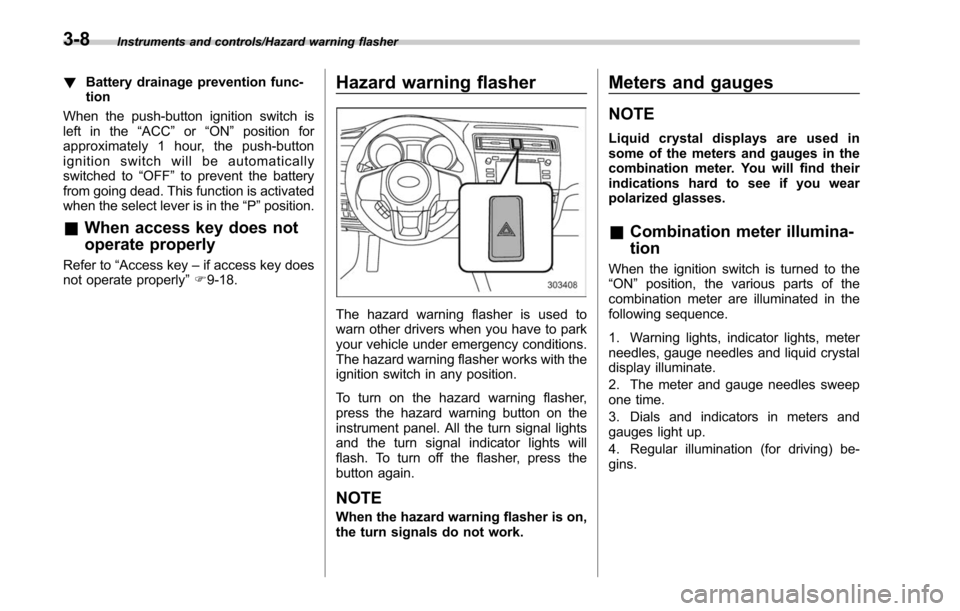
Hazard warning flasher
The hazard warning flasher is used to
warn other drivers when you have to park
your vehicle under emergency conditions.
The hazard warning flasher works with the
ignition switch in any position.
To turn on the hazard warning flasher,
press the hazard warning button on the
instrument panel. All the turn signal lights
and the turn signal indicator lights will
flash. To turn off the flasher, press the
button again.
NOTE
When the hazard warning flasher is on,
the turn signals do not work.
Meters and gauges
NOTE
Liquid crystal displays are used in
some of the meters and gauges in the
combination meter. You will find their
indications hard to see if you wear
polarized glasses.
& Combination meter illumina-
tion
When the ignition switch is turned to the
“ON ”position, the various parts of the
combination meter are illuminated in the
following sequence.
1. Warning lights, indicator lights, meter
needles, gauge needles and liquid crystal
display illuminate.
2. The meter and gauge needles sweep
one time.
3. Dials and indicators in meters and
gauges light up.
4. Regular illumination (for driving) be-
gins.
3-8
Page 178 of 610
damage to the engine.
&Door open indicator
When any of the doors, the rear gate
(Outback) or the trunk lid (Legacy) is not
fully closed, the door open indicator
appears. This function is effective even if
the ignition switch is in the“LOCK”/“OFF ”
or “ACC ”position (all models) or the key is
removed from the ignition switch (models
without “keyless access with push-button
start system ”).
The open door is indicated by the corre-
sponding part of the door open indicator.
Always make sure this indicator does not
appear before you start to drive.
&Windshield washer
fluid warning indicator
This indicator appears when the fluid level
in the windshield washer fluid tank de-
creases to the lower limit (approximately
0.6 US qt, 0.6 liter, 0.5 Imp qt).
&All-Wheel Drive warn-
ing light (CVT models)
WARNING
Continued driving with the AWD
warning light flashing can lead to
powertrain damage. If the AWD
warning light flashes, promptly park
in a safe location and then check
whether all four tires are the same
diameter and whether any of the
tires has a puncture or has lost air
pressure for some other reason.
NOTE
If the temporary spare tire is used, the
AWD warning light may flash. Use of
the temporary spare tire should there-
fore be restricted to the minimum time
necessary. Replace the temporary
spare tire with a conventional tire as
soon as possible.
This light flashes if the vehicle is driven
with tires of different diameters fitted on its
wheels or with the air pressure exces-
sively low in any of its tires.
&Power steering warn-
ing light
While the engine is running, this warning
light illuminates when a malfunction has
been detected in the electric power steer-
ing system.
CAUTION
When the power steering warning
light is illuminated, there may be
more resistance when the steering
wheel is operated. Drive carefully to
the nearest SUBARU dealer and
have the vehicle inspected immedi-
ately.
NOTE
If the steering wheel is operated in the
following ways, the power steering
control system may temporarily limit
the power assist in order to prevent the
system components, such as the con-
trol computer and drive motor, from
overheating.
. The steering wheel is operated fre-
quently and turned sharply while the
vehicle is maneuvered at extremely low
speeds, such as while frequently turn-
ing the steering wheel during parallel
parking.
Instruments and controls/Warning and indicator lights
–CONTINUED –3-23
Page 180 of 610
NOTE
.The light may remain illuminated for
a short period of time after the engine
has been started, especially in cold
weather. This does not indicate the
existence of a problem. The light
should turn off as soon as the engine
has warmed up.
. The indicator light illuminates when
the engine has developed a problem
and the CHECK ENGINE warning light/
malfunction indicator light is on.
The Vehicle Dynamics Control system is
probably malfunctioning under the follow-
ing condition. Have your vehicle checked
at a SUBARU dealer as soon as possible.
. The light does not turn off even after
the lapse of several minutes (the engine
has warmed up) after the engine has
started.
&Vehicle Dynamics
Control OFF indicator
light
The light illuminates when the Vehicle
Dynamics Control OFF switch is pressed
to deactivate the Vehicle Dynamics Con-
trol system.
The Vehicle Dynamics Control system is
probably malfunctioning under any of the
following conditions. Have your vehicle checked at a SUBARU dealer immedi-
ately.
.
The light does not illuminate when the
ignition switch is turned to the “ON ”
position.
. The light does not turn off even after a
period of approximately 2 seconds after
the ignition switch has been turned to the
“ON ”position.
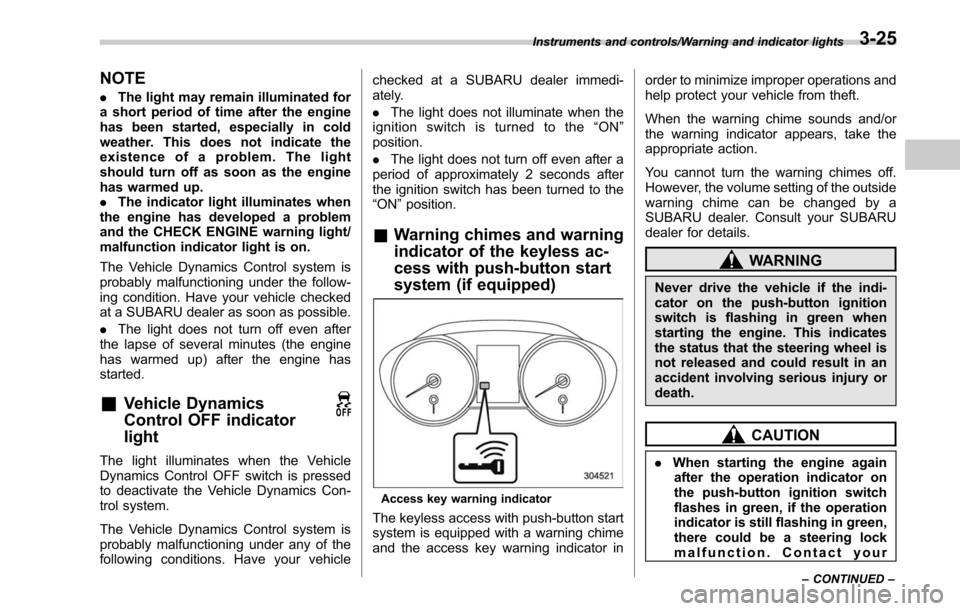
& Warning chimes and warning
indicator of the keyless ac-
cess with push-button start
system (if equipped)
Access key warning indicator
The keyless access with push-button start
system is equipped with a warning chime
and the access key warning indicator in order to minimize improper operations and
help protect your vehicle from theft.
When the warning chime sounds and/or
the warning indicator appears, take the
appropriate action.
You cannot turn the warning chimes off.
However, the volume setting of the outside
warning chime can be changed by a
SUBARU dealer. Consult your SUBARU
dealer for details.
WARNING
Never drive the vehicle if the indi-
cator on the push-button ignition
switch is flashing in green when
starting the engine. This indicates
the status that the steering wheel is
not released and could result in an
accident involving serious injury or
death.
CAUTION
.
When starting the engine again
after the operation indicator on
the push-button ignition switch
flashes in green, if the operation
indicator is still flashing in green,
there could be a steering lock
malfunction. Contact your
Instruments and controls/Warning and indicator lights
–CONTINUED –3-25
Page 181 of 610
Instruments and controls/Warning and indicator lights
SUBARU dealer as soon as pos-
sible.
. When the operation indicator on
the push-button ignition switch
flashes in orange, contact a
SUBARU dealer immediately.
NOTE
. Even when the access key is within
the operating ranges inside the vehicle,
the access key warning for engine start
may be provided depending on the
status of the access key and the
environmental conditions.
. When the access key is taken out of
the vehicle through an open window,
the access key takeout warning or
passenger access key takeout warning
will not be provided. !
List of warnings
CAUTION
When any of the following warnings
occurs even if the access key warn-
ing indicator does not appear, take
the appropriate action.
3-26
Page 182 of 610
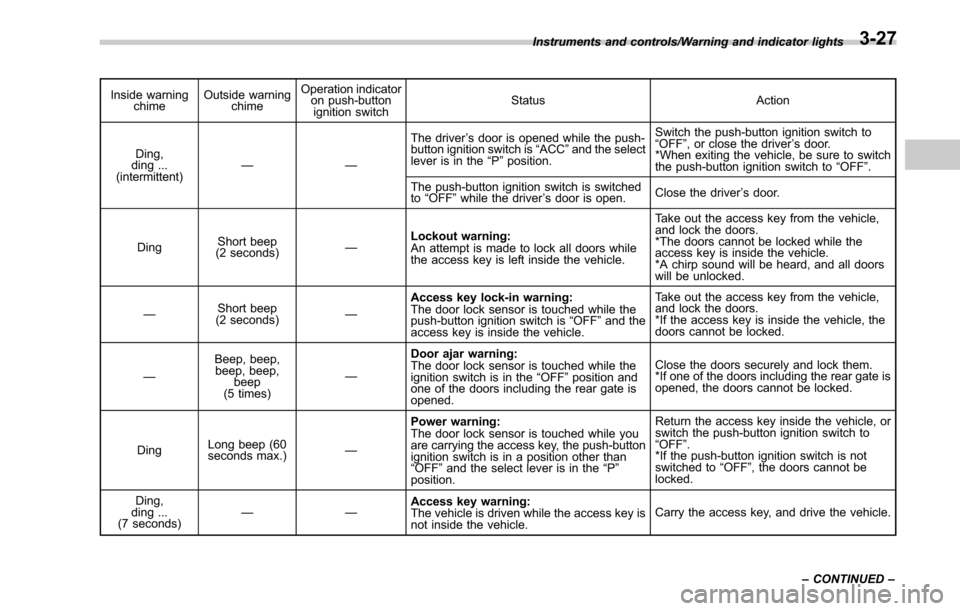
Inside warningchime Outside warning
chime Operation indicator
on push-button
ignition switch Status Action
Ding,
ding ...
(intermittent) —— The driver
’s door is opened while the push-
button ignition switch is “ACC ”and the select
lever is in the “P ”position. Switch the push-button ignition switch to
“
OFF” , or close the driver ’s door.
*When exiting the vehicle, be sure to switch
the push-button ignition switch to “OFF ”.
The push-button ignition switch is switched
to “OFF ”while the driver ’s door is open. Close the driver
’s door.
Ding Short beep
(2 seconds) —Lockout warning:
An attempt is made to lock all doors while
the access key is left inside the vehicle. Take out the access key from the vehicle,
and lock the doors.
*The doors cannot be locked while the
access key is inside the vehicle.
*A chirp sound will be heard, and all doors
will be unlocked.
— Short beep
(2 seconds) —Access key lock-in warning:
The door lock sensor is touched while the
push-button ignition switch is
“OFF ”and the
access key is inside the vehicle. Take out the access key from the vehicle,
and lock the doors.
*If the access key is inside the vehicle, the
doors cannot be locked.
— Beep, beep,
beep, beep,
beep
(5 times) —Door ajar warning:
The door lock sensor is touched while the
ignition switch is in the
“OFF ”position and
one of the doors including the rear gate is
opened. Close the doors securely and lock them.
*If one of the doors including the rear gate is
opened, the doors cannot be locked.
Ding Long beep (60
seconds max.)
—Power warning:
The door lock sensor is touched while you
are
carrying the access key, the push-button
ignition switch is in a position other than
“ OFF ”and the select lever is in the “P ”
position. Return the access key inside the vehicle, or
switch the push-button ignition switch to
“
OFF” .
*If the push-button ignition switch is not
switched to “OFF ”, the doors cannot be
locked.
Ding,
ding ...
(7 seconds) ——
Access key warning:
The vehicle is driven while the access key is
not inside the vehicle. Carry the access key, and drive the vehicle.
Instruments and controls/Warning and indicator lights
–CONTINUED –
3-27
Page 183 of 610
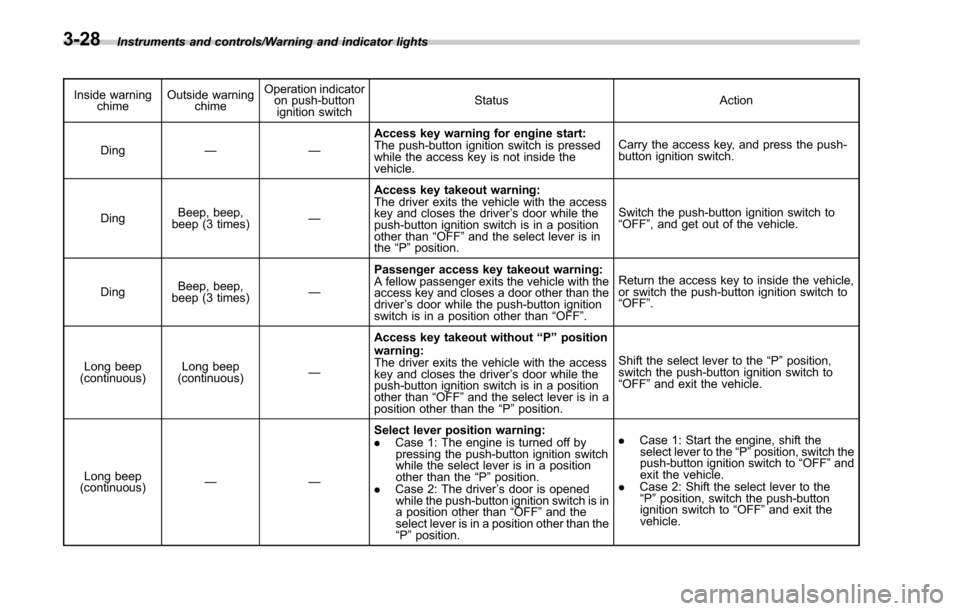
Instruments and controls/Warning and indicator lights
Inside warningchime Outside warning
chime Operation indicator
on push-button
ignition switch Status Action
Ding —— Access key warning for engine start:
The push-button ignition switch is pressed
while the access key is not inside the
vehicle. Carry the access key, and press the push-
button ignition switch.
Ding Beep, beep,
beep (3 times) —Access key takeout warning:
The driver exits the vehicle with the access
key and closes the driver
’s door while the
push-button ignition switch is in a position
other than “OFF ”and the select lever is in
the “P ”position. Switch the push-button ignition switch to
“
OFF” , and get out of the vehicle.
Ding Beep, beep,
beep (3 times) —Passenger access key takeout warning:
A fellow passenger exits the vehicle with the
access key and closes a door other than the
driver
’s door while the push-button ignition
switch is in a position other than “OFF ”. Return the access key to inside the vehicle,
or switch the push-button ignition switch to
“
OFF” .
Long beep
(continuous) Long beep
(continuous) —Access key takeout without
“P ” position
warning:
The driver exits the vehicle with the access
key and closes the driver ’s door while the
push-button ignition switch is in a position
other than “OFF ”and the select lever is in a
position other than the “P ”position. Shift the select lever to the
“P ”position,
switch the push-button ignition switch to
“ OFF” and exit the vehicle.
Long beep
(continuous) —— Select lever position warning:
.
Case
1: The engine is turned off by
pressing the push-button ignition switch
while the select lever is in a position
other than the “P ”position.
. Case 2: The driver ’s door is opened
while the push-button ignition switch is in
a position other than “OFF ”and the
select lever is in a position other than the
“ P ”position. .
Case 1: Start the engine, shift the
select lever to the “P ”position, switch the
push-button ignition switch to “OFF ”and
exit the vehicle.
. Case 2: Shift the select lever to the
“ P ”position, switch the push-button
ignition switch to “OFF ”and exit the
vehicle.
3-28