display SUBARU OUTBACK 2017 6.G Manual PDF
[x] Cancel search | Manufacturer: SUBARU, Model Year: 2017, Model line: OUTBACK, Model: SUBARU OUTBACK 2017 6.GPages: 610, PDF Size: 10.28 MB
Page 305 of 610
Audio/Audio set
!Loading a disc
CAUTION
Never try to disassemble the audio
kit or lubricate any part of the CD
player. Do not insert anything other
than a disc into the slot.
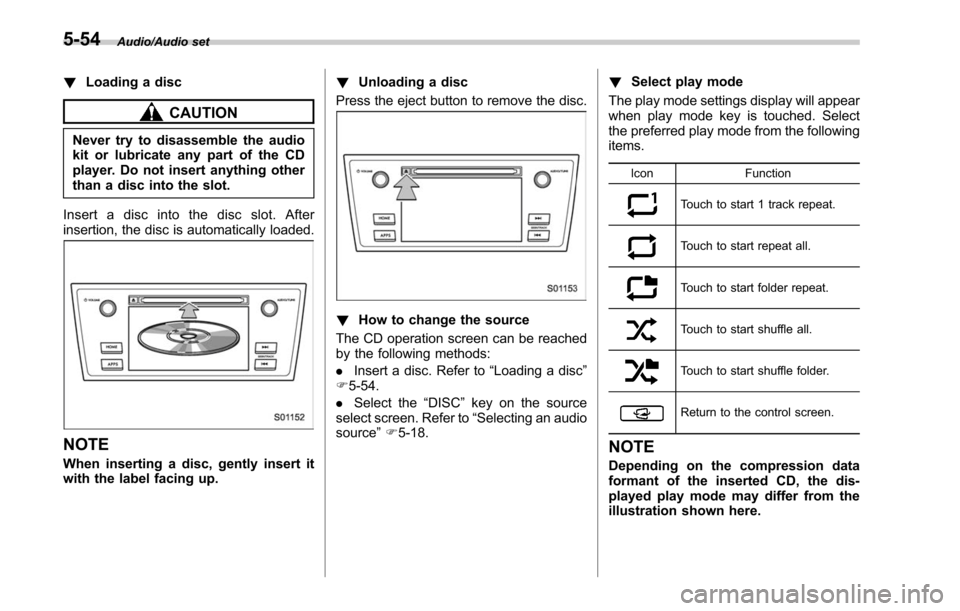
Insert a disc into the disc slot. After
insertion, the disc is automatically loaded.
NOTE
When inserting a disc, gently insert it
with the label facing up. !
Unloading a disc
Press the eject button to remove the disc.
! How to change the source
The CD operation screen can be reached
by the following methods:
. Insert a disc. Refer to “Loading a disc”
F 5-54.
. Select the “DISC ”key on the source
select screen. Refer to “Selecting an audio
source” F5-18. !
Select play mode
The play mode settings display will appear
when play mode key is touched. Select
the preferred play mode from the following
items.
Icon Function
Touch to start 1 track repeat.
Touch to start repeat all.
Touch to start folder repeat.
Touch to start shuffle all.
Touch to start shuffle folder.
Return to the control screen.
NOTE
Depending on the compression data
formant of the inserted CD, the dis-
played play mode may differ from the
illustration shown here.
5-54
Page 306 of 610
&USB memory
Audio files on the USB memory can be
played.
WARNING
Do not operate the player ’s controls
or connect the USB memory while
driving. Doing so may result in
losing control of your vehicle and
cause an accident or serious injury.
CAUTION
. Do not leave your USB memory
in the car. In particular, high
temperatures inside the vehicle
may damage the USB memory.
. Do not push down on or apply
unnecessary pressure to the
USB memory while it is con-
nected as this may damage the
portable player or its terminal.
. Do not insert foreign objects into
the port as this may damage the
USB memory or its terminal. !
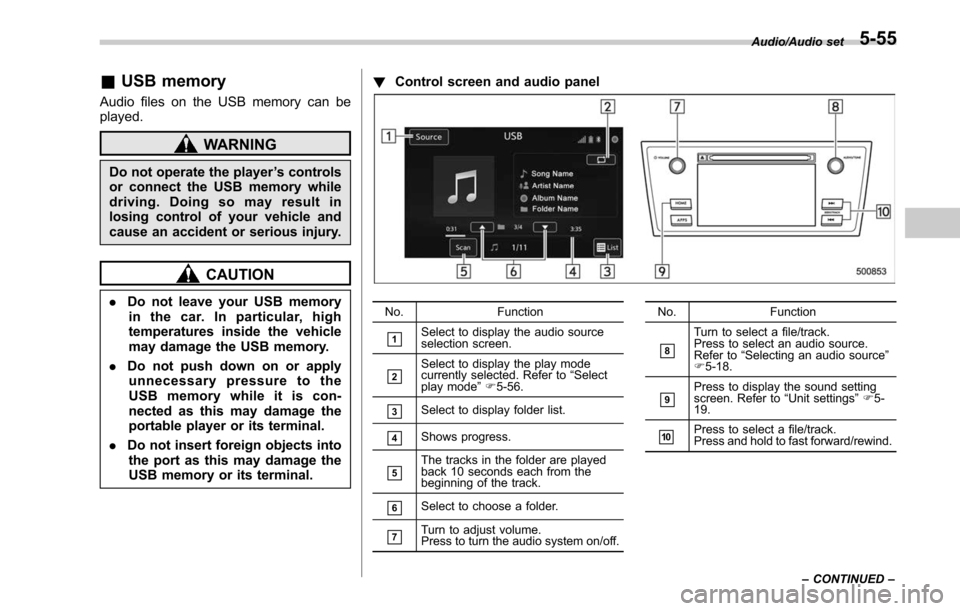
Control screen and audio panelNo. Function
&1Select to display the audio source
selection screen.
&2Select to display the play mode
currently selected. Refer to “Select
play mode ”F 5-56.
&3Select to display folder list.
&4Shows progress.
&5The tracks in the folder are played
back 10 seconds each from the
beginning of the track.
&6Select to choose a folder.
&7Turn to adjust volume.
Press to turn the audio system on/off. No.
Function
&8
Turn to select a file/track.
Press to select an audio source.
Refer to“Selecting an audio source ”
F 5-18.
&9Press to display the sound setting
screen. Refer to “Unit settings ”F 5-
19.
&10Press to select a file/track.
Press and hold to fast forward/rewind. Audio/Audio set
–CONTINUED –
5-55
Page 307 of 610
Audio/Audio set
!Connecting a USB device
You can connect a USB device to the
vehicle USB port. Refer to “Connecting
and disconnecting a USB memory/porta-
ble device ”F 5-17.
! How to change the source
The USB Audio playback screen can be
reached by the following methods:
. Connect a USB memory. Refer to
“ Connecting and disconnecting a USB
memory/portable device ”F 5-17.
. Select the “USB/iPod ”key on the
source select screen. Refer to “Selecting
an audio source” F5-18. !
Select play mode
The play mode settings display will appear
when play mode key is touched. Select
the preferred play mode from the following
items.
Icon Function
Touch to start 1 track repeat.
Touch to start repeat all.
Touch to start folder repeat.
Touch to start shuffle all.
Touch to start shuffle folder.
Return to the control screen.
&iPod
Audio files on the iPod can be played.
WARNING
Do not operate the player ’s controls
or connect the iPod while driving.
Doing so may result in loss of
control of your vehicle and cause
an accident or serious injury.
CAUTION
. Do not leave your portable player
in the car. In particular, high
temperatures inside the vehicle
may damage the portable player.
. Do not push down on or apply
unnecessary pressure to the por-
table player while it is connected
as this may damage the portable
player or its terminal.
. Do not insert foreign objects into
the port as this may damage the
portable player or its terminal.
5-56
Page 308 of 610
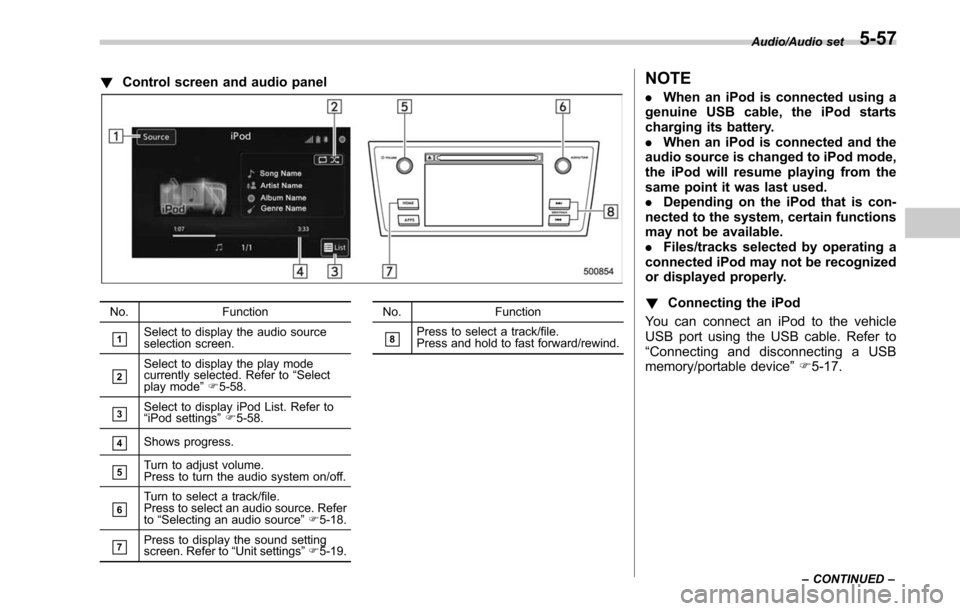
!Control screen and audio panel
No. Function
&1Select to display the audio source
selection screen.
&2Select to display the play mode
currently selected. Refer to “Select
play mode ”F 5-58.
&3Select to display iPod List. Refer to
“iPod settings ”F 5-58.
&4Shows progress.
&5Turn to adjust volume.
Press to turn the audio system on/off.
&6Turn to select a track/file.
Press to select an audio source. Refer
to “Selecting an audio source ”F 5-18.
&7Press to display the sound setting
screen. Refer to “Unit settings ”F 5-19. No. Function
&8Press to select a track/file.
Press and hold to fast forward/rewind.
NOTE
.
When an iPod is connected using a
genuine USB cable, the iPod starts
charging its battery.
. When an iPod is connected and the
audio source is changed to iPod mode,
the iPod will resume playing from the
same point it was last used.
. Depending on the iPod that is con-
nected to the system, certain functions
may not be available.
. Files/tracks selected by operating a
connected iPod may not be recognized
or displayed properly.
! Connecting the iPod
You can connect an iPod to the vehicle
USB port using the USB cable. Refer to
“ Connecting and disconnecting a USB
memory/portable device ”F 5-17.
Audio/Audio set
–CONTINUED –5-57
Page 309 of 610
Audio/Audio set
!How to change the source
TheiPodoperationscreencanbe
reached by the following methods:
. Connect an iPod. Refer to “Connecting
and disconnecting a USB memory/porta-
ble device ”F 5-17.
. Select the “USB/iPod ”key on the
source select screen. Refer to “Selecting
an audio source” F5-18.
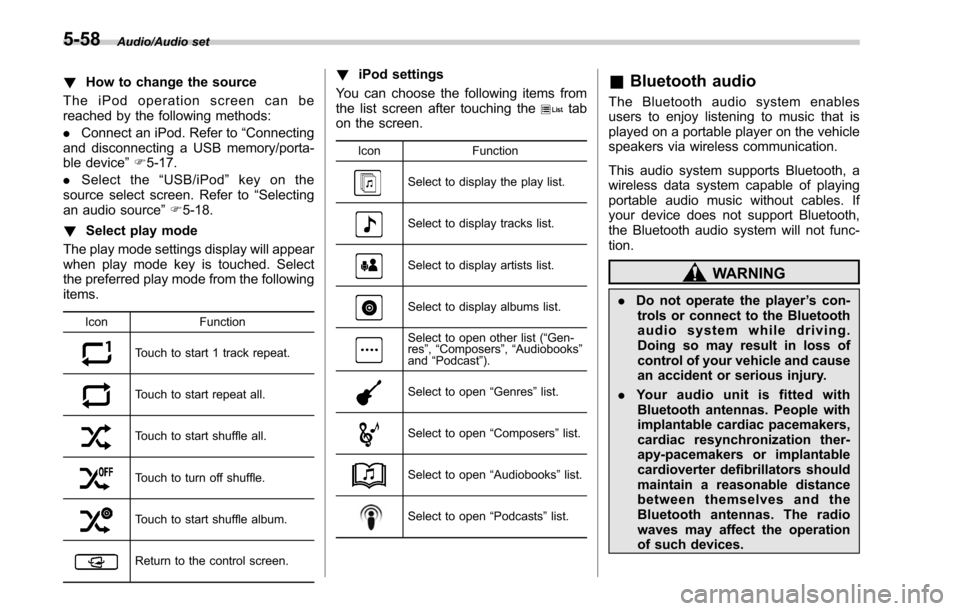
! Select play mode
The play mode settings display will appear
when play mode key is touched. Select
the preferred play mode from the following
items.
Icon Function
Touch to start 1 track repeat.
Touch to start repeat all.
Touch to start shuffle all.
Touch to turn off shuffle.
Touch to start shuffle album.
Return to the control screen.
!iPod settings
You can choose the following items from
the list screen after touching the
tab
on the screen.
Icon Function
Select to display the play list.
Select to display tracks list.
Select to display artists list.
Select to display albums list.
Select to open other list ( “Gen-
res ”, “Composers ”, “Audiobooks ”
and “Podcast ”).
Select to open “Genres ”list.
Select to open “Composers ”list.
Select to open “Audiobooks ”list.
Select to open “Podcasts ”list.
& Bluetooth audio
The Bluetooth audio system enables
users to enjoy listening to music that is
played on a portable player on the vehicle
speakers via wireless communication.
This audio system supports Bluetooth, a
wireless data system capable of playing
portable audio music without cables. If
your device does not support Bluetooth,
the Bluetooth audio system will not func-
tion.
WARNING
. Do not operate the player ’s con-
trols or connect to the Bluetooth
audio system while driving.
Doing so may result in loss of
control of your vehicle and cause
an accident or serious injury.
. Your audio unit is fitted with
Bluetooth antennas. People with
implantable cardiac pacemakers,
cardiac resynchronization ther-
apy-pacemakers or implantable
cardioverter defibrillators should
maintain a reasonable distance
between themselves and the
Bluetooth antennas. The radio
waves may affect the operation
of such devices.
5-58
Page 310 of 610
.Before using Bluetooth devices,
users of any electrical medical
device other than implantable
cardiac pacemakers, cardiac re-
synchronization thera py-pace-
makers or implantable cardiover-
ter defibrillators should consult
the manufacturer of the device
for information about its opera-
tion under the influence of radio
waves. Radio waves could have
unexpected effects on the opera-
tion of such medical devices.
CAUTION
Do not leave your portable player in
the vehicle. In particular, high tem-
peratures inside the vehicle may
damage the portable player. !
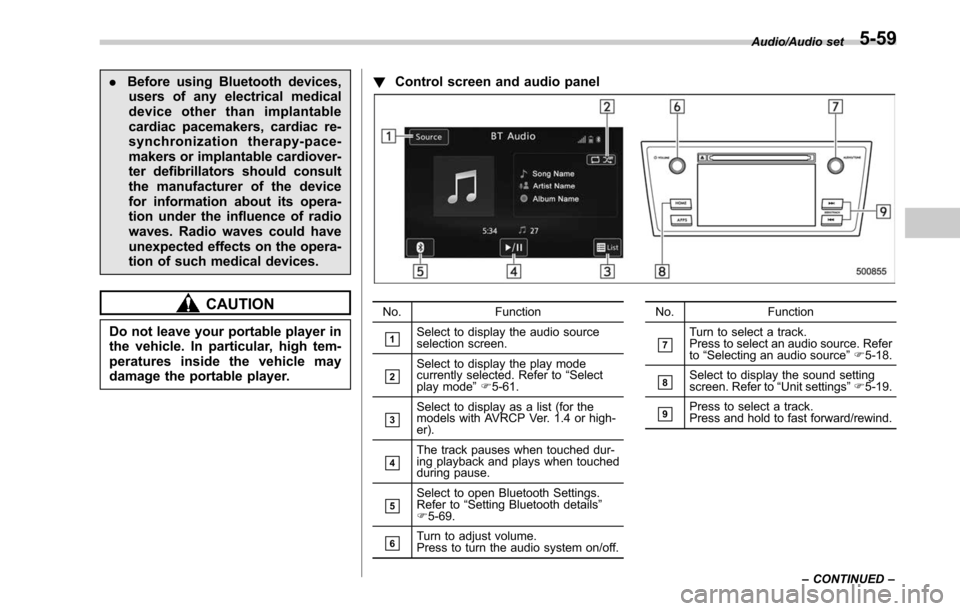
Control screen and audio panel
No. Function
&1Select to display the audio source
selection screen.
&2Select to display the play mode
currently selected. Refer to “Select
play mode ”F 5-61.
&3Select to display as a list (for the
models with AVRCP Ver. 1.4 or high-
er).
&4The track pauses when touched dur-
ing playback and plays when touched
during pause.
&5Select to open Bluetooth Settings.
Refer to “Setting Bluetooth details ”
F 5-69.
&6Turn to adjust volume.
Press to turn the audio system on/off. No. Function
&7Turn to select a track.
Press to select an audio source. Refer
to
“Selecting an audio source ”F 5-18.
&8Select to display the sound setting
screen. Refer to “Unit settings ”F 5-19.
&9Press to select a track.
Press and hold to fast forward/rewind. Audio/Audio set
–CONTINUED –
5-59
Page 312 of 610
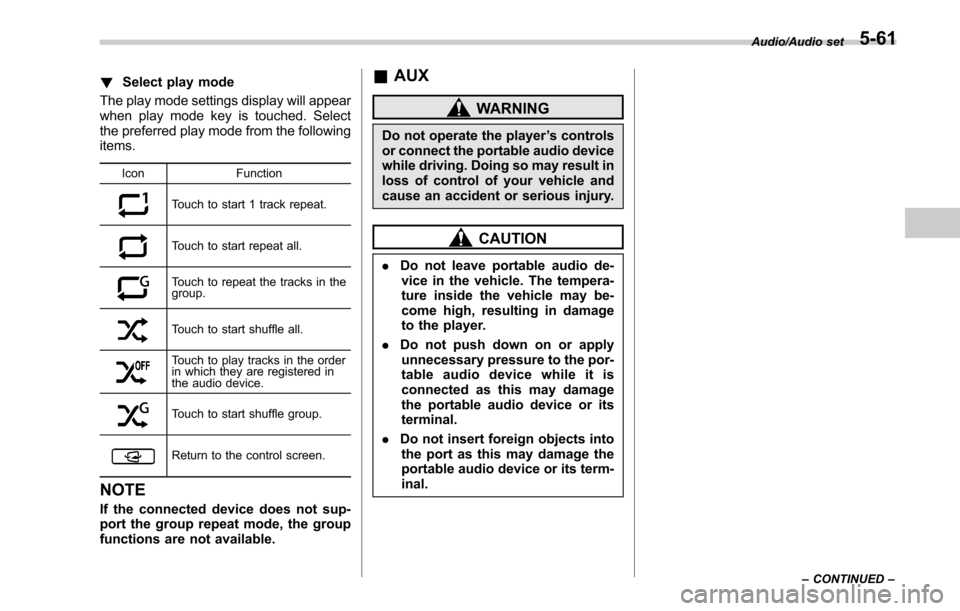
!Select play mode
The play mode settings display will appear
when play mode key is touched. Select
the preferred play mode from the following
items.
Icon Function
Touch to start 1 track repeat.
Touch to start repeat all.
Touch to repeat the tracks in the
group.
Touch to start shuffle all.
Touch to play tracks in the order
in which they are registered in
the audio device.
Touch to start shuffle group.
Return to the control screen.
NOTE
If the connected device does not sup-
port the group repeat mode, the group
functions are not available.
&AUX
WARNING
Do not operate the player ’s controls
or connect the portable audio device
while driving. Doing so may result in
loss of control of your vehicle and
cause an accident or serious injury.
CAUTION
. Do not leave portable audio de-
vice in the vehicle. The tempera-
ture inside the vehicle may be-
come high, resulting in damage
to the player.
. Do not push down on or apply
unnecessary pressure to the por-
table audio device while it is
connected as this may damage
the portable audio device or its
terminal.
. Do not insert foreign objects into
the port as this may damage the
portable audio device or its term-
inal.
Audio/Audio set
–CONTINUED –5-61
Page 313 of 610
Audio/Audio set
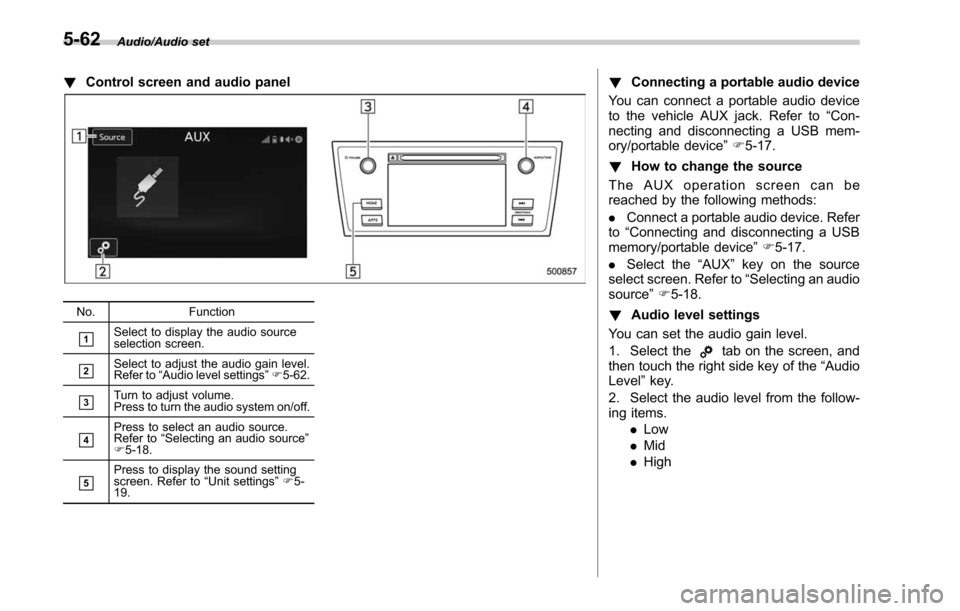
!Control screen and audio panel
No. Function
&1Select to display the audio source
selection screen.
&2Select to adjust the audio gain level.
Refer to“Audio level settings ”F 5-62.
&3Turn to adjust volume.
Press to turn the audio system on/off.
&4Press to select an audio source.
Refer to “Selecting an audio source ”
F 5-18.
&5Press to display the sound setting
screen. Refer to “Unit settings ”F 5-
19.
! Connecting a portable audio device
You can connect a portable audio device
to the vehicle AUX jack. Refer to “Con-
necting and disconnecting a USB mem-
ory/portable device ”F 5-17.
! How to change the source
The AUX operation screen can be
reached by the following methods:
. Connect a portable audio device. Refer
to “Connecting and disconnecting a USB
memory/portable device ”F 5-17.
. Select the “AUX”key on the source
select screen. Refer to “Selecting an audio
source” F5-18.
! Audio level settings
You can set the audio gain level.
1. Select the
tab on the screen, and
then touch the right side key of the “Audio
Level ”key.
2. Select the audio level from the follow-
ing items. .Low
. Mid
. High
5-62
Page 318 of 610
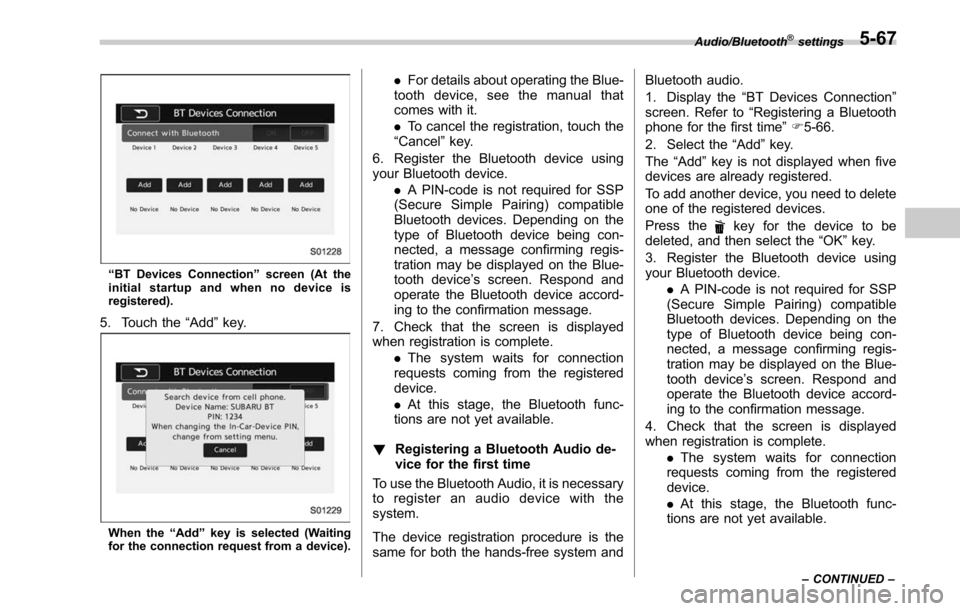
“BT Devices Connection ”screen (At the
initial startup and when no device is
registered).
5. Touch the “Add”key.
When the “Add ”key is selected (Waiting
for the connection request from a device).
. For details about operating the Blue-
tooth device, see the manual that
comes with it.
. To cancel the registration, touch the
“Cancel” key.
6. Register the Bluetooth device using
your Bluetooth device. .A PIN-code is not required for SSP
(Secure Simple Pairing) compatible
Bluetooth devices. Depending on the
type of Bluetooth device being con-
nected, a message confirming regis-
tration may be displayed on the Blue-
tooth device ’s screen. Respond and
operate the Bluetooth device accord-
ing to the confirmation message.
7. Check that the screen is displayed
when registration is complete. .The system waits for connection
requests coming from the registered
device.
. At this stage, the Bluetooth func-
tions are not yet available.
! Registering a Bluetooth Audio de-
vice for the first time
To use the Bluetooth Audio, it is necessary
to register an audio device with the
system.
The device registration procedure is the
same for both the hands-free system and Bluetooth audio.
1. Display the
“BT Devices Connection ”
screen. Refer to “Registering a Bluetooth
phone for the first time ”F 5-66.
2. Select the “Add”key.
The “Add” key is not displayed when five
devices are already registered.
To add another device, you need to delete
one of the registered devices.
Press the
key for the device to be
deleted, and then select the “OK”key.
3. Register the Bluetooth device using
your Bluetooth device. .A PIN-code is not required for SSP
(Secure Simple Pairing) compatible
Bluetooth devices. Depending on the
type of Bluetooth device being con-
nected, a message confirming regis-
tration may be displayed on the Blue-
tooth device ’s screen. Respond and
operate the Bluetooth device accord-
ing to the confirmation message.
4. Check that the screen is displayed
when registration is complete. .The system waits for connection
requests coming from the registered
device.
. At this stage, the Bluetooth func-
tions are not yet available.
Audio/Bluetooth®settings
– CONTINUED –5-67
Page 320 of 610
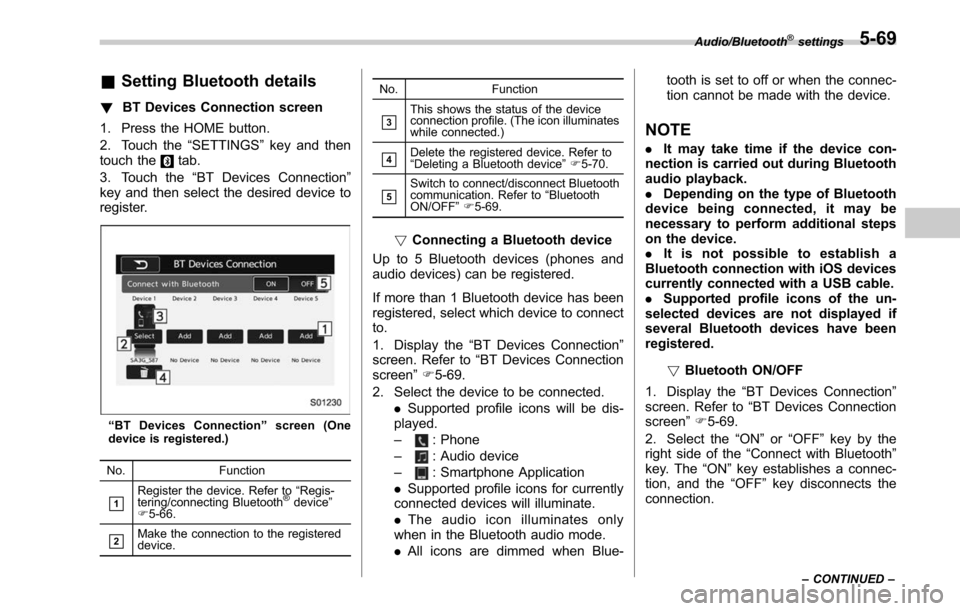
&Setting Bluetooth details
! BT Devices Connection screen
1. Press the HOME button.
2. Touch the “SETTINGS”key and then
touch the
tab.
3. Touch the “BT Devices Connection ”
key and then select the desired device to
register.
“ BT Devices Connection ”screen (One
device is registered.)
No. Function
&1Register the device. Refer to “Regis-
tering/connecting Bluetooth®device ”
F 5-66.
&2Make the connection to the registered
device. No. Function
&3This shows the status of the device
connection profile. (The icon illuminates
while connected.)
&4Delete the registered device. Refer to
“
Deleting a Bluetooth device ”F 5-70.
&5Switch to connect/disconnect Bluetooth
communication. Refer to “Bluetooth
ON/OFF ”F 5-69.
! Connecting a Bluetooth device
Up to 5 Bluetooth devices (phones and
audio devices) can be registered.
If more than 1 Bluetooth device has been
registered, select which device to connect
to.
1. Display the “BT Devices Connection ”
screen. Refer to “BT Devices Connection
screen” F5-69.
2. Select the device to be connected. .Supported profile icons will be dis-
played.
–
: Phone
–
: Audio device
–
: Smartphone Application
. Supported profile icons for currently
connected devices will illuminate.
. The audio icon illuminates only
when in the Bluetooth audio mode.
. All icons are dimmed when Blue- tooth is set to off or when the connec-
tion cannot be made with the device.
NOTE
.
It may take time if the device con-
nection is carried out during Bluetooth
audio playback.
. Depending on the type of Bluetooth
device being connected, it may be
necessary to perform additional steps
on the device.
. It is not possible to establish a
Bluetooth connection with iOS devices
currently connected with a USB cable.
. Supported profile icons of the un-
selected devices are not displayed if
several Bluetooth devices have been
registered.
!Bluetooth ON/OFF
1. Display the “BT Devices Connection ”
screen. Refer to “BT Devices Connection
screen” F5-69.
2. Select the “ON”or “OFF ”key by the
right side of the “Connect with Bluetooth ”
key. The “ON”key establishes a connec-
tion, and the “OFF”key disconnects the
connection.
Audio/Bluetooth®settings
– CONTINUED –5-69