HAzard warning SUBARU OUTBACK 2017 6.G Owners Manual
[x] Cancel search | Manufacturer: SUBARU, Model Year: 2017, Model line: OUTBACK, Model: SUBARU OUTBACK 2017 6.GPages: 610, PDF Size: 10.28 MB
Page 7 of 610
Chapter 4: Climate control
This chapter informs you how to operate
the climate control.
Chapter 5: Audio
This chapter informs you how to operate
your audio system.
Chapter 6: Interior equipment
This chapter informs you how to operate
interior equipment.
Chapter 7: Starting and operating
This chapter informs you how to start and
operate your SUBARU.
Chapter 8: Driving tips
This chapter informs you how to drive your
SUBARU in various conditions and ex-
plains some safety tips on driving.
Chapter 9: In case of emergency
This chapter informs you what to do if you
have a problem, such as a flat tire or
engine overheating.
Chapter 10: Appearance care
This chapter informs you how to keep your
SUBARU looking good.
Chapter 11: Maintenance and service
This chapter informs you when you need
to take your SUBARU to the dealer for
scheduled maintenance and informs you
how to keep your SUBARU running
properly.Chapter 12: Specifications
This chapter informs you about the dimen-
sions and capacities of your SUBARU.
Chapter 13: Consumer information and
Reporting safety defects
This chapter informs you about Tire
information, Uniform tire quality grading
standards and Reporting safety defects.
Chapter 14: Index
This is an alphabetical listing of all that’
sin
this manual. You can use it to quickly find
something you want to read.
For models with EyeSight system:
For details about the EyeSight system,
refer to the Owner ’s Manual supplement
for the EyeSight system.
& Safety warnings
You will find a number of WARNINGs,
CAUTIONs and NOTEs in this manual.
These safety warnings alert you to poten-
tial hazards that could result in injury to
you or others.
Please read these safety warnings as well
as all other portions of this manual care-
fully in order to gain a better understand-
ing of how to use your SUBARU vehicle
safely.
WARNING
A WARNING indicates a situation in
which serious injury or death could
result if the warning is ignored.
CAUTION
A CAUTION indicates a situation in
which injury or damage to your
vehicle, or both, could result if the
caution is ignored.
NOTE
A NOTE gives information or sugges-
tions how to make better use of your
vehicle.
2
Page 13 of 610
in the front passenger’s seat. For further
information, consult you r veterinarian,
local animal protection society or pet
shop.
& Tire pressures
WARNING
Driving at high speeds with exces-
sively low tire pressures can cause
the tires to deform severely and to
rapidly become hot. A sharp in-
crease in temperature could cause
tread separation, and destruction of
the tires. The resulting loss of
vehicle control could lead to an
accident.
Check and, if necessary, adjust the
pressure of each tire (including the spare)
at least once a month and before any long
journey.
Check the tire pressure when the tires are
cold. Use a pressure gauge to adjust the
tire pressures to the values shown on the
tire placard. For detailed information, refer
to “Tires and wheels” F11-25.
& Attaching accessories
WARNING
. Do not attach any accessories,
labels or stickers (other than
properly placed inspection stick-
ers) to the windshield. Such
items may obstruct your view.
. If it is necessary to attach an
accessory (such as an electronic
toll collection (ETC) device or
security pass) to the windshield,
consult your SUBARU dealer for
details on the proper location.
General information
& California proposition 65
warning
WARNING
Engine exhaust, some of its consti-
tuents, and certain vehicle compo-
nents contain or emit chemicals
known to the State of California to
cause cancer and birth defects or
other reproductive harm. In addi-
tion, certain fluids in vehicles and
certain components of product wear
contain or emit chemicals known to
the State of California to cause
cancer and birth defects or other
reproductive harm.
&California Perchlorate Advi-
sory
Certain vehicle components such as air-
bag modules, seatbelt pretensioners and
keyless entry transmitter batteries may
contain perchlorate material. Special
handling may apply for service or vehicle
end of life disposal. See www.dtsc.ca.gov/
hazardouswaste/perchlorate.
8
Page 23 of 610
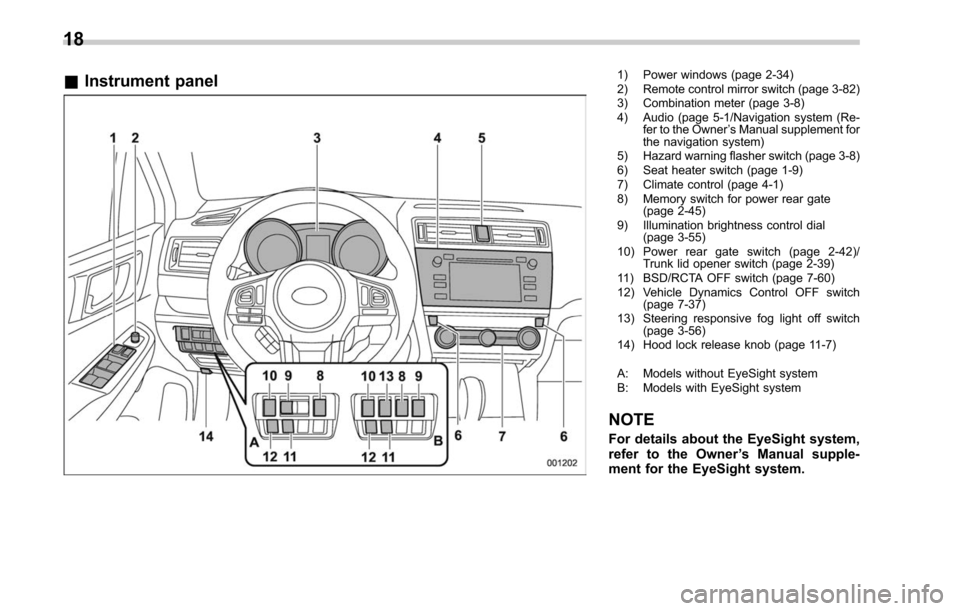
&Instrument panel1) Power windows (page 2-34)
2) Remote control mirror switch (page 3-82)
3) Combination meter (page 3-8)
4) Audio (page 5-1/Navigation system (Re-
fer to the Owner ’s Manual supplement for
the navigation system)
5) Hazard warning flasher switch (page 3-8)
6) Seat heater switch (page 1-9)
7) Climate control (page 4-1)
8) Memory switch for power rear gate (page 2-45)
9) Illumination brightness control dial (page 3-55)
10) Power rear gate switch (page 2-42)/ Trunk lid opener switch (page 2-39)
11) BSD/RCTA OFF switch (page 7-60)
12) Vehicle Dynamics Control OFF switch (page 7-37)
13) Steering responsive fog light off switch (page 3-56)
14) Hood lock release knob (page 11-7)
A: Models without EyeSight system
B: Models with EyeSight system
NOTE
For details about the EyeSight system,
refer to the Owner ’s Manual supple-
ment for the EyeSight system.
18
Page 32 of 610
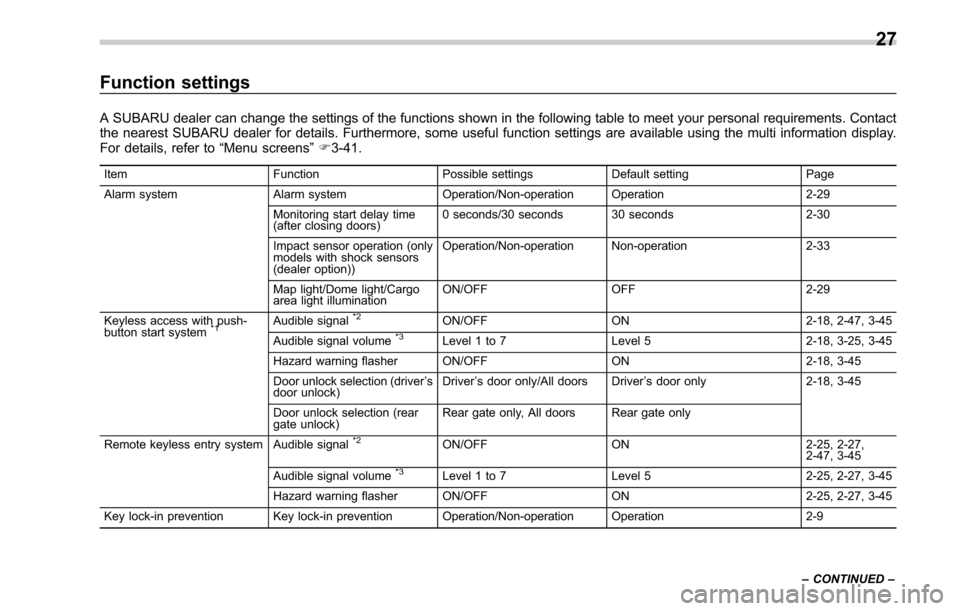
Function settings
A SUBARU dealer can change the settings of the functions shown in the following table to meet your personal requirements. Contact
the nearest SUBARU dealer for details. Furthermore, some useful function settings are available using the multi information display.
For details, refer to“Menu screens”F3-41.
Item FunctionPossible settingsDefault setting Page
Alarm system Alarm systemOperation/Non-operation Operation 2-29
Monitoring start delay time
(after closing doors) 0 seconds/30 seconds 30 seconds
2-30
Impact sensor operation (only
models with shock sensors
(dealer option)) Operation/Non-operation Non-operation
2-33
Map light/Dome light/Cargo
area light illumination ON/OFF
OFF 2-29
Keyless access with push-
button start system
*1Audible signal*2ON/OFF ON 2-18, 2-47, 3-45
Audible signal volume*3Level 1 to 7 Level 5 2-18, 3-25, 3-45
Hazard warning flasher ON/OFF ON2-18, 3-45
Door unlock selection (driver ’s
door unlock) Driver
’s door only/All doors Driver ’s door only 2-18, 3-45
Door unlock selection (rear
gate unlock) Rear gate only, All doors Rear gate only
Remote keyless entry system Audible signal
*2ON/OFF ON 2-25, 2-27,
2-47, 3-45
Audible signal volume
*3Level 1 to 7 Level 5 2-25, 2-27, 3-45
Hazard warning flasher ON/OFF ON2-25, 2-27, 3-45
Key lock-in prevention Key lock-in prevention Operation/Non-operation Operation 2-9
– CONTINUED –
27
Page 61 of 610
Seat, seatbelt and SRS airbags/Child restraint systems
WARNING
Never let a passenger hold a child
on his or her lap while the vehicle is
moving. The passenger cannot pro-
tect the child from injury in a colli-
sion, because the child will be
caught between the passenger and
objects inside the vehicle. Addition-
ally, holding a child in your lap or
arms in the front seat exposes that
child to another serious danger.
Since the SRS airbag deploys with
considerable speed and force, the
child could be injured or even killed.
WARNING
Children should be properly re-
strained at all times. Never allow a
child to stand up, or to kneel on any
seat. Unrestrained children will be
thrown forward during sudden stop
or in an accident and can be injured
seriously.
Additionally, children standing up or
kneeling on or in front of the front
seat are exposed another serious
danger. Since the SRS airbag de-
ploys with considerable speed and
force, the child could be injured or
even killed.
&Where to place a child re-
straint system
The following descriptions are SUBARU ’s
recommendations on where to place a
child restraint system in your vehicle.
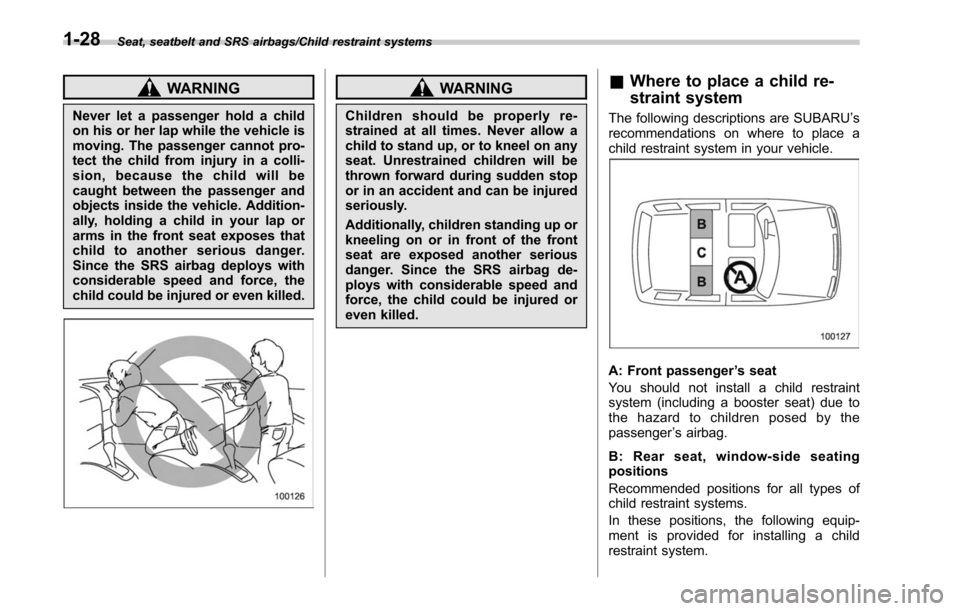
A: Front passenger ’s seat
You should not install a child restraint
system (including a booster seat) due to
the hazard to children posed by the
passenger ’s airbag.
B: Rear seat, window-side seating
positions
Recommended positions for all types of
child restraint systems.
In these positions, the following equip-
ment is provided for installing a child
restraint system.
1-28
Page 106 of 610
Keys..................................................................... 2-3
Key number plate ................................................ 2-3
Immobilizer.......................................................... 2-4Certification for immobilizer system ..................... 2-4
Security indicator light ........................................ 2-5
Key replacement ................................................. 2-5
Door locks........................................................... 2-6Locking and unlocking from the outside . ............. 2-6
Locking and unlocking from the inside ................ 2-7
Battery drainage prevention function ................... 2-8
Power door locking switches............................. 2-9Key lock-in prevention function ........................... 2-9
Keyless access with push-button start
system (if equipped) ....................................... 2-10
Access key........................................................ 2-10
Safety precautions ............................................. 2-11
Locking and unlocking with “keyless access ”
entry function. .................................................. 2-14
Selecting audible signal operation ...................... 2-18
Selecting hazard warning flasher operation ......... 2-18
Warning chimes and warning indicator ............... 2-18
Disabling keyless access function ...................... 2-18
When access key does not operate properly ....... 2-20
Replacing battery of access key ......................... 2-20
Replacing access key ......................................... 2-20
Certification for keyless access with push-button start system ..................................................... 2-21
PIN Code Access (models with “keyless
access with push-button start system ”) ....... 2-22
Registering a PIN code ...................................... 2-22
Unlocking .......................................................... 2-23
Remote keyless entry system ........................... 2-24Operating the access key................................... 2-25
Operating the transmitter ................................... 2-26
Replacing the battery ......................................... 2-27
Replacing lost transmitters ................................ 2-27
Certification for remote keyless entry system ..... 2-27
Alarm system..................................................... 2-28System alarm operation ..................................... 2-29
Activating and deactivating the alarm system ..... 2-29
If you have accidentally triggered the alarm system ............................................................ 2-29
Arming the system ............................................ 2-30
Disarming the system ........................................ 2-32
Valet mode ........................................................ 2-33
Tripped sensor identification .............................. 2-33
Shock sensors (dealer option).. .......................... 2-33
Child safety locks.............................................. 2-34
Windows ............................................................. 2-34
Power window operation by driver ..................... 2-34
Power window operation by passengers ............. 2-37
Initialization of power window .. .......................... 2-38
Trunk lid (Legacy).............................................. 2-38
To open and close the trunk lid from outside . ..... 2-39
To open the trunk lid from inside. ....................... 2-39
Internal trunk lid release handle ......................... 2-39
Keys and doors
2
Page 121 of 610
Keys and doors/Keyless access with push–button start system
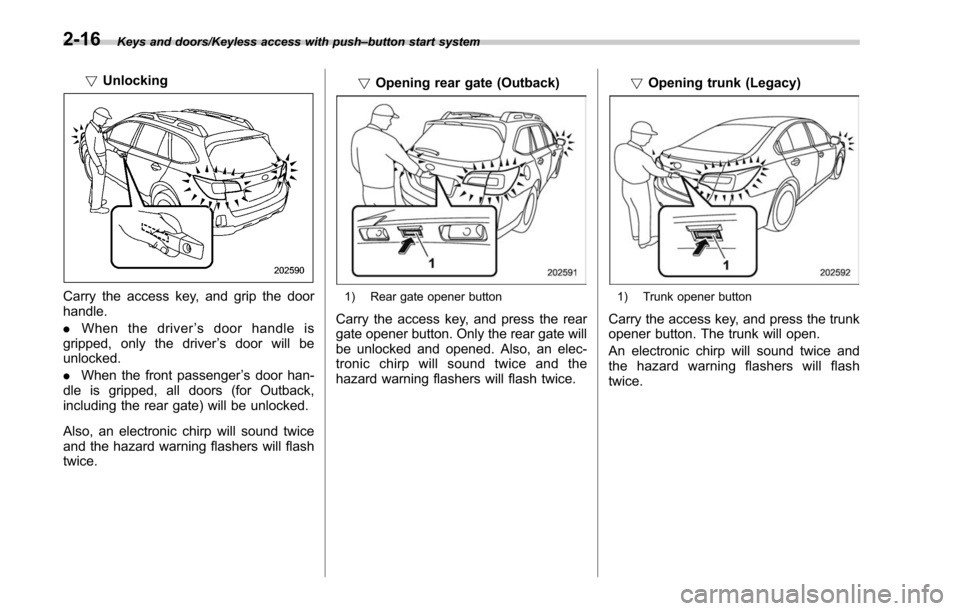
! Unlocking
Carry the access key, and grip the door
handle.
. When the driver ’s door handle is
gripped, only the driver ’s door will be
unlocked.
. When the front passenger ’s door han-
dle is gripped, all doors (for Outback,
including the rear gate) will be unlocked.
Also, an electronic chirp will sound twice
and the hazard warning flashers will flash
twice. !
Opening rear gate (Outback)1) Rear gate opener button
Carry the access key, and press the rear
gate opener button. Only the rear gate will
be unlocked and opened. Also, an elec-
tronic chirp will sound twice and the
hazard warning flashers will flash twice. !
Opening trunk (Legacy)
1) Trunk opener button
Carry the access key, and press the trunk
opener button. The trunk will open.
An electronic chirp will sound twice and
the hazard warning flashers will flash
twice.
2-16
Page 122 of 610
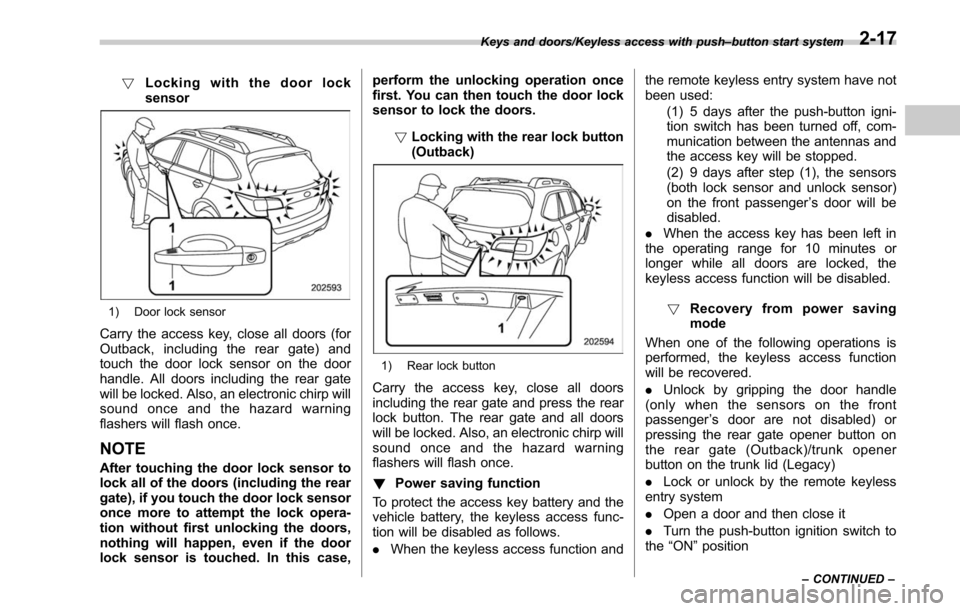
!Locking with the door lock
sensor
1) Door lock sensor
Carry the access key, close all doors (for
Outback, including the rear gate) and
touch the door lock sensor on the door
handle. All doors including the rear gate
will be locked. Also, an electronic chirp will
sound once and the hazard warning
flashers will flash once.
NOTE
After touching the door lock sensor to
lock all of the doors (including the rear
gate), if you touch the door lock sensor
once more to attempt the lock opera-
tion without first unlocking the doors,
nothing will happen, even if the door
lock sensor is touched. In this case, perform the unlocking operation once
first. You can then touch the door lock
sensor to lock the doors.
!Locking with the rear lock button
(Outback)
1) Rear lock button
Carry the access key, close all doors
including the rear gate and press the rear
lock button. The rear gate and all doors
will be locked. Also, an electronic chirp will
sound once and the hazard warning
flashers will flash once.
! Power saving function
To protect the access key battery and the
vehicle battery, the keyless access func-
tion will be disabled as follows.
. When the keyless access function and the remote keyless entry system have not
been used:
(1) 5 days after the push-button igni-
tion switch has been turned off, com-
munication between the antennas and
the access key will be stopped.
(2) 9 days after step (1), the sensors
(both lock sensor and unlock sensor)
on the front passenger ’s door will be
disabled.
. When the access key has been left in
the operating range for 10 minutes or
longer while all doors are locked, the
keyless access function will be disabled.
! Recovery from power saving
mode
When one of the following operations is
performed, the keyless access function
will be recovered.
. Unlock by gripping the door handle
(only when the sensors on the front
passenger ’s door are not disabled) or
pressing the rear gate opener button on
the rear gate (Outback)/trunk opener
button on the trunk lid (Legacy)
. Lock or unlock by the remote keyless
entry system
. Open a door and then close it
. Turn the push-button ignition switch to
the “ON ”position
Keys and doors/Keyless access with push –button start system
–CONTINUED –2-17
Page 123 of 610
Keys and doors/Keyless access with push–button start system
! Door unlock selection function
The door unlock selection function makes
the following operations possible.
. Unlocking the driver ’s door without
unlocking any other doors (including the
rear gate) when gripping the driver ’s door
handle
. For Outback, opening the rear gate
without unlocking any doors when press-
ing the rear gate opener button
The operational/non-operational setting
for this function can be changed by
operating the multi information display.
For details, refer to “Keyless Entry Sys-
tem ”F3-45. The setting can also be
changed by a SUBARU dealer. Consult
your SUBARU dealer for details.
Operational:
. Only the driver ’s door will be unlocked
when the driver ’s door handle is gripped.
. For Outback, the rear gate will open,
but the other doors will remain locked
when the rear gate opener button is
pressed.
Non-operational:
. All doors and the rear gate will be
unlocked when the driver ’s door handle is
gripped.
. For Outback, the rear gate will open
and all doors will be unlocked when the rear gate opener button is pressed.
The factory setting (default setting) is set
as
“operational ”.
&Selecting audible signal op-
eration
Using an electronic chirp, the system will
give you an audible signal when the doors
are locked or unlocked. If desired, you can
turn the audible signal off by operating the
multi information display. For details, refer
to“Keyless Entry System ”F 3-45.
Furthermore, the volume setting of the
audible signal can also be changed by a
SUBARU dealer. Consult your SUBARU
dealer for details.
& Selecting hazard warning
flasher operation
Using the hazard warning flasher, the
system will give you a visible signal when
the doors are locked or unlocked. If
desired, you can turn the hazard warning
flashers off by operating the multi informa-
tion display. For details, refer to “Keyless
Entry System ”F3-45. The setting can
also be changed by a SUBARU dealer.
Consult your SUBARU dealer for details.
& Warning chimes and warning
indicator
The keyless access with push-button start
system is equipped with a warning chime
and the access key warning indicator in
order to minimize improper operations and
help protect your vehicle from theft.
For details, refer to “Warning chimes and
warning indicator of the keyless access
with push-button start system ”F 3-25.
& Disabling keyless access
function
When the vehicle is not going to be used
for a long time, or when you choose not to
use the keyless access function, the
keyless access function can be disabled.
2-18
Page 130 of 610
&Operating the access key
NOTE
The remote keyless entry system will
not be activated when the push-button
ignition switch is in any position other
than the “OFF ”position.
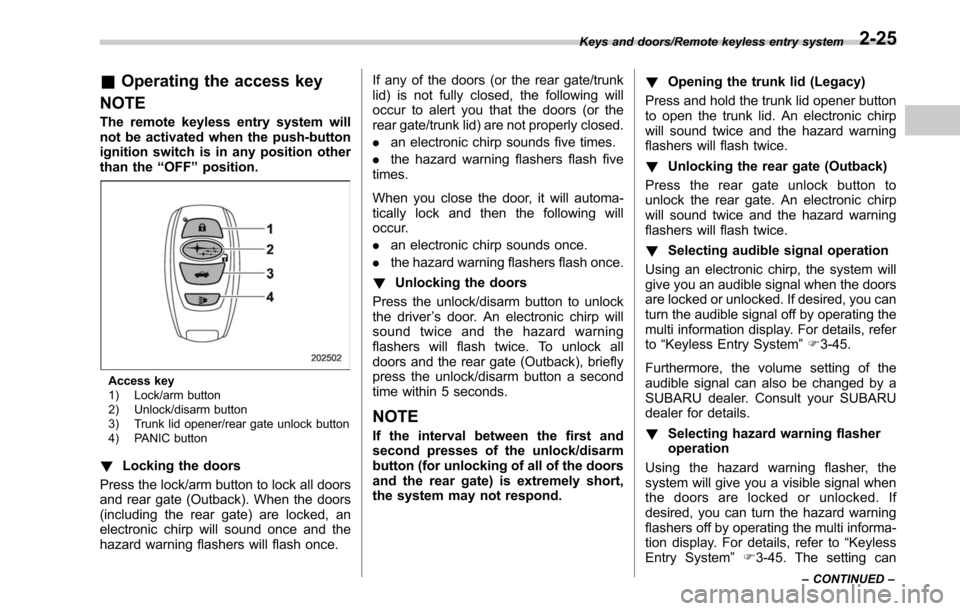
Access key
1) Lock/arm button
2) Unlock/disarm button
3) Trunk lid opener/rear gate unlock button
4) PANIC button
! Locking the doors
Press the lock/arm button to lock all doors
and rear gate (Outback). When the doors
(including the rear gate) are locked, an
electronic chirp will sound once and the
hazard warning flashers will flash once. If any of the doors (or the rear gate/trunk
lid) is not fully closed, the following will
occur to alert you that the doors (or the
rear gate/trunk lid) are not properly closed.
.
an electronic chirp sounds five times.
. the hazard warning flashers flash five
times.
When you close the door, it will automa-
tically lock and then the following will
occur.
. an electronic chirp sounds once.
. the hazard warning flashers flash once.
! Unlocking the doors
Press the unlock/disarm button to unlock
the driver ’s door. An electronic chirp will
sound twice and the hazard warning
flashers will flash twice. To unlock all
doors and the rear gate (Outback), briefly
press the unlock/disarm button a second
time within 5 seconds.
NOTE
If the interval between the first and
second presses of the unlock/disarm
button (for unlocking of all of the doors
and the rear gate) is extremely short,
the system may not respond. !
Opening the trunk lid (Legacy)
Press and hold the trunk lid opener button
to open the trunk lid. An electronic chirp
will sound twice and the hazard warning
flashers will flash twice.
! Unlocking the rear gate (Outback)
Press the rear gate unlock button to
unlock the rear gate. An electronic chirp
will sound twice and the hazard warning
flashers will flash twice.
! Selecting audible signal operation
Using an electronic chirp, the system will
give you an audible signal when the doors
are locked or unlocked. If desired, you can
turn the audible signal off by operating the
multi information display. For details, refer
to “Keyless Entry System ”F 3-45.
Furthermore, the volume setting of the
audible signal can also be changed by a
SUBARU dealer. Consult your SUBARU
dealer for details.
! Selecting hazard warning flasher
operation
Using the hazard warning flasher, the
system will give you a visible signal when
the doors are locked or unlocked. If
desired, you can turn the hazard warning
flashers off by operating the multi informa-
tion display. For details, refer to “Keyless
Entry System ”F3-45. The setting can
Keys and doors/Remote keyless entry system
–CONTINUED –2-25