cruise control SUBARU SOLTERRA 2023 User Guide
[x] Cancel search | Manufacturer: SUBARU, Model Year: 2023, Model line: SOLTERRA, Model: SUBARU SOLTERRA 2023Pages: 628, PDF Size: 11.91 MB
Page 289 of 628
2895-4. Using the driving support systems
Owners Manual_USA_M42C01_en
5
Driving
WARNING
●Set the speed appropriately
according to the speed limit,
traffic flow, road conditions,
weather conditions, etc. The
driver is responsible for confirm-
ing the set speed.
●Even if the system is operating
correctly, the condition of a pre-
ceding vehicle as recognized by
the driver and detected by the
system may differ. Therefore, it
is necessary for the driver to
pay attention, assess risks, and
ensure safety. Over-reliance on
this system to drive the vehicle
safely may lead to an accident
resulting in death or serious
injury.
■Precautions for the driving
assist systems
Observe the following precau-
tions, as there are limitations to
the assistance provided by the
system. Over-reliance on this sys-
tem may lead to an accident
resulting in death or serious injury.
●Details of support provided for
the driver’s vision The dynamic
radar cruise control is only
intended to help the driver in
determining the distance
between the driver’s own vehi-
cle and a designated preceding
vehicle. It is not a system which
allows for careless or inattentive
driving, and is not a system
which assists in poor visibility
conditions. The driver must pay
attention to their surroundings,
even when the vehicle stops.
●Details of suppor t provided for
the driver’s judgement The
dynamic radar cruise control
determines whether the dis-
tance between the driver’s own
vehicle and a designated pre-
ceding vehicle is within a set
range. It is not capable of mak-
ing any other type of judgement.
Therefore, it is absolutely nec-
essary for the driver to remain
vigilant and to determine
whether or not t here is a possi-
bility of danger.
●Details of suppor t provided for
the driver’s operation The
dynamic radar cruise control
does not include functions
which will prevent or avoid colli-
sions with vehicles ahead of
your vehicle. Ther efore, if there
is ever any possibility of danger,
the driver must take immediate
and direct control of the vehicle
and act appropriately in order to
ensure safety.
■Situations in which the
dynamic radar cruise control
should not be used
Do not use the d ynamic radar
cruise control in the following situ-
ations. As the system will not be
able to provide appropriate con-
trol, using it may lead to an acci-
dent resulting in death or serious
injury.
●Roads where there are pedes-
trians, cyclists, etc.
●When driving on a highway or
expressway entrance or exit
●When the approach warning
sounds frequently
●Situations in which the sensors
may not operate properly:
P.263
●Situations in which the lane may
not be detected: P.264
Page 291 of 628
2915-4. Using the driving support systems
Owners Manual_USA_M42C01_en
5
Driving
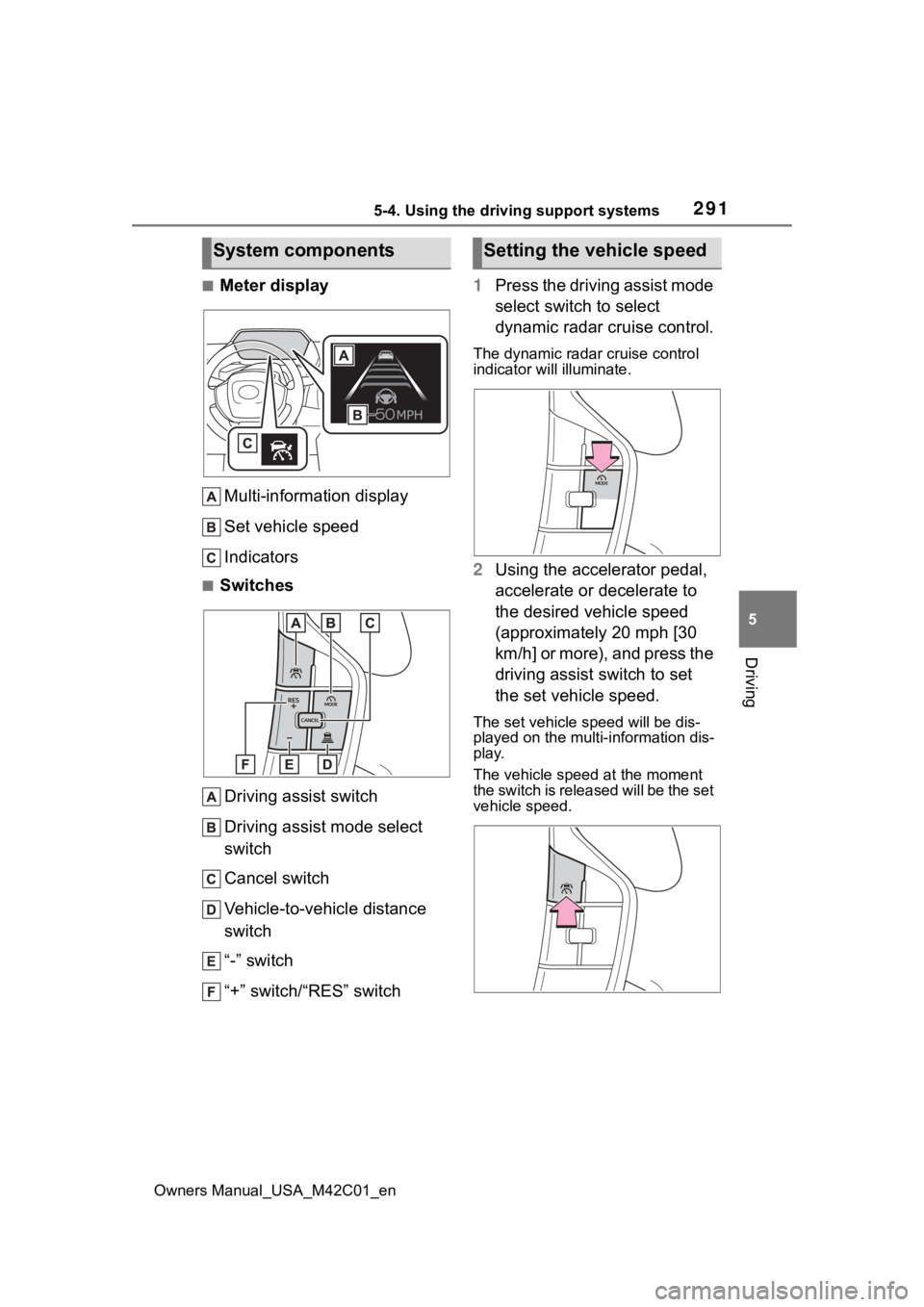
■Meter display Multi-information display
Set vehicle speed
Indicators
■SwitchesDriving assist switch
Driving assist mode select
switch
Cancel switch
Vehicle-to-vehicle distance
switch
“-” switch
“+” switch/“RES” switch 1
Press the driving assist mode
select switch to select
dynamic radar cruise control.
The dynamic radar cruise control
indicator will illuminate.
2Using the accelerator pedal,
accelerate or decelerate to
the desired vehicle speed
(approximately 20 mph [30
km/h] or more), and press the
driving assist switch to set
the set vehicle speed.
The set vehicle speed will be dis-
played on the multi-information dis-
play.
The vehicle speed at the moment
the switch is released will be the set
vehicle speed.
System componentsSetting the vehicle speed
Page 294 of 628
2945-4. Using the driving support systems
Owners Manual_USA_M42C01_enoperated
●When the vehicle is stopped by
system control on a steep incline
●When any of the following are
detected while the vehicle is
stopped by system control:
• The driver’s seat belt is unfas-
tened
• The driver’s door is opened
• Approximately 3 minutes have elapsed since the vehicle was
stopped
The parking brake may be actived
automatically.
The shift position may automatically
change to P. ( P.238)
●Situations in whic h some or all of
the functions of the system cannot
operate: P. 2 6 4
■Dynamic radar cruise control
system warning messages and
buzzers
For safe use: P.259
■Preceding vehicles that the sen-
sor may not detect correctly
In the following situations, depend-
ing on the conditions, if the system
cannot provide sufficient decelera-
tion or accelerati on is necessary,
operate the brake pedal or accelera-
tor pedal.
As the sensor may not be able to
correctly detect these types of vehi-
cles, the approach warning
( P.294) may not operate.
●When a vehicle cuts in front of
your vehicle or changes lanes
away from your vehicle extremely
slowly or quickly
●When changing lanes
●When a preceding vehicle is driv-
ing at a low speed
●When a vehicle i s stopped in the
same lane as the vehicle
●When a motorcycle is traveling in
the same lane as the vehicle
■Conditions under which the
system may not operate cor-
rectly
In the following situations, operate
the brake pedal (or accelerator
pedal, depending on the situation)
as necessary.
As the sensor may not be able to
correctly detect a vehicle, the sys-
tem may not operate properly.
●When a preceding vehicle brakes
suddenly
●When changing lanes at low
speeds, such as in a traffic jam
In situations where the vehicle
approaches a preceding vehicle
and the system cannot provide
sufficient deceleration, such as
if a vehicle cuts in front of the
vehicle, a warning display will
flash and a buzzer will sound to
alert the driver. Depress the
brake pedal to ensure appropri-
ate vehicle-to-vehicle distance.
■Warnings may not occur
when
In the following situations, the
warning may not operate even
though the vehicle-to-vehicle
distance is short.
When the preceding vehicle is
traveling at the same speed
or faster than your vehicle
When the preceding vehicle is
traveling at an extremely low
speed
Immediately after the vehicle
speed has been set
Approach warning
Page 295 of 628
2955-4. Using the driving support systems
Owners Manual_USA_M42C01_en
5
Driving
When the accelerator pedal is
depressed
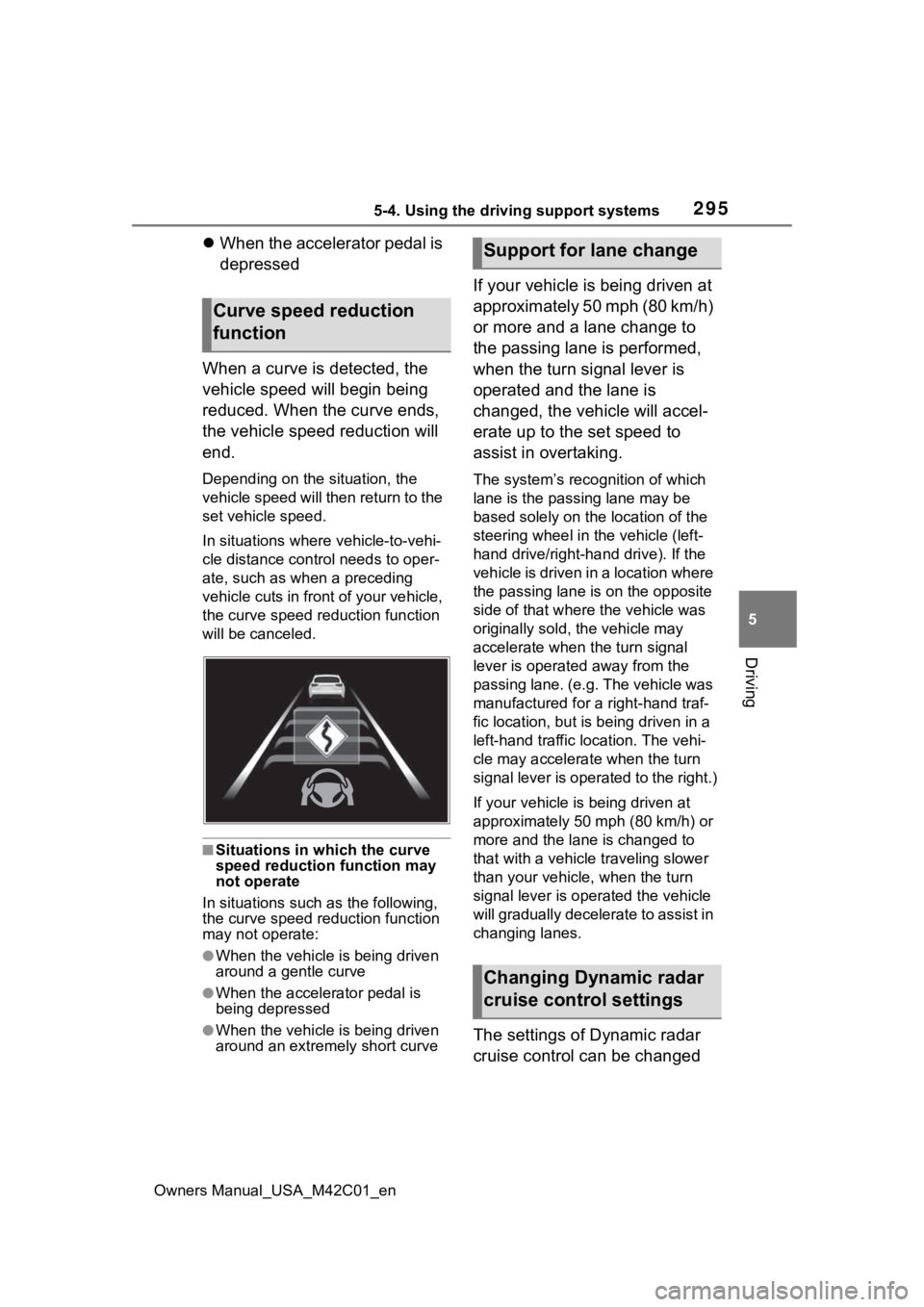
When a curve is detected, the
vehicle speed will begin being
reduced. When the curve ends,
the vehicle speed reduction will
end.
Depending on the situation, the
vehicle speed will then return to the
set vehicle speed.
In situations where vehicle-to-vehi-
cle distance control needs to oper-
ate, such as whe n a preceding
vehicle cuts in front of your vehicle,
the curve speed r eduction function
will be canceled.
■Situations in which the curve
speed reduction function may
not operate
In situations such as the following,
the curve speed r eduction function
may not operate:
●When the vehicle is being driven
around a gentle curve
●When the accelerator pedal is
being depressed
●When the vehicle is being driven
around an extremely short curve
If your vehicle is being driven at
approximately 50 mph (80 km/h)
or more and a lane change to
the passing lane is performed,
when the turn signal lever is
operated and the lane is
changed, the vehicle will accel-
erate up to the set speed to
assist in overtaking.
The system’s recognition of which
lane is the passing lane may be
based solely on the location of the
steering wheel in the vehicle (left-
hand drive/right-ha nd drive). If the
vehicle is driven in a location where
the passing lane i s on the opposite
side of that where the vehicle was
originally sold, the vehicle may
accelerate when the turn signal
lever is operated away from the
passing lane. (e.g. The vehicle was
manufactured for a right-hand traf-
fic location, but is being driven in a
left-hand traffic location. The vehi-
cle may accelera te when the turn
signal lever is operated to the right.)
If your vehicle is being driven at
approximately 50 mph (80 km/h) or
more and the lane is changed to
that with a vehicle traveling slower
than your vehicle, when the turn
signal lever is operated the vehicle
will gradually decelerate to assist in
changing lanes.
The settings of Dynamic radar
cruise control can be changed
Curve speed reduction
function
Support for lane change
Changing Dynamic radar
cruise control settings
Page 296 of 628
2965-4. Using the driving support systems
Owners Manual_USA_M42C01_en
through customize settings.
(P.572)Cruise control
The vehicle can be driven at
a set speed even if the
accelerator pedal is not
depressed.
Use the cruise control only
on highways and express-
ways.
WARNING
■For safe use
●Driving safely is solely the
responsibility of the driver.
Therefore, do not overly rely on
this system. The driver is solely
responsible for paying attention
to the vehicle’s surroundings
and driving safely.
●Set the speed appropriately
according to the speed limit,
traffic flow, road conditions,
weather conditions, etc. The
driver is responsible for confirm-
ing the set speed.
■Situations in which cruise
control should not be used
Do not use the cruise control in
the following situ ations. As the
system will not be able to provide
appropriate control, using it may
lead to an acciden t resulting in
death or serious injury.
●On roads with sharp bends
●On winding roads
●On slippery roads, such as
those covered with rain, ice or
snow
Page 297 of 628
2975-4. Using the driving support systems
Owners Manual_USA_M42C01_en
5
Driving
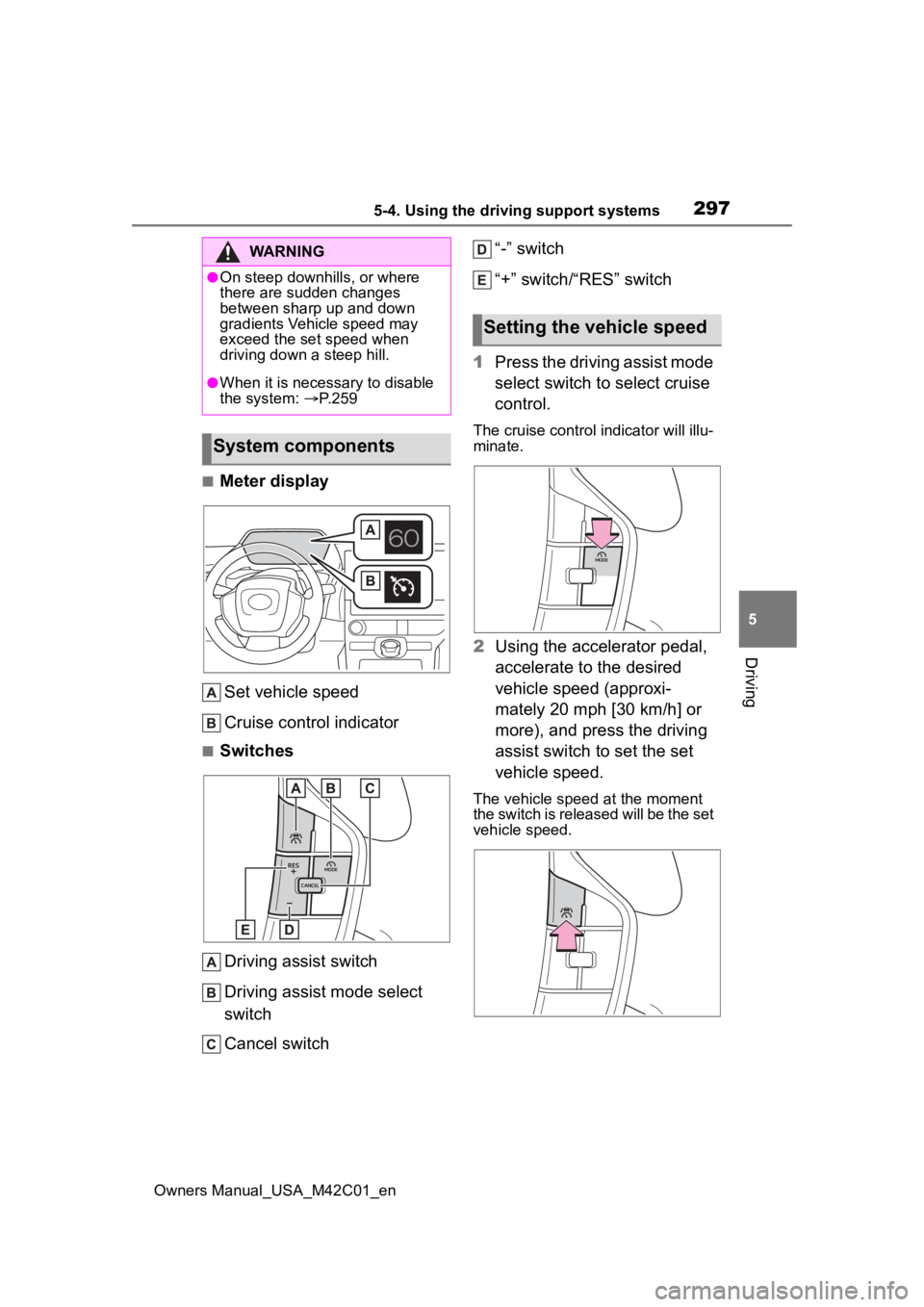
■Meter display Set vehicle speed
Cruise control indicator
■SwitchesDriving assist switch
Driving assist mode select
switch
Cancel switch “-” switch
“+” switch/“RES” switch
1 Press the driving assist mode
select switch to select cruise
control.
The cruise control indicator will illu-
minate.
2Using the accelerator pedal,
accelerate to the desired
vehicle speed (approxi-
mately 20 mph [30 km/h] or
more), and press the driving
assist switch to set the set
vehicle speed.
The vehicle speed at the moment
the switch is released will be the set
vehicle speed.
WARNING
●On steep downhills, or where
there are sudden changes
between sharp up and down
gradients Vehicle speed may
exceed the set speed when
driving down a steep hill.
●When it is necessary to disable
the system: P. 2 5 9
System components
Setting the vehicle speed
Page 298 of 628
2985-4. Using the driving support systems
Owners Manual_USA_M42C01_en
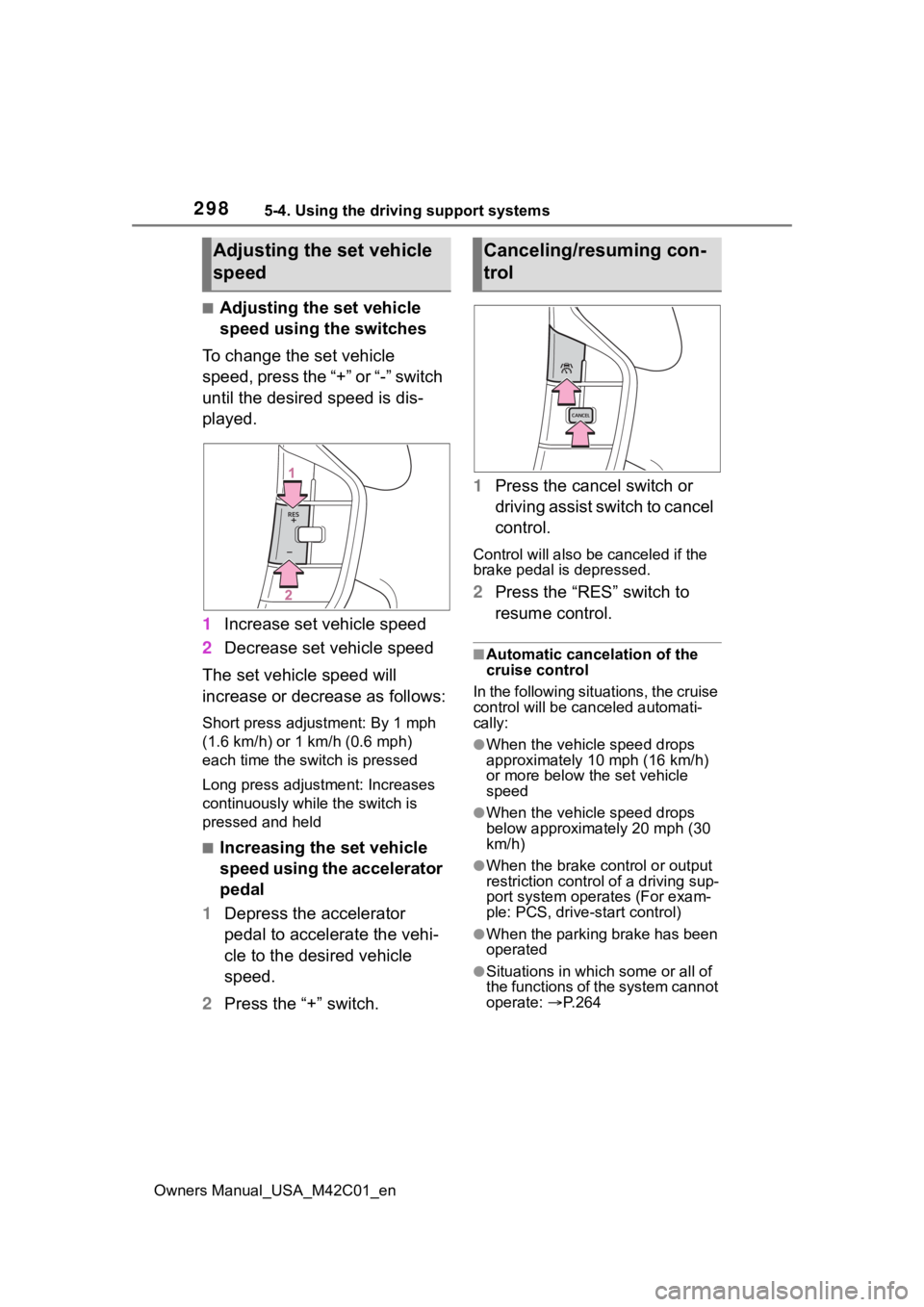
■Adjusting the set vehicle
speed using the switches
To change the set vehicle
speed, press the “+” or “-” switch
until the desired speed is dis-
played.
1 Increase set vehicle speed
2 Decrease set vehicle speed
The set vehicle speed will
increase or decrease as follows:
Short press adjustment: By 1 mph
(1.6 km/h) or 1 km/h (0.6 mph)
each time the switch is pressed
Long press adjustment: Increases
continuously while the switch is
pressed and held
■Increasing the set vehicle
speed using the accelerator
pedal
1 Depress the accelerator
pedal to accelerate the vehi-
cle to the desired vehicle
speed.
2 Press the “+” switch. 1
Press the cancel switch or
driving assist switch to cancel
control.
Control will also be canceled if the
brake pedal is depressed.
2Press the “RES” switch to
resume control.
■Automatic cancelation of the
cruise control
In the following situations, the cruise
control will be canceled automati-
cally:
●When the vehicle speed drops
approximately 10 mph (16 km/h)
or more below the set vehicle
speed
●When the vehicle speed drops
below approximately 20 mph (30
km/h)
●When the brake control or output
restriction control of a driving sup-
port system oper ates (For exam-
ple: PCS, drive-start control)
●When the parking brake has been
operated
●Situations in which some or all of
the functions of the system cannot
operate: P. 2 6 4
Adjusting the set vehicle
speedCanceling/resuming con-
trol
Page 300 of 628
3005-4. Using the driving support systems
Owners Manual_USA_M42C01_en
Operation of this system is sep-
arated into 4 control states.
Through control state “warning
phase 1” and “warning phase 2”,
the system determines if the
driver is aware and responsive
while outputting a warning and
controlling the vehicle speed. If
the system determines the
driver is not responsive, it will
operate in control state “deceler-
ation stop phase” and “stop hold
phase” and decelerate and stop
the vehicle. It will then operate
continuously in “stop hold
phase”.
■Operating conditions
This system operates when all of
the following conditions are met:
●When the LTA is on
●When the vehicle speed is
approximately 30 mph (50 km/h)
or more
■Operation cancelation condi-
tions
In the following si tuations, system
operation will be canceled:
●When LTA control has been can-
celed (the LTA switch has been
pressed, etc.)
●When the dynamic radar cruise
control has been canceled
●When driver operations are
detected (the steering wheel is
held, the brake pedal, accelerator
pedal, parking brake, hazard light
switch, or turn signal lever is oper-
ated)
●When the driving assist switch is
pressed while in the stop and hold
phase
●When the power switch has been
turned from ON to OFF
●Situations in which some or all of
the functions of the system cannot
operate: P. 2 6 4
■LTA control when operation is
canceled
When emergency driving stop sys-
tem operation is canceled, LTA con-
trol may also be canceled.
If driving operations are not
detected after the hands off
steering wheel warning oper-
ates, a buzzer will sound inter-
mittently and a message will be
displayed to warn the driver, and
the system will judge if the driver
is responsive or not. If driving
operations, such as holding the
steering wheel, are not per-
WARNING
●After this system operates, pas-
sengers should attend to the
driver as necessary and take
appropriate hazard prevention
measures, such as moving to a
place where safety can be
ensured, such as the shoulder
of the road or b ehind a guard-
rail.
●This system detects the condi-
tion of the driver through the
operation of the steering wheel.
This system may operate if the
driver is aware but intentionally
and continuously does not oper-
ate the vehicle. Also, the system
may not operate if it cannot
determine that the driver is not
responsive, such as if they are
leaning on the steering wheel.
Summary of the system
Warning phase 1
Page 354 of 628
3545-4. Using the driving support systems
Owners Manual_USA_M42C01_en
■Situations in which parking
assistance may not operate
even if there is no possibility of
a collision
P. 3 1 5
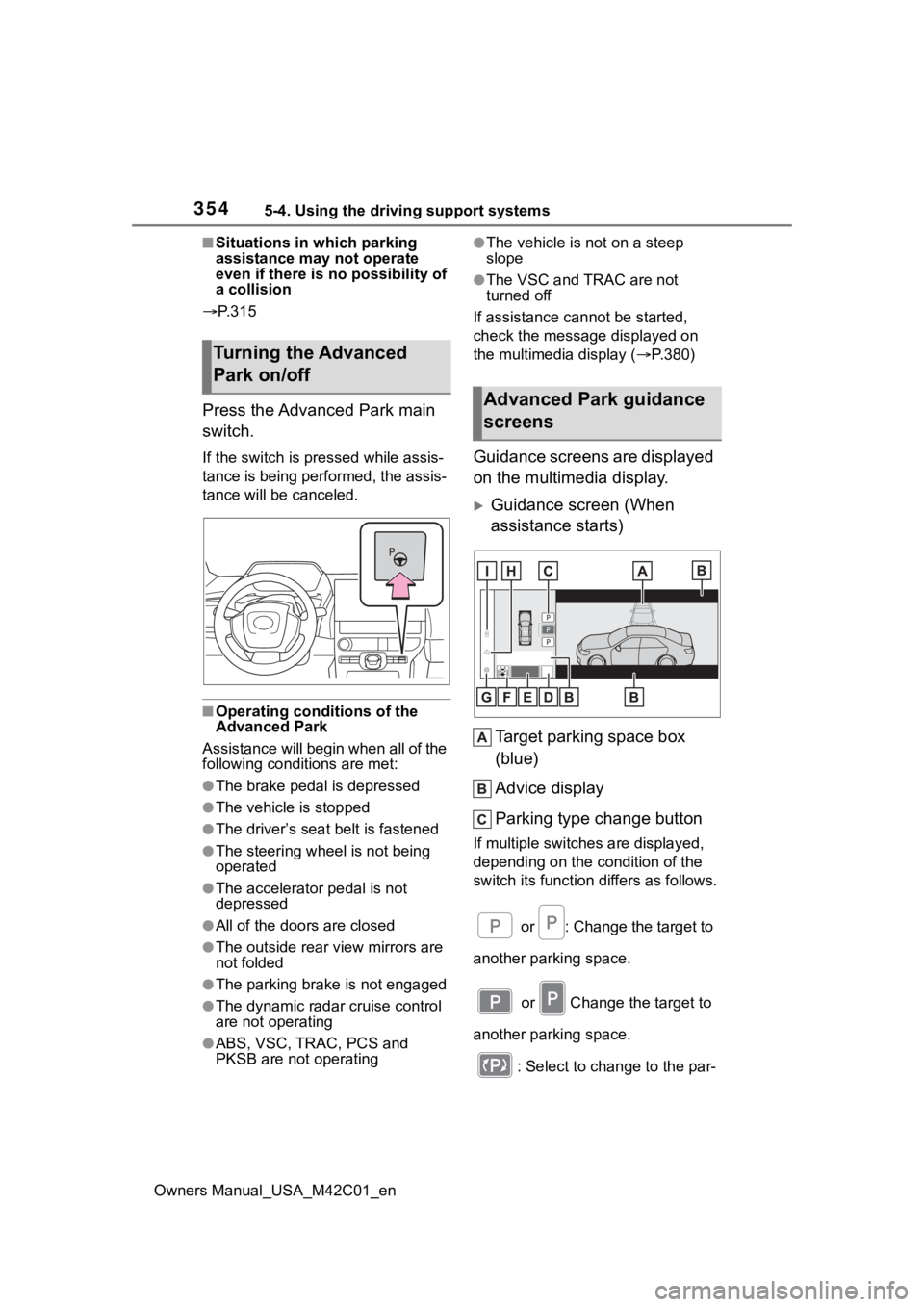
Press the Advanced Park main
switch.
If the switch is pr essed while assis-
tance is being performed, the assis-
tance will be canceled.
■Operating conditions of the
Advanced Park
Assistance will begin when all of the
following conditions are met:
●The brake pedal is depressed
●The vehicle is stopped
●The driver’s seat belt is fastened
●The steering wheel is not being
operated
●The accelerator pedal is not
depressed
●All of the doors are closed
●The outside rear view mirrors are
not folded
●The parking brake is not engaged
●The dynamic radar cruise control
are not operating
●ABS, VSC, TRAC, PCS and
PKSB are not operating
●The vehicle is not on a steep
slope
●The VSC and TRAC are not
turned off
If assistance can not be started,
check the message displayed on
the multimedia display ( P.380)
Guidance screens are displayed
on the multimedia display.
Guidance screen (When
assistance starts)
Target parking space box
(blue)
Advice display
Parking type change button
If multiple switches are displayed,
depending on the condition of the
switch its function differs as follows. or : Change the target to
another parking space.
or Change the target to
another parking space.
: Select to change to the par-
Turning the Advanced
Park on/off
Advanced Park guidance
screens
Page 384 of 628
3845-4. Using the driving support systems
Owners Manual_USA_M42C01_en
■When “X-MODE” is not avail-
able
In the following cases, the system
does not operate.
• When the EV system is not started
• When SNOW/DIRT mode or D.SNOW/MUD mode is not
selected
• When Regeneration Boost is selected
• When Advanced Park is being used
• When the EV system is malfunc- tioning
■About Dynamic Radar Cruise
Control or Cruise Control
Dynamic radar cruise control and
cruise control cannot be used during
“X-MODE”. If dynamic radar cruise
control or cruise control are being
used, it will be automatically can-
celed.
■During “X-MODE”
• In “X-MODE”, VSC does not switch ON/OFF even if the VSC
OFF switch is operated. It is fixed
as ON in SNOW/DIRT mode and
OFF in D.SNOW/MUD mode.
• During “X-MODE”, even if the Eco mode switch or regeneration
boost switch is operated, opera-
tions will not switch to the respec-
tive modes.
■“X-MODE” Automatic Release
• “X-MODE” is automatically can- celed when the po wer switch is
turned OFF.
• When the vehicle speed exceeds about 25 mph (40 km/h), the X-
MODE is canceled, the “X-MODE”
indicator on the meter lights up in
white, and switches to the normal
mode.
• When the vehicle speed is approximately 22 mph (35 km/h)
or less, “X-MODE” indicator lights
up in green and switches to X- MODE again.
■Cautions regarding the use of
the system
For safety, the fo llowing operations
are not accepted when “X-MODE” is
ON.
• Eco mode switch operations
• Regeneration Boost switch opera- tions
When the “X-MODE” switch is
pressed and SNOW/DIRT mode
or D.SNOW/MUD mode is
selected, the Downhill Assist
Control automatically enters the
standby state and operates
under the following conditions.
• When the vehicle speed is
approximately 18 mph (30
km/h) or less
• Neither the accelerator pedal or brake pedal are not oper-
ated
■When changing the target vehi-
cle speed
When changing the target vehicle
speed, adjust it with the accelerator
pedal or the brake pedal. When the
foot is removed from the pedal, the
system will operate at the vehicle
speed at that time.
■Downhill Assist Control during
“X-MODE”
• In SNOW/DIRT mode or D.SNOW/MUD mode, the down-
hill assist control can be set to
standby state. The operation indi-
cator changes depending on the
operating status of the downhill
When selecting “X-
MODE”, Downhill Assist
Control