ECU SUBARU SOLTERRA 2023 Repair Manual
[x] Cancel search | Manufacturer: SUBARU, Model Year: 2023, Model line: SOLTERRA, Model: SUBARU SOLTERRA 2023Pages: 628, PDF Size: 11.91 MB
Page 370 of 628
3705-4. Using the driving support systems
Owners Manual_USA_M42C01_en
NOTICE
●If a parking space has been reg-
istered in situations such as the
following, assistance may not
be able to be started later or
assistance to the registered
position may not be possible.
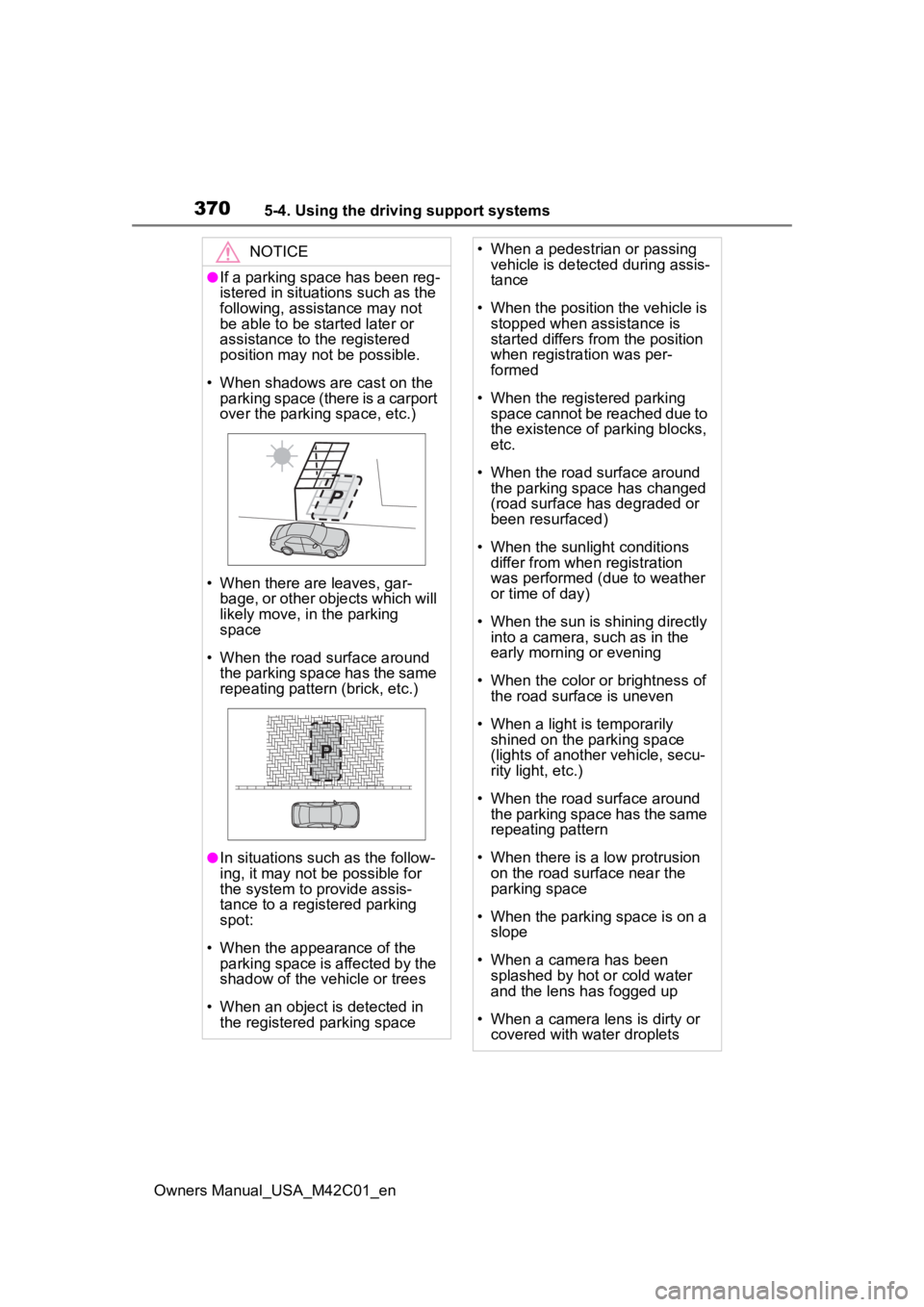
• When shadows are cast on the parking space (there is a carport
over the parking space, etc.)
• When there are leaves, gar- bage, or other objects which will
likely move, in the parking
space
• When the road surface around the parking space has the same
repeating pattern (brick, etc.)
●In situations such as the follow-
ing, it may not be possible for
the system to provide assis-
tance to a registered parking
spot:
• When the appearance of the parking space is affected by the
shadow of the vehicle or trees
• When an object is detected in the registered parking space
• When a pedestrian or passing vehicle is detected during assis-
tance
• When the position the vehicle is stopped when assistance is
started differs from the position
when registration was per-
formed
• When the registered parking space cannot be reached due to
the existence of parking blocks,
etc.
• When the road surface around the parking space has changed
(road surface has degraded or
been resurfaced)
• When the sunlight conditions differ from when registration
was performed (due to weather
or time of day)
• When the sun is shining directly into a camera, such as in the
early morning or evening
• When the color or brightness of the road surface is uneven
• When a light is temporarily shined on the parking space
(lights of another vehicle, secu-
rity light, etc.)
• When the road surface around the parking space has the same
repeating pattern
• When there is a low protrusion on the road surface near the
parking space
• When the parking space is on a slope
• When a camera has been splashed by hot o r cold water
and the lens has fogged up
• When a camera lens is dirty or covered with water droplets
Page 410 of 628
4106-1. Using the air conditioning system and defogger
Owners Manual_USA_M42C01_en
System.
The system will shut off if a door is
opened.
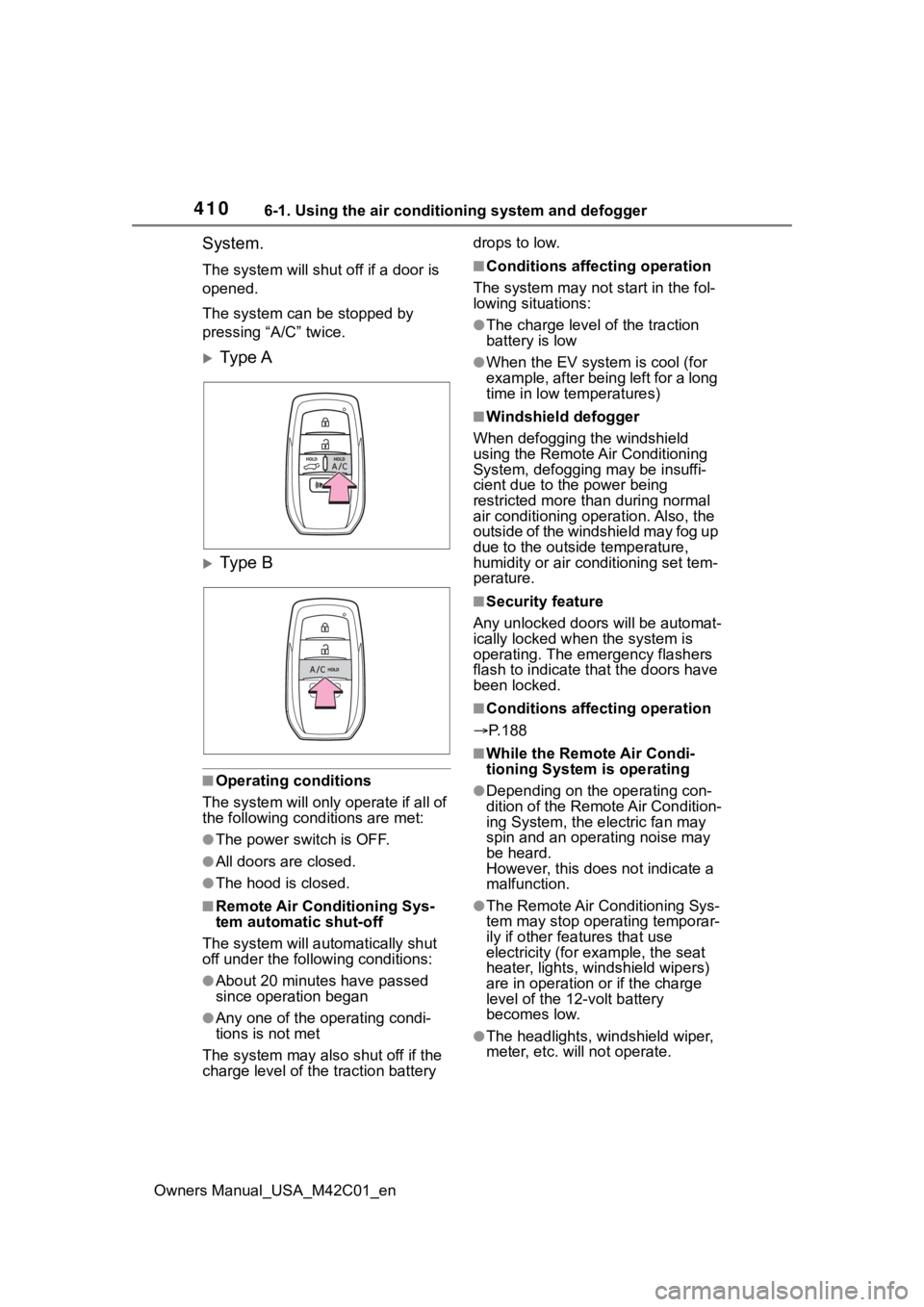
The system can be stopped by
pressing “A/C” twice.
Ty p e A
Ty p e B
■Operating conditions
The system will only operate if all of
the following cond itions are met:
●The power switch is OFF.
●All doors are closed.
●The hood is closed.
■Remote Air Conditioning Sys-
tem automatic shut-off
The system will auto matically shut
off under the following conditions:
●About 20 minutes have passed
since operation began
●Any one of the operating condi-
tions is not met
The system may also shut off if the
charge level of the traction battery drops to low.
■Conditions affecting operation
The system may not start in the fol-
lowing situations:
●The charge level of the traction
battery is low
●When the EV system is cool (for
example, after being left for a long
time in low temperatures)
■Windshield defogger
When defogging the windshield
using the Remote Air Conditioning
System, defogging may be insuffi-
cient due to the power being
restricted more than during normal
air conditioning operation. Also, the
outside of the windshield may fog up
due to the outsi de temperature,
humidity or air conditioning set tem-
perature.
■Security feature
Any unlocked doors will be automat-
ically locked when the system is
operating. The emergency flashers
flash to indicate that the doors have
been locked.
■Conditions affecting operation
P.188
■While the Remote Air Condi-
tioning System is operating
●Depending on the operating con-
dition of the Remote Air Condition-
ing System, the e lectric fan may
spin and an operating noise may
be heard.
However, this does not indicate a
malfunction.
●The Remote Air Conditioning Sys-
tem may stop operating temporar-
ily if other features that use
electricity (for example, the seat
heater, lights, windshield wipers)
are in operation or if the charge
level of the 12-volt battery
becomes low.
●The headlights, windshield wiper,
meter, etc. will not operate.
Page 421 of 628
4216-3. Using the storage features
Owners Manual_USA_M42C01_en
6
Interior features
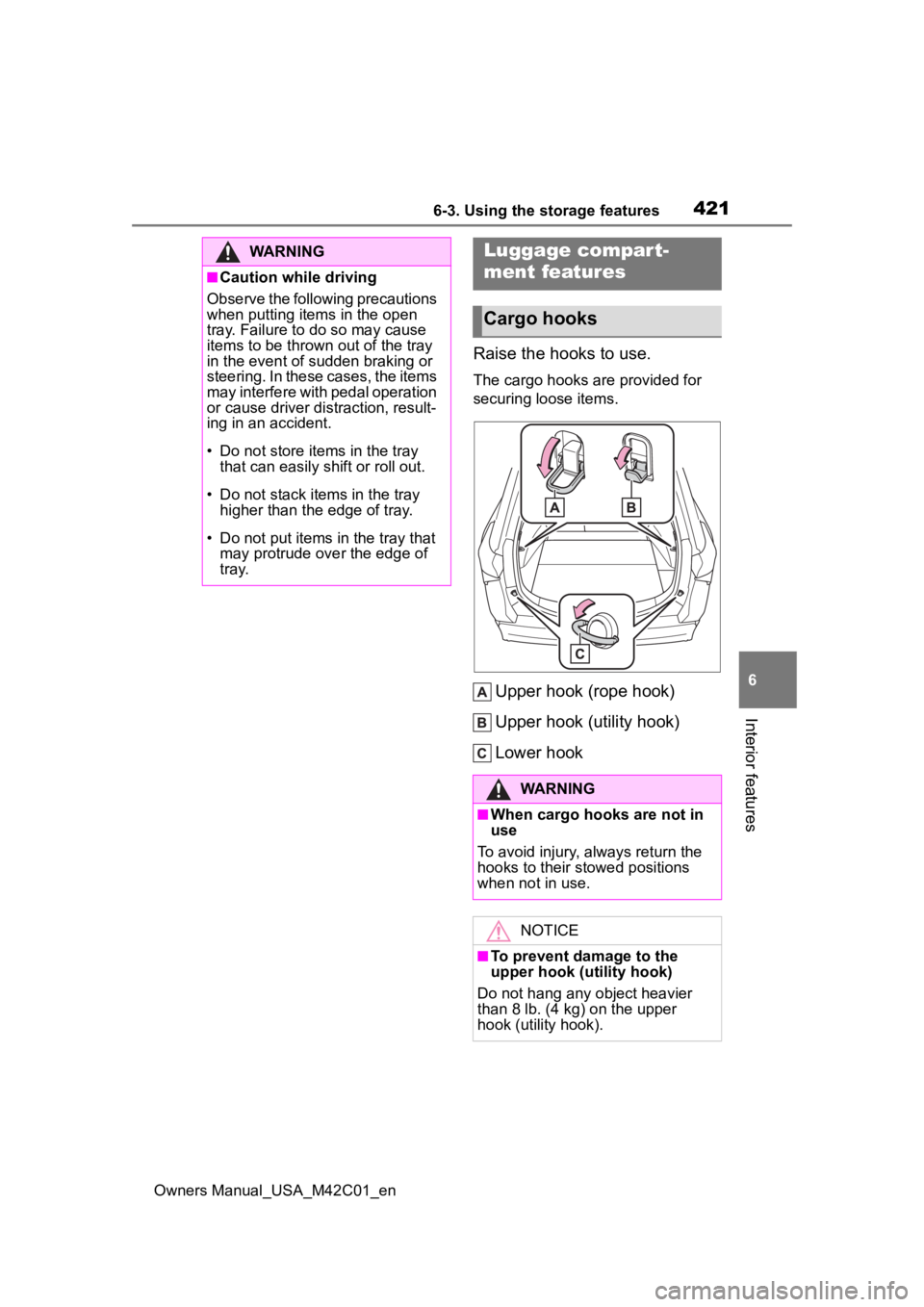
Raise the hooks to use.
The cargo hooks are provided for
securing loose items.
Upper hook (rope hook)
Upper hook (utility hook)
Lower hook
WARNING
■Caution while driving
Observe the following precautions
when putting items in the open
tray. Failure to do so may cause
items to be thrown out of the tray
in the event of sudden braking or
steering. In these cases, the items
may interfere with pedal operation
or cause driver distraction, result-
ing in an accident.
• Do not store items in the tray
that can easily shift or roll out.
• Do not stack items in the tray higher than the edge of tray.
• Do not put items in the tray that may protrude over the edge of
tray.
Luggage compar t-
ment features
Cargo hooks
WARNING
■When cargo hooks are not in
use
To avoid injury , always return the
hooks to their stowed positions
when not in use.
NOTICE
■To prevent damage to the
upper hook (utility hook)
Do not hang any object heavier
than 8 lb. (4 kg) on the upper
hook (utility hook).
Page 425 of 628
4256-3. Using the storage features
Owners Manual_USA_M42C01_en
6
Interior features
WARNING
■Luggage cover
●When installing/stowing the lug-
gage cover, make sure that the
luggage cover is securely
installed/stowed. Failure to do
so may result in serious injury in
the event of sudden braking or a
collision.
●Do not place anything on the
luggage cover. In the event of
sudden braking or turning, the
item may go flying and strike an
occupant. This could lead to an
unexpected accident, resulting
in death or serious injury.
●Do not allow ch ildren to climb
on the luggage cover. Climbing
on the luggage cover could
result in damage to the luggage
cover, possibly causing death or
serious injury to the child.
Page 439 of 628
4396-4. Using the other interior features
Owners Manual_USA_M42C01_en
6
Interior features
*: If equipped
■HomeLink® programming pro-
cedure
The programming procedures can
also be found at the following URL.
Website: www.homelink.com/toyota
For support, contact customer sup-
port at the following.
Help Line: 1-800-355-3515
The HomeLink® wireless control
system in your vehicle has 3
buttons which can be pro-
grammed to operate 3 different
devices. Refer to the program-
ming methods on the following
pages to determine the method
which is appropriate for the
device.
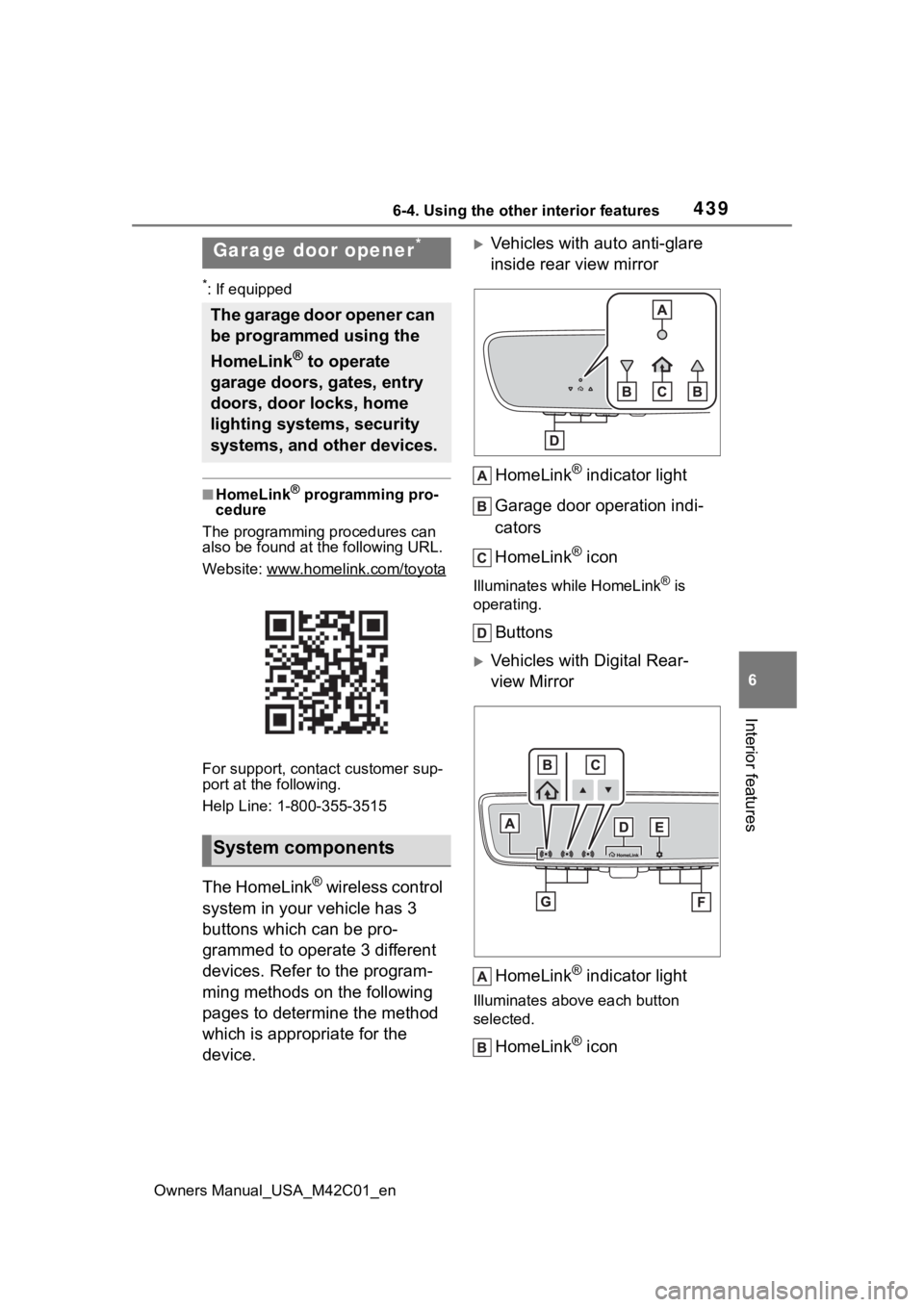
Vehicles with auto anti-glare
inside rear view mirror
HomeLink
® indicator light
Garage door operation indi-
cators
HomeLink
® icon
Illuminates while HomeLink® is
operating.
Buttons
Vehicles with Digital Rear-
view Mirror
HomeLink
® indicator light
Illuminates above each button
selected.
HomeLink® icon
Garage door opener*
The garage door opener can
be programmed using the
HomeLink
® to operate
garage doors, gates, entry
doors, door locks, home
lighting systems, security
systems, and other devices.
System components
Page 457 of 628
4577-2. Maintenance
Owners Manual_USA_M42C01_en
7
Maintenance and care
Radiator/con-
denser
The radiator and
condenser should
be free from for-
eign objects.
( P.466)
Washer fluid
Is there sufficient
washer fluid?
( P.471)
Vehicle interior
ItemsCheck points
Accelerator
pedal
• The accelerator
pedal should
move smoothly
(without uneven
pedal effort or
catching).
Transmission
“Park” mecha-
nism
• When parked on a slope and the
shift position is in
P, is the vehicle
securely
stopped?
Brake pedal
• Does the brake pedal move
smoothly?
• Does the brake pedal have
appropriate
clearance from
the floor?
• Does the brake pedal have the
correct amount
of free play?
ItemsCheck points
Brakes
• The vehicle should not pull to
one side when
the brakes are
applied.
• The brakes should work
effectively.
• The brake pedal should not feel
spongy.
• The brake pedal should not get
too close to the
floor when the
brakes are
applied.
Head
restraints
• Do the head restraints move
smoothly and
lock securely?
Indica-
tors/buzzers
• Do the indica-tors and buzzers
function prop-
erly?
Lights
• Do all the lights come on?
• Are the head- lights aimed cor-
rectly?
Parking brake
• Does the park-ing brake oper-
ate normally?
• When parked on a slope and the
parking brake is
on, is the vehicle
securely
stopped?
ItemsCheck points
Page 469 of 628
4697-3. Do-it-yourself maintenance
Owners Manual_USA_M42C01_en
7
Maintenance and care
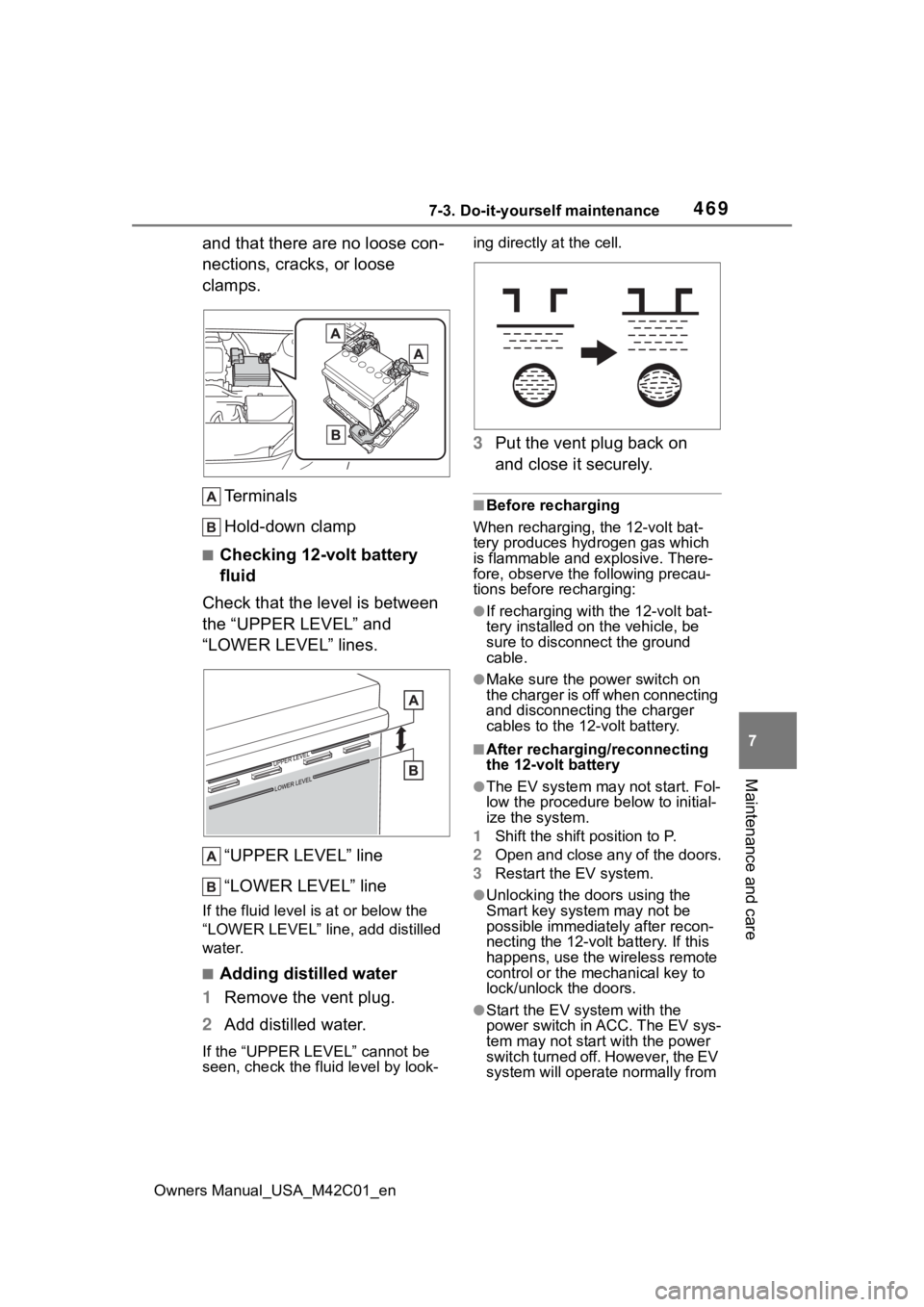
and that there are no loose con-
nections, cracks, or loose
clamps. Terminals
Hold-down clamp
■Checking 12-volt battery
fluid
Check that the level is between
the “UPPER LEVEL” and
“LOWER LEVEL” lines.
“UPPER LEVEL” line
“LOWER LEVEL” line
If the fluid level is at or below the
“LOWER LEVEL” line, add distilled
water.
■Adding distilled water
1 Remove the vent plug.
2 Add distilled water.
If the “UPPER LEVEL” cannot be
seen, check the fluid level by look- ing directly at the cell.
3
Put the vent plug back on
and close it securely.
■Before recharging
When recharging, the 12-volt bat-
tery produces hydrogen gas which
is flammable and explosive. There-
fore, observe the following precau-
tions before recharging:
●If recharging with the 12-volt bat-
tery installed on the vehicle, be
sure to disconnect the ground
cable.
●Make sure the power switch on
the charger is off when connecting
and disconnecting the charger
cables to the 12-volt battery.
■After recharging/reconnecting
the 12-volt battery
●The EV system may not start. Fol-
low the procedure below to initial-
ize the system.
1 Shift the shift position to P.
2 Open and close any of the doors.
3 Restart the EV system.
●Unlocking the doors using the
Smart key system may not be
possible immediately after recon-
necting the 12-volt battery. If this
happens, use the wireless remote
control or the mechanical key to
lock/unlock the doors.
●Start the EV system with the
power switch in ACC. The EV sys-
tem may not start with the power
switch turned off. However, the EV
system will operate normally from
Page 500 of 628
5007-3. Do-it-yourself maintenance
Owners Manual_USA_M42C01_en
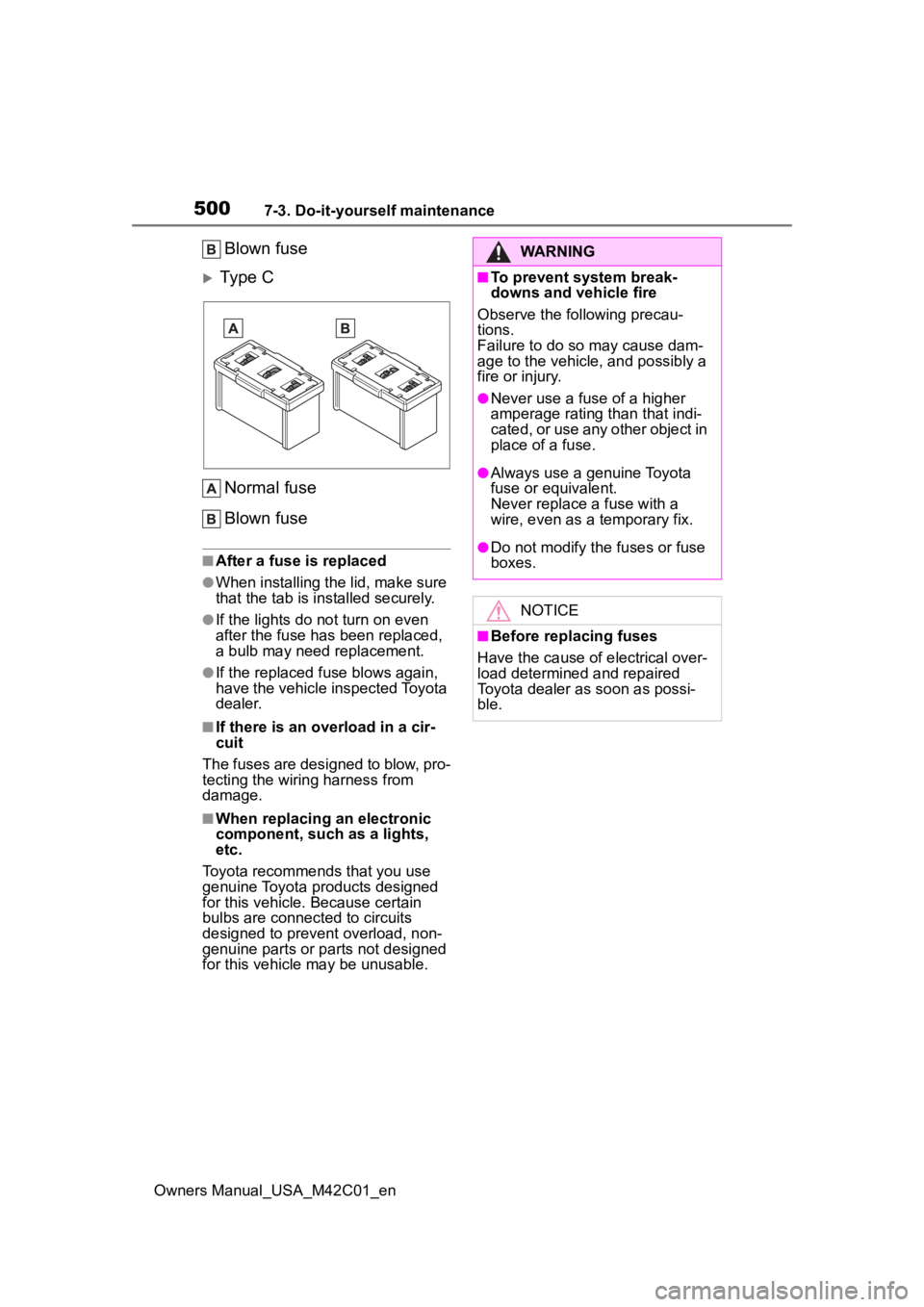
Blown fuse
Type C
Normal fuse
Blown fuse
■After a fuse is replaced
●When installing the lid, make sure
that the tab is installed securely.
●If the lights do n ot turn on even
after the fuse has been replaced,
a bulb may need replacement.
●If the replaced fuse blows again,
have the vehicle inspected Toyota
dealer.
■If there is an overload in a cir-
cuit
The fuses are designed to blow, pro-
tecting the wiring harness from
damage.
■When replacing an electronic
component, such as a lights,
etc.
Toyota recommends that you use
genuine Toyota products designed
for this vehicle. Because certain
bulbs are connected to circuits
designed to prevent overload, non-
genuine parts or parts not designed
for this vehicle may be unusable.
WARNING
■To prevent system break-
downs and vehicle fire
Observe the following precau-
tions.
Failure to do so may cause dam-
age to the vehicle, and possibly a
fire or injury.
●Never use a fuse of a higher
amperage rating than that indi-
cated, or use any other object in
place of a fuse.
●Always use a genuine Toyota
fuse or equivalent.
Never replace a fuse with a
wire, even as a temporary fix.
●Do not modify the fuses or fuse
boxes.
NOTICE
■Before replacing fuses
Have the cause of electrical over-
load determined and repaired
Toyota dealer as soon as possi-
ble.
Page 505 of 628
5058-1. Essential information
Owners Manual_USA_M42C01_en
8
When trouble arises
1 Steadily step on the brake
pedal with both feet and
firmly depress it.
Do not pump the brake pedal
repeatedly as this will increase the
effort required to slow the vehicle.
2Shift the shift position to N.
If the shift position is shifted to
N
3 After slowing down, stop the
vehicle in a safe place by the
road.
4 Stop the EV system.
If the shift position cannot be
shifted to N
3 Keep depressing the brake
pedal with both feet to reduce
vehicle speed as much as
possible.
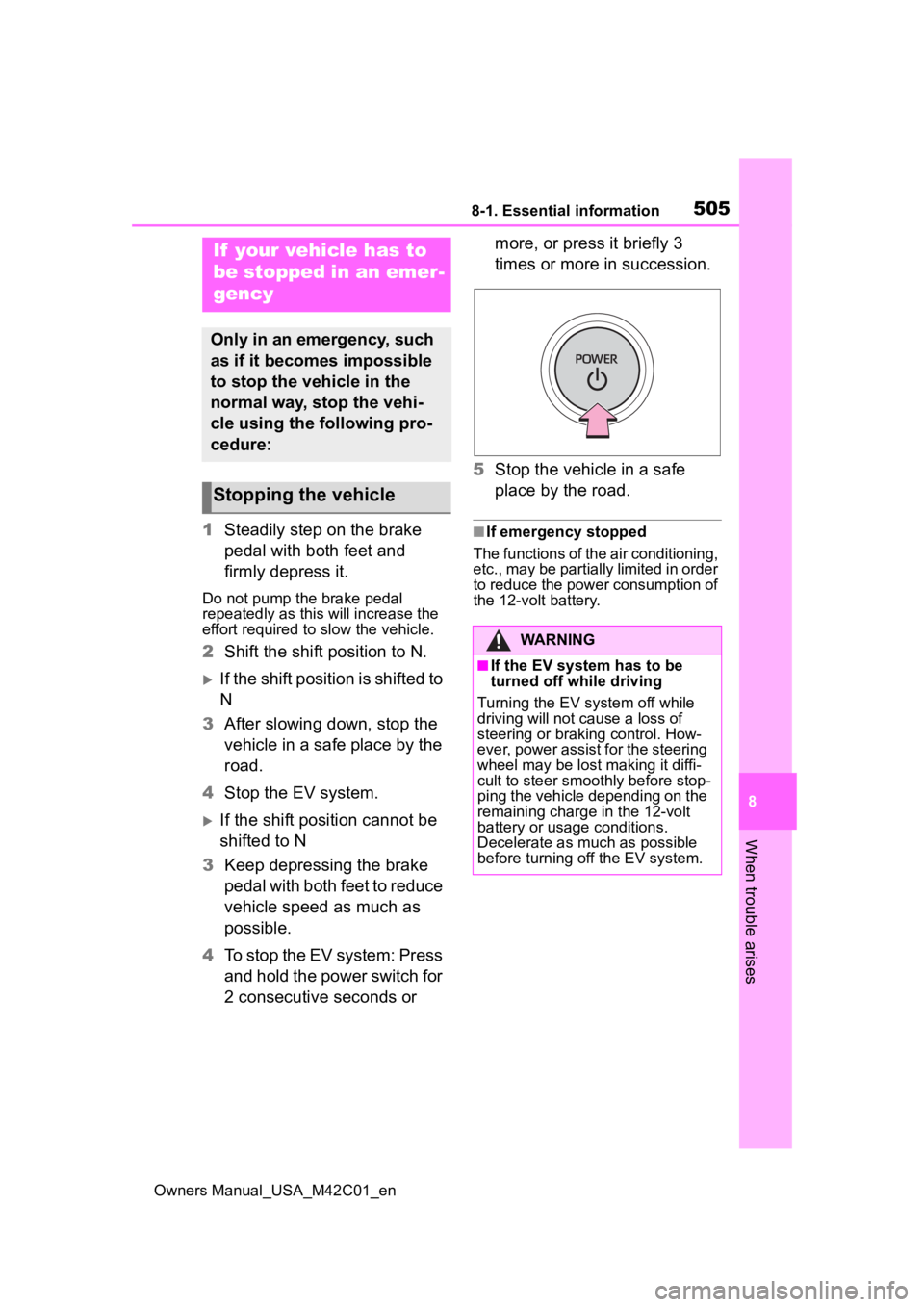
4 To stop the EV system: Press
and hold the power switch for
2 consecutive seconds or more, or press it briefly 3
times or more in succession.
5 Stop the vehicle in a safe
place by the road.
■If emergency stopped
The functions of the air conditioning,
etc., may be partially limited in order
to reduce the power consumption of
the 12-volt battery.
If your vehicle has to
be stopped in an emer-
gency
Only in an emergency, such
as if it becomes impossible
to stop the vehicle in the
normal way, stop the vehi-
cle using the following pro-
cedure:
Stopping the vehicle
WARNING
■If the EV system has to be
turned off while driving
Turning the EV system off while
driving will not cause a loss of
steering or braking control. How-
ever, power assist for the steering
wheel may be lost making it diffi-
cult to steer smoothly before stop-
ping the vehicle depending on the
remaining charge in the 12-volt
battery or usage conditions.
Decelerate as mu ch as possible
before turning off the EV system.
Page 509 of 628
5098-2. Steps to take in an emergency
Owners Manual_USA_M42C01_en
8
When trouble arises
When using a flat-bed truck to
transport the vehicle, use tire
strapping belts. Refer to the
owner’s manual of the flat-bed
truck for the tire strapping
method.
In order to suppress vehicle
movement during transporta-
tion, set the parking brake and
turn the power switch off.
If a tow truck is not available in
an emergency, your vehicle may
be temporarily towed using
cables or chains secured to the
emergency towing eyelets. This
should only be attempted on
hard surfaced roads for short
distances at under 18 mph (30
km/h).
A driver must be in the vehicle to
steer and operate the brakes.
The vehicle’s wheels, drive train,
axles, steering and brakes must
be in good condition.
WARNING
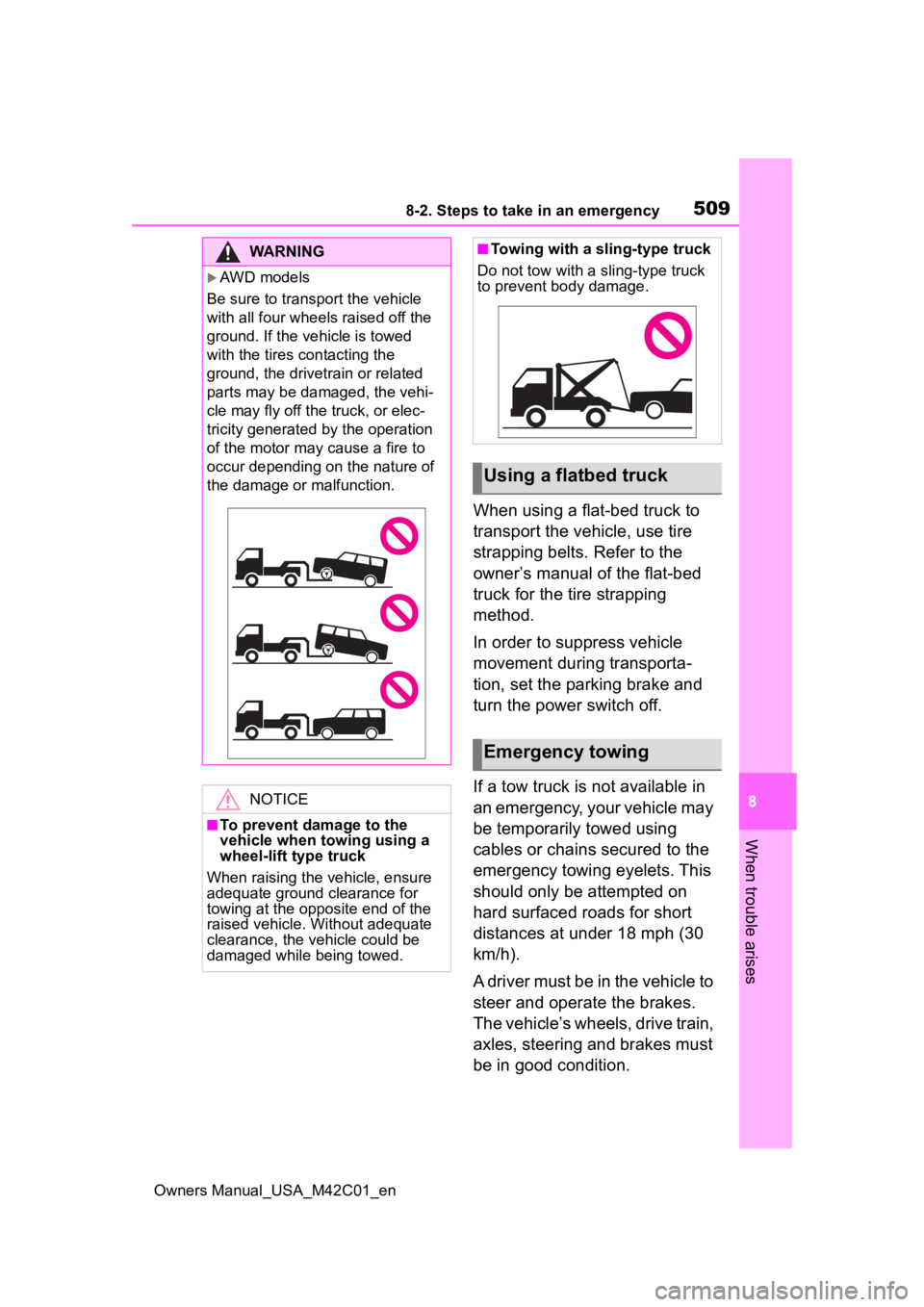
AWD models
Be sure to transport the vehicle
with all four wheels raised off the
ground. If the vehicle is towed
with the tires contacting the
ground, the drivetrain or related
parts may be damaged, the vehi-
cle may fly off the truck, or elec-
tricity generated by the operation
of the motor may cause a fire to
occur depending on the nature of
the damage or malfunction.
NOTICE
■To prevent damage to the
vehicle when towing using a
wheel-lift type truck
When raising the vehicle, ensure
adequate ground clearance for
towing at the opposite end of the
raised vehicle. Without adequate
clearance, the vehicle could be
damaged while being towed.
■Towing with a sling-type truck
Do not tow with a sling-type truck
to prevent body damage.
Using a flatbed truck
Emergency towing