lights SUBARU SOLTERRA 2023 Repair Manual
[x] Cancel search | Manufacturer: SUBARU, Model Year: 2023, Model line: SOLTERRA, Model: SUBARU SOLTERRA 2023Pages: 628, PDF Size: 11.91 MB
Page 399 of 628
399
Owners Manual_USA_M42C01_en
6
6
Interior features
Interior features
6-1. Using the air conditioning system and defogger
ALL AUTO (“ECO”) control .................................. 400
Automatic air conditioning system ....................... 402
Remote Air Conditioning System ...................... 409
Heated steering wheel/seat heaters/seat ventila-
tors/radiant heater ..... 411
6-2. Using the interior lights Interior lights list .......... 415
6-3. Using the storage features List of storage features 418
Luggage compartment fea- tures .......................... 421
6-4. Using the other interior features
Electronic sunshade.... 426
Other interior features . 428
Garage door opener.... 439
Page 410 of 628
4106-1. Using the air conditioning system and defogger
Owners Manual_USA_M42C01_en
System.
The system will shut off if a door is
opened.
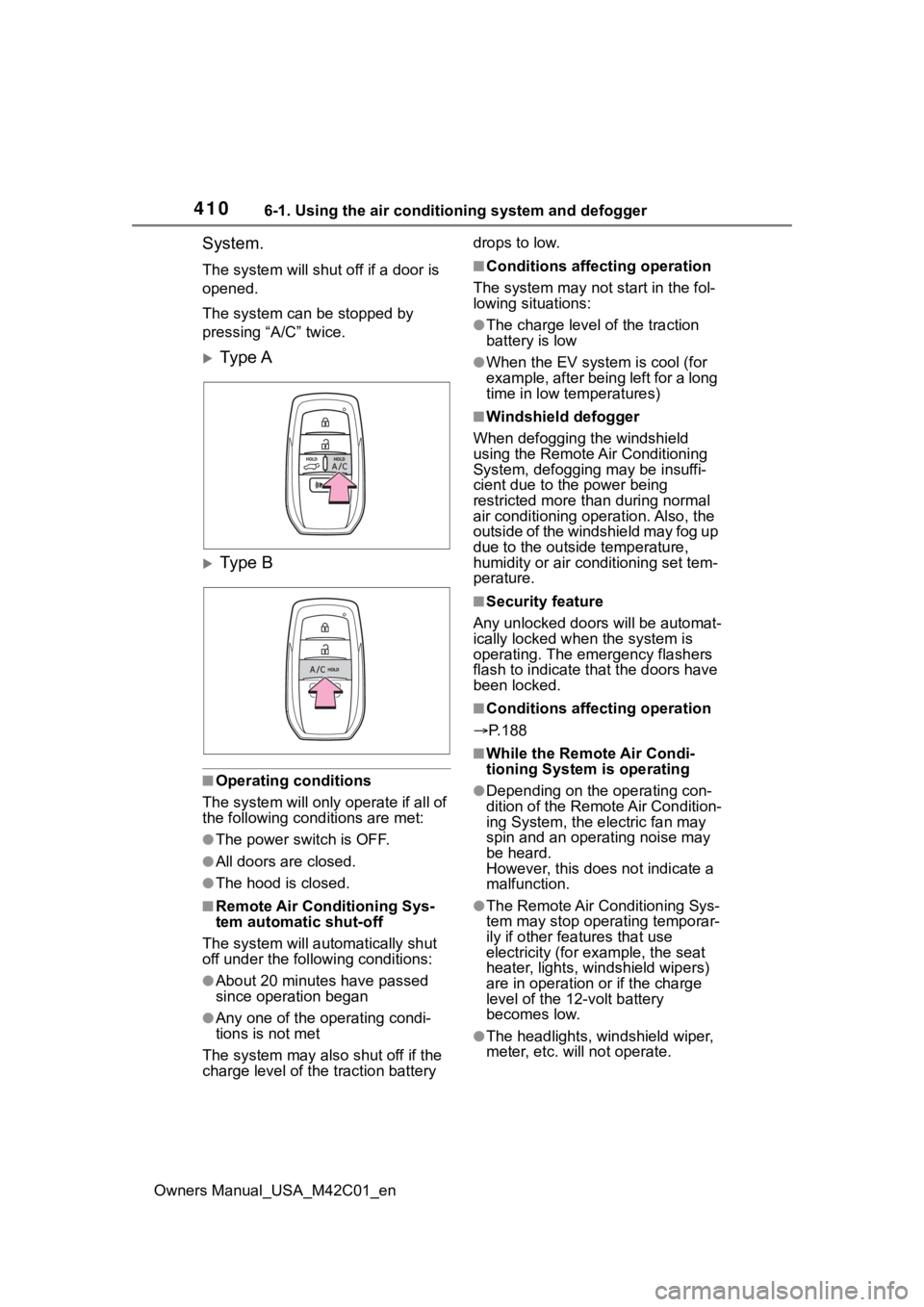
The system can be stopped by
pressing “A/C” twice.
Ty p e A
Ty p e B
■Operating conditions
The system will only operate if all of
the following cond itions are met:
●The power switch is OFF.
●All doors are closed.
●The hood is closed.
■Remote Air Conditioning Sys-
tem automatic shut-off
The system will auto matically shut
off under the following conditions:
●About 20 minutes have passed
since operation began
●Any one of the operating condi-
tions is not met
The system may also shut off if the
charge level of the traction battery drops to low.
■Conditions affecting operation
The system may not start in the fol-
lowing situations:
●The charge level of the traction
battery is low
●When the EV system is cool (for
example, after being left for a long
time in low temperatures)
■Windshield defogger
When defogging the windshield
using the Remote Air Conditioning
System, defogging may be insuffi-
cient due to the power being
restricted more than during normal
air conditioning operation. Also, the
outside of the windshield may fog up
due to the outsi de temperature,
humidity or air conditioning set tem-
perature.
■Security feature
Any unlocked doors will be automat-
ically locked when the system is
operating. The emergency flashers
flash to indicate that the doors have
been locked.
■Conditions affecting operation
P.188
■While the Remote Air Condi-
tioning System is operating
●Depending on the operating con-
dition of the Remote Air Condition-
ing System, the e lectric fan may
spin and an operating noise may
be heard.
However, this does not indicate a
malfunction.
●The Remote Air Conditioning Sys-
tem may stop operating temporar-
ily if other features that use
electricity (for example, the seat
heater, lights, windshield wipers)
are in operation or if the charge
level of the 12-volt battery
becomes low.
●The headlights, windshield wiper,
meter, etc. will not operate.
Page 415 of 628
4156-2. Using the interior lights
Owners Manual_USA_M42C01_en
6
Interior features
6-2.Using the interior lights
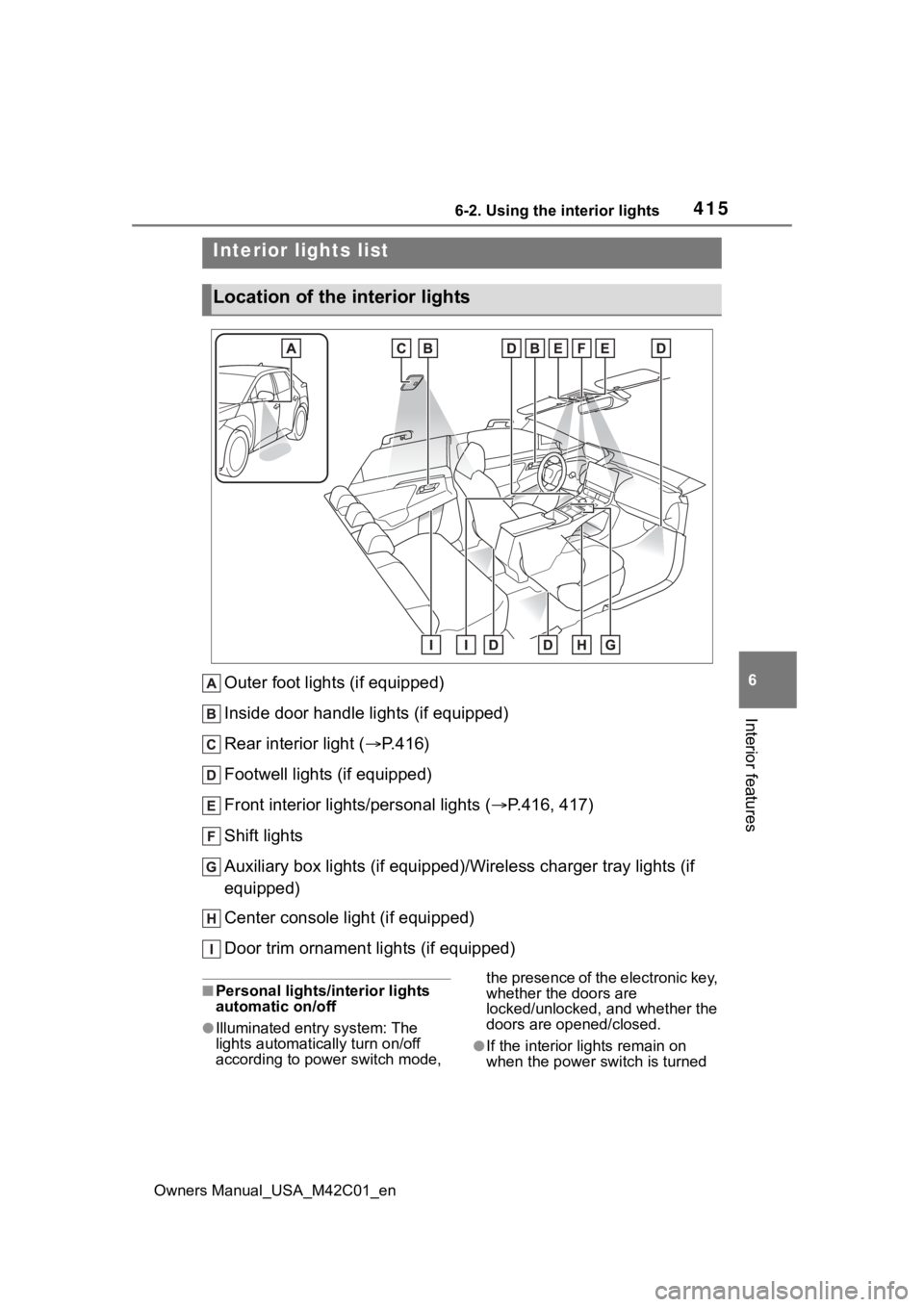
Outer foot lights (if equipped)
Inside door handle lights (if equipped)
Rear interior light ( P.416)
Footwell lights (if equipped)
Front interior lights/personal lights ( P.416, 417)
Shift lights
Auxiliary box lights (if equipped)/Wireless charger tray lights (if
equipped)
Center console light (if equipped)
Door trim ornament lights (if equipped)
■Personal lights/interior lights
automatic on/off
●Illuminated entry system: The
lights automatically turn on/off
according to power switch mode, the presence of the electronic key,
whether the doors are
locked/unlocked, and whether the
doors are opened/closed.
●If the interior
lights remain on
when the power switch is turned
Interior lights list
Location of the i nterior lights
Page 416 of 628
4166-2. Using the interior lights
Owners Manual_USA_M42C01_enoff, the lights will go off automati-
cally after 20 minutes.
■The interior lights will turn on
automatically when
If any of the SRS airbags deploy
(inflate) or in the event of a strong
rear impact, the interior lights will
turn on automatically. The interior
lights will turn off automatically after
approximately 20 minutes.
The interior lights can be turned off
manually. However, in order to help
prevent further collisions, it is rec-
ommended that they be left on until
safety can be ensured.
(The interior lights may not turn on
automatically depending on the
force of the impact and conditions of
the collision.)
■Customization
Setting (e.g. the time elapsed before
the lights turn off) can be changed.
(Customizable features: P.575)
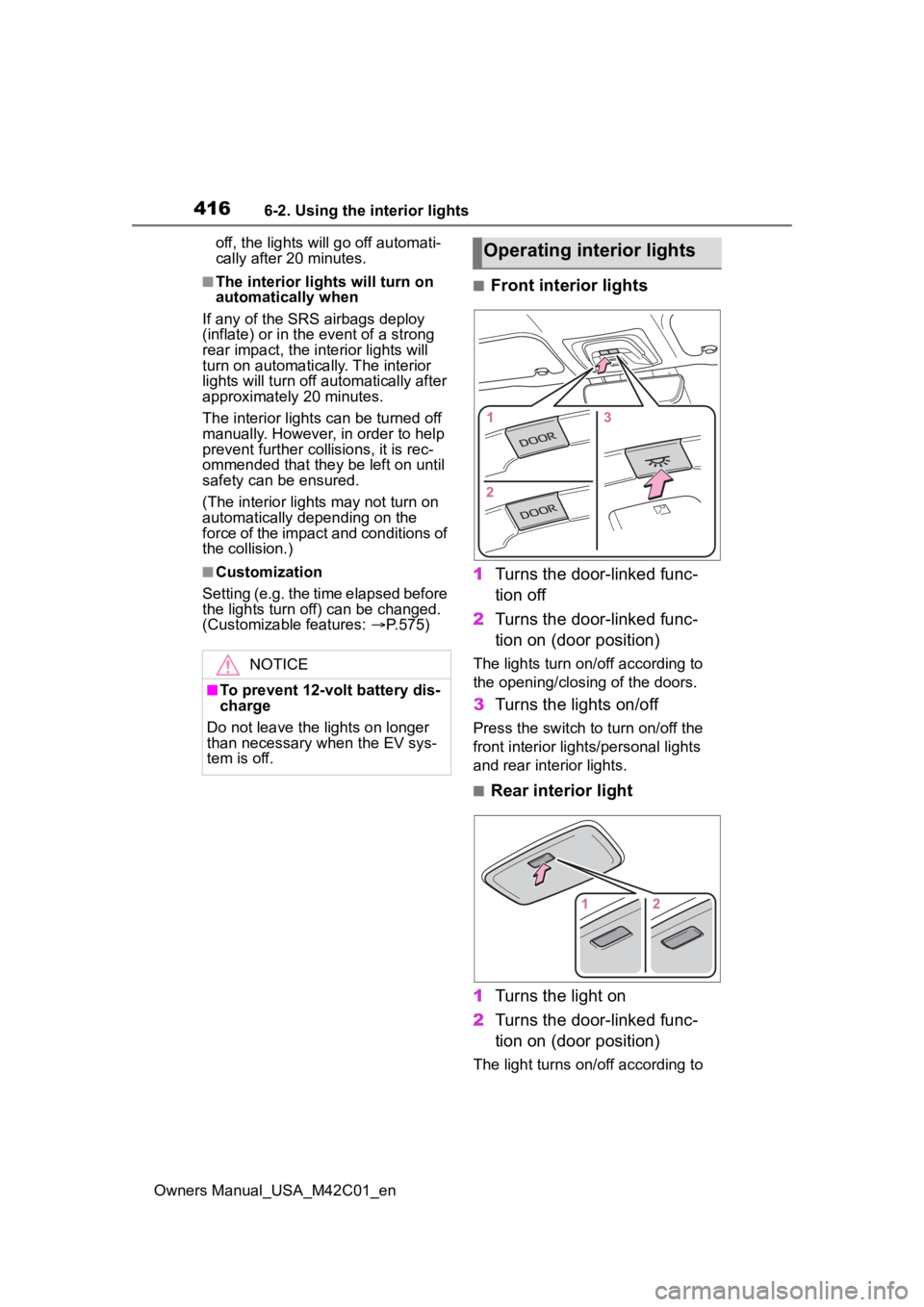
■Front interior lights
1 Turns the door-linked func-
tion off
2 Turns the door-linked func-
tion on (door position)
The lights turn on/off according to
the opening/closing of the doors.
3Turns the lights on/off
Press the switch to turn on/off the
front interior lights/personal lights
and rear interior lights.
■Rear interior light
1 Turns the light on
2 Turns the door-linked func-
tion on (door position)
The light turns on/off according to
NOTICE
■To prevent 12-volt battery dis-
charge
Do not leave the lights on longer
than necessary when the EV sys-
tem is off.
Operating interior lights
Page 417 of 628
4176-2. Using the interior lights
Owners Manual_USA_M42C01_en
6
Interior features
the opening/closing of the doors.
The rear interior light turn on/off
together the front interior light.
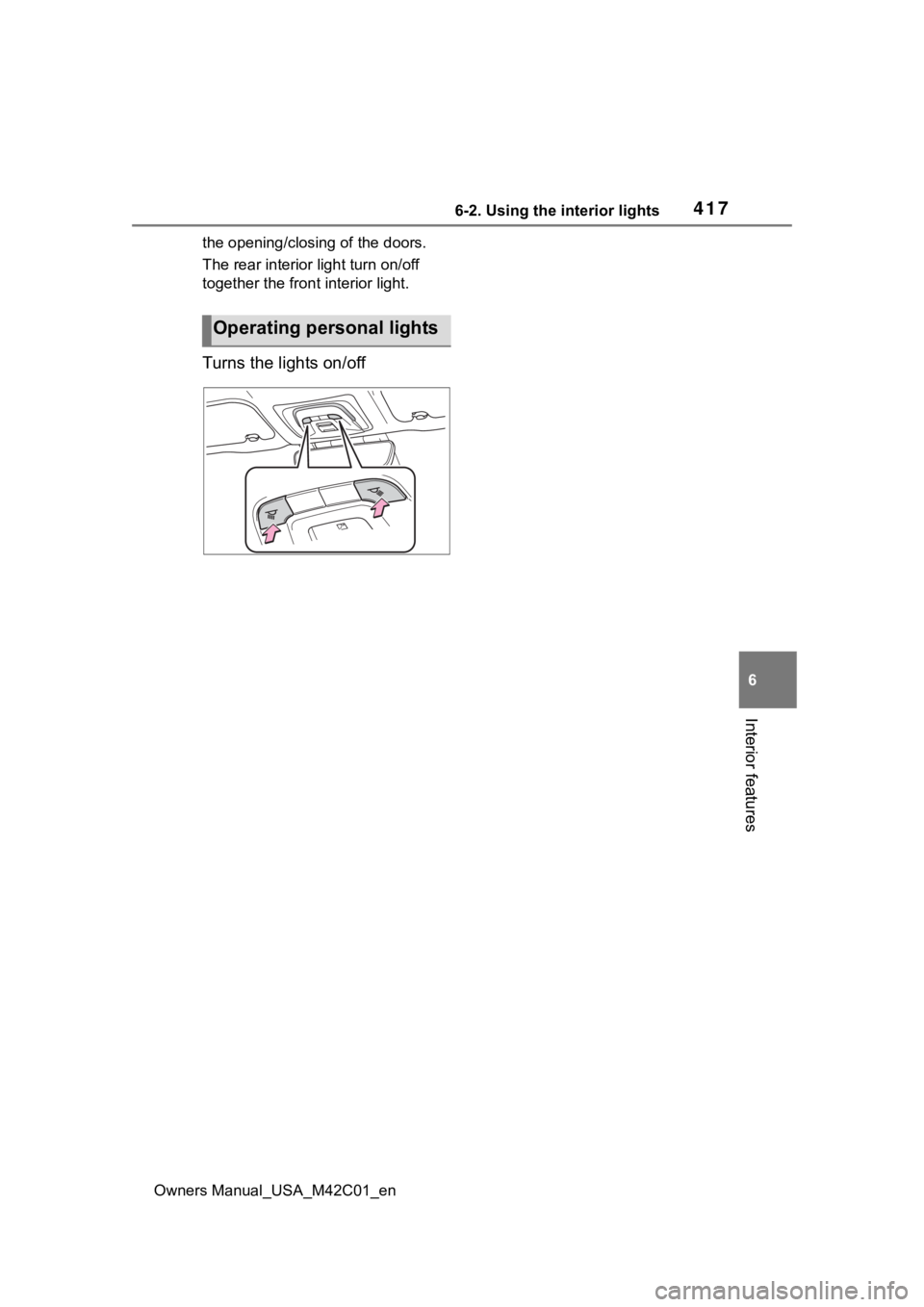
Turns the lights on/off
Operating personal lights
Page 428 of 628
4286-4. Using the other interior features
Owners Manual_USA_M42C01_en
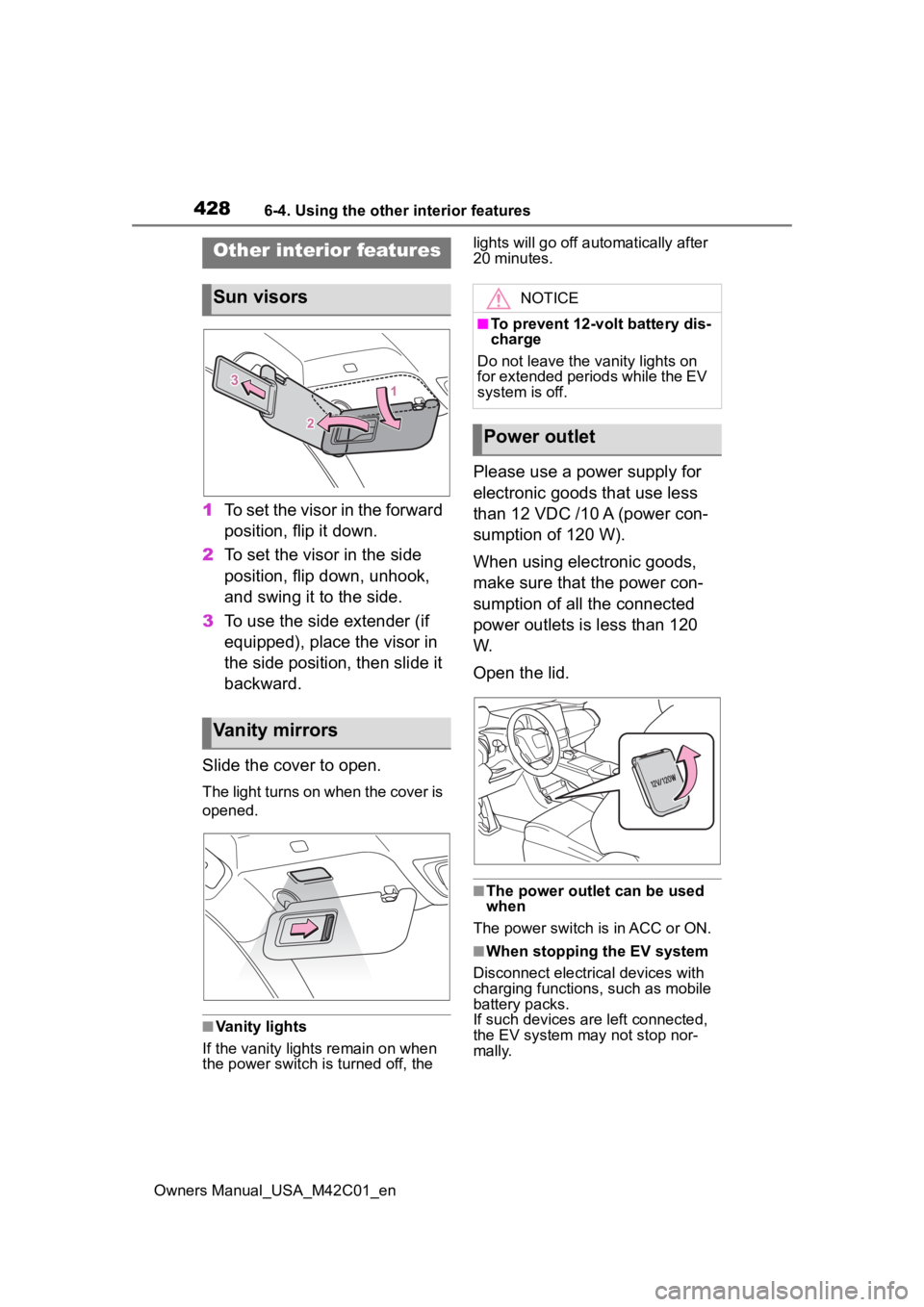
1To set the visor in the forward
position, flip it down.
2 To set the visor in the side
position, flip down, unhook,
and swing it to the side.
3 To use the side extender (if
equipped), place the visor in
the side position, then slide it
backward.
Slide the cover to open.
The light turns on when the cover is
opened.
■Vanity lights
If the vanity light s remain on when
the power switch is turned off, the lights will go off automatically after
20 minutes.
Please use a power supply for
electronic goods that use less
than 12 VDC /10 A (power con-
sumption of 120 W).
When using electronic goods,
make sure that the power con-
sumption of all the connected
power outlets is less than 120
W.
Open the lid.
■The power outlet can be used
when
The power switch is in ACC or ON.
■When stopping the EV system
Disconnect electrical devices with
charging functions, such as mobile
battery packs.
If such devices are left connected,
the EV system may not stop nor-
mally.
Other interior features
Sun visors
Vanity mirrors
NOTICE
■To prevent 12-volt battery dis-
charge
Do not leave the vanity lights on
for extended periods while the EV
system is off.
Power outlet
Page 429 of 628
4296-4. Using the other interior features
Owners Manual_USA_M42C01_en
6
Interior features
The USB Type-C charging ports
are used to supply 3 A of elec-
tricity at 5 V to external devices.
The USB Type-C charging ports
are for charging only. They are
not designed for data transfer or
other purposes. Depending on the external
device, it may not charge prop-
erly. Refer to the manual
included with the device before
using a USB charging port.
Refer to “MULTIMEDIA
OWNER’S MANUAL” for USB
Type-A information.
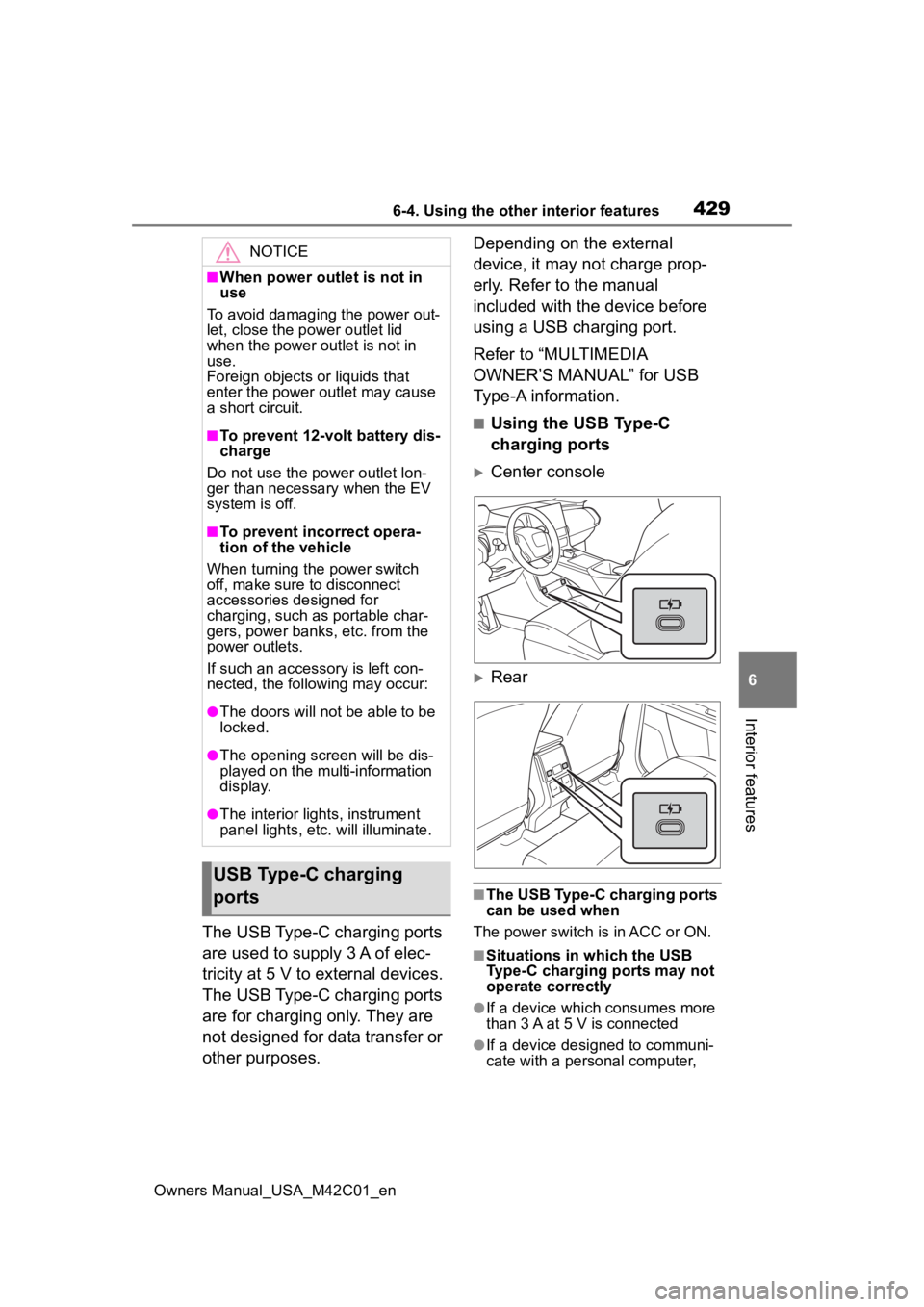
■Using the USB Type-C
charging ports
Center console
Rear
■The USB Type-C charging ports
can be used when
The power switch is in ACC or ON.
■Situations in which the USB
Type-C charging ports may not
operate correctly
●If a device which consumes more
than 3 A at 5 V is connected
●If a device designed to communi-
cate with a personal computer,
NOTICE
■When power outlet is not in
use
To avoid damaging the power out-
let, close the p ower outlet lid
when the power outlet is not in
use.
Foreign objects or liquids that
enter the power outlet may cause
a short circuit.
■To prevent 12-volt battery dis-
charge
Do not use the power outlet lon-
ger than necessary when the EV
system is off.
■To prevent incorrect opera-
tion of the vehicle
When turning the power switch
off, make sure to disconnect
accessories designed for
charging, such as portable char-
gers, power banks, etc. from the
power outlets.
If such an accessory is left con-
nected, the following may occur:
●The doors will not be able to be
locked.
●The opening scr een will be dis-
played on the multi-information
display.
●The interior lights, instrument
panel lights, etc. will illuminate.
USB Type-C charging
ports
Page 450 of 628
4507-1. Maintenance and care
Owners Manual_USA_M42C01_en
WARNING
●If something bumps against the
windshield
●If you directly touch the raindrop
sensor body or if something
bumps into the raindrop sensor
■Precaution regarding the rear
bumper
If the paint of the rear bumper is
chipped or scratched, the system
may malfunction. If this occurs,
consult your Toyota dealer.
●Toyota Safety Sense 3.0
●BSM (if equipped)
●RCTA (if equipped)
●PKSB (if equipped)
NOTICE
■To prevent paint deteriora-
tion and corrosion on the
body and components (alumi-
num wheels, etc.)
●Wash the vehicle immediately in
the following cases:
• After driving near the sea coast
• After driving on salted roads
• If coal tar or tre e sap is present
on the paint surface
• If dead insects, insect droppings or bird droppings are present on
the paint surface
• After driving in an area contami- nated with soot, oily smoke,
mine dust, iron powder or chem-
ical substances
• If the vehicle becomes heavily soiled with dust or mud
• If liquids such as benzene and gasoline are spilled on the paint
surface
●If the paint is chipped or
scratched, have it repaired
immediately.
●To prevent the wheels from cor-
roding, remove any dirt and
store in a place with low humid-
ity when storing the wheels.
■Cleaning the exterior lights
●Wash carefully. Do not use
organic substances or scrub
with a hard brush.
This may damage the surfaces
of the lights.
●Do not apply wax to the sur-
faces of the lights.
Wax may cause damage to the
lenses.
■When using an automatic car
wash (vehicles with rain-
sensing windshield wipers)
Set the wiper switch to off posi-
tion.
If the wiper switch is in “AUTO”,
the wipers may operate and the
wiper blades may be damaged.
■When using a high pressure
car wash
●When washing the vehicle, do
not spray the camera or its sur-
rounding area directly with a
high pressure washer. Shock
applied from high pressure
water may cause the device to
not operate normally.
●Do not spray water directly on
the radar which is equipped
behind the radar sensor cover.
Otherwise it may cause the
device to be damaged.
●Do not bring the nozzle tip close
to boots (rubber or resin manu-
factured cover), or connectors
or the following parts.
The parts may be damaged if
they come into contact with
high-pressure water.
Page 457 of 628
4577-2. Maintenance
Owners Manual_USA_M42C01_en
7
Maintenance and care
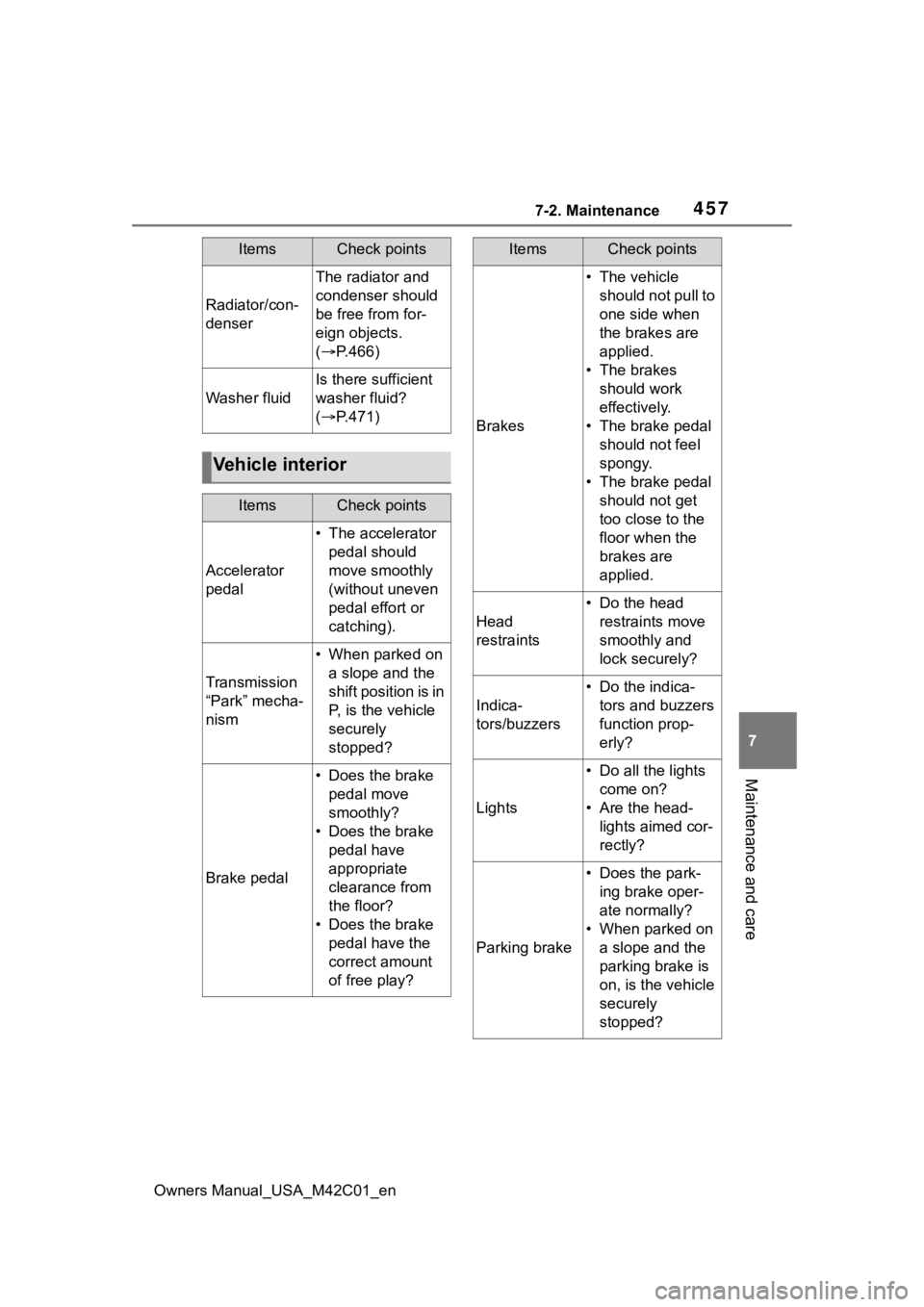
Radiator/con-
denser
The radiator and
condenser should
be free from for-
eign objects.
( P.466)
Washer fluid
Is there sufficient
washer fluid?
( P.471)
Vehicle interior
ItemsCheck points
Accelerator
pedal
• The accelerator
pedal should
move smoothly
(without uneven
pedal effort or
catching).
Transmission
“Park” mecha-
nism
• When parked on a slope and the
shift position is in
P, is the vehicle
securely
stopped?
Brake pedal
• Does the brake pedal move
smoothly?
• Does the brake pedal have
appropriate
clearance from
the floor?
• Does the brake pedal have the
correct amount
of free play?
ItemsCheck points
Brakes
• The vehicle should not pull to
one side when
the brakes are
applied.
• The brakes should work
effectively.
• The brake pedal should not feel
spongy.
• The brake pedal should not get
too close to the
floor when the
brakes are
applied.
Head
restraints
• Do the head restraints move
smoothly and
lock securely?
Indica-
tors/buzzers
• Do the indica-tors and buzzers
function prop-
erly?
Lights
• Do all the lights come on?
• Are the head- lights aimed cor-
rectly?
Parking brake
• Does the park-ing brake oper-
ate normally?
• When parked on a slope and the
parking brake is
on, is the vehicle
securely
stopped?
ItemsCheck points
Page 495 of 628
4957-3. Do-it-yourself maintenance
Owners Manual_USA_M42C01_en
7
Maintenance and care
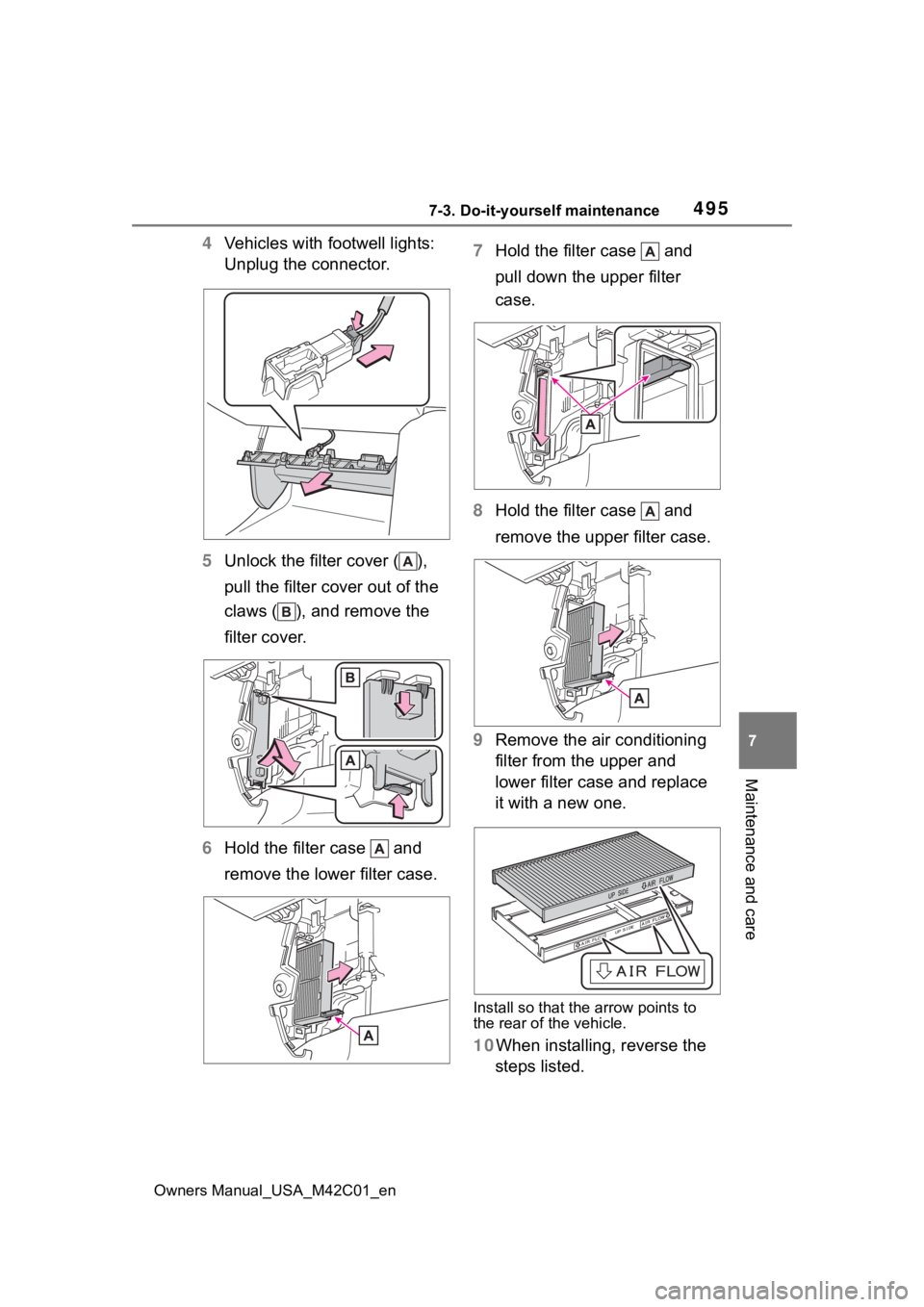
4 Vehicles with footwell lights:
Unplug the connector.
5 Unlock the filter cover ( ),
pull the filter cover out of the
claws ( ), and remove the
filter cover.
6 Hold the filter case and
remove the lower filter case. 7
Hold the filter case and
pull down the upper filter
case.
8 Hold the filter case and
remove the upper filter case.
9 Remove the air conditioning
filter from the upper and
lower filter case and replace
it with a new one.
Install so that the arrow points to
the rear of the vehicle.
10When installing, reverse the
steps listed.