lights SUBARU SOLTERRA 2023 Owner's Manual
[x] Cancel search | Manufacturer: SUBARU, Model Year: 2023, Model line: SOLTERRA, Model: SUBARU SOLTERRA 2023Pages: 628, PDF Size: 11.91 MB
Page 147 of 628
147
Owners Manual_USA_M42C01_en
3
3
Vehicle status information and indicators
Vehicle status informa-tion and indicators
3-1. Instrument cluster
Warning lights and indica-tors ............................ 148
Gauges and meters .... 152
Multi-information display .................................. 155
Page 148 of 628
1483-1. Instrument cluster
Owners Manual_USA_M42C01_en
3-1.Instrument cluster
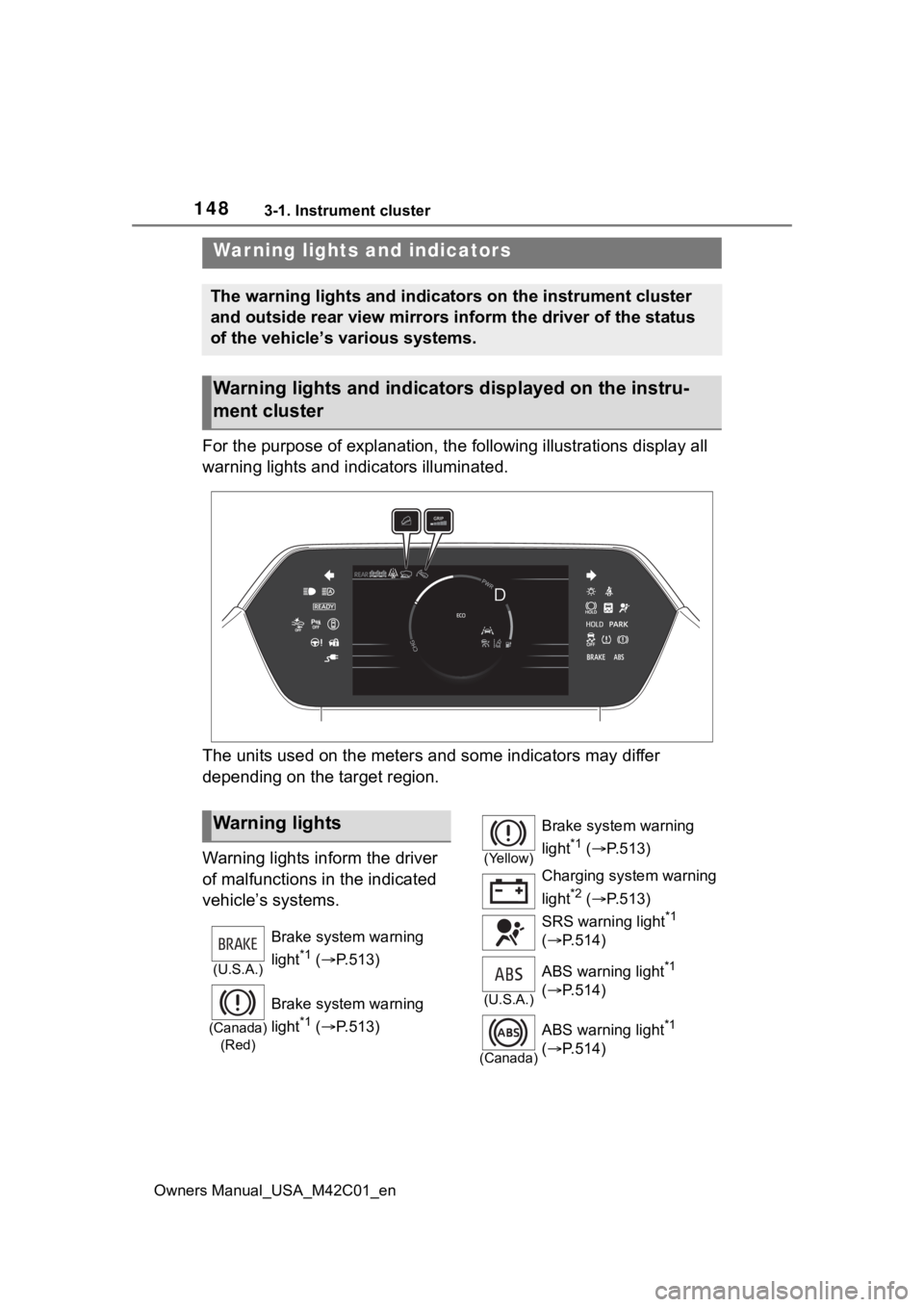
For the purpose of explanation, the following illustrations display all
warning lights and indicators illuminated.
The units used on the meters and some indicators may differ
depending on the target region.
Warning lights inform the driver
of malfunctions in the indicated
vehicle’s systems.
War ning lights and indicators
The warning lights and indicators on the instrument cluster
and outside rear view mirrors inform the driver of the status
of the vehicle’s various systems.
Warning lights and indicators displayed on the instru-
ment cluster
Warning lights
(U.S.A.)
Brake system warning
light
*1 ( P.513)
(Canada)
(Red)
Brake system warning
light
*1 ( P.513)
(Yellow)
Brake system warning
light
*1 ( P.513)
Charging system warning
light
*2 ( P.513)
SRS warning light
*1
( P.514)
(U.S.A.)
ABS warning light*1
( P.514)
(Canada)
ABS warning light*1
( P.514)
Page 149 of 628
1493-1. Instrument cluster
Owners Manual_USA_M42C01_en
3
Vehicle status information and indicators
*1: These lights come on when the power switch is turned to ON to
indicate that a system check is
being performed. They will turn
off after the EV system is started,
or after a few seconds. There
may be a malfunction in a sys-
tem if the lights do not come on,
or turn off. Have the vehicle
inspected by your Toyota dealer.
*2: This light illuminates on the multi-information display with a
message.
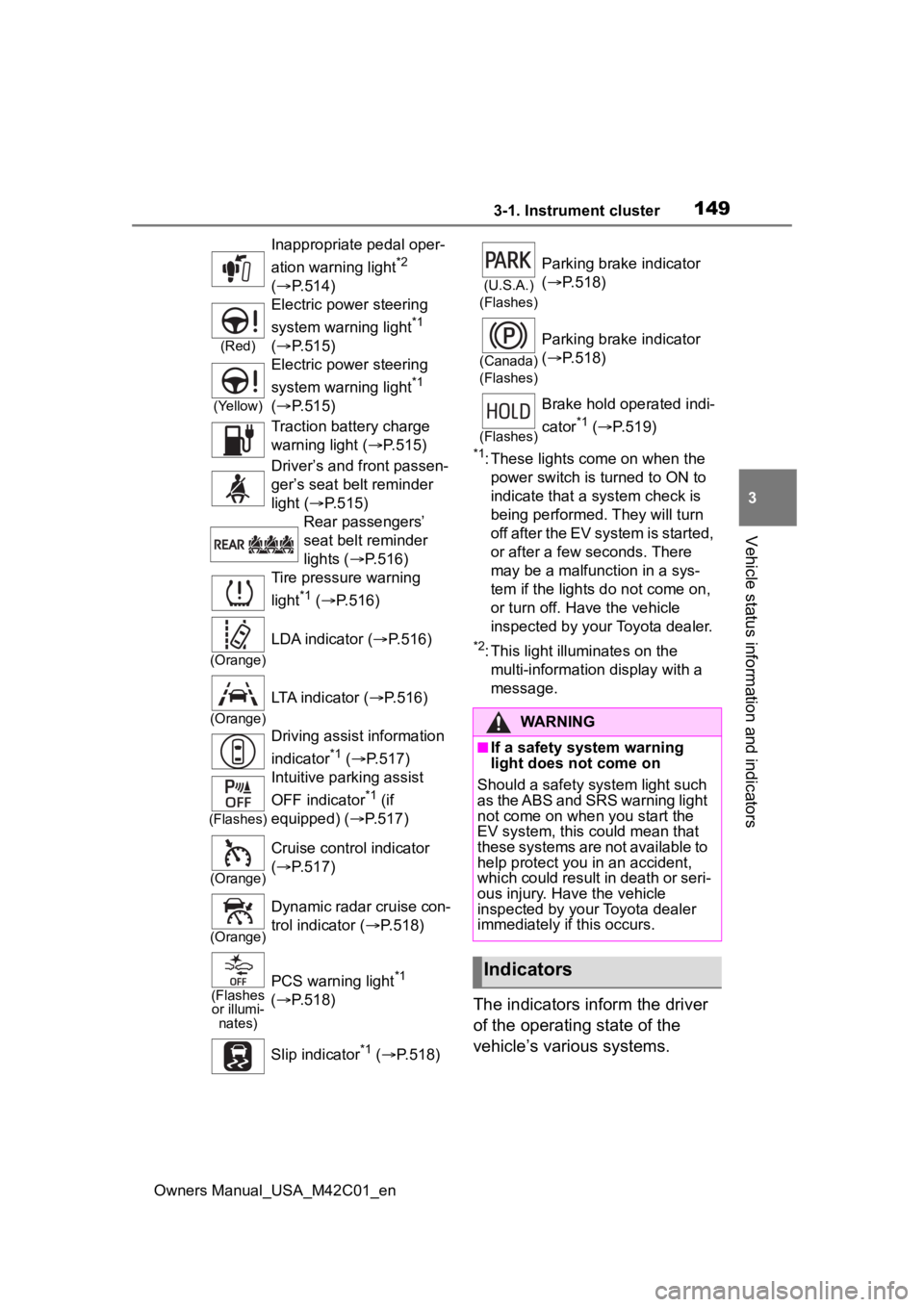
The indicators inform the driver
of the operating state of the
vehicle’s various systems.
Inappropriate pedal oper-
ation warning light
*2
( P.514)
(Red)
Electric power steering
system warning light
*1
( P.515)
(Yellow)
Electric power steering
system warning light
*1
( P.515)
Traction battery charge
warning light ( P.515)
Driver’s and front passen-
ger’s seat belt reminder
light ( P.515)
Rear passengers’
seat belt reminder
lights ( P.516)
Tire pressure warning
light
*1 ( P.516)
(Orange)
LDA indicator ( P.516)
(Orange)
LTA indicator (P.516)
Driving assist information
indicator
*1 ( P.517)
(Flashes)
Intuitive parking assist
OFF indicator
*1 (if
equipped) ( P.517)
(Orange)
Cruise control indicator
( P.517)
(Orange)
Dynamic radar cruise con-
trol indicator ( P.518)
(Flashes
or illumi- nates)PCS warning light*1
( P.518)
Slip indicator
*1 ( P.518)
(U.S.A.)
(Flashes)
Parking brake indicator
( P.518)
(Canada)
(Flashes)
Parking brake indicator
( P.518)
(Flashes)
Brake hold operated indi-
cator
*1 ( P.519)
WARNING
■If a safety system warning
light does not come on
Should a safety system light such
as the ABS and SRS warning light
not come on when you start the
EV system, this c ould mean that
these systems are not available to
help protect you in an accident,
which could result in death or seri-
ous injury. Have the vehicle
inspected by you r Toyota dealer
immediately if this occurs.
Indicators
Page 151 of 628
1513-1. Instrument cluster
Owners Manual_USA_M42C01_en
3
Vehicle status information and indicators
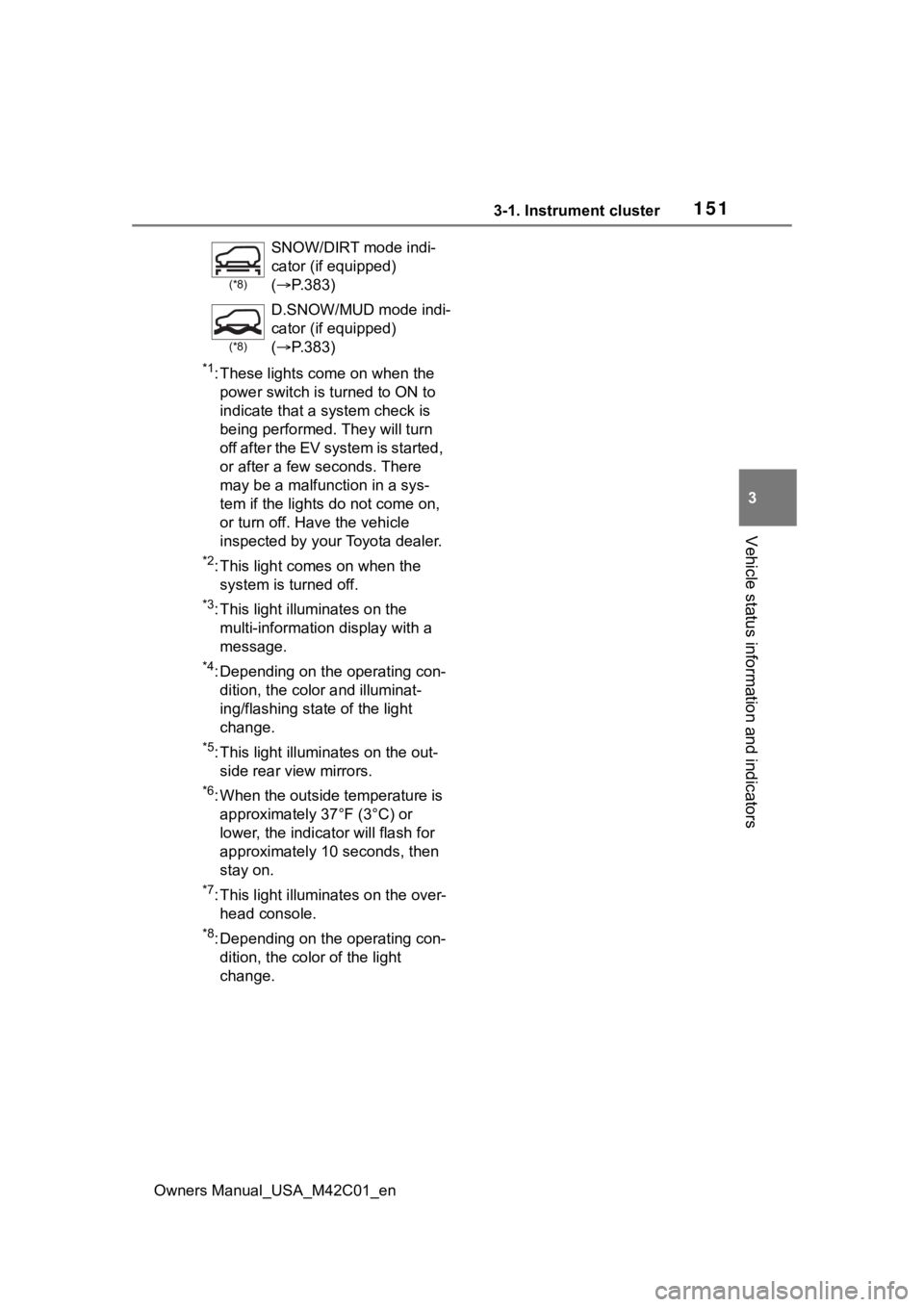
*1: These lights come on when the power switch is turned to ON to
indicate that a system check is
being performed. They will turn
off after the EV system is started,
or after a few seconds. There
may be a malfunction in a sys-
tem if the lights do not come on,
or turn off. Have the vehicle
inspected by your Toyota dealer.
*2: This light comes on when the system is turned off.
*3: This light illuminates on the multi-informatio n display with a
message.
*4: Depending on the operating con- dition, the color and illuminat-
ing/flashing state of the light
change.
*5: This light illumi nates on the out-
side rear view mirrors.
*6: When the outside temperature is approximately 37°F (3°C) or
lower, the indica tor will flash for
approximately 10 seconds, then
stay on.
*7: This light illuminates on the over- head console.
*8: Depending on the operating con-dition, the color of the light
change.
(*8)
SNOW/DIRT mode indi-
cator (if equipped)
( P.383)
(*8)
D.SNOW/MUD mode indi-
cator (if equipped)
( P.383)
Page 155 of 628
1553-1. Instrument cluster
Owners Manual_USA_M42C01_en
3
Vehicle status information and indicators
If is displayed when is
selected on the mu lti-information
display, the system may be malfunc-
tioning.
Have the vehicle inspected by your
Toyota dealer.
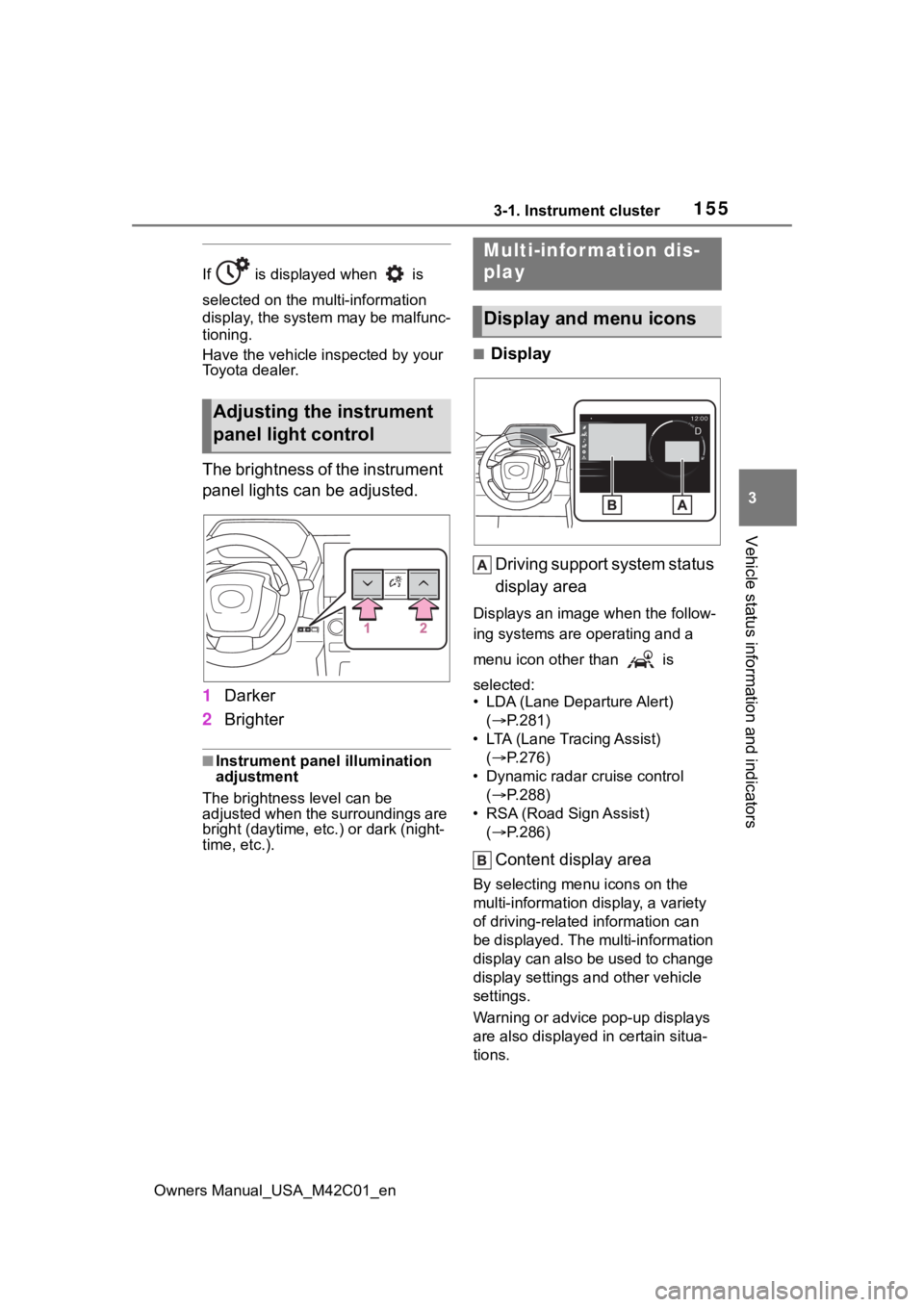
The brightness of the instrument
panel lights can be adjusted.
1 Darker
2 Brighter
■Instrument panel illumination
adjustment
The brightness level can be
adjusted when the surroundings are
bright (daytime, etc.) or dark (night-
time, etc.).
■Display
Driving support system status
display area
Displays an image when the follow-
ing systems are operating and a
menu icon other than is
selected:
• LDA (Lane Departure Alert) ( P.281)
• LTA (Lane Tracing Assist) ( P.276)
• Dynamic radar cruise control ( P.288)
• RSA (Road Sign Assist) ( P.286)
Content display area
By selecting menu icons on the
multi-information di splay, a variety
of driving-related information can
be displayed. The multi-information
display can also be used to change
display settings and other vehicle
settings.
Warning or advice pop-up displays
are also displayed in certain situa-
tions.
Adjusting the instrument
panel light control
Multi-infor mation dis-
play
Display and menu icons
Page 159 of 628
1593-1. Instrument cluster
Owners Manual_USA_M42C01_en
3
Vehicle status information and indicators
• Power consumption display
Select to change the average
power consumption display Trip
Average/Total Average. ( P.157)
Select to display/not display the
audio system linked display.
Select to change the displayed con-
tent of the following:
• Display contents (AWD models
only)
Select to display/not display the
torque distribution display.
• Drive information type
Select to change the drive informa-
tion type display between after
start/after reset.
• Drive information items
Select to set the first and second
items of the drive information dis-
play to any of the following: aver-
age vehicle
speed/distance/elapsed time.
Closing Display
Select to set the i tems displayed
when the power switch is turned off.
Pop-up display
Select to enable/disable pop-up
displays for each relevant system.
Calendar
The year, month, and day can be
set.
Default setting
Select to reset the meter display settings to the default setting.
■Vehicle functions and set-
tings that can be changed
P.566
■Suspension of the settings dis-
play
●Some settings cannot be changed
while driving. When changing set-
tings, park the vehicle in a safe
place.
●If a warning message is displayed,
operation of the settings display
will be suspended.
Displays suggestions to the
driver in the following situations.
To select a response to a dis-
played suggestion, use the
meter control switches.
■Suggestion to turn on the
headlights
If the headlight switch is in other
than or , and the vehicle
speed is 3 mph (5 km/h) or
higher for a certain amount of
time when the surroundings are
dark, a suggestion message will
be displayed.
NOTICE
■During setting up the display
To prevent 12-volt battery dis-
charge, ensure that the EV sys-
tem is operating while setting up
the display features.
Suggestion function
Page 160 of 628

1603-1. Instrument cluster
Owners Manual_USA_M42C01_en
■Suggestion to turn off the
headlights
If the headlights are left on for a
certain amount of time after the
power switch has been turned
off, a suggestion message will
be displayed.
When the headlight switch is in
the AUTO position: The mes-
sage asking if you wish to turn
the headlights off is displayed.
To turn the headlights off, select
“Yes”.
If the driver’s door is opened after
the power switch is turned off, this
suggestion message will not be dis-
played.
■Customization
The suggestion function can be
turned on/off. (Customizable fea-
tures: P.566)
Page 164 of 628
1644-1. Key information
Owners Manual_USA_M42C01_en
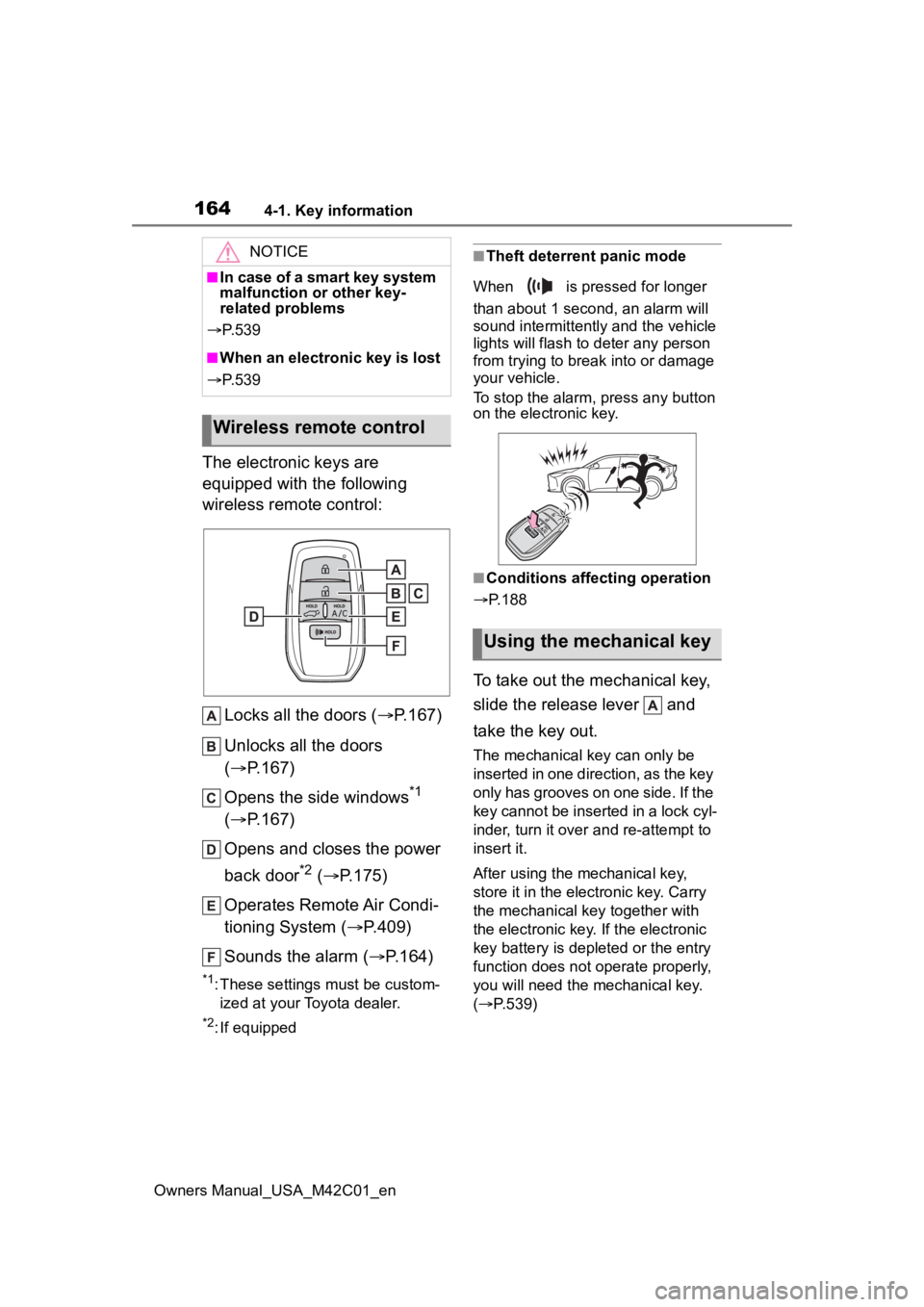
The electronic keys are
equipped with the following
wireless remote control:Locks all the doors ( P.167)
Unlocks all the doors
( P.167)
Opens the side windows
*1
( P.167)
Opens and closes the power
back door
*2 ( P.175)
Operates Remote Air Condi-
tioning System ( P.409)
Sounds the alarm ( P.164)
*1: These settings must be custom-
ized at your Toyota dealer.
*2: If equipped
■Theft deterrent panic mode
When is pressed for longer
than about 1 second, an alarm will
sound intermittently and the vehicle
lights will flash to deter any person
from trying to break into or damage
your vehicle.
To stop the alarm, press any button
on the electronic key.
■Conditions affecting operation
P.188
To take out the mechanical key,
slide the release lever and
take the key out.
The mechanical key can only be
inserted in one direction, as the key
only has grooves on one side. If the
key cannot be inserted in a lock cyl-
inder, turn it over a nd re-attempt to
insert it.
After using the mechanical key,
store it in the electronic key. Carry
the mechanical k ey together with
the electronic key. If the electronic
key battery is depleted or the entry
function does not operate properly,
you will need the mechanical key.
( P.539)
NOTICE
■In case of a smart key system
malfunction or other key-
related problems
P. 5 3 9
■When an electronic key is lost
P. 5 3 9
Wireless remote control
Using the mechanical key
Page 200 of 628
2004-4. Adjusting the steering wheel and mirrors
Owners Manual_USA_M42C01_en
*: If equipped
The height of the rear view mir-
ror can be adjusted to suit your
driving posture.
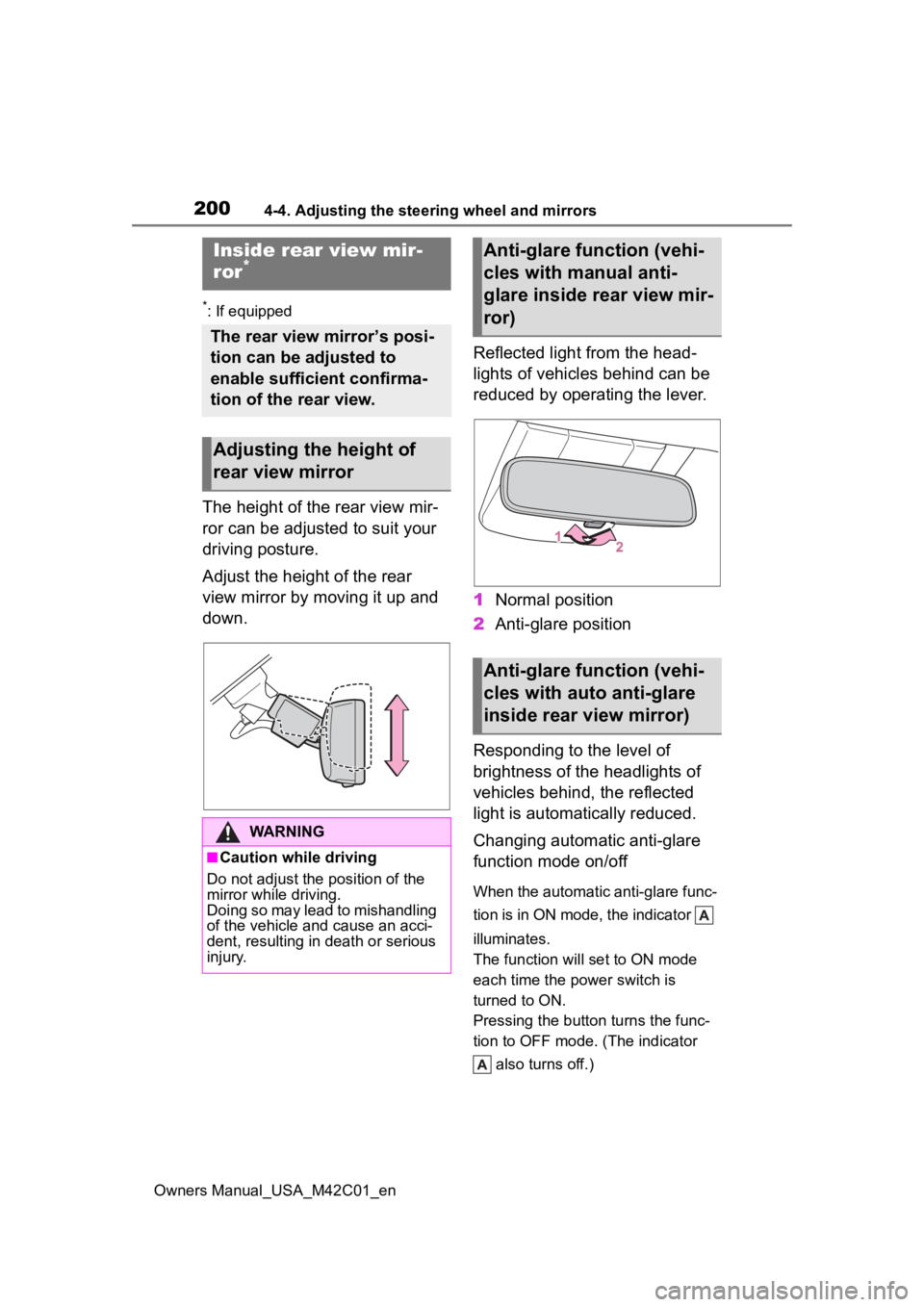
Adjust the height of the rear
view mirror by moving it up and
down.Reflected light from the head-
lights of vehicles behind can be
reduced by operating the lever.
1
Normal position
2 Anti-glare position
Responding to the level of
brightness of the headlights of
vehicles behind, the reflected
light is automatically reduced.
Changing automatic anti-glare
function mode on/off
When the automatic anti-glare func-
tion is in ON mode, the indicator
illuminates.
The function will set to ON mode
each time the power switch is
turned to ON.
Pressing the button turns the func-
tion to OFF mode. (The indicator also turns off.)
Inside rear view mir-
ror*
The rear view mirror’s posi-
tion can be adjusted to
enable sufficient confirma-
tion of the rear view.
Adjusting the height of
rear view mirror
WARNING
■Caution while driving
Do not adjust the position of the
mirror while driving.
Doing so may lead to mishandling
of the vehicle and cause an acci-
dent, resulting in death or serious
injury.
Anti-glare function (vehi-
cles with manual anti-
glare inside rear view mir-
ror)
Anti-glare function (vehi-
cles with auto anti-glare
inside rear view mirror)
Page 203 of 628
2034-4. Adjusting the steering wheel and mirrors
Owners Manual_USA_M42C01_en
4
Before driving
●If the display is difficult to see due
to reflected light, close the elec-
tronic sunshade for the panoramic
moon roof (if equipped).
●Any of the following conditions
may occur when d riving in the
dark, such as at night. None of
them indicates that a malfunction
has occurred.
• Colors of objects in the displayed image may differ f rom their actual
color.
• Depending on the height of the lights of the vehicle behind, the
area around the vehicle may
appear white and blurry.
• Automatic image adjustment for
brighter surrounding image may
cause flickering.
If it is difficult to see the displayed
image or flickering bothers you,
change to optical mirror mode.
●The Digital Rear-view Mirror may
become hot while it is in digital
mirror mode.
This is not a malfunction.
●Depending on your physical con-
dition or age, it may take longer
than usual to focus on the dis-
played image. In this case,
change to optical mirror mode.
●Do not let passengers stare at the
displayed image when the vehicle
is being driven, as doing so may
cause motion sickness.
■When the system malfunctions
If the symbol show n in the illustra-
tion is displayed when using the
Digital Rear-view Mirror in digital
mirror mode, the system may be
malfunctioning. The symbol will dis-
appear in a few seconds. Operate
the lever, change to optical mirror
mode and have the vehicle
inspected by your Toyota dealer.
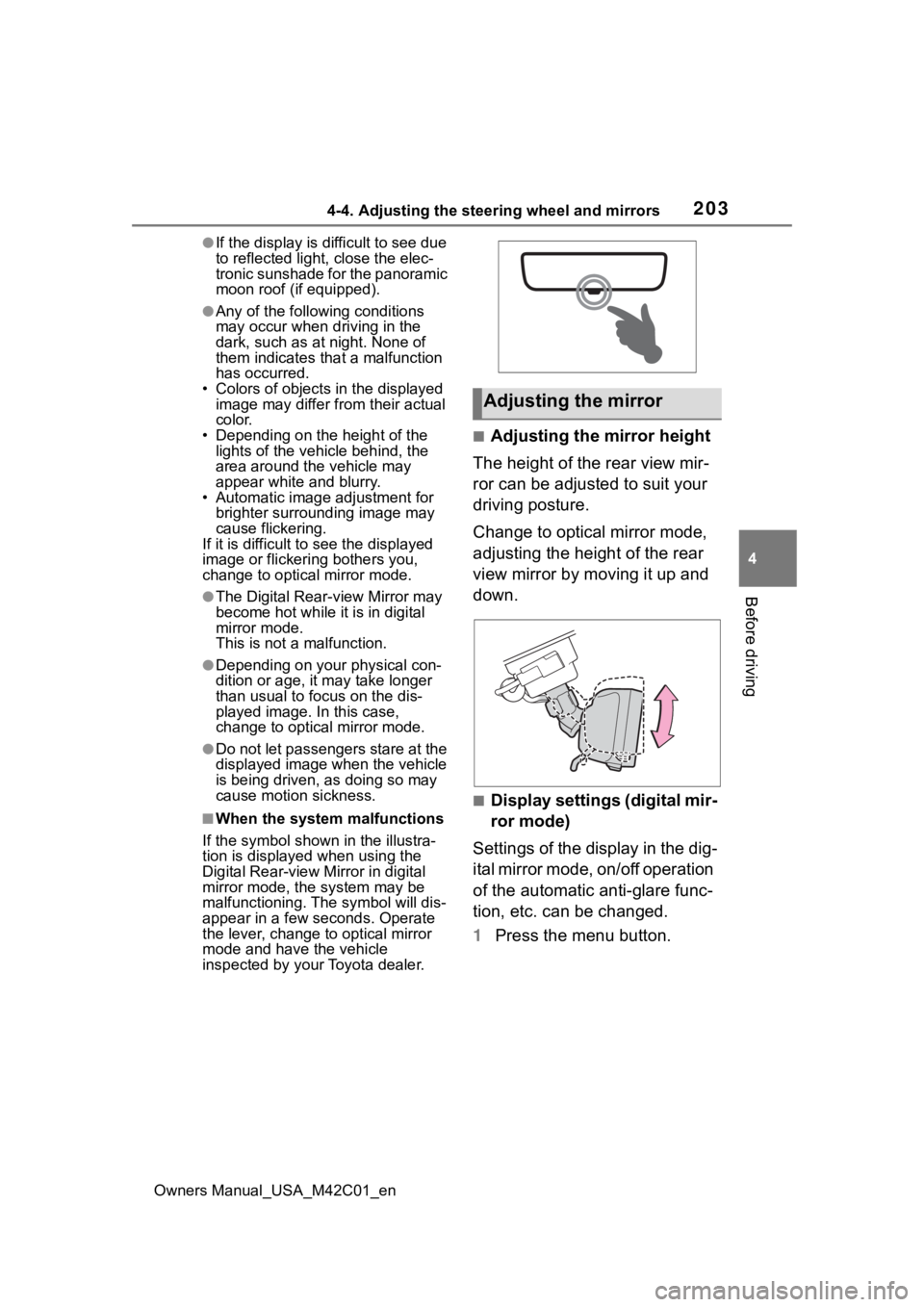
■Adjusting the mirror height
The height of the rear view mir-
ror can be adjusted to suit your
driving posture.
Change to optical mirror mode,
adjusting the height of the rear
view mirror by moving it up and
down.
■Display settings (digital mir-
ror mode)
Settings of the display in the dig-
ital mirror mode, on/off operation
of the automatic anti-glare func-
tion, etc. can be changed.
1 Press the menu button.
Adjusting the mirror