audio SUBARU SOLTERRA 2023 Owners Manual
[x] Cancel search | Manufacturer: SUBARU, Model Year: 2023, Model line: SOLTERRA, Model: SUBARU SOLTERRA 2023Pages: 628, PDF Size: 11.91 MB
Page 21 of 628
21Pictorial index
Owners Manual_USA_M42C01_en
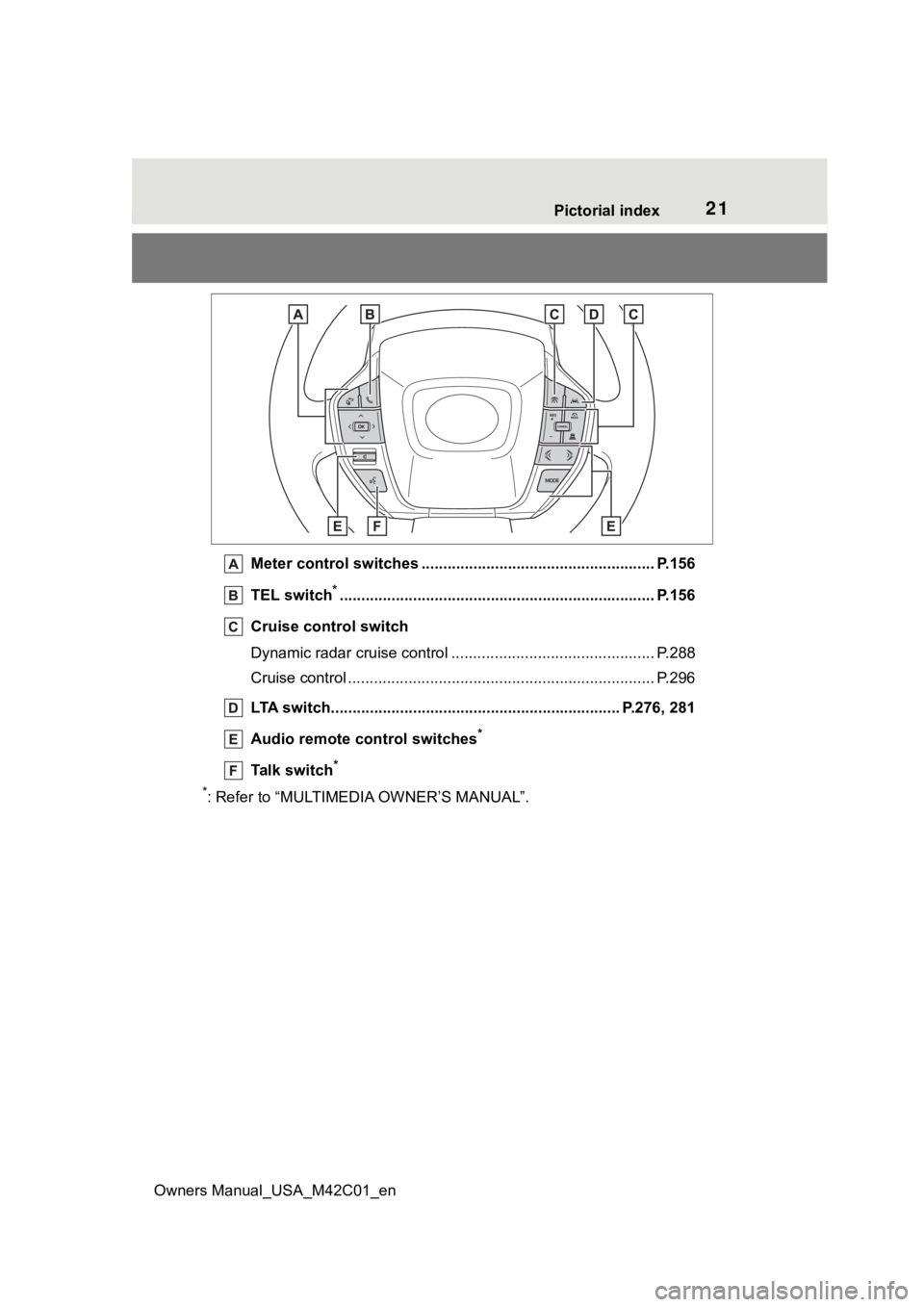
Meter control switches .. .................................................... P.156
TEL switch
*............................................................... .......... P.156
Cruise control switch
Dynamic radar cruise control ................................... ............ P.288
Cruise control ................................................. ...................... P.296
LTA switch..................................................... .............. P.276, 281
Audio remote control switches
*
Talk switch*
*
: Refer to “MULTIMEDIA OWNER’S MANUAL”.
Page 98 of 628
982-2. Charging
Owners Manual_USA_M42C01_en
■AC charging (P.105)
This is a charging method used
when charging from an AC out-
let with the AC charging cable or
charging that uses AC charger.
By setting charging schedule, it is
also possible to charge at the
desired date and time. ( P. 1 1 8 )
■DC charging ( P.113)
This is a charging method that
uses a DC charger that com-
plies with SAE J 1772. The trac-
tion battery can be charged in a
shorter time than AC charging.
SAE is an abbreviation for an
industrial standard issued by the
Society of Automotive Engi-
neers.
This vehicle is equipped with
several functions that are linked
with charging.
■My Room Mode ( P.129)
When the charging cable is con-
nected to the vehicle, electrical
components such as the air con-
ditioning system and audio sys-
WARNING
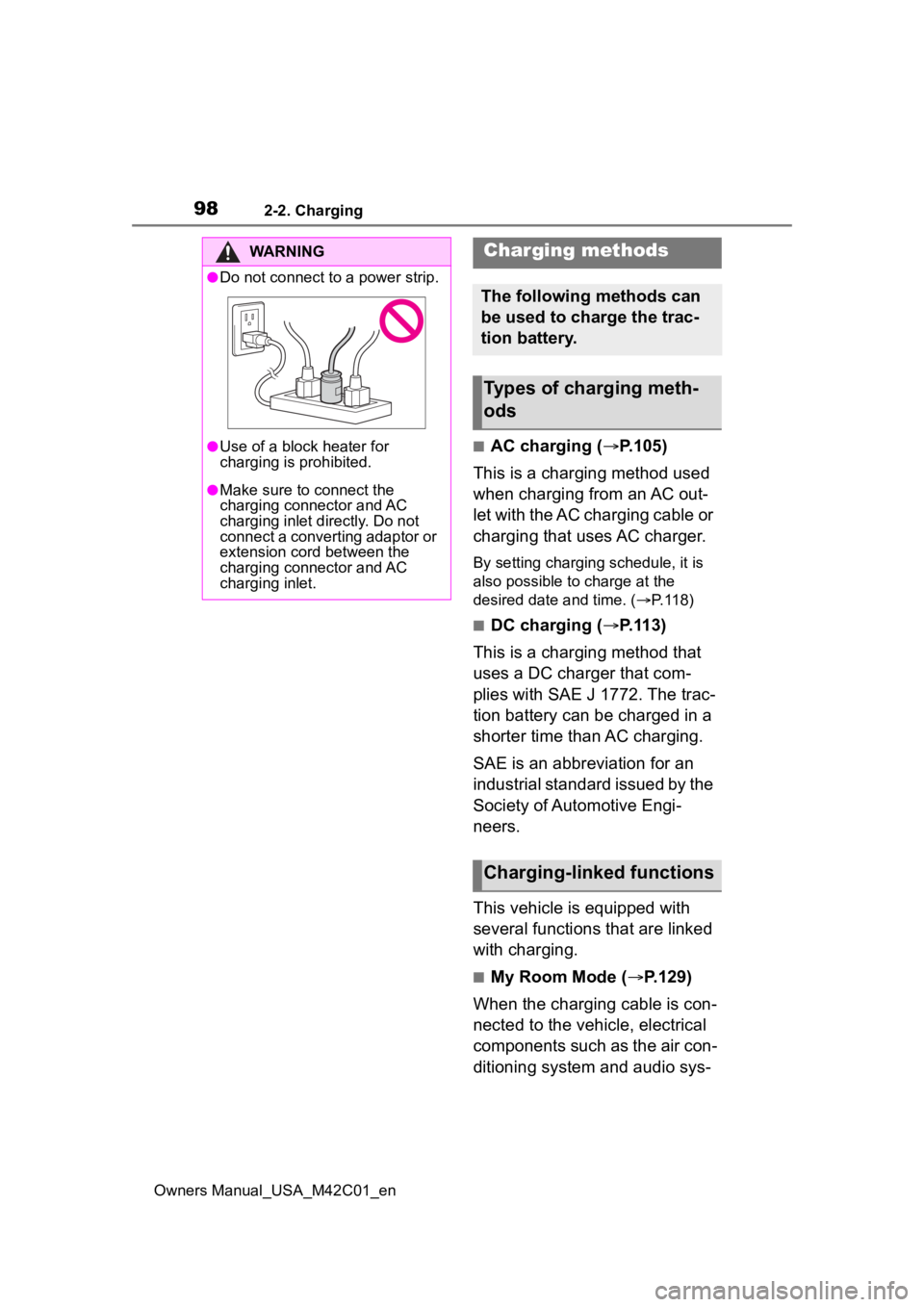
●Do not connect to a power strip.
●Use of a block heater for
charging is prohibited.
●Make sure to connect the
charging connector and AC
charging inlet directly. Do not
connect a converting adaptor or
extension cord between the
charging connector and AC
charging inlet.
Charging methods
The following methods can
be used to charge the trac-
tion battery.
Types of charging meth-
ods
Charging-linked functions
Page 125 of 628
1252-2. Charging
Owners Manual_USA_M42C01_en
2
Electric Vehicle systemFor details on how to operate
the audio system screen, refer
to “MULTIMEDIA OWNER’S
MANUAL”.
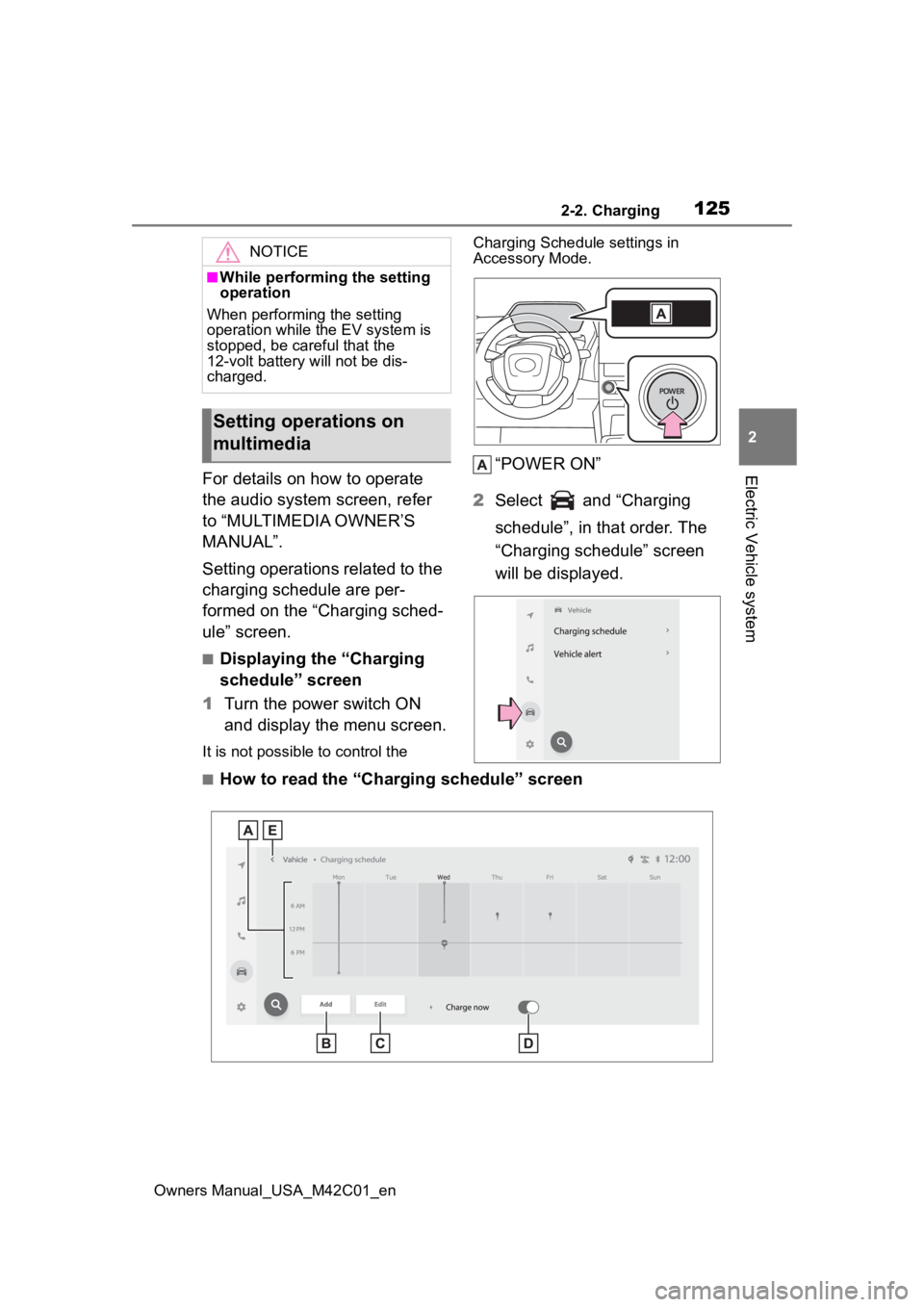
Setting operations related to the
charging schedule are per-
formed on the “Charging sched-
ule” screen.
■Displaying the “Charging
schedule” screen
1 Turn the power switch ON
and display the menu screen.
It is not possible to control the Charging Schedule settings in
Accessory Mode.
“POWER ON”
2 Select and “Charging
schedule”, in that order. The
“Charging schedule” screen
will be displayed.
■How to read the “Charging schedule” screen
NOTICE
■While performing the setting
operation
When performing the setting
operation while t he EV system is
stopped, be careful that the
12-volt battery will not be dis-
charged.
Setting operations on
multimedia
Page 129 of 628
1292-2. Charging
Owners Manual_USA_M42C01_en
2
Electric Vehicle system
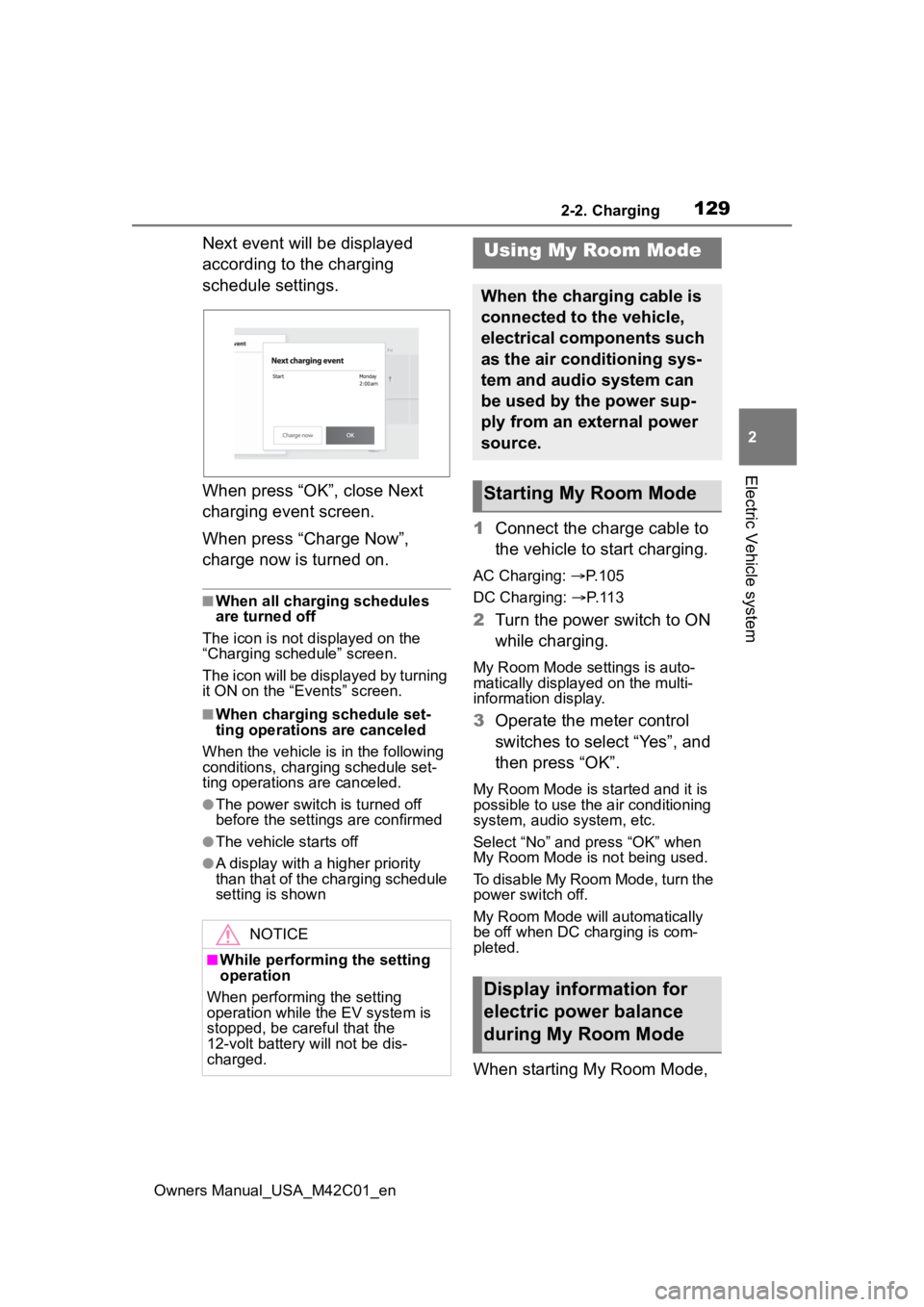
Next event will be displayed
according to the charging
schedule settings.
When press “OK”, close Next
charging event screen.
When press “Charge Now”,
charge now is turned on.
■When all charging schedules
are turned off
The icon is not displayed on the
“Charging schedule” screen.
The icon will be displayed by turning
it ON on the “Events” screen.
■When charging schedule set-
ting operations are canceled
When the vehicle is in the following
conditions, charging schedule set-
ting operations are canceled.
●The power switch is turned off
before the setting s are confirmed
●The vehicle starts off
●A display with a higher priority
than that of the charging schedule
setting is shown
1Connect the charge cable to
the vehicle to start charging.
AC Charging: P. 1 0 5
DC Charging: P. 1 1 3
2 Turn the power switch to ON
while charging.
My Room Mode settings is auto-
matically display ed on the multi-
information display.
3 Operate the meter control
switches to select “Yes”, and
then press “OK”.
My Room Mode is started and it is
possible to use the air conditioning
system, audio system, etc.
Select “No” and press “OK” when
My Room Mode is not being used.
To disable My Room Mode, turn the
power switch off.
My Room Mode will automatically
be off when DC charging is com-
pleted.
When starting My Room Mode,
NOTICE
■While performing the setting
operation
When performing the setting
operation while t he EV system is
stopped, be careful that the
12-volt battery will not be dis-
charged.
Using My Room Mode
When the charging cable is
connected to the vehicle,
electrical components such
as the air conditioning sys-
tem and audio system can
be used by the power sup-
ply from an external power
source.
Starting My Room Mode
Display information for
electric power balance
during My Room Mode
Page 131 of 628
1312-2. Charging
Owners Manual_USA_M42C01_en
2
Electric Vehicle system
traction battery may be consumed.
In this case, charging may be per- formed again.
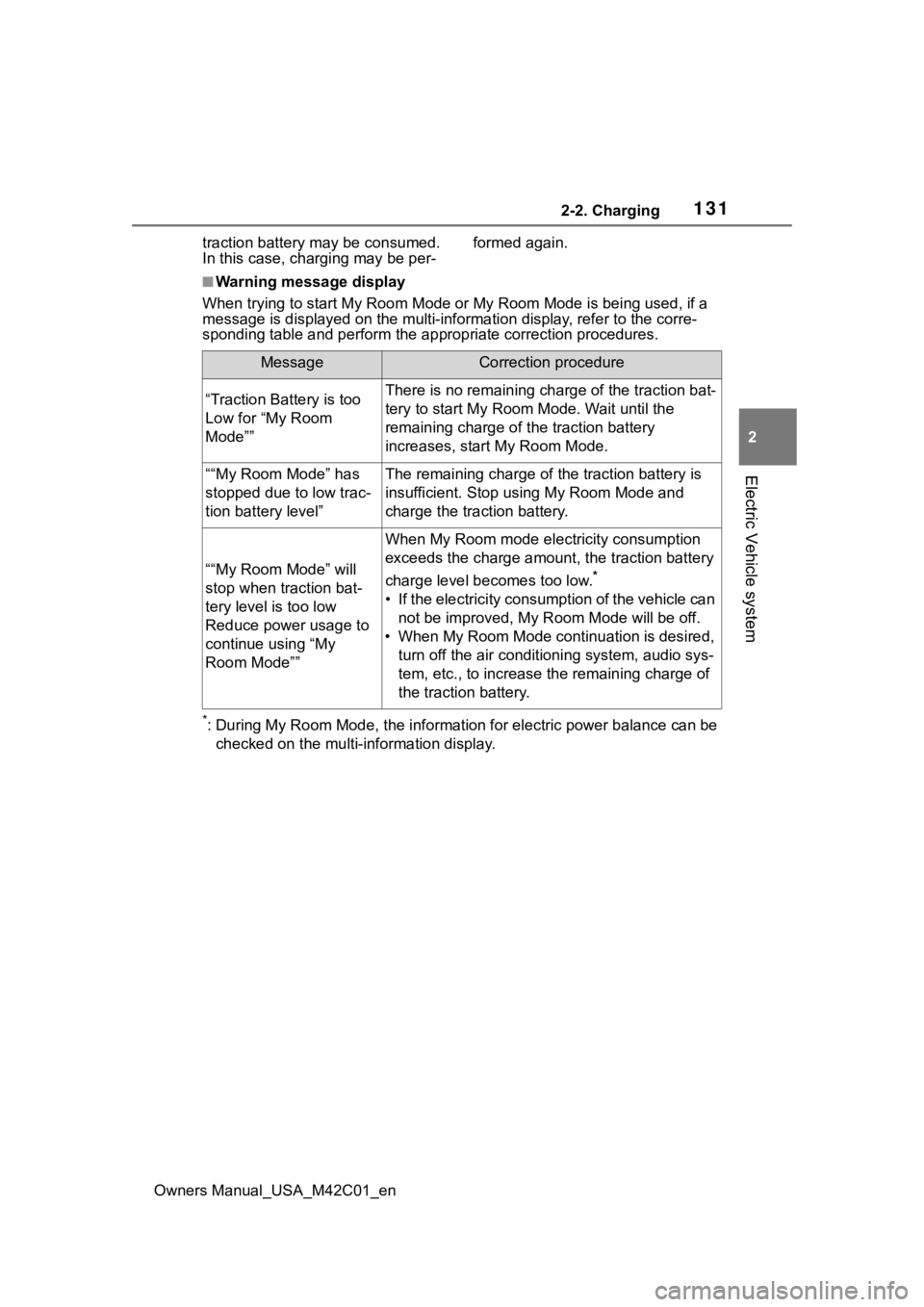
■Warning message display
When trying to start My Room Mode or My Room Mode is being used , if a
message is displayed on the multi -information display, refer to the corre-
sponding table and perform the app ropriate correction procedures.
*: During My Room Mode, the informa tion for electric power balance can be
checked on the multi-information display.
MessageCorrection procedure
“Traction Battery is too
Low for “My Room
Mode””There is no remaining charge of the traction bat-
tery to start M y Room Mode. Wait until the
remaining charge of the traction battery
increases, start My Room Mode.
““My Room Mode” has
stopped due to low trac-
tion battery level”The remaining charge of the traction battery is
insufficient. Stop using My Room Mode and
charge the traction battery.
““My Room Mode” will
stop when traction bat-
tery level is too low
Reduce power usage to
continue using “My
Room Mode””
When My Room mode electricity consumption
exceeds the charge amount, the traction battery
charge level becomes too low.
*
• If the electricity consumption of the vehicle can not be improved, My R oom Mode will be off.
• When My Room Mode continuation is desired, turn off the air conditioning system, audio sys-
tem, etc., to increase t he remaining charge of
the traction battery.
Page 143 of 628
1432-2. Charging
Owners Manual_USA_M42C01_en
2
Electric Vehicle system
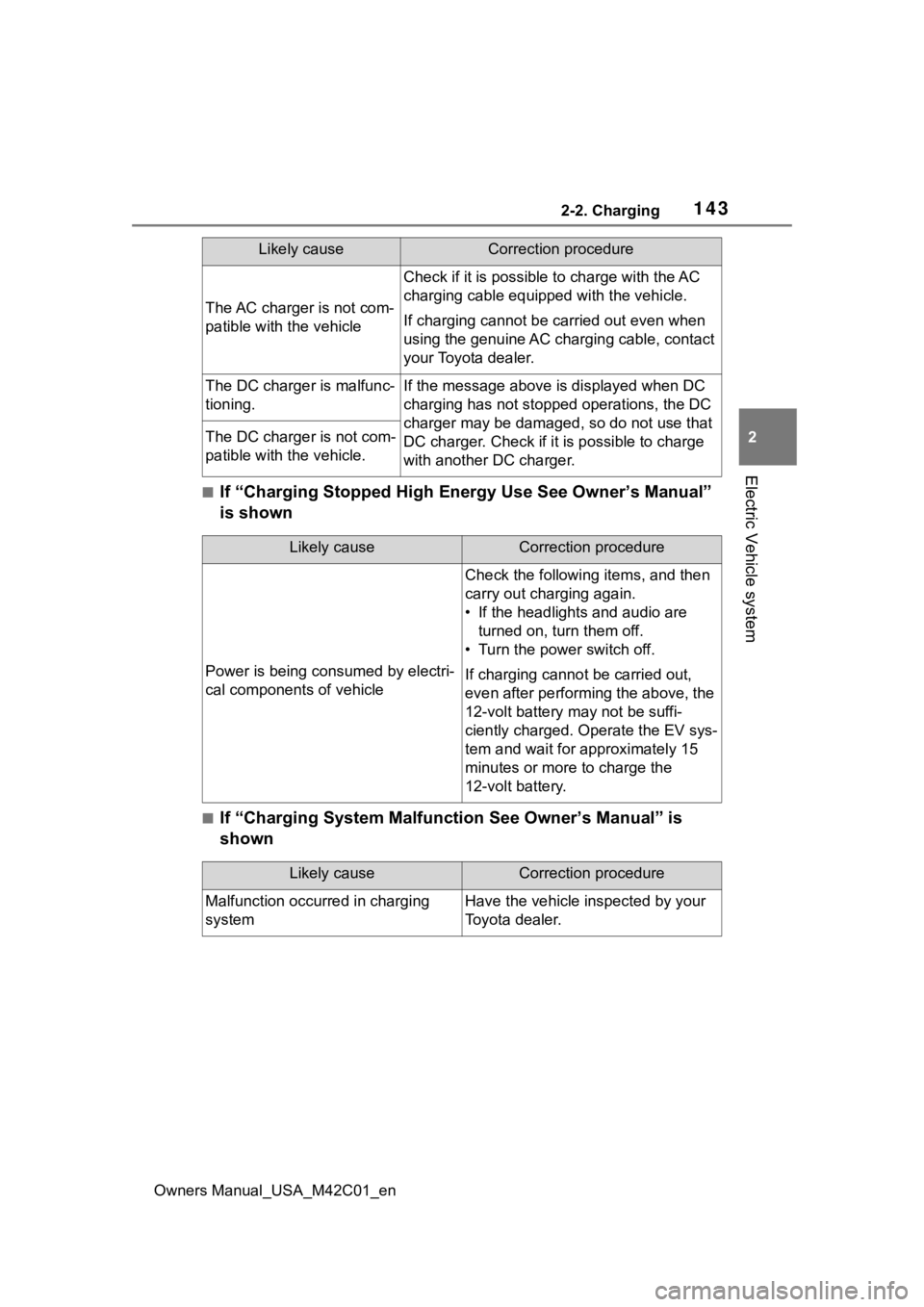
■If “Charging Stopped High Energy Use See Owner’s Manual”
is shown
■If “Charging System Malfunction See Owner’s Manual” is
shown
The AC charger is not com-
patible with the vehicle
Check if it is possible to charge with the AC
charging cable equipped with the vehicle.
If charging cannot be carried out even when
using the genuine AC charging cable, contact
your Toyota dealer.
The DC charger is malfunc-
tioning.If the message above is displayed when DC
charging has not stopp ed operations, the DC
charger may be damaged, so do not use that
DC charger. Check if it is possible to charge
with another DC charger.
The DC charger is not com-
patible with the vehicle.
Likely causeCorrection procedure
Likely causeCorrection procedure
Power is being consumed by electri-
cal components of vehicle
Check the following items, and then
carry out charging again.
• If the headlights and audio are turned on, tur n them off.
• Turn the power switch off.
If charging cannot be carried out,
even after performing the above, the
12-volt battery may not be suffi-
ciently charged. Operate the EV sys-
tem and wait for approximately 15
minutes or more to charge the
12-volt battery.
Likely causeCorrection procedure
Malfunction occurred in charging
systemHave the vehicle inspected by your
Toyota dealer.
Page 144 of 628
1442-2. Charging
Owners Manual_USA_M42C01_en
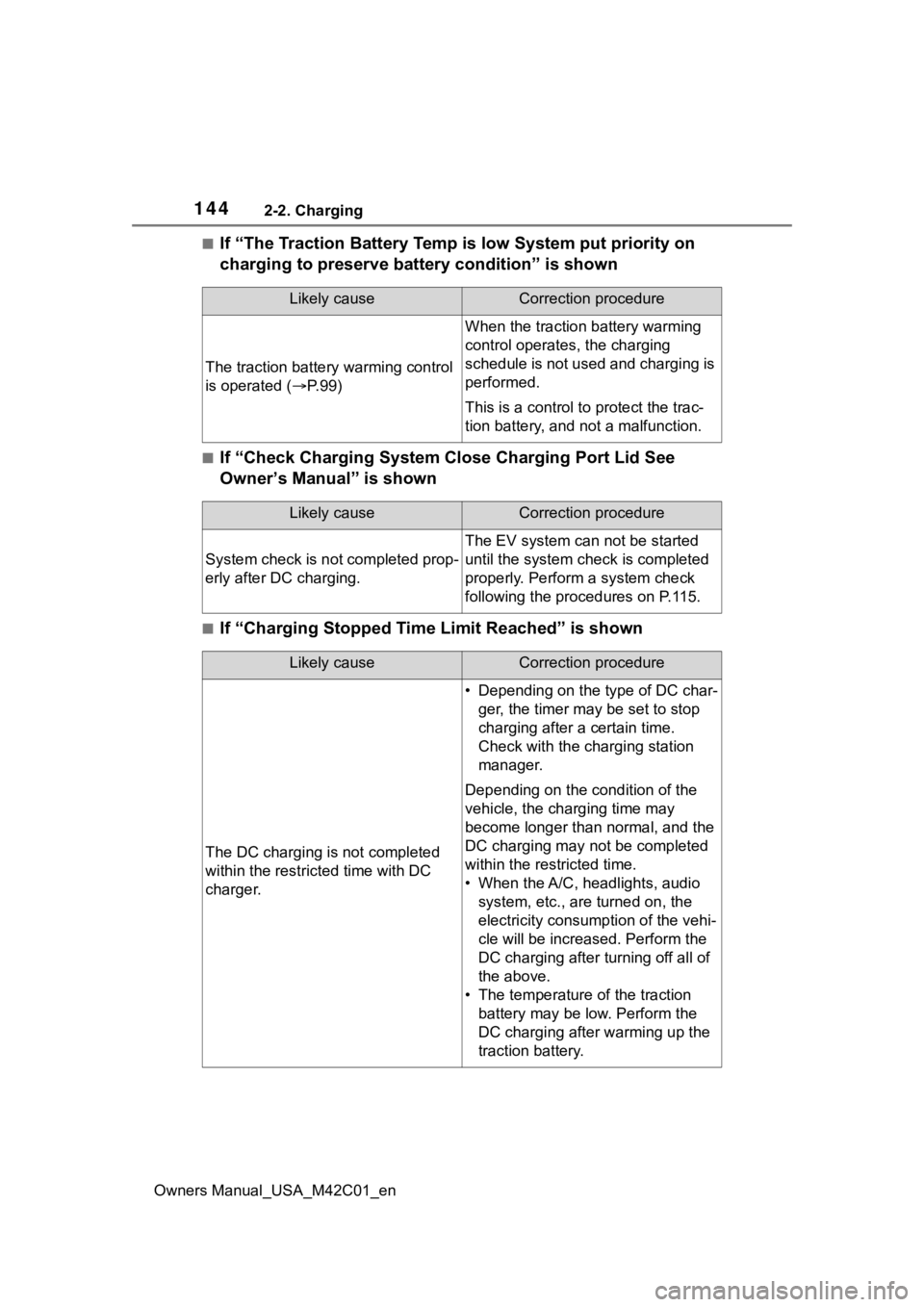
■If “The Traction Battery Temp is low System put priority on
charging to preserve battery condition” is shown
■If “Check Charging System Close Charging Port Lid See
Owner’s Manual” is shown
■If “Charging Stopped Time Limit Reached” is shown
Likely causeCorrection procedure
The traction battery warming control
is operated ( P. 9 9 )
When the traction battery warming
control operates, the charging
schedule is not used and charging is
performed.
This is a control to protect the trac-
tion battery, and not a malfunction.
Likely causeCorrection procedure
System check is not completed prop-
erly after DC charging.
The EV system can not be started
until the system check is completed
properly. Perform a system check
following the procedures on P.115.
Likely causeCorrection procedure
The DC charging is not completed
within the restric ted time with DC
charger.
• Depending on the type of DC char- ger, the timer may be set to stop
charging after a certain time.
Check with the charging station
manager.
Depending on the condition of the
vehicle, the charging time may
become longer than normal, and the
DC charging may not be completed
within the restricted time.
• When the A/C, headlights, audio system, etc., are turned on, the
electricity consum ption of the vehi-
cle will be increas ed. Perform the
DC charging after turning off all of
the above.
• The temperature of the traction battery may be low. Perform the
DC charging after warming up the
traction battery.
Page 154 of 628
1543-1. Instrument cluster
Owners Manual_USA_M42C01_envehicle to your Toyota dealer.
●When the outside
temperature is
approximately 37°F (3°C) or
lower, the indicator will flash
for approximately 10 seconds,
then stay on.
■Liquid crystal display
P. 1 5 6
■Customization
The gauges and meters can be cus-
tomized in of th e multi-informa-
tion display. ( P.566)
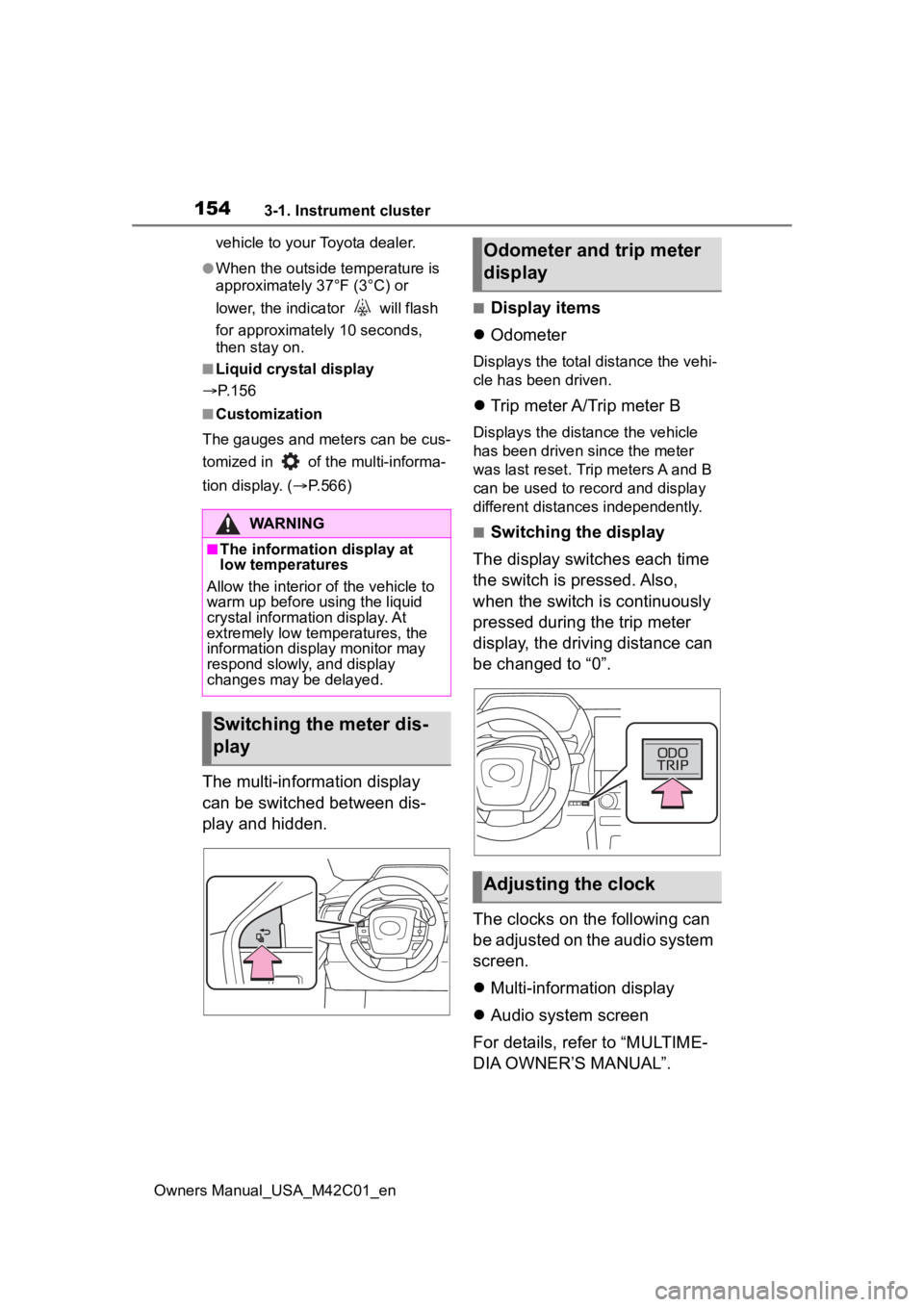
The multi-information display
can be switched between dis-
play and hidden.
■Display items
Odometer
Displays the total distance the vehi-
cle has been driven.
Trip meter A/Trip meter B
Displays the distance the vehicle
has been driven since the meter
was last reset. Trip meters A and B
can be used to record and display
different distances independently.
■Switching the display
The display switches each time
the switch is pressed. Also,
when the switch is continuously
pressed during the trip meter
display, the driving distance can
be changed to “0”.
The clocks on the following can
be adjusted on the audio system
screen.
Multi-information display
Audio system screen
For details, refer to “MULTIME-
DIA OWNER’S MANUAL”.WARNING
■The information display at
low temperatures
Allow the interior of the vehicle to
warm up before u sing the liquid
crystal informat ion display. At
extremely low temperatures, the
information display monitor may
respond slowly, and display
changes may be delayed.
Switching the meter dis-
play
Odometer and trip meter
display
Adjusting the clock
Page 156 of 628
1563-1. Instrument cluster
Owners Manual_USA_M42C01_en
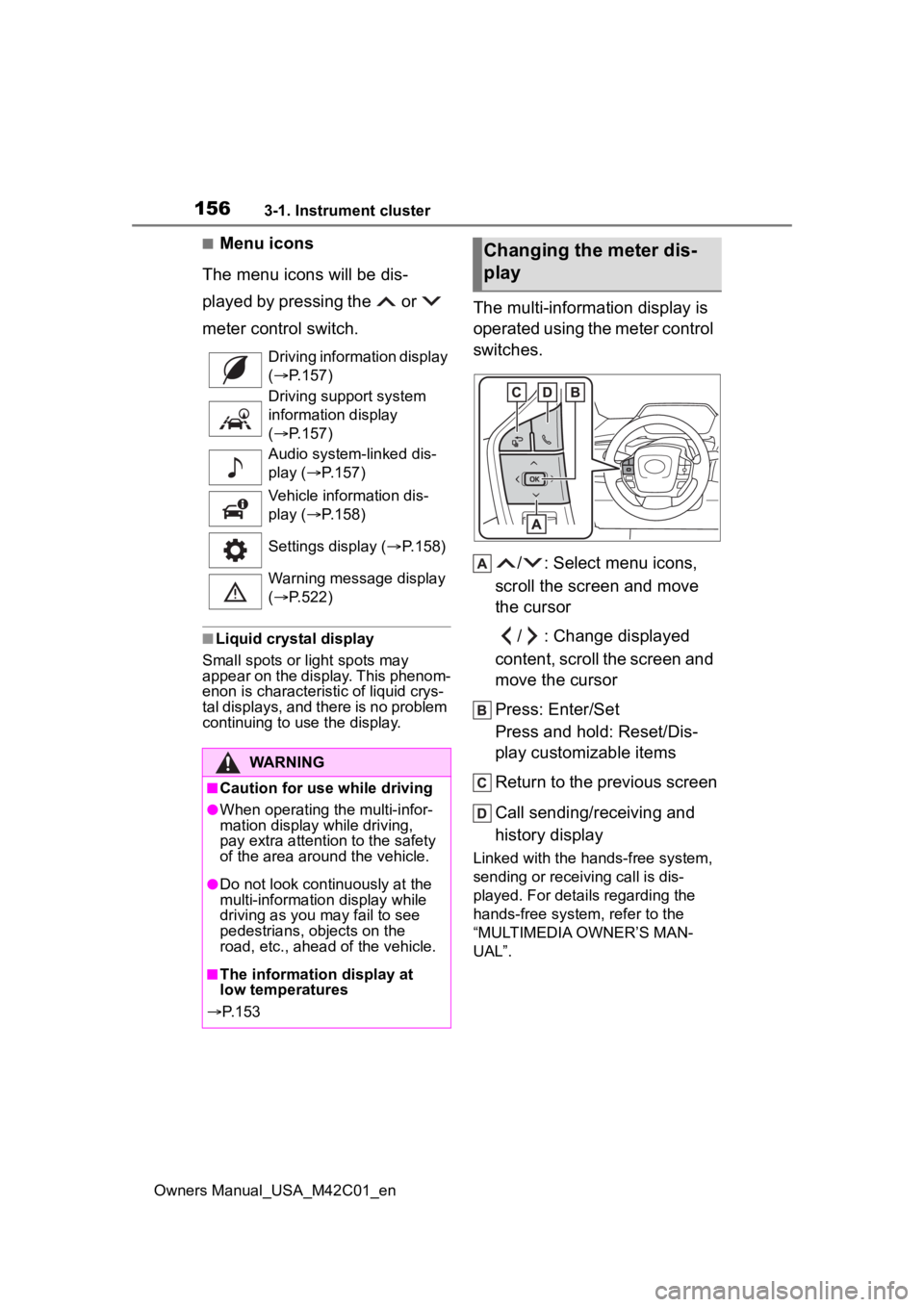
■Menu icons
The menu icons will be dis-
played by pressing the or
meter control switch.
■Liquid crystal display
Small spots or light spots may
appear on the display. This phenom-
enon is characteristi c of liquid crys-
tal displays, and there is no problem
continuing to use the display.
The multi-information display is
operated using the meter control
switches.
/ : Select menu icons,
scroll the screen and move
the cursor
/ : Change displayed
content, scroll the screen and
move the cursor
Press: Enter/Set
Press and hold: Reset/Dis-
play customizable items
Return to the previous screen
Call sending/receiving and
history display
Linked with the hands-free system,
sending or receiving call is dis-
played. For details regarding the
hands-free system, refer to the
“MULTIMEDIA OWNER’S MAN-
UAL”.
Driving information display
(
P.157)
Driving support system
information display
( P.157)
Audio system-linked dis-
play ( P.157)
Vehicle information dis-
play ( P.158)
Settings display ( P.158)
Warning message display
( P.522)
WARNING
■Caution for use while driving
●When operating the multi-infor-
mation display while driving,
pay extra attention to the safety
of the area aroun d the vehicle.
●Do not look continuously at the
multi-information display while
driving as you may fail to see
pedestrians, objects on the
road, etc., ahead of the vehicle.
■The information display at
low temperatures
P. 1 5 3
Changing the meter dis-
play
Page 157 of 628
1573-1. Instrument cluster
Owners Manual_USA_M42C01_en
3
Vehicle status information and indicators
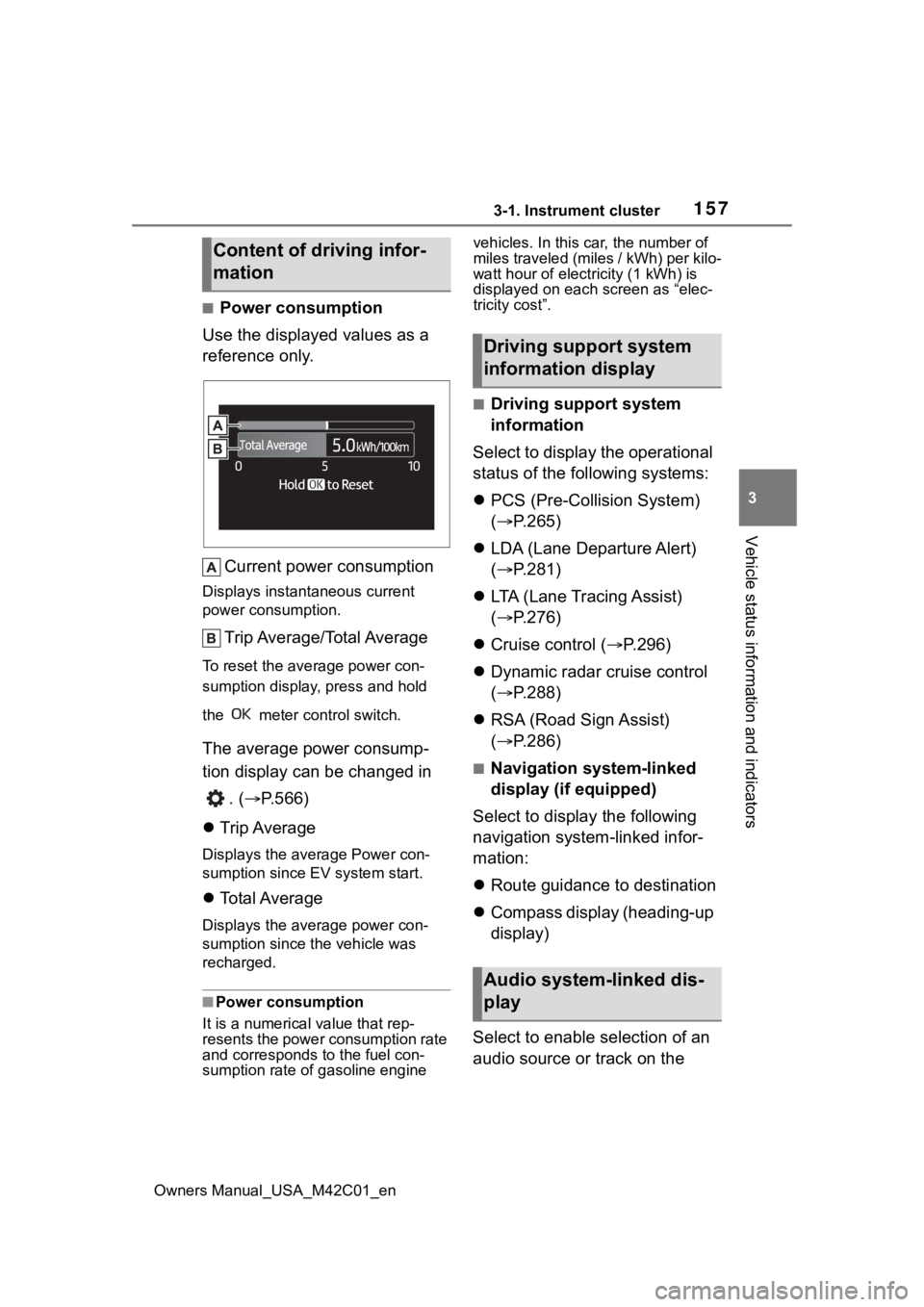
■Power consumption
Use the displayed values as a
reference only.
Current power consumption
Displays instant aneous current
power consumption.
Trip Average/Total Average
To reset the ave rage power con-
sumption display, press and hold
the meter control switch.
The average power consump-
tion display can be changed in
. ( P.566)
Trip Average
Displays the average Power con-
sumption since EV system start.
Total Average
Displays the aver age power con-
sumption since the vehicle was
recharged.
■Power consumption
It is a numerical value that rep-
resents the power consumption rate
and corresponds to the fuel con-
sumption rate of gasoline engine vehicles. In this car, the number of
miles traveled (miles / kWh) per kilo-
watt hour of elect
ricity (1 kWh) is
displayed on each screen as “elec-
tricity cost”.
■Driving support system
information
Select to display the operational
status of the following systems:
PCS (Pre-Colli sion System)
( P.265)
LDA (Lane Departure Alert)
( P.281)
LTA (Lane Tracing Assist)
( P.276)
Cruise control ( P.296)
Dynamic radar cruise control
( P.288)
RSA (Road Sign Assist)
( P.286)
■Navigation system-linked
display (if equipped)
Select to display the following
navigation system-linked infor-
mation:
Route guidance to destination
Compass display (heading-up
display)
Select to enable selection of an
audio source or track on the
Content of driving infor-
mation
Driving support system
information display
Audio system-linked dis-
play