ignition SUBARU TRIBECA 2008 User Guide
[x] Cancel search | Manufacturer: SUBARU, Model Year: 2008, Model line: TRIBECA, Model: SUBARU TRIBECA 2008Pages: 409, PDF Size: 5.75 MB
Page 97 of 409
ImmobilizerThe immobilizer system is designed to
prevent an unauthorized person from
starting the engine. Only keys registered
with your vehicle’s immobilizer system can
be used to operate your vehicle. Even if
an unregistered key fits into the ignition
switch and can be turned to the “START”
position, the engine will automatically stop
after several seconds.
Each immobilizer key contains a trans-
ponder in which the key ’s ID code is
stored. When a key is inserted into the
ignition switch and turned to the “ON”
position, the transponder transmits the
key ’s ID code to the immobilizer system ’s
receiver. If the transmitted ID code
matches the ID code registered in the
immobilizer system, the system allows the
engine to be started. Since the ID code is
transmitted and acted upon almost in-
stantly, the immobilizer system does not
impede normal starting of the engine.
If the engine fails to start, pull out the key
once before trying again. Refer to the
“Ignition switch ”section in chapter 3.
This device complies with Part 15 of
the FCC Rules and with RSS-210 of
Industry Canada. Operation is subject
to the following two conditions: (1) This device may not cause harmful inter-
ference, and (2) this device must
accept any interference received, in-
cluding interference that may cause
undesired operation.
Changes or modifications not ex-
pressly approved by the party respon-
sible for compliance could void the
user
’s authority to operate the equip-
ment.
NOTETo protect your vehicle from theft,
please pay close attention to the fol-
lowing security precautions:
. Never leave your vehicle unattended
with its keys inside.
. Before leaving your vehicle, close all
windows and lock the doors and rear
gate.
. Do not leave spare keys or any
record of your key number in the
vehicle.
CAUTION
. Do not place the key under direct
sunlight or anywhere it may
become hot. .
Do not get the key wet. If the key
gets wet, wipe it dry with a cloth
immediately.
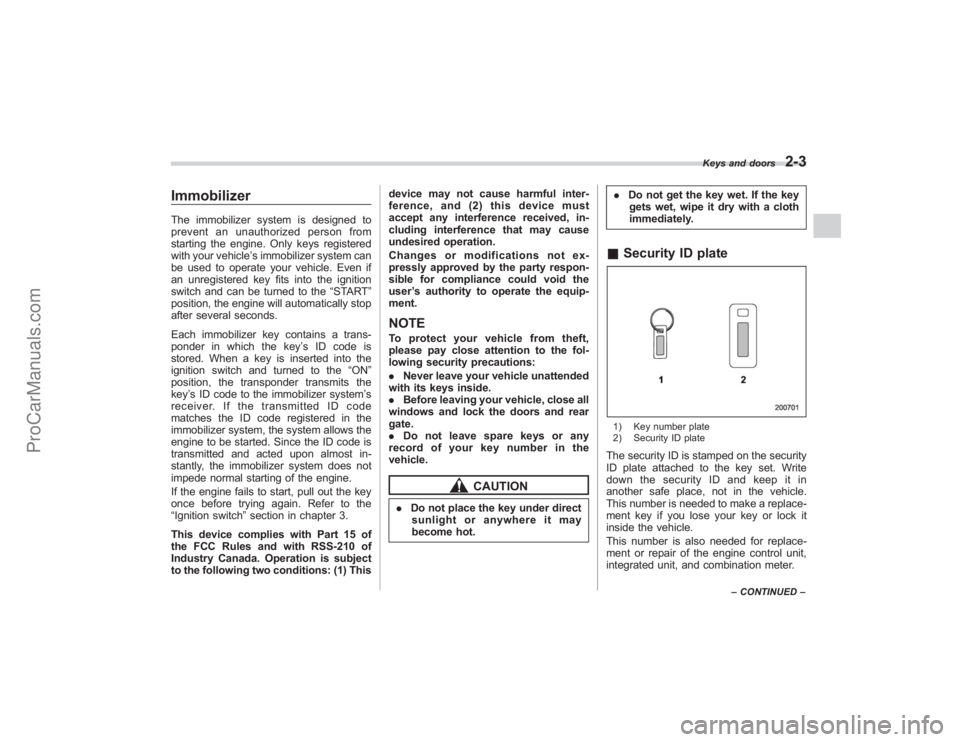
& Security ID plate1) Key number plate
2) Security ID plateThe security ID is stamped on the security
ID plate attached to the key set. Write
down the security ID and keep it in
another safe place, not in the vehicle.
This number is needed to make a replace-
ment key if you lose your key or lock it
inside the vehicle.
This number is also needed for replace-
ment or repair of the engine control unit,
integrated unit, and combination meter.
Keys and doors
2-3
–CONTINUED –
ProCarManuals.com
Page 98 of 409
2-4
Keys and doors
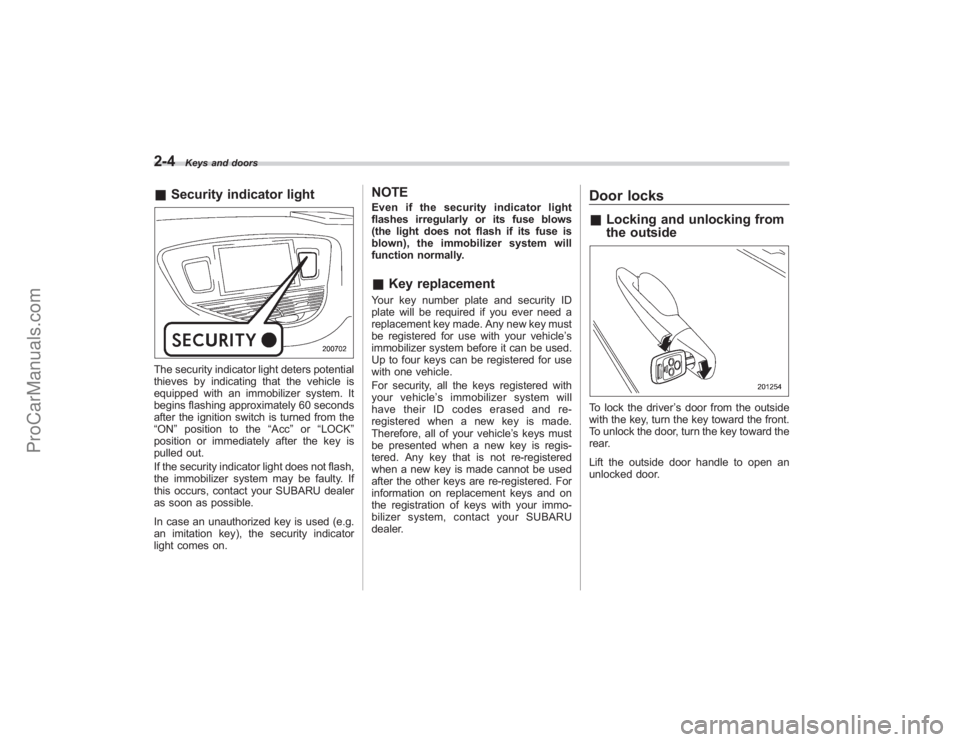
&Security indicator lightThe security indicator light deters potential
thieves by indicating that the vehicle is
equipped with an immobilizer system. It
begins flashing approximately 60 seconds
after the ignition switch is turned from the
“ON ”position to the “Acc”or “LOCK ”
position or immediately after the key is
pulled out.
If the security indicator light does not flash,
the immobilizer system may be faulty. If
this occurs, contact your SUBARU dealer
as soon as possible.
In case an unauthorized key is used (e.g.
an imitation key), the security indicator
light comes on.
NOTEEven if the security indicator light
flashes irregularly or its fuse blows
(the light does not flash if its fuse is
blown), the immobilizer system will
function normally.& Key replacementYour key number plate and security ID
plate will be required if you ever need a
replacement key made. Any new key must
be registered for use with your vehicle’ s
immobilizer system before it can be used.
Up to four keys can be registered for use
with one vehicle.
For security, all the keys registered with
your vehicle ’s immobilizer system will
have their ID codes erased and re-
registered when a new key is made.
Therefore, all of your vehicle’ s keys must
be presented when a new key is regis-
tered. Any key that is not re-registered
when a new key is made cannot be used
after the other keys are re-registered. For
information on replacement keys and on
the registration of keys with your immo-
bilizer system, contact your SUBARU
dealer.
Door locks& Locking and unlocking from
the outsideTo lock the driver ’s door from the outside
with the key, turn the key toward the front.
To unlock the door, turn the key toward the
rear.
Lift the outside door handle to open an
unlocked door.
ProCarManuals.com
Page 100 of 409
2-6
Keys and doors
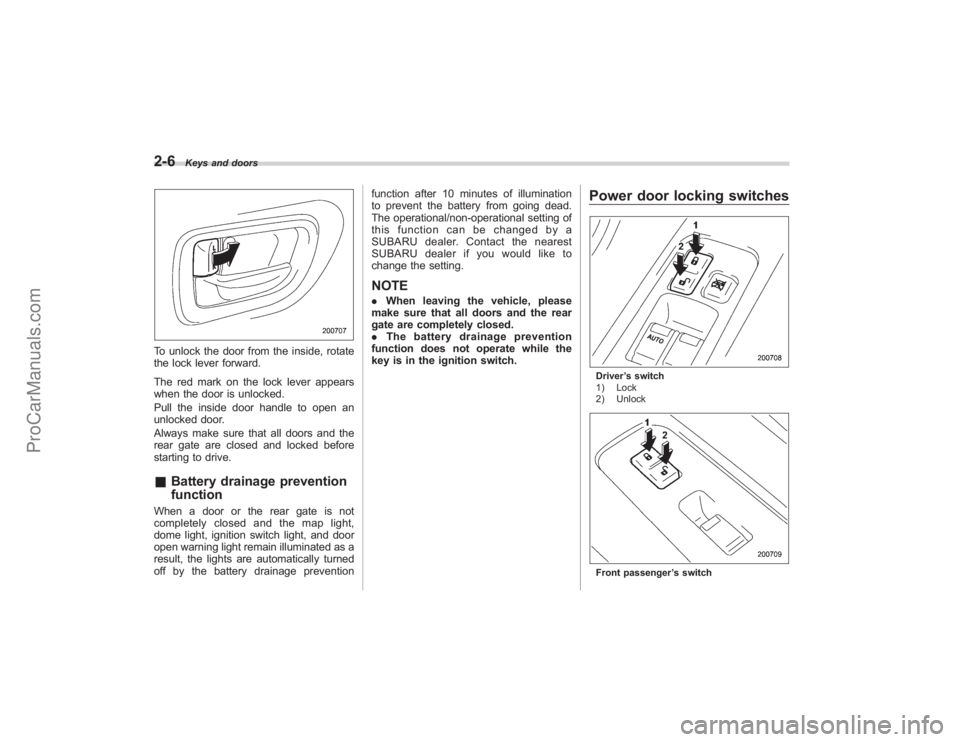
To unlock the door from the inside, rotate
the lock lever forward.
The red mark on the lock lever appears
when the door is unlocked.
Pull the inside door handle to open an
unlocked door.
Always make sure that all doors and the
rear gate are closed and locked before
starting to drive.&Battery drainage prevention
functionWhen a door or the rear gate is not
completely closed and the map light,
dome light, ignition switch light, and door
open warning light remain illuminated as a
result, the lights are automatically turned
off by the battery drainage prevention function after 10 minutes of illumination
to prevent the battery from going dead.
The operational/non-operational setting of
this function can be changed by a
SUBARU dealer. Contact the nearest
SUBARU dealer if you would like to
change the setting.
NOTE.
When leaving the vehicle, please
make sure that all doors and the rear
gate are completely closed.
. The battery drainage prevention
function does not operate while the
key is in the ignition switch.
Power door locking switchesDriver ’s switch
1) Lock
2) UnlockFront passenger ’s switch
ProCarManuals.com
Page 101 of 409
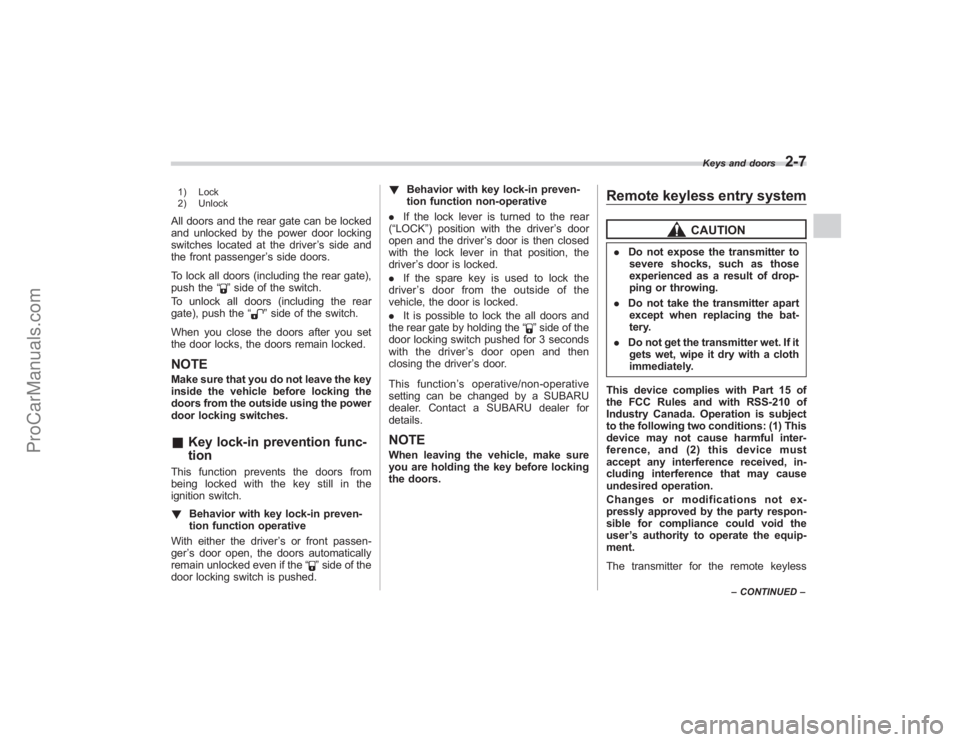
1) Lock
2) UnlockAll doors and the rear gate can be locked
and unlocked by the power door locking
switches located at the driver’s side and
the front passenger ’s side doors.
To lock all doors (including the rear gate),
push the “
”side of the switch.
To unlock all doors (including the rear
gate), push the “
”side of the switch.
When you close the doors after you set
the door locks, the doors remain locked.
NOTEMake sure that you do not leave the key
inside the vehicle before locking the
doors from the outside using the power
door locking switches.& Key lock-in prevention func-
tionThis function prevents the doors from
being locked with the key still in the
ignition switch.
! Behavior with key lock-in preven-
tion function operative
With either the driver ’s or front passen-
ger ’s door open, the doors automatically
remain unlocked even if the “
”side of the
door locking switch is pushed. !
Behavior with key lock-in preven-
tion function non-operative
. If the lock lever is turned to the rear
(“LOCK”) position with the driver ’s door
open and the driver ’s door is then closed
with the lock lever in that position, the
driver ’s door is locked.
. If the spare key is used to lock the
driver ’s door from the outside of the
vehicle, the door is locked.
. It is possible to lock the all doors and
the rear gate by holding the “
”side of the
door locking switch pushed for 3 seconds
with the driver ’s door open and then
closing the driver ’s door.
This function ’s operative/non-operative
setting can be changed by a SUBARU
dealer. Contact a SUBARU dealer for
details.
NOTEWhen leaving the vehicle, make sure
you are holding the key before locking
the doors.
Remote keyless entry system
CAUTION
. Do not expose the transmitter to
severe shocks, such as those
experienced as a result of drop-
ping or throwing.
. Do not take the transmitter apart
except when replacing the bat-
tery.
. Do not get the transmitter wet. If it
gets wet, wipe it dry with a cloth
immediately.
This device complies with Part 15 of
the FCC Rules and with RSS-210 of
Industry Canada. Operation is subject
to the following two conditions: (1) This
device may not cause harmful inter-
ference, and (2) this device must
accept any interference received, in-
cluding interference that may cause
undesired operation.
Changes or modifications not ex-
pressly approved by the party respon-
sible for compliance could void the
user ’s authority to operate the equip-
ment.
The transmitter for the remote keyless
Keys and doors
2-7
– CONTINUED –
ProCarManuals.com
Page 102 of 409
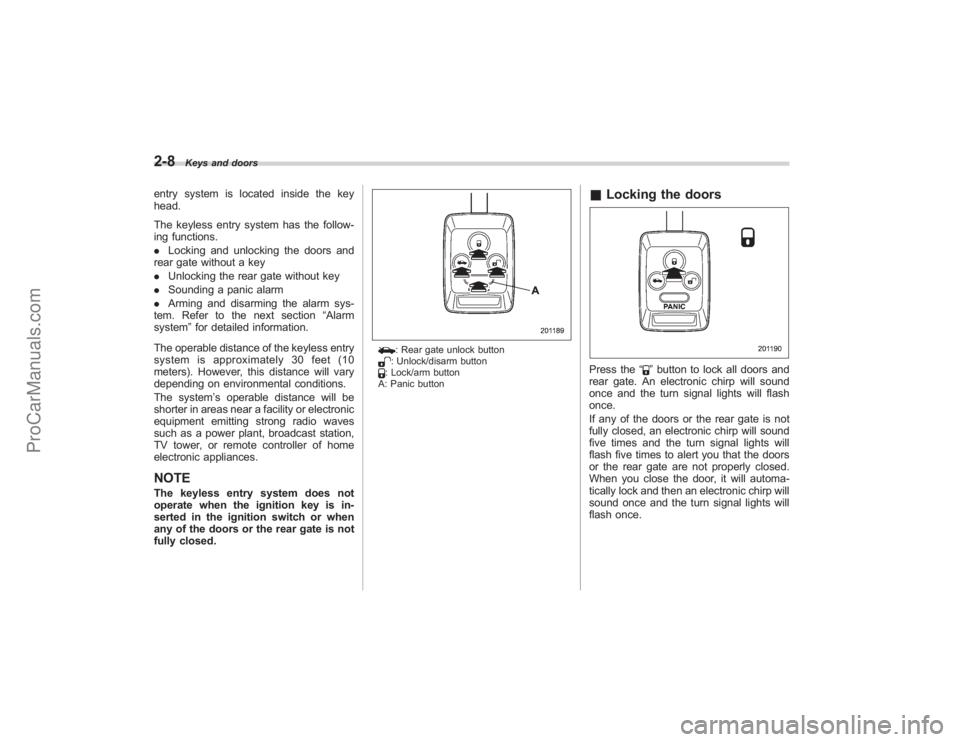
2-8
Keys and doors
entry system is located inside the key
head.
The keyless entry system has the follow-
ing functions.
.Locking and unlocking the doors and
rear gate without a key
. Unlocking the rear gate without key
. Sounding a panic alarm
. Arming and disarming the alarm sys-
tem. Refer to the next section “Alarm
system ”for detailed information.
The operable distance of the keyless entry
system is approximately 30 feet (10
meters). However, this distance will vary
depending on environmental conditions.
The system ’s operable distance will be
shorter in areas near a facility or electronic
equipment emitting strong radio waves
such as a power plant, broadcast station,
TV tower, or remote controller of home
electronic appliances.NOTEThe keyless entry system does not
operate when the ignition key is in-
serted in the ignition switch or when
any of the doors or the rear gate is not
fully closed.
: Rear gate unlock button: Unlock/disarm button: Lock/arm button
A: Panic button
& Locking the doorsPress the “
”button to lock all doors and
rear gate. An electronic chirp will sound
once and the turn signal lights will flash
once.
If any of the doors or the rear gate is not
fully closed, an electronic chirp will sound
five times and the turn signal lights will
flash five times to alert you that the doors
or the rear gate are not properly closed.
When you close the door, it will automa-
tically lock and then an electronic chirp will
sound once and the turn signal lights will
flash once.
ProCarManuals.com
Page 104 of 409
2-10
Keys and doors
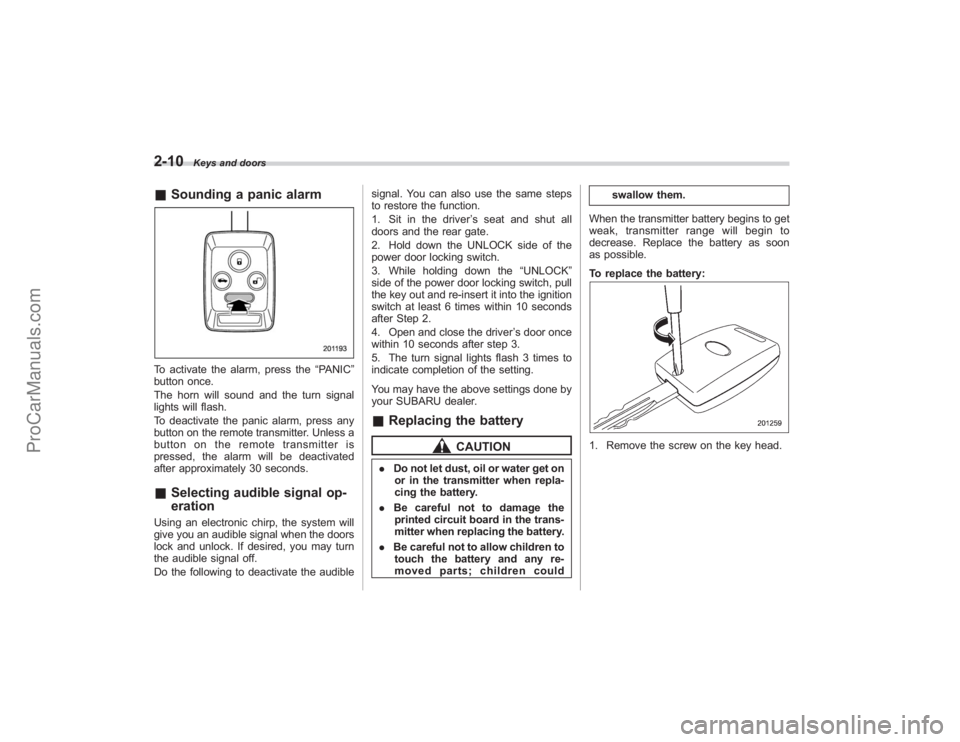
&Sounding a panic alarmTo activate the alarm, press the “PANIC”
button once.
The horn will sound and the turn signal
lights will flash.
To deactivate the panic alarm, press any
button on the remote transmitter. Unless a
button on the remote transmitter is
pressed, the alarm will be deactivated
after approximately 30 seconds.& Selecting audible signal op-
erationUsing an electronic chirp, the system will
give you an audible signal when the doors
lock and unlock. If desired, you may turn
the audible signal off.
Do the following to deactivate the audible signal. You can also use the same steps
to restore the function.
1. Sit in the driver
’s seat and shut all
doors and the rear gate.
2. Hold down the UNLOCK side of the
power door locking switch.
3. While holding down the “UNLOCK”
side of the power door locking switch, pull
the key out and re-insert it into the ignition
switch at least 6 times within 10 seconds
after Step 2.
4. Open and close the driver ’s door once
within 10 seconds after step 3.
5. The turn signal lights flash 3 times to
indicate completion of the setting.
You may have the above settings done by
your SUBARU dealer.
& Replacing the battery
CAUTION
. Do not let dust, oil or water get on
or in the transmitter when repla-
cing the battery.
. Be careful not to damage the
printed circuit board in the trans-
mitter when replacing the battery.
. Be careful not to allow children to
touch the battery and any re-
moved parts; children could swallow them.
When the transmitter battery begins to get
weak, transmitter range will begin to
decrease. Replace the battery as soon
as possible.
To replace the battery:
1. Remove the screw on the key head.
ProCarManuals.com
Page 106 of 409
2-12
Keys and doors
Programming transmitter codes into
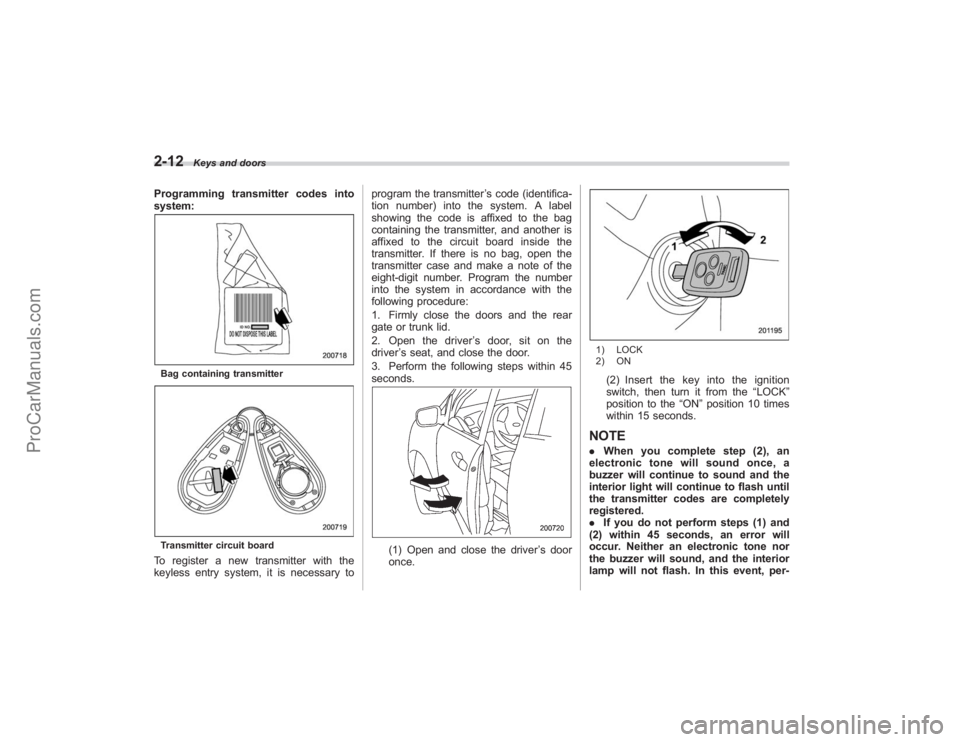
system:Bag containing transmitterTransmitter circuit boardTo register a new transmitter with the
keyless entry system, it is necessary toprogram the transmitter
’s code (identifica-
tion number) into the system. A label
showing the code is affixed to the bag
containing the transmitter, and another is
affixed to the circuit board inside the
transmitter. If there is no bag, open the
transmitter case and make a note of the
eight-digit number. Program the number
into the system in accordance with the
following procedure:
1. Firmly close the doors and the rear
gate or trunk lid.
2. Open the driver ’s door, sit on the
driver ’s seat, and close the door.
3. Perform the following steps within 45
seconds.
(1) Open and close the driver ’s door
once.
1) LOCK
2) ON(2) Insert the key into the ignition
switch, then turn it from the “LOCK”
position to the “ON”position 10 times
within 15 seconds.
NOTE. When you complete step (2), an
electronic tone will sound once, a
buzzer will continue to sound and the
interior light will continue to flash until
the transmitter codes are completely
registered.
. If you do not perform steps (1) and
(2) within 45 seconds, an error will
occur. Neither an electronic tone nor
the buzzer will sound, and the interior
lamp will not flash. In this event, per-
ProCarManuals.com
Page 108 of 409
2-14
Keys and doors
NOTE.When you finish entering the eighth
digit, an electronic tone will sound for
30 seconds.
. If the interval between one push of
the switch and the next exceeds 5
seconds, an error will occur. In this
event, perform the procedure again
beginning with part 4. If an error occurs
six times, perform the procedure again
starting with part 3.
8. Before the electronic tone stops
sounding, use the power door locking
switch to reenter the transmitter code
beginning with the leftmost digit.NOTEIf you do not start entering the number
using the lock knob before the electro-
nic tone stops sounding, an error will
occur. In this event, perform the proce-
dure again beginning with part 3.
9. When you have finished entering the
code a second time, an electronic tone will
sound for 1 second and automatic door
locking and unlocking operation will take
place once to indicate completion of
registration, provided the code entered
the second time is identical to that entered
the first time.
NOTEIf the code entered the second time is
not identical to the code entered the
first time, an error will occur. In this
event, perform the procedure again
beginning with part 5. If an error occurs
five times, perform the procedure again
starting with part 3.
10. If you wish to program another trans-
mitter code into the system (up to four
transmitter codes can be programmed into
the system), perform the procedure begin-
ning with part 4. When you have finished
programming all of the necessary trans-
mitter codes into the system, remove the
key from the ignition switch.
11. Test every registered transmitter to
confirm correct operation.
! Deleting old transmitter codes
The control unit of the keyless entry
system has four memory locations to store
transmitter codes, giving it the ability to
operate with up to four transmitters. When
you lose a transmitter, the lost transmit-
ter ’s code remains in the memory. For
security reasons, lost transmitter codes
should be deleted from the memory.
To delete old transmitter codes, program
four transmitter codes into the system. If
you have only one current transmitter, program it four times. If you have two
current transmitters, program each one
twice. If you have three current transmit-
ters, program two of them once and the
third one twice. This process will leave
only current transmitter codes in the
system
’s memory.
NOTEMake sure no one else is operating
their keyless entry system within range
of your vehicle when programming
transmitters. If someone else were to
operate their remote transmitter while
you are programming your transmit-
ters, it is possible that their transmitter
code will be programmed into your
system, allowing them unauthorized
access to your vehicle.
ProCarManuals.com
Page 109 of 409
Alarm systemThe alarm system helps to protect your
vehicle and valuables from theft. The horn
sounds and the turn signal lights flash if
someone attempts to break into your
vehicle.
The system can be armed and disarmed
with the remote transmitter.
The system does not operate when the
key is inserted into the ignition switch.
Your vehicle’s alarm system has been set
for activation at the time of shipment from
the factory. You can set the system for
deactivation yourself or have it done by
your SUBARU dealer.& System operationThe alarm system will give the following
alarms when triggered:
. The vehicle’ s horn will sound and the
turn signal lights will flash for 30 seconds.
. If any door (or the rear gate) remains
open after the 30-second period, the horn
will continue to sound for a maximum of 3
minutes. If the door (or the rear gate) is
closed while the horn is sounding, the
horn will stop sounding with a delay of up
to 30 seconds.
The alarm is triggered by: .
Opening a door or the rear gate
. Physical impact to the vehicle, such as
forced entry (only vehicles with shock
sensors (dealer option))
& Activating and deactivating
the alarm systemTo change the setting of your vehicle’ s
alarm system for activation or deactiva-
tion, do the following.
1. Disarm the alarm system (refer to
“Disarming the system ”in this section).
2. Sit in the driver ’s seat and shut all
doors (and the rear gate).
3. Turn the ignition switch to the “ON”
position.
4. Hold down the UNLOCK side of the
driver ’s power door locking switch, open
the driver ’s door within the following 1
second, and wait 10 seconds without
releasing the switch. The setting will then
be changed as follows:
If the system was previously activated:
The odometer/trip meter screen displays
“ AL oF ”and the horn sounds twice,
indicating that the system is now deacti-
vated.
If the system was previously deacti-
vated:
The odometer/trip meter screen displays “
AL on” and the horn sounds once,
indicating that the system is now acti-
vated.
NOTEYou may have the above setting
change done by your SUBARU dealer.& If you have accidentally trig-
gered the alarm system! To stop the alarm
Do any of the following operations:
. Press any button on the remote trans-
mitter.
. Turn the ignition switch to the “ON”
position.& Arming the system! To arm the system using remote
transmitter
1. Close all windows and the moonroof.
2. Remove the key from the ignition
switch.
3. Open the doors and get out of the
vehicle.
4. Make sure that the engine hood is
locked.
5. Close all doors (and the rear gate).
Keys and doors
2-15
– CONTINUED –
ProCarManuals.com
Page 110 of 409
2-16
Keys and doors
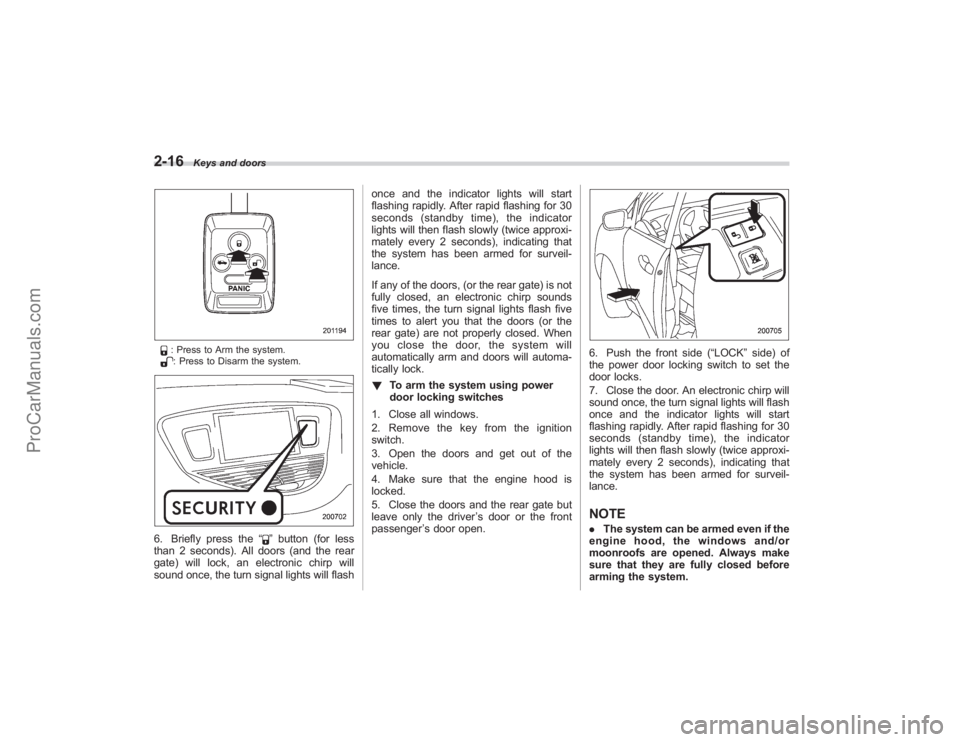
: Press to Arm the system.: Press to Disarm the system.
6. Briefly press the“
”button (for less
than 2 seconds). All doors (and the rear
gate) will lock, an electronic chirp will
sound once, the turn signal lights will flash once and the indicator lights will start
flashing rapidly. After rapid flashing for 30
seconds (standby time), the indicator
lights will then flash slowly (twice approxi-
mately every 2 seconds), indicating that
the system has been armed for surveil-
lance.
If any of the doors, (or the rear gate) is not
fully closed, an electronic chirp sounds
five times, the turn signal lights flash five
times to alert you that the doors (or the
rear gate) are not properly closed. When
you close the door, the system will
automatically arm and doors will automa-
tically lock.
!
To arm the system using power
door locking switches
1. Close all windows.
2. Remove the key from the ignition
switch.
3. Open the doors and get out of the
vehicle.
4. Make sure that the engine hood is
locked.
5. Close the doors and the rear gate but
leave only the driver ’s door or the front
passenger ’s door open.
6. Push the front side (“LOCK” side) of
the power door locking switch to set the
door locks.
7. Close the door. An electronic chirp will
sound once, the turn signal lights will flash
once and the indicator lights will start
flashing rapidly. After rapid flashing for 30
seconds (standby time), the indicator
lights will then flash slowly (twice approxi-
mately every 2 seconds), indicating that
the system has been armed for surveil-
lance.NOTE. The system can be armed even if the
engine hood, the windows and/or
moonroofs are opened. Always make
sure that they are fully closed before
arming the system.
ProCarManuals.com