fog light SUBARU TRIBECA 2009 1.G Service User Guide
[x] Cancel search | Manufacturer: SUBARU, Model Year: 2009, Model line: TRIBECA, Model: SUBARU TRIBECA 2009 1.GPages: 2453, PDF Size: 46.32 MB
Page 475 of 2453
LAN(diag)-19
Subaru Select Monitor
LAN SYSTEM (DIAGNOSTICS)
6. REGISTRATION BODY INTEGRATED
UNIT (EQUIPMENT SETTING)
CAUTION:
Body integrated unit is core of LAN system, and
also can select the function of all vehicle sys-
tem control. It is possible to control the original
functions of vehicle when registrations of body
integrated unit and function setting are corre-
sponded to vehicle equipment.
If registrations and function setting are differ-
ent from vehicle equipment, vehicle system
does not operate normally and diagnosis can-
not be performed correctly. Pay attention to fol-
lowing item.
•Be sure to correspond registrations and
function settings to vehicle equipment.
•Do not change the settings of vehicle improp-
erly.
•Confirm key illumination does not blink or
“Factory initial setting” of body integrated unit
registrations is “Market.” If “Factory initial set-
ting” is set to “Factory,” key illumination blinks
with ignition key turned to ON to give warning
of unconfirmed settings.
•Key illumination does not blink with ignition
switch turned to ON and go off with door
closed.
•Be sure to register immobilizer if body inte-
grated unit is replaced with a new one. (Model
with immobilizer)
•Make a registration of immobilizer when the
parts related to immobilizer have been re-
placed. Refer to the “REGISTRATION MANUAL
FOR IMMOBILIZER”.
•Do not install or register an immobilizer relat-
ed module of other registered vehicles to diag-
nose failures or inspect functions.
1) Turn the ignition switch to OFF.
2) Connect the Subaru Select Monitor to data link
connector.
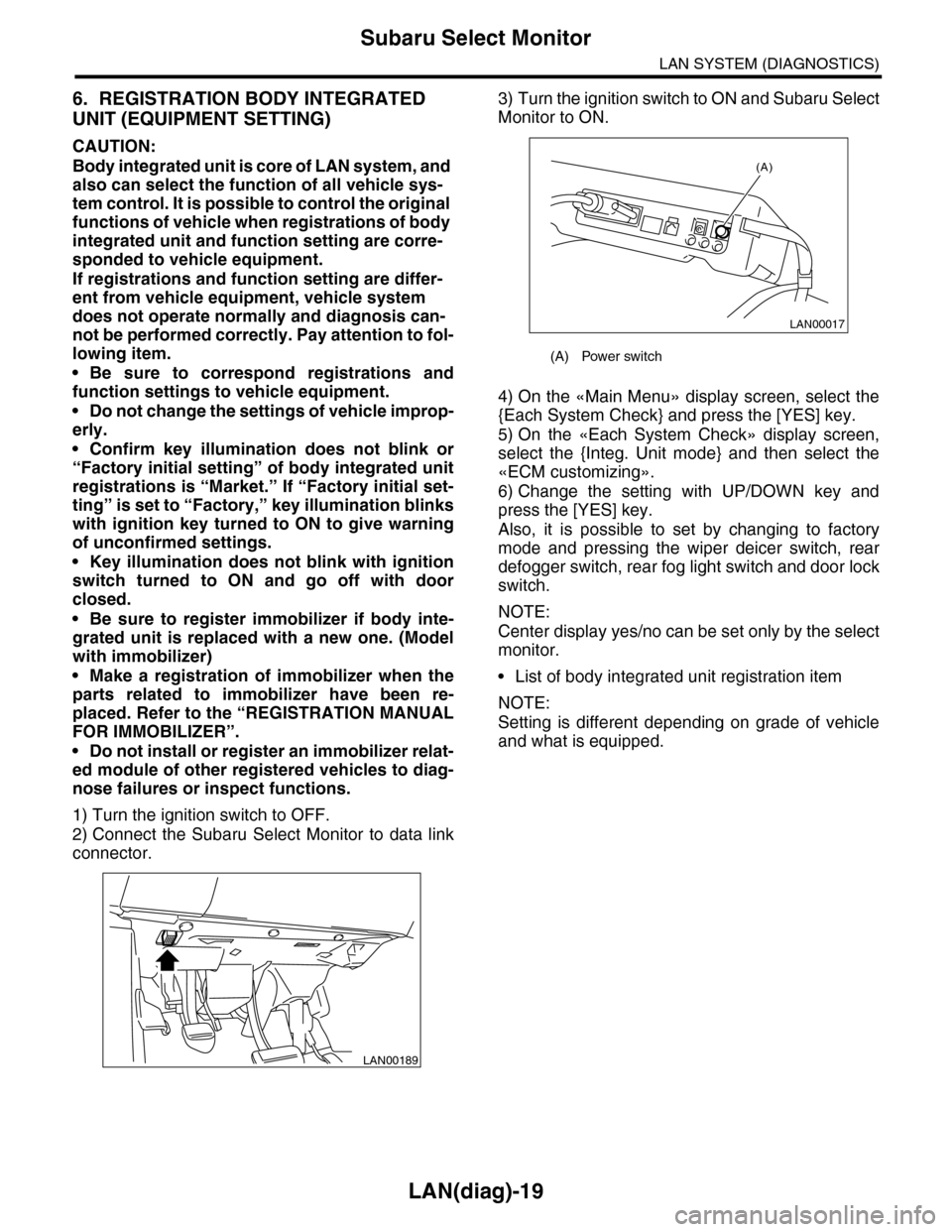
3) Turn the ignition switch to ON and Subaru Select
Monitor to ON.
4) On the «Main Menu» display screen, select the
{Each System Check} and press the [YES] key.
5) On the «Each System Check» display screen,
select the {Integ. Unit mode} and then select the
«ECM customizing».
6) Change the setting with UP/DOWN key and
press the [YES] key.
Also, it is possible to set by changing to factory
mode and pressing the wiper deicer switch, rear
defogger switch, rear fog light switch and door lock
switch.
NOTE:
Center display yes/no can be set only by the select
monitor.
•List of body integrated unit registration item
NOTE:
Setting is different depending on grade of vehicle
and what is equipped.
LAN00189
(A) Power switch
LAN00017
(A)
Page 476 of 2453
LAN(diag)-20
Subaru Select Monitor
LAN SYSTEM (DIAGNOSTICS)
CAUTION:
•It is possible to control the original functions of vehicle when registrations of body integrated
unit and function setting are corresponded to vehicle equipment.
•When body integrated unit is a new one or “Factory” mode, key illumination blinks to show
equipment settings have not been completed.
•Be sure not to change Factory initial setting except installation of new body integrated unit.
NOTE:
“Factory” mode:
•Body integrated unit has not been set yet. It can be recognized by key illumination blinking with ignition
switch turned to ON.
•All body integrated units as part for repair are set to “Factory” mode. When replacing a body integrated
unit, be sure to perform the registration operation.
“Market” mode:
Each settings have been set. It can be recognized by key illumination coming on in concocting with room light
and going off with ignition switch turned to ON.
7) Perform the Factory setting. On the «ECM customizing” display screen of Subaru Select Monitor, select
the {Factory initial setting} and press the [YES] key.
8) Change the mode from Factory to Market.
9) Register the immobilizer key.
10) Perform the registration according to the procedures of the “IMMOBILIZER REGISTRATION OPERA-
TION MANUAL”.
11) When key registration is completed, “Do you want to register remote engine start?” is displayed. Select
NO.
12) Perform the function setting (ECM customizing).
NOTE:
For details concerning operation procedure, refer to the “SUBARU SELECT MONITOR OPERATION MAN-
UAL”.
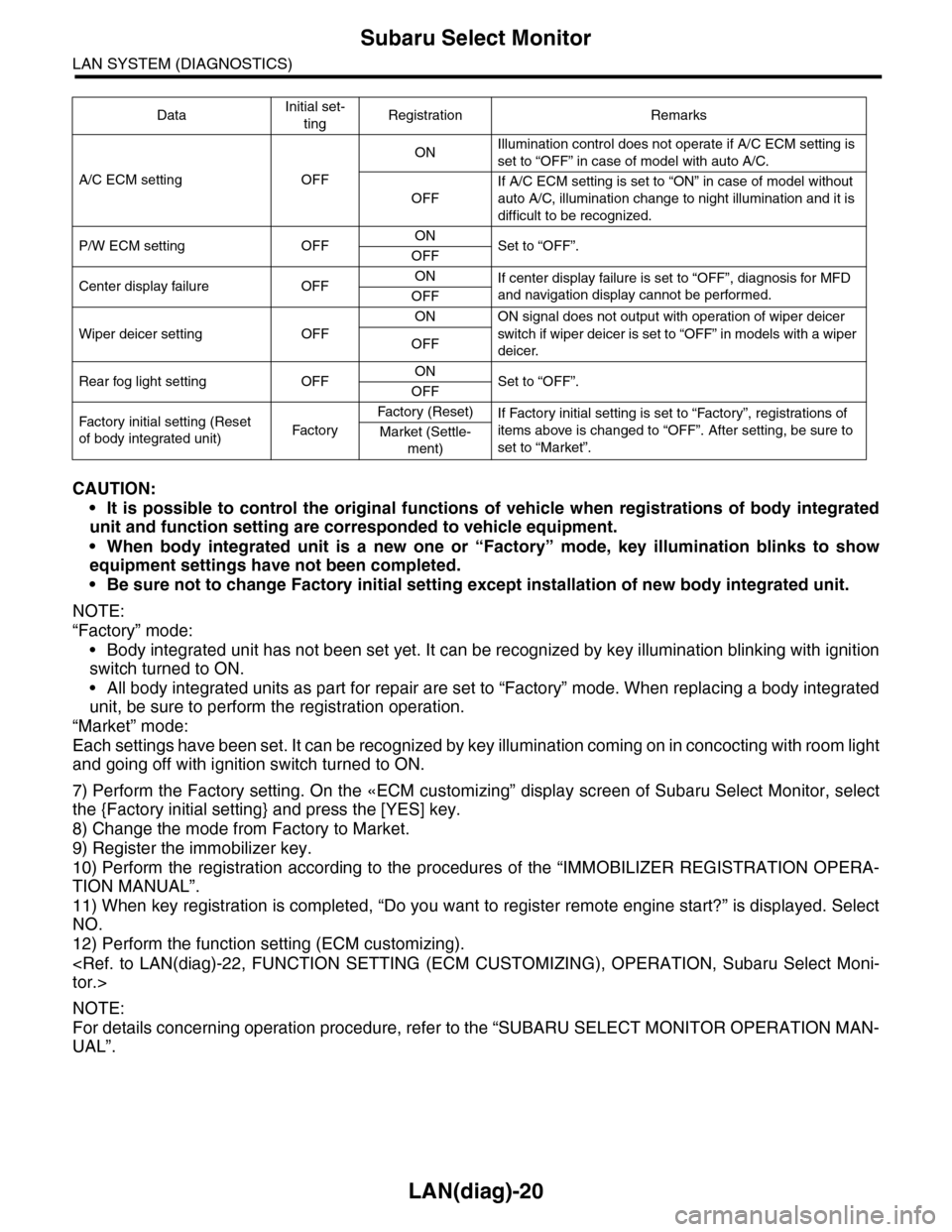
DataInitial set-
tingRegistration Remarks
A/C ECM setting OFF
ONIllumination control does not operate if A/C ECM setting is
set to “OFF” in case of model with auto A/C.
OFF
If A/C ECM setting is set to “ON” in case of model without
auto A/C, illumination change to night illumination and it is
difficult to be recognized.
P/W ECM setting OFFONSet to “OFF”.OFF
Center display failure OFFONIf center display failure is set to “OFF”, diagnosis for MFD
and navigation display cannot be performed.OFF
Wiper deicer setting OFF
ON ON signal does not output with operation of wiper deicer
switch if wiper deicer is set to “OFF” in models with a wiper
deicer.OFF
Rear fog light setting OFFONSet to “OFF”.OFF
Fac t or y in i ti a l s et t i ng ( Res et
of body integrated unit)Fac to r y
Fa ct or y ( Re se t )If Factory initial setting is set to “Factory”, registrations of
items above is changed to “OFF”. After setting, be sure to
set to “Market”.Market (Settle-
ment)
Page 479 of 2453
LAN(diag)-23
Subaru Select Monitor
LAN SYSTEM (DIAGNOSTICS)
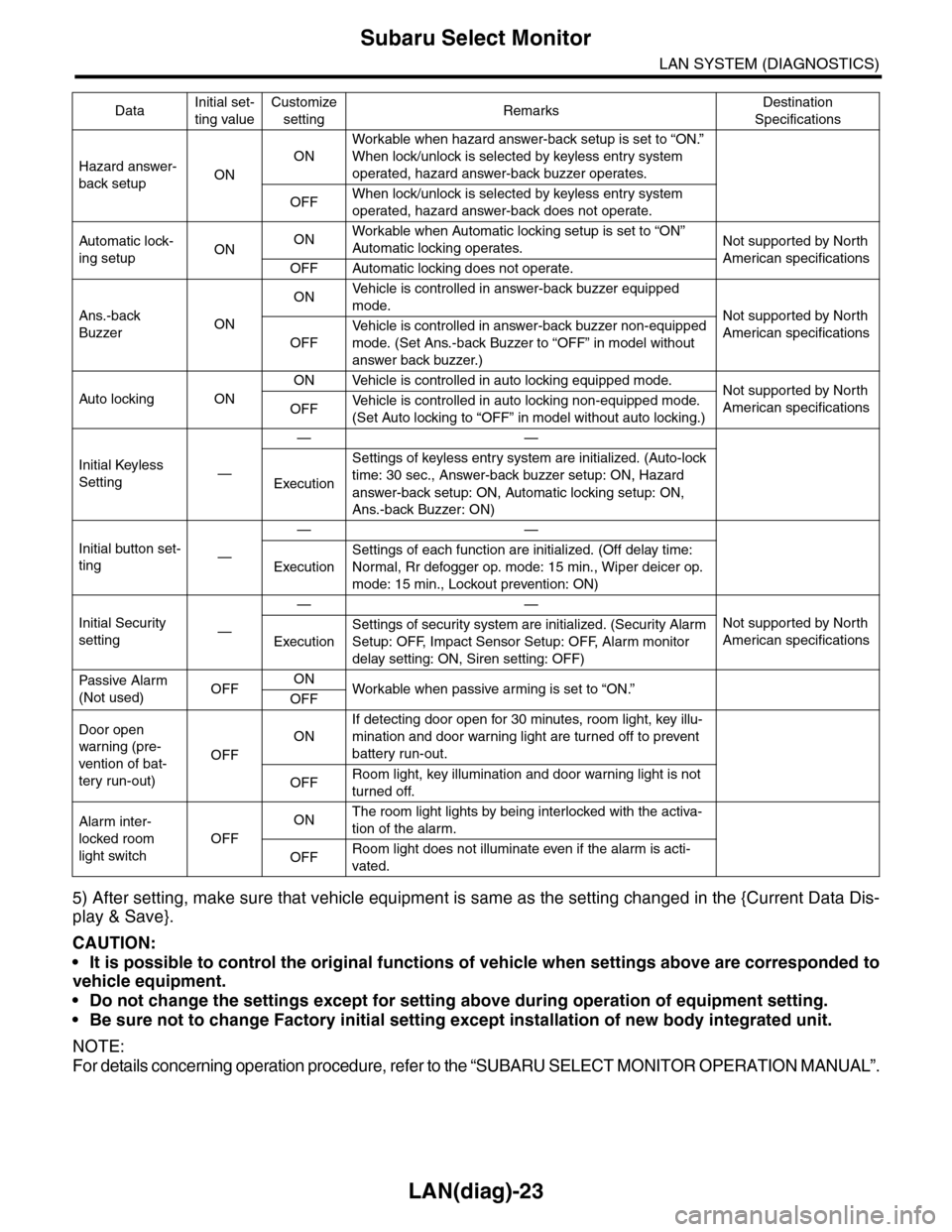
5) After setting, make sure that vehicle equipment is same as the setting changed in the {Current Data Dis-
play & Save}.
CAUTION:
•It is possible to control the original functions of vehicle when settings above are corresponded to
vehicle equipment.
•Do not change the settings except for setting above during operation of equipment setting.
•Be sure not to change Factory initial setting except installation of new body integrated unit.
NOTE:
For details concerning operation procedure, refer to the “SUBARU SELECT MONITOR OPERATION MANUAL”.
Hazard answer-
back setupON
ON
Workable when hazard answer-back setup is set to “ON.”
When lock/unlock is selected by keyless entry system
operated, hazard answer-back buzzer operates.
OFFWhen lock/unlock is selected by keyless entry system
operated, hazard answer-back does not operate.
Automatic lock-
ing setupONONWorkable when Automatic locking setup is set to “ON”
Automatic locking operates.Not supported by North
American specificationsOFF Automatic locking does not operate.
Ans.-back
BuzzerON
ONVe h i c l e i s c o n t r o l l e d i n a n sw e r - b a c k b u z z e r e q u i p p e d
mode.Not supported by North
American specificationsOFF
Ve h i c l e i s c o n t r o l l e d i n a n sw e r - b a c k b u z z e r n o n - e q u i p p e d
mode. (Set Ans.-back Buzzer to “OFF” in model without
answer back buzzer.)
Auto locking ON
ON Vehicle is controlled in auto locking equipped mode.Not supported by North
American specificationsOFFVe h i c l e i s c o n t r o l l e d i n a u t o l o c k i n g n o n - e q u i p p e d m o d e .
(Set Auto locking to “OFF” in model without auto locking.)
Initial Keyless
Setting—
——
Execution
Settings of keyless entry system are initialized. (Auto-lock
time: 30 sec., Answer-back buzzer setup: ON, Hazard
answer-back setup: ON, Automatic locking setup: ON,
Ans.-back Buzzer: ON)
Initial button set-
ting—
——
Execution
Settings of each function are initialized. (Off delay time:
Normal, Rr defogger op. mode: 15 min., Wiper deicer op.
mode: 15 min., Lockout prevention: ON)
Initial Security
setting—
——
Not supported by North
American specificationsExecution
Settings of security system are initialized. (Security Alarm
Setup: OFF, Impact Sensor Setup: OFF, Alarm monitor
delay setting: ON, Siren setting: OFF)
Passive Alar m
(Not used)OFFONWorkable when passive ar ming is set to “ON.”
OFF
Door open
warning (pre-
vention of bat-
tery run-out)
OFF
ON
If detecting door open for 30 minutes, room light, key illu-
mination and door warning light are turned off to prevent
battery run-out.
OFFRoom light, key illumination and door warning light is not
turned off.
Alarm inter-
locked room
light switch
OFF
ONThe room light lights by being interlocked with the activa-
tion of the alarm.
OFFRoom light does not illuminate even if the alarm is acti-
vated.
DataInitial set-
ting value
Customize
settingRemarksDestination
Specifications
Page 535 of 2453
LI-2
General Description
LIGHTING SYSTEM
1. General Description
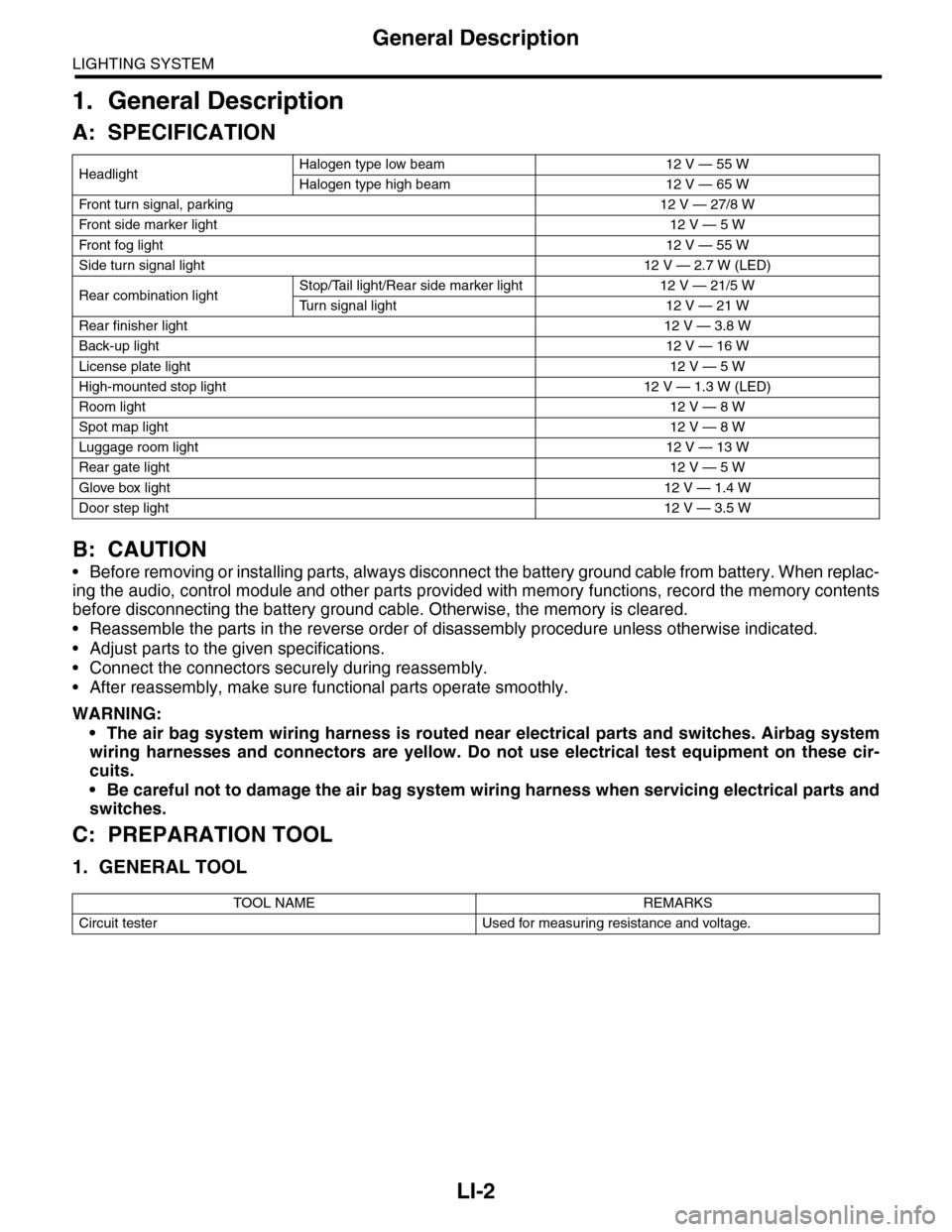
A: SPECIFICATION
B: CAUTION
•Before removing or installing parts, always disconnect the battery ground cable from battery. When replac-
ing the audio, control module and other parts provided with memory functions, record the memory contents
before disconnecting the battery ground cable. Otherwise, the memory is cleared.
•Reassemble the parts in the reverse order of disassembly procedure unless otherwise indicated.
•Adjust parts to the given specifications.
•Connect the connectors securely during reassembly.
•After reassembly, make sure functional parts operate smoothly.
WARNING:
•The air bag system wiring harness is routed near electrical parts and switches. Airbag system
wiring harnesses and connectors are yellow. Do not use electrical test equipment on these cir-
cuits.
•Be careful not to damage the air bag system wiring harness when servicing electrical parts and
switches.
C: PREPARATION TOOL
1. GENERAL TOOL
HeadlightHalogen type low beam 12 V — 55 W
Halogen type high beam 12 V — 65 W
Fr o nt t ur n si gn a l, p ar k in g 1 2 V — 27 / 8 W
Fr o nt si d e m ar ke r li gh t12 V — 5 W
Fr o nt fog li g ht12 V — 55 W
Side turn signal light 12 V — 2.7 W (LED)
Rear combination lightStop/Tail light/Rear side marker light 12 V — 21/5 W
Tu r n s i g n a l l i g h t 1 2 V — 2 1 W
Rear finisher light12 V — 3.8 W
Back-up light12 V — 16 W
License plate light12 V — 5 W
High-mounted stop light 12 V — 1.3 W (LED)
Room light12 V — 8 W
Spot map light12 V — 8 W
Luggage room light12 V — 13 W
Rear gate light12 V — 5 W
Glove box light12 V — 1.4 W
Door step light12 V — 3.5 W
TOOL NAME REMARKS
Circuit tester Used for measuring resistance and voltage.
Page 537 of 2453
LI-4
Front Fog Light System
LIGHTING SYSTEM
3. Front Fog Light System
A: WIRING DIAGRAM
1. FRONT FOG LIGHT
B: INSPECTION
1. FRONT FOG LIGHT SWITCH
Measure the resistance between front fog light
switch terminals.
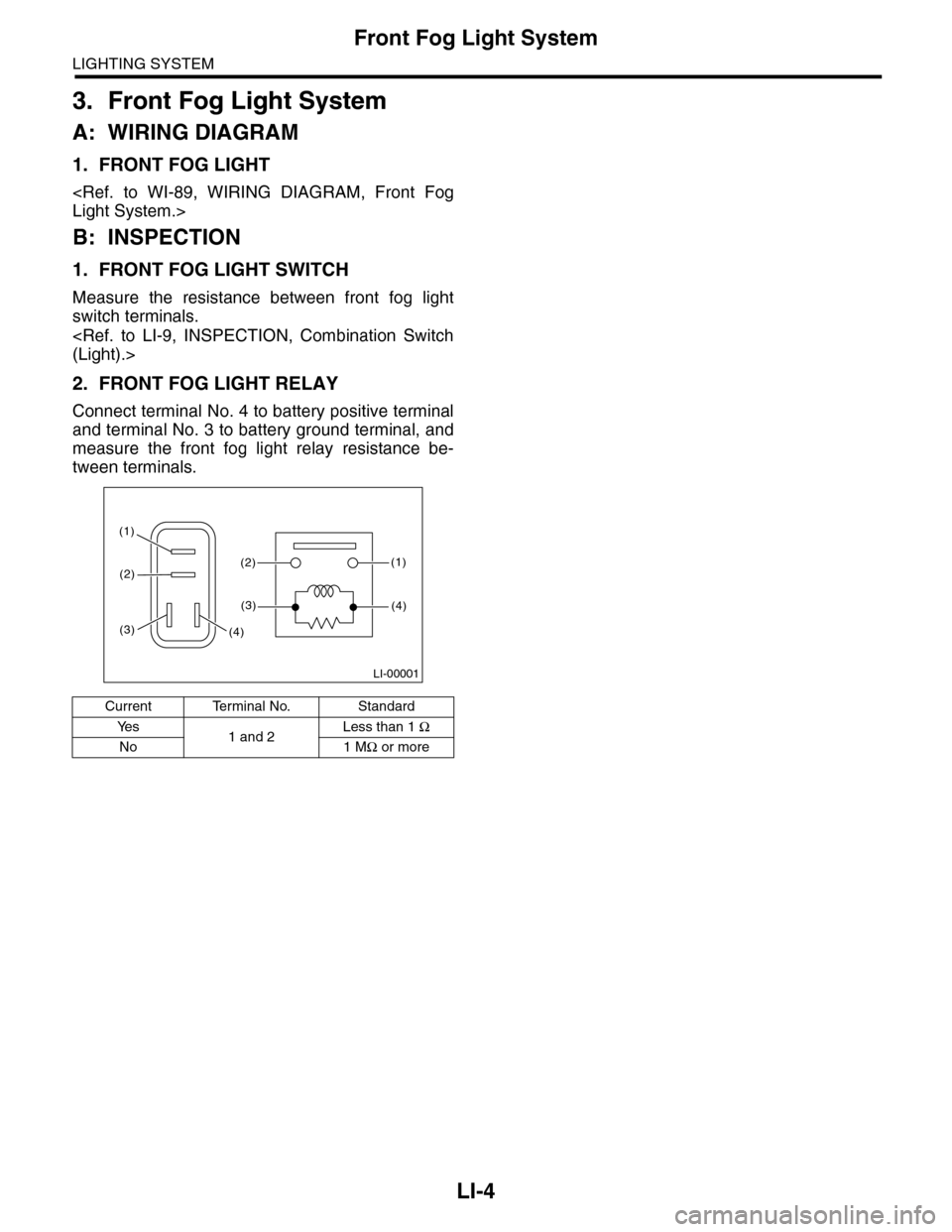
2. FRONT FOG LIGHT RELAY
Connect terminal No. 4 to battery positive terminal
and terminal No. 3 to battery ground terminal, and
measure the front fog light relay resistance be-
tween terminals.
Current Terminal No. Standard
Ye s1 and 2Less than 1 Ω
No 1 MΩ or more
LI-00001
(1)(2)
(1)
(4)
(2)
(3)
(3)(4)
Page 542 of 2453
LI-9
Combination Switch (Light)
LIGHTING SYSTEM
8. Combination Switch (Light)
A: REMOVAL
1) Disconnect the ground cable from battery.
2) Remove the screws and remove the steering
column covers (upper and lower).
3) Disconnect the connector from the combination
switch.
4) Remove the screws which secure the switch,
then remove the combination switch.
B: INSTALLATION
Install in the reverse order of removal.
C: INSPECTION
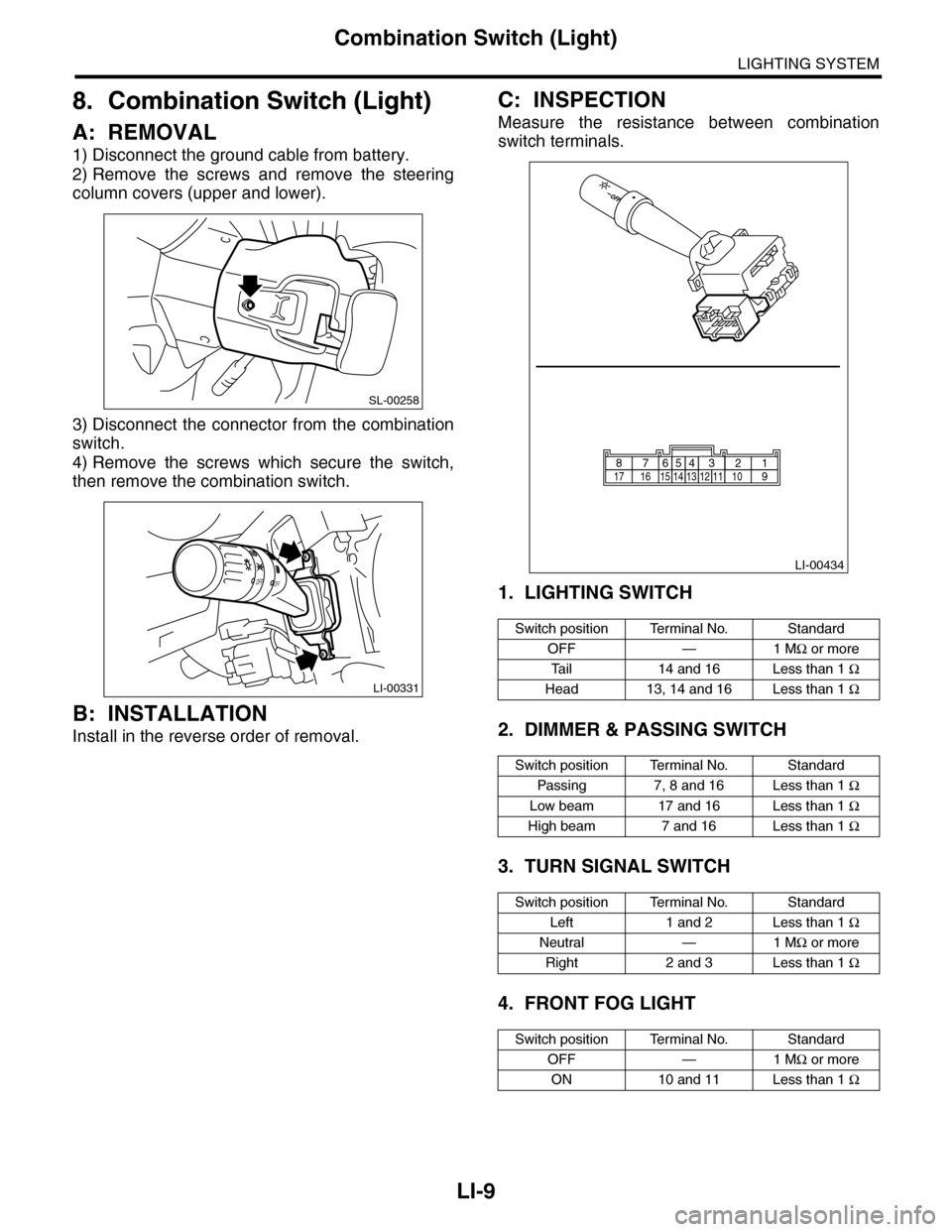
Measure the resistance between combination
switch terminals.
1. LIGHTING SWITCH
2. DIMMER & PASSING SWITCH
3. TURN SIGNAL SWITCH
4. FRONT FOG LIGHT
SL-00258
LI-00331
OFFOFF
Switch position Terminal No. Standard
OFF — 1 MΩ or more
Ta i l 1 4 a n d 1 6 L e s s t h a n 1 Ω
Head 13, 14 and 16 Less than 1 Ω
Switch position Terminal No. Standard
Passing 7, 8 and 16 Less than 1 Ω
Low beam 17 and 16 Less than 1 Ω
High beam 7 and 16 Less than 1 Ω
Switch position Terminal No. Standard
Left 1 and 2 Less than 1 Ω
Neutral — 1 MΩ or more
Right 2 and 3 Less than 1 Ω
Switch position Terminal No. Standard
OFF — 1 MΩ or more
ON 10 and 11 Less than 1 Ω
LI-00434
1514131211109171665432187
Page 550 of 2453
LI-17
Front Fog Light Assembly
LIGHTING SYSTEM
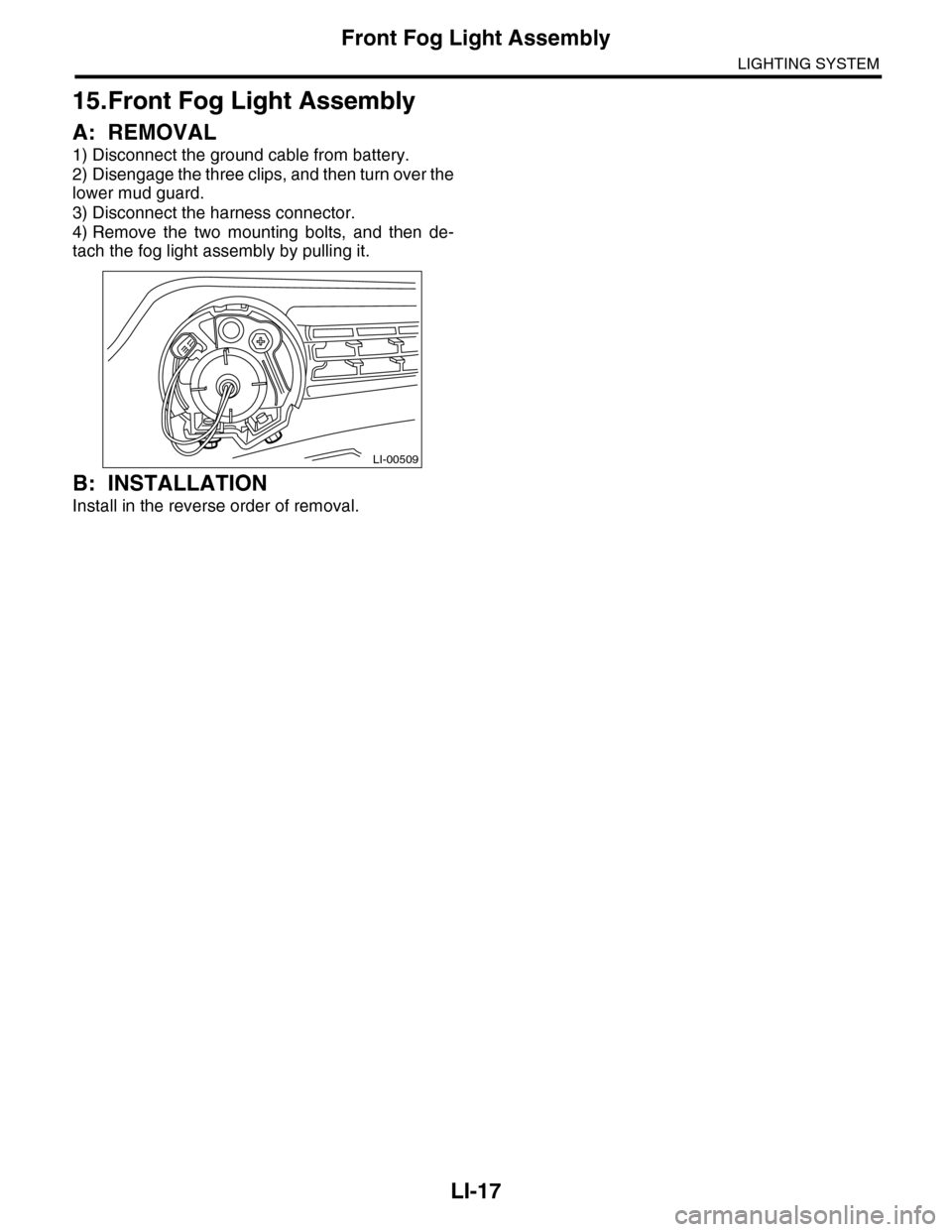
15.Front Fog Light Assembly
A: REMOVAL
1) Disconnect the ground cable from battery.
2) Disengage the three clips, and then turn over the
lower mud guard.
3) Disconnect the harness connector.
4) Remove the two mounting bolts, and then de-
tach the fog light assembly by pulling it.
B: INSTALLATION
Install in the reverse order of removal.
LI-00509
Page 551 of 2453
LI-18
Front Fog Light Bulb
LIGHTING SYSTEM
16.Front Fog Light Bulb
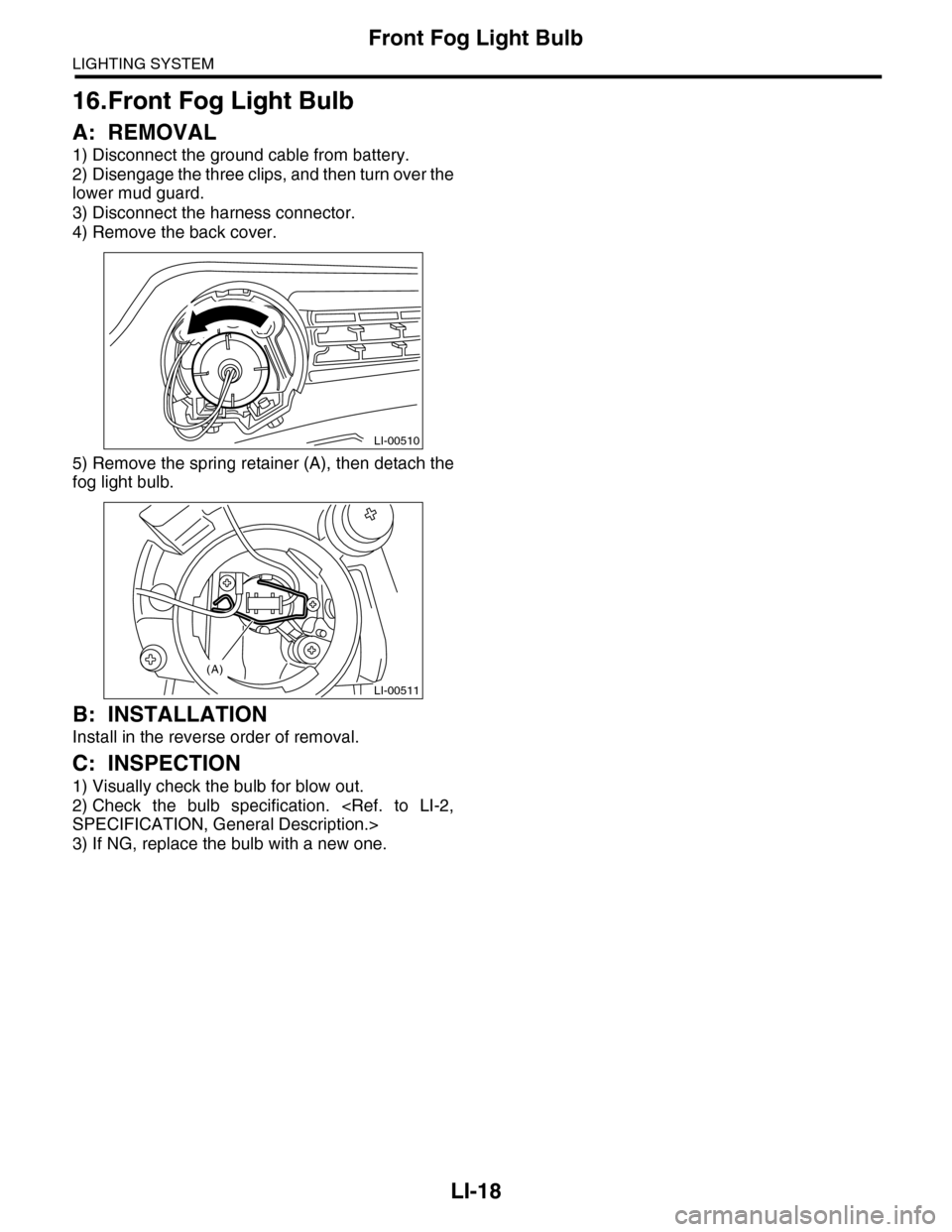
A: REMOVAL
1) Disconnect the ground cable from battery.
2) Disengage the three clips, and then turn over the
lower mud guard.
3) Disconnect the harness connector.
4) Remove the back cover.
5) Remove the spring retainer (A), then detach the
fog light bulb.
B: INSTALLATION
Install in the reverse order of removal.
C: INSPECTION
1) Visually check the bulb for blow out.
2) Check the bulb specification.
3) If NG, replace the bulb with a new one.
LI-00510
LI-00511
(A)
Page 1043 of 2453
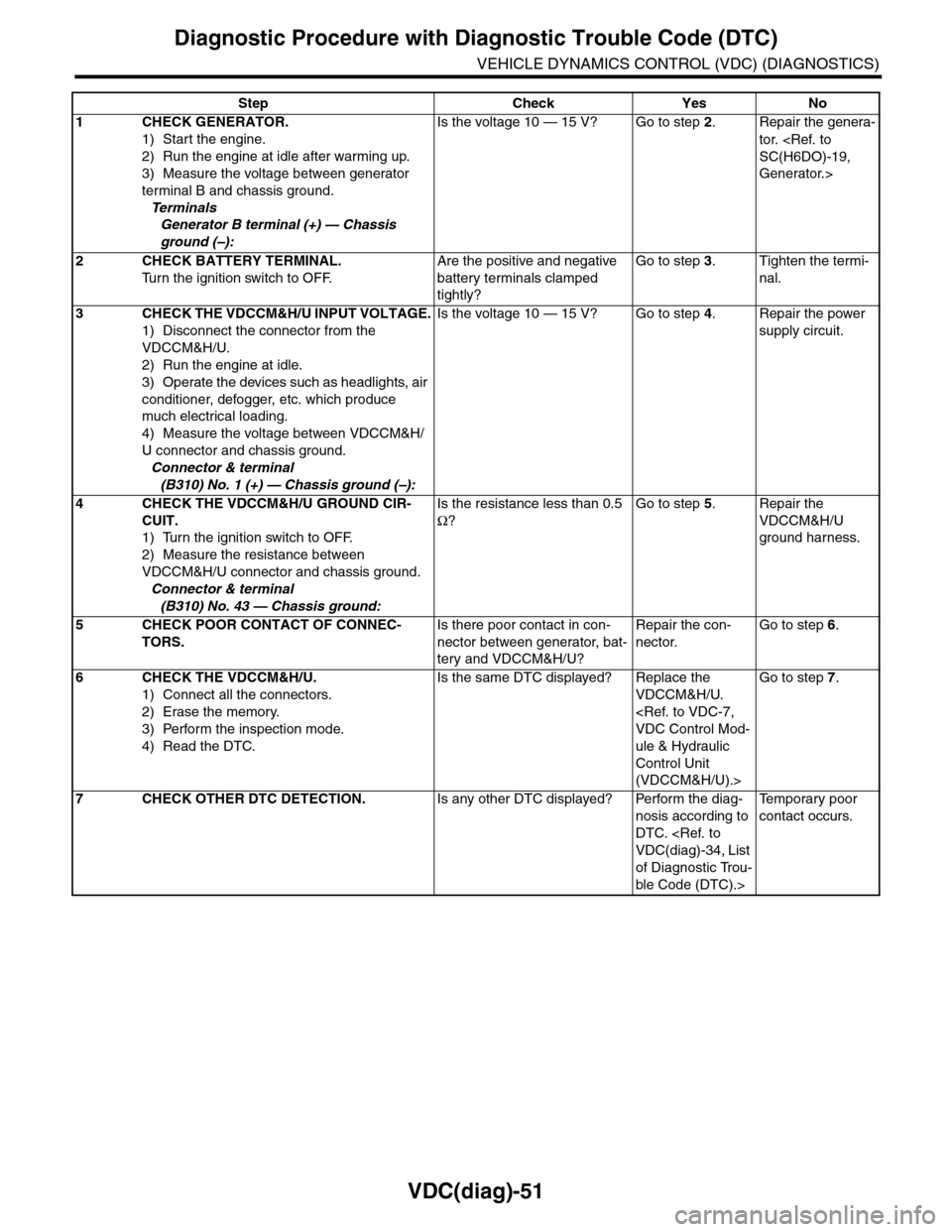
VDC(diag)-51
Diagnostic Procedure with Diagnostic Trouble Code (DTC)
VEHICLE DYNAMICS CONTROL (VDC) (DIAGNOSTICS)
Step Check Yes No
1CHECK GENERATOR.
1) Start the engine.
2) Run the engine at idle after warming up.
3) Measure the voltage between generator
terminal B and chassis ground.
Te r m i n a l s
Generator B terminal (+) — Chassis
ground (–):
Is the voltage 10 — 15 V? Go to step 2.Repair the genera-
tor.
Generator.>
2CHECK BATTERY TERMINAL.
Tu r n t h e i g n i t i o n s w i t c h t o O F F.
Are the positive and negative
battery terminals clamped
tightly?
Go to step 3.Tighten the termi-
nal.
3CHECK THE VDCCM&H/U INPUT VOLTAGE.
1) Disconnect the connector from the
VDCCM&H/U.
2) Run the engine at idle.
3) Operate the devices such as headlights, air
conditioner, defogger, etc. which produce
much electrical loading.
4) Measure the voltage between VDCCM&H/
U connector and chassis ground.
Connector & terminal
(B310) No. 1 (+) — Chassis ground (–):
Is the voltage 10 — 15 V? Go to step 4.Repair the power
supply circuit.
4CHECK THE VDCCM&H/U GROUND CIR-
CUIT.
1) Turn the ignition switch to OFF.
2) Measure the resistance between
VDCCM&H/U connector and chassis ground.
Connector & terminal
(B310) No. 43 — Chassis ground:
Is the resistance less than 0.5
Ω?
Go to step 5.Repair the
VDCCM&H/U
ground harness.
5CHECK POOR CONTACT OF CONNEC-
TORS.
Is there poor contact in con-
nector between generator, bat-
tery and VDCCM&H/U?
Repair the con-
nector.
Go to step 6.
6CHECK THE VDCCM&H/U.
1) Connect all the connectors.
2) Erase the memory.
3) Perform the inspection mode.
4) Read the DTC.
Is the same DTC displayed? Replace the
VDCCM&H/U.
ule & Hydraulic
Control Unit
(VDCCM&H/U).>
Go to step 7.
7CHECK OTHER DTC DETECTION.Is any other DTC displayed? Perform the diag-
nosis according to
DTC.
of Diagnostic Trou-
ble Code (DTC).>
Te m p o r a r y p o o r
contact occurs.
Page 1164 of 2453
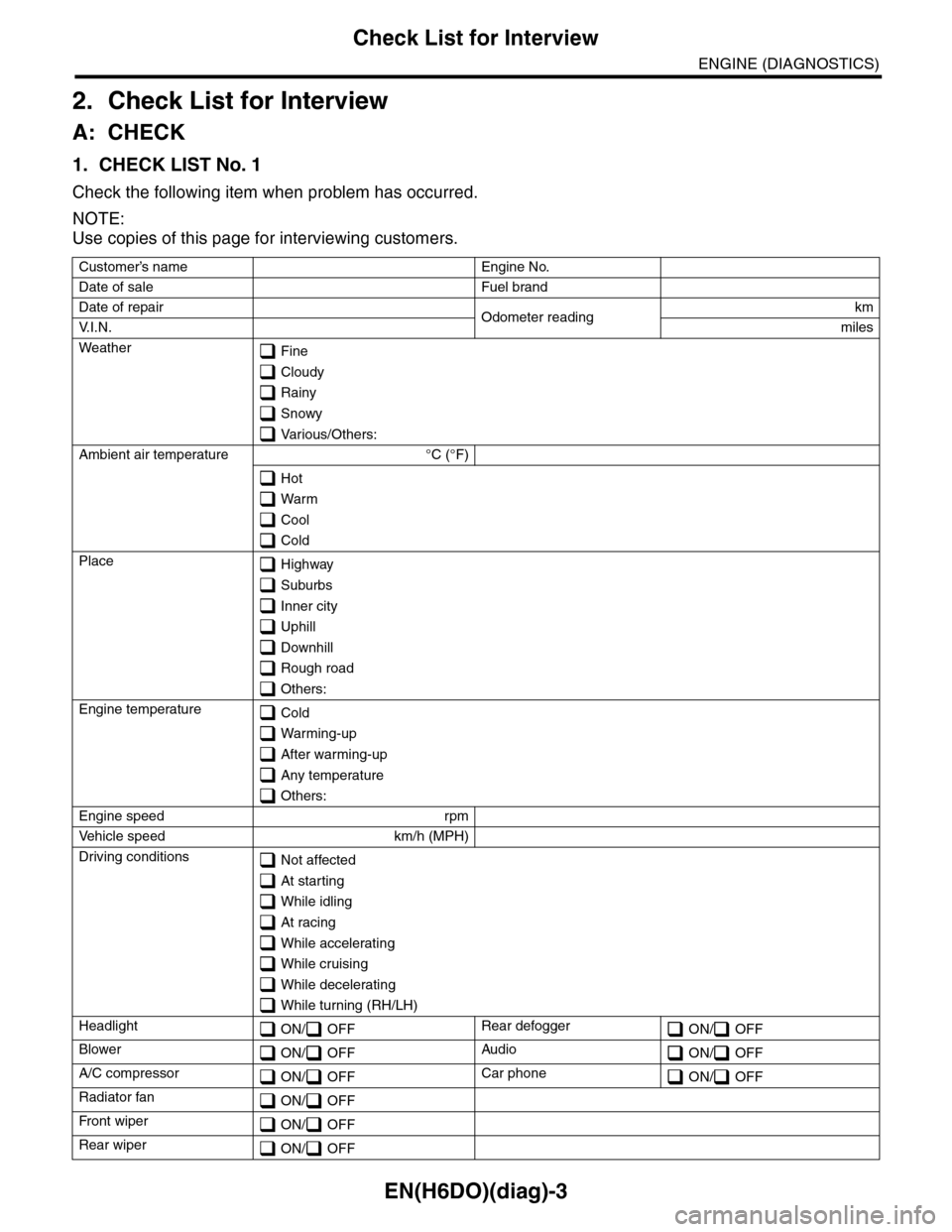
EN(H6DO)(diag)-3
Check List for Interview
ENGINE (DIAGNOSTICS)
2. Check List for Interview
A: CHECK
1. CHECK LIST No. 1
Check the following item when problem has occurred.
NOTE:
Use copies of this page for interviewing customers.
Customer’s name Engine No.
Date of sale Fuel brand
Date of repair Odometer readingkm
V. I . N . miles
Weather Fine
Cloudy
Rainy
Snowy
Various/Others:
Ambient air temperature °C (°F)
Hot
Warm
Cool
Cold
Place Highway
Suburbs
Inner city
Uphill
Downhill
Rough road
Others:
Engine temperature Cold
Warming-up
After warming-up
Any temperature
Others:
Engine speed rpm
Ve h i c l e s p e e d k m / h ( M P H )
Driving conditions Not affected
At starting
While idling
At racing
While accelerating
While cruising
While decelerating
While turning (RH/LH)
Headlight ON/ OFFRear defogger ON/ OFF
Blower ON/ OFFAudio ON/ OFF
A/C compressor ON/ OFFCar phone ON/ OFF
Radiator fan ON/ OFF
Fr o nt wi pe r ON/ OFF
Rear wiper ON/ OFF