service SUBARU TRIBECA 2009 1.G Service User Guide
[x] Cancel search | Manufacturer: SUBARU, Model Year: 2009, Model line: TRIBECA, Model: SUBARU TRIBECA 2009 1.GPages: 2453, PDF Size: 46.32 MB
Page 349 of 2453
AC-23
Refrigerant Charging Procedure
HVAC SYSTEM (HEATER, VENTILATOR AND A/C)
17) After confirming that there are no leaks with the
leak test, charge the required amount of refrigerant.
CAUTION:
Never run the engine while charging from the
high-pressure side.
18) Close the high-pressure valve when;
•the readings of low- / high-pressure gauges be-
come almost equal, after the charging speed is re-
duced,
•the HFC-134a source becomes empty, or the
system is full with the gas.
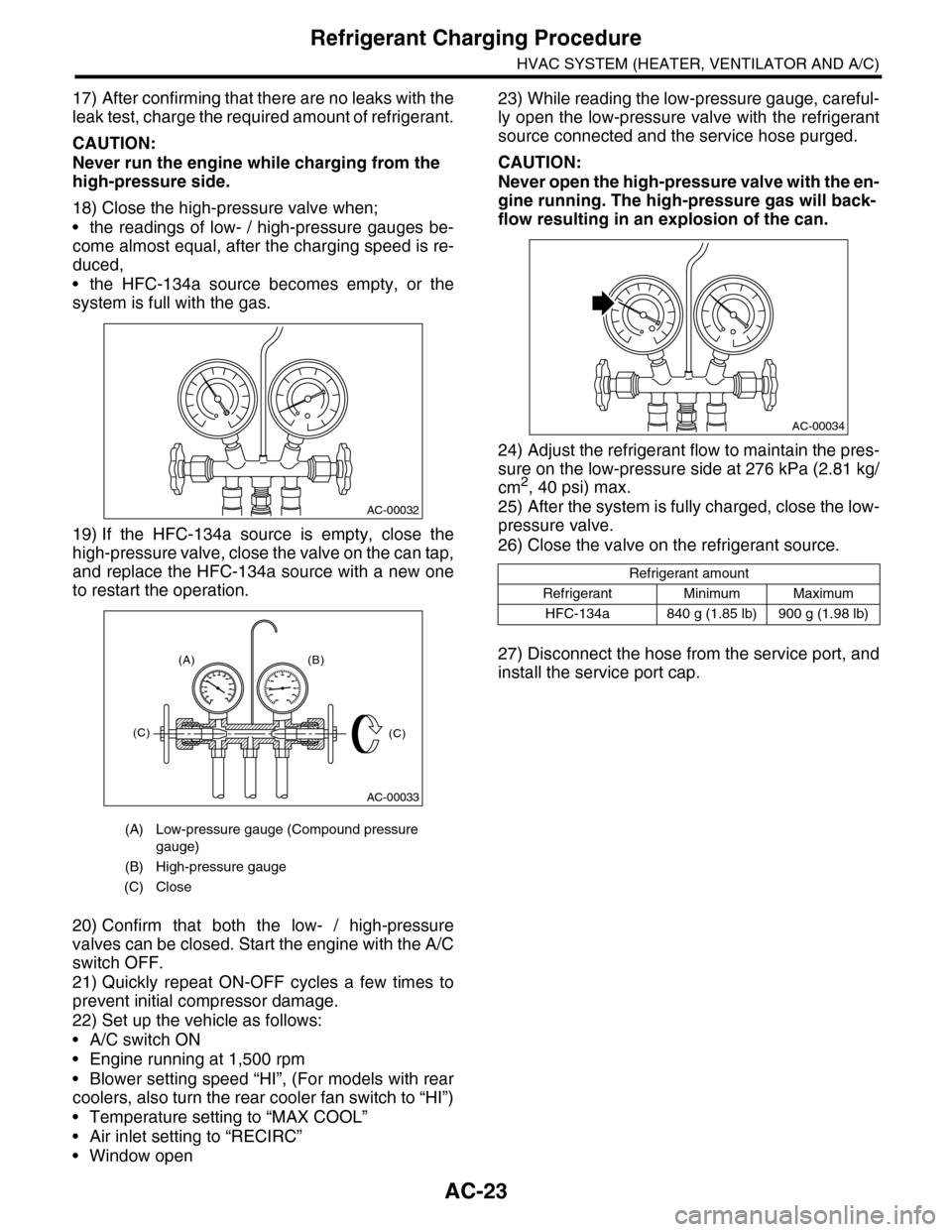
19) If the HFC-134a source is empty, close the
high-pressure valve, close the valve on the can tap,
and replace the HFC-134a source with a new one
to restart the operation.
20) Confirm that both the low- / high-pressure
valves can be closed. Start the engine with the A/C
switch OFF.
21) Quickly repeat ON-OFF cycles a few times to
prevent initial compressor damage.
22) Set up the vehicle as follows:
•A/C switch ON
•Engine running at 1,500 rpm
•Blower setting speed “HI”, (For models with rear
coolers, also turn the rear cooler fan switch to “HI”)
•Temperature setting to “MAX COOL”
•Air inlet setting to “RECIRC”
•Window open
23) While reading the low-pressure gauge, careful-
ly open the low-pressure valve with the refrigerant
source connected and the service hose purged.
CAUTION:
Never open the high-pressure valve with the en-
gine running. The high-pressure gas will back-
flow resulting in an explosion of the can.
24) Adjust the refrigerant flow to maintain the pres-
sure on the low-pressure side at 276 kPa (2.81 kg/
cm2, 40 psi) max.
25) After the system is fully charged, close the low-
pressure valve.
26) Close the valve on the refrigerant source.
27) Disconnect the hose from the service port, and
install the service port cap.
(A) Low-pressure gauge (Compound pressure
gauge)
(B) High-pressure gauge
(C) Close
AC-00032
AC-00033
(A) (B)
(C)(C)
Refrigerant amount
Refrigerant Minimum Maximum
HFC-134a 840 g (1.85 lb) 900 g (1.98 lb)
AC-00034
Page 350 of 2453
AC-24
Refrigerant Leak Check
HVAC SYSTEM (HEATER, VENTILATOR AND A/C)
5. Refrigerant Leak Check
A: INSPECTION
1) At engine speed below 1500rpm, operate the A/
C system for approx. 10 minutes, and confirm that
the high-side pressure shows at least 690 kPa
(7.03 kg/cm2, 100 psi). Then stop the engine to
start the leak test.
2) Starting from the connection between high-pres-
sure pipe and evaporator, check the system for
leaks along the high-pressure side through the
compressor. The following items must be checked
thoroughly.
3) Check the joint and seam between pressure
switch (dual switch) and high-pressure pipe.
4) Check the connections between condenser and
pipes, and welded joints on the condenser.
The leak tester may detect the oil on the condenser
fins as a leak.
5) Check the joint between compressor and hoses.
6) Check the machined area of the compressor and
other joints on the compressor.
7) Check the compressor shaft seal at the area
near the center of compressor clutch pulley.
Some shaft seals show a slight amount of leakage,
about 3 g (0.1 oz) per year. This is not a problem.
8) Starting from the connection between low-pres-
sure pipe and evaporator, check the system for
leakage along the low-pressure side through the
compressor. The following items must be checked
thoroughly.
•Connection between 2 parts
•Connection between pipe and plate
•Connection between pipes
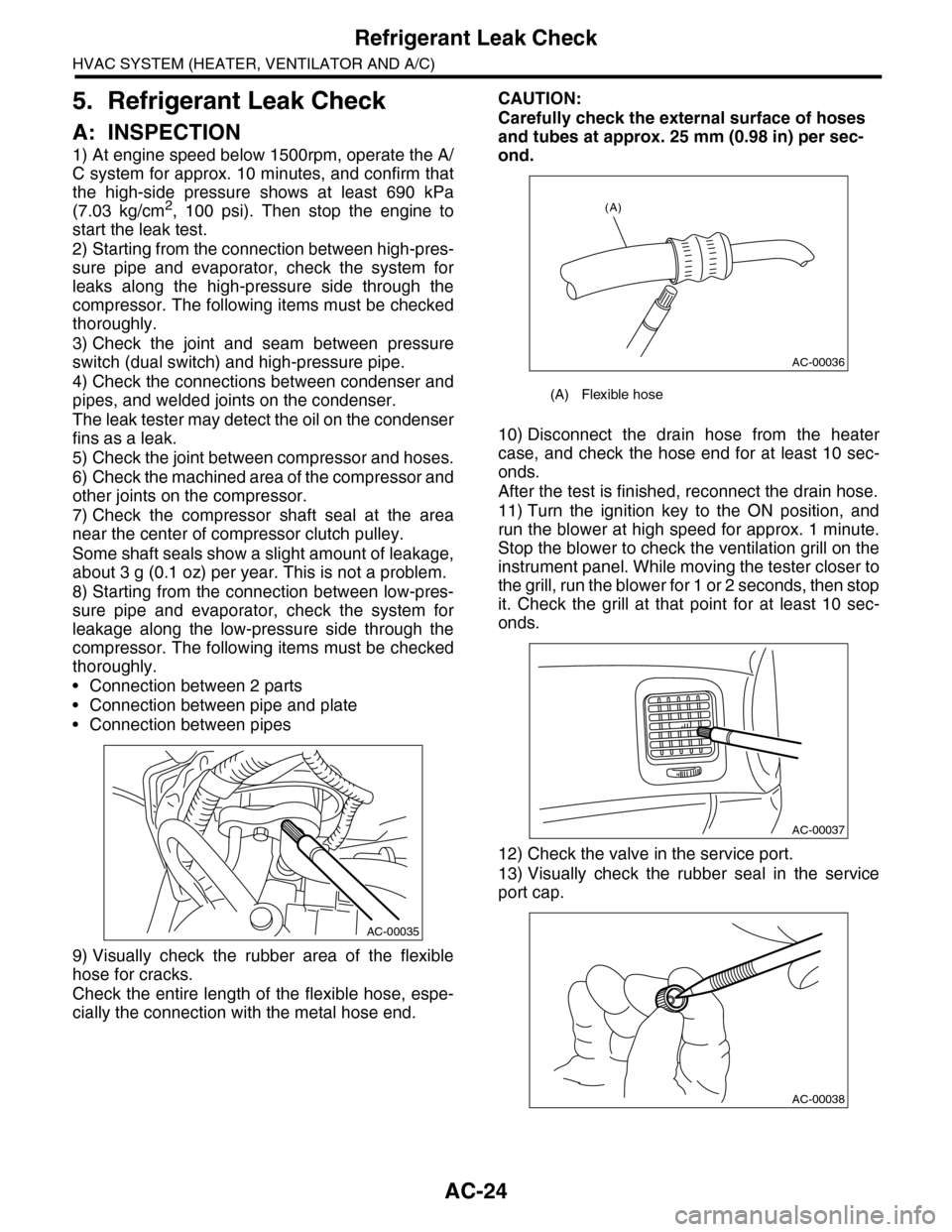
9) Visually check the rubber area of the flexible
hose for cracks.
Check the entire length of the flexible hose, espe-
cially the connection with the metal hose end.
CAUTION:
Carefully check the external surface of hoses
and tubes at approx. 25 mm (0.98 in) per sec-
ond.
10) Disconnect the drain hose from the heater
case, and check the hose end for at least 10 sec-
onds.
After the test is finished, reconnect the drain hose.
11) Turn the ignition key to the ON position, and
run the blower at high speed for approx. 1 minute.
Stop the blower to check the ventilation grill on the
instrument panel. While moving the tester closer to
the grill, run the blower for 1 or 2 seconds, then stop
it. Check the grill at that point for at least 10 sec-
onds.
12) Check the valve in the service port.
13) Visually check the rubber seal in the service
port cap.
AC-00035
(A) Flexible hose
AC-00036
(A)
AC-00037
AC-00038
Page 367 of 2453
AC-41
Pressure Switch (Triple Pressure Switch)
HVAC SYSTEM (HEATER, VENTILATOR AND A/C)
20.Pressure Switch (Triple Pres-
sure Switch)
A: INSPECTION
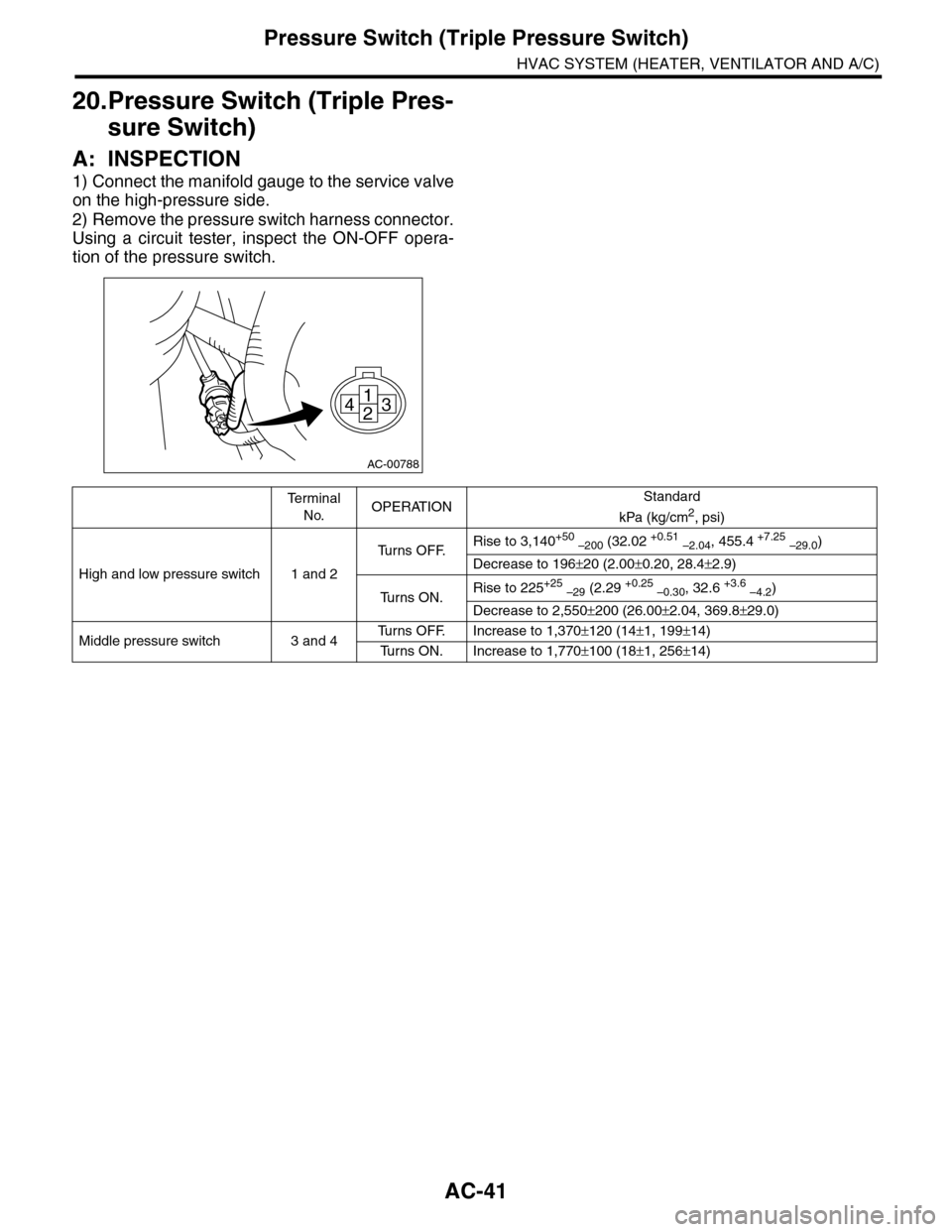
1) Connect the manifold gauge to the service valve
on the high-pressure side.
2) Remove the pressure switch harness connector.
Using a circuit tester, inspect the ON-OFF opera-
tion of the pressure switch.
AC-00788
1
243
Te r m i n a l
No.OPERATIONStandard
kPa (kg/cm2, psi)
High and low pressure switch 1 and 2
Tu r n s O F F.Rise to 3,140+50 –200 (32.02 +0.51 –2.04, 455.4 +7.25 –29.0)
Decrease to 196±20 (2.00±0.20, 28.4±2.9)
Tu r n s O N .Rise to 225+25 –29 (2.29 +0.25 –0.30, 32.6 +3.6 –4.2)
Decrease to 2,550±200 (26.00±2.04, 369.8±29.0)
Middle pressure switch 3 and 4Tu r n s O F F. I n c r e a s e t o 1 , 3 7 0±120 (14±1, 199±14)
Tu r n s O N . I n c r e a s e t o 1 , 7 7 0±100 (18±1, 256±14)
Page 375 of 2453
AC-49
A/C Filter
HVAC SYSTEM (HEATER, VENTILATOR AND A/C)
28.A/C Filter
A: REPLACEMENT
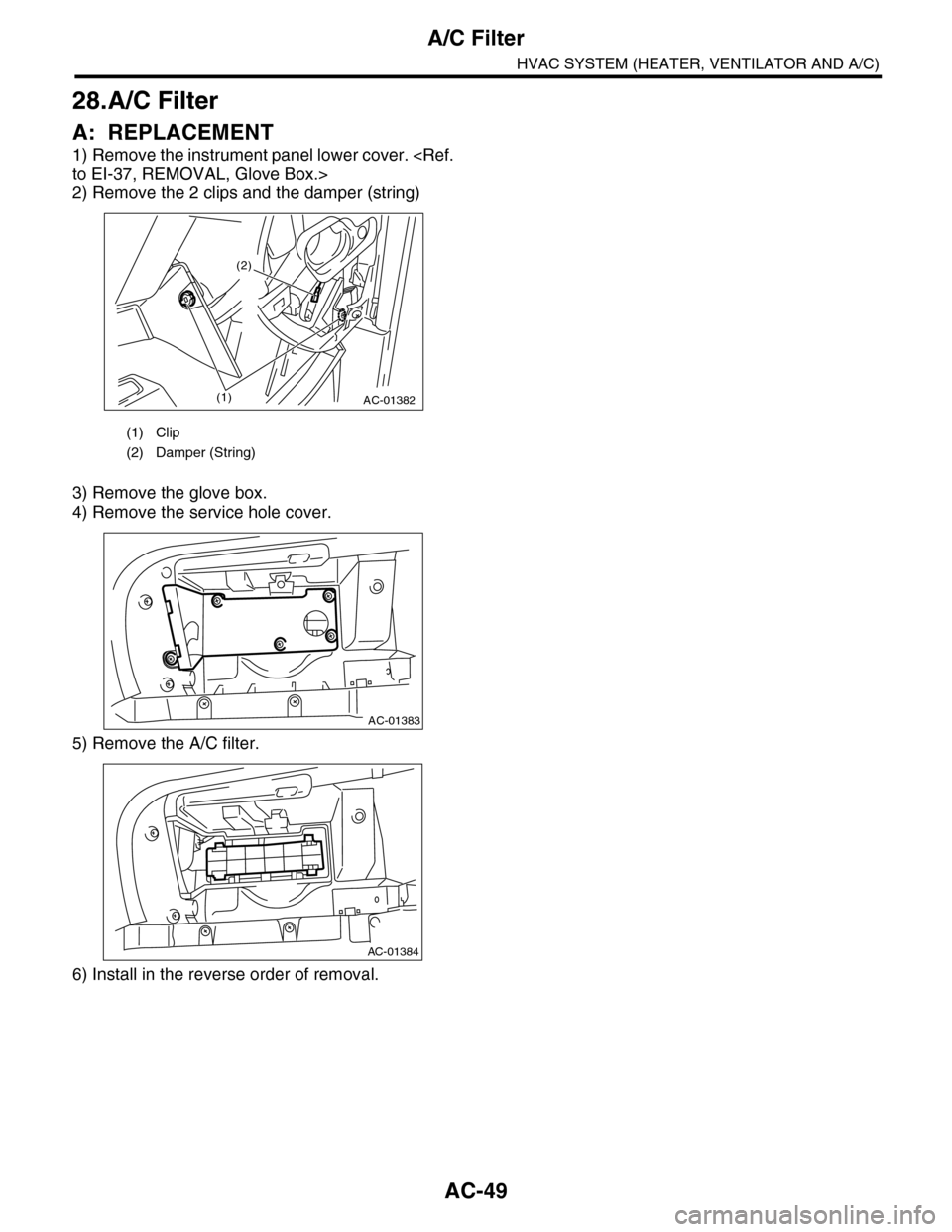
1) Remove the instrument panel lower cover.
2) Remove the 2 clips and the damper (string)
3) Remove the glove box.
4) Remove the service hole cover.
5) Remove the A/C filter.
6) Install in the reverse order of removal.
(1) Clip
(2) Damper (String)
AC-01382(1)
(2)
AC-01383
AC-01384
Page 546 of 2453
LI-13
Headlight Bulb
LIGHTING SYSTEM
11.Headlight Bulb
A: REMOVAL
1. HIGH BEAM AND LOW BEAM
CAUTION:
•Because the halogen bulb operates at a high
temperature, dirt and oil on the bulb surface re-
duces the bulb's service life. Hold the flange
portion when replacing the bulb. Never touch
the glass portion.
•Do not leave the headlight without a bulb for
a long time. Dust, moisture, etc. entering the
headlight may affect its performance.
1) Disconnect the ground cable from battery.
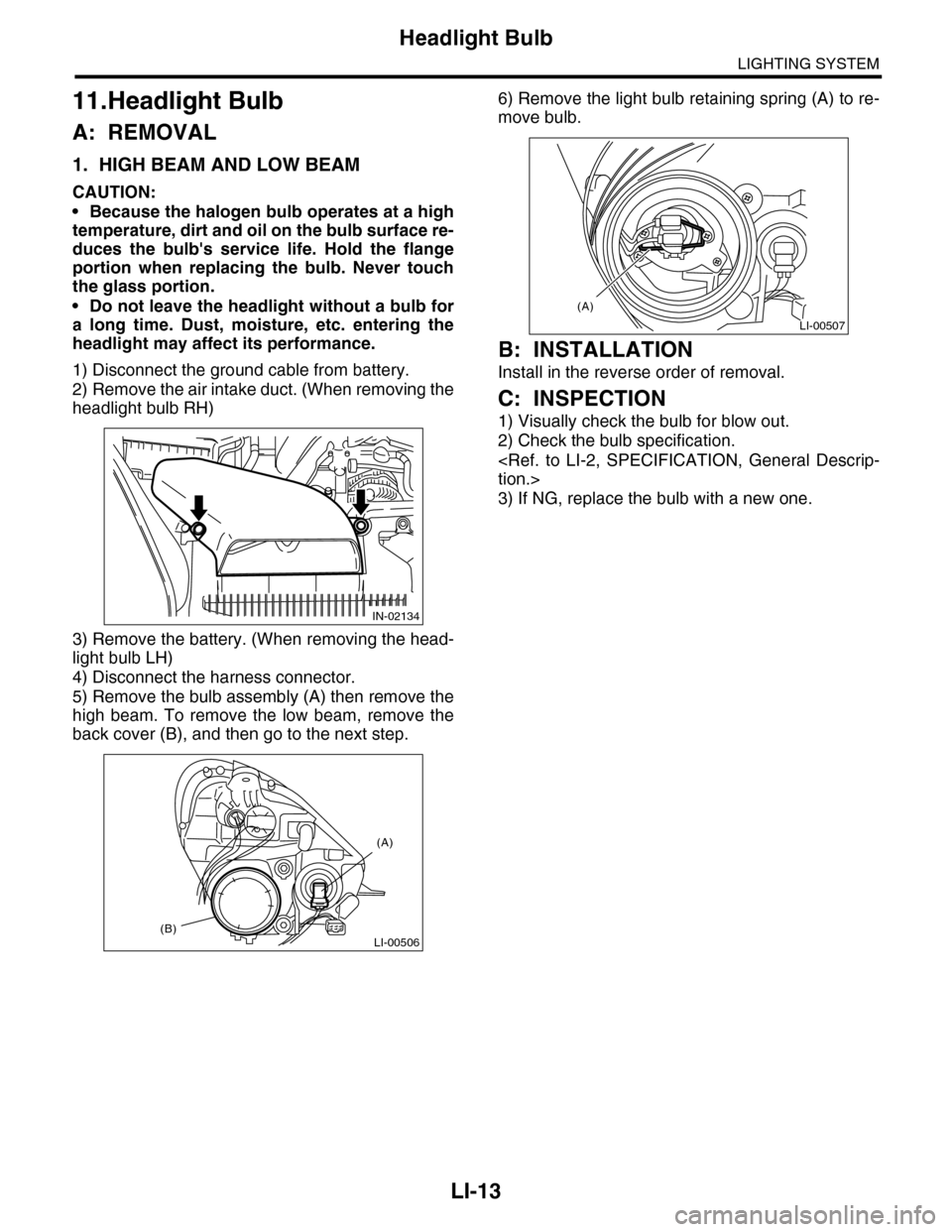
2) Remove the air intake duct. (When removing the
headlight bulb RH)
3) Remove the battery. (When removing the head-
light bulb LH)
4) Disconnect the harness connector.
5) Remove the bulb assembly (A) then remove the
high beam. To remove the low beam, remove the
back cover (B), and then go to the next step.
6) Remove the light bulb retaining spring (A) to re-
move bulb.
B: INSTALLATION
Install in the reverse order of removal.
C: INSPECTION
1) Visually check the bulb for blow out.
2) Check the bulb specification.
3) If NG, replace the bulb with a new one.
IN-02134
LI-00506(B)
(A)
LI-00507
(A)
Page 586 of 2453
OD(diag)-18
Subaru Select Monitor
OCCUPANT DETECTION SYSTEM (DIAGNOSTICS)
3. CLEAR MEMORY MODE
Clear the DTC stored in the airbag control module
after repairing the airbag system and occupant de-
tection system. (After the breakdown is recovered,
the breakdown code for completed recoveries are
read out when the next breakdown occurs if the
memory clear work is not performed.)
1) On the «Main Menu» display screen, select the
{Each System Check} and press the [YES] key.
2) On the «System Selection Menu» display
screen, select the {Airbag System} and press the
[YES] key.
3) On the {Airbag System} menu screen, select the
{Clear Memory} and press the [YES] key.
4) When the “Clear Memory?” is shown on the
screen, press the [YES] key.
5) When “Done” is displayed, turn the Subaru Se-
lect Monitor to OFF.
NOTE:
For details concerning operation procedure, refer
to the “SUBARU SELECT MONITOR OPERATION
MANUAL”.
4. SYSTEM CALIBRATION (REZEROING)
NOTE:
When replacing the occupant detection system, or
removing and disassembling the passenger’s seat,
always perform the system calibration after install-
ing a seat in the vehicle.
CAUTION:
When the trouble occurs in the system during
calibration process, “Occupant detection cali-
bration failure” is detected in the DTC 2A of the
airbag system and the airbag warning light
lights. In this case, after turning the ignition
switch to OFF once, redo the system calibration
(Rezeroing), or after clearing the cause of the
failure, perform the system calibration again.
1) Park empty vehicle on a level surface.
2) On the «Main Menu» display screen, select the
{Each System Check} and press the [YES] key.
3) On the «System Selection Menu» display
screen, select the {Occupant Detection System}
and press the [YES] key.
4) On the Occupant Detection System display
screen, select the {Zero Point Adjustment} and
press the [YES] key.
5) “See service manual. And check vehicle condi-
tion for successfully completing the rezeroing.” is
displayed. Check the following to adjust the condi-
tion of the vehicle.
•Adjust the seat backrest to be vertical. (Press the
power seat switch to put the seat in a position
where it will not move.)
•Adjust the seat sliding position to all the way
back. (Press the power seat switch to put the seat
in a position where it will not move.)
•Do not place anything on the top of the seat
cushion.
•Sit on the seat cushion to smooth the seat sur-
face.
•Check that the passenger’s seat belt is not in-
serted into the buckle, not tense or not stuck.
•Check that ambient temperature is in a range
from 0 to 40°C.
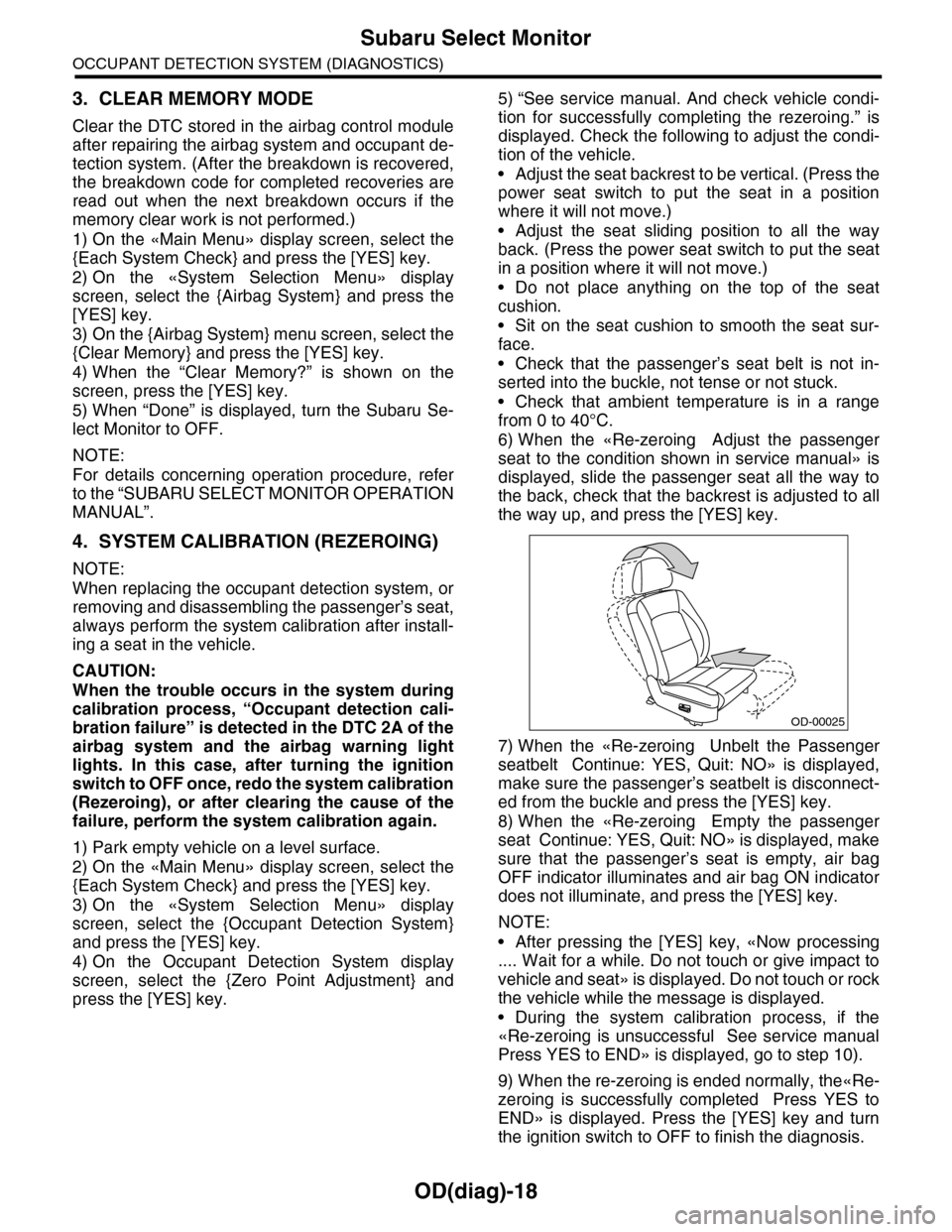
6) When the «Re-zeroing Adjust the passenger
seat to the condition shown in service manual» is
displayed, slide the passenger seat all the way to
the back, check that the backrest is adjusted to all
the way up, and press the [YES] key.
7) When the «Re-zeroing Unbelt the Passenger
seatbelt Continue: YES, Quit: NO» is displayed,
make sure the passenger’s seatbelt is disconnect-
ed from the buckle and press the [YES] key.
8) When the «Re-zeroing Empty the passenger
seat Continue: YES, Quit: NO» is displayed, make
sure that the passenger’s seat is empty, air bag
OFF indicator illuminates and air bag ON indicator
does not illuminate, and press the [YES] key.
NOTE:
•After pressing the [YES] key, «Now processing
.... Wait for a while. Do not touch or give impact to
vehicle and seat» is displayed. Do not touch or rock
the vehicle while the message is displayed.
•During the system calibration process, if the
«Re-zeroing is unsuccessful See service manual
Press YES to END» is displayed, go to step 10).
9) When the re-zeroing is ended normally, the«Re-
zeroing is successfully completed Press YES to
END» is displayed. Press the [YES] key and turn
the ignition switch to OFF to finish the diagnosis.
OD-00025
Page 587 of 2453
OD(diag)-19
Subaru Select Monitor
OCCUPANT DETECTION SYSTEM (DIAGNOSTICS)
10) During the system calibration process, if the
«Re-zeroing is unsuccessful See service manual
Press YES to END» is displayed, turn the ignition
switch to OFF once and turn it to ON again, and
then read the DTC of airbag system.
tor.>
When DTC is input, fix the fault and then perform
the system calibration. When DTC is not input,
check the seat and vehicle status and then perform
the system calibration again.
TION, Subaru Select Monitor.>
NOTE:
When the re-zeroing is unsuccessful, there could
be occupant detection system failure or improper
seat and vehicle status. When the airbag warning
light illuminates, read the DTC of airbag system,
and perform the diagnosis referring to “List of Diag-
nostic Trouble Code.”
B: INSPECTION
1. COMMUNICATION FOR INITIALIZING
IMPOSSIBLE
DETECTING CONDITION:
Defective harness connector
TROUBLE SYMPTOM:
Communication is impossible between the airbag
control module and the Subaru Select Monitor.
Refer to “Initial Communication Impossible” in the
DTC of the airbag system (diagnosis).
tor.>
2. WITHOUT DTC
DETECTING CONDITION:
•Defective combination meter
•Open circuit of harness
TROUBLE SYMPTOM:
•Airbag warning light remains on.
•“NO TROUBLE CODE” will be displayed on the
Subaru Select Monitor.
For detailed operation procedure, refer to “Airbag
Warning Light Failure”.
NOTE:
When the airbag warning light is OFF and “NO
TROUBLE CODE” is displayed on Subaru Select
Monitor, the system is in normal condition.
Page 617 of 2453
SE-7
Front Seat
SEATS
2. Front Seat
A: REMOVAL
CAUTION:
The airbag system is fitted with a backup power
source. After disconnecting the battery ground
cable, the airbag may deploy if you do not wait
for 20 seconds before starting the service of
airbag system.
1. DRIVER’S SEAT
1) Remove the headrest.
2) Tilt the backrest forward, and move the seat for-
ward.
3) Remove the rear leg cover, and remove the two
bolts at the rear side of slide rail.
4) Move the seat backward, remove the front leg
cover, and then remove the 2 bolts at the front side
of the slide rail.
5) Disconnect the ground cable from battery, and
wait for more than 20 seconds before starting work.
6) Disconnect the connector under the seat.
•Seat belt buckle switch connector
•Seat position sensor connector
•Side airbag connector
•Seat heater connector
•Power seat connector
7) Remove the seat from vehicle.
2. PASSENGER’S SEAT
CAUTION:
Refer to “CAUTION” of “General Description”
before starting the work.
1) Remove the headrest.
2) Tilt the backrest forward, and move the seat for-
ward.
3) Remove the rear leg cover, and remove the bolt
at the rear side of the slide rail.
4) Move the seat backward, remove the front leg
cover, and then remove the bolt at the front side of
the slide rail.
5) Disconnect the ground cable from battery, and
wait for more than 20 seconds before starting work.
6) Disconnect all the connectors of connector hold-
er in the backside of seat cushion.
•Harness connector of occupant detection control
module
•Side airbag connector
•Power seat connector
•Seat heater connector
7) Remove the seat belt anchor cover.
NOTE:
Tilt the seat back all the way to provide workspace.
8) Remove the seat from vehicle.
B: INSTALLATION
Install in the reverse order of removal.
NOTE:
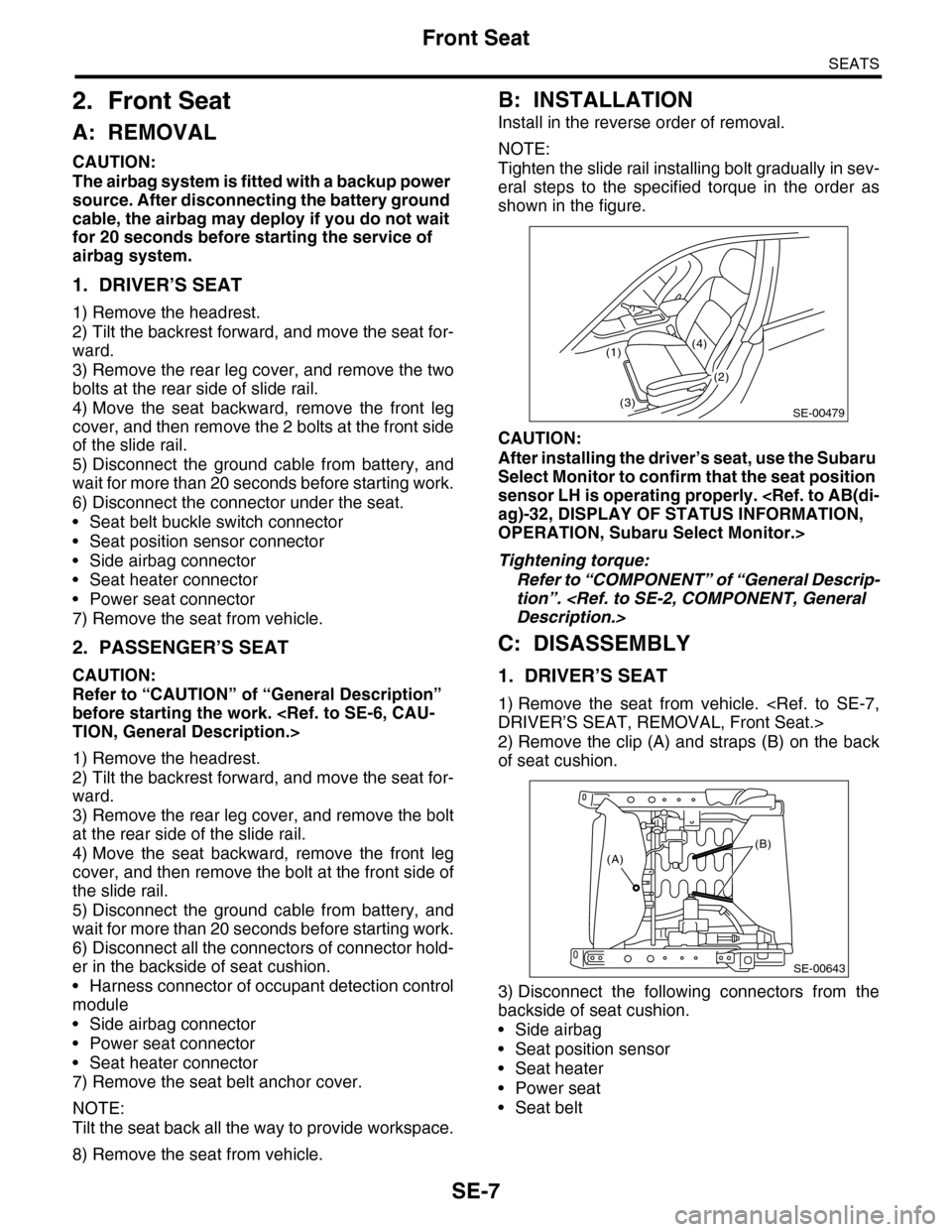
Tighten the slide rail installing bolt gradually in sev-
eral steps to the specified torque in the order as
shown in the figure.
CAUTION:
After installing the driver’s seat, use the Subaru
Select Monitor to confirm that the seat position
sensor LH is operating properly.
OPERATION, Subaru Select Monitor.>
Tightening torque:
Refer to “COMPONENT” of “General Descrip-
tion”.
C: DISASSEMBLY
1. DRIVER’S SEAT
1) Remove the seat from vehicle.
2) Remove the clip (A) and straps (B) on the back
of seat cushion.
3) Disconnect the following connectors from the
backside of seat cushion.
•Side airbag
•Seat position sensor
•Seat heater
•Power seat
•Seat belt
SE-00479
(1)
(3)
(4)
(2)
(B)(A)
SE-00643
Page 728 of 2453
BR-14
Front Disc Rotor
BRAKE
3. Front Disc Rotor
A: REMOVAL
1) Lift-up the vehicle, and remove the front wheels.
2) Remove the caliper body and the support from
housing, and suspend it from the strut using a wire.
3) Remove the disc rotor.
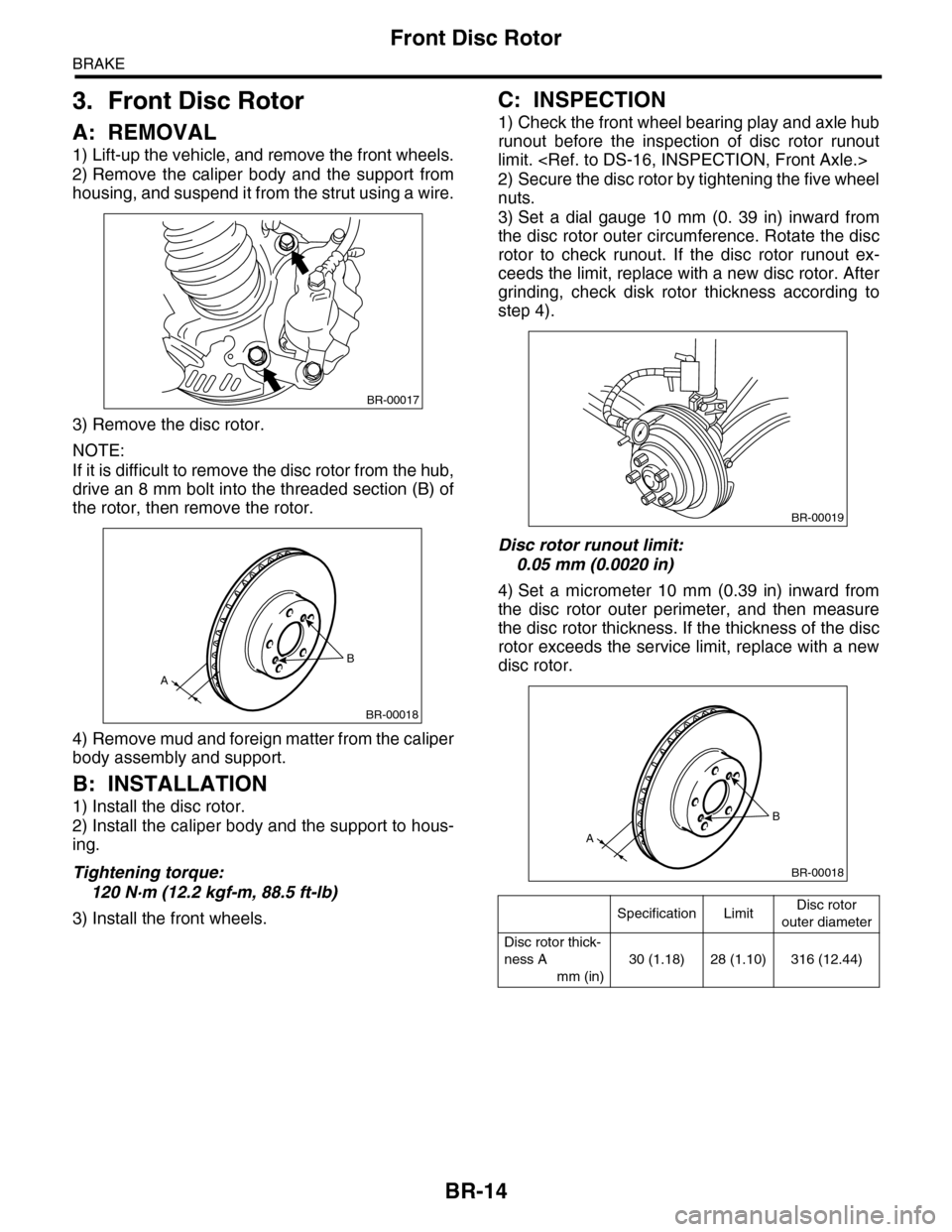
NOTE:
If it is difficult to remove the disc rotor from the hub,
drive an 8 mm bolt into the threaded section (B) of
the rotor, then remove the rotor.
4) Remove mud and foreign matter from the caliper
body assembly and support.
B: INSTALLATION
1) Install the disc rotor.
2) Install the caliper body and the support to hous-
ing.
Tightening torque:
120 N·m (12.2 kgf-m, 88.5 ft-lb)
3) Install the front wheels.
C: INSPECTION
1) Check the front wheel bearing play and axle hub
runout before the inspection of disc rotor runout
limit.
2) Secure the disc rotor by tightening the five wheel
nuts.
3) Set a dial gauge 10 mm (0. 39 in) inward from
the disc rotor outer circumference. Rotate the disc
rotor to check runout. If the disc rotor runout ex-
ceeds the limit, replace with a new disc rotor. After
grinding, check disk rotor thickness according to
step 4).
Disc rotor runout limit:
0.05 mm (0.0020 in)
4) Set a micrometer 10 mm (0.39 in) inward from
the disc rotor outer perimeter, and then measure
the disc rotor thickness. If the thickness of the disc
rotor exceeds the service limit, replace with a new
disc rotor.
BR-00017
B
A
BR-00018
Specification LimitDisc rotor
outer diameter
Disc rotor thick-
ness A
mm (in)
30 (1.18) 28 (1.10) 316 (12.44)
BR-00019
B
A
BR-00018
Page 735 of 2453
BR-21
Rear Disc Rotor
BRAKE
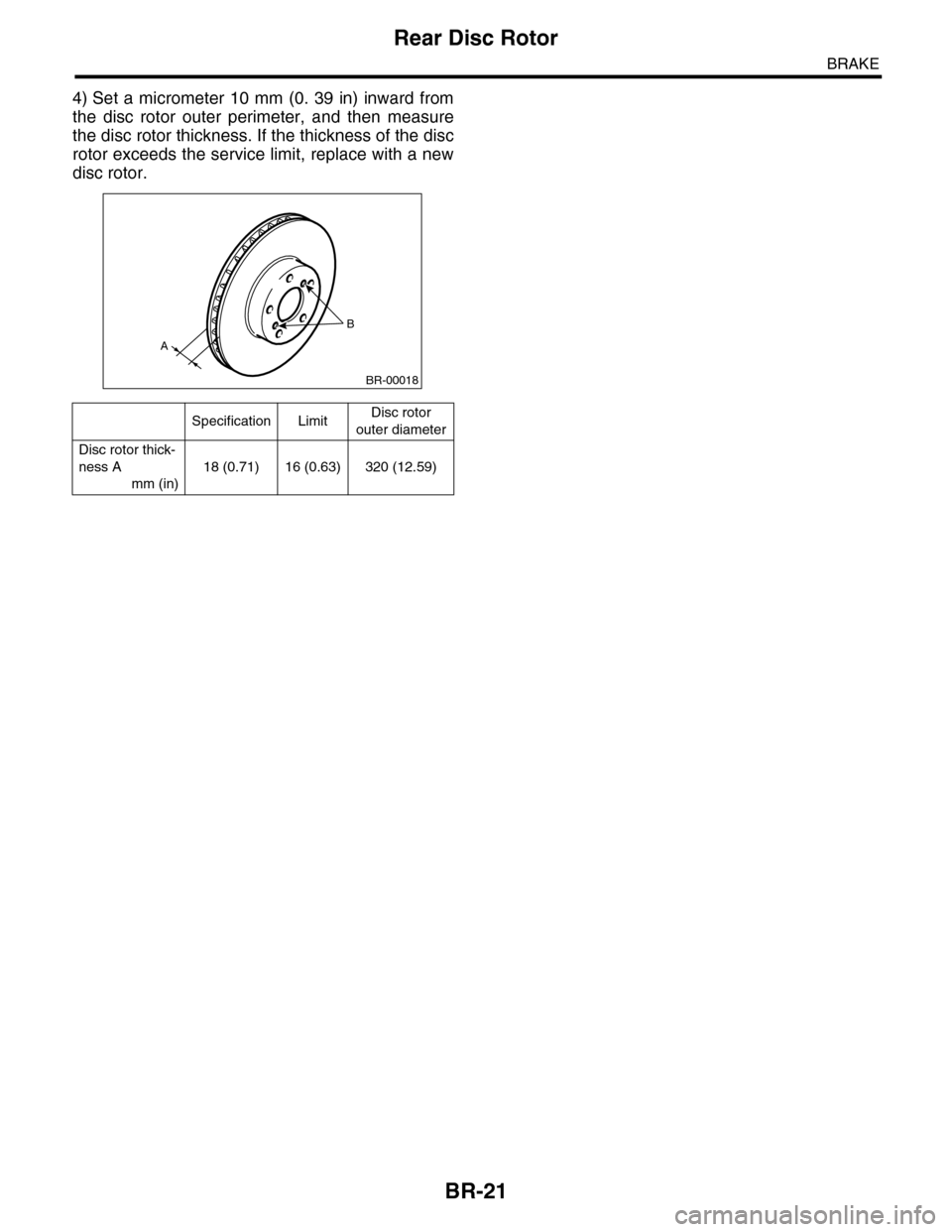
4) Set a micrometer 10 mm (0. 39 in) inward from
the disc rotor outer perimeter, and then measure
the disc rotor thickness. If the thickness of the disc
rotor exceeds the service limit, replace with a new
disc rotor.
Specification LimitDisc rotor
outer diameter
Disc rotor thick-
ness A
mm (in)
18 (0.71) 16 (0.63) 320 (12.59)
B
A
BR-00018