Display SUBARU TRIBECA 2009 1.G Service Workshop Manual
[x] Cancel search | Manufacturer: SUBARU, Model Year: 2009, Model line: TRIBECA, Model: SUBARU TRIBECA 2009 1.GPages: 2453, PDF Size: 46.32 MB
Page 2132 of 2453
5AT(diag)-15
Subaru Select Monitor
AUTOMATIC TRANSMISSION (DIAGNOSTICS)
6. Subaru Select Monitor
A: OPERATION
1. READ DIAGNOSTIC TROUBLE CODE
(DTC)
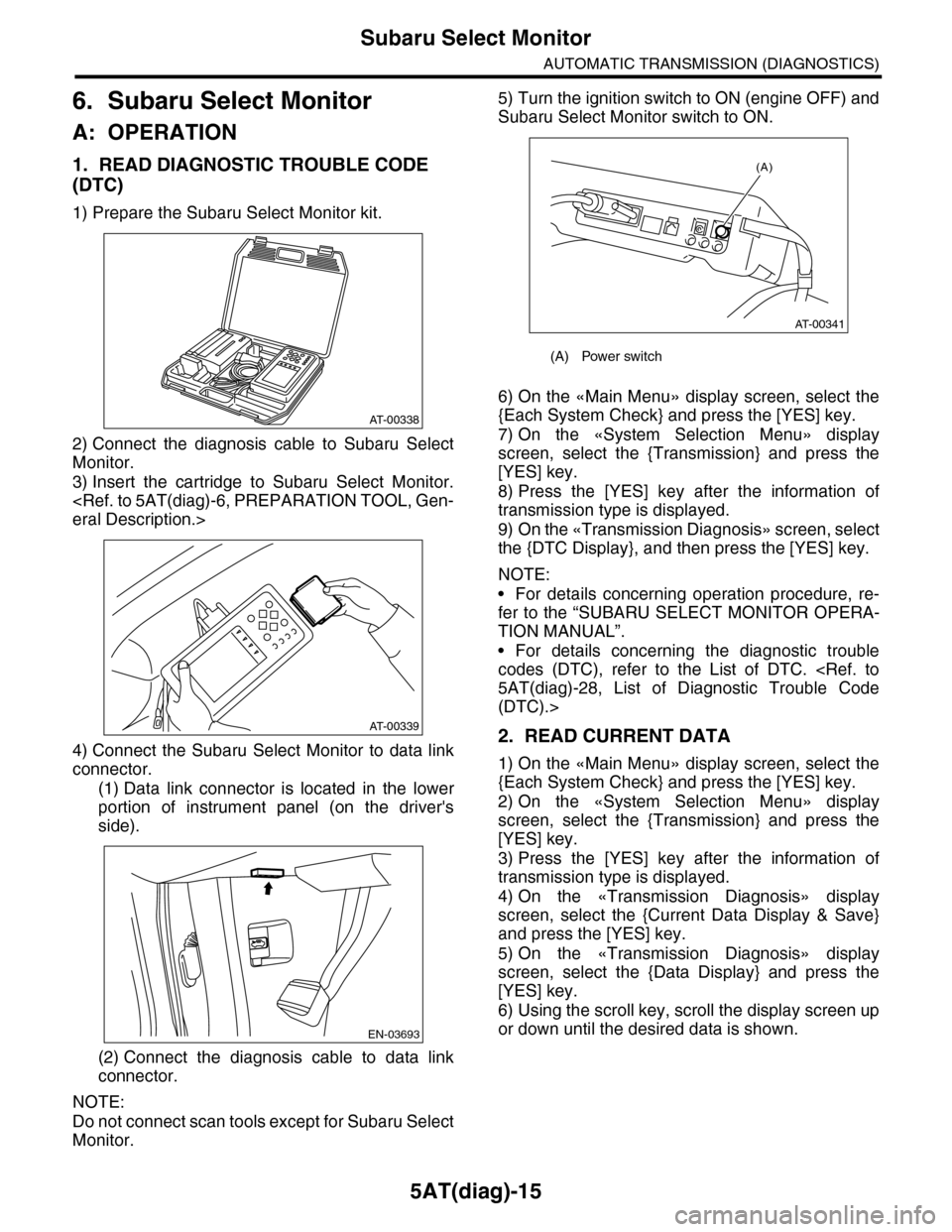
1) Prepare the Subaru Select Monitor kit.
2) Connect the diagnosis cable to Subaru Select
Monitor.
3) Insert the cartridge to Subaru Select Monitor.
4) Connect the Subaru Select Monitor to data link
connector.
(1) Data link connector is located in the lower
portion of instrument panel (on the driver's
side).
(2) Connect the diagnosis cable to data link
connector.
NOTE:
Do not connect scan tools except for Subaru Select
Monitor.
5) Turn the ignition switch to ON (engine OFF) and
Subaru Select Monitor switch to ON.
6) On the «Main Menu» display screen, select the
{Each System Check} and press the [YES] key.
7) On the «System Selection Menu» display
screen, select the {Transmission} and press the
[YES] key.
8) Press the [YES] key after the information of
transmission type is displayed.
9) On the «Transmission Diagnosis» screen, select
the {DTC Display}, and then press the [YES] key.
NOTE:
•For details concerning operation procedure, re-
fer to the “SUBARU SELECT MONITOR OPERA-
TION MANUAL”.
•For details concerning the diagnostic trouble
codes (DTC), refer to the List of DTC.
(DTC).>
2. READ CURRENT DATA
1) On the «Main Menu» display screen, select the
{Each System Check} and press the [YES] key.
2) On the «System Selection Menu» display
screen, select the {Transmission} and press the
[YES] key.
3) Press the [YES] key after the information of
transmission type is displayed.
4) On the «Transmission Diagnosis» display
screen, select the {Current Data Display & Save}
and press the [YES] key.
5) On the «Transmission Diagnosis» display
screen, select the {Data Display} and press the
[YES] key.
6) Using the scroll key, scroll the display screen up
or down until the desired data is shown.
AT-00338
AT-00339
EN-03693
(A) Power switch
(A)
AT-00341
Page 2133 of 2453
5AT(diag)-16
Subaru Select Monitor
AUTOMATIC TRANSMISSION (DIAGNOSTICS)
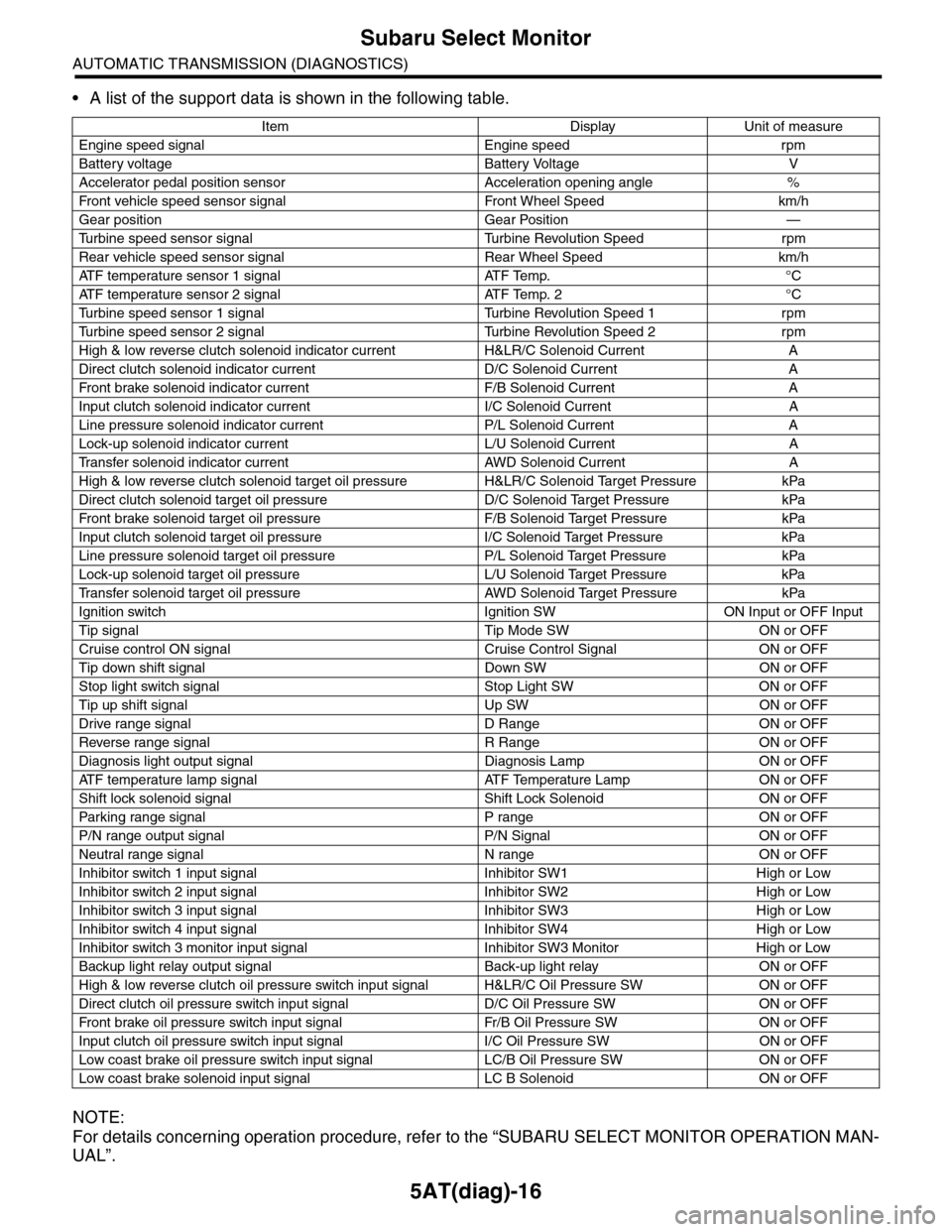
•A list of the support data is shown in the following table.
NOTE:
For details concerning operation procedure, refer to the “SUBARU SELECT MONITOR OPERATION MAN-
UAL”.
Item Display Unit of measure
Engine speed signal Engine speed rpm
Battery voltage Battery Voltage V
Accelerator pedal position sensor Acceleration opening angle %
Fr o nt veh ic l e sp e ed se n so r s ig n al Fr o n t W h ee l S p e ed km/ h
Gear position Gear Position —
Tu r b i n e s p e e d s e n s o r s i g n a l Tu r b i n e R e v o l u t i o n S p e e d r p m
Rear vehicle speed sensor signal Rear Wheel Speed km/h
ATF temperature sensor 1 signal ATF Temp. °C
ATF temperature sensor 2 signal ATF Temp. 2 °C
Tu r b i n e s p e e d s e n s o r 1 s i g n a l Tu r b i n e R e v o l u t i o n S p e e d 1 r p m
Tu r b i n e s p e e d s e n s o r 2 s i g n a l Tu r b i n e R e v o l u t i o n S p e e d 2 r p m
High & low reverse clutch solenoid indicator current H&LR/C Solenoid Current A
Direct clutch solenoid indicator current D/C Solenoid Current A
Fr o nt b rake so l en oi d in di c at o r c u rr e n t F / B S o l en o id Cur r e nt A
Input clutch solenoid indicator current I/C Solenoid Current A
Line pressure solenoid indicator current P/L Solenoid Current A
Lock-up solenoid indicator current L/U Solenoid Current A
Tr a n s f e r s o l e n o i d i n d i c a t o r c u r r e n t A W D S o l e n o i d C u r r e n t A
High & low reverse clutch solenoid target oil pressure H&LR/C Solenoid Target Pressure kPa
Direct clutch solenoid target oil pressure D/C Solenoid Target Pressure kPa
Fr o nt b rake so l en oi d ta r g et o il pr e ss ur e F / B S o l en o id Ta r g et P r es su r e kPa
Input clutch solenoid target oil pressure I/C Solenoid Target Pressure kPa
Line pressure solenoid target oil pressure P/L Solenoid Target Pressure kPa
Lock-up solenoid target oil pressure L/U Solenoid Target Pressure kPa
Tr a n s f e r s o l e n o i d t a r g e t o i l p r e s s u r e A W D S o l e n o i d Ta r g e t P r e s s u r e k P a
Ignition switch Ignition SW ON Input or OFF Input
Tip signal Tip Mode SW ON or OFF
Cruise control ON signal Cruise Control Signal ON or OFF
Tip down shift signal Down SW ON or OFF
Stop light switch signal Stop Light SW ON or OFF
Tip up shift signal Up SW ON or OFF
Drive range signal D Range ON or OFF
Reverse range signal R Range ON or OFF
Diagnosis light output signal Diagnosis Lamp ON or OFF
AT F t e m p e r a t u r e l a m p s i g n a l AT F Te m p e r a t u r e L a m p O N o r O F F
Shift lock solenoid signal Shift Lock Solenoid ON or OFF
Par king range signal P range ON or OFF
P/N range output signal P/N Signal ON or OFF
Neutral range signal N range ON or OFF
Inhibitor switch 1 input signal Inhibitor SW1 High or Low
Inhibitor switch 2 input signal Inhibitor SW2 High or Low
Inhibitor switch 3 input signal Inhibitor SW3 High or Low
Inhibitor switch 4 input signal Inhibitor SW4 High or Low
Inhibitor switch 3 monitor input signal Inhibitor SW3 Monitor High or Low
Backup light relay output signal Back-up light relay ON or OFF
High & low reverse clutch oil pressure switch input signal H&LR/C Oil Pressure SW ON or OFF
Direct clutch oil pressure switch input signal D/C Oil Pressure SW ON or OFF
Fr o nt b rake oi l pr e ss ur e swi tc h i n pu t si gn a l Fr / B Oi l P r e ss ur e S W ON or OF F
Input clutch oil pressure switch input signal I/C Oil Pressure SW ON or OFF
Low coast brake oil pressure switch input signal LC/B Oil Pressure SW ON or OFF
Low coast brake solenoid input signal LC B Solenoid ON or OFF
Page 2134 of 2453
5AT(diag)-17
Subaru Select Monitor
AUTOMATIC TRANSMISSION (DIAGNOSTICS)
3. CLEAR MEMORY MODE
NOTE:
To clear the previous DTC, use {Clear Memory},
and to clear the learned value, use {Clear Memory
2}.
1) Check that the select lever is in “P” range.
2) On the «Main Menu» display screen, select the
{Each System Check} and press the [YES] key.
3) On the «System Selection Menu» display
screen, select the {Transmission} and press the
[YES] key.
4) Press the [YES] key after the information of
transmission type is displayed.
5) On the «Transmission Diagnosis» display
screen, select the {Clear Memory} and press the
[YES] key.
NOTE:
If {Clear Memory 2} is selected and performed,
DTC are not cleared.
6) When ‘Done’ is shown on the display screen,
turn off the Subaru Select Monitor and turn the ig-
nition switch to OFF. To turn the ignition switch to
ON again, wait for more than 10 seconds.
NOTE:
For details concerning operation procedure, refer
to the “SUBARU SELECT MONITOR OPERATION
MANUAL”.
Page 2139 of 2453
5AT(diag)-22
SPORT Indicator Light Display
AUTOMATIC TRANSMISSION (DIAGNOSTICS)
11.SPORT Indicator Light Display
A: OPERATION
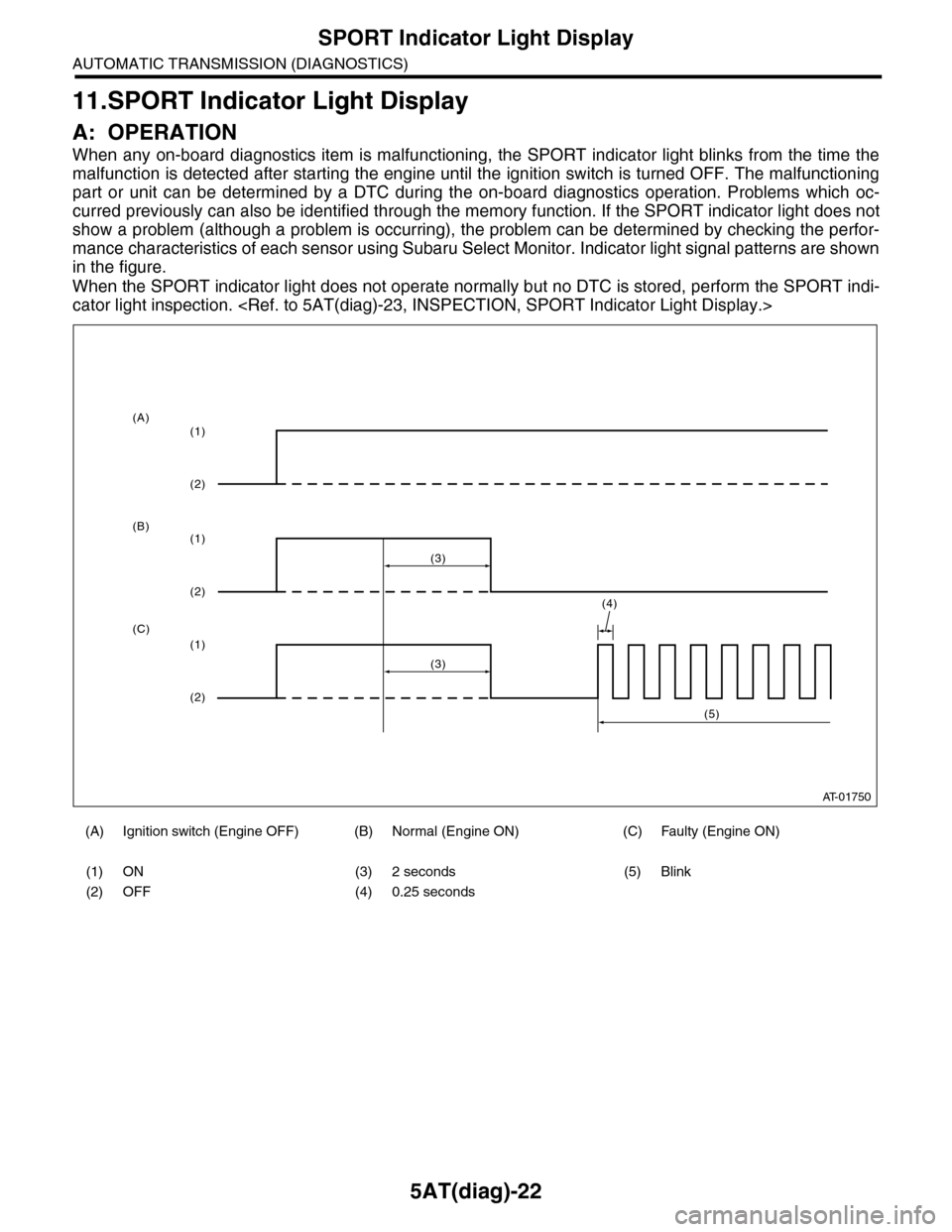
When any on-board diagnostics item is malfunctioning, the SPORT indicator light blinks from the time the
malfunction is detected after starting the engine until the ignition switch is turned OFF. The malfunctioning
part or unit can be determined by a DTC during the on-board diagnostics operation. Problems which oc-
curred previously can also be identified through the memory function. If the SPORT indicator light does not
show a problem (although a problem is occurring), the problem can be determined by checking the perfor-
mance characteristics of each sensor using Subaru Select Monitor. Indicator light signal patterns are shown
in the figure.
When the SPORT indicator light does not operate normally but no DTC is stored, perform the SPORT indi-
cator light inspection.
(A) Ignition switch (Engine OFF) (B) Normal (Engine ON) (C) Faulty (Engine ON)
(1) ON (3) 2 seconds (5) Blink
(2) OFF (4) 0.25 seconds
AT-01750
(4)
(3)
(1)
(2)
(1)
(2)
(1)
(2)
(3)
(5)
(A)
(B)
(C)
Page 2140 of 2453
5AT(diag)-23
SPORT Indicator Light Display
AUTOMATIC TRANSMISSION (DIAGNOSTICS)
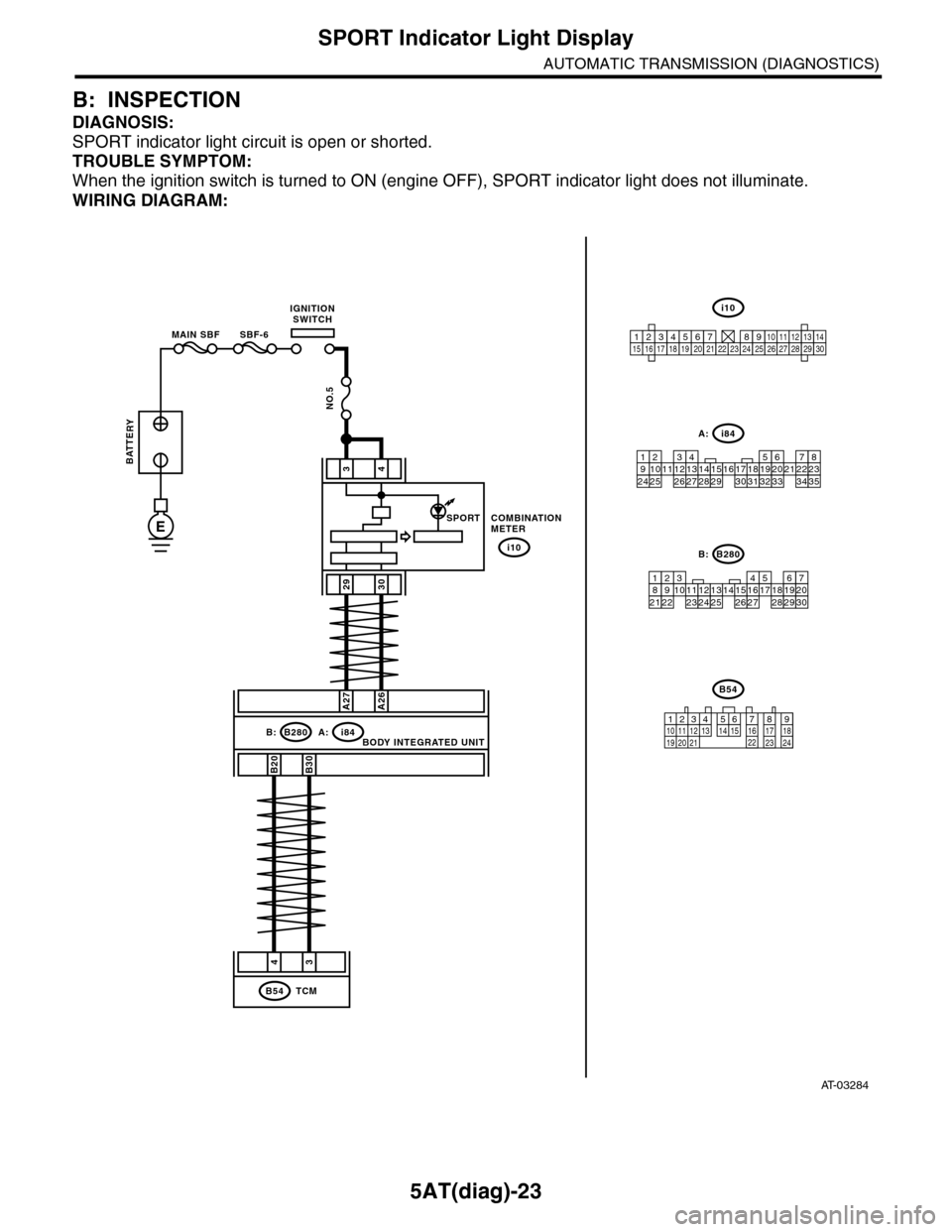
B: INSPECTION
DIAGNOSIS:
SPORT indicator light circuit is open or shorted.
TROUBLE SYMPTOM:
When the ignition switch is turned to ON (engine OFF), SPORT indicator light does not illuminate.
WIRING DIAGRAM:
AT-03284
34
2930
COMBINATIONMETER
i10
i84A:B280B:
A27A26
B20B30
43
TCMB54
BODY INTEGRATED UNIT
SPORT
BATTERY
MAIN SBF SBF-6
IGNITIONSWITCH
NO.5
E
i84
8765432122232120191615141312111093435333217301831292827262524
A:
B280
87654321
2223212019161514131211109173018292827262524
B:
B54
12789563410 11 1219 20 2113 14 15 16 17 18222324
i10
123456789101112131415161718192021222324252627282930
Page 2141 of 2453
5AT(diag)-24
SPORT Indicator Light Display
AUTOMATIC TRANSMISSION (DIAGNOSTICS)
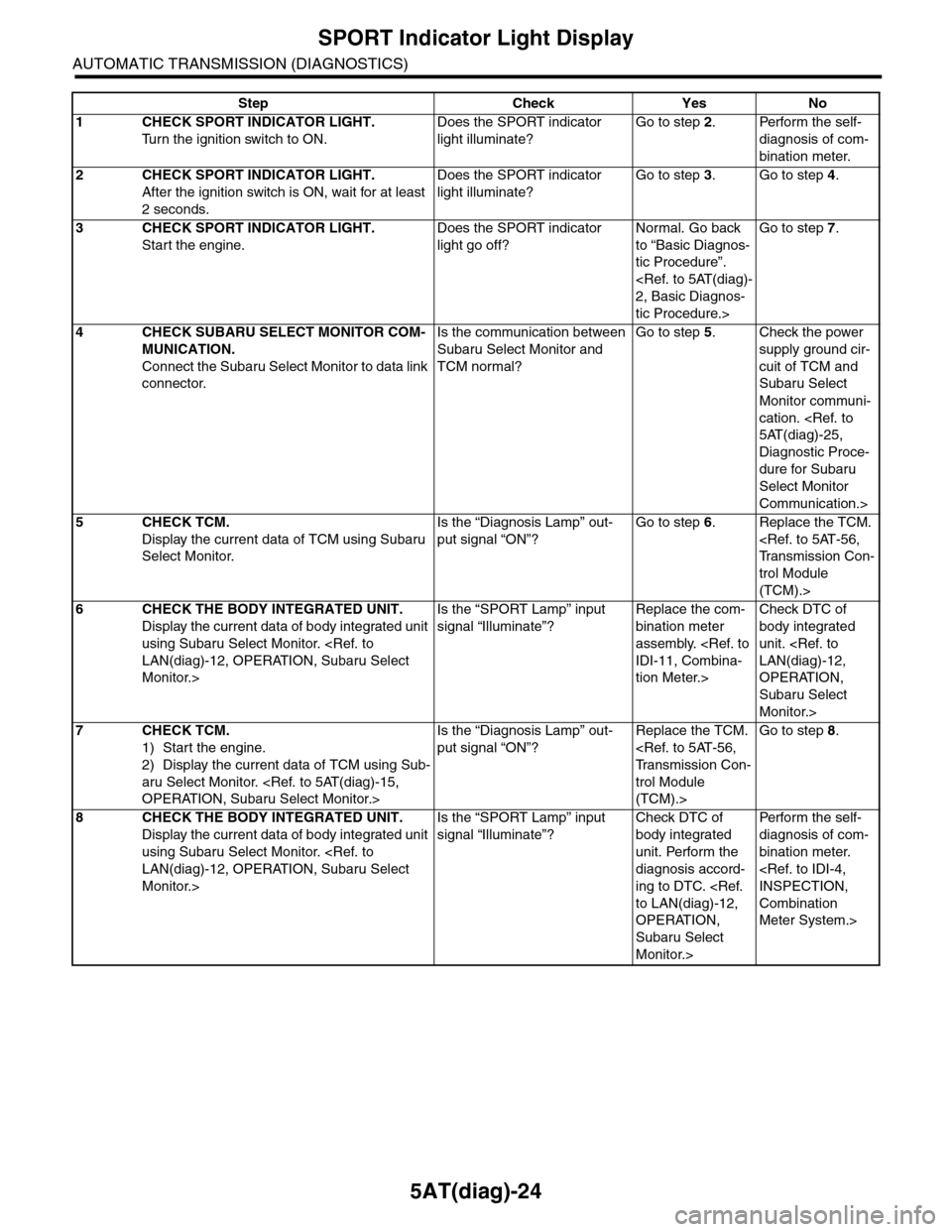
Step Check Yes No
1CHECK SPORT INDICATOR LIGHT.
Tu r n t h e i g n i t i o n s w i t c h t o O N .
Does the SPORT indicator
light illuminate?
Go to step 2.Perform the self-
diagnosis of com-
bination meter.
2CHECK SPORT INDICATOR LIGHT.
After the ignition switch is ON, wait for at least
2 seconds.
Does the SPORT indicator
light illuminate?
Go to step 3.Go to step 4.
3CHECK SPORT INDICATOR LIGHT.
Start the engine.
Does the SPORT indicator
light go off?
Normal. Go back
to “Basic Diagnos-
tic Procedure”.
tic Procedure.>
Go to step 7.
4CHECK SUBARU SELECT MONITOR COM-
MUNICATION.
Connect the Subaru Select Monitor to data link
connector.
Is the communication between
Subaru Select Monitor and
TCM normal?
Go to step 5.Check the power
supply ground cir-
cuit of TCM and
Subaru Select
Monitor communi-
cation.
Diagnostic Proce-
dure for Subaru
Select Monitor
Communication.>
5CHECK TCM.
Display the current data of TCM using Subaru
Select Monitor.
Is the “Diagnosis Lamp” out-
put signal “ON”?
Go to step 6.Replace the TCM.
trol Module
(TCM).>
6CHECK THE BODY INTEGRATED UNIT.
Display the current data of body integrated unit
using Subaru Select Monitor.
Monitor.>
Is the “SPORT Lamp” input
signal “Illuminate”?
Replace the com-
bination meter
assembly.
tion Meter.>
Check DTC of
body integrated
unit.
OPERATION,
Subaru Select
Monitor.>
7CHECK TCM.
1) Start the engine.
2) Display the current data of TCM using Sub-
aru Select Monitor.
Is the “Diagnosis Lamp” out-
put signal “ON”?
Replace the TCM.
trol Module
(TCM).>
Go to step 8.
8CHECK THE BODY INTEGRATED UNIT.
Display the current data of body integrated unit
using Subaru Select Monitor.
Monitor.>
Is the “SPORT Lamp” input
signal “Illuminate”?
Check DTC of
body integrated
unit. Perform the
diagnosis accord-
ing to DTC.
OPERATION,
Subaru Select
Monitor.>
Per fo r m th e se lf -
diagnosis of com-
bination meter.
Combination
Meter System.>
Page 2143 of 2453
5AT(diag)-26
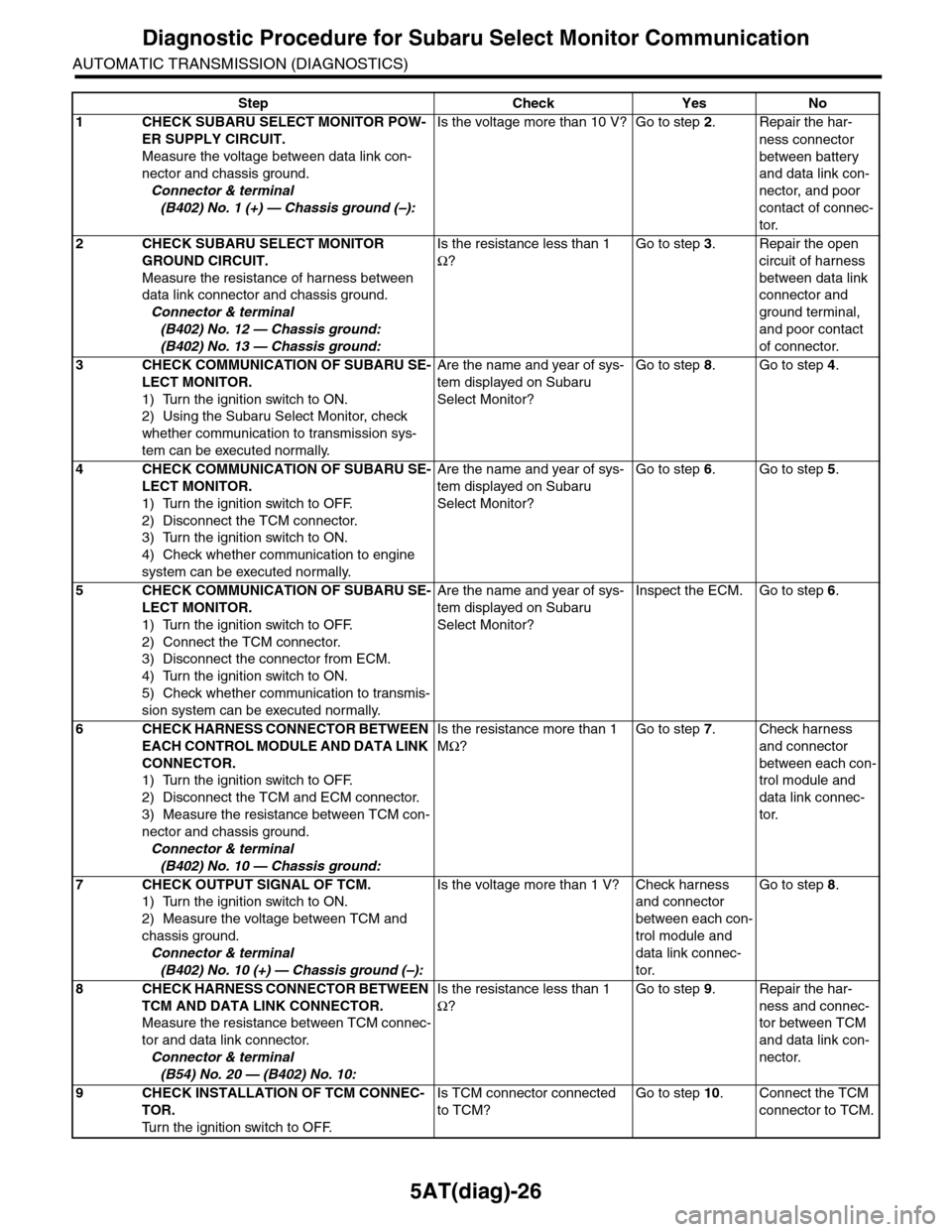
Diagnostic Procedure for Subaru Select Monitor Communication
AUTOMATIC TRANSMISSION (DIAGNOSTICS)
Step Check Yes No
1CHECK SUBARU SELECT MONITOR POW-
ER SUPPLY CIRCUIT.
Measure the voltage between data link con-
nector and chassis ground.
Connector & terminal
(B402) No. 1 (+) — Chassis ground (–):
Is the voltage more than 10 V? Go to step 2.Repair the har-
ness connector
between battery
and data link con-
nector, and poor
contact of connec-
tor.
2CHECK SUBARU SELECT MONITOR
GROUND CIRCUIT.
Measure the resistance of harness between
data link connector and chassis ground.
Connector & terminal
(B402) No. 12 — Chassis ground:
(B402) No. 13 — Chassis ground:
Is the resistance less than 1
Ω?
Go to step 3.Repair the open
circuit of harness
between data link
connector and
ground terminal,
and poor contact
of connector.
3CHECK COMMUNICATION OF SUBARU SE-
LECT MONITOR.
1) Turn the ignition switch to ON.
2) Using the Subaru Select Monitor, check
whether communication to transmission sys-
tem can be executed normally.
Are the name and year of sys-
tem displayed on Subaru
Select Monitor?
Go to step 8.Go to step 4.
4CHECK COMMUNICATION OF SUBARU SE-
LECT MONITOR.
1) Turn the ignition switch to OFF.
2) Disconnect the TCM connector.
3) Turn the ignition switch to ON.
4) Check whether communication to engine
system can be executed normally.
Are the name and year of sys-
tem displayed on Subaru
Select Monitor?
Go to step 6.Go to step 5.
5CHECK COMMUNICATION OF SUBARU SE-
LECT MONITOR.
1) Turn the ignition switch to OFF.
2) Connect the TCM connector.
3) Disconnect the connector from ECM.
4) Turn the ignition switch to ON.
5) Check whether communication to transmis-
sion system can be executed normally.
Are the name and year of sys-
tem displayed on Subaru
Select Monitor?
Inspect the ECM. Go to step 6.
6CHECK HARNESS CONNECTOR BETWEEN
EACH CONTROL MODULE AND DATA LINK
CONNECTOR.
1) Turn the ignition switch to OFF.
2) Disconnect the TCM and ECM connector.
3) Measure the resistance between TCM con-
nector and chassis ground.
Connector & terminal
(B402) No. 10 — Chassis ground:
Is the resistance more than 1
MΩ?
Go to step 7.Check harness
and connector
between each con-
trol module and
data link connec-
tor.
7CHECK OUTPUT SIGNAL OF TCM.
1) Turn the ignition switch to ON.
2) Measure the voltage between TCM and
chassis ground.
Connector & terminal
(B402) No. 10 (+) — Chassis ground (–):
Is the voltage more than 1 V? Check harness
and connector
between each con-
trol module and
data link connec-
tor.
Go to step 8.
8CHECK HARNESS CONNECTOR BETWEEN
TCM AND DATA LINK CONNECTOR.
Measure the resistance between TCM connec-
tor and data link connector.
Connector & terminal
(B54) No. 20 — (B402) No. 10:
Is the resistance less than 1
Ω?
Go to step 9.Repair the har-
ness and connec-
tor between TCM
and data link con-
nector.
9CHECK INSTALLATION OF TCM CONNEC-
TOR.
Tu r n t h e i g n i t i o n s w i t c h t o O F F.
Is TCM connector connected
to TCM?
Go to step 10.Connect the TCM
connector to TCM.
Page 2149 of 2453
5AT(diag)-32
Diagnostic Procedure with Diagnostic Trouble Code (DTC)
AUTOMATIC TRANSMISSION (DIAGNOSTICS)
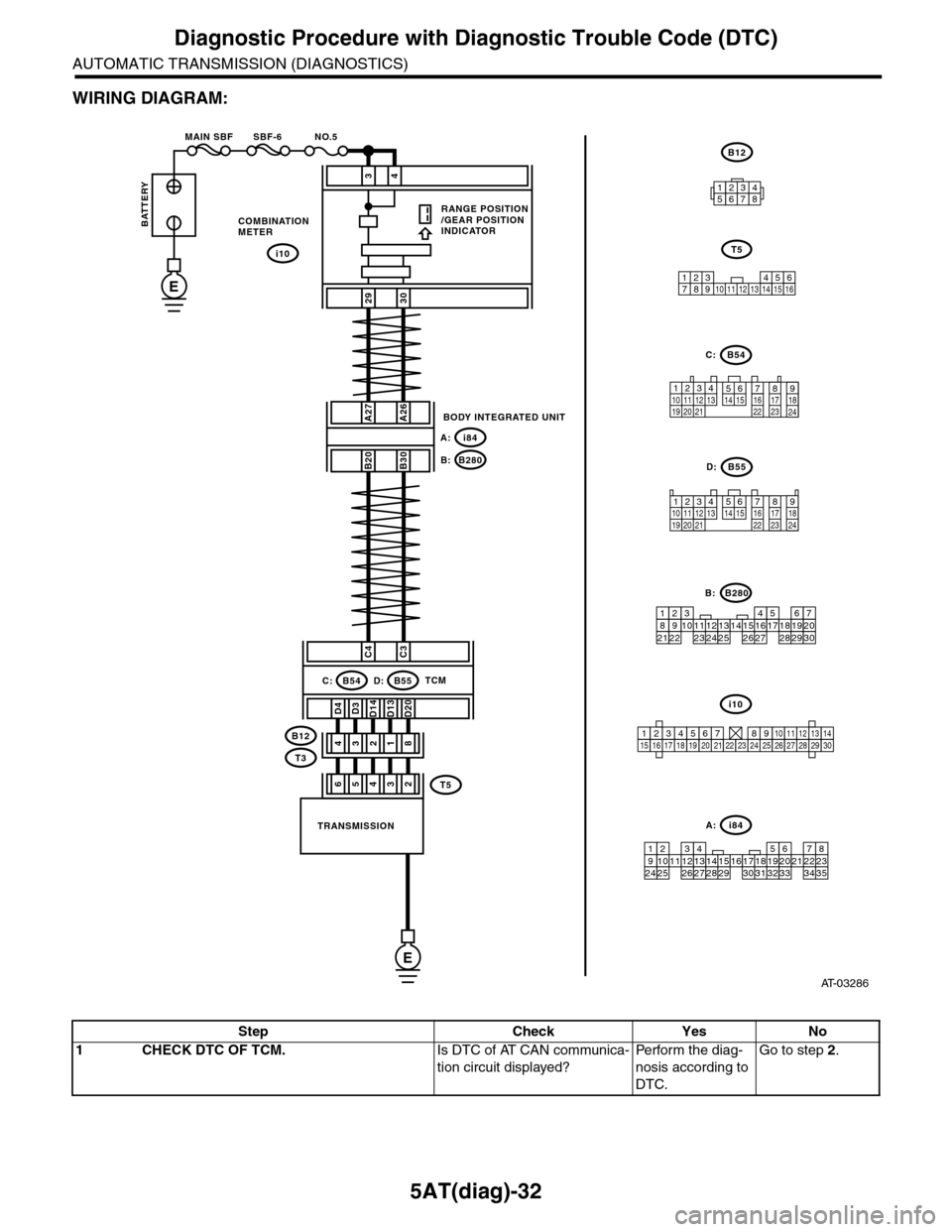
WIRING DIAGRAM:
AT-03286
i10
123456789101112131415161718192021222324252627282930
34
2930
COMBINATIONMETER
RANGE POSITION/GEAR POSITIONINDICATOR
i10
BODY INTEGRATED UNIT
i84A:
B280B:
A27A26
B20B30
C4C3
D3D13D20D4D14
31428
TRANSMISSION
TCMB54C:B55D:
B12
T3
BATTERY
MAIN SBF SBF-6 NO.5
E
E
i84
8765432122232120191615141312111093435333217301831292827262524
A:
B280
87654321
2223212019161514131211109173018292827262524
B:
B54
12789563410 11 1219 20 2113 14 15 16 17 18222324
C:
123410 11 1219 20 21135614 1578916 17 1822 23 24
B55D:
B12
12345678
123 68910 11 12 13 14451516
T5
7
53642T5
Step Check Yes No
1CHECK DTC OF TCM.Is DTC of AT CAN communica-
tion circuit displayed?
Pe r for m t h e d ia g -
nosis according to
DTC.
Go to step 2.
Page 2162 of 2453
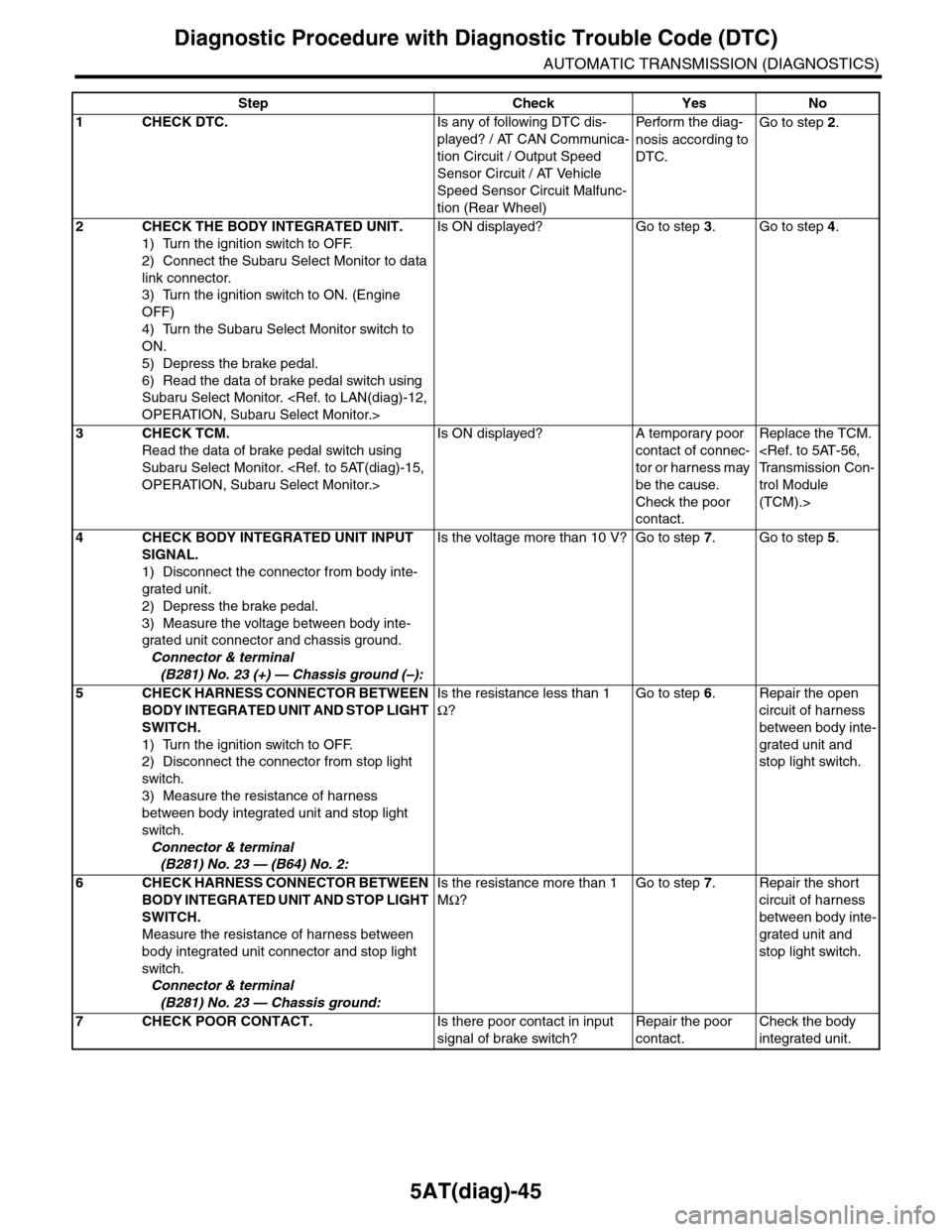
5AT(diag)-45
Diagnostic Procedure with Diagnostic Trouble Code (DTC)
AUTOMATIC TRANSMISSION (DIAGNOSTICS)
Step Check Yes No
1CHECK DTC.Is any of following DTC dis-
played? / AT CAN Communica-
tion Circuit / Output Speed
Sensor Circuit / AT Vehicle
Speed Sensor Circuit Malfunc-
tion (Rear Wheel)
Pe r for m t h e d ia g -
nosis according to
DTC.
Go to step 2.
2CHECK THE BODY INTEGRATED UNIT.
1) Turn the ignition switch to OFF.
2) Connect the Subaru Select Monitor to data
link connector.
3) Turn the ignition switch to ON. (Engine
OFF)
4) Turn the Subaru Select Monitor switch to
ON.
5) Depress the brake pedal.
6) Read the data of brake pedal switch using
Subaru Select Monitor.
Is ON displayed? Go to step 3.Go to step 4.
3CHECK TCM.
Read the data of brake pedal switch using
Subaru Select Monitor.
Is ON displayed? A temporary poor
contact of connec-
tor or harness may
be the cause.
Check the poor
contact.
Replace the TCM.
trol Module
(TCM).>
4CHECK BODY INTEGRATED UNIT INPUT
SIGNAL.
1) Disconnect the connector from body inte-
grated unit.
2) Depress the brake pedal.
3) Measure the voltage between body inte-
grated unit connector and chassis ground.
Connector & terminal
(B281) No. 23 (+) — Chassis ground (–):
Is the voltage more than 10 V? Go to step 7.Go to step 5.
5CHECK HARNESS CONNECTOR BETWEEN
BODY INTEGRATED UNIT AND STOP LIGHT
SWITCH.
1) Turn the ignition switch to OFF.
2) Disconnect the connector from stop light
switch.
3) Measure the resistance of harness
between body integrated unit and stop light
switch.
Connector & terminal
(B281) No. 23 — (B64) No. 2:
Is the resistance less than 1
Ω?
Go to step 6.Repair the open
circuit of harness
between body inte-
grated unit and
stop light switch.
6CHECK HARNESS CONNECTOR BETWEEN
BODY INTEGRATED UNIT AND STOP LIGHT
SWITCH.
Measure the resistance of harness between
body integrated unit connector and stop light
switch.
Connector & terminal
(B281) No. 23 — Chassis ground:
Is the resistance more than 1
MΩ?
Go to step 7.Repair the short
circuit of harness
between body inte-
grated unit and
stop light switch.
7CHECK POOR CONTACT.Is there poor contact in input
signal of brake switch?
Repair the poor
contact.
Check the body
integrated unit.
Page 2168 of 2453
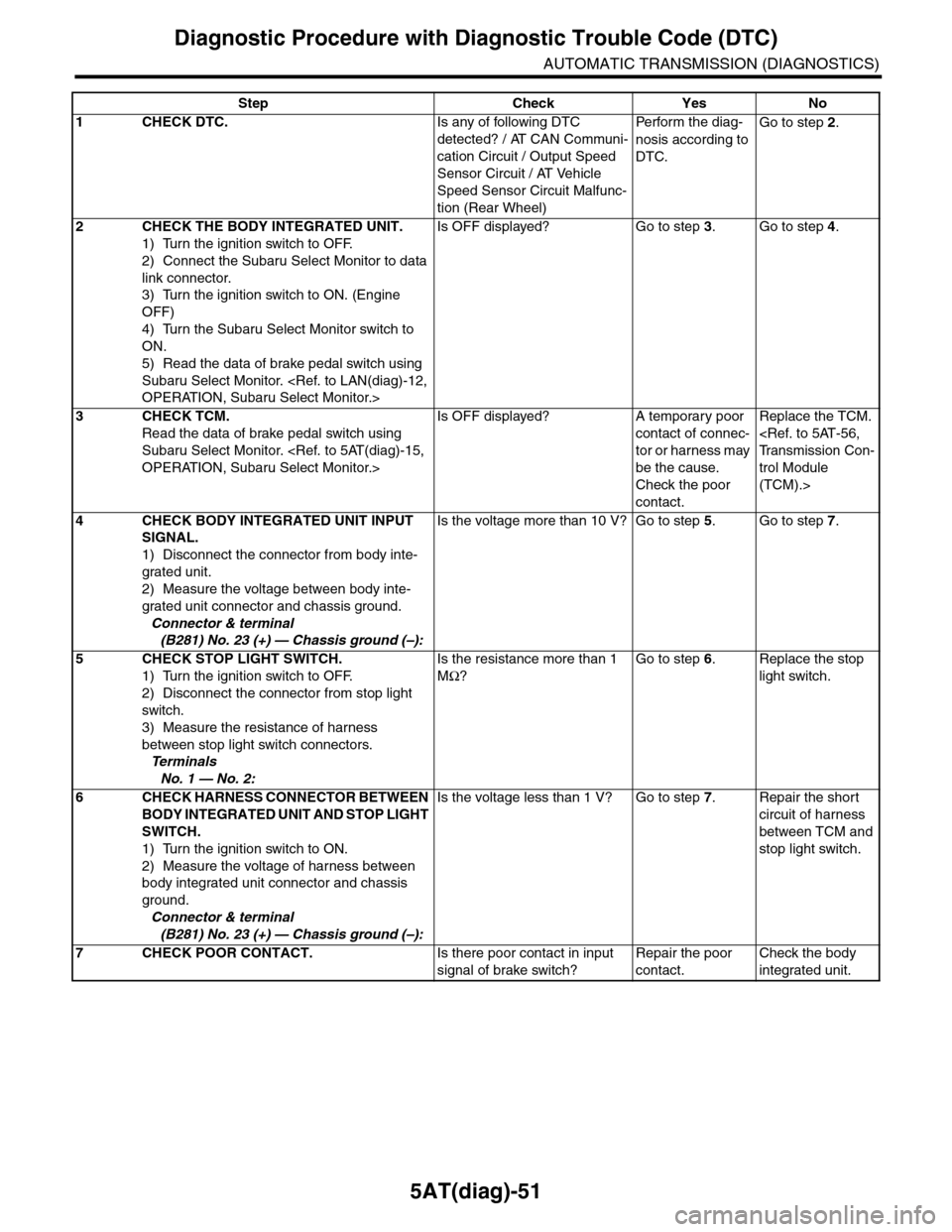
5AT(diag)-51
Diagnostic Procedure with Diagnostic Trouble Code (DTC)
AUTOMATIC TRANSMISSION (DIAGNOSTICS)
Step Check Yes No
1CHECK DTC.Is any of following DTC
detected? / AT CAN Communi-
cation Circuit / Output Speed
Sensor Circuit / AT Vehicle
Speed Sensor Circuit Malfunc-
tion (Rear Wheel)
Pe r for m t h e d ia g -
nosis according to
DTC.
Go to step 2.
2CHECK THE BODY INTEGRATED UNIT.
1) Turn the ignition switch to OFF.
2) Connect the Subaru Select Monitor to data
link connector.
3) Turn the ignition switch to ON. (Engine
OFF)
4) Turn the Subaru Select Monitor switch to
ON.
5) Read the data of brake pedal switch using
Subaru Select Monitor.
Is OFF displayed? Go to step 3.Go to step 4.
3CHECK TCM.
Read the data of brake pedal switch using
Subaru Select Monitor.
Is OFF displayed? A temporary poor
contact of connec-
tor or harness may
be the cause.
Check the poor
contact.
Replace the TCM.
trol Module
(TCM).>
4CHECK BODY INTEGRATED UNIT INPUT
SIGNAL.
1) Disconnect the connector from body inte-
grated unit.
2) Measure the voltage between body inte-
grated unit connector and chassis ground.
Connector & terminal
(B281) No. 23 (+) — Chassis ground (–):
Is the voltage more than 10 V? Go to step 5.Go to step 7.
5CHECK STOP LIGHT SWITCH.
1) Turn the ignition switch to OFF.
2) Disconnect the connector from stop light
switch.
3) Measure the resistance of harness
between stop light switch connectors.
Te r m i n a l s
No. 1 — No. 2:
Is the resistance more than 1
MΩ?
Go to step 6.Replace the stop
light switch.
6CHECK HARNESS CONNECTOR BETWEEN
BODY INTEGRATED UNIT AND STOP LIGHT
SWITCH.
1) Turn the ignition switch to ON.
2) Measure the voltage of harness between
body integrated unit connector and chassis
ground.
Connector & terminal
(B281) No. 23 (+) — Chassis ground (–):
Is the voltage less than 1 V? Go to step 7.Repair the short
circuit of harness
between TCM and
stop light switch.
7CHECK POOR CONTACT.Is there poor contact in input
signal of brake switch?
Repair the poor
contact.
Check the body
integrated unit.