mirror SUBARU TRIBECA 2014 1.G User Guide
[x] Cancel search | Manufacturer: SUBARU, Model Year: 2014, Model line: TRIBECA, Model: SUBARU TRIBECA 2014 1.GPages: 426, PDF Size: 6.37 MB
Page 222 of 426
Interior light......................................................... 6-2Dome light.......................................................... 6-2Cargo area light.................................................. 6-3Rear gate light.................................................... 6-3Map light............................................................. 6-3Automatic ambient light for center console area(if equipped)...................................................... 6-4
Sun visors........................................................... 6-4Sun visor extension plate.................................... 6-5Vanity mirror with light........................................ 6-5
Storage compartment......................................... 6-6Glove box........................................................... 6-6Center console box............................................. 6-6Rear console....................................................... 6-7Overhead console............................................... 6-8
Cupholder........................................................... 6-8Front passenger’s cup holder.............................. 6-8Second-row seat cup holders.............................. 6-9Third-row seat cup holders.................................. 6-9
Bottle holders...................................................... 6-9
Accessory power outlets................................... 6-10
Coat hook........................................................... 6-12
Shopping bag hook............................................ 6-13
Floor mat............................................................ 6-13
Cargo area cover (if equipped)......................... 6-14Using the cover................................................. 6-14To remove the cover.......................................... 6-15To install the cover housing............................... 6-15
Convenient tie-down hooks.............................. 6-16
Under-floor storage compartment.................... 6-16
HomeLink®Wireless Control System (ifequipped)........................................................ 6-17Garage door opener programming in theU.S.A............................................................... 6-18Programming rolling-code-protected garage dooropeners in the U.S.A........................................ 6-19Programmingfor entrance gates and garage dooropeners in Canada........................................... 6-20Programming other devices............................... 6-21Operating the HomeLink®Wireless ControlSystem............................................................ 6-21ErasingHomeLink®button memory.................... 6-21In case a problem occurs................................... 6-21
Rear view camera (if equipped)........................ 6-21How to use the rear view camera....................... 6-22Viewing range on the screen.............................. 6-23Help line............................................................ 6-24
Interior equipment
6
Page 226 of 426
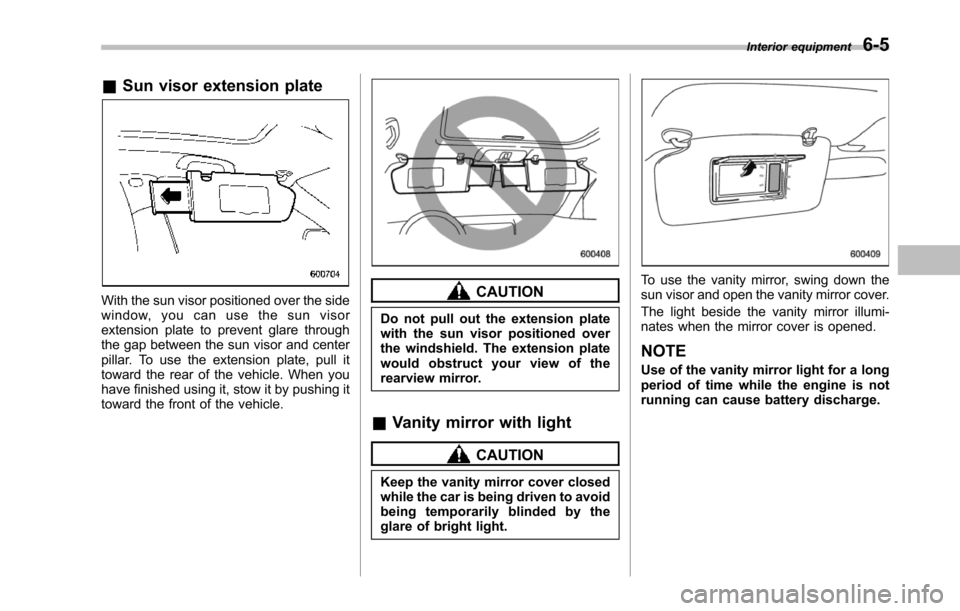
&Sun visor extension plate
With the sun visor positioned over the sidewindow, you can use the sun visorextension plate to prevent glare throughthe gap between the sun visor and centerpillar. To use the extension plate, pull ittoward the rear of the vehicle. When youhave finished using it, stow it by pushing ittoward the front of the vehicle.
CAUTION
Do not pull out the extension platewith the sun visor positioned overthe windshield. The extension platewould obstruct your view of therearview mirror.
&Vanity mirror with light
CAUTION
Keep the vanity mirror cover closedwhile the car is being driven to avoidbeing temporarily blinded by theglare of bright light.
To use the vanity mirror, swing down thesun visor and open the vanity mirror cover.
The light beside the vanity mirror illumi-nates when the mirror cover is opened.
NOTE
Use of the vanity mirror light for a longperiod of time while the engine is notrunning can cause battery discharge.
Interior equipment6-5
Page 242 of 426
opener by pressing the programmedHomeLink®button.
&Programming other devices
To program other devices such as doorlocks, home lighting and security systems,contact HomeLink at www.homelink.comor call 1-800-355-3515.
&Operating the HomeLink®
Wireless Control System
Once programmed, the HomeLink®Wire-less Control System can be used toremote-controlthe devices to which itsbuttons are programmed. To activate adevice, simply press the appropriate but-ton.The indicator light illuminates, indicat-ing that the signal is being transmitted.
&Erasing HomeLink®button
memory
NOTE
.Performing this procedure erasesthe memory of all the preprogrammedbuttons simultaneously. The memoryof individual buttons cannot be erased..It is recommended that upon thesale of the vehicle, the memory of allprogrammed HomeLink®buttons beerased for security purposes.
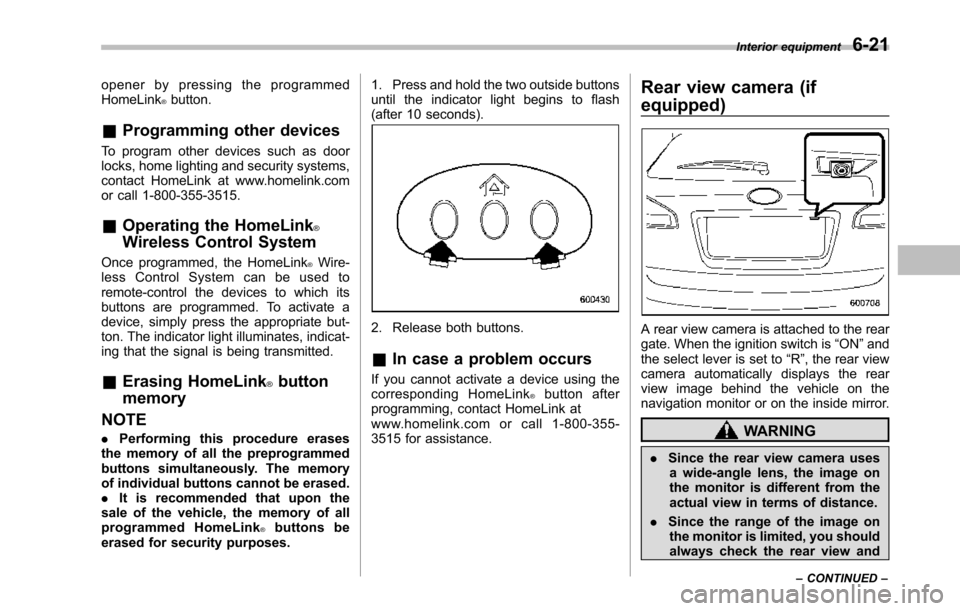
1. Press and hold the two outside buttonsuntil the indicator light begins to flash(after 10 seconds).
2. Release both buttons.
&In case a problem occurs
If you cannot activate a device using thecorresponding HomeLink®button afterprogramming, contact HomeLink atwww.homelink.com or call 1-800-355-3515 for assistance.
Rear view camera (if
equipped)
A rear view camera is attached to the reargate. When the ignition switch is“ON”andthe select lever is set to“R”, the rear viewcamera automatically displays the rearview image behind the vehicle on thenavigation monitor or on the inside mirror.
WARNING
.Since the rear view camera usesa wide-angle lens, the image onthe monitor is different from theactual view in terms of distance.
.Since the range of the image onthe monitor is limited, you shouldalways check the rear view and
Interior equipment6-21
–CONTINUED–
Page 243 of 426
6-22Interior equipment
the surrounding area with youreyes and mirrors, and movebackward at a slow speed. Mov-ing backward only by checkingthe rear view image from thecamera could cause an accident.
.Do not disassemble or modify thecamera, switch or wiring. Ifsmoke comes out or you smella strange odor, stop using therear view camera immediately.Contact your SUBARU dealerfor an inspection. Continued usemay result in accident, fire orelectric shock.
CAUTION
.If your vehicle is washed with ahigh-pressure washer, do notallow water to contact the cameradirectly. Entry of water in thecamera lens may result in con-densation, malfunction, fire orelectric shock.
.Since the camera is a precisiondevice, do not subject it to strongimpacts. Otherwise, malfunction,fire or electric shock may occur.
.If mud or snow sticks to or isfrozen on the camera, you must
be very careful removing it.Otherwise, damage done to thecamera may cause a fire orelectric shock. Pour water orlukewarm water over the camerato remove mud and ice, and wipeit with a soft, dry cloth.
.Do not put a flame close to thecamera or wiring. Otherwise, da-mage or fire may occur.
.When replacing the fuse, be sureto use a fuse with the specifiedrating. Use of a fuse with adifferent rating may result in amalfunction.
.If the rear view camera is used fora long time while the engine isnot operated, the battery maybecome completely discharged.
NOTE
.Do not wipe the camera with alcohol,benzine or paint thinner. Otherwise,discoloration may occur. To removecontamination, wipe the camera with acloth moistened with a diluted neutraldetergent and then wipe it with a soft,dry cloth..When waxing the vehicle, be carefulnot to apply the wax to the camera. If itcomes in contact with the camera,
moisten a clean cloth with a dilutedneutral detergent to remove the wax..The camera lens has hard coating tohelp prevent scratches. However, whenwashing the vehicle or cleaning thecamera lens, be careful not to scratchthe camera lens. Do not use a washingbrush directly on the camera lens. Themonitorscreen may be adversely af-fected..Strong light shined on the cameralens may develop white light stripesaround the light source. This is not amalfunction..Under the fluorescent light, the dis-play may flicker. However, this is not amalfunction..The image of the rear view cameramay be slightly different from theactual color of the objects.
&How to use the rear view
camera
When the select lever is set to“R”, the rearview camera automatically displays therear view image from the vehicle. Whenthe lever is set to other positions, theimage before setting to“R”is displayed.
1. Set the ignition switch to“ON”.
2. Set the select lever to“R”.
Page 244 of 426
NOTE
.The image of the rear view camerahas priority over other screen displays..The image of the rear view camera ishorizontally reversed as is the casewith the vehicle rearview mirror or theside view mirror..It may be difficult to see the image ofthe rearview camera in the followingcases. This is not a malfunction of thecamera.–The vehicle is in a dark place (atnight, in a tunnel, etc.).–The vehicle is in an extremely hotor cold place.–An object (such as raindrops,snow, dirt, etc.) that disturbs theview of the rear view camera sticksto the lens of the camera.–Strong light shined directly onthe camera lens (occasionally, thereare vertical lines on the screen).
&Viewing range on the screen
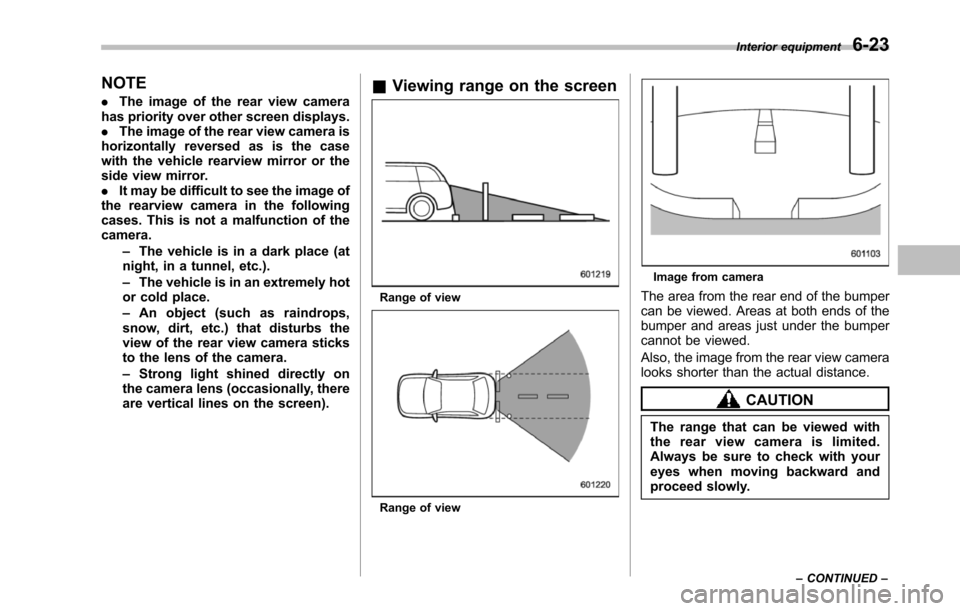
Range of view
Range of view
Image from camera
Thearea from the rear end of the bumpercan be viewed. Areas at both ends of thebumper and areas just under the bumpercannot be viewed.
Also, the image from the rear view cameralooks shorter than the actual distance.
CAUTION
The rangethat can be viewed withthe rear view camera is limited.Always be sure to check with youreyes when moving backward andproceed slowly.
Interior equipment6-23
–CONTINUED–
Page 245 of 426
6-24Interior equipment
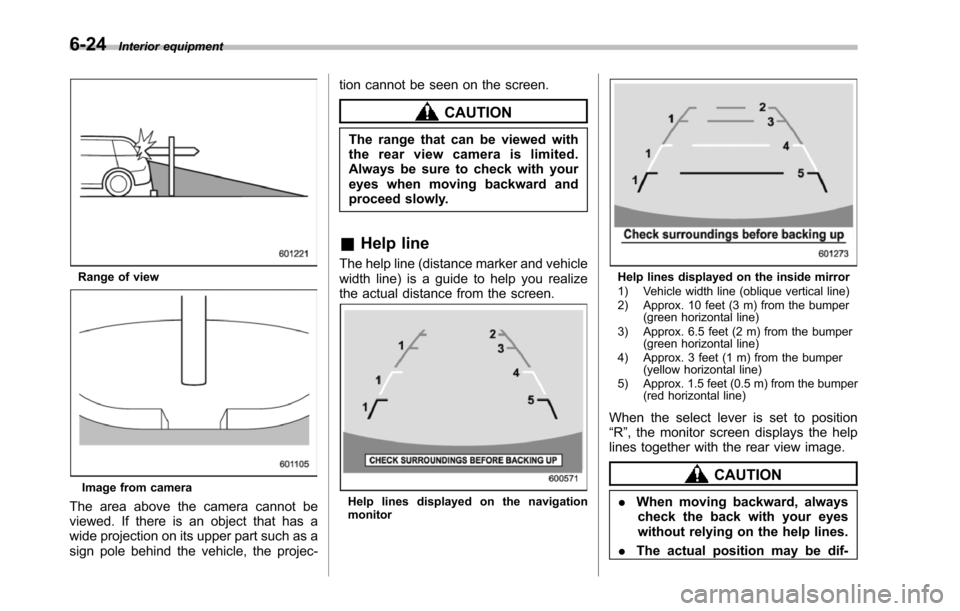
Range of view
Image from camera
The area above the camera cannot beviewed. If there is an object that has awide projection on its upper part such as asign pole behind the vehicle, the projec-
tion cannot be seen on the screen.
CAUTION
The range that can be viewed withthe rear view camera is limited.Always be sure to check with youreyes when moving backward andproceed slowly.
&Help line
The help line (distance marker and vehiclewidth line) is a guide to help you realizethe actual distance from the screen.
Help lines displayed on the navigationmonitor
Help lines displayed on the inside mirror1) Vehicle width line (oblique vertical line)2) Approx. 10 feet (3 m) from the bumper(green horizontal line)3) Approx. 6.5 feet (2 m) from the bumper(green horizontal line)4) Approx. 3 feet (1 m) from the bumper(yellow horizontal line)5) Approx. 1.5 feet (0.5 m) from the bumper(red horizontal line)
When the select lever is set to position“R”, the monitor screen displays the helplines together with the rear view image.
CAUTION
.When moving backward, alwayscheck the back with your eyeswithout relying on the help lines.
.The actual position may be dif-
Page 254 of 426
Preparing to drive
You should perform the following checksand adjustments every day before youstart driving.
1. Check that all windows, mirrors, andlights are clean and unobstructed.
2. Check the appearance and conditionof the tires. Also check tires for properinflation.
3. Look under the vehicle for any sign ofleaks.
4. Check that the hood and rear gate arefully closed.
5. Check the adjustment of the seat.
6. Check the adjustment of the insideand outside mirrors.
7. Fasten your seatbelt. Check that yourpassengers have fastened their seatbelts.
8. Check the operation of the warningand indicator lights when the ignitionswitch is turned to the“ON”position.
9. Check the gauges, indicator and warn-ing lights after starting the engine.
NOTE
Engine oil, engine coolant, brake fluid,washer fluid and other fluid levelsshould be checked daily, weekly or atfuel stops.
Starting the engine
CAUTION
.Do not operate the starter motorcontinuously for more than 10seconds. If the engine fails tostart after operating the starterfor 5 to 10 seconds, wait for 10seconds or more before tryingagain.
.If you restart the engine while thevehicle is moving, shift the selectlever into the“N”position. Donot attempt to place the selectlever of a moving vehicle into the“P”position.
1. Apply the parking brake.
2. Turn off unnecessary lights and ac-cessories.
3. Shift the select lever to the“P”or“N”position (preferably“P”position). Thestarter will only operate when the selectlever is at the“P”or“N”position.
4. Turn the ignition switch to the“ON”position and check the operation of thewarning and indicator lights. Refer to“Warning and indicator lights”F3-9.
5. Turn the ignition switch to the“START”positionwithoutdepressing the accelera-
tor pedal. Release the key immediatelyafter the engine has started.
If the engine does not start, try thefollowing.(1) Turn the ignition switch to the“LOCK”position and wait for at least10 seconds. After checking that theparking brake is firmly set, turn theignition switch to the“START”positionwhile depressing the accelerator pedalslightly (approximately a quarter of thefull stroke).Release the acceleratorpedal as soon as the engine starts.(2) If this fails to start the engine, turnthe ignition switch back to the“LOCK”position and wait for at least 10seconds.Then fully depress the accel-erator pedal and turn the ignitionswitch to the“START”position. If theengine starts, quickly release theaccelerator pedal.(3) If this fails to start the engine, turnthe ignition switch again to the“LOCK”position.After waiting for 10 secondsor longer, turn the ignition switch to the“START”position without depressingthe accelerator pedal.(4) If the engine still refuses to start,contact your nearest SUBARU dealerfor assistance.
6. Confirm that all warning and indicatorlights have turned off after the engine has
Starting and operating7-7
–CONTINUED–
Page 304 of 426
SUBARU dealer.
If use of a non-genuine hitch is unavoid-able, be sure the hitch is suited to yourvehicle and trailer. Consult with a profes-sional hitch supplier to assist you inchoosing an appropriate hitch for yourvehicle. Be sure to follow all of the hitchmanufacturer’s instructions for installationand use.
Never use a hitch that mounts only to therear bumper. The bumper is not designedto handle that type of load.
For all types of hitches, regularly checkthat the hitch mounting bolts and nuts aretight.
&Connecting a trailer
!Trailer brakes
WARNING
.Adequate size trailer brakes arerequired when the trailer and itscargo exceed 1,000 lbs (453 kg)total weight.
.Do not directly connect yourtrailer’s hydraulic brake systemto the hydraulic brake system inyour vehicle. Direct connectionwouldcause the vehicle’s brakeperformance to deteriorate and
could lead to an accident.
If your trailer’s total weight (trailer weightplus its cargo weight) exceeds 1,000 lbs(453 kg), the trailer is required to beequipped with its own brake system.Electric brakes or surge brakes arerecommended, and must be installedproperly. Check that your trailer’s brakesconform with Federal, state/province and/or other applicable regulations. YourSUBARU’s brake system is not designedto be tapped into the trailer’s hydraulicbrake system. Please ask your SUBARUdealer and professional trailer supplier formore information about the trailer’s brakesystem.
!Trailer safety chains
WARNING
Always use safety chains betweenyour vehicle and the trailer. Towingtrailer without safety chains couldcreate a traffic safety hazard if thetrailer separates from the hitch dueto coupling damage or hitch balldamage.
In case the trailer hitch connector or hitchball should break or become discon-nected, the trailer could get loose and
create a traffic safety hazard.
For safety, always connect the towingvehicle and trailer with trailer safetychains. Pass the chains crossing eachother under the trailer tongue to preventthe trailer from dropping onto the groundin case the trailer tongue should discon-nect from the hitch ball. Allow sufficientslack in the chains taking tight turnsituations into account; however, be care-ful not to let them drag on the ground.
For more information about the safetychain connection, refer to the instructionsfor your hitch and trailer.
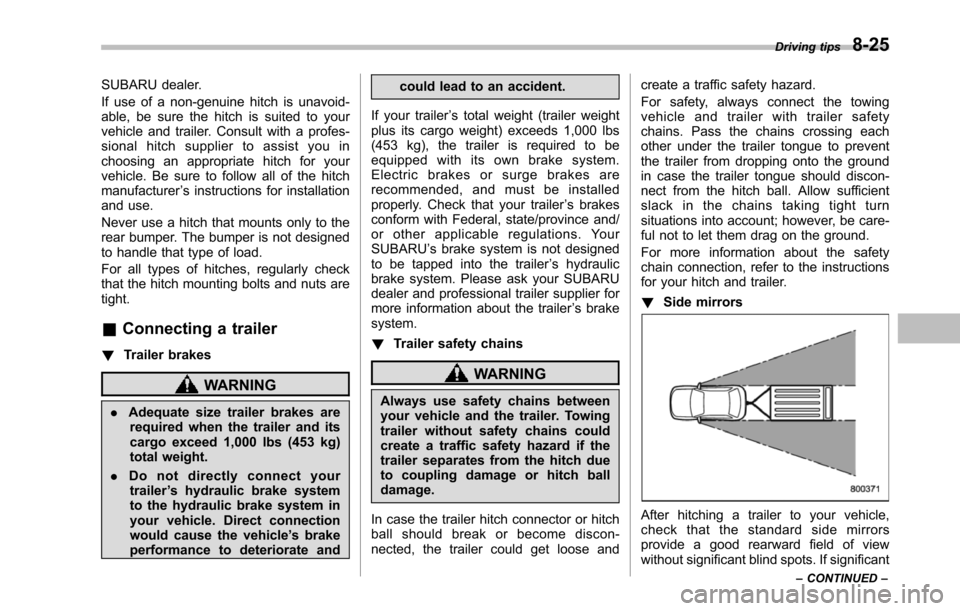
!Side mirrors
After hitching a trailer to your vehicle,check that the standard side mirrorsprovide a good rearward field of viewwithout significant blind spots. If significant
Driving tips8-25
–CONTINUED–
Page 305 of 426
8-26Driving tips
blind spots occur with the vehicle’s stan-dard side mirrors, use towing mirrors thatconform with Federal, state/province and/or other applicable regulations.
!Trailer lights
CAUTION
Direct splicing or other improperconnection of trailer lights maydamage your vehicle’selectricalsystem and cause a malfunction ofyour vehicle’s lighting system.
Connection of trailer lights to your vehi-cle’s electrical system requires modifica-tions to the vehicle’s lighting circuit toincrease its capacity and accommodatewiring changes. To ensure the trailer lightsare connected properly, please consultyour SUBARU dealer. Check for properoperation of the turn signals, stop lightsand parking lights each time you hitch up.
!Tires
WARNING
Never tow a trailer when the tem-porary spare tire is used. The tem-porary spare tire is not designed tosustain the towing load. Use of thetemporary spare tire when towing
can result in failure of the spare tireand/or less stability of the vehicle.
Make sure that all the tires on your vehicleare properly inflated. Refer to“Tires”F12-8.
Trailer tire condition, size, load rating andproper inflation pressure should be inaccordance with the trailer manufacturer’sspecifications.
In the event your vehicle gets a flat tirewhen towing a trailer, ask a commercialroad service to repair the flat tire.
If you carry a regular size spare tire in yourvehicle or trailer as a precaution againstgetting a flat tire, be sure that the sparetire is firmly secured.
&Trailer towing tips
CAUTION
.Never exceed 45 mph (72 km/h)when towing a trailer in hillycountry on hot days.
.When towing a trailer, steering,stability, stopping distance andbraking performance will be dif-ferent from normal operation. Forsafety’s sake, you should employ
extra caution when towing atrailer and you should neverspeed. You should also keep thefollowing tips in mind:
!Before starting out on a trip
.Check that the vehicle and vehicle-to-hitch mounting are in good condition. Ifany problems are apparent, do not tow thetrailer.
.Check that the vehicle sits horizontallywith the trailer attached. If the vehicle istippedsharply up at the front and down atthe rear, check the total trailer weight,GVW, GAWs and tongue load again, thenconfirm that the load and its distributionare acceptable.
.Check that the tire pressures arecorrect.
.Checkthat the vehicle and trailer areconnected properly. Confirm that–the trailer tongue is connectedproperly to the hitch ball.–the trailer lights connector is con-nected properly and trailer’s stop lightsilluminate when the vehicle’s brakepedal is pressed, and that the trailer’sturn signal lights flash when thevehicle’s turn signal lever is operated.–the safety chains are connectedproperly.
Page 306 of 426
–all cargo in the trailer is securedsafely in position.–the side mirrors provide a goodrearward field of view without a sig-nificant blind spot..Sufficient time should be taken to learnthe“feel”of the vehicle/trailer combinationbefore starting out on a trip. In an area freeof traffic, practice turning, stopping andbacking up.
!Driving with a trailer
.You should allow for considerably morestopping distance when towing a trailer.Avoid sudden braking because it mayresult in skidding or jackknifing and loss ofcontrol.
.Avoid uneven steering, sharp turns andrapid lane changes.
.Slow down before turning. Make alonger than normal turning radius becausethe trailer wheels will be closer than thevehicle wheels to the inside of the turn. Ina tight turn, the trailer could hit yourvehicle.
.Crosswinds will adversely affect thehandling of your vehicle and trailer, caus-ing sway. Crosswinds can be due toweather conditions or the passing of largetrucks or buses. If swaying occurs, firmlygrip the steering wheel and slow downimmediately but gradually.
.When passing other vehicles, consid-erable distance is required because of theadded weight and length caused byattaching the trailer to your vehicle.
1) Left turn2) Right turn
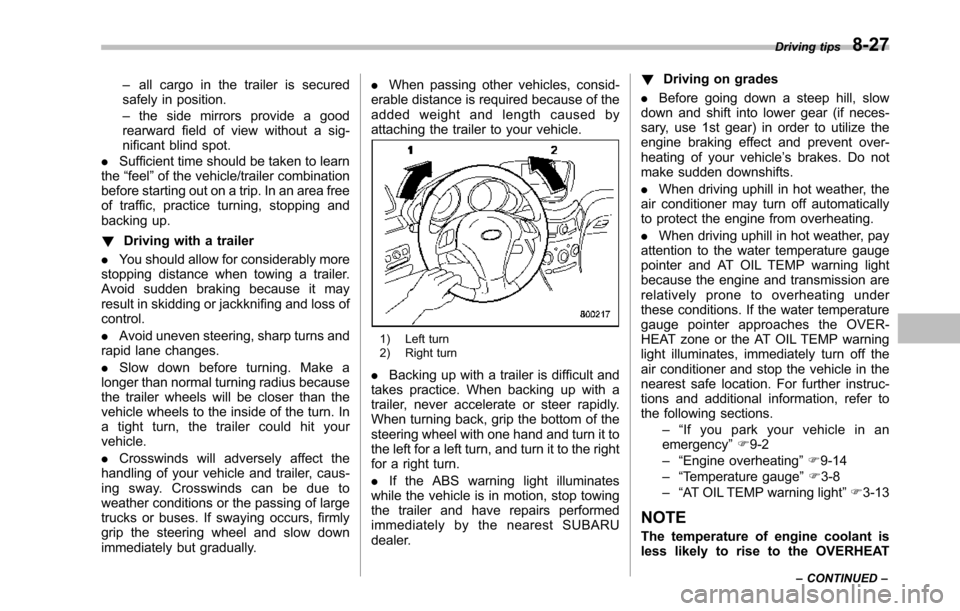
.Backing up with a trailer is difficult andtakes practice. When backing up with atrailer, never accelerate or steer rapidly.When turning back, grip the bottom of thesteering wheel with one hand and turn it tothe left for a left turn, and turn it to the rightfor a right turn.
.If the ABS warning light illuminateswhile the vehicle is in motion, stop towingthe trailer and have repairs performedimmediately by the nearest SUBARUdealer.
!Driving on grades
.Before going down a steep hill, slowdown and shift into lower gear (if neces-sary, use 1st gear) in order to utilize theengine braking effect and prevent over-heating of your vehicle’s brakes. Do notmake sudden downshifts.
.When driving uphill in hot weather, theair conditioner may turn off automaticallyto protect the engine from overheating.
.When driving uphill in hot weather, payattention to the water temperature gaugepointer and AT OIL TEMP warning lightbecause the engine and transmission arerelatively prone to overheating underthese conditions. If the water temperaturegauge pointer approaches the OVER-HEAT zone or the AT OIL TEMP warninglight illuminates, immediately turn off theair conditioner and stop the vehicle in thenearest safe location. For further instruc-tions and additional information, refer tothe following sections.–“If you park your vehicle in anemergency”F9-2–“Engine overheating”F9-14–“Temperature gauge”F3-8–“AT OIL TEMP warning light”F3-13
NOTE
The temperature of engine coolant isless likely to rise to the OVERHEAT
Driving tips8-27
–CONTINUED–