ECO mode SUBARU TRIBECA 2014 1.G Owner's Manual
[x] Cancel search | Manufacturer: SUBARU, Model Year: 2014, Model line: TRIBECA, Model: SUBARU TRIBECA 2014 1.GPages: 426, PDF Size: 6.37 MB
Page 174 of 426
&Type C inside mirror (if
equipped)
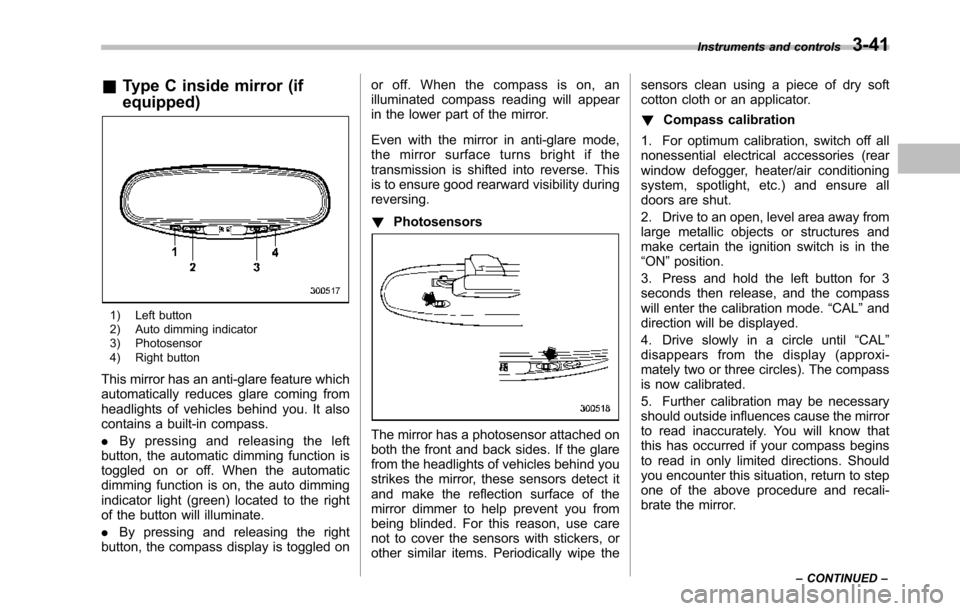
1) Left button2) Auto dimming indicator3) Photosensor4) Right button
This mirror has an anti-glare feature whichautomatically reduces glare coming fromheadlights of vehicles behind you. It alsocontains a built-in compass.
.By pressing and releasing the leftbutton, the automatic dimming function istoggled on or off. When the automaticdimming function is on, the auto dimmingindicator light (green) located to the rightof the button will illuminate.
.By pressing and releasing the rightbutton, the compass display is toggled on
or off. When the compass is on, anilluminated compass reading will appearin the lower part of the mirror.
Even with the mirror in anti-glare mode,the mirror surface turns bright if thetransmission is shifted into reverse. Thisis to ensure good rearward visibility duringreversing.
!Photosensors
The mirror has a photosensor attached onboth the front and back sides. If the glarefrom the headlights of vehicles behind youstrikes the mirror, these sensors detect itand make the reflection surface of themirror dimmer to help prevent you frombeing blinded. For this reason, use carenot to cover the sensors with stickers, orother similar items. Periodically wipe the
sensors clean using a piece of dry softcotton cloth or an applicator.
!Compass calibration
1. For optimum calibration, switch off allnonessential electrical accessories (rearwindow defogger, heater/air conditioningsystem, spotlight, etc.) and ensure alldoors are shut.
2. Drive to an open, level area away fromlarge metallic objects or structures andmake certain the ignition switch is in the“ON”position.
3. Press and hold the left button for 3seconds then release, and the compasswill enter the calibration mode.“CAL”anddirection will be displayed.
4. Drive slowly in a circle until“CAL”disappears from the display (approxi-mately two or three circles). The compassis now calibrated.
5. Further calibration may be necessaryshould outside influences cause the mirrorto read inaccurately. You will know thatthis has occurred if your compass beginsto read in only limited directions. Shouldyou encounter this situation, return to stepone of the above procedure and recali-brate the mirror.
Instruments and controls3-41
–CONTINUED–
Page 175 of 426
3-42Instruments and controls
!Compass zone adjustment
1. The zone setting is factory preset toZone 8. Refer to the“Compass calibrationzone”map attached to the end of thismanual to verify that the compass zonesetting is correct for your geographicallocation.
2. Press and hold the right button for 3seconds then release, and the word“ZONE”will briefly appear and then thezone number will be displayed.
3. Press the right-hand button repeatedlyto cycle the display through all possiblezone settings. Stop cycling when thecorrect zone setting for your location isdisplayed.
4. Releasing the button for 3 seconds willexit the zone setting mode.
&Outside mirrors
!Convex mirror (passenger side)
WARNING
Objects look smaller in a convexmirror and farther away than whenviewed in a flat mirror. Do not usethe convex mirror to judge thedistance of vehicles behind youwhen changing lanes. Use the insidemirror (or glance backwards) todetermine the actual size and dis-tance of objects that you view inconvex mirror.
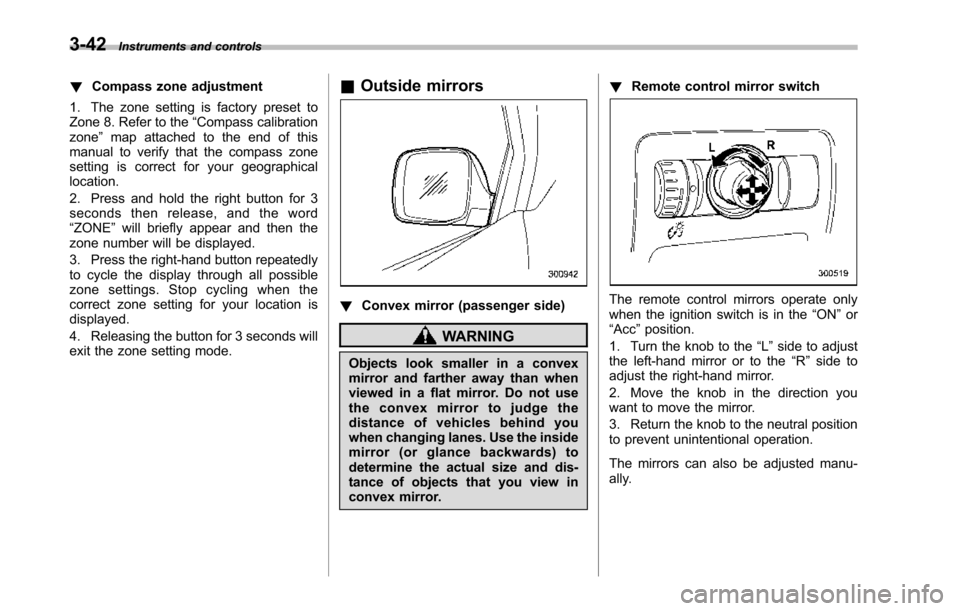
!Remote control mirror switch
The remote control mirrors operate onlywhen the ignition switch is in the“ON”or“Acc”position.
1. Turn the knob to the“L”side to adjustthe left-hand mirror or to the“R”side toadjust the right-hand mirror.
2. Move the knob in the direction youwant to move the mirror.
3. Return the knob to the neutral positionto prevent unintentional operation.
The mirrors can also be adjusted manu-ally.
Page 176 of 426
!Outside mirror defogger
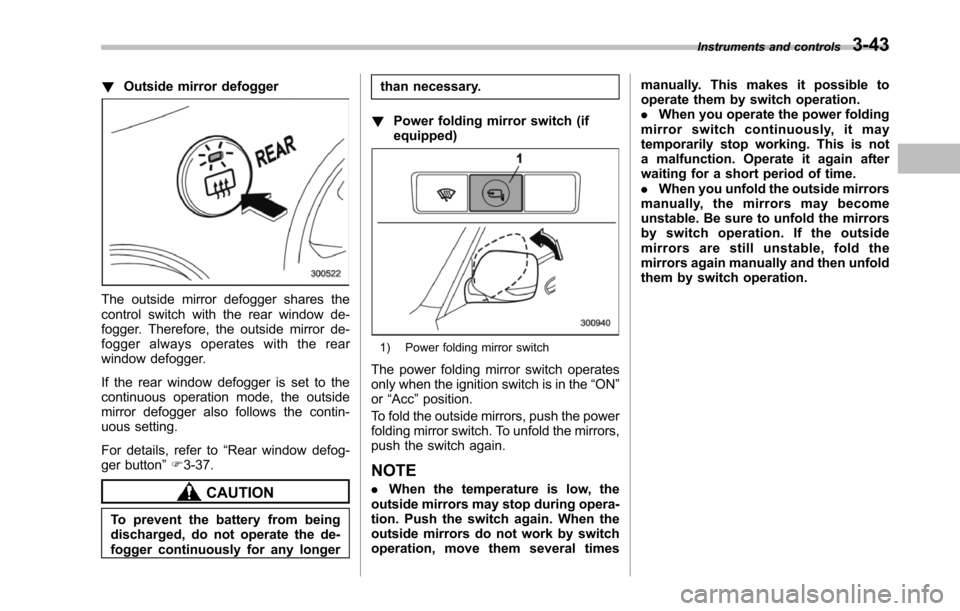
The outside mirror defogger shares thecontrol switch with the rear window de-fogger. Therefore, the outside mirror de-fogger always operates with the rearwindow defogger.
If the rear window defogger is set to thecontinuous operation mode, the outsidemirror defogger also follows the contin-uous setting.
For details, refer to“Rear window defog-ger button”F3-37.
CAUTION
To prevent the battery from beingdischarged, do not operate the de-fogger continuously for any longer
than necessary.
!Power folding mirror switch (ifequipped)
1) Power folding mirror switch
The power folding mirror switch operatesonly when the ignition switch is in the“ON”or“Acc”position.
To fold the outside mirrors, push the powerfolding mirror switch. To unfold the mirrors,push the switch again.
NOTE
.When the temperature is low, theoutside mirrorsmay stop during opera-tion. Push the switch again. When theoutside mirrors do not work by switchoperation, move them several times
manually. This makes it possible tooperate them by switch operation..When you operate the power foldingmirror switch continuously, it maytemporarily stop working. This is nota malfunction. Operate it again afterwaiting for a short period of time..When you unfold the outside mirrorsmanually, the mirrors may becomeunstable. Be sure to unfold the mirrorsby switch operation. If the outsidemirrors are still unstable, fold themirrors again manually and then unfoldthem by switch operation.
Instruments and controls3-43
Page 182 of 426
Automatic climate control
system
NOTE
.Operate the automatic climate con-trol system when the engine is running..The blower fan rotates at a lowspeed when the engine coolant tem-perature is low.
Forefficient defogging or dehumidify-ing in cold weather, press the“A/C”button..The vehicle has a rear air condi-tioner. The fan speed of the rear airconditioner can be adjusted, but otheradjustments (outlet air temperature, airdistribution, etc.)are not possible forthe rear air conditioner. For details,refer to“Rear air conditioner”F4-9.
The automatic climate control systemautomatically controls outlet air tempera-ture, fan speed, airflow distribution, airinlet control, and air conditioner compres-sor operation. It activates when the“AUTO”button is pressed, and is used tomaintain a constant, comfortable climatewithin the passenger compartment.
The temperature can be set within a rangeof 65 to 858F (18 to 328C).
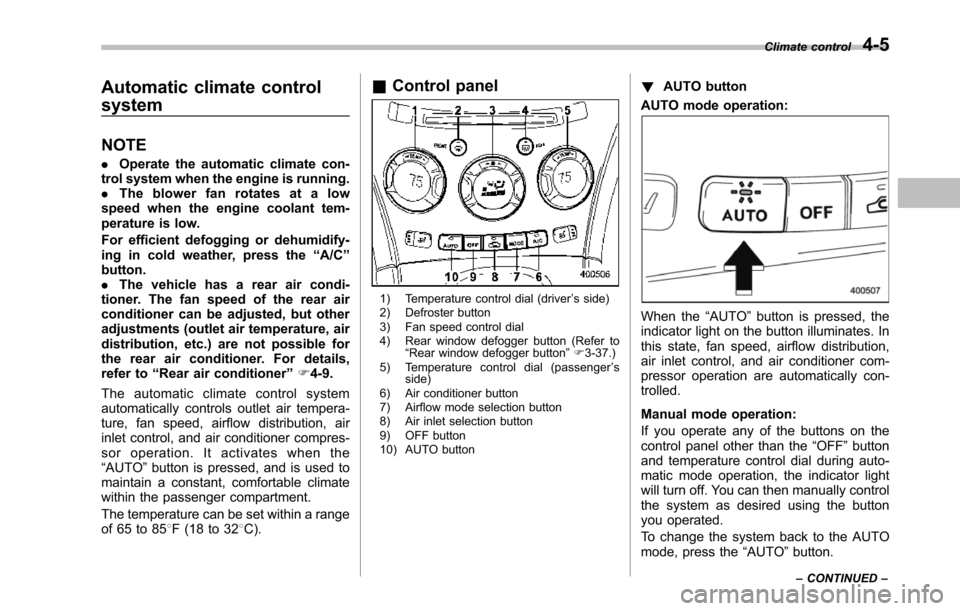
&Control panel
1) Temperature control dial (driver’s side)2) Defroster button3) Fan speed control dial4) Rear window defogger button (Refer to“Rearwindow defogger button”F3-37.)5) Temperature control dial (passenger’sside)6) Air conditioner button7) Airflow mode selection button8) Air inlet selection button9) OFF button10) AUTO button
!AUTO button
AUTO mode operation:
When the“AUTO”button is pressed, theindicator light on the button illuminates. Inthis state, fan speed, airflow distribution,air inlet control, and air conditioner com-pressor operation are automatically con-trolled.
Manual mode operation:
If you operate any of the buttons on thecontrol panel other than the“OFF”buttonand temperature control dial during auto-matic mode operation, the indicator lightwill turn off. You can then manually controlthe system as desired using the buttonyou operated.
To change the system back to the AUTOmode, press the“AUTO”button.
Climate control4-5
–CONTINUED–
Page 186 of 426
to the OFF position as soon as theoutside dusty condition clears.
NOTE
When driving on a dusty road or behinda vehicle that emits unpleasant exhaustgases, set the air inlet selection buttonto the ON position.
From time to time, return the air inletselection button to the OFF position todraw outside air into the passengercompartment.
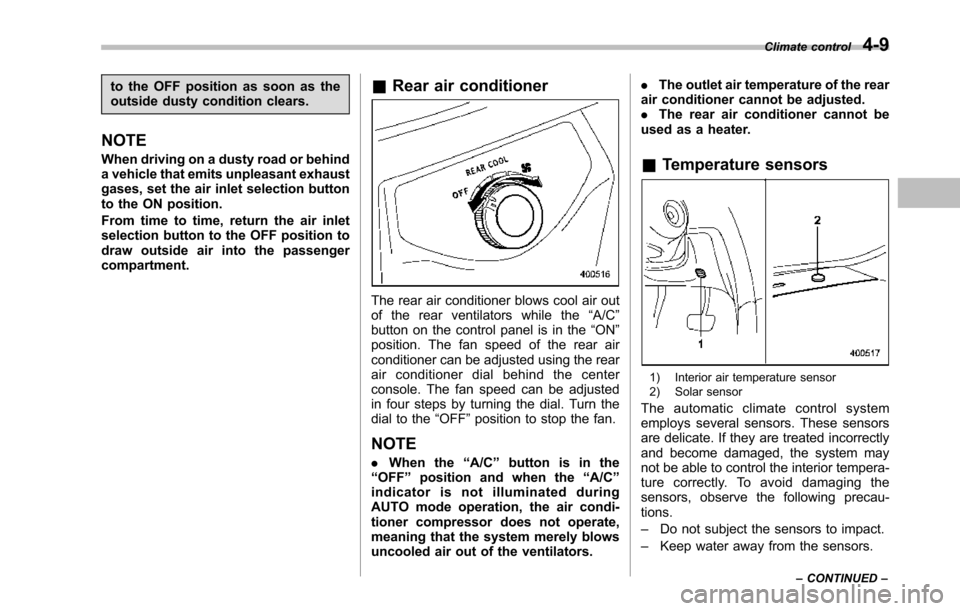
&Rear air conditioner
The rear air conditioner blows cool air outof the rear ventilators while the“A/C”button on the control panel is in the“ON”position. The fan speed of the rear airconditionercan be adjusted using the rearair conditioner dial behind the centerconsole. The fan speed can be adjustedin four steps by turning the dial. Turn thedial to the“OFF”position to stop the fan.
NOTE
.When the“A/C”button is in the“OFF”position and when the“A/C”indicator is not illuminated duringAUTO mode operation, the air condi-tioner compressor does not operate,meaning that the system merely blowsuncooled air out of the ventilators.
.The outlet air temperature of the rearair conditioner cannot be adjusted..The rear air conditioner cannot beused as a heater.
&Temperature sensors
1) Interior air temperature sensor2) Solar sensor
The automatic climate control systememploys several sensors. These sensorsare delicate. If they are treated incorrectlyand become damaged, the system maynot be able to control the interior tempera-ture correctly. To avoid damaging thesensors, observe the following precau-tions.
–Do not subject the sensors to impact.
–Keep water away from the sensors.
Climate control4-9
–CONTINUED–
Page 195 of 426
5-4Audio
Type A audio set (if equipped)
The audio set will operate only when the ignition switch is in the“Acc”or“ON”position.
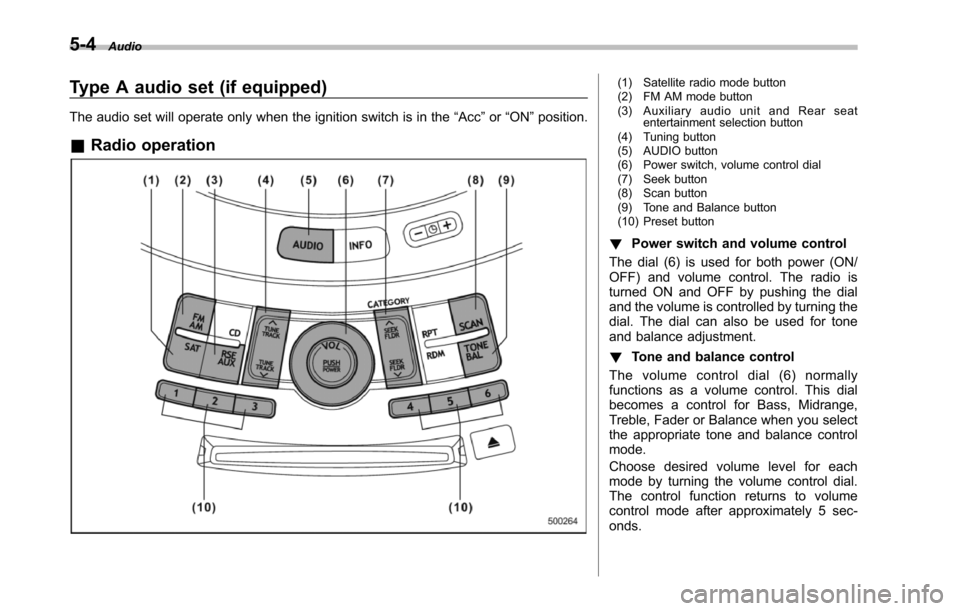
&Radio operation
(1) Satellite radio mode button(2) FM AM mode button(3) Auxiliary audio unit and Rear seatentertainment selection button(4) Tuning button(5) AUDIO button(6) Power switch, volume control dial(7) Seek button(8) Scan button(9) Tone and Balance button(10) Preset button
!Power switch and volume control
The dial (6) is used for both power (ON/OFF) and volume control. The radio isturned ON and OFF by pushing the dialand the volume is controlled by turning thedial. The dial can also be used for toneand balance adjustment.
!Tone and balance control
The volume control dial (6) normallyfunctions as a volume control. This dialbecomes a control for Bass, Midrange,Treble, Fader or Balance when you selectthe appropriate tone and balance controlmode.
Choose desired volume level for eachmode by turning the volume control dial.The control function returns to volumecontrol mode after approximately 5 sec-onds.
Page 196 of 426
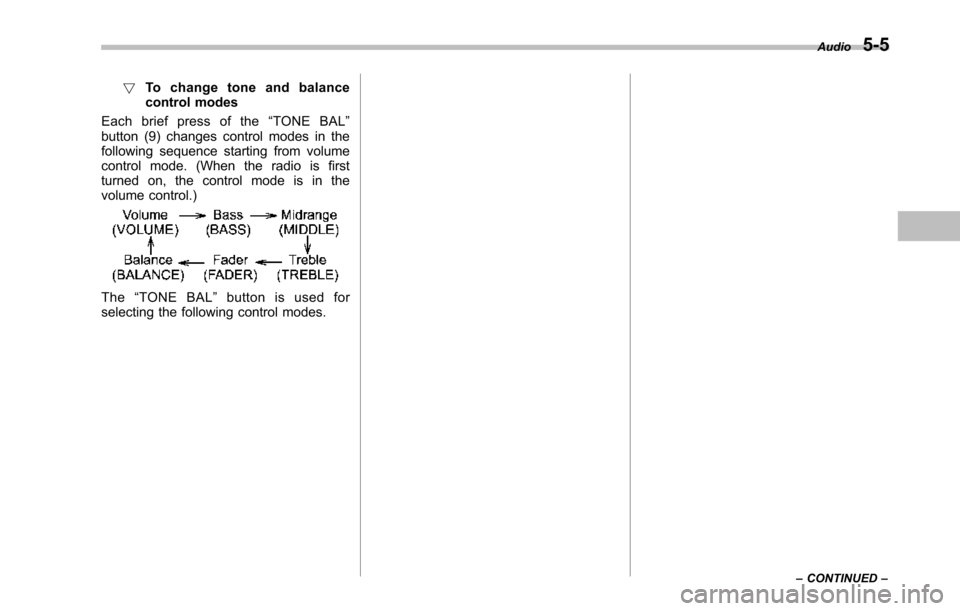
!To c h a n g e t o n e a n d b a l a n c econtrol modes
Each brief press of the“TONE BAL”button (9) changes control modes in thefollowing sequence starting from volumecontrol mode. (When the radio is firstturned on, the control mode is in thevolume control.)
The“TONE BAL”button is used forselecting the following control modes.
Audio5-5
–CONTINUED–
Page 197 of 426
5-6Audio
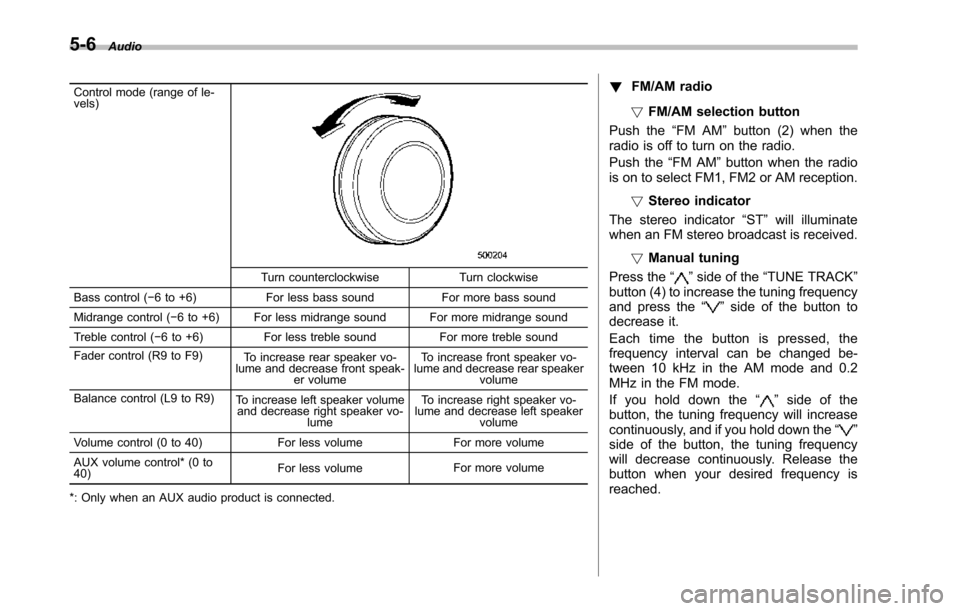
Control mode (range of le-vels)
Turn counterclockwise Turn clockwise
Bass control (!6 to +6) For less bass sound For more bass sound
Midrange control(!6 to +6) For less midrange sound For more midrange sound
Treble control (!6 to +6) For less treble sound For more treble sound
Fader control (R9 to F9)To increase rear speaker vo-lume and decrease front speak-er volume
To increase front speaker vo-lume and decrease rear speakervolume
Balance control(L9 to R9)To increase left speaker volumeand decrease right speaker vo-lume
To increase right speaker vo-lume and decrease left speakervolume
Volume control (0 to 40) For less volume For more volume
AUX volume control* (0 to40)For less volumeFor more volume
*: Only when an AUX audio product is connected.
!FM/AM radio
!FM/AM selection button
Push the“FM AM”button (2) when theradio is off to turn on the radio.
Push the“FM AM”button when the radiois on to select FM1, FM2 or AM reception.
!Stereo indicator
The stereo indicator“ST”will illuminatewhen an FM stereo broadcast is received.
!Manual tuning
Press the“”side of the“TUNE TRACK”button(4) to increase the tuning frequencyand press the“”side of the button todecrease it.
Each time the button is pressed, thefrequencyinterval can be changed be-tween 10 kHz in the AM mode and 0.2MHz in the FM mode.
If you hold down the“”side of thebutton, the tuningfrequency will increasecontinuously, and if you hold down the“”side of the button, the tuning frequencywill decrease continuously. Release thebutton when your desired frequency isreached.
Page 198 of 426
NOTE
While you are holding down either sideof the“TUNE TRACK”button, thetuning frequency will not stop chan-ging even if the frequency of a recei-vable station is reached.
!Seek tuning
If you press the“”or“”side of the“SEEK FLDR”button (7), the radio willautomatically search for a receivablestation and stop at the first one it finds.This function may not be available, how-ever, when radio signals are weak. In suchasituation,performmanualtuningtoselect the desired station.
!Automatic tuning (SCAN)
Press the“SCAN”button (8) to change theradio to the SCAN mode. In this mode, theradio scans through the radio band until astation is found. The radio will stop at thestation for 5 seconds while displaying thefrequency, after which scanning will con-tinue until the entire band has beenscanned from the low end to the highend. Press the“SCAN”button again tocancel the SCAN mode and to stop on anydisplayed frequency.
Press the“”or“”side of the“SEEKFLDR”button (7) again to cancel the scanmode and to stop on any displayed
frequency.
When the“SCAN”button is pressed forautomatic tuning, stations are scanned inthe direction of low frequencies to highfrequencies only.
Automatic tuning may not function prop-erly if the station reception is weakened bydistancefrom the station or proximity totall buildings and hills.
!Selecting preset stations
Presetting a station with a preset button(10) allows you to select that station in asingle operation. Up to six, AM, FM1 andFM2 stations each may be preset.
!How to preset stations
1. Press the“FM AM”button (2) to selectFM1, FM2, or AM reception.
2. Press the“SCAN”button (8) or tunethe radio manually until the desired stationfrequencyis displayed.
3. Press and hold one of the presetbuttons (10) to store the frequency. If thebutton is pressed briefly, the precedingselection will remain in memory.
NOTE
.If the connection between the radioand battery is broken for any reasonsuch as vehicle maintenance or radioremoval, all stations stored in the
preset buttons are cleared. If thisoccurs, it is necessary to reset thepreset buttons..If a cell phone is placed near theradio, it may cause the radio to emitnoise when it receives calls. This noisedoes not indicate a radio malfunction.
!Satellite radio mode (if equipped)
To receive satellite radio, it is necessary toinstall the SUBARU genuine satellitereceiver (optional part) and to enter intoa contract with a satellite radio networkservice such as“Sirius XMTMsatelliteradio”(for U.S.A. only)or“Sirius satelliteradio”(for Canada only). For details,please contact your SUBARU dealer.
!Sirius satellite radio (for Canadaonly)
Sirius satellite radio is a recent innovationthat allows the listener to experiencedigital sound quality and to have a greatervariety of channels.
Use of satellite radio (Sirius) requires atuner, antenna and a service contract. Fordetails, please contact your SUBARUdealer or visit Sirius Satellite Radio atwww.sirius.ca or call 1-888-539-7474 formore information. Sirius, the Sirius doglogo, channel names and logos are trade-marks of SIRIUS Satellite Radio Inc.
Audio5-7
–CONTINUED–
Page 199 of 426
5-8Audio
!Sirius XMTMSatellite Radio Acti-vation (for U.S.A. only)
Models with Sirius XMTMare eligible for a3-month complimentary subscription tothe Sirius XMTMSatellite Radio service.
Activation process:
You can activate the XM Satellite Radiofromthe website of the XM Satellite Radio.For details, visit the website.
!Satellite radio reception
Satellite radio signals are best received inareas with a clear view of the open sky. Inareas wherethere are tall buildings, trees,tunnels or other structures that mayobstruct the signal of the satellites, theremay be signal interruptions. Other circum-stances that may result in signal lossinclude driving near a wall, steep cliff orhill, or driving on the lower level of a multi-tiered road or inside a parking garage.
To help reduce this condition, satelliteradio providers have installed ground-based repeaters in heavily populatedareas. However, you may still experiencereception problems in some areas.
!Displaying satellite radio ID oftuner
When you activate satellite radio, youshould have your satellite radio tuner ID
ready because each tuner is identified byits unique satellite radio tuner ID.
The satellite radio ID will be needed whenyou activate satellite radio and receivesatellite radio customer support.
The satellite radio ID can be found on theaudio display by tuning the channel to“0”.
Turn the“TUNE TRACK”button (4) toselect the satellite radio channel.
!Band selection button
Push the“SAT”button (1) when the radiois off to turn on the radio.
Push the“SAT”button when the radio ison to select SAT1, SAT2 or SAT3 recep-tion.
!Channel selection
Press“”of the“TUNE TRACK”button(4) to select the next channel and press“”of the button to select the previouschannel.
Keep pressing“”of the button tochange to the next channel continuouslyand keep pressing“”of the button tochange to the previous channel continu-ously.
!Category selection
Press“”or“”of the“SEEK FLDR”button (7) to display the current category.Press“”again to select the next
category, and press“”again to selectthe previous category.
!Channel scan
Press the“SCAN”button (8) to change theradio to the SCAN mode. In this mode, theradio scans through the channels until astation is found. The radio will stop at thestation for 5 seconds while displaying thechannel number, after which scanning willcontinue until the entire channel has beenscanned from the low end to the high end.
Also during the category selection, chan-nel scan can be performed in that cate-gory.
Press the“SCAN”button again to cancelthe SCAN mode and to stop on anydisplayed channel.
!Selecting presetchannels
Presetting a channel with a preset button(10) allows you to select that channel in asingle operation. Up to six, SAT1, SAT2and SAT3 channels each may be preset.
!How to preset channels
1. Press the“SAT”button (1) to selectSAT1, SAT2 and SAT3 reception.
2. Press the“SCAN”button (8) or the“TUNE TRACK”button (4) to select thechannel.
3. Press and hold one of the preset