display SUBARU WRX 2016 Owners Manual
[x] Cancel search | Manufacturer: SUBARU, Model Year: 2016, Model line: WRX, Model: SUBARU WRX 2016Pages: 594, PDF Size: 19.43 MB
Page 448 of 594
& BSD/RCTA approach indica-
tor light/warning buzzer When the BSD/RCTA is active, the BSD/
RCTA approach indicator light and warn-
ing buzzer will operate to alert the driver to
the presence of the following vehicles.
. Vehicles in the neighboring lanes
. Vehicles approaching from the left or
right rear side when reversing
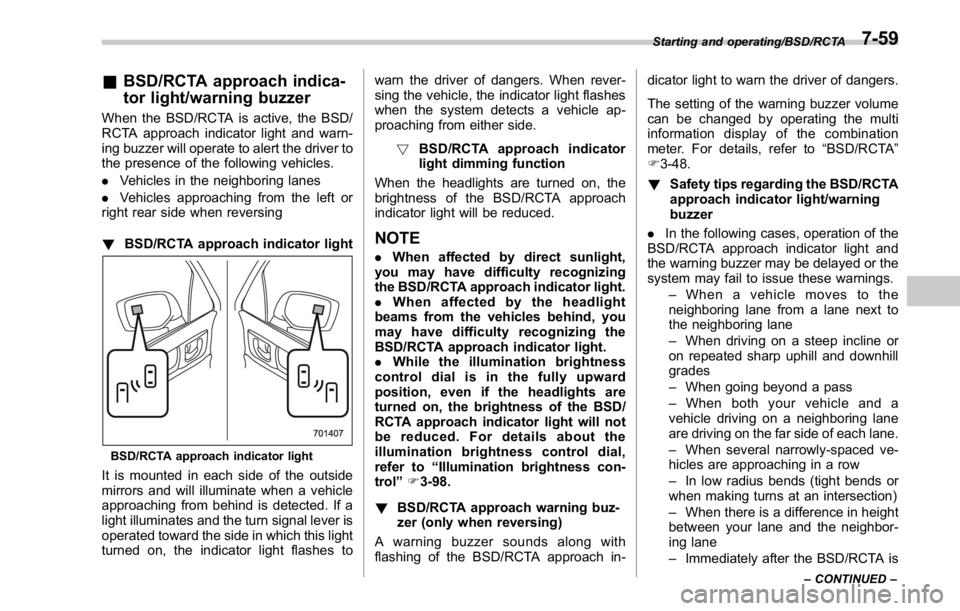
! BSD/RCTA approach indicator light
BSD/RCTA approach indicator light
It is mounted in each side of the outside
mirrors and will illuminate when a vehicle
approaching from behind is detected. If a
light illuminates and the turn signal lever is
operated toward the side in which this light
turned on, the indicator light flashes to warn the driver of dangers. When rever-
sing the vehicle, the indicator light flashes
when the system detects a vehicle ap-
proaching from either side.
! BSD/RCTA approach indicator
light dimming function
When the headlights are turned on, the
brightness of the BSD/RCTA approach
indicator light will be reduced.
NOTE . When affected by direct sunlight,
you may have difficulty recognizing
the BSD/RCTA approach indicator light.
. When affected by the headlight
beams from the vehicles behind, you
may have difficulty recognizing the
BSD/RCTA approach indicator light.
. While the illumination brightness
control dial is in the fully upward
position, even if the headlights are
turned on, the brightness of the BSD/
RCTA approach indicator light will not
be reduced. For details about the
illumination brightness control dial,
refer to “ Illumination brightness con-
trol ” F 3-98.
! BSD/RCTA approach warning buz-
zer (only when reversing)
A warning buzzer sounds along with
flashing of the BSD/RCTA approach in- dicator light to warn the driver of dangers.
The setting of the warning buzzer volume
can be changed by operating the multi
information display of the combination
meter. For details, refer to “ BSD/RCTA ”
F 3-48.
! Safety tips regarding the BSD/RCTA
approach indicator light/warning
buzzer
. In the following cases, operation of the
BSD/RCTA approach indicator light and
the warning buzzer may be delayed or the
system may fail to issue these warnings.
– When a vehicle moves to the
neighboring lane from a lane next to
the neighboring lane
– When driving on a steep incline or
on repeated sharp uphill and downhill
grades
– When going beyond a pass
– When both your vehicle and a
vehicle driving on a neighboring lane
are driving on the far side of each lane.
– When several narrowly-spaced ve-
hicles are approaching in a row
– In low radius bends (tight bends or
when making turns at an intersection)
– When there is a difference in height
between your lane and the neighbor-
ing lane
– Immediately after the BSD/RCTA is Starting and operating/BSD/RCTA
– CONTINUED –7-59
Page 450 of 594
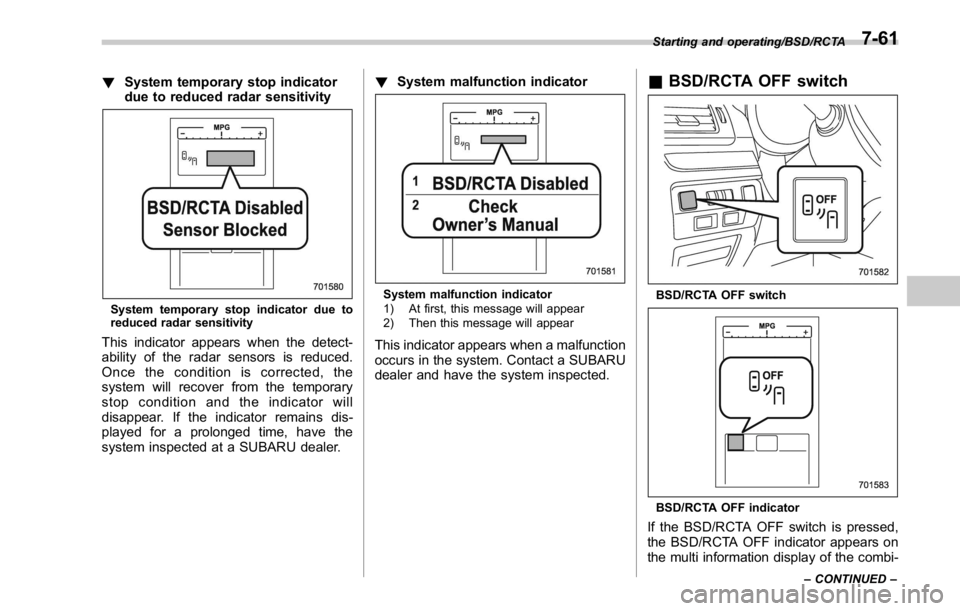
! System temporary stop indicator
due to reduced radar sensitivity
System temporary stop indicator due to
reduced radar sensitivity
This indicator appears when the detect-
ability of the radar sensors is reduced.
Once the condition is corrected, the
system will recover from the temporary
stop condition and the indicator will
disappear. If the indicator remains dis-
played for a prolonged time, have the
system inspected at a SUBARU dealer. ! System malfunction indicator
System malfunction indicator
1) At first, this message will appear
2) Then this message will appear
This indicator appears when a malfunction
occurs in the system. Contact a SUBARU
dealer and have the system inspected. & BSD/RCTA OFF switch
BSD/RCTA OFF switch
BSD/RCTA OFF indicator
If the BSD/RCTA OFF switch is pressed,
the BSD/RCTA OFF indicator appears on
the multi information display of the combi- Starting and operating/BSD/RCTA
– CONTINUED –7-61
Page 489 of 594
Appearance care/Cleaning the interior
CAUTION. Do not use organic solvents such
as paint thinners or fuel, or
strong cleaning agents that con-
tain those solvents. Doing so
could damage the surface and
cause the color to deteriorate.
. Do not use chemical solvents
that contain silicone on the vehi-
cle audio system, electrical com-
ponents of the air-conditioner or
any switches. If silicone adheres
to these parts, it may cause
damage to electrical compo-
nents. & Monitor To clean the audio/navigation/multi func-
tion display monitor, wipe it with a silicone
cloth or with a soft cloth. If the monitor is
extremely dirty, clean it with a soft cloth
moistened with neutral detergent then
carefully wipe off any remaining detergent.
CAUTION. Do not spray neutral detergent
directly onto the monitor. Doing
so could damage the monitor ’ s
components.
. Do not wipe the monitor with a
hard cloth. Doing so could
scratch the monitor.
. Do not use cleaning fluid that
contains thinner, fuel, or any
other volatile substance. Such
cleaning fluid could erase the
lettering on the switches at the
bottom of the monitor.10-6
Page 492 of 594
Maintenance schedule The scheduled maintenance items re-
quired to be serviced at regular intervals
are shown in the “ Warranty and Main-
tenance Booklet ” .
For details of your maintenance schedule,
read the separate “ Warranty and Main-
tenance Booklet ” .
NOTE For models with a multi function dis-
play, you can set a reminder to be
displayed when a scheduled mainte-
nance item is almost due. For details,
refer to “ Maintenance settings ” F 3-79.Maintenance precautions When maintenance and service are re-
quired, it is recommended that all work be
done by an authorized SUBARU dealer.
If you perform maintenance and service
by yourself, you should familiarize yourself
with the information provided in this
section on general maintenance and
service for your SUBARU.
Incorrect or incomplete service could
cause improper or unsafe vehicle opera-
tion. Any problems caused by improper
maintenance and service performed by
you are not eligible for warranty coverage.
WARNING
. Testing of an All-Wheel Drive
model must NEVER be per-
formed on a single two-wheel
dynamometer or similar appara-
tus. Attempting to do so will
result in transmission damage
and in uncontrolled vehicle
movement and may cause an
accident or injuries to persons
nearby.
. Always select a safe area when
performing maintenance on your
vehicle. . Always be very careful to avoid
injury when working on the vehi-
cle. Remember that some of the
materials in the vehicle may be
hazardous if improperly used or
handled, for example, battery
acid.
. Your vehicle should only be ser-
viced by persons fully competent
to do so. Serious personal injury
may result to persons not experi-
enced in servicing vehicles.
. Always use the proper tools and
make certain that they are well
maintained.
. Never get under the vehicle sup-
ported only by a jack. Always use
safety stands to support the
vehicle.
. Never keep the engine running in
a poorly ventilated area, such as
a garage or other closed areas.
. Do not smoke or allow open
flames around the fuel or battery.
This will cause a fire.
. Because the fuel system is under
pressure, replacement of the fuel
filter should be performed only
by your SUBARU dealer.
. Wear adequate eye protection toMaintenance and service/Maintenance schedule
– CONTINUED –11-3
Page 582 of 594

Keyless access with push-button start system .. ............... 2-9
Disabling keyless access functions ........................... 2-16
Locking and unlocking doors ................................... 2-13
Opening trunk lid ................................................... 2-15
Warning chimes and warning light .................... 2-16, 3-28
When access key does not operate
properly ....................................... 2-18, 3-8, 7-14, 9-16
L
Lap belt pretensioner .................................................. 1-18
Leather seat materials ................................................ 10-5
License plate light ..................................................... 11-49
Light
Control switch ........................................................ 3-94
Daytime running. .................................................... 3-97
Dome ..................................................................... 6-2
Front fog ...................................................... 3-99, 11-47
Front position ................................................ 3-95, 3-99
Front side marker ................................................. 12-16
Ignition switch .......................................................... 3-6
License plate ........................................................ 11-49
Map ....................................................................... 6-2
Rear combination .................................................. 11-48
Rear side marker light ........................................... 11-48
Stop light ............................................................. 11-48
Tail light ............................................................... 11-48
Turn signal ................................................... 3-97, 11-48
Limited slip differential (LSD) ....................................... 7-33
Loading your vehicle .................................................. 8-10
Low fuel warning light ................................................. 3-24
Low tire pressure warning light .................................... 3-19 Lower and tether anchorage ........................................ 1-29
LSD (Limited slip differential) ........................................ 7-33
M
Maintenance
Precautions ........................................................... 11-3
Schedule ............................................................... 11-3
Seatbelt. ................................................................ 1-16
Tips ...................................................................... 11-6
Tools ...................................................................... 9-3
Malfunction indicator light (check engine warning light) .... 3-16
Manual
Climate control .................................................. 4-5, 4-6
Mode (continuously variable transmission) ................. 7-26
Seat ....................................................................... 1-4
Transmission ......................................................... 7-17
Transmission oil ........................................... 11-23, 12-6
Map light .................................................................... 6-2
Media operation ......................................................... 5-50
AUX. ..................................................................... 5-73
Bluetooth audio ...................................................... 5-60
CD ....................................................................... 5-50
iPod ...................................................................... 5-56
USB memory ......................................................... 5-53
Meters and gauges ...................................................... 3-8
Mirror defogger ........................................................ 3-112
Mirrors .................................................................... 3-103
Moonroof ...........................................................
2-38, 9-18
Multi function display ................................................... 3-48 Index
14-7