alarm SUBARU WRX 2016 User Guide
[x] Cancel search | Manufacturer: SUBARU, Model Year: 2016, Model line: WRX, Model: SUBARU WRX 2016Pages: 594, PDF Size: 19.43 MB
Page 118 of 594
! To arm the system using the key-
less access function (if equipped)
1. Close all windows and the moonroof (if
equipped)
2. Turn the push-button ignition switch to
the “ OFF ” position.
3. Open the doors and get out of the
vehicle.
4. Make sure that the engine hood is
locked.
5. Close all doors and the trunk lid.
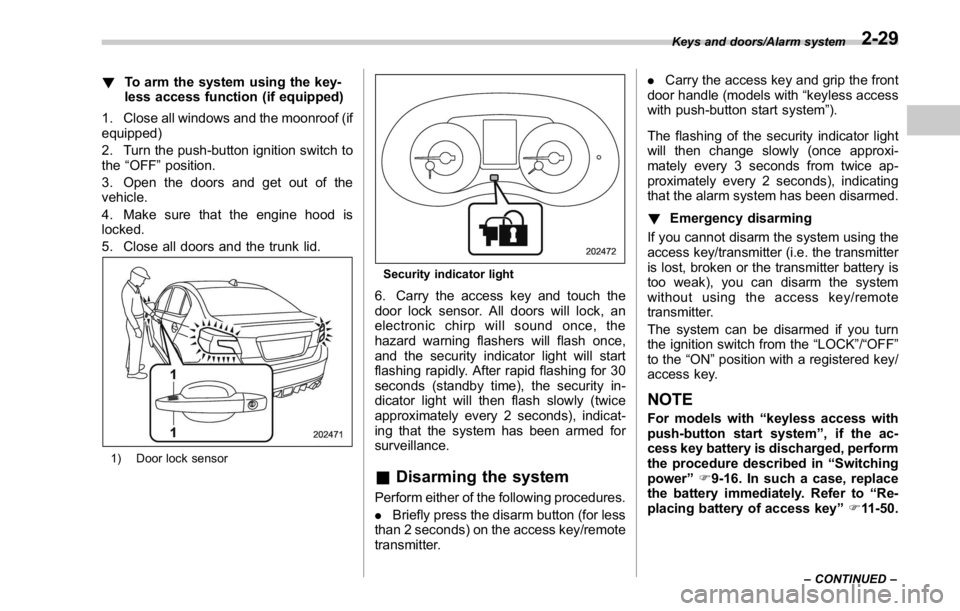
1) Door lock sensor Security indicator light
6. Carry the access key and touch the
door lock sensor. All doors will lock, an
electronic chirp will sound once, the
hazard warning flashers will flash once,
and the security indicator light will start
flashing rapidly. After rapid flashing for 30
seconds (standby time), the security in-
dicator light will then flash slowly (twice
approximately every 2 seconds), indicat-
ing that the system has been armed for
surveillance.
& Disarming the system Perform either of the following procedures.
. Briefly press the disarm button (for less
than 2 seconds) on the access key/remote
transmitter. . Carry the access key and grip the front
door handle (models with “ keyless access
with push-button start system ” ).
The flashing of the security indicator light
will then change slowly (once approxi-
mately every 3 seconds from twice ap-
proximately every 2 seconds), indicating
that the alarm system has been disarmed.
! Emergency disarming
If you cannot disarm the system using the
access key/transmitter (i.e. the transmitter
is lost, broken or the transmitter battery is
too weak), you can disarm the system
without using the access key/remote
transmitter.
The system can be disarmed if you turn
the ignition switch from the “ LOCK ” / “ OFF ”
to the “ ON ” position with a registered key/
access key.
NOTE For models with “ keyless access with
push-button start system ” , if the ac-
cess key battery is discharged, perform
the procedure described in “ Switching
power ” F 9-16. In such a case, replace
the battery immediately. Refer to “ Re-
placing battery of access key ” F 11-50.Keys and doors/Alarm system
– CONTINUED –2-29
Page 119 of 594
Keys and doors/Alarm system
& Valet modeWhen you choose the valet mode, the
alarm system does not operate. In valet
mode, the access key/remote transmitter
is used only for locking and unlocking the
doors and for panic activation.
To enter the valet mode, change the
setting of your vehicle ’ s alarm system for
deactivation mode. Refer to “ Activating
and deactivating the alarm system ” F 2-
26. The security indicator light will con-
tinue to flash once every 3 seconds
indicating that the system is in the valet
mode.
To exit valet mode, change the setting of
your vehicle ’ s alarm system for activation
mode. Refer to “ Activating and deactivat-
ing the alarm system ” F 2-26.
& Passive arming (models
without “ keyless access with
push-button start system ” )When passive arming mode has been
programmed by the dealer, arming of the
system is automatically accomplished
without using the remote transmitter. Note
that in this mode, DOORS MUST BE
MANUALLY LOCKED. ! To enter the passive mode
If you wish to program the passive arming
mode, have it done by your SUBARU
dealer.
! Arming the system
CAUTIONIn passive mode, the system will
automatically activate the alarm but
WILL NOT automatically lock the
doors. In order to lock the doors
you must either lock them as in-
dicated in step 4 below or with the
key once they have been closed.
Failure to lock the doors manually
will result in a higher security risk.
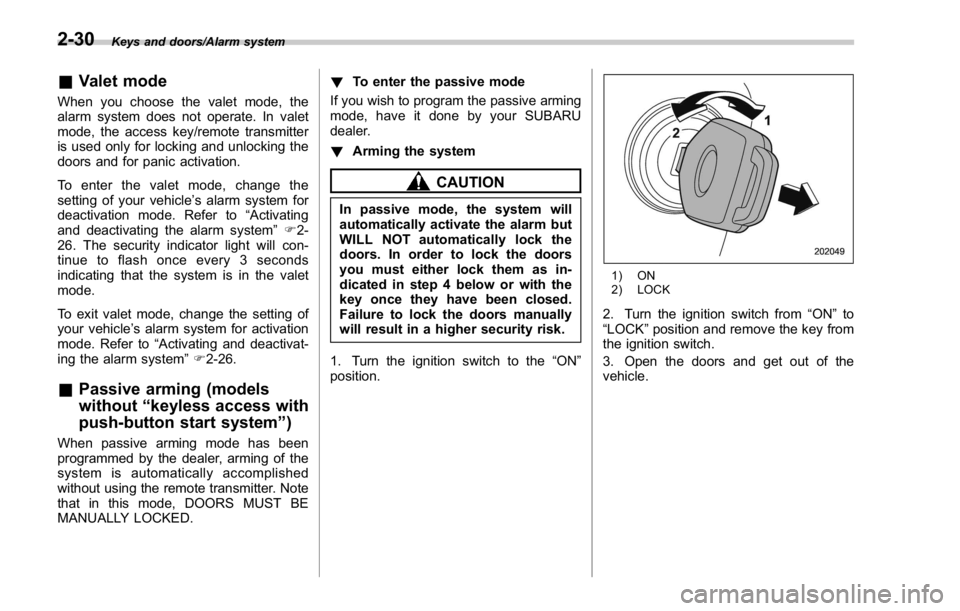
1. Turn the ignition switch to the “ ON ”
position. 1) ON
2) LOCK
2. Turn the ignition switch from “ ON ” to
“ LOCK ” position and remove the key from
the ignition switch.
3. Open the doors and get out of the
vehicle.2-30
Page 120 of 594
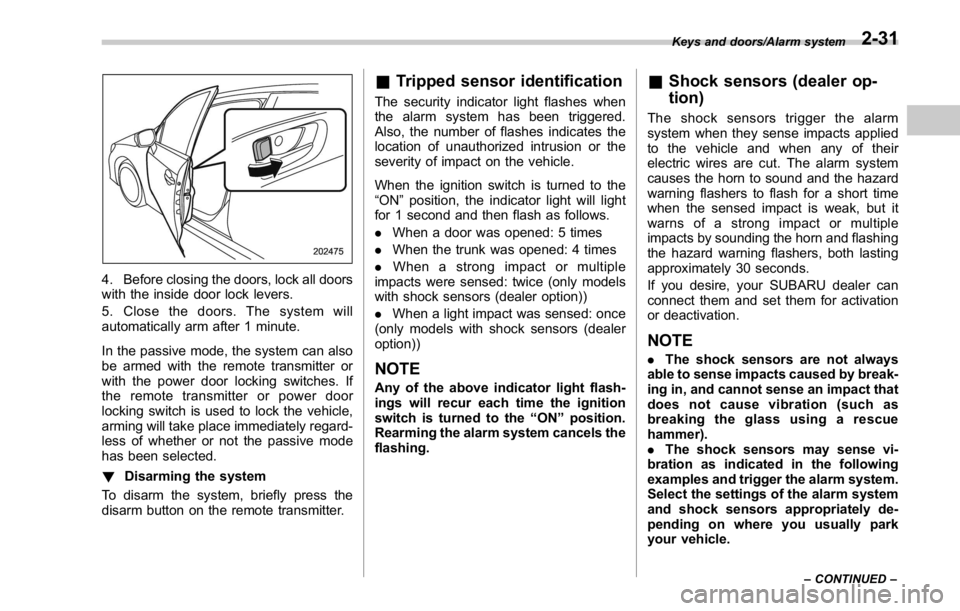
4. Before closing the doors, lock all doors
with the inside door lock levers.
5. Close the doors. The system will
automatically arm after 1 minute.
In the passive mode, the system can also
be armed with the remote transmitter or
with the power door locking switches. If
the remote transmitter or power door
locking switch is used to lock the vehicle,
arming will take place immediately regard-
less of whether or not the passive mode
has been selected.
! Disarming the system
To disarm the system, briefly press the
disarm button on the remote transmitter. & Tripped sensor identification The security indicator light flashes when
the alarm system has been triggered.
Also, the number of flashes indicates the
location of unauthorized intrusion or the
severity of impact on the vehicle.
When the ignition switch is turned to the
“ ON ” position, the indicator light will light
for 1 second and then flash as follows.
. When a door was opened: 5 times
. When the trunk was opened: 4 times
. When a strong impact or multiple
impacts were sensed: twice (only models
with shock sensors (dealer option))
. When a light impact was sensed: once
(only models with shock sensors (dealer
option))
NOTE Any of the above indicator light flash-
ings will recur each time the ignition
switch is turned to the “ ON ” position.
Rearming the alarm system cancels the
flashing. & Shock sensors (dealer op-
tion) The shock sensors trigger the alarm
system when they sense impacts applied
to the vehicle and when any of their
electric wires are cut. The alarm system
causes the horn to sound and the hazard
warning flashers to flash for a short time
when the sensed impact is weak, but it
warns of a strong impact or multiple
impacts by sounding the horn and flashing
the hazard warning flashers, both lasting
approximately 30 seconds.
If you desire, your SUBARU dealer can
connect them and set them for activation
or deactivation.
NOTE . The shock sensors are not always
able to sense impacts caused by break-
ing in, and cannot sense an impact that
does not cause vibration (such as
breaking the glass using a rescue
hammer).
. The shock sensors may sense vi-
bration as indicated in the following
examples and trigger the alarm system.
Select the settings of the alarm system
and shock sensors appropriately de-
pending on where you usually park
your vehicle. Keys and doors/Alarm system
– CONTINUED –2-31
Page 141 of 594

Instruments and controls/REV indicator light and buzzer (STI)
& ECO gauge
The unit displayed varies depending on the
models.
The ECO gauge shows the difference
between the average rate of fuel con-
sumption since the trip meter was last
reset and the current rate of fuel con-
sumption.
The ECO gauge indicates the current fuel
efficiency as shown in the following chart.
Displayed
unit Needle position
“ + ” side “ - ” side
MPG Better Poorer
l/100km Poorer Better
km/l Better PoorerNOTE . The ECO gauge shows only an
approximate indication.
. After resetting the trip meter, the
average rate of fuel consumption is not
shown until driving 0.6 mile (1 km).
Until that time, the ECO gauge does not
operate.
REV indicator light and buz-
zer (STI)
1) REV indicator light
The REV alarm system has the following
functions.
. When the engine speed reaches the
level that was previously set, the REV
indicator light illuminates to inform you. At
this time, a buzzer also sounds if the
buzzer setting is activated.
. Whenever the engine speed enters the
red zone of the tachometer, the REV
indicator light flashes.
NOTE
Even if the REV alarm system is not set,
the REV indicator light will flash when-3-12
Page 162 of 594

& Security indicator lightThis indicator light shows the status of the
alarm system. It also indicates operation
of the immobilizer system.
! Alarm system
It blinks to show the driver the operational
status of the alarm system. For detailed
information, refer to “ Alarm system ” F 2-
25.
! Immobilizer system
The security indicator light starts blinking
in the following conditions.
For models with “ keyless access with
push-button start system ” :
. Immediately after the push-button igni-
tion switch is turned to the “ OFF ” position.
. Immediately after the driver ’ s door is
opened or closed when all of the following
conditions are met.
– The push-button ignition switch is in
the “ ON ” or “ ACC ” position.
– The access key is outside the
vehicle.
– The engine is not running.
– In the event that an unauthorized
key is used (for example, the key is
unregistered or the ID code does not
match), the power is not switched to
“ ON ” and the security indicator light continues blinking.
For models without “ keyless access
with push-button start system ” :
. Approximately 60 seconds after the
ignition switch is turned from the “ ON ”
position to the “ ACC ” or “ LOCK ” position.
. Immediately after the key is pulled out.
If the indicator light does not blink in the
above conditions, it may indicate that
immobilizer system may be malfunction-
ing. Contact your nearest SUBARU dealer
immediately.
In the event that an unauthorized key (for
example, an unauthorized duplicate) is
used, the security indicator light illumi-
nates. For details about the immobilizer
system, refer to “ Immobilizer ” F 2-3.
NOTE . The security indicator light remains
off in the following conditions. It means
that the matching of the ID code is
completed and the immobilizer system
is deactivated, and it does not indicate
a malfunction.
Models with “ keyless access with
push-button start system ” :
– while the engine is running
– the push-button ignition switch has been turned to the “ ON ” or
“ ACC ” position and the driver ’ s
door has not been opened or closed
Models without “ keyless access
with push-button start system ” :
– while the engine is running
– for approximately 60 seconds
after the ignition switch is turned
from the “ ON ” position to the
“ ACC ” or “ LOCK ” position
– when the ignition switch is in the
“ ON ” position.
. Even if a malfunction occurs, such
as the security indicator light flashes
irregularly, it will not affect the func-
tionality of the immobilizer system.Instruments and controls/Warning and indicator lights
– CONTINUED –3-33
Page 175 of 594

Instruments and controls/Multi information display
The menu list is as follows. Top menu Menu option Possible settings Initial settings
Screen Settings Welcome Good-bye Screen On or Off On
Gauge Initial Movement On or Off On
Gear Position Indicator Setting (MT
models) On or Off On
Languages Select the display language. The default language settings vary
depending on individual countries.
(For U.S. models: English)
REV settings (STI) REV Indicator Light On or Off Off
REV Alarm Level Engine Speed 2000 rpm - RED ZONE 2000 rpm
REV Buzzer On or Off Off
EyeSight (models with EyeSight
system) Warning Volume Max/Mid/Min Mid
Lead Vehicle Acquisition Sound On or Off On
Lead Vehicle Moving Monitor
Function On or Off On
BSD/RCTA (if equipped) Warning Volume Max/Mid/Min/OFF Mid
Default Settings ― Ye s o r N o ―3-46
Page 176 of 594

By operating the “ ” or “ ” switch on the
steering wheel, you can select the menu.
Pull the “
/SET ” switch to enter the
selected menu.
NOTE If you enter the “ Return ” menu, the
system will return to the previous
screen.
! Screen Settings
After entering the “ Screen Settings ” menu,
select one of the following menus.
! Welcome Good-bye Screen
The welcome screen/good-bye screens
can be activated or deactivated. Select
“ On ” to activate the screens. Select “ Off ”
to deactivate the screens.
! Gauge Initial Movement
The movement of the meter needles and
gauge needles that occurs when the
ignition switch is turned to the “ ON ”
position can be activated or deactivated.
Select “ On ” to activate. Select “ Off ” to
deactivate.
! Gear Position Indicator Setting
(MT models)
Display of the shift position indicator can
be activated or deactivated. Select “ On ” to
activate display of the shift position in- dicator or “ Off ” to deactivate it.
! Languages
Operate the “
” or “ ” switch on the
steering wheel to display the preferred
language. Then pull the “
/SET ” switch to
select the displayed language.
! REV settings (STI)
NOTE If the setting of the REV Indicator Light
is “ Off ” , the setting menus of the REV
Alarm Level Engine Speed and the REV
Buzzer are not displayed.
After entering the “ REV settings ” menu,
select any of the following menus.
! REV Indicator Light
Display of the REV indicator light can be
activated or deactivated. Select “ On ” to
activate display of the REV indicator light
or “ Off ” to deactivate it.
! REV Alarm Level Engine Speed
The alarm-level engine speed can be set
(in 100 rpm steps) within the range from
2,000 rpm to the red zone.
! REV Buzzer
The REV buzzer can be activated or
deactivated. Select “ On ” to activate the
REV buzzer or “ Off ” to deactivate it. ! EyeSight (models with EyeSight
system)
NOTE For models with the EyeSight system,
refer to the Owner ’ s Manual supple-
ment for the EyeSight system.
After entering the “ EyeSight ” menu, select
one of the following menus.
! Warning Volume
The volume of the warning buzzer that
sounds when the EyeSight system is in
use can be set in 3 stages ( “ Max ” , “ Mid ”
and “ Min ” ).
! Lead Vehicle Acquisition Sound
When adaptive cruise control is used, the
buzzer that sounds under any of the
following conditions can be activated or
deactivated.
. A vehicle is detected in front
. Detection is not possible
Select “ On ” to activate the buzzer. Select
“ Off ” to deactivate the buzzer.
! Lead Vehicle Moving Monitor
Function
When the lead vehicle moving monitor
function is operated, the buzzer that
sounds if a vehicle in front has started
can be activated or deactivated. SelectInstruments and controls/Multi information display
– CONTINUED –3-47
Page 405 of 594

Starting and operating/Remote engine start system (dealer option)
! Stopping the engine
Press and hold the lock button to stop the
engine with remote engine start system.
! Automatic engine shutdown
The remote engine start system will
automatically shut down or will not start
the engine under the following conditions.
. The total run-time has exceeded 20
minutes.
. Any door is opened.
. The select lever is moved to any
position other than “ P ” .
. The engine hood is opened.
. Thepush-buttonignitionswitchis
pressed.
. The brake pedal is depressed.
. The engine speed is 3,000 rpm or
more.
The time setting until the engine auto-
matically stops can be changed. To
change it, please contact your SUBARU
dealer. Note that some settings may
violate state, provincial, or local laws and
regulations. Check the laws in your area to
determine which setting is permitted. & Entering the vehicle while it
is running via remote start 1. Unlock the vehicle doors using the
keyless access function. If the vehicle ’ s
doors are unlocked manually using the
key, the vehicle ’ s alarm system will trigger
(if the alarm system is armed prior to
activating the remote engine start system)
and the engine will turn off. Perform either
of the following procedures to disarm the
alarm system. Refer to “ Alarm system ”
F 2-25.
. Switch the ignition to the “ ACC ” or
“ ON ” state by pressing the push-button
ignition switch once or twice, respec-
tively.
. Press any button on the access key/
transmitter.
2. Enter the vehicle.
3. The engine will shut down when any
door is opened.
4. Press the push-button ignition switch
while depressing the brake pedal to restart
the engine.
& Entering the vehicle follow-
ing remote engine start shut-
down
An alarm trigger may occur if the vehicle is
opened by the remote keyless entry
transmitter within a few seconds immedi- ately following remote engine start shut-
down.
& Pre-heating or pre-cooling
the interior of the vehicle Before exiting the vehicle, set the tem-
perature controls to the desired setting
and operation. After the system starts the
engine, the heater or air conditioning will
activate and heat or cool the interior to
your setting.
& System maintenance For models with “ keyless access with
push-button start system ” :
Perform the procedure described in “ Re-
placing battery of access key ” F 11-50.7-16
Page 577 of 594

14-2 Index
A
Abbreviation ................................................................... 2
ABS (Anti-lock Brake System) ..................................... 7-36
Warning light ......................................................... 3-20
Access key ................................................................. 2-9
Warning light ................................................. 3-28, 3-29
Accessories ....................................................... 5-3, 11-44
Accessory power outlet ................................................. 6-8
Air cleaner element ................................................... 11-19
Air conditioner
Automatic climate control .......................................... 4-5
Manual climate control .............................................. 4-6
Air flow mode .............................................................. 4-6
Alarm system ............................................................ 2-25
All-Wheel Drive warning light ....................................... 3-25
Aluminum wheel ....................................................... 11-38
Cleaning ............................................................... 10-3
Antenna system ........................................................... 5-2
Anti-lock Brake System (ABS) ..................................... 7-36
Arming the system ..................................................... 2-27
Ashtray ..................................................................... 6-10
AT OIL TEMP warning light ......................................... 3-18
Audio
Antenna system ....................................................... 5-2
Set......................................................................... 5-3
Audio/visual remote controls ........................................ 5-18
Steering switches ................................................... 5-18
Auto-dimming mirror/compass ........................... 3- 104, 3-105
Automatic headlight beam leveler ................................. 3-99
Warning light ......................................................... 3-35 Automatic Locking Retractor/Emergency Locking
Retractor (ALR/ELR) ................................................ 1-13
Automatic transmission
Oil temperature warning light (AT OIL TEMP) ............. 3-18
B
Basic information before use ......................................... 5-5
Connecting and disconnecting a USB memory/portable
device .................................................................. 5-6
Entering letters and numbers/list screen operation ... .... 5-8
Initial screen ........................................................... 5-5
Loading and unloading a disc ................................... 5-5
Screen adjustment ................................................... 5-9
Touch screen gestures ............................................. 5-7
Touch screen operation ............................................ 5-7
Basic operation .......................................................... 5-12
Battery .................................................................... 11-41
Drainage prevention function ..................................... 2-7
Jump starting .......................................................... 9-9
Replacement (access key) ..................................... 11-50
Replacement (keyless access with push-button
start system) .............................................. 2-18, 11-50
Replacement (remote keyless entry system) .... 2-24, 11-51
Replacement (transmitter) ...................................... 11-51
Bluetooth ®
settings ..................................................... 5-81
Registering/connecting Bluetooth ®
device .................. 5-81
Setting Bluetooth details .......................................... 5-84
Booster seat .............................................................. 1-28
Bottle holder ............................................................... 6-7
Brake
Assist .................................................................... 7-35
Page 579 of 594

14-4 Index
Automatic ................................................................ 4-5
Manual ................................................................... 4-6
Clock ........................................................ 3-48, 3-62, 3-76
Clutch
Fluid ............................................................ 11-26, 12-7
Pedal .................................................................. 11-28
Coat hook ................................................................. 6-11
Command list ........................................................... 5-110
Compass ....................................................... 3- 104, 3-105
Console ...................................................................... 6-5
Continuously variable transmission (CVT) ..................... 7-23
Fluid .................................................................... 11-23
Coolant ............................................................ 11-18, 12-7
Cooling system ......................................................... 11-17
Corrosion protection ................................................... 10-4
Cruise control ............................................................ 7-52
Indicator light ......................................................... 3-35
Set indicator light ........................................... 3-35, 7-53
Cup holder .................................................................. 6-6
Front passenger ’ s .................................................... 6-6
Rear passenger ’ s..................................................... 6-7
D
Daytime running light system ....................................... 3-97
Defogger .................................................................. 3-112
Defrosting ................................................................... 4-9
Deicer ..................................................................... 3-112
Differential gear oil
Front ........................................................... 11-23, 12-6
Rear ............................................................ 11-23, 12-6
Dimensions ............................................................... 12-2 Disarming the alarm system ......................................... 2-29
Disc brake pad wear warning indicators ........................ 7-36
Dome light .................................................................. 6-2
Door
Locks ..................................................................... 2-5
Open warning light. ................................................. 3-25
Double trip meter ......................................................... 3-9
Drive belts ............................................................... 11-22
Driver ’ s Control Center Differential ................................ 7-19
Auto indicator light .................................................. 3-35
Indicator light ......................................................... 3-36
Driving
All-Wheel Drive warning light ................................... 3-25
AWD vehicles ......................................................... 8-5
Car phone/cell phone .................................................. 7
Drinking. .................................................................... 5
Drugs ........................................................................ 6
Foreign countries ..................................................... 8-4
Pets .......................................................................... 7
Snowy and icy roads ............................................... 8-8
Tips ................................................. 7-18, 7-28, 8-2, 8-5
Tired or sleepy ...........................................................
6
Winter .................................................................... 8-6
E
ECO gauge ............................................................... 3-12
Electrical system ........................................................ 12-8
Electronic Brake Force Distribution (EBD) system... 3-22, 7-37
Electronic parking brake .............................................. 7-44
Automatic release function by accelerator pedal ......... 7-46
Hill Holder ............................................................. 7-46