ESP SUBARU WRX 2016 Owner's Manual
[x] Cancel search | Manufacturer: SUBARU, Model Year: 2016, Model line: WRX, Model: SUBARU WRX 2016Pages: 594, PDF Size: 19.43 MB
Page 155 of 594

Instruments and controls/Warning and indicator lights
& Vehicle Dynamics
Control warning light/
Vehicle Dynamics Con-
trol operation indicator
light! Vehicle Dynamics Control warning
light
CAUTIONThe Vehicle Dynamics Control sys-
tem provides its ABS control
through the electrical circuit of the
ABS. Accordingly, if the ABS is
inoperative, the Vehicle Dynamics
Control system becomes unable to
provide ABS control. As a result, the
Vehicle Dynamics Control system
also becomes inoperative, causing
the warning light to illuminate.
Though both the Vehicle Dynamics
Control and ABS are inoperative in
this case, the ordinary functions of
the brake system are still available.
You will be safe while driving with
this condition, but drive carefully
and have your vehicle checked at a
SUBARU dealer as soon as possi-
ble. NOTE . If the electrical circuit of the Vehicle
Dynamics Control system itself mal-
functions, the warning light only illumi-
nates. At this time, the ABS (Anti-lock
Brake System) remains fully opera-
tional.
. The warning light illuminates when
the electronic control system of the
ABS/Vehicle Dynamics Control system
malfunctions.
The Vehicle Dynamics Control system is
probably inoperative under any of the
following conditions. Have your vehicle
checked at a SUBARU dealer immedi-
ately.
. The warning light does not illuminate
when the ignition switch is turned to the
“ ON ” position.
. The warning light illuminates while the
vehicle is running.
NOTE If the warning light behavior is as
described in the following examples,
the Vehicle Dynamics Control system
may be considered normal.
. The warning light illuminates when
the ignition switch is turned to the
“ ON ” position and turns off approxi-
mately 2 seconds after the engine has
started. . The warning light illuminates right
after the engine is started but turns off
immediately, remaining off.
. The warning light illuminates after
the engine has started and turns off
while the vehicle is subsequently being
driven.
. The warning light illuminates during
driving, but it turns off immediately and
remains off.
. The warning light illuminates when
the engine has stalled and continues to
illuminate after the engine has been
restarted. However, it will turn off once
the vehicle starts moving.
! Vehicle Dynamics Control opera-
tion indicator light
The indicator light flashes during activa-
tion of the skid suppression function and
during activation of the traction control
function.
NOTE . The light may remain illuminated for
a short period of time after the engine
has been started, especially in cold
weather. This does not indicate the
existence of a problem. The light
should turn off as soon as the engine
has warmed up.
. The indicator light illuminates when
the engine has developed a problem3-26
Page 157 of 594
Instruments and controls/Warning and indicator lights
! Vehicle Dynamics Control OFF in-
dicator light
This light illuminates when the Vehicle
Dynamics Control OFF switch is operated
to select the traction mode or the Vehicle
Dynamic Control OFF mode. For details,
refer to “ Vehicle Dynamics Control sys-
tem ” F 7-38.
NOTE . The light may remain illuminated for
a while after the engine has been
started, especially in cold weather. This
does not indicate the existence of a
problem. The light should turn off as
soon as the engine has warmed up.
. The indicator light illuminates when
the engine has developed a problem
and the CHECK ENGINE warning light/
malfunction indicator light is on.
The Vehicle Dynamics Control system is
probably malfunctioning under the follow-
ing conditions. Have your vehicle checked
at a SUBARU dealer as soon as possible.
. The light does not illuminate when the
ignition switch is turned to the “ ON ”
position.
. The light does not turn off even after
the lapse of several minutes (the engine
has warmed up) after the engine has
started. ! Traction mode indicator light
The light illuminates when the Vehicle
Dynamics Control OFF switch is pressed
briefly to select the traction mode. For
details, refer to “ Traction mode ” F 7-41.
& Warning chimes and warning
indicator of the keyless ac-
cess with push-button start
system (if equipped)
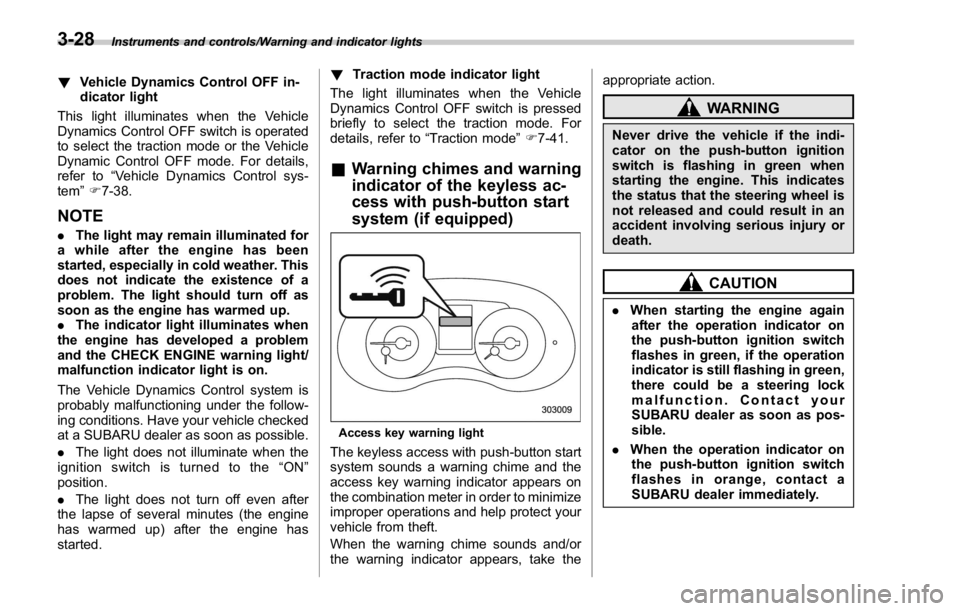
Access key warning light
The keyless access with push-button start
system sounds a warning chime and the
access key warning indicator appears on
the combination meter in order to minimize
improper operations and help protect your
vehicle from theft.
When the warning chime sounds and/or
the warning indicator appears, take the appropriate action.
WARNINGNever drive the vehicle if the indi-
cator on the push-button ignition
switch is flashing in green when
starting the engine. This indicates
the status that the steering wheel is
not released and could result in an
accident involving serious injury or
death.
CAUTION. When starting the engine again
after the operation indicator on
the push-button ignition switch
flashes in green, if the operation
indicator is still flashing in green,
there could be a steering lock
malfunction. Contact your
SUBARU dealer as soon as pos-
sible.
. When the operation indicator on
the push-button ignition switch
flashes in orange, contact a
SUBARU dealer immediately.3-28
Page 166 of 594
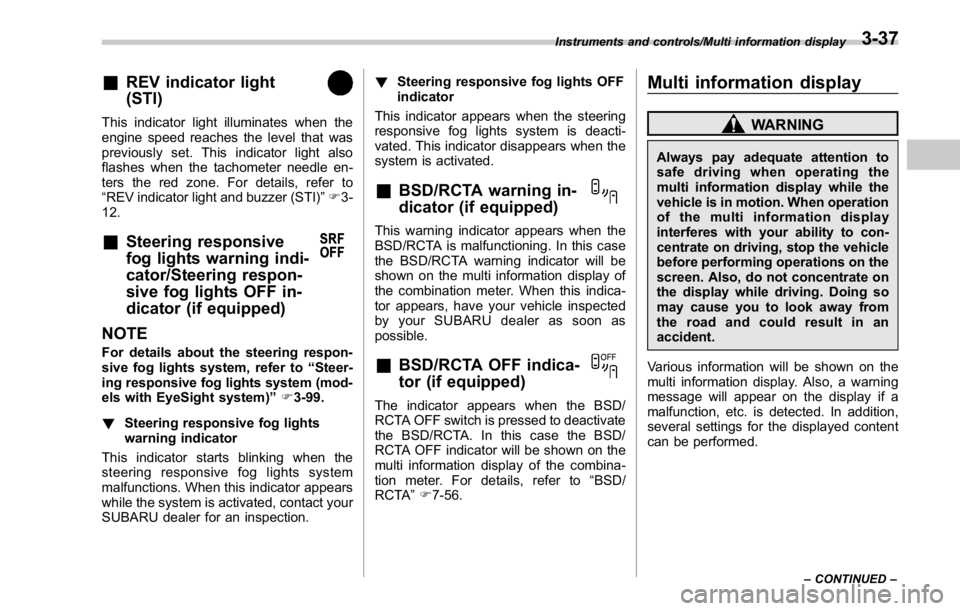
& REV indicator light
(STI)This indicator light illuminates when the
engine speed reaches the level that was
previously set. This indicator light also
flashes when the tachometer needle en-
ters the red zone. For details, refer to
“ REV indicator light and buzzer (STI) ” F 3-
12.
& Steering responsive
fog lights warning indi-
cator/Steering respon-
sive fog lights OFF in-
dicator (if equipped)
NOTE For details about the steering respon-
sive fog lights system, refer to “ Steer-
ing responsive fog lights system (mod-
els with EyeSight system) ” F 3-99.
! Steering responsive fog lights
warning indicator
This indicator starts blinking when the
steering responsive fog lights system
malfunctions. When this indicator appears
while the system is activated, contact your
SUBARU dealer for an inspection. ! Steering responsive fog lights OFF
indicator
This indicator appears when the steering
responsive fog lights system is deacti-
vated. This indicator disappears when the
system is activated.
& BSD/RCTA warning in-
dicator (if equipped) This warning indicator appears when the
BSD/RCTA is malfunctioning. In this case
the BSD/RCTA warning indicator will be
shown on the multi information display of
the combination meter. When this indica-
tor appears, have your vehicle inspected
by your SUBARU dealer as soon as
possible.
& BSD/RCTA OFF indica-
tor (if equipped) The indicator appears when the BSD/
RCTA OFF switch is pressed to deactivate
the BSD/RCTA. In this case the BSD/
RCTA OFF indicator will be shown on the
multi information display of the combina-
tion meter. For details, refer to “ BSD/
RCTA ” F 7-56. Multi information display WARNINGAlways pay adequate attention to
safe driving when operating the
multi information display while the
vehicle is in motion. When operation
of the multi information display
interferes with your ability to con-
centrate on driving, stop the vehicle
before performing operations on the
screen. Also, do not concentrate on
the display while driving. Doing so
may cause you to look away from
the road and could result in an
accident.
Various information will be shown on the
multi information display. Also, a warning
message will appear on the display if a
malfunction, etc. is detected. In addition,
several settings for the displayed content
can be performed.Instruments and controls/Multi information display
– CONTINUED –3-37
Page 179 of 594
Instruments and controls/Multi function display
& Date screenIf you have set the date and time in the
selection screen, after the welcome
screen is displayed, the current date will
be displayed for a certain period of time. If
“ On/Off setting ” is set to “ On ” in the
“ Maintenance settings ” , the date will be
displayed after the self-check screen.
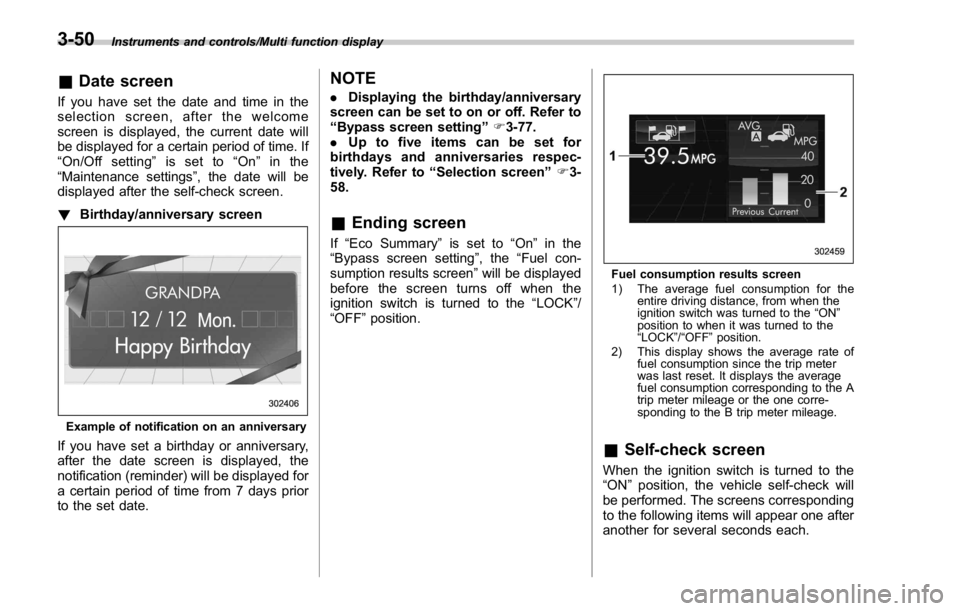
! Birthday/anniversary screen
Example of notification on an anniversary
If you have set a birthday or anniversary,
after the date screen is displayed, the
notification (reminder) will be displayed for
a certain period of time from 7 days prior
to the set date. NOTE . Displaying the birthday/anniversary
screen can be set to on or off. Refer to
“ Bypass screen setting ” F 3-77.
. Up to five items can be set for
birthdays and anniversaries respec-
tively. Refer to “ Selection screen ” F 3-
58.
& Ending screen If “ Eco Summary ” is set to “ On ” in the
“ Bypass screen setting ” , the “ Fuel con-
sumption results screen ” will be displayed
before the screen turns off when the
ignition switch is turned to the “ LOCK ” /
“ OFF ” position. Fuel consumption results screen
1) The average fuel consumption for the
entire driving distance, from when the
ignition switch was turned to the “ ON ”
position to when it was turned to the
“ LOCK ” / “ OFF ” position.
2) This display shows the average rate of
fuel consumption since the trip meter
was last reset. It displays the average
fuel consumption corresponding to the A
trip meter mileage or the one corre-
sponding to the B trip meter mileage.
& Self-check screen When the ignition switch is turned to the
“ ON ” position, the vehicle self-check will
be performed. The screens corresponding
to the following items will appear one after
another for several seconds each.3-50
Page 180 of 594
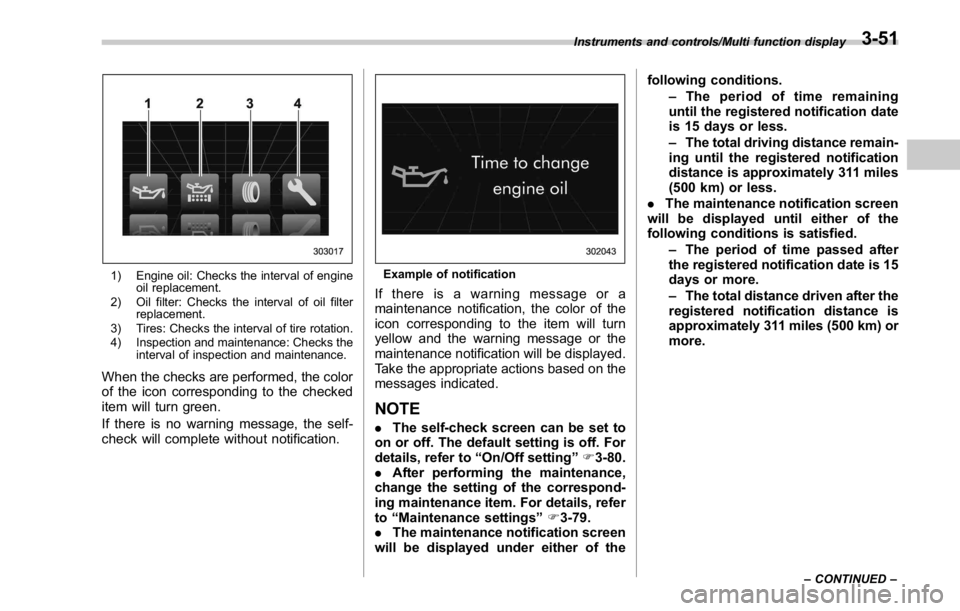
1) Engine oil: Checks the interval of engine
oil replacement.
2) Oil filter: Checks the interval of oil filter
replacement.
3) Tires: Checks the interval of tire rotation.
4) Inspection and maintenance: Checks the
interval of inspection and maintenance.
When the checks are performed, the color
of the icon corresponding to the checked
item will turn green.
If there is no warning message, the self-
check will complete without notification. Example of notification
If there is a warning message or a
maintenance notification, the color of the
icon corresponding to the item will turn
yellow and the warning message or the
maintenance notification will be displayed.
Take the appropriate actions based on the
messages indicated.
NOTE . The self-check screen can be set to
on or off. The default setting is off. For
details, refer to “ On/Off setting ” F 3-80.
. After performing the maintenance,
change the setting of the correspond-
ing maintenance item. For details, refer
to “ Maintenance settings ” F 3-79.
. The maintenance notification screen
will be displayed under either of the following conditions.
– The period of time remaining
until the registered notification date
is 15 days or less.
– The total driving distance remain-
ing until the registered notification
distance is approximately 311 miles
(500 km) or less.
. The maintenance notification screen
will be displayed until either of the
following conditions is satisfied.
– The period of time passed after
the registered notification date is 15
days or more.
– The total distance driven after the
registered notification distance is
approximately 311 miles (500 km) or
more.Instruments and controls/Multi function display
– CONTINUED –3-51
Page 182 of 594
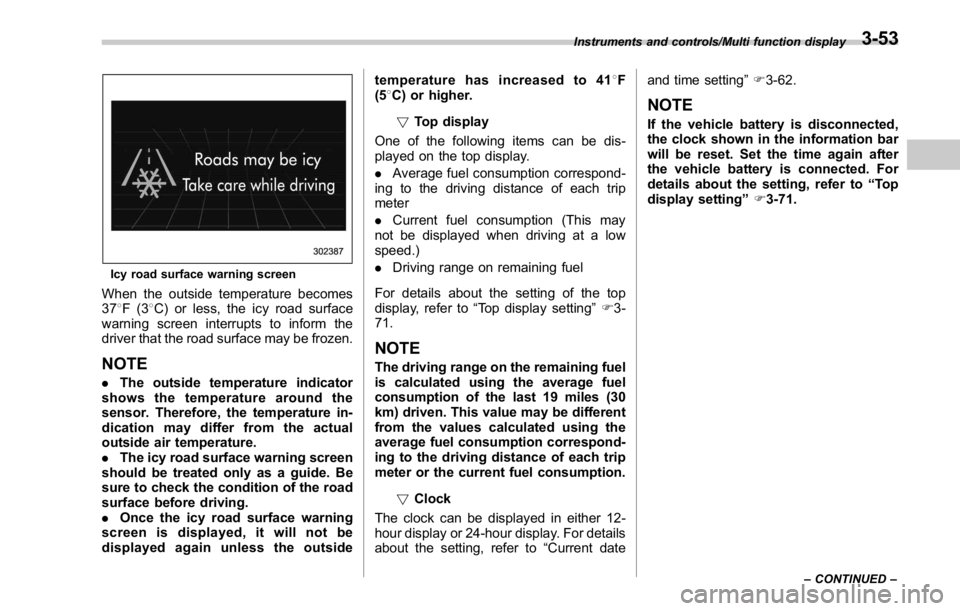
Icy road surface warning screen
When the outside temperature becomes
37 8 F(3 8 C) or less, the icy road surface
warning screen interrupts to inform the
driver that the road surface may be frozen.
NOTE . The outside temperature indicator
shows the temperature around the
sensor. Therefore, the temperature in-
dication may differ from the actual
outside air temperature.
. The icy road surface warning screen
should be treated only as a guide. Be
sure to check the condition of the road
surface before driving.
. Once the icy road surface warning
screen is displayed, it will not be
displayed again unless the outside temperature has increased to 41 8 F
(5 8 C) or higher.
! Top display
One of the following items can be dis-
played on the top display.
. Average fuel consumption correspond-
ing to the driving distance of each trip
meter
. Current fuel consumption (This may
not be displayed when driving at a low
speed.)
. Driving range on remaining fuel
For details about the setting of the top
display, refer to “ Top display setting ” F 3-
71.
NOTE The driving range on the remaining fuel
is calculated using the average fuel
consumption of the last 19 miles (30
km) driven. This value may be different
from the values calculated using the
average fuel consumption correspond-
ing to the driving distance of each trip
meter or the current fuel consumption.
! Clock
The clock can be displayed in either 12-
hour display or 24-hour display. For details
about the setting, refer to “ Current date and time setting ” F 3-62.
NOTE If the vehicle battery is disconnected,
the clock shown in the information bar
will be reset. Set the time again after
the vehicle battery is connected. For
details about the setting, refer to “ To p
display setting ” F 3-71.Instruments and controls/Multi function display
– CONTINUED –3-53
Page 183 of 594
Instruments and controls/Multi function display
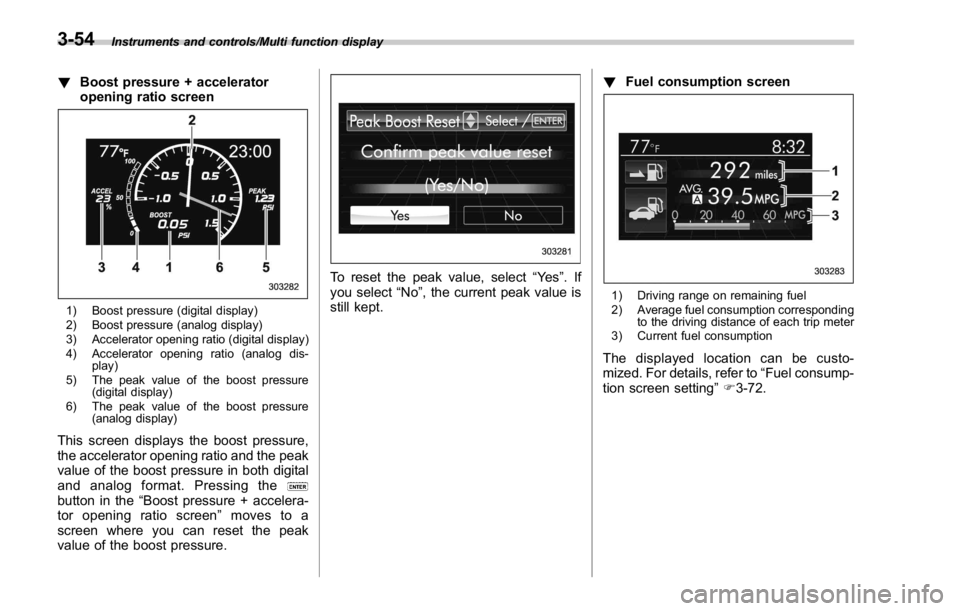
! Boost pressure + accelerator
opening ratio screen
1) Boost pressure (digital display)
2) Boost pressure (analog display)
3) Accelerator opening ratio (digital display)
4) Accelerator opening ratio (analog dis-
play)
5) The peak value of the boost pressure
(digital display)
6) The peak value of the boost pressure
(analog display)
This screen displays the boost pressure,
the accelerator opening ratio and the peak
value of the boost pressure in both digital
and analog format. Pressing the
button in the “ Boost pressure + accelera-
tor opening ratio screen ” moves to a
screen where you can reset the peak
value of the boost pressure. To reset the peak value, select “ Ye s ” .If
you select “ No ” , the current peak value is
still kept. ! Fuel consumption screen
1) Driving range on remaining fuel
2) Average fuel consumption corresponding
to the driving distance of each trip meter
3) Current fuel consumption
The displayed location can be custo-
mized. For details, refer to “ Fuel consump-
tion screen setting ” F 3-72.3-54
Page 184 of 594
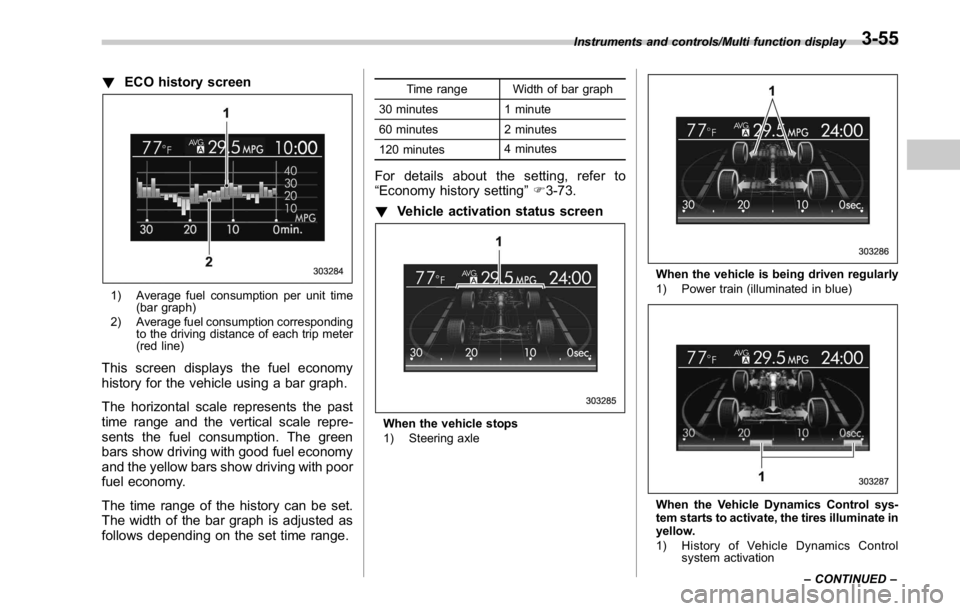
! ECO history screen
1) Average fuel consumption per unit time
(bar graph)
2) Average fuel consumption corresponding
to the driving distance of each trip meter
(red line)
This screen displays the fuel economy
history for the vehicle using a bar graph.
The horizontal scale represents the past
time range and the vertical scale repre-
sents the fuel consumption. The green
bars show driving with good fuel economy
and the yellow bars show driving with poor
fuel economy.
The time range of the history can be set.
The width of the bar graph is adjusted as
follows depending on the set time range. Time range Width of bar graph
30 minutes 1 minute
60 minutes 2 minutes
120 minutes 4 minutes
For details about the setting, refer to
“ Economy history setting ” F 3-73.
! Vehicle activation status screen
When the vehicle stops
1) Steering axle When the vehicle is being driven regularly
1) Power train (illuminated in blue)
When the Vehicle Dynamics Control sys-
tem starts to activate, the tires illuminate in
yellow.
1) History of Vehicle Dynamics Control
system activationInstruments and controls/Multi function display
– CONTINUED –3-55
Page 228 of 594
Headlight beam leveler (if
equipped) & Automatic headlight beam
leveler (models with LED
headlights) The LED headlights generate more light
than conventional halogen headlights.
Therefore a driver of an oncoming vehicle
may experience too much glare if your
headlight beam height adjustment is high
when the vehicle is carrying a heavy load.
The automatic headlight beam leveler
adjusts the headlight beam height auto-
matically and optimally according to the
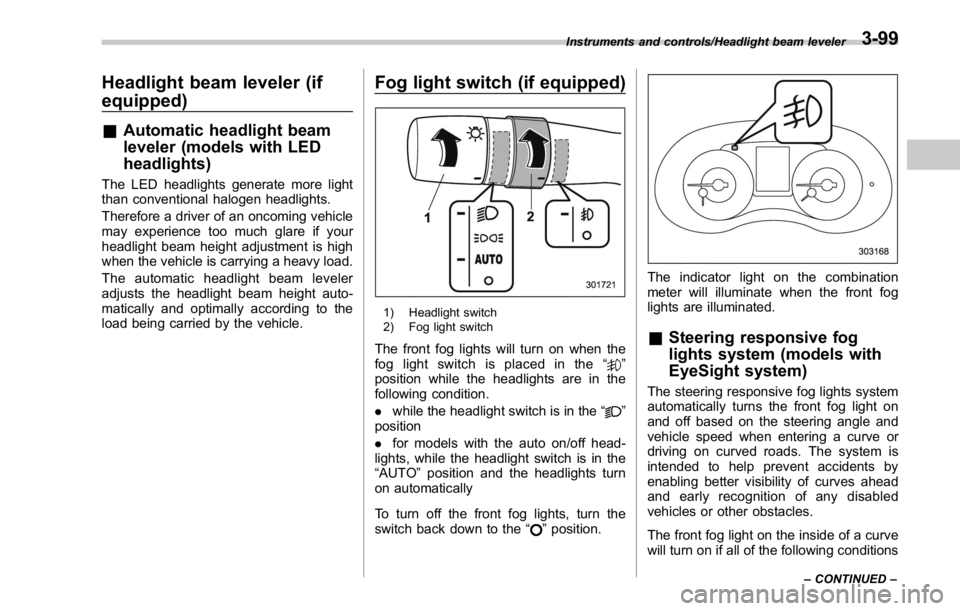
load being carried by the vehicle. Fog light switch (if equipped)
1) Headlight switch
2) Fog light switch
The front fog lights will turn on when the
fog light switch is placed in the “
”
position while the headlights are in the
following condition.
. while the headlight switch is in the “
”
position
. for models with the auto on/off head-
lights, while the headlight switch is in the
“ AUTO ” position and the headlights turn
on automatically
To turn off the front fog lights, turn the
switch back down to the “
” position. The indicator light on the combination
meter will illuminate when the front fog
lights are illuminated.
& Steering responsive fog
lights system (models with
EyeSight system) The steering responsive fog lights system
automatically turns the front fog light on
and off based on the steering angle and
vehicle speed when entering a curve or
driving on curved roads. The system is
intended to help prevent accidents by
enabling better visibility of curves ahead
and early recognition of any disabled
vehicles or other obstacles.
The front fog light on the inside of a curve
will turn on if all of the following conditionsInstruments and controls/Headlight beam leveler
– CONTINUED –3-99
Page 229 of 594
Instruments and controls/Fog light switch
are met.
. The light control switch is in the “
”
position
. The light control switch is in the
“ AUTO ” position and the low beam head-
lights turn on automatically
. The fog light switch is in the “
”
position
. The low beam mode is selected (the
turn signal lever is in the center position)
. The select lever is in a position other
than the “ R ” position
. The steering responsive fog lights
system has not been deactivated
. The operating conditions such as the
steering angle and vehicle speed are met
The front fog lights on both sides will turn
on as usual if all of the following conditions
are met.
. The light control switch is in the “
”
position
. The light control switch is in the
“ AUTO ” position and the low beam head-
lights turn on automatically
. The fog light switch is in the “
”
position
. The low beam mode is selected (the
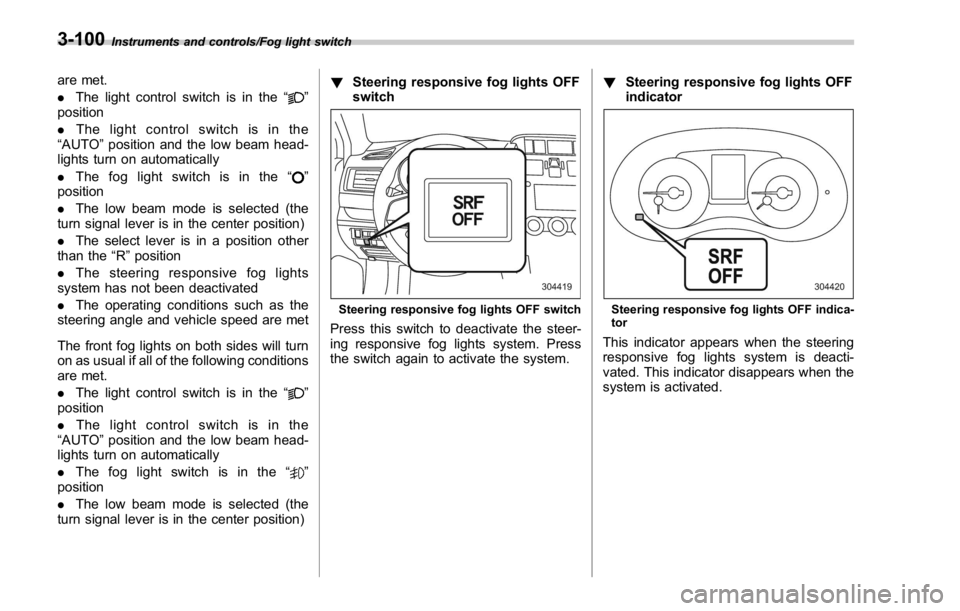
turn signal lever is in the center position) ! Steering responsive fog lights OFF
switch
Steering responsive fog lights OFF switch
Press this switch to deactivate the steer-
ing responsive fog lights system. Press
the switch again to activate the system. ! Steering responsive fog lights OFF
indicator
Steering responsive fog lights OFF indica-
tor
This indicator appears when the steering
responsive fog lights system is deacti-
vated. This indicator disappears when the
system is activated.3-100