ESP SUBARU WRX 2016 Workshop Manual
[x] Cancel search | Manufacturer: SUBARU, Model Year: 2016, Model line: WRX, Model: SUBARU WRX 2016Pages: 594, PDF Size: 19.43 MB
Page 415 of 594
Starting and operating/Continuously variable transmission
! D (Drive)
This position is for normal driving. The
transmission shifts automatically and con-
tinuously into a suitable gear according to
the vehicle speed and the acceleration
you require. Also, while driving up and
down a hill, the transmission assists and
controls the driving performance and
engine braking while corresponding to
the road grade.
When more acceleration is required in the
“ D ” position, depress the accelerator
pedal fully to the floor and hold that
position. The transmission will automati-
cally downshift. If the Intelligent (I) mode
or the Sport (S) mode has been selected,
the transmission will operate like a con-
ventional automatic transmission. When
you release the pedal, the transmission
will return to the original gear position.
If one of the shift paddles behind the
steering wheel is operated while driving in
the “ D ” position, the transmission will
temporarily switch to the manual mode.
In this mode, you can shift into any gear
position using the shift paddles. For de-
tails about the manual mode, refer to
“ Selection of manual mode ” F 7-26. Once
the vehicle speed stabilizes, the transmis-
sion will switch from the manual mode
back to the “ D ” position for normal driving. & Selection of manual mode
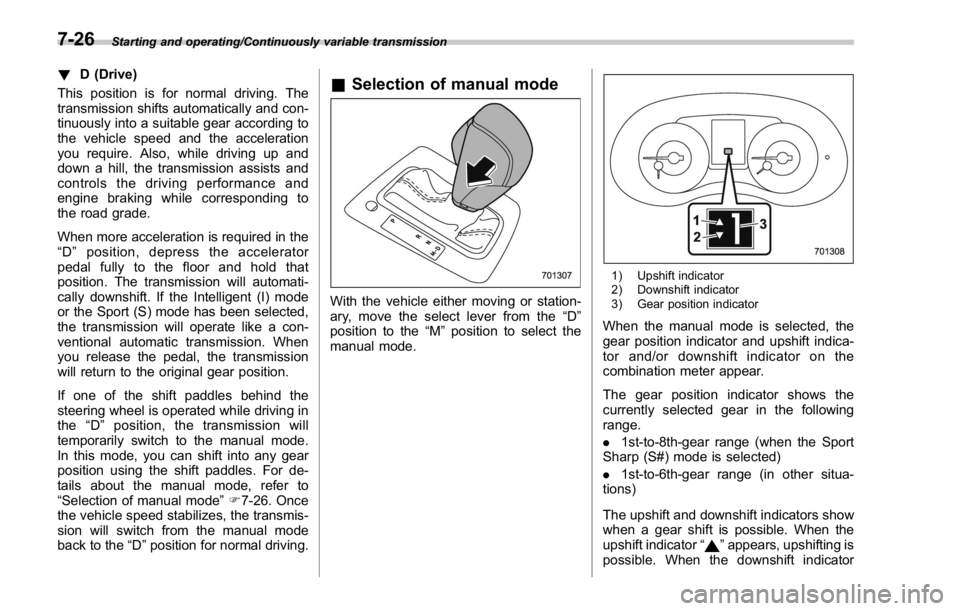
With the vehicle either moving or station-
ary, move the select lever from the “ D ”
position to the “ M ” position to select the
manual mode. 1) Upshift indicator
2) Downshift indicator
3) Gear position indicator
When the manual mode is selected, the
gear position indicator and upshift indica-
tor and/or downshift indicator on the
combination meter appear.
The gear position indicator shows the
currently selected gear in the following
range.
. 1st-to-8th-gear range (when the Sport
Sharp (S#) mode is selected)
. 1st-to-6th-gear range (in other situa-
tions)
The upshift and downshift indicators show
when a gear shift is possible. When the
upshift indicator “
” appears, upshifting is
possible. When the downshift indicator7-26
Page 416 of 594
“ ” appears, downshifting is possible.
When both indicators appear, upshifting
and downshifting are both possible. When
the vehicle stops (for example, at traffic
signals), the downshift indicator turns off.
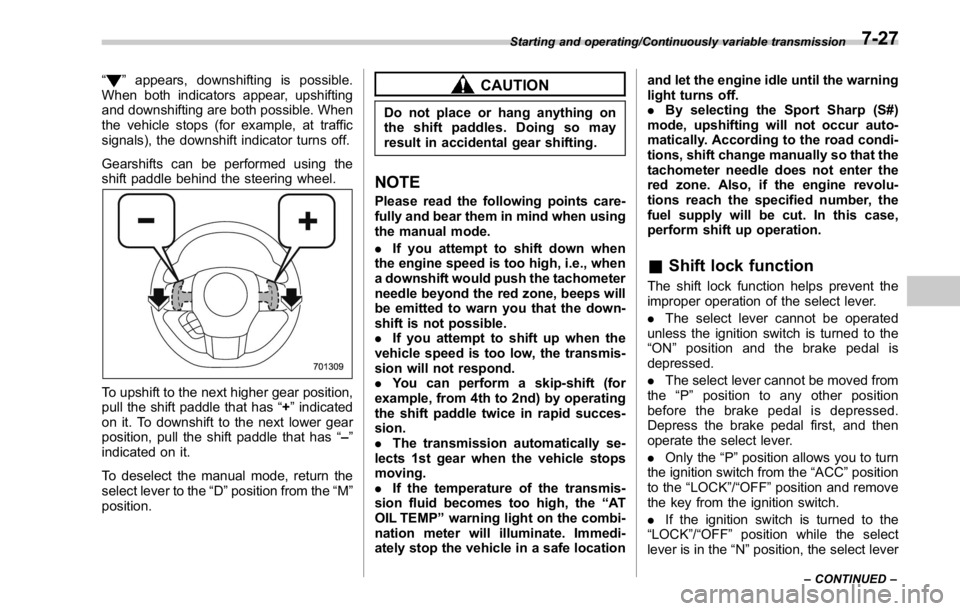
Gearshifts can be performed using the
shift paddle behind the steering wheel.
To upshift to the next higher gear position,
pull the shift paddle that has “ + ” indicated
on it. To downshift to the next lower gear
position, pull the shift paddle that has “ – ”
indicated on it.
To deselect the manual mode, return the
select lever to the “ D ” position from the “ M ”
position. CAUTIONDo not place or hang anything on
the shift paddles. Doing so may
result in accidental gear shifting.
NOTE Please read the following points care-
fully and bear them in mind when using
the manual mode.
. If you attempt to shift down when
the engine speed is too high, i.e., when
a downshift would push the tachometer
needle beyond the red zone, beeps will
be emitted to warn you that the down-
shift is not possible.
. If you attempt to shift up when the
vehicle speed is too low, the transmis-
sion will not respond.
. You can perform a skip-shift (for
example, from 4th to 2nd) by operating
the shift paddle twice in rapid succes-
sion.
. The transmission automatically se-
lects 1st gear when the vehicle stops
moving.
. If the temperature of the transmis-
sion fluid becomes too high, the “ AT
OIL TEMP ” warning light on the combi-
nation meter will illuminate. Immedi-
ately stop the vehicle in a safe location and let the engine idle until the warning
light turns off.
. By selecting the Sport Sharp (S#)
mode, upshifting will not occur auto-
matically. According to the road condi-
tions, shift change manually so that the
tachometer needle does not enter the
red zone. Also, if the engine revolu-
tions reach the specified number, the
fuel supply will be cut. In this case,
perform shift up operation.
& Shift lock function The shift lock function helps prevent the
improper operation of the select lever.
. The select lever cannot be operated
unless the ignition switch is turned to the
“ ON ” position and the brake pedal is
depressed.
. The select lever cannot be moved from
the “ P ” position to any other position
before the brake pedal is depressed.
Depress the brake pedal first, and then
operate the select lever.
. Only the “ P ” position allows you to turn
the ignition switch from the “ ACC ” position
to the “ LOCK ” / “ OFF ” position and remove
the key from the ignition switch.
. If the ignition switch is turned to the
“ LOCK ” / “ OFF ” position while the select
lever is in the “ N ” position, the select leverStarting and operating/Continuously variable transmission
– CONTINUED –7-27
Page 418 of 594
. Do not keep the vehicle in a stationary
position on an uphill grade by using the
“ D ” position. Use the brake instead.
. The engine may, on rare occasions,
knock when the vehicle rapidly acceler-
ates or rapidly pulls away from a standstill.
This phenomenon does not indicate a
malfunction.
SI-DRIVE (STI) SI-DRIVE (SUBARU Intelligent Drive)
works to maximize engine performance,
control and efficiency.
This system consists of three modes:
Intelligent (I), Sport (S), and Sport Sharp
(S#). By adjusting the SI-DRIVE selector,
the character of the power unit changes.
& Intelligent (I) mode ! For smooth, efficient performance
driving
The Intelligent (I) mode provides well-
balanced performance with greater fuel
efficiency and smooth driveability without
stress. Power delivery is moderate during
acceleration for maximum fuel efficiency. This is ideal for around-town driving and
situations that do not require full power
output. It provides better control in difficult
driving conditions, such as slippery roads
or loose surfaces, due to gentler throttle
response.
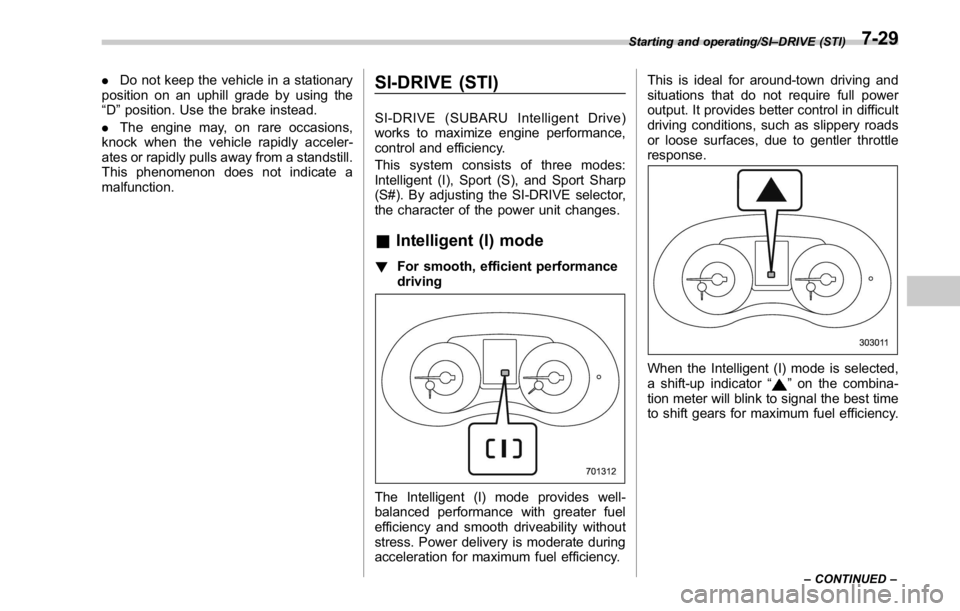
When the Intelligent (I) mode is selected,
a shift-up indicator “
” on the combina-
tion meter will blink to signal the best time
to shift gears for maximum fuel efficiency. Starting and operating/SI – DRIVE (STI)
– CONTINUED –7-29
Page 419 of 594
Starting and operating/SI – DRIVE (STI)
& Sport (S) mode! For all-around performance driving
The Sport (S) mode provides the engine
power desired by those who want to make
the driving experience their own personal
adventure.
The linear acceleration characteristic of
this versatile mode is ideal for normal
driving use. & Sport Sharp (S#) mode ! For maximum performance driving
For sports-minded drivers, the Sport
Sharp (S#) mode offers an exhilarating
level of engine performance and control.
The throttle becomes more responsive
regardless of the engine speed. Delivering
maximum driving enjoyment, this mode is
ideal for tackling twisting roads and for
merging or overtaking other vehicles on
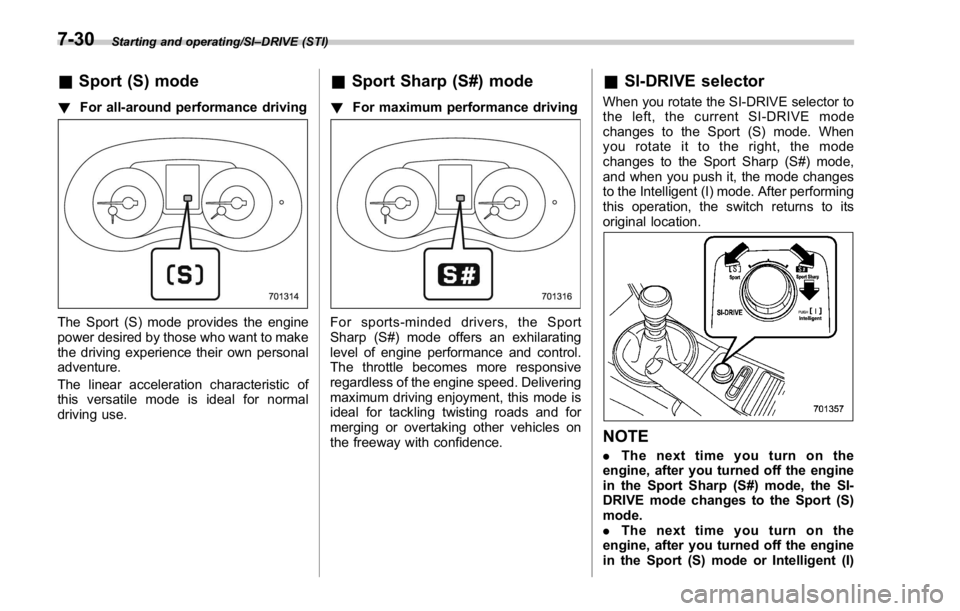
the freeway with confidence. & SI-DRIVE selector When you rotate the SI-DRIVE selector to
the left, the current SI-DRIVE mode
changes to the Sport (S) mode. When
yourotateittotheright,themode
changes to the Sport Sharp (S#) mode,
and when you push it, the mode changes
to the Intelligent (I) mode. After performing
this operation, the switch returns to its
original location.
NOTE . Thenexttimeyouturnonthe
engine, after you turned off the engine
in the Sport Sharp (S#) mode, the SI-
DRIVE mode changes to the Sport (S)
mode.
. Thenexttimeyouturnonthe
engine, after you turned off the engine
in the Sport (S) mode or Intelligent (I)7-30
Page 420 of 594
mode, the SI-DRIVE mode will stay in
the same mode as when the engine
was turned off.
. While the engine is running, if the
CHECK ENGINE warning light/malfunc-
tion indicator light illuminates, the SI-
DRIVE mode changes to the Sport (S)
mode. In this case, it is not possible to
change to the Sport Sharp (S#) mode or
Intelligent (I) mode.
. If there is a possibility that the
engine could overheat because of a
temperature increase of the engine
coolant, it is not possible to change to
the Sport Sharp (S#) mode. While the
vehicle is in the Sport Sharp (S#) mode,
it changes to the Sport (S) mode when
the engine coolant temperature in-
creases.
. If any of the SI-DRIVE indicators
blink, the SI-DRIVE system may be
malfunctioning. Contact your SUBARU
dealer.
. While the engine is cool, you cannot
change to Sport Sharp (S#) mode. SI-DRIVE (except STI: CVT
models) SI-DRIVE (SUBARU Intelligent Drive)
works to maximize engine performance,
control and efficiency.
This system consists of three modes:
Intelligent (I), Sport (S), and Sport Sharp
(S#). By operating the SI-DRIVE switches,
the character of the power unit changes.
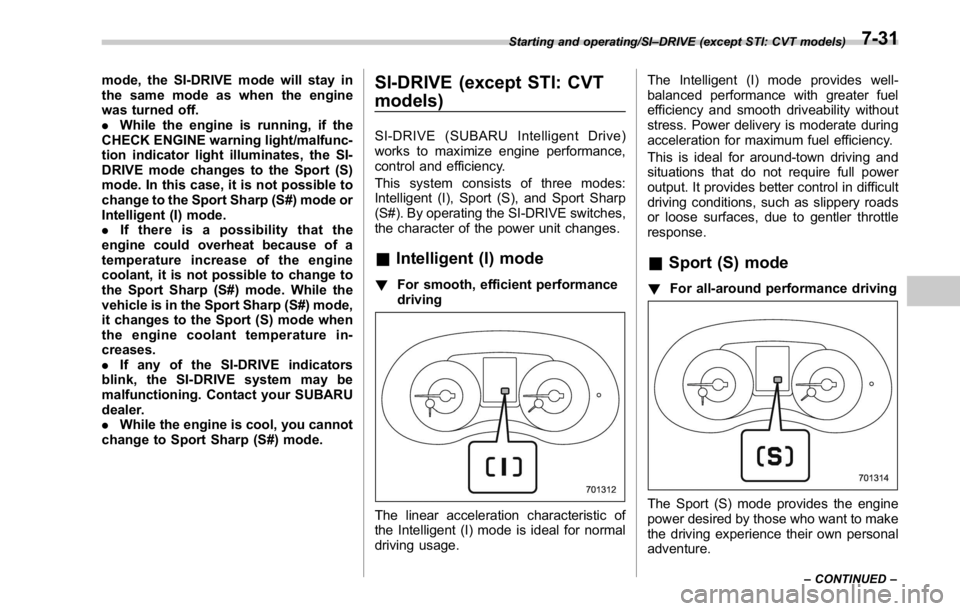
& Intelligent (I) mode ! For smooth, efficient performance
driving
The linear acceleration characteristic of
the Intelligent (I) mode is ideal for normal
driving usage. The Intelligent (I) mode provides well-
balanced performance with greater fuel
efficiency and smooth driveability without
stress. Power delivery is moderate during
acceleration for maximum fuel efficiency.
This is ideal for around-town driving and
situations that do not require full power
output. It provides better control in difficult
driving conditions, such as slippery roads
or loose surfaces, due to gentler throttle
response.
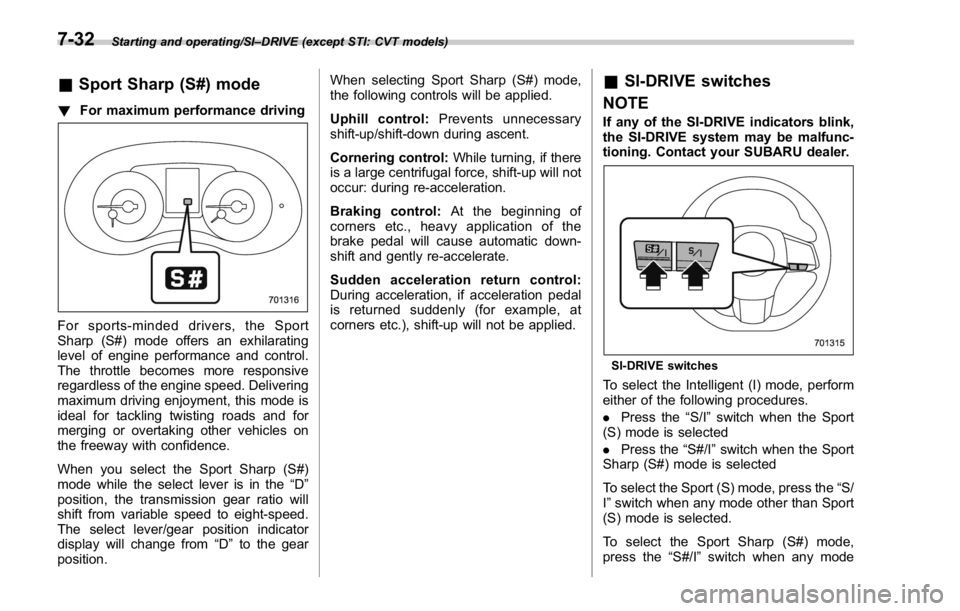
& Sport (S) mode ! For all-around performance driving
The Sport (S) mode provides the engine
power desired by those who want to make
the driving experience their own personal
adventure.Starting and operating/SI – DRIVE (except STI: CVT models)
– CONTINUED –7-31
Page 421 of 594
Starting and operating/SI – DRIVE (except STI: CVT models)
& Sport Sharp (S#) mode! For maximum performance driving
For sports-minded drivers, the Sport
Sharp (S#) mode offers an exhilarating
level of engine performance and control.
The throttle becomes more responsive
regardless of the engine speed. Delivering
maximum driving enjoyment, this mode is
ideal for tackling twisting roads and for
merging or overtaking other vehicles on
the freeway with confidence.
When you select the Sport Sharp (S#)
mode while the select lever is in the “ D ”
position, the transmission gear ratio will
shift from variable speed to eight-speed.
The select lever/gear position indicator
display will change from “ D ” to the gear
position. When selecting Sport Sharp (S#) mode,
the following controls will be applied.
Uphill control: Prevents unnecessary
shift-up/shift-down during ascent.
Cornering control: While turning, if there
is a large centrifugal force, shift-up will not
occur: during re-acceleration.
Braking control: At the beginning of
corners etc., heavy application of the
brake pedal will cause automatic down-
shift and gently re-accelerate.
Sudden acceleration return control:
During acceleration, if acceleration pedal
is returned suddenly (for example, at
corners etc.), shift-up will not be applied. & SI-DRIVE switches
NOTE If any of the SI-DRIVE indicators blink,
the SI-DRIVE system may be malfunc-
tioning. Contact your SUBARU dealer.
SI-DRIVE switches
To select the Intelligent (I) mode, perform
either of the following procedures.
. Press the “ S/I ” switch when the Sport
(S) mode is selected
. Press the “ S#/I ” switch when the Sport
Sharp (S#) mode is selected
To select the Sport (S) mode, press the “ S/
I ” switch when any mode other than Sport
(S) mode is selected.
To select the Sport Sharp (S#) mode,
press the “ S#/I ” switch when any mode7-32
Page 428 of 594
namics Control is no guarantee
that full vehicle control will be
maintained at all times and under
all conditions, its activation
should be seen as a sign that
the speed of the vehicle should
be reduced considerably.
. Whenever suspension compo-
nents, steering components, or
an axle are removed from a
vehicle, have an inspection of
that system performed by an
authorized SUBARU dealer.
. The following precautions should
be observed in order to ensure
that the Vehicle Dynamics Con-
trol system is operating properly:
– All four wheels should be
fitted with tires of the same
size, type, and brand. Further-
more, the amount of wear
should be the same for all
four tires.
– Keep the tire pressure at the
proper level as shown on the
vehicle placard attached to
the driver ’ s side door pillar.
– Use only the specified tem-
porary spare tire to replace a
flat tire. With a temporary
spare tire, the effectiveness of the Vehicle Dynamics Con-
trol system is reduced and
this should be taken into ac-
count when driving the vehi-
cle in such a condition.
. If non-matching tires are used,
the Vehicle Dynamics Control
system may not operate cor-
rectly.
. The Vehicle Dynamics Control
system helps prevent unstable
vehicle motion such as skidding
using control of the brakes and
engine power. Do not turn off the
Vehicle Dynamics Control sys-
tem unless it is absolutely ne-
cessary. If you must turn off the
Vehicle Dynamics Control sys-
tem, drive very carefully accord-
ing to the road surface condition.
In the event of wheelspin and/or skidding
on a slippery road surface and/or during
cornering and/or an evasive maneuver,
the Vehicle Dynamics Control system
adjusts the engine ’ s output and the
wheels ’ respective braking forces to help
maintain traction and directional control.
. Traction Control Function
The traction control function is designed to
prevent spinning of the driving wheels on slippery road surfaces, thereby helping to
maintain traction and directional control.
Activation of this function is shown by
flashing the Vehicle Dynamics Control
operation indicator light.
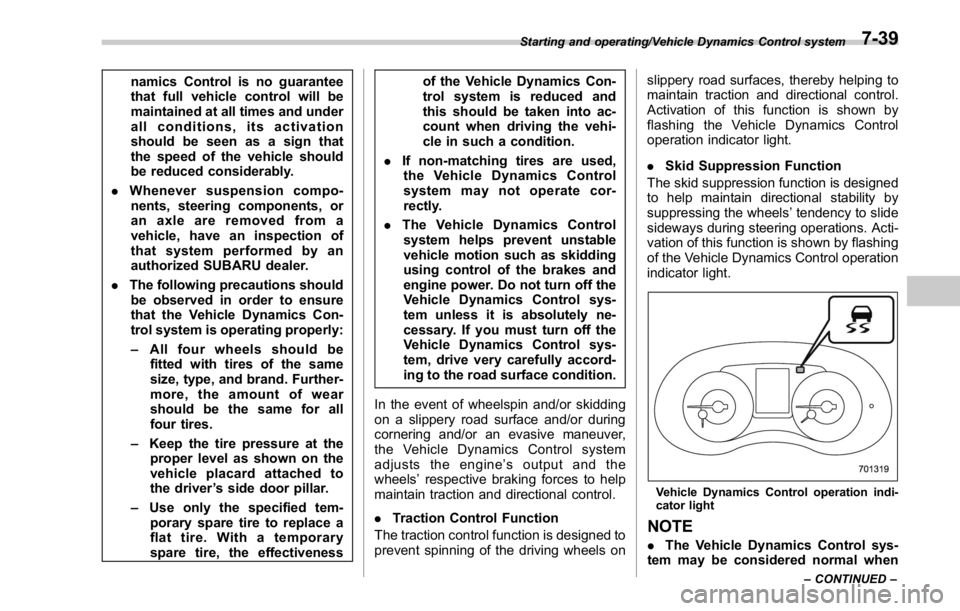
. Skid Suppression Function
The skid suppression function is designed
to help maintain directional stability by
suppressing the wheels ’ tendency to slide
sideways during steering operations. Acti-
vation of this function is shown by flashing
of the Vehicle Dynamics Control operation
indicator light.
Vehicle Dynamics Control operation indi-
cator light
NOTE
. The Vehicle Dynamics Control sys-
tem may be considered normal whenStarting and operating/Vehicle Dynamics Control system
– CONTINUED –7-39
Page 432 of 594
hicle is stationary. After adjusting
the tire pressures, increase the
vehicle speed to at least 20 mph
(32 km/h) to start the TPMS
rechecking of the tire inflation
pressures. If the tire pressures
are now above the severe low
pressure threshold, the low tire
pressure warning light should
turn off a few minutes later.
If this light still illuminates while
driving after adjusting the tire
pressure, a tire may have signifi-
cant damage and a fast leak that
causes the tire to lose air rapidly.
If you have a flat tire, replace it
with a spare tire as soon as
possible.
. When a spare tire is mounted or a
wheel rim is replaced without the
original pressure sensor/trans-
mitter being transferred, the low
tire pressure warning light will
illuminate steadily after blinking
for approximately one minute.
This indicates the TPMS is un-
able to monitor all four road
wheels. Contact your SUBARU
dealer as soon as possible for
tire and sensor replacement and/
or system resetting.
. When a tire is repaired with liquid sealant, the tire pressure warning
valve and transmitter may not
operate properly. If a liquid sea-
lant is used, contact your nearest
SUBARU dealer or other qualified
service shop as soon as possi-
ble. Make sure to replace the tire
pressure warning valve and
transmitter when replacing the
tire. You may reuse the wheel if
there is no damage to it and if the
sealant residue is properly
cleaned off. Do not inject any tire
liquid or aerosol tire sealant into
the tires, as this may cause a
malfunction of the tire pressure
sensors. If the light illuminates
steadily after blinking for ap-
proximately one minute,
promptly contact a SUBARU
dealer to have the system in-
spected.
CAUTION
Do not place metal film or any metal
parts in the trunk. This may cause
poor reception of the signals from
the tire pressure sensors, and the
tire pressure monitoring system will
not function properly. FCC ID: CWTWD1U781
NOTE This device complies with part 15 of the
FCC Rules. Operation is subject to the
following two conditions: (1) This de-
vice may not cause harmful interfer-
ence, and (2) this device must accept
any interference received, including
interference that may cause undesired
operation.
FCC CAUTION
Changes or modifications not ex-
pressly approved by the party respon-
sible for compliance could void the
user ’ s authority to operate the equip-
ment.Starting and operating/Tire pressure monitoring system (TPMS) (U.S. – spec. models)
7-43
Page 445 of 594
Starting and operating/BSD/RCTA
BSD/RCTA (if equipped) The BSD/RCTA consists of rear radar with
Blind Spot Detection and Rear Cross
Traffic Alert.
These functions of BSD/RCTA are the
systems that detect objects and vehicles
to the rear and draw attention to the driver
when changing a lane or when driving in
reverse.
WARNINGThe driver is responsible for driving
safely. Always be sure to check the
surroundings with your eyes when
changing lanes or reversing the
vehicle.
The system is designed to assist the
driver by monitoring the rear and
side areas of the vehicle during a
lane change or reversing. However,
you cannot rely on this system
alone in assuring the safety during
a lane change or reversing. Over-
confidence in this system could
result in an accident and lead to
serious injury or death. Since the
system operation has various limita-
tions, the flashing or illumination of
the BSD/RCTA approach indicator
light may be delayed or it may not operate at all even when a vehicle is
present in a neighboring lane or
approaching from either side.
The driver is responsible for paying
attention to the rear and side areas
of the vehicle.
& System features BSD/RCTA has a function that detects an
invisible vehicle in a blind spot on an
adjacent lane or a vehicle approaching at
high speed while driving the vehicle (Blind
Spot Detection). It also has a function that
detects a vehicle approaching from the
right or left while driving the vehicle in
reverse (Rear Cross Traffic Alert).
The system uses radar sensors for the
following features.
NOTE The BSD/RCTA radar sensor has been
certified by the radio wave related laws
of the U.S. and Canada. When driving
in other countries, certification of the
country where the vehicle is driven
must be obtained. For certification in
the U.S. and Canada, refer to “ Certifica-
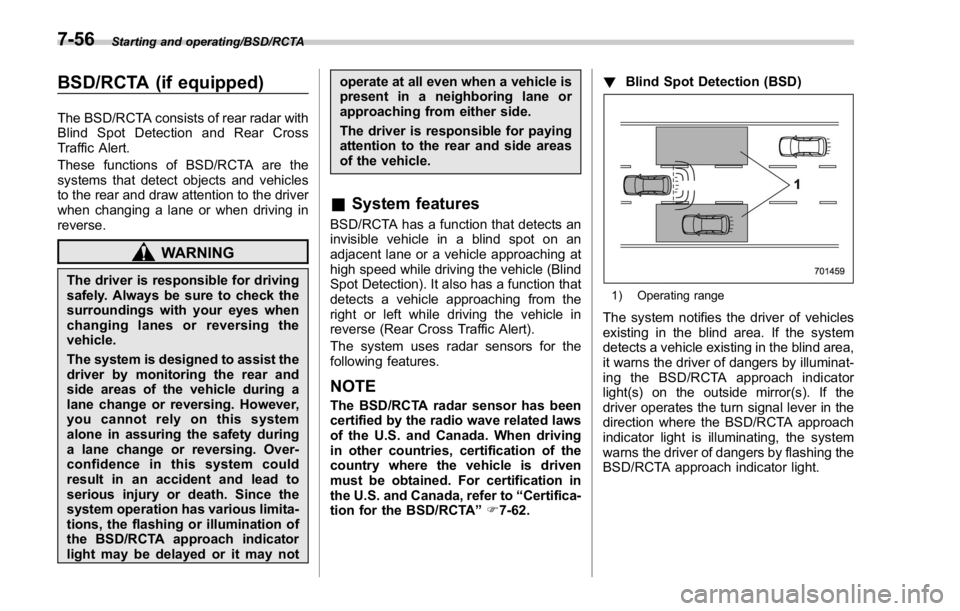
tion for the BSD/RCTA ” F 7-62. ! Blind Spot Detection (BSD)
1) Operating range
The system notifies the driver of vehicles
existing in the blind area. If the system
detects a vehicle existing in the blind area,
it warns the driver of dangers by illuminat-
ing the BSD/RCTA approach indicator
light(s) on the outside mirror(s). If the
driver operates the turn signal lever in the
direction where the BSD/RCTA approach
indicator light is illuminating, the system
warns the driver of dangers by flashing the
BSD/RCTA approach indicator light.7-56
Page 461 of 594
Driving tips/Winter driving
or ice buildup on the suspension,
disc brakes and brake hoses
underneath the vehicle. If there
is caked snow or ice, remove it,
being careful not to damage the
disc brakes and brake hoses and
ABS harness.
When parking for long periods in cold
weather, you should observe the following
tips.
1. For MT models, place the shift lever in
the “ 1 ” or “ R ” position. For CVT models,
place the select lever in the “ P ” position.
2. Use tire stops under the tires to
prevent the vehicle from moving.
! Refueling in cold weather
To help prevent moisture from forming in
the fuel system and the risk of its freezing,
use of an antifreeze additive in the fuel
tank is recommended during cold weather.
Use only additives that are specifically
designed for this purpose. When an
antifreeze additive is used, its effect lasts
longer if the tank is refilled whenever the
fuel level reaches half empty.
If your SUBARU is not going to be used
for an extended period, it is best to have
the fuel tank filled to capacity. & Driving on snowy and icy
roads To prevent skidding and slipping, avoid
sudden braking, abrupt acceleration, high-
speed driving, and sharp turning when
driving on snowy or icy roads.
Always maintain ample distance between
your vehicle and the vehicle ahead of you
to avoid the need for sudden braking.
To supplement the foot brake, use the
engine brake effectively to control the
vehicle speed. (Shift into a lower gear
when necessary.)
Avoid shifting down abruptly. Such beha-
vior can cause the wheels to lock, possibly
leading to loss of vehicle control.
An anti-lock brake system (ABS) en-
hances your vehicle ’ s braking perfor-
mance on snowy and icy roads. For
information on braking on slippery sur-
faces, refer to “ ABS (Anti-lock Brake
System) ” F 7-36 and “ Vehicle Dynamics
Control system ” F 7-38.
WARNING
Do not use the cruise control on
slippery roads such as snowy or icy
roads. This may cause loss of
vehicle control. CAUTIONAvoid prolonged continuous driving
in snowstorms. Snow will enter the
engine ’ s intake system and may
hinder the airflow, which could re-
sult in engine shutdown or even
breakdown.
! Wiper operation when snowing
Before driving in cold weather, make sure
the wiper blades are not frozen to the
windshield or rear window.
If the wiper blades are frozen to the
windshield, use the defroster and the
temperature set for maximum warmth until
the wiper blades are completely thawed.
Refer to “ Climate control ” F 4-1.
If your vehicle is equipped with a wiper
deicer, use it. It is helpful to thaw the
windshield wiper blades. Refer to “ Defog-
ger and deicer ” F 3-112.
When driving in snow, if frozen snow starts
to stick on the surface of the windshield
despite wiper operation, use the defroster
and the temperature set for maximum
warmth. After the windshield gets warmed
enough to melt the frozen snow on it,
wash it away using the windshield washer.
Refer to “ Windshield washer ” F 3-103.8-8