roof SUBARU WRX 2016 Owner's Manual
[x] Cancel search | Manufacturer: SUBARU, Model Year: 2016, Model line: WRX, Model: SUBARU WRX 2016Pages: 594, PDF Size: 19.43 MB
Page 256 of 594

Antenna system .................................................. 5-2Roof antenna ...................................................... 5-2
FM reception ....................................................... 5-2
Installation of accessories .................................. 5-3
Audio set ............................................................. 5-3Audio set ............................................................ 5-4
Basic information before use ............................. 5-5Initial screen ....................................................... 5-5
Loading and unloading a disc .............................. 5-5
Connecting and disconnecting a USB memory/
portable device ................................................. 5-6
Touch screen gestures ........................................ 5-7
Touch screen operation ....................................... 5-7
Entering letters and numbers/list screen
operation .......................................................... 5-8
Screen adjustment .............................................. 5-9
Other settings ..................................................... 5-10
Basic operation .................................................. 5-12Some basics ...................................................... 5-12
Audio/visual remote controls ............................ 5-18Steering switches ............................................... 5-18
Tips for operating the audio/visual system ...... 5-21Operating information. ........................................ 5-21
Useful information .............................................. 5-28
SiriusXM Data Service* ....................................... 5-28
STARLINK .......................................................... 5-30
Radio operation .................................................. 5-33
AM/FM radio ....................................................... 5-33
SiriusXM Satellite Radio ..................................... 5-45 Media operation ................................................. 5-50CD .................................................................... 5-50
USB memory ..................................................... 5-53
iPod .................................................................. 5-56
Bluetooth audio ................................................. 5-60
aha TM
by HARMAN ............................................ 5-64
AUX .................................................................. 5-73
Pandora ®
........................................................... 5-76
Bluetooth ®
settings ........................................... 5-81Registering/connecting Bluetooth ®
device .......... 5-81
Setting Bluetooth details .................................... 5-84
Phone operation (Hands-free system for
cellular phones) .............................................. 5-87Quick reference ................................................. 5-87
Some basics ...................................................... 5-88
Calling on the Bluetooth phone .......................... 5-91
Receiving on the Bluetooth phone ...................... 5-98
Talking on the Bluetooth phone .......................... 5-99
Setup ................................................................ 5-101 Phone settings ................................................ 5-101
What to do if.... ................................................. 5-103Troubleshooting ............................................... 5-103
Voice command system operation ................. 5-107
Voice command system ................................... 5-107
Command list ................................................... 5-110
Appendix .......................................................... 5-114
Certification ..................................................... 5-114
Certification for the Hands-free system ............. 5-115
Certification for Mexico models ........................ 5-115Audio
5
Page 257 of 594

Audio/Antenna system
Antenna system & Roof antenna
The shark-fin type roof antenna is installed
in the center at the rear of the roof. & FM reception Although FM is normally static free,
reception can be affected by the surround-
ing area, atmospheric conditions, station
strength and transmitter distance. Build-
ings or other obstructions may cause
momentary static, flutter or station inter-
ference. If reception continues to be
unsatisfactory, switch to a stronger station.5-2
Page 276 of 594

Tips for operating the audio/
visual system & Operating information CAUTION. To avoid damage to the audio/
visual system:
– Be careful not to spill bev-
erages over the audio/visual
system.
– Do not put anything other than
an appropriate disc into the
disc slot.
NOTE The use of a cellular phone inside or
near the vehicle may cause a noise
from the speakers of the audio/visual
system which you are listening to.
However, this does not indicate a
malfunction.
! Radio
Usually, a problem with radio reception
does not mean there is a problem with the
radio — it is just the normal result of
conditions outside the vehicle.
For example, nearby buildings and terrain can interfere with FM reception. Power
lines or phone wires can interfere with AM
signals. And of course, radio signals have
a limited range. The farther the vehicle is
from a station, the weaker its signal will
be. In addition, reception conditions
change constantly as the vehicle moves.
Here, some common reception problems
that probably do not indicate a problem
with the radio are described.
! FM
Fading and drifting stations: Generally, the
effective range of FM is about 25 miles (40
km). Once outside this range, you may
notice fading and drifting, which increase
with the distance from the radio transmit-
ter. They are often accompanied by
distortion.
Static and fluttering: These occur when
signals are blocked by buildings, trees or
other large objects. Increasing the bass
level may reduce static and fluttering.
Station swapping: If the FM signal being
listened to is interrupted or weakened, and
there is another strong station nearby on
the FM band, the radio may tune in the
second station until the original signal can
be picked up again. ! AM
Fading: AM broadcasts are reflected by
the upper atmosphere — especially at
night. These reflected signals can inter-
fere with those received directly from the
radio station, causing the radio station to
sound alternately strong and weak.
Station interference: When a reflected
signal and a signal received directly from
a radio station are very nearly the same
frequency, they can interfere with each
other, making it difficult to hear the broad-
cast.
Static: AM is easily affected by external
sources of electrical noise, such as high
tension power lines, lightening or electrical
motors. This results in static.
! SiriusXM
. Cargo loaded on the roof luggage
carrier, especially metal objects, may
adversely affect the reception of SiriusXM
Satellite Radio.
. Alternation or modifications carried out
without appropriate authorization may in-
validate the user ’ s right to operate the
equipment.Audio/Tips for operating the audio/visual system
– CONTINUED –5-21
Page 345 of 594
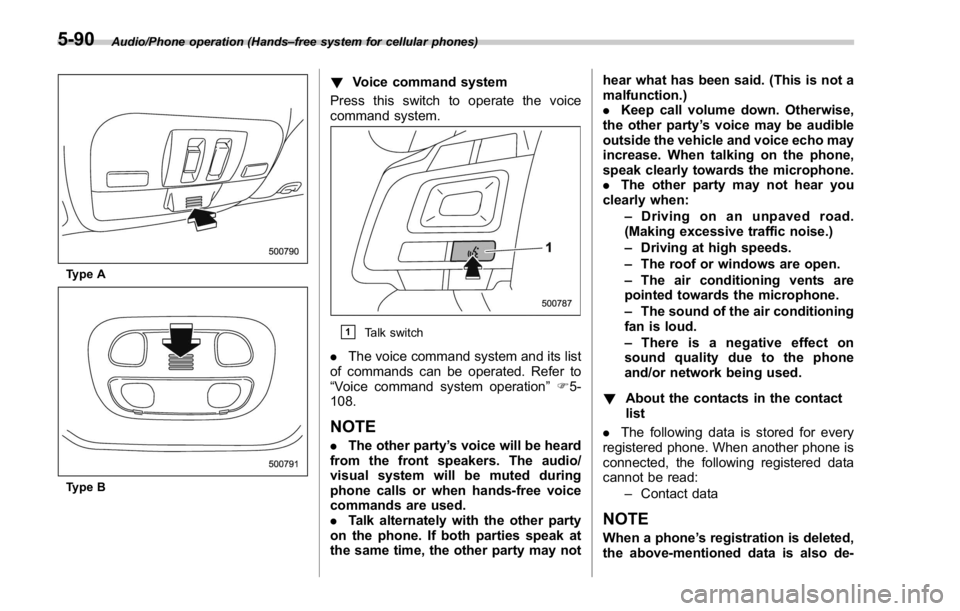
Audio/Phone operation (Hands – free system for cellular phones)
Type A
Type B ! Voice command system
Press this switch to operate the voice
command system.
& 1
Talk switch
. The voice command system and its list
of commands can be operated. Refer to
“ Voice command system operation ” F 5-
108.
NOTE . The other party ’ s voice will be heard
from the front speakers. The audio/
visual system will be muted during
phone calls or when hands-free voice
commands are used.
. Talk alternately with the other party
on the phone. If both parties speak at
the same time, the other party may not hear what has been said. (This is not a
malfunction.)
. Keep call volume down. Otherwise,
the other party ’ s voice may be audible
outside the vehicle and voice echo may
increase. When talking on the phone,
speak clearly towards the microphone.
. The other party may not hear you
clearly when:
– Drivingonanunpavedroad.
(Making excessive traffic noise.)
– Driving at high speeds.
– The roof or windows are open.
– The air conditioning vents are
pointed towards the microphone.
– The sound of the air conditioning
fan is loud.
– Thereisanegativeeffecton
sound quality due to the phone
and/or network being used.
! About the contacts in the contact
list
. The following data is stored for every
registered phone. When another phone is
connected, the following registered data
cannot be read:
– Contact data
NOTE
When a phone ’ s registration is deleted,
the above-mentioned data is also de-5-90
Page 362 of 594
Voice command system op-
eration & Voice command system The voice command system enables the
audio, hands-free systems, etc. to be
operated using voice commands.
Refer to the “ Command list ” F 5-110 for
samples of voice commands.
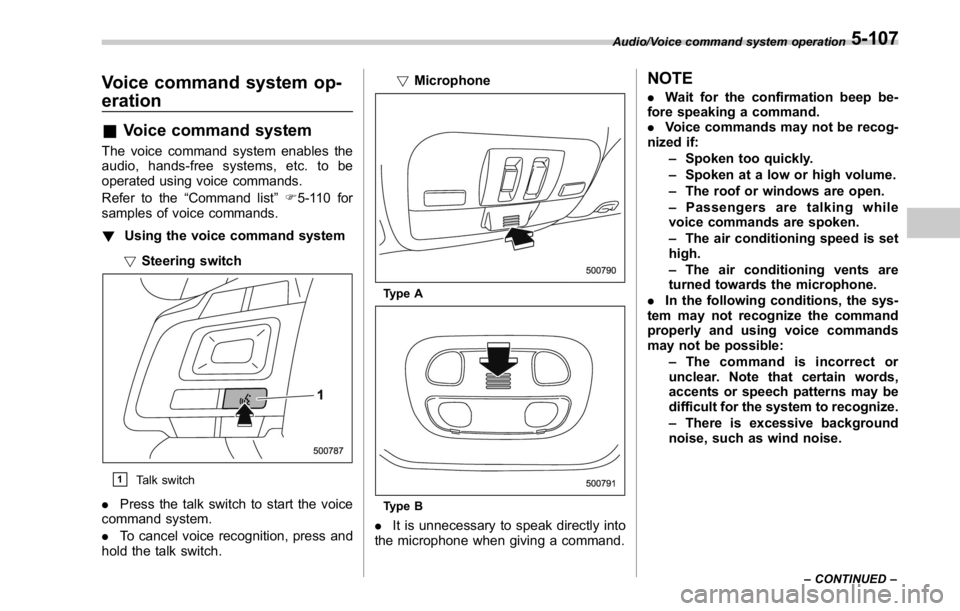
! Using the voice command system
! Steering switch
& 1
Talk switch
. Press the talk switch to start the voice
command system.
. To cancel voice recognition, press and
hold the talk switch. ! Microphone
Type A
Type B
. It is unnecessary to speak directly into
the microphone when giving a command. NOTE . Wait for the confirmation beep be-
fore speaking a command.
. Voice commands may not be recog-
nized if:
– Spoken too quickly.
– Spoken at a low or high volume.
– The roof or windows are open.
– Passengers are talking while
voice commands are spoken.
– The air conditioning speed is set
high.
– The air conditioning vents are
turned towards the microphone.
. In the following conditions, the sys-
tem may not recognize the command
properly and using voice commands
may not be possible:
– The command is incorrect or
unclear. Note that certain words,
accents or speech patterns may be
difficult for the system to recognize.
– There is excessive background
noise, such as wind noise. Audio/Voice command system operation
– CONTINUED –5-107
Page 464 of 594
possible.
. Stow cargo and luggage in the
trunk whenever possible.
. To prevent cargo and luggage
from sliding forward during brak-
ing, do not stack anything in the
enlarged trunk. Keep cargo and
luggage low, as close to the floor
as possible.
. When you carry something inside
the vehicle, secure it whenever
you can to prevent it from being
thrown around inside the vehicle
during sudden stops, sharp turns
or in an accident.
. Do not pile heavy loads on the
roof. These loads raise the vehi-
cle ’ s center of gravity and make it
more prone to tip over.
. Secure lengthy items properly to
prevent them from shooting for-
ward and causing serious injury
during a sudden stop.
. Never exceed the maximum load
limit. If you do, some parts on
your vehicle can break, or it can
change the way your vehicle
handles. This could result in loss
of control and cause personal
injury. Also, overloading can
shorten the life of your vehicle. . Do not place cargo or luggage in
or on the following locations as
the item may get under the
clutch, brake, or accelerator ped-
al and prevent the pedals from
being depressed properly, block
the driver ’ s vision, or hit the
driver or passengers, causing
an accident:
– At the feet of the driver
– On the front passenger or rear
seats (when stacking items)
– On the rear shelf
– On the instrument panel
– On the dashboard
CAUTION
Do not carry spray cans, containers
with flammable or corrosive liquids
or any other dangerous items inside
the vehicle.
NOTE For better fuel economy, do not carry
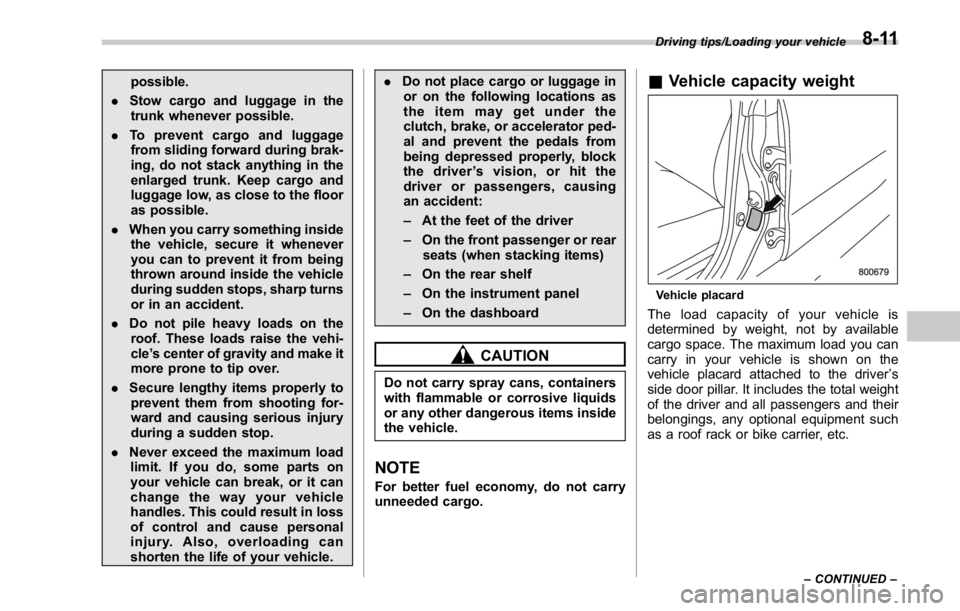
unneeded cargo. & Vehicle capacity weight
Vehicle placard
The load capacity of your vehicle is
determined by weight, not by available
cargo space. The maximum load you can
carry in your vehicle is shown on the
vehicle placard attached to the driver ’ s
side door pillar. It includes the total weight
of the driver and all passengers and their
belongings, any optional equipment such
as a roof rack or bike carrier, etc. Driving tips/Loading your vehicle
– CONTINUED –8-11
Page 466 of 594

If you park your vehicle in case of an
emergency ........................................................ 9-2
Temporary spare tire ........................................... 9-2
Maintenance tools ............................................... 9-3
Flat tires ............................................................... 9-4Changing a flat tire .............................................. 9-4
Tire pressure monitoring system (TPMS)
(U.S.-spec. models) ........................................... 9-8
Jump starting ...................................................... 9-9How to jump start ................................................ 9-9
Engine overheating ............................................ 9-11If steam is coming from the engine
compartment .................................................... 9-11
If no steam is coming from the engine
compartment .................................................... 9-11 Towing ................................................................ 9-12 Towing and tie-down hooks. ............................... 9-12
Using a flat-bed truck. ........................................ 9-14
Towing with all wheels on the ground ................. 9-15
Electronic parking brake – if the electronic
parking brake cannot be released
(models with electronic parking brake
system) ............................................................ 9-16
Access key – if access key does not
operate properly ............................................. 9-16Locking and unlocking ....................................... 9-16
Switching power ................................................ 9-16
Starting engine .................................................. 9-17
Moonroof (if equipped) – if the moonroof
does not close ................................................ 9-18
If your vehicle is involved in an accident ........ 9-18In case of emergency
9
Page 483 of 594

In case of emergency/Moonroof – if the moonroof does not close
Moonroof (if equipped) – if
the moonroof does not close If the moonroof does not close, we
recommend that you have the system
checked by a SUBARU dealer.
If your vehicle is involved in
an accident CAUTIONIf your vehicle is involved in an
accident, be sure to inspect the
ground under the vehicle before
restarting the engine. If you find that
fuel has leaked on the ground, do
not try to restart the engine. The fuel
system has been damaged and is in
need of repair. Immediately contact
the nearest automotive service facil-
ity. We recommend that you consult
your SUBARU dealer.
Your vehicle has a fuel pump shut off
system. To minimize the risk of fire due to
fuel leakage when the engine stalls or an
airbag inflates upon collision, the system
stops supplying fuel to the engine.
Perform the following procedures to re-
start the engine after the system is
activated.
Models without “ keyless access with
push-button start system ” :
1. Turn the ignition switch to the “ LOCK ”
or “ ACC ” position.
2. Restart the engine. Models with “ keyless access with
push-button start system ” :
1. Turn the push-button ignition switch to
the “ ACC ” or “ OFF ” position.
2. Restart the engine.
9-18
Page 566 of 594

.
Passenger car tire
A tire intended for use on passen-
ger cars, multipurpose passenger
vehicles, and trucks, that have a
gross vehicle weight rating (GVWR)
of 10,000 lbs (4,535 kg) or less. .
Ply
A layer of rubber-coated parallel
cords. .
Ply separation
A parting of rubber compound
between adjacent plies. .
Pneumatic tire
A mechanical device made of rub-
ber, chemicals, fabric and steel or
other materials, that, when
mounted on an automotive wheel,
provides the traction and contains
the gas or fluid that sustains the
load. .
Production options weight
The combined weight of those
installed regular production options
weighing over 5.1 lbs (2.3 kg) in
excess of those standard items
which they replace, not previously
considered in curb weight or acces- sory weight, including heavy duty
brakes, ride levelers, roof rack,
heavy duty battery, and special
trim. .
Radial ply tire
A pneumatic tire in which the ply
cords that extend to the beads are
laid at substantially 90 degrees to
the centerline of the tread. .
Recommended inflation pres-
sure
The cold inflation pressure recom-
mended by a vehicle manufacturer. .
Reinforced tire
A tire designed to operate at higher
loads and at higher inflation pres-
sures than the corresponding stan-
dard tire. .
Rim
A metal support for a tire or a tire
and tube assembly upon which the
tire beads are seated. .
Rim diameter
Nominal diameter of the bead seat.
.
Rim size designation
Rim diameter and width. .
Rim type designation
The industry of manufacturer ’ s des-
ignation for a rim by style or code. .
Rim width
Nominal distance between rim
flanges. .
Section width
The linear distance between the
exteriors of the sidewalls of an
inflated tire, excluding elevations
due to labeling, decoration, or
protective bands. .
Sidewall
That portion of a tire between the
tread and bead. .
Sidewall separation
The parting of the rubber com-
pound from the cord material in
the sidewall. .
Test rim
The rim on which a tire is fitted for
testing, and it may be any rim listed
as appropriate for use with that tire. .
Tread
That portion of a tire that comes
into contact with the road.Consumer information and Reporting safety defects/Tire information
– CONTINUED –13-7
Page 569 of 594

Consumer information and Reporting safety defects/Tire information
& Tire care – maintenance and
safety practices.
Check on a daily basis that the
tires are free from serious damage,
nails, and stones. At the same time,
check the tires for abnormal wear. .
Inspect the tire tread regularly
and replace the tires before their
tread wear indicators become visi-
ble. When a tire ’ streadwear
indicator becomes visible, the tire
is worn beyond the acceptable limit
and must be replaced immediately.
With a tire in this condition, driving
at even low speeds in wet weather
can cause the vehicle to hydro-
plane. Possible resulting loss of
vehiclecontrolcanleadtoan
accident. .
Replace any damaged or un-
evenly worn tires at the time of
rotation. For information about the
tire rotation order, refer to “ Tire
rotation ” F 11-36 .
After tire rotation,
adjust the tire pressures and make
sure the wheel nuts are correctly
tightened. For information about the tightening torque and tighten-
ing sequence for the wheel nuts,
refer to “ Flat tires ” F 9-4 .
& Vehicle load limit – how to
determine
The load capacity of your vehicle is
determined by weight, not by avail-
able cargo space. The load limit of
your vehicle is shown on the
vehicle placard attached to the
driver ’ s side B-pillar. Locate the
statement “ The combined weight
of occupants and cargo should
never exceed XXX kg or XXX lbs ”
on your vehicle ’ s placard.
Thevehicleplacardalsoshows
seating capacity of your vehicle.
The total load capacity includes the
total weight of driver and all pas-
sengers and their belongings, any
cargo, any optional equipment such
as a roof rack or bike carrier, etc.
Therefore cargo capacity can be
calculated by the following method.
Cargo capacity = Load limit − (total weight of occupants + total weight
of optional equipment)
For information about vehicle load-
ing, refer to “ Loading your vehicle ”
F 8-10 .
13-10