change time SUBARU WRX 2016 Owners Manual
[x] Cancel search | Manufacturer: SUBARU, Model Year: 2016, Model line: WRX, Model: SUBARU WRX 2016Pages: 594, PDF Size: 19.43 MB
Page 2 of 594

Foreword Congratulations on choosing a SUBARU vehicle. This Owner ’ s
Manual has all the information necessary to keep your SUBARU in
excellent condition and to properly maintain the emission control
system for minimizing emission pollutants. We urge you to read
this manual carefully so that you may understand your vehicle and
its operation. For information not found in this Owner ’ s Manual,
such as details concerning repairs or adjustments, please contact
the SUBARU dealer from whom you purchased your SUBARU or
the nearest SUBARU dealer.
The information, specifications and illustrations found in this
manual are those in effect at the time of printing. FUJI HEAVY
INDUSTRIES LTD. reserves the right to change specifications and
designs at any time without prior notice and without incurring any
obligation to make the same or similar changes on vehicles
previously sold. This Owner ’ s Manual applies to all models and
covers all equipment, including factory installed options. Some
explanations, therefore may be for equipment not installed in your
vehicle.
Please leave this manual in the vehicle at the time of resale. The
next owner will need the information found herein.
FUJI HEAVY INDUSTRIES LTD., TOKYO, JAPAN is a registered trademark of FUJI HEAVY INDUSTRIES LTD.
* C
Copyright 2015 FUJI HEAVY INDUSTRIES LTD.
Page 23 of 594
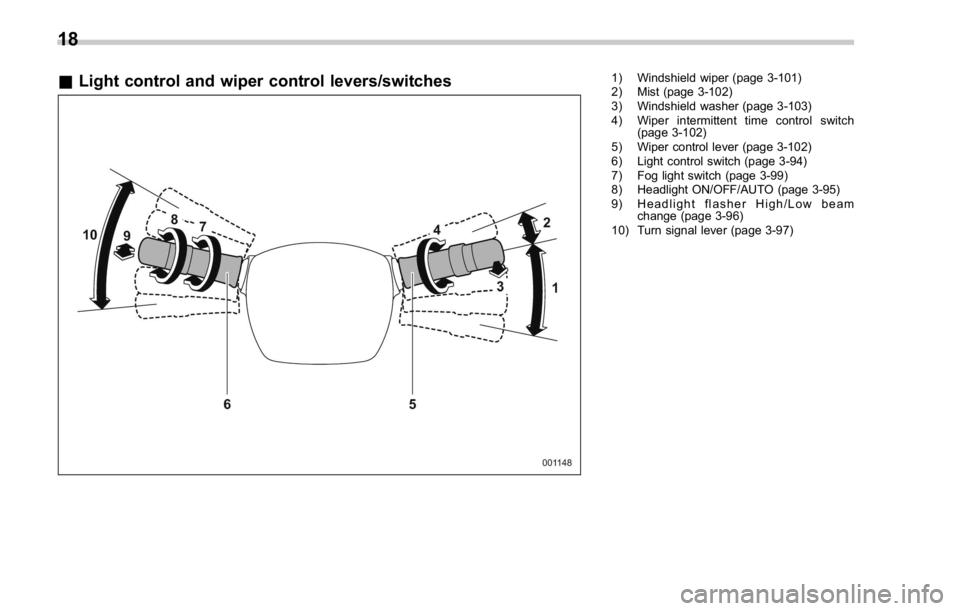
& Light control and wiper control levers/switches 1) Windshield wiper (page 3-101)
2) Mist (page 3-102)
3) Windshield washer (page 3-103)
4) Wiper intermittent time control switch
(page 3-102)
5) Wiper control lever (page 3-102)
6) Light control switch (page 3-94)
7) Fog light switch (page 3-99)
8) Headlight ON/OFF/AUTO (page 3-95)
9) Headlight flasher High/Low beam
change (page 3-96)
10) Turn signal lever (page 3-97)
18
Page 28 of 594

Function settings A SUBARU dealer can change the settings of the functions shown in the following table to meet your personal requirements. If your
vehicle is equipped with a multi function display, the settings for some of these functions can be changed using the display. Contact the
nearest SUBARU dealer for details. For details, refer to “ Multi function display ” F 3-48.Item Function Possible settings Default setting
Alarm system Alarm system Operation/Non-operation Operation
Monitoring start delay time (after closure of doors) 0 seconds/30 seconds 30 seconds
Impact sensor operation (only models with shock
sensors (dealer option)) Operation/Non-operation Non-operation
Passive arming (models without “ keyless access with
push-button start system ” ) Operation/Non-operation Non-operation
Dome light and map lights (models with moonroof)
illumination ON/OFF OFF
Keyless access (if equipped) Hazard warning flasher* Operation/Non-operation Operation
Audible signal Operation/Non-operation Operation
Audible signal volume* Level 1 - 7 Level 5
Door unlock selection function (driver ’ s door unlock) Driver ’ s door only/All doors Driver ’ s door only
Remote keyless entry system Hazard warning flasher* Operation/Non-operation Operation
Audible signal Operation/Non-operation Operation
Audible signal volume* Level 1 - 7 Level 5
Key lock-in prevention Key lock-in prevention Operation/Non-operation Operation
Defogger and deicer system for models
with the automatic climate control sys-
tem* Rear window defogger, outside mirror defogger and
windshield wiper deicer Operation for 15 minutes/
Continuous operation Operation for 15
minutes
Dome light Operation of dome light/map light OFF delay timer OFF/10 seconds/20 sec-
onds/30 seconds 30 seconds
Map light (models with moonroof)
– CONTINUED –23
Page 29 of 594

Item Function Possible settings Default setting
Battery drainage prevention function Battery drainage prevention function Operation/Non-operation Operation
Seatbelt warning Sounds a chime while driving Operation/Non-operation Operation
Auto on/off headlights (if equipped)* Sensitivity of the operation of the auto on/off headlights Low/Normal/High/Very high Normal
Welcome lighting* Approaching (operation of timer) OFF/30 seconds/60 sec-
onds/90 seconds 30 seconds
Exiting (operation of timer)
One-touch lane changer Operation of the one-touch lane changer Operation/Non-operation Operation
*: The settings can be changed by the customer using the multi function display.
24
Page 56 of 594
CAUTIONStore the head restraint that has
been removed in the cargo area.
Avoid placing the head restraint in
the passenger compartment to pre-
vent it from being thrown around in
the passenger compartment in a
sudden stop or a sharp turn.
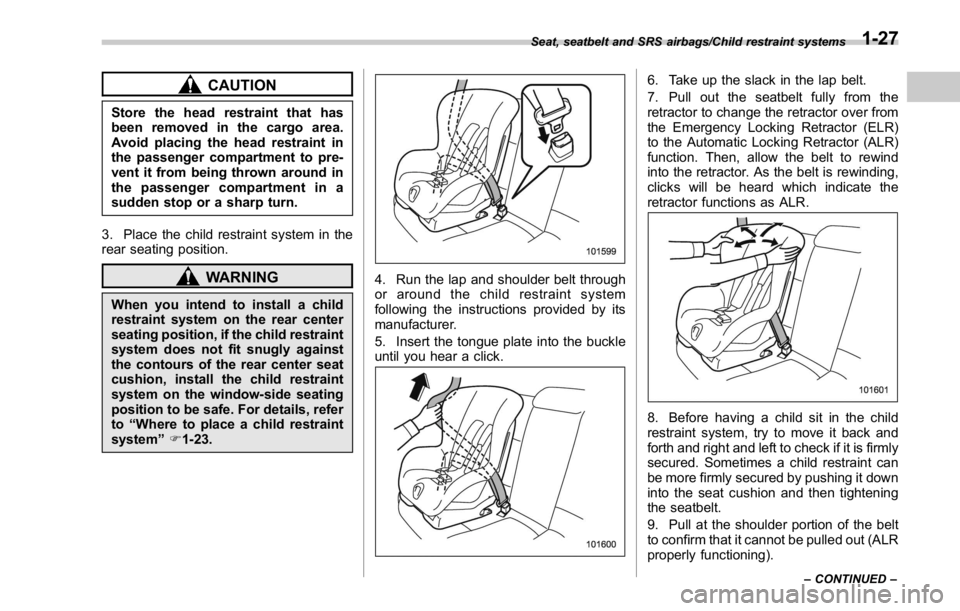
3. Place the child restraint system in the
rear seating position.
WARNINGWhen you intend to install a child
restraint system on the rear center
seating position, if the child restraint
system does not fit snugly against
the contours of the rear center seat
cushion, install the child restraint
system on the window-side seating
position to be safe. For details, refer
to “ Where to place a child restraint
system ” F 1-23. 4. Run the lap and shoulder belt through
or around the child restraint system
following the instructions provided by its
manufacturer.
5. Insert the tongue plate into the buckle
until you hear a click. 6. Take up the slack in the lap belt.
7. Pull out the seatbelt fully from the
retractor to change the retractor over from
the Emergency Locking Retractor (ELR)
to the Automatic Locking Retractor (ALR)
function. Then, allow the belt to rewind
into the retractor. As the belt is rewinding,
clicks will be heard which indicate the
retractor functions as ALR.
8. Before having a child sit in the child
restraint system, try to move it back and
forth and right and left to check if it is firmly
secured. Sometimes a child restraint can
be more firmly secured by pushing it down
into the seat cushion and then tightening
the seatbelt.
9. Pull at the shoulder portion of the belt
to confirm that it cannot be pulled out (ALR
properly functioning).Seat, seatbelt and SRS airbags/Child restraint systems
– CONTINUED –1-27
Page 103 of 594

Keys and doors/Keyless access with push – button start system
on a cell phone, the operating ranges may
be reduced, or the keyless access func-
tion may not operate.
In such a case, perform the procedure
described in “ Locking and unlocking ” F 9-
16.
. When an access key is in the operating
range, if the door handle becomes wet
due to exposure to a significant amount of
water when the vehicle is washed or
during heavy rain, the doors may be
locked or unlocked.
. The keyless access function may not
operate properly depending on the status
of the access key and the radio wave
conditions around the vehicle. In such a
case, perform the procedure described in
“ Locking and unlocking ” F 9-16.
! How to use keyless access func-
tions
! Keyless access function tips
. When you lock the doors using the
keyless access function, turn the push-
button ignition switch off. It is not possible
to lock the doors using the keyless access
function when the push-button ignition
switch is on the “ ACC ” or “ ON ” position.
Refer to “ Switching power ” F 3-7.
. If the door handle is gripped or the door
lock sensor is touched with a gloved hand,
the door lock may not be operated. . If the door lock sensor is touched three
times or more repeatedly, the system will
ignore the sensor operation.
. When performing the locking proce-
dure too quickly, locking may not have
been completed. After locking the doors, it
is recommended to pull the REAR door
handles to confirm that the doors have
been locked.
. It is possible to lock the doors even
when one of the doors is open. After
performing the locking procedure, close
the opened door to lock it.
. Within 3 seconds after locking the
doors by using the keyless access func-
tion, it is not possible to unlock doors by
using the keyless access function.
. When locking, be sure to carry the
access key to prevent locking the access
key in the vehicle.
. The setting of the hazard warning
flasher operation and the volume of the
audible signal can be changed by your
SUBARU dealer. Contact your SUBARU
dealer for details.
. The setting of the hazard warning
flasher operation can also be changed
by operating the multi function display. For
details, refer to “ Hazard warning flasher
setting ” F 3-84. ! Unlocking
Carry the access key, and grip the door
handle.
. When the driver ’ s door handle is
gripped, only the driver ’ s door will be
unlocked.
. When the front passenger ’ s door han-
dle is gripped, all doors will be unlocked.
Also, an electronic chirp will sound twice
and the hazard warning flashers will flash
twice.2-14
Page 105 of 594
Keys and doors/Keyless access with push – button start system
. Lock or unlock the doors by using the
remote keyless entry system
. Lock or unlock the doors by using the
power door locking switch
. Open either of the front doors
! Door unlock selection function
The door unlock selection function makes
it possible to unlock the driver ’ s door
without unlocking any other doors. You
can change the setting for the driver ’ s
door.
Operational: Only the driver ’ s door will be
unlocked.
Non-operational: All doors will be un-
locked.
For the factory setting (default setting),
refer to “ Function settings ” F 23.
NOTE The setting can be changed by your
SUBARU dealer. Contact your SUBARU
dealer for details. Also, the setting can
be changed by operating the multi
function display. For details, refer to
“ Keyless access setting (models with
“ keyless access with push-button start
system ” ) ” F 3-89. & Selecting audible signal op-
eration Using an electronic chirp, the system will
give you an audible signal when the doors
lock and unlock. If desired, you may
change the volume of the audible signal
or turn it off. For details, refer to “ Keyless
buzzer volume setting ” F 3-84.
& Warning chimes and warning
indicator The keyless access with push-button start
system sounds a warning chime and
flashes the access key warning indicator
on the combination meter in order to
minimize improper operations and help
protect your vehicle from theft.
For details, refer to “ Warning chimes and
warning indicator of the keyless access
with push-button start system ” F 3-28.
& Disabling keyless access
function
WARNING
If you wear an implanted pacemaker
or an implanted defibrillator, operate
the driver ’ s door to disable the
keyless access function. Otherwise,
the operation of an implanted pace- maker or implanted defibrillator may
be affected by the radio waves from
the transmitter antenna.
When the vehicle is not going to be used
for a long time, or when you choose not to
use the keyless access function, the
keyless access function can be disabled.
NOTE . The locking and unlocking function
by the remote keyless entry system is
not disabled.
. The setting can also be changed at
SUBARU dealers. For more details,
contact a SUBARU dealer.
. To start the engine while the func-
tions are disabled, perform the proce-
dure described in “ Starting engine ”
F 9-17.
. We recommend that you disable the
keyless access functions under the
following conditions.
– When the vehicle is not going to
be used for an extended period of
time
– When the keyless access func-
tions are not going to be used2-16
Page 109 of 594

Keys and doors/PIN Code Access (models with “ keyless access with push – button start system ” )
& Registering a PIN code! Preparation
1. Close all doors (including the trunk).
2. Press and hold the “
” button on the
access key. Then all doors (including the
trunk) will be locked.
3. Keep the “
” button pressed, and
press the trunk lid opener button within 5
seconds after step 2.
4. Press and hold the above button for
more than 5 seconds. Then a chirp will
sound.
5. Press the “
” button on the access key
while the chirp sounds.
Then the chirp will stop and the prepara-
tion is complete.
NOTE If you do not press the “ ” button on
the access key, the chirp will sound for
30 seconds. In this case, the prepara-
tion for registering a PIN code does not
complete even if the chirp stops. ! Registration
For example, to register “ 32468 ” as the
PIN code, perform the following proce-
dure.
1. Press the trunk lid opener button three
times.
2. After a buzzer (ding) sounds once,
press the trunk lid opener button twice.
3. After a buzzer (ding) sounds once,
press the trunk lid opener button four
times.
4. After a buzzer (ding) sounds once,
press the trunk lid opener button six times.
5. After a buzzer (ding) sounds once,
press the trunk lid opener button eight
times.
6. Perform steps 1 to 5 again within
approximately 30 seconds after the buz-
zer starts sounding intermittently.
7. All doors will be unlocked and locked.
Then the PIN code will be registered.
NOTE . If you make an error during the
registration procedure, open the dri-
ver ’ s door and then close it. Then, start
over from the procedure described in
“ Preparation ” .
. To protect your vehicle from theft,
you cannot register “ 00000 ” , “ 11111 ” to “ 99999 ” or “ 12345 ” as a PIN code.
. Do not register your vehicle license
plate number or simple numbers such
as “ 11122 ” or “ 12121 ” as a PIN code.
Doing so will increase the risk of
vehicle theft.
. When you try to register “ 22222 ” ,
the registered PIN code will be deleted.
You cannot unlock the doors by PIN
Code Access until a new code is
registered.
. After registering a new PIN code,
make sure that you can unlock the
doors using the PIN code.
. When you delete the PIN code while
the keyless access function is dis-
abled, the keyless access function will
be enabled.
. Reregister the PIN code in the
following case.
– when you forget the PIN code
– when you want to change the PIN
code2-20
Page 111 of 594
Keys and doors/Remote keyless entry system
than the “ OFF ” position.
. For models without “ keyless access
with push-button start system ” ,the
remote keyless entry system will not
be activated when the key is inserted in
the ignition switch.
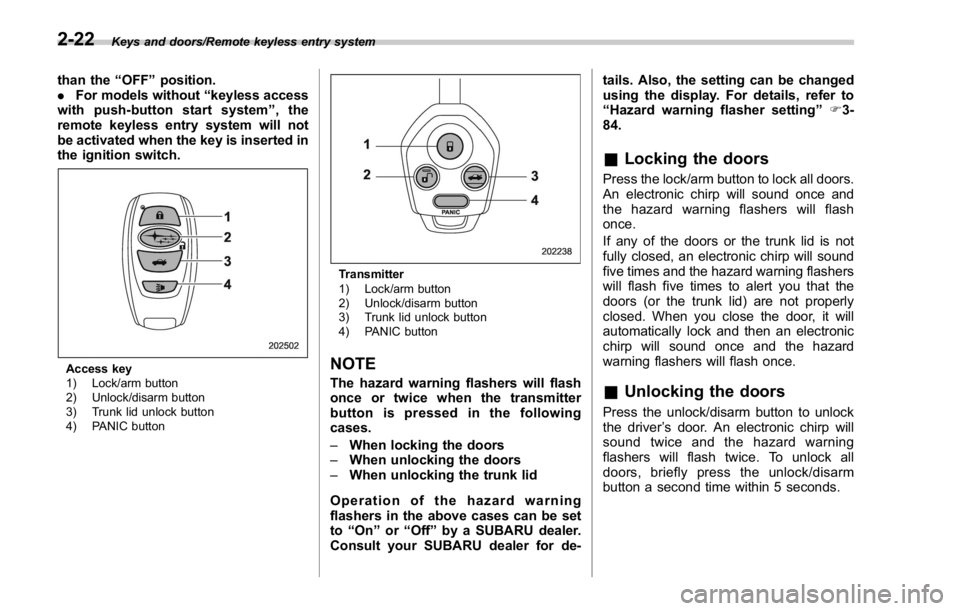
Access key
1) Lock/arm button
2) Unlock/disarm button
3) Trunk lid unlock button
4) PANIC button Transmitter
1) Lock/arm button
2) Unlock/disarm button
3) Trunk lid unlock button
4) PANIC button
NOTE The hazard warning flashers will flash
once or twice when the transmitter
button is pressed in the following
cases.
– When locking the doors
– When unlocking the doors
– When unlocking the trunk lid
Operation of the hazard warning
flashers in the above cases can be set
to “ On ” or “ Off ” by a SUBARU dealer.
Consult your SUBARU dealer for de- tails. Also, the setting can be changed
using the display. For details, refer to
“ Hazard warning flasher setting ” F 3-
84.
& Locking the doors Press the lock/arm button to lock all doors.
An electronic chirp will sound once and
the hazard warning flashers will flash
once.
If any of the doors or the trunk lid is not
fully closed, an electronic chirp will sound
five times and the hazard warning flashers
will flash five times to alert you that the
doors (or the trunk lid) are not properly
closed. When you close the door, it will
automatically lock and then an electronic
chirp will sound once and the hazard
warning flashers will flash once.
& Unlocking the doors Press the unlock/disarm button to unlock
the driver ’ s door. An electronic chirp will
sound twice and the hazard warning
flashers will flash twice. To unlock all
doors, briefly press the unlock/disarm
button a second time within 5 seconds.2-22
Page 112 of 594

NOTE If the interval between the first and
second presses of the unlock/disarm
button (for unlocking of all of the
doors) is extremely short, the system
may not respond.
& Opening the trunk lid The trunk lid opens when the “ ” button
is pressed continuously for at least 2
seconds. An electronic chirp will sound
twice and the turn signal lights will flash
twice.
& Vehicle finder function Use this function to find your vehicle
parked among many vehicles in a large
parking lot. Provided you are within 30 feet
(10 meters) of the vehicle, pressing the
lock/arm button three times in a 5-second
period will cause your vehicle ’ s horn to
sound once and its hazard warning
flashers to flash three times.
NOTE If the interval between presses is too
short when you press the lock/arm
button three times, the system may
not respond to the signals from the
access key/remote transmitter. & Sounding a panic alarm To activate the alarm, press the “ PANIC ”
button once.
The horn will sound and the hazard
warning flashers will flash.
To deactivate the panic alarm, press any
button on the access key/remote transmit-
ter. Unless a button on the access key/
remote transmitter is pressed, the alarm
will be deactivated after approximately 30
seconds.
& Selecting audible signal op-
eration (models without
“ keyless access with push-
button start system ” )Using an electronic chirp, the system will
give you an audible signal when the doors
lock and unlock. If desired, you may turn
the audible signal off.
Perform the following steps to deactivate
the audible signal. You can also use the
same steps to restore the function.
1. Sit in the driver ’ s seat and shut all
doors and the trunk. 2. Hold down the REAR (UNLOCK) side
of the power door locking switch.
3. While holding down the REAR (UN-
LOCK) side of the power door locking
switch, pull the key out and re-insert it into
the ignition switch at least 6 times within
10 seconds after Step 2.
4. Open and close the driver ’ s door once
within 10 seconds after Step 3.
5. The hazard warning flashers flash 3
times to indicate completion of the setting.
You may have the above settings done by
your SUBARU dealer. Also, the setting
can be changed using the multi function
display. For details, refer to “ Keyless
buzzer volume setting ” F 3-84.
You may also change the volume of the
audible signal by operating the multi Keys and doors/Remote keyless entry system
– CONTINUED –2-23