steering SUBARU WRX 2016 Owner's Manual
[x] Cancel search | Manufacturer: SUBARU, Model Year: 2016, Model line: WRX, Model: SUBARU WRX 2016Pages: 594, PDF Size: 19.43 MB
Page 131 of 594

Instruments and controls
Warning chimes and warning indicator of the
keyless access with push-button start system (if
equipped) ......................................................... 3-28
Security indicator light ....................................... 3-33
SI-DRIVE indicator (if equipped) .......................... 3-34
Shift-up indicator (STI) ........................................ 3-34
Select lever/gear position indicator (CVT
models). ........................................................... 3-34
Turn signal indicator lights ................................. 3-35
High beam indicator light ................................... 3-35
Cruise control indicator ...................................... 3-35
Cruise control set indicator ................................ 3-35
Automatic headlight beam leveler warning light
(models with LED headlights) ........................... 3-35
Front fog light indicator light (if equipped) .......... 3-35
Headlight indicator light ..................................... 3-35
Driver ’ s control center differential auto indicator
(STI) ................................................................. 3-35
Driver ’ s control center differential indicator and
warning (STI) .................................................... 3-36
REV indicator light (STI) ..................................... 3-37
Steering responsive fog lights warning indicator/
Steering responsive fog lights OFF indicator (if
equipped) ......................................................... 3-37
BSD/RCTA warning indicator (if equipped) .......... 3-37
BSD/RCTA OFF indicator (if equipped) ................ 3-37
Multi information display ................................... 3-37
Basic operation .................................................. 3-38
Welcome screen ................................................. 3-38
Good-bye screen ................................................ 3-39
Warning screen .................................................. 3-39
Basic screens .................................................... 3-44 Menu screens .................................................... 3-45
Multi function display ........................................ 3-48Basic operation ................................................. 3-49
Welcome screen ................................................ 3-49
Date screen ....................................................... 3-50
Ending screen ................................................... 3-50
Self-check screen .............................................. 3-50
Interruption screen ............................................ 3-52
Basic screens .................................................... 3-52
Selection screen ................................................ 3-58
Date and time settings ....................................... 3-62
Image quality and volume settings ..................... 3-69
Screen settings. ................................................. 3-71
Maintenance settings ......................................... 3-79
Driving history registration ................................. 3-82
Car settings ....................................................... 3-83
Initialize ............................................................. 3-92
Light control switch ........................................... 3-94Headlights ......................................................... 3-95
High/low beam change (dimmer) ... ..................... 3-96
Headlight flasher ............................................... 3-96
Daytime running light system ............................. 3-97
Turn signal lever ................................................ 3-97
One-touch lane changer ..................................... 3-98
Illumination brightness control ......................... 3-98
Headlight beam leveler (if equipped) ............... 3-99
Automatic headlight beam leveler (models with
LED headlights) ............................................... 3-99
Fog light switch (if equipped) ........................... 3-99
Steering responsive fog lights system (models
with EyeSight system) ..................................... 3-99
Page 132 of 594

Instruments and controls
Wiper and washer ............................................ 3-101Windshield wiper and washer switches ............. 3-102
Mirrors. .............................................................. 3-103Inside mirror .................................................... 3-103
Auto-dimming mirror/compass (if equipped) ...... 3-104 Auto-dimming mirror/compass with HomeLink ®
(if equipped) .................................................. 3-105
Outside mirrors ................................................ 3-111
Defogger and deicer ........................................ 3-112
Tilt/telescopic steering wheel ......................... 3-113
Horn .................................................................. 3-114
Page 133 of 594
Instruments and controls/Ignition switch (models without push – button start system)
Ignition switch (models with-
out push-button start sys-
tem) WARNING. Never turn the ignition switch to
“ LOCK ” while the vehicle is
being driven or towed because
that will lock the steering wheel,
preventing steering control. And
when the engine is turned off, it
takes a much greater effort than
usual to steer.
. Before leaving the vehicle, al-
ways remove the key from the
ignition switch for safety and
never allow an unattended child
to remain in the vehicle. Failure
to follow this procedure could
result in injury to a child or
others. Children could operate
the power windows, the moon-
roof or other controls or even
make the vehicle move.
CAUTION
Do not attach a large key holder or
key case to either key. If it banged against your knees or hands while
you are driving, it could turn the
ignition switch from the “ ON ” posi-
tion to the “ ACC ” or “ LOCK ” posi-
tion, thereby stopping the engine.
Also, if the key is attached to a
keyholder or to a large bunch of
other keys, centrifugal force may act
on it as the vehicle moves, resulting
in unwanted turning of the ignition
switch.
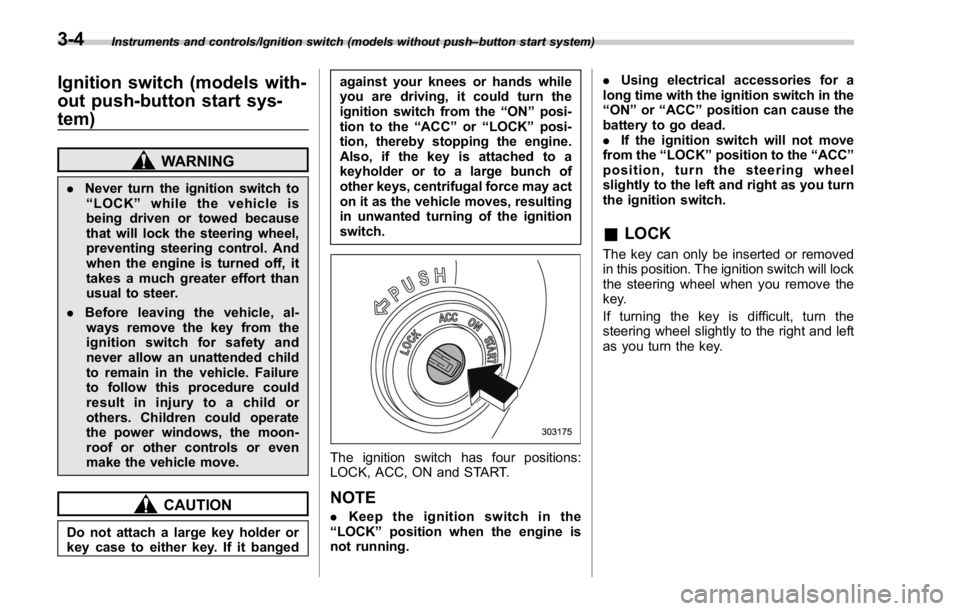
The ignition switch has four positions:
LOCK, ACC, ON and START.
NOTE . Keep the ignition switch in the
“ LOCK ” position when the engine is
not running. . Using electrical accessories for a
long time with the ignition switch in the
“ ON ” or “ ACC ” position can cause the
battery to go dead.
. If the ignition switch will not move
from the “ LOCK ” position to the “ ACC ”
position, turn the steering wheel
slightly to the left and right as you turn
the ignition switch.
& LOCK The key can only be inserted or removed
in this position. The ignition switch will lock
the steering wheel when you remove the
key.
If turning the key is difficult, turn the
steering wheel slightly to the right and left
as you turn the key.3-4
Page 137 of 594
Instruments and controls/Hazard warning flasher
pressed, steering is locked. When this
occurs, press the push-button ignition
switch while turning the steering wheel
left and right.
! Battery drainage prevention func-
tion
When the push-button ignition switch is
left in the “ ACC ” or “ ON ” position for
approximately 1 hour, the push-button
ignition switch will be automatically
switched to “ OFF ” to prevent the battery
from going dead. (In CVT models, this
function is activated when the select lever
is in the “ P ” position.)
& When access key does not
operate properlyRefer to “ Access key – if access key does
not operate properly ” F 9-16. Hazard warning flasher
The hazard warning flasher is used to
warn other drivers when you have to park
your vehicle under emergency conditions.
The hazard warning flasher works regard-
less of the position of the ignition switch.
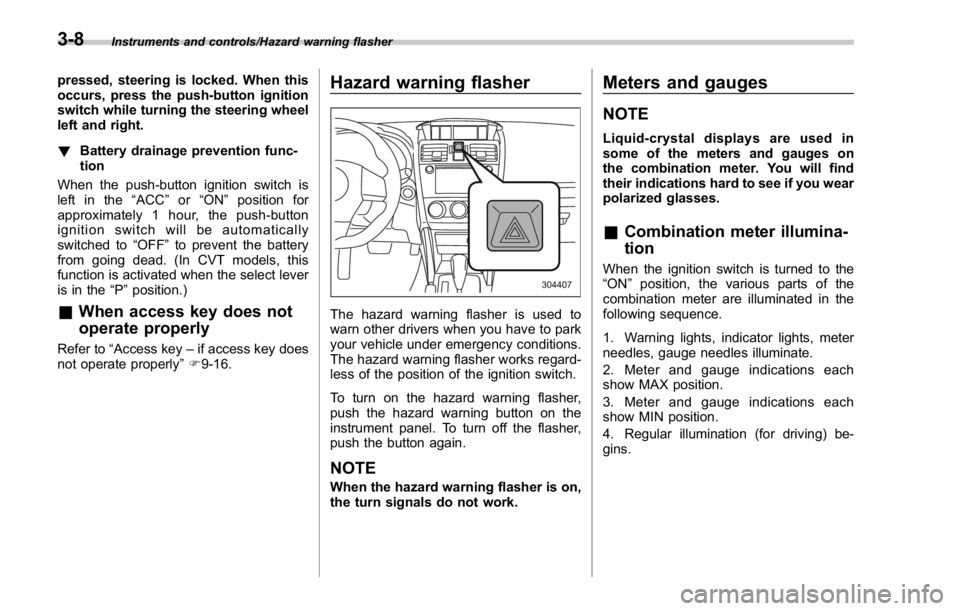
To turn on the hazard warning flasher,
push the hazard warning button on the
instrument panel. To turn off the flasher,
push the button again.
NOTE When the hazard warning flasher is on,
the turn signals do not work. Meters and gauges NOTE Liquid-crystal displays are used in
some of the meters and gauges on
the combination meter. You will find
their indications hard to see if you wear
polarized glasses.
& Combination meter illumina-
tion When the ignition switch is turned to the
“ ON ” position, the various parts of the
combination meter are illuminated in the
following sequence.
1. Warning lights, indicator lights, meter
needles, gauge needles illuminate.
2. Meter and gauge indications each
show MAX position.
3. Meter and gauge indications each
show MIN position.
4. Regular illumination (for driving) be-
gins.3-8
Page 142 of 594

ever the engine speed enters the red
zone of the tachometer.
To change the REV indicator settings,
perform the procedures described in “ REV
settings (STI) ” F 3-47.
Warning and indicator lights Several of the warning and indicator lights
illuminate when the ignition switch is
initially turned to the “ ON ” position. This
permits checking the operation of the
bulbs.
Apply the parking brake and turn the
ignition switch to the “ ON ” position. For
the system check, the following lights
illuminate and then turn off after several
seconds or after the engine has started.
: Seatbelt warning light
(The seatbelt warning light turns off
only when the driver fastens the
seatbelt.)
: Front passenger ’ s seatbelt warning
light
(The seatbelt warning light turns off
only when the front seat passenger
fastens the seatbelt.)
: SRS airbag system warning light
ON /
: Front passenger ’ s frontal airbag
ON indicator light
/ : Front passenger ’ s frontal airbag
OFF indicator light
: CHECK ENGINE warning light/Mal-
function indicator light : Charge warning light
: Oil pressure warning light
: REV indicator light (STI)
: AT OIL TEMP warning light
(CVT models)
: Rear differential oil temperature warn-
ing light (STI)
: Low tire pressure warning light
(U.S.-spec. models)
/ : ABS warning light
/ : Brake system warning light
: Electronic parking brake indicator
light
: Low fuel warning light
: Hill start assist warning light/Hill start
assist OFF indicator light (models
without electronic parking brake sys-
tem)
: Hill holder indicator light (models with
electronic parking brake system)
: Door open warning light
: AWD warning light (if equipped)
: Power steering warning light (except
STI)Instruments and controls/Warning and indicator lights
– CONTINUED –3-13
Page 143 of 594
Instruments and controls/Warning and indicator lights
: Vehicle Dynamics Control warning
light/Vehicle Dynamics Control opera-
tion indicator light
: Vehicle Dynamics Control OFF indica-
tor light
: LED headlight warning light
: Headlight indicator light
: Automatic headlight beam leveler
warning light (if equipped)
: Traction mode indicator light
: Steering responsive fog lights OFF
indicator light
If any lights fail to illuminate, it indicates a
burned-out bulb or a malfunction of the
corresponding system.
Consult your authorized SUBARU dealer
for repair.
& Seatbelt warning light
and chimeYour vehicle is equipped with a seatbelt
warning device at the driver ’ s and front
passenger ’ s seat, as required by current
safety standards.
With the ignition switch turned to the “ ON ”
position, this device reminds the driver
and front passenger to fasten their seat-
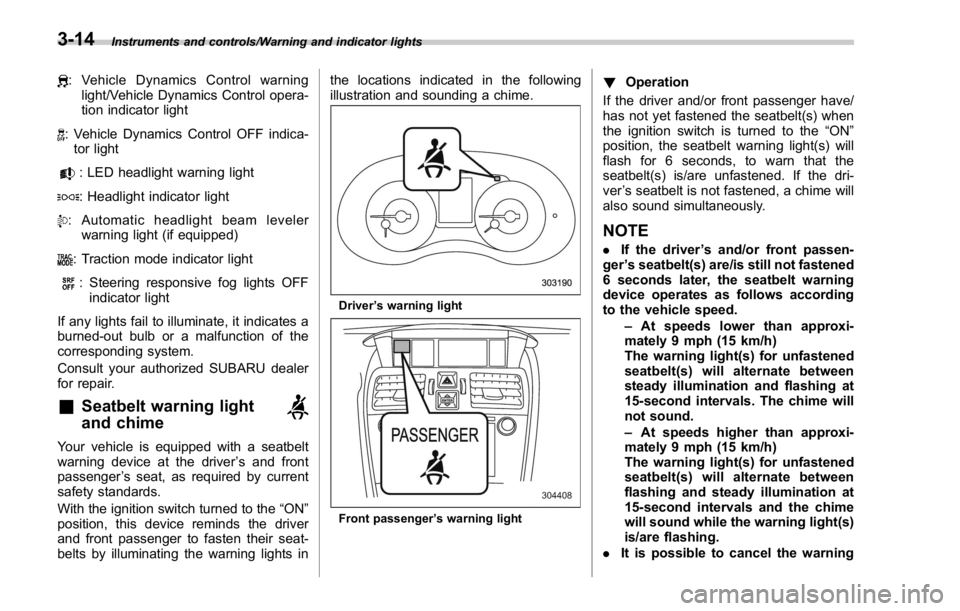
belts by illuminating the warning lights in the locations indicated in the following
illustration and sounding a chime.
Driver ’ s warning light
Front passenger ’ s warning light ! Operation
If the driver and/or front passenger have/
has not yet fastened the seatbelt(s) when
the ignition switch is turned to the “ ON ”
position, the seatbelt warning light(s) will
flash for 6 seconds, to warn that the
seatbelt(s) is/are unfastened. If the dri-
ver ’ s seatbelt is not fastened, a chime will
also sound simultaneously.
NOTE . If the driver ’ s and/or front passen-
ger ’ s seatbelt(s) are/is still not fastened
6 seconds later, the seatbelt warning
device operates as follows according
to the vehicle speed.
– At speeds lower than approxi-
mately 9 mph (15 km/h)
The warning light(s) for unfastened
seatbelt(s) will alternate between
steady illumination and flashing at
15-second intervals. The chime will
not sound.
– At speeds higher than approxi-
mately 9 mph (15 km/h)
The warning light(s) for unfastened
seatbelt(s) will alternate between
flashing and steady illumination at
15-second intervals and the chime
will sound while the warning light(s)
is/are flashing.
. It is possible to cancel the warning3-14
Page 154 of 594
& Door open warning
lightThe warning light illuminates if any door or
the trunk lid is not fully closed. This
function is effective even if the ignition
switch is in the “ LOCK ” / “ OFF ” or “ ACC ”
position, or the key is removed from the
ignition switch.
Always make sure this light is not illumi-
nated before you start to drive.
& All-Wheel Drive warn-
ing light (if equipped)This light flashes if the vehicle is driven
with tires of differing diameters fitted on
the wheels or with an excessively low air
pressure in any of the tires.
WARNING
Continued driving with the AWD
warning light flashing can lead to
powertrain damage. If the AWD
warning light flashes, promptly park
in a safe place then check whether
all four tires are the same diameter
and whether any of the tires has a
puncture or has lost air pressure for
some other reason. & Power steering warn-
ing light (except STI) This warning light illuminates when the
ignition switch is turned to the “ ON ”
position and turns off after the engine
has started. This indicates that the warn-
ing system is working properly.
While the engine is running, this warning
light illuminates when a malfunction has
been detected in the electric power steer-
ing system.
CAUTIONWhen the power steering warning
light is illuminated, there may be
more resistance when the steering
wheel is operated. Drive carefully to
the nearest SUBARU dealer and
have the vehicle inspected immedi-
ately.
NOTE If the steering wheel is operated in the
following ways, the power steering
control system may temporarily limit
the power assist in order to prevent the
system components, such as the con-
trol computer and drive motor, from
overheating. . The steering wheel is operated fre-
quently and turned sharply while the
vehicle is maneuvered at extremely low
speeds, such as while frequently turn-
ing the steering wheel during parallel
parking.
. The steering wheel remains in the
fully turned position for a long period
of time.
At this time, there will be more resis-
tance when steering. However this is
not a malfunction. Normal steering
force will be restored after the steering
wheel is not operated for a while and
the power steering control system has
an opportunity to cool down. However,
if the power steering is operated in a
non-standard way which causes power
assist limitation to occur too fre-
quently, that may result in a malfunc-
tion of the power steering control
system.
& LED headlight warning
light (if equipped) This light illuminates if the LED headlights
malfunction. Have your vehicle inspected
at a SUBARU dealer as soon as possible.Instruments and controls/Warning and indicator lights
– CONTINUED –3-25
Page 157 of 594
Instruments and controls/Warning and indicator lights
! Vehicle Dynamics Control OFF in-
dicator light
This light illuminates when the Vehicle
Dynamics Control OFF switch is operated
to select the traction mode or the Vehicle
Dynamic Control OFF mode. For details,
refer to “ Vehicle Dynamics Control sys-
tem ” F 7-38.
NOTE . The light may remain illuminated for
a while after the engine has been
started, especially in cold weather. This
does not indicate the existence of a
problem. The light should turn off as
soon as the engine has warmed up.
. The indicator light illuminates when
the engine has developed a problem
and the CHECK ENGINE warning light/
malfunction indicator light is on.
The Vehicle Dynamics Control system is
probably malfunctioning under the follow-
ing conditions. Have your vehicle checked
at a SUBARU dealer as soon as possible.
. The light does not illuminate when the
ignition switch is turned to the “ ON ”
position.
. The light does not turn off even after
the lapse of several minutes (the engine
has warmed up) after the engine has
started. ! Traction mode indicator light
The light illuminates when the Vehicle
Dynamics Control OFF switch is pressed
briefly to select the traction mode. For
details, refer to “ Traction mode ” F 7-41.
& Warning chimes and warning
indicator of the keyless ac-
cess with push-button start
system (if equipped)
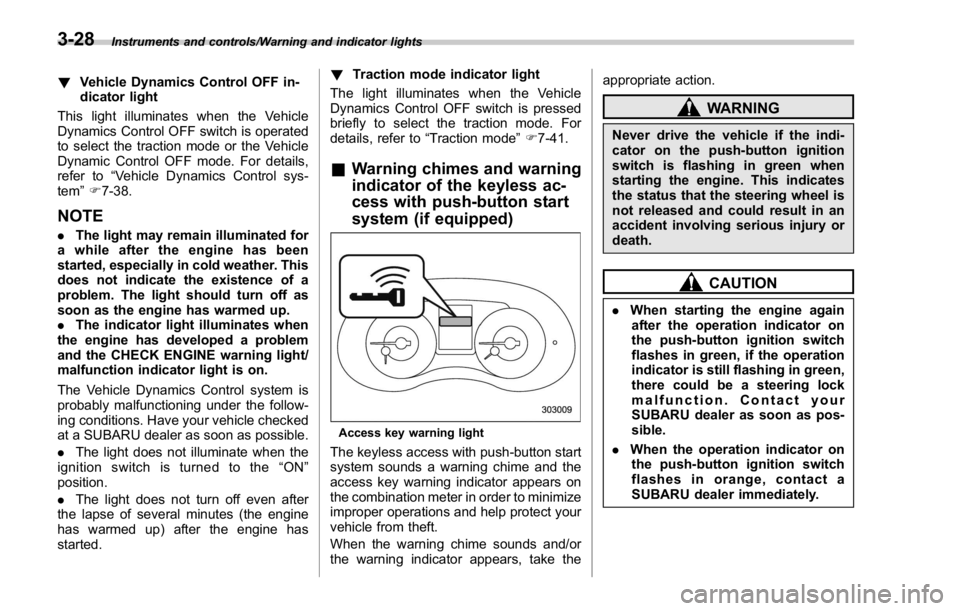
Access key warning light
The keyless access with push-button start
system sounds a warning chime and the
access key warning indicator appears on
the combination meter in order to minimize
improper operations and help protect your
vehicle from theft.
When the warning chime sounds and/or
the warning indicator appears, take the appropriate action.
WARNINGNever drive the vehicle if the indi-
cator on the push-button ignition
switch is flashing in green when
starting the engine. This indicates
the status that the steering wheel is
not released and could result in an
accident involving serious injury or
death.
CAUTION. When starting the engine again
after the operation indicator on
the push-button ignition switch
flashes in green, if the operation
indicator is still flashing in green,
there could be a steering lock
malfunction. Contact your
SUBARU dealer as soon as pos-
sible.
. When the operation indicator on
the push-button ignition switch
flashes in orange, contact a
SUBARU dealer immediately.3-28
Page 161 of 594

Instruments and controls/Warning and indicator lights
Inside warning
chime Outside warning
chime Operation indicator
on push-button igni-
tion switch Status Action
Long beep
(continuous) —— Select lever position warning:
The driver ’ s door was opened while the
push-button ignition switch is in a posi-
tion other than “ OFF ” and the select
lever is in a position other than the “ P ”
position. Shift the select lever to the “ P ” position,
switch the push-button ignition switch to
“ OFF ” and exit the vehicle.
Ding —— The battery of the access key is low. Replace the battery of the access key.
Ding — Flashes in green (15
seconds max.) Steering lock warning:
The engine start procedure was per-
formed, but the steering is still locked. While turning the steering wheel right
and left lightly, depress the brake pedal
and press the push-button ignition
switch.
Ding — Flashes in orange System malfunction warning:
A malfunction was detected in the power
system or steering lock. Contact a SUBARU dealer immediately
and have the vehicle inspected.
NOTE An electronic chirp will sound while the select lever is in the “ R ” position. In this case, the select lever position warning chime
will not sound.3-32
Page 166 of 594
& REV indicator light
(STI)This indicator light illuminates when the
engine speed reaches the level that was
previously set. This indicator light also
flashes when the tachometer needle en-
ters the red zone. For details, refer to
“ REV indicator light and buzzer (STI) ” F 3-
12.
& Steering responsive
fog lights warning indi-
cator/Steering respon-
sive fog lights OFF in-
dicator (if equipped)
NOTE For details about the steering respon-
sive fog lights system, refer to “ Steer-
ing responsive fog lights system (mod-
els with EyeSight system) ” F 3-99.
! Steering responsive fog lights
warning indicator
This indicator starts blinking when the
steering responsive fog lights system
malfunctions. When this indicator appears
while the system is activated, contact your
SUBARU dealer for an inspection. ! Steering responsive fog lights OFF
indicator
This indicator appears when the steering
responsive fog lights system is deacti-
vated. This indicator disappears when the
system is activated.
& BSD/RCTA warning in-
dicator (if equipped) This warning indicator appears when the
BSD/RCTA is malfunctioning. In this case
the BSD/RCTA warning indicator will be
shown on the multi information display of
the combination meter. When this indica-
tor appears, have your vehicle inspected
by your SUBARU dealer as soon as
possible.
& BSD/RCTA OFF indica-
tor (if equipped) The indicator appears when the BSD/
RCTA OFF switch is pressed to deactivate
the BSD/RCTA. In this case the BSD/
RCTA OFF indicator will be shown on the
multi information display of the combina-
tion meter. For details, refer to “ BSD/
RCTA ” F 7-56. Multi information display WARNINGAlways pay adequate attention to
safe driving when operating the
multi information display while the
vehicle is in motion. When operation
of the multi information display
interferes with your ability to con-
centrate on driving, stop the vehicle
before performing operations on the
screen. Also, do not concentrate on
the display while driving. Doing so
may cause you to look away from
the road and could result in an
accident.
Various information will be shown on the
multi information display. Also, a warning
message will appear on the display if a
malfunction, etc. is detected. In addition,
several settings for the displayed content
can be performed.Instruments and controls/Multi information display
– CONTINUED –3-37