steering SUBARU WRX 2016 Service Manual
[x] Cancel search | Manufacturer: SUBARU, Model Year: 2016, Model line: WRX, Model: SUBARU WRX 2016Pages: 594, PDF Size: 19.43 MB
Page 256 of 594

Antenna system .................................................. 5-2Roof antenna ...................................................... 5-2
FM reception ....................................................... 5-2
Installation of accessories .................................. 5-3
Audio set ............................................................. 5-3Audio set ............................................................ 5-4
Basic information before use ............................. 5-5Initial screen ....................................................... 5-5
Loading and unloading a disc .............................. 5-5
Connecting and disconnecting a USB memory/
portable device ................................................. 5-6
Touch screen gestures ........................................ 5-7
Touch screen operation ....................................... 5-7
Entering letters and numbers/list screen
operation .......................................................... 5-8
Screen adjustment .............................................. 5-9
Other settings ..................................................... 5-10
Basic operation .................................................. 5-12Some basics ...................................................... 5-12
Audio/visual remote controls ............................ 5-18Steering switches ............................................... 5-18
Tips for operating the audio/visual system ...... 5-21Operating information. ........................................ 5-21
Useful information .............................................. 5-28
SiriusXM Data Service* ....................................... 5-28
STARLINK .......................................................... 5-30
Radio operation .................................................. 5-33
AM/FM radio ....................................................... 5-33
SiriusXM Satellite Radio ..................................... 5-45 Media operation ................................................. 5-50CD .................................................................... 5-50
USB memory ..................................................... 5-53
iPod .................................................................. 5-56
Bluetooth audio ................................................. 5-60
aha TM
by HARMAN ............................................ 5-64
AUX .................................................................. 5-73
Pandora ®
........................................................... 5-76
Bluetooth ®
settings ........................................... 5-81Registering/connecting Bluetooth ®
device .......... 5-81
Setting Bluetooth details .................................... 5-84
Phone operation (Hands-free system for
cellular phones) .............................................. 5-87Quick reference ................................................. 5-87
Some basics ...................................................... 5-88
Calling on the Bluetooth phone .......................... 5-91
Receiving on the Bluetooth phone ...................... 5-98
Talking on the Bluetooth phone .......................... 5-99
Setup ................................................................ 5-101 Phone settings ................................................ 5-101
What to do if.... ................................................. 5-103Troubleshooting ............................................... 5-103
Voice command system operation ................. 5-107
Voice command system ................................... 5-107
Command list ................................................... 5-110
Appendix .......................................................... 5-114
Certification ..................................................... 5-114
Certification for the Hands-free system ............. 5-115
Certification for Mexico models ........................ 5-115Audio
5
Page 273 of 594
Audio/Audio/visual remote controls
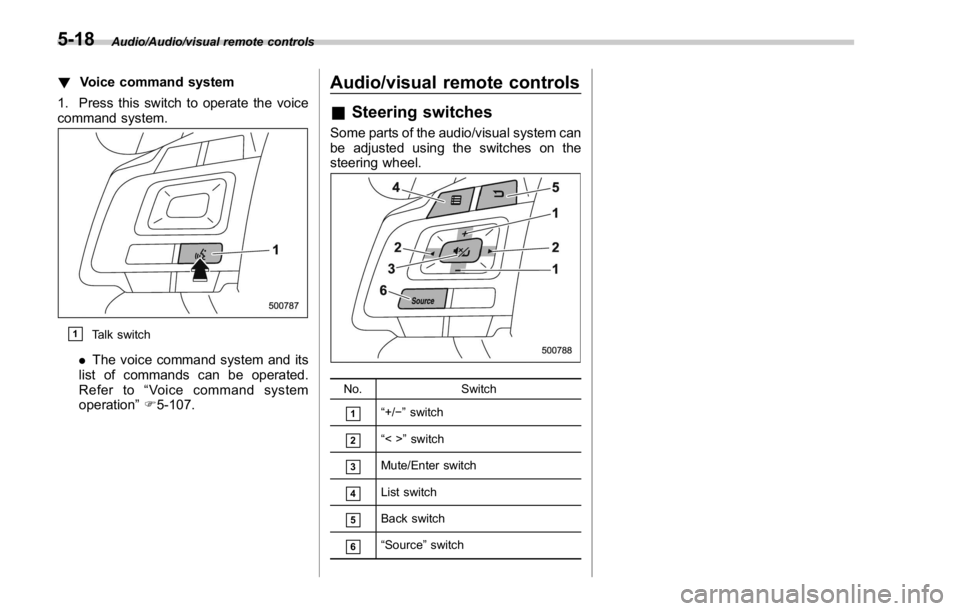
! Voice command system
1. Press this switch to operate the voice
command system.
& 1
Talk switch
. The voice command system and its
list of commands can be operated.
Refer to “ Voice command system
operation ” F 5-107. Audio/visual remote controls & Steering switches Some parts of the audio/visual system can
be adjusted using the switches on the
steering wheel.
No. Switch
& 1
“ +/ − ” switch
& 2
“ <> ” switch
& 3
Mute/Enter switch
& 4
List switch
& 5
Back switch
& 6
“ Source ” switch5-18
Page 307 of 594
Audio/Media operation
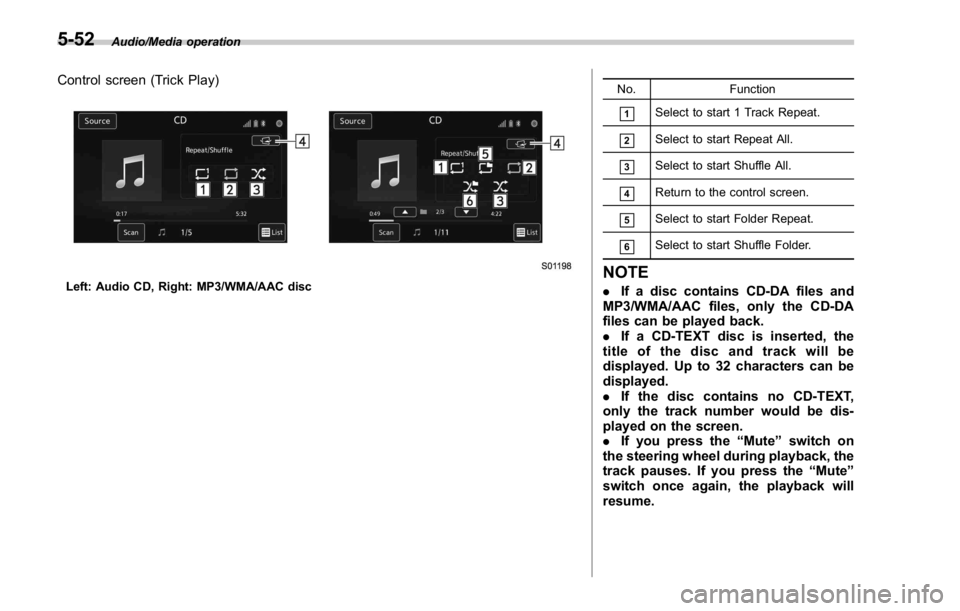
Control screen (Trick Play)
Left: Audio CD, Right: MP3/WMA/AAC disc No. Function
& 1
Select to start 1 Track Repeat.
& 2
Select to start Repeat All.
& 3
Select to start Shuffle All.
& 4
Return to the control screen.
& 5
Select to start Folder Repeat.
& 6
Select to start Shuffle Folder.
NOTE . If a disc contains CD-DA files and
MP3/WMA/AAC files, only the CD-DA
files can be played back.
. If a CD-TEXT disc is inserted, the
title of the disc and track will be
displayed. Up to 32 characters can be
displayed.
. If the disc contains no CD-TEXT,
only the track number would be dis-
played on the screen.
. If you press the “ Mute ” switch on
the steering wheel during playback, the
track pauses. If you press the “ Mute ”
switch once again, the playback will
resume.5-52
Page 311 of 594

Audio/Media operation
CAUTION. Do not leave your portable player
in the car. In particular, high
temperatures inside the vehicle
may damage the portable player.
. Do not push down on or apply
unnecessary pressure to the por-
table player while it is connected
as this may damage the portable
player or its terminal.
. Do not insert foreign objects into
the port as this may damage the
portable player or its terminal.
NOTE If you press the “ Mute ” switch on the
steering wheel during playback, the
track pauses. If you press the “ Mute ”
switch once again, the playback will
resume. & iPod ! Overview
TheiPodoperationscreencanbe
reached by the following methods:
. Connect an iPod. Refer to “ Connecting
and disconnecting a USB memory/porta-
ble device ” F 5-6.
. Select
USB/iPod (USB/iPod) on the
“ Select Audio Source (Select Audio
Source) ” screen. Refer to “ Selecting an
audio source ” F 5-13.5-56
Page 315 of 594
Audio/Media operation
WARNINGDo not operate the player ’ s controls
or connect the iPod while driving.
CAUTION. Do not leave your portable player
in the car. In particular, high
temperatures inside the vehicle
may damage the portable player.
. Do not push down on or apply
unnecessary pressure to the por-
table player while it is connected
as this may damage the portable
player or its terminal.
. Do not insert foreign objects into
the port as this may damage the
portable player or its terminal.
NOTE . When an iPod is connected using a
genuine iPod cable, the iPod starts
charging its battery.
. When an iPod is connected and the
audio source is changed to iPod mode,
the iPod will resume playing from the
same point it was last used.
. Depending on the iPod that is con-
nected to the system, certain functions may not be available.
. Files/tracks selected by operating a
connected iPod may not be recognized
or displayed properly.
. If you press the “ Mute ” switch on
the steering wheel during playback, the
track pauses. If you press the “ Mute ”
switch once again, the playback will
resume.
& Bluetooth audio The Bluetooth audio system enables
users to enjoy listening to music that is
played on a portable player on the vehicle
speakers via wireless communication.
This audio system supports Bluetooth, a
wireless data system capable of playing
portable audio music without cables. If
your device does not support Bluetooth,
the Bluetooth audio system will not func-
tion.
! Overview
Select
BT Audio (BT Audio) on the “ Select
Audio Source (Select Audio Source) ”
screen. Refer to “ Selecting an audio
source ” F 5-13.
Depending on the type of portable player
connected, some functions may not be
available and/or the screen may look
differently than shown in this manual.5-60
Page 342 of 594
! When the cursor is at the “ Device
Name Display Area ”
. Thedevicenamecanbesetor
changed.
. Press the “ PIN ” key to enter a pass-
code.
. If the “ PIN ” key is already selected, the
“ Alphabet ” key is cross-hatched and dis-
abled.
! When the cursor is at the “ Pass-
code Display Area ”
. The passcode can be set/changed.
. Press the “ Name ” key to enter a device
name. Phone operation (Hands-free
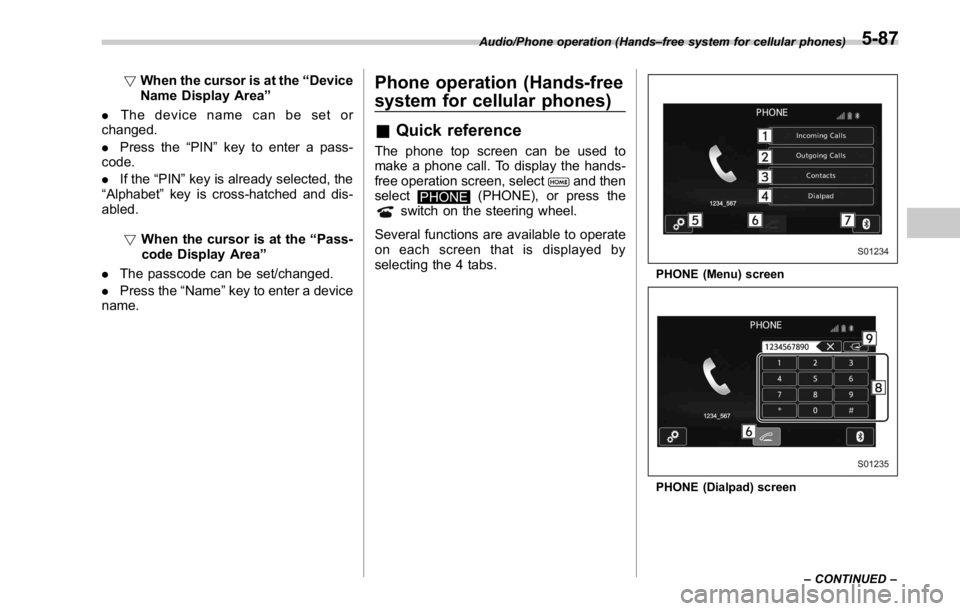
system for cellular phones) & Quick reference The phone top screen can be used to
make a phone call. To display the hands-
free operation screen, select
and then
select
PHONE (PHONE), or press the
switch on the steering wheel.
Several functions are available to operate
on each screen that is displayed by
selecting the 4 tabs. PHONE (Menu) screen
PHONE (Dialpad) screenAudio/Phone operation (Hands – free system for cellular phones)
– CONTINUED –5-87
Page 343 of 594
Audio/Phone operation (Hands – free system for cellular phones)
No. Function
& 1
“ Incoming Calls ” key: Opens the
Incoming Calls screen.
& 2
“ Outgoing Calls ” key: Opens the Out-
going Calls screen.
& 3
“ Contacts ” key: Opens the Contacts
screen.
& 4
“ Dialpad ” key: Changes the screen
from the Menu screen to the Dialpad
screen.
& 5
“ Option ” key: Opens the phone vo-
lume setting screen.
& 6
“ OFF Hook ” key: Use to make a
phone call. You cannot press this key
until you open the Dialpad screen and
enter a phone number.
& 7
“ Bluetooth Setting ” key: Opens the BT
Devices Connection screen.
& 8
Enter the phone number that you
want to call.
& 9
“ Switch Screen ” key: Switches the
screen to the Phone (Menu) screen.
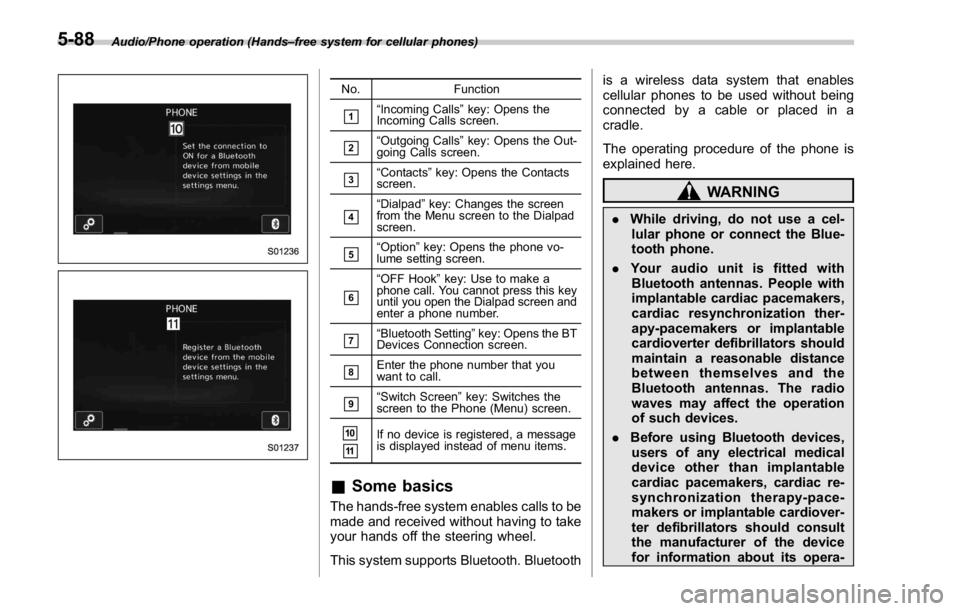
& 10
& 11
If no device is registered, a message
is displayed instead of menu items.
& Some basics The hands-free system enables calls to be
made and received without having to take
your hands off the steering wheel.
This system supports Bluetooth. Bluetooth is a wireless data system that enables
cellular phones to be used without being
connected by a cable or placed in a
cradle.
The operating procedure of the phone is
explained here.
WARNING. While driving, do not use a cel-
lular phone or connect the Blue-
tooth phone.
. Your audio unit is fitted with
Bluetooth antennas. People with
implantable cardiac pacemakers,
cardiac resynchronization ther-
apy-pacemakers or implantable
cardioverter defibrillators should
maintain a reasonable distance
between themselves and the
Bluetooth antennas. The radio
waves may affect the operation
of such devices.
. Before using Bluetooth devices,
users of any electrical medical
device other than implantable
cardiac pacemakers, cardiac re-
synchronization therapy-pace-
makers or implantable cardiover-
ter defibrillators should consult
the manufacturer of the device
for information about its opera-5-88
Page 344 of 594
tion under the influence of radio
waves. Radio waves could have
unexpected effects on the opera-
tion of such medical devices.
CAUTIONDo not leave your cellular phone in
the vehicle. The temperature inside
mayrisetoalevelthatcould
damage the phone.
NOTE . If your cellular phone does not
support Bluetooth, this system cannot
function.
. In the following conditions, the sys-
tem may not function:
– The cellular phone is turned off.
– The current position is outside
the communication area.
– The cellular phone is not con-
nected.
– The cellular phone has a low
battery.
. When using the hands free function
and other Bluetooth functions at the
same time, the following problems may
occur:
– The Bluetooth connection may be cut.
– Noise may be heard when play-
ing back voice with the Bluetooth
function.
! Registering/connecting a Bluetooth
phone
To use the hands-free system for cellular
phones, it is necessary to register a
cellular phone with the system. Refer to
“ Registering/connecting Bluetooth ®
de-
vice ” F 5-81.
! Bluetooth phone condition dis-
play
The condition of the Bluetooth phone
appears on the upper right side of the
screen. Refer to “ Bluetooth phone condi-
tion display ” F 5-89.
! Using the phone switch/micro-
phone
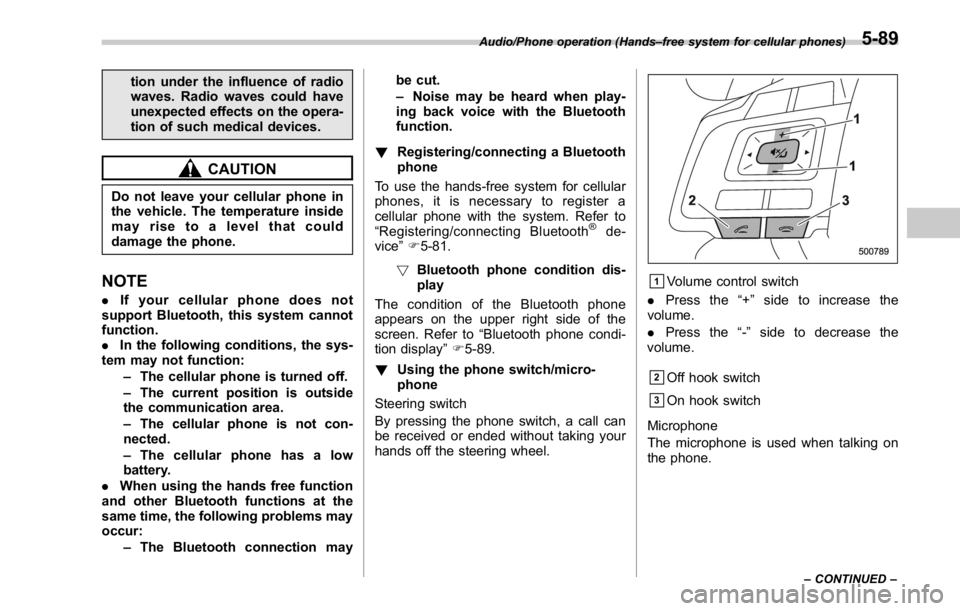
Steering switch
By pressing the phone switch, a call can
be received or ended without taking your
hands off the steering wheel. & 1
Volume control switch
. Press the “ + ” side to increase the
volume.
. Press the “ - ” side to decrease the
volume.
& 2
Off hook switch
& 3
On hook switch
Microphone
The microphone is used when talking on
the phone.Audio/Phone operation (Hands – free system for cellular phones)
– CONTINUED –5-89
Page 352 of 594
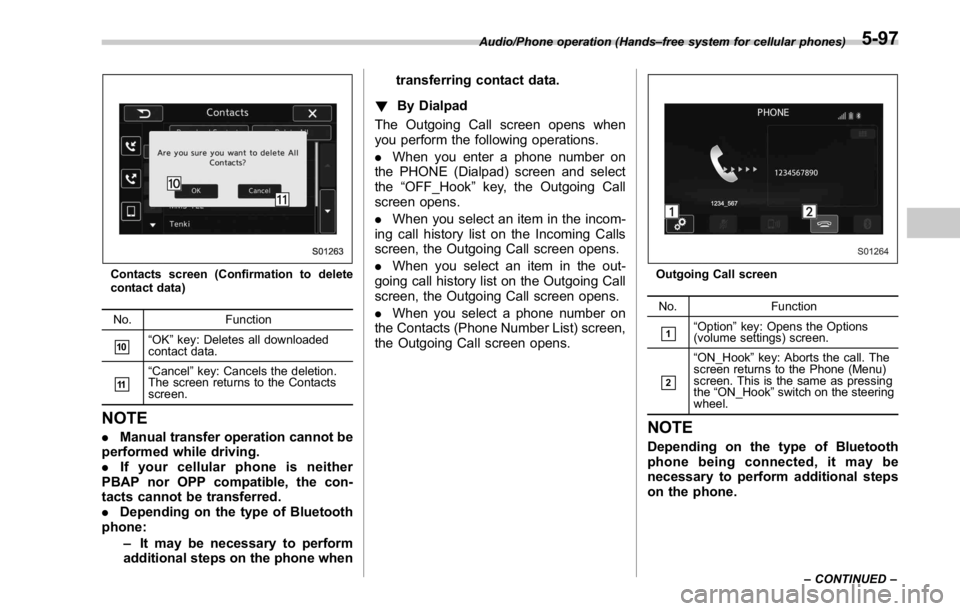
Contacts screen (Confirmation to delete
contact data)
No. Function
& 10
“ OK ” key: Deletes all downloaded
contact data.
& 11
“ Cancel ” key: Cancels the deletion.
The screen returns to the Contacts
screen.
NOTE . Manual transfer operation cannot be
performed while driving.
. If your cellular phone is neither
PBAP nor OPP compatible, the con-
tacts cannot be transferred.
. Depending on the type of Bluetooth
phone:
– It may be necessary to perform
additional steps on the phone when transferring contact data.
! By Dialpad
The Outgoing Call screen opens when
you perform the following operations.
. When you enter a phone number on
the PHONE (Dialpad) screen and select
the “ OFF_Hook ” key, the Outgoing Call
screen opens.
. When you select an item in the incom-
ing call history list on the Incoming Calls
screen, the Outgoing Call screen opens.
. When you select an item in the out-
going call history list on the Outgoing Call
screen, the Outgoing Call screen opens.
. When you select a phone number on
the Contacts (Phone Number List) screen,
the Outgoing Call screen opens. Outgoing Call screen
No. Function
& 1
“ Option ” key: Opens the Options
(volume settings) screen.
& 2
“ ON_Hook ” key: Aborts the call. The
screen returns to the Phone (Menu)
screen. This is the same as pressing
the “ ON_Hook ” switch on the steering
wheel.
NOTE Depending on the type of Bluetooth
phone being connected, it may be
necessary to perform additional steps
on the phone.Audio/Phone operation (Hands – free system for cellular phones)
– CONTINUED –5-97
Page 353 of 594
Audio/Phone operation (Hands – free system for cellular phones)
! By off hook switch
1. Press the
switch on the steering
wheel to display the phone top screen.
2. Check that the “ Call (Call) ” screen is
displayed.
& Receiving on the Bluetooth
phone! Incoming calls
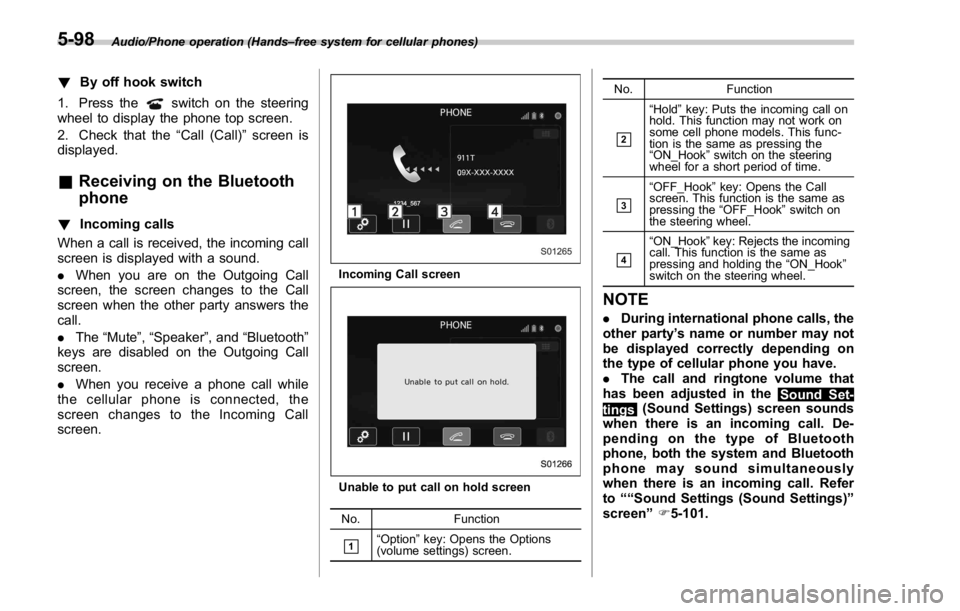
When a call is received, the incoming call
screen is displayed with a sound.
. When you are on the Outgoing Call
screen, the screen changes to the Call
screen when the other party answers the
call.
. The “ Mute ” , “ Speaker ” , and “ Bluetooth ”
keys are disabled on the Outgoing Call
screen.
. When you receive a phone call while
the cellular phone is connected, the
screen changes to the Incoming Call
screen. Incoming Call screen
Unable to put call on hold screen
No. Function
& 1
“ Option ” key: Opens the Options
(volume settings) screen. No. Function
& 2
“ Hold ” key: Puts the incoming call on
hold. This function may not work on
some cell phone models. This func-
tion is the same as pressing the
“ ON_Hook ” switch on the steering
wheel for a short period of time.
& 3
“ OFF_Hook ” key: Opens the Call
screen. This function is the same as
pressing the “ OFF_Hook ” switch on
the steering wheel.
& 4
“ ON_Hook ” key: Rejects the incoming
call. This function is the same as
pressing and holding the “ ON_Hook ”
switch on the steering wheel.
NOTE . During international phone calls, the
other party ’ s name or number may not
be displayed correctly depending on
the type of cellular phone you have.
. The call and ringtone volume that
has been adjusted in the
Sound Set-
tings (Sound Settings) screen sounds
when there is an incoming call. De-
pending on the type of Bluetooth
phone, both the system and Bluetooth
phone may sound simultaneously
when there is an incoming call. Refer
to ““ Sound Settings (Sound Settings) ”
screen ” F 5-101.5-98