ad blue SUBARU WRX 2016 Owner's Guide
[x] Cancel search | Manufacturer: SUBARU, Model Year: 2016, Model line: WRX, Model: SUBARU WRX 2016Pages: 594, PDF Size: 19.43 MB
Page 355 of 594
Audio/Phone operation (Hands – free system for cellular phones)
No. Function
& 2
“ Mute ” key: Mutes your voice to the
other party. Press the “ Mute ” key
again to deactivate the Mute mode.
This key is disabled in the Private
mode.
& 3
“ Speaker ” key: Changes the mode to
Private mode. The other party ’ s voice
emits from the cell phone. Press the
“ Speaker ” key again to deactivate the
Private mode.
& 4
“ ON_Hook ” key: Ends the call. You
return to the Phone (Menu) screen
when ending outgoing calls and the
previous screen when ending incom-
ing calls. This function is the same as
pressing and holding the “ ON_Hook ”
switch on the steering wheel.
& 5
“ Dialpad ” key: Opens the Call (Dia-
lpad) screen.
& 6
“ Switch Screen ” key: Switches the
screen to the Phone (Menu) screen.
& 7
“ Dialpad ” key: Allows you to make
DTMF (Dual Tone Multi Frequency)
calls. The numbers you enter are sent
as tone signals.
NOTE . When cellular phone call is changed
to hands-free call, the hands-free
screen will be displayed and its func-
tions can be operated on the screen.
. Changing between cellular phone
call and hands-free call can be per- formed by operating the cellular phone
directly.
. Transferring methods and opera-
tions will be different depending on
the type of cellular phone you have.
. For the operation of the cellular
phone, see the manual that comes with
it.
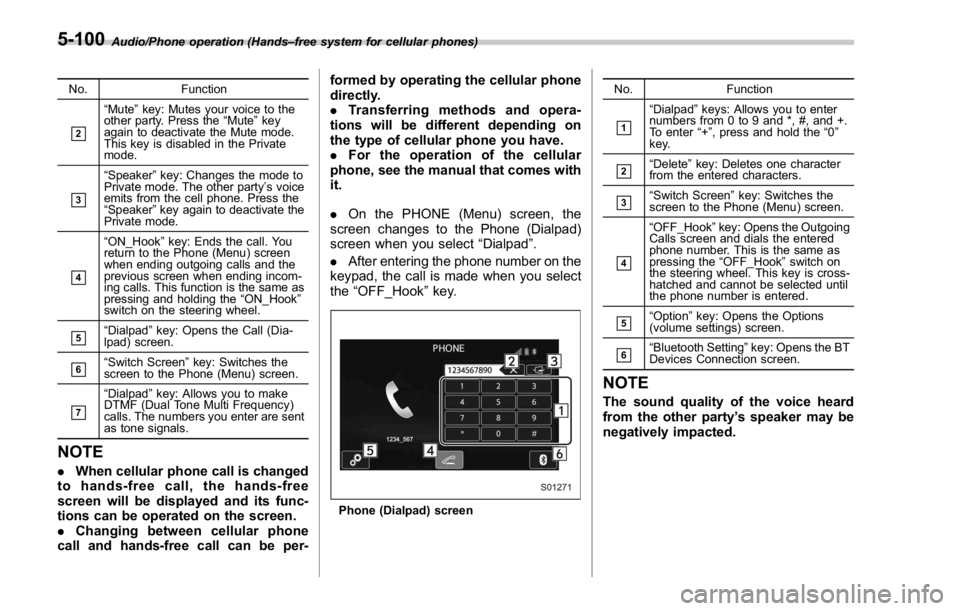
. On the PHONE (Menu) screen, the
screen changes to the Phone (Dialpad)
screen when you select “ Dialpad ” .
. After entering the phone number on the
keypad, the call is made when you select
the “ OFF_Hook ” key.
Phone (Dialpad) screen No. Function
& 1
“ Dialpad ” keys: Allows you to enter
numbers from 0 to 9 and *, #, and +.
To enter “ + ” , press and hold the “ 0 ”
key.
& 2
“ Delete ” key: Deletes one character
from the entered characters.
& 3
“ Switch Screen ” key: Switches the
screen to the Phone (Menu) screen.
& 4
“ OFF_Hook ” key: Opens the Outgoing
Calls screen and dials the entered
phone number. This is the same as
pressing the “ OFF_Hook ” switch on
the steering wheel. This key is cross-
hatched and cannot be selected until
the phone number is entered.
& 5
“ Option ” key: Opens the Options
(volume settings) screen.
& 6
“ Bluetooth Setting ” key: Opens the BT
Devices Connection screen.
NOTE The sound quality of the voice heard
from the other party ’ s speaker may be
negatively impacted.5-100
Page 356 of 594
Setup & Phone settings ! “ Sound Settings (Sound Settings) ”
screen
The call and ringtone volume can be
adjusted. A ringtone can be selected.
1. Display the “ PHONE ” screen. Refer to
“ Quick reference ” F 5-87.
2. Select
Option (Option).
3. Select the desired item to be set.
. Select to adjust the volume of the
telephone function.
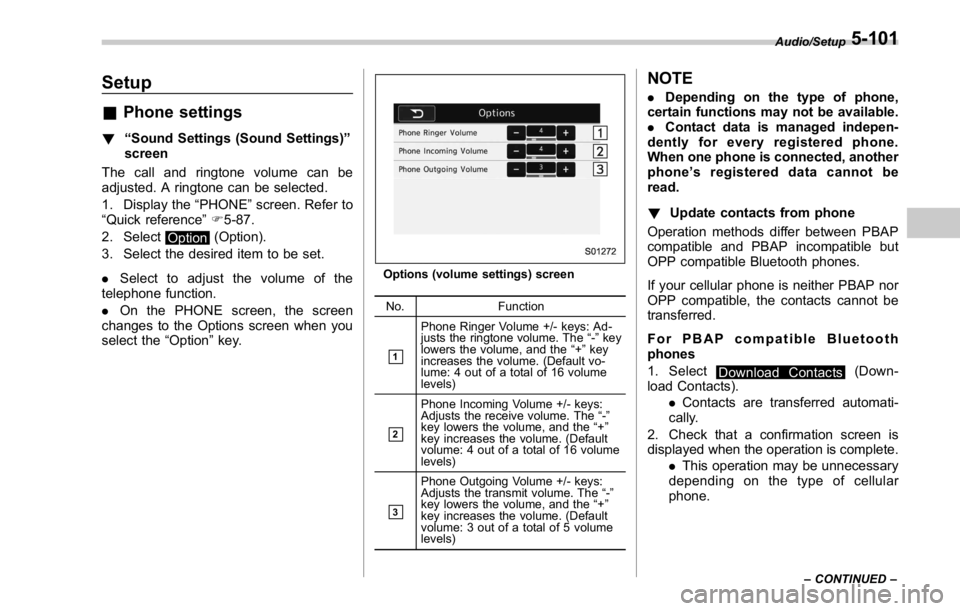
. On the PHONE screen, the screen
changes to the Options screen when you
select the “ Option ” key. Options (volume settings) screen
No. Function
& 1
Phone Ringer Volume +/- keys: Ad-
justs the ringtone volume. The “ - ” key
lowers the volume, and the “ + ” key
increases the volume. (Default vo-
lume: 4 out of a total of 16 volume
levels)
& 2
Phone Incoming Volume +/- keys:
Adjusts the receive volume. The “ - ”
key lowers the volume, and the “ + ”
key increases the volume. (Default
volume: 4 out of a total of 16 volume
levels)
& 3Phone Outgoing Volume +/- keys:
Adjusts the transmit volume. The “ - ”
key lowers the volume, and the “ + ”
key increases the volume. (Default
volume: 3 out of a total of 5 volume
levels) NOTE . Depending on the type of phone,
certain functions may not be available.
. Contact data is managed indepen-
dently for every registered phone.
When one phone is connected, another
phone ’ s registered data cannot be
read.
! Update contacts from phone
Operation methods differ between PBAP
compatible and PBAP incompatible but
OPP compatible Bluetooth phones.
If your cellular phone is neither PBAP nor
OPP compatible, the contacts cannot be
transferred.
For PBAP compatible Bluetooth
phones
1. Select
Download Contacts (Down-
load Contacts).
. Contacts are transferred automati-
cally.
2. Check that a confirmation screen is
displayed when the operation is complete.
. This operation may be unnecessary
depending on the type of cellular
phone. Audio/Setup
– CONTINUED –5-101
Page 357 of 594
Audio/Setup
. If another Bluetooth device is con-
nected when transferring contact data,
depending on the phone, the con-
nected Bluetooth device may need to
be disconnected.
. Depending on the type of Bluetooth
phone being connected, it may be
necessary to perform additional steps
on the phone.
For PBAP incompatible but OPP com-
patible Bluetooth phones
This operation cannot be performed while
driving.
1. Select
Download Contacts (Down-
load Contacts).
Select Download 1 Entry.
2. Transfer the contact data to the sys-
tem using a Bluetooth phone.
. This operation may be unnecessary
depending on the type of cellular
phone.
. To cancel this function, select
Can-
cel (Cancel).
3. Check that a confirmation screen is
displayed when the operation is complete. ! Deleting the contact data
1. Select
Delete All (Delete All).
2. Select
OK (OK) when the confirma-
tion screen appears.
Refer to “ By contacts list ” F 5-95.
NOTE For deleting data, all items are deleted.5-102
Page 358 of 594

What to do if... & Troubleshooting If there is a problem with the hands-free system or a Bluetooth device, first check the table below.
When using the hands-free system with a Bluetooth device Symptom Likely cause Solution Page
Cellular
phone This
system
The hands-free system or Bluetooth
device does not work. The connected device may not be a
compatible Bluetooth cellular phone. For USA customers, please visit
www.subaru.com for details. Outside of the
USA customers, contact your local dealer to
arrange a demonstration in order to confirm
whether or not the device can be paired with
the vehicle. * —
The Bluetooth version of the connected
cellular phone may be older than the
specified version. Use a cellular phone with Bluetooth version
1.1 or higher (recommended: Ver. 2.1 + EDR
or higher). * 5-83
*: For details, refer to the owner ’ s manual that came with the cellular phone. Audio/What to do if...
– CONTINUED –5-103
Page 359 of 594

Audio/What to do if...
When registering/connecting a cellular phone Symptom Likely cause Solution Page
Cellular
phone This
system
A cellular phone cannot be regis-
tered. An incorrect passcode was entered
on the cellular phone. Enter the correct passcode on the cellular phone. * —
The registration operation has not
been completed on the cellular phone
side. Complete the registration operation on the cellular
phone (approve registration on the phone). * —
Old registration information remains
on either this system or the cellular
phone. Delete the existing registration information from
both this system and the cellular phone, then
register the cellular phone you wish to connect to
this system. *5-84
A Bluetooth connection cannot be
made. Another Bluetooth device is already
connected. Manually connect the cellular phone you wish to
use to this system. — 5-84
Bluetooth function is not enabled on
the cellular phone. Enable the Bluetooth function on the cellular phone. * —
Automatic Bluetooth connection on
this system is set to off. Set automatic Bluetooth connection on this system
to on when the ignition switch is turned to the “ ACC ”
or “ ON ” position. — 5-84
“ Unable to dial. Please check your
phone. (Unable to dial. Please
check your phone.) ” Bluetooth function is not enabled on
the cellular phone. Enable the Bluetooth function on the cellular phone. * —
Old registration information remains
on either this system or the cellular
phone. Delete the existing registration information from
both this system and the cellular phone, then
register the cellular phone you wish to connect to
this system. * 5-84
*: For details, refer to the owner ’ s manual that came with the cellular phone.5-104
Page 361 of 594

Audio/What to do if...
In other situations Symptom Likely cause Solution Page
Cellular
phone This
system
Even though all conceivable mea-
sures have been taken, the symptom
status does not change. The cellular phone is not close enough
to this system. Bring the cellular phone closer to this system. ——
The cellular phone is the most likely
cause of the symptom. Turn the cellular phone off, remove and
reinstall the battery pack, and then restart the
cellular phone. * —
Enable the cellular phone ’ s Bluetooth con-
nection. * —
Stop the cellular phone ’ s security software
and close all applications. * —
Before using an application installed on the
cellular phone, carefully check its source and
how its operation might affect this system. * —
*: For details, refer to the owner ’ s manual that came with the cellular phone.5-106
Page 366 of 594

Commands for changing the radio mode Voice
command Phrase Function
AM mode
change Change to
AM Switch to AM
mode
Change to
AM1 Switch to AM
mode band 1
Change to
AM2 Switch to AM
mode band 2
FM mode
change Change to
FM Switch to FM
mode
Change to
FM1 Switch to FM
mode band 1
Change to
FM2 Switch to FM
mode band 2
Change to
FM3 Switch to FM
mode band 3
XM radio
mode change Change to
SiriusXM Switch to XM
mode
Bluetooth
Audio mode
change Change to BT
Audio Switch to
Bluetooth
Audio mode
CD mode
change Change to
CD Switch to CD
mode
USB mode
change Change to
USB Switch to
USB mode
iPod mode
change Change to
iPod Switch to iPod
mode
Aha radio
mode change Change to
Aha Switch to Aha
radio mode Voice
command Phrase Function
Pandora
mode change Change to
Pandora Switch to
Pandora
mode
AUX mode
change Change to
AUX Switch to
AUX mode
Commands for Hands Free Voice
command Phrase Function
Dial number
calling Dial Number
? <0-9, +, *,
#> ? Change
number, Dial Places a call
to the said
phone num-
berDial <0-9, +,
*, #> ?
Change num-
ber, Dial
Contacts
(Phonebook) Contacts,
Phonebook
?
? <1-5> ?
Dial Make a call
by using the
phonebook
Call
? <1-5> ?
Dial Voice
command Phrase Function
Recent calls Call History
? Incoming
call, Outgoing
call ? Next
(page), Pre-
vious (page)
? <1-5> ?
Dial Make a call
by using the
call history
Incoming
calls Incoming
Calls Display the
call history
screen
Outgoing
calls Outgoing
Calls Display the
call history
screen
Redial Redial Places a call
to the phone
number of the
latest out-
going call
Callback Callback Places a call
to the phone
number of the
latest incom-
ing call
Select phone Select Phone
? <1-5> Display the
phone select
screen
Show phone
menu Phone Menu Display the
hands free
top screenAudio/Command list
– CONTINUED –5-111
Page 369 of 594

Audio/Appendix
Commands for Bluetooth audio control Voice
command Phrase Function
Pause Pause Pause play
Track up,
next track Track Up Select the
next track
Track down,
previous track Track Down Select the
current track
1 Track re-
peat 1 Track Re-
peat Repeat single
track
Repeat all Repeat All Repeat all
tracks
Group repeat Group Re-
peat Repeat tracks
on group
Shuffle all Shuffle All Shuffle all
tracks
Group shuffle Group Shuffle Shuffle tracks
on group
Shuffle OFF Shuffle OFF Turn off shuf-
fleAppendix & Certification . Bluetooth
The Bluetooth word mark and logo are
registered trademarks of Bluetooth SIG,
Inc. and any use of such marks by Clarion
Co., Ltd. is under license.
. SiriusXM Satellite Radio
SiriusXM TM
and all related marks and
logos are trademarks of SiriusXM Radio
Inc. All rights reserved.
. Pandora
Pandora, the Pandora logo, and other
Pandora marks are trademarks or regis-
tered trademarks of Pandora Media, Inc.,
or its subsidiaries worldwide.
If you have any issues with the Pandora
application on your mobile phone, please
direct them to
[email protected]. . iPod
“ Made for iPod ” and “ Made for iPhone ”
mean that an electronic accessory has
been designed to connect specifically to
iPod or iPhone respectively, and has been
certified by the developer to meet Apple
performance standards. Apple is not
responsible for the operation of this device
or its compliance with safety and regula-
tory standards. Please note that the use of
this accessory with iPod or iPhone may
affect wireless performance.
iPhone, iPod, iPod classic, iPod nano,
iPod touch, and iTunes are trademarks of
Apple Inc., registered in the U.S. and other
countries.
. How to get the source code using
the open source
This system implements software using
the open source. For customers who
would like to get the source code of the
software, it is available by downloading it
from the web site of Clarion Co., Ltd.
For details, refer to the following web site.
http://www.clarion.com/us/en/support/in-
dex.html5-114
Page 577 of 594

14-2 Index
A
Abbreviation ................................................................... 2
ABS (Anti-lock Brake System) ..................................... 7-36
Warning light ......................................................... 3-20
Access key ................................................................. 2-9
Warning light ................................................. 3-28, 3-29
Accessories ....................................................... 5-3, 11-44
Accessory power outlet ................................................. 6-8
Air cleaner element ................................................... 11-19
Air conditioner
Automatic climate control .......................................... 4-5
Manual climate control .............................................. 4-6
Air flow mode .............................................................. 4-6
Alarm system ............................................................ 2-25
All-Wheel Drive warning light ....................................... 3-25
Aluminum wheel ....................................................... 11-38
Cleaning ............................................................... 10-3
Antenna system ........................................................... 5-2
Anti-lock Brake System (ABS) ..................................... 7-36
Arming the system ..................................................... 2-27
Ashtray ..................................................................... 6-10
AT OIL TEMP warning light ......................................... 3-18
Audio
Antenna system ....................................................... 5-2
Set......................................................................... 5-3
Audio/visual remote controls ........................................ 5-18
Steering switches ................................................... 5-18
Auto-dimming mirror/compass ........................... 3- 104, 3-105
Automatic headlight beam leveler ................................. 3-99
Warning light ......................................................... 3-35 Automatic Locking Retractor/Emergency Locking
Retractor (ALR/ELR) ................................................ 1-13
Automatic transmission
Oil temperature warning light (AT OIL TEMP) ............. 3-18
B
Basic information before use ......................................... 5-5
Connecting and disconnecting a USB memory/portable
device .................................................................. 5-6
Entering letters and numbers/list screen operation ... .... 5-8
Initial screen ........................................................... 5-5
Loading and unloading a disc ................................... 5-5
Screen adjustment ................................................... 5-9
Touch screen gestures ............................................. 5-7
Touch screen operation ............................................ 5-7
Basic operation .......................................................... 5-12
Battery .................................................................... 11-41
Drainage prevention function ..................................... 2-7
Jump starting .......................................................... 9-9
Replacement (access key) ..................................... 11-50
Replacement (keyless access with push-button
start system) .............................................. 2-18, 11-50
Replacement (remote keyless entry system) .... 2-24, 11-51
Replacement (transmitter) ...................................... 11-51
Bluetooth ®
settings ..................................................... 5-81
Registering/connecting Bluetooth ®
device .................. 5-81
Setting Bluetooth details .......................................... 5-84
Booster seat .............................................................. 1-28
Bottle holder ............................................................... 6-7
Brake
Assist .................................................................... 7-35
Page 582 of 594

Keyless access with push-button start system .. ............... 2-9
Disabling keyless access functions ........................... 2-16
Locking and unlocking doors ................................... 2-13
Opening trunk lid ................................................... 2-15
Warning chimes and warning light .................... 2-16, 3-28
When access key does not operate
properly ....................................... 2-18, 3-8, 7-14, 9-16
L
Lap belt pretensioner .................................................. 1-18
Leather seat materials ................................................ 10-5
License plate light ..................................................... 11-49
Light
Control switch ........................................................ 3-94
Daytime running. .................................................... 3-97
Dome ..................................................................... 6-2
Front fog ...................................................... 3-99, 11-47
Front position ................................................ 3-95, 3-99
Front side marker ................................................. 12-16
Ignition switch .......................................................... 3-6
License plate ........................................................ 11-49
Map ....................................................................... 6-2
Rear combination .................................................. 11-48
Rear side marker light ........................................... 11-48
Stop light ............................................................. 11-48
Tail light ............................................................... 11-48
Turn signal ................................................... 3-97, 11-48
Limited slip differential (LSD) ....................................... 7-33
Loading your vehicle .................................................. 8-10
Low fuel warning light ................................................. 3-24
Low tire pressure warning light .................................... 3-19 Lower and tether anchorage ........................................ 1-29
LSD (Limited slip differential) ........................................ 7-33
M
Maintenance
Precautions ........................................................... 11-3
Schedule ............................................................... 11-3
Seatbelt. ................................................................ 1-16
Tips ...................................................................... 11-6
Tools ...................................................................... 9-3
Malfunction indicator light (check engine warning light) .... 3-16
Manual
Climate control .................................................. 4-5, 4-6
Mode (continuously variable transmission) ................. 7-26
Seat ....................................................................... 1-4
Transmission ......................................................... 7-17
Transmission oil ........................................... 11-23, 12-6
Map light .................................................................... 6-2
Media operation ......................................................... 5-50
AUX. ..................................................................... 5-73
Bluetooth audio ...................................................... 5-60
CD ....................................................................... 5-50
iPod ...................................................................... 5-56
USB memory ......................................................... 5-53
Meters and gauges ...................................................... 3-8
Mirror defogger ........................................................ 3-112
Mirrors .................................................................... 3-103
Moonroof ...........................................................
2-38, 9-18
Multi function display ................................................... 3-48 Index
14-7