ad blue SUBARU WRX 2016 User Guide
[x] Cancel search | Manufacturer: SUBARU, Model Year: 2016, Model line: WRX, Model: SUBARU WRX 2016Pages: 594, PDF Size: 19.43 MB
Page 316 of 594
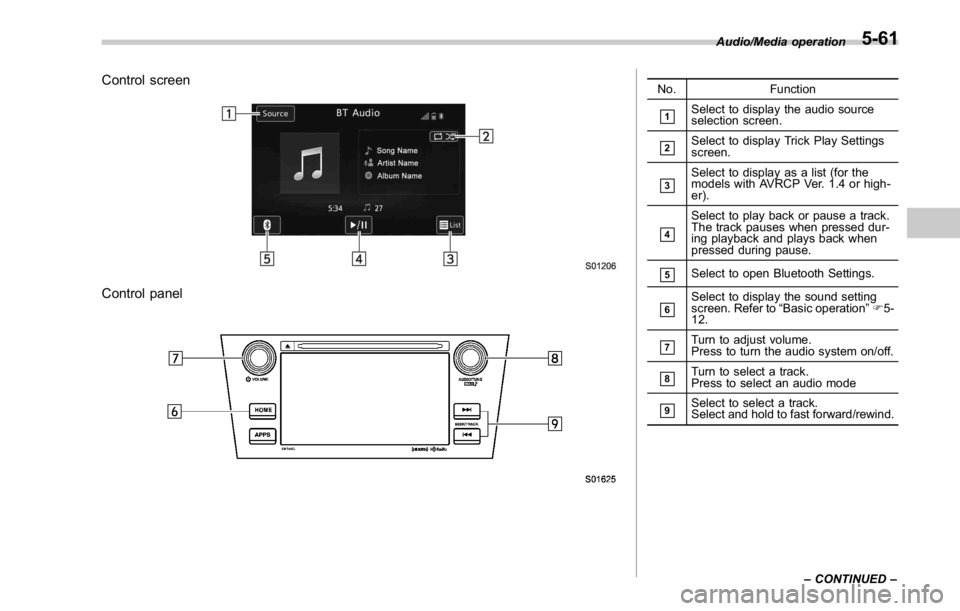
Control screen
Control panel No. Function
& 1
Select to display the audio source
selection screen.
& 2
Select to display Trick Play Settings
screen.
& 3
Select to display as a list (for the
models with AVRCP Ver. 1.4 or high-
er).
& 4
Select to play back or pause a track.
The track pauses when pressed dur-
ing playback and plays back when
pressed during pause.
& 5
Select to open Bluetooth Settings.
& 6
Select to display the sound setting
screen. Refer to “ Basic operation ” F 5-
12.
& 7
Turn to adjust volume.
Press to turn the audio system on/off.
& 8
Turn to select a track.
Press to select an audio mode
& 9
Select to select a track.
Select and hold to fast forward/rewind. Audio/Media operation
– CONTINUED –5-61
Page 318 of 594
WARNING. Do not operate the player ’ s con-
trols or connect to the Bluetooth
audio system while driving.
. Your audio unit is fitted with
Bluetooth antennas. People with
implantable cardiac pacemakers,
cardiac resynchronization ther-
apy-pacemakers or implantable
cardioverter defibrillators should
maintain a reasonable distance
between themselves and the
Bluetooth antennas. The radio
waves may affect the operation
of such devices.
. Before using Bluetooth devices,
users of any electrical medical
device other than implantable
cardiac pacemakers, cardiac re-
synchronization therapy-pace-
makers or implantable cardiover-
ter defibrillators should consult
the manufacturer of the device
for information about its opera-
tion under the influence of radio
waves. Radio waves could have
unexpected effects on the opera-
tion of such medical devices. CAUTIONDo not leave your portable player in
the vehicle. In particular, high tem-
peratures inside the vehicle may
damage the portable player.
NOTE . Depending on the Bluetooth device
that is connected to the system, the
music may start playing when selecting
while it is paused. Conversely, the
music may pause when selecting
while it is playing.
. In the following conditions, the sys-
tem may not function:
– The Bluetooth device is turned
off.
– The Bluetooth device is not con-
nected.
– The Bluetooth device has a low
battery.
. Itmaytaketimetoconnectthe
phone when Bluetooth audio is being
played.
. For operating the portable player,
see the instruction manual that comes
with it.
. If the Bluetooth device is discon-
nected due to poor reception from the
Bluetooth network when the ignition switch is in the “ ACC ” or “ ON ” posi-
tion, the system will automatically
reconnect to the portable player.
. If the Bluetooth device is discon-
nected on purpose, such as it was
turned off, this does not happen.
Reconnect the portable player manu-
ally.
. Bluetooth device information is re-
gistered when the Bluetooth device is
connected to the Bluetooth audio sys-
tem. When selling or disposing of the
vehicle, remove the Bluetooth audio
information from the system. Refer to
“ Other settings ” F 5-10.
! Connecting a Bluetooth device
To use the Bluetooth audio system, it is
necessary to register a Bluetooth device
with the system.
Registering an additional device
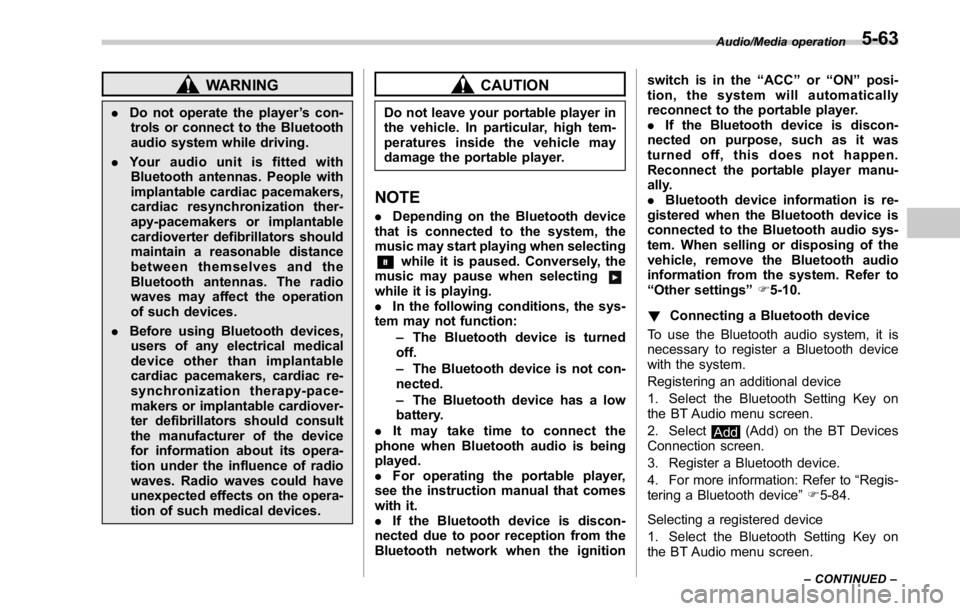
1. Select the Bluetooth Setting Key on
the BT Audio menu screen.
2. Select
Add (Add) on the BT Devices
Connection screen.
3. Register a Bluetooth device.
4. For more information: Refer to “ Regis-
tering a Bluetooth device ” F 5-84.
Selecting a registered device
1. Select the Bluetooth Setting Key on
the BT Audio menu screen. Audio/Media operation
– CONTINUED –5-63
Page 319 of 594
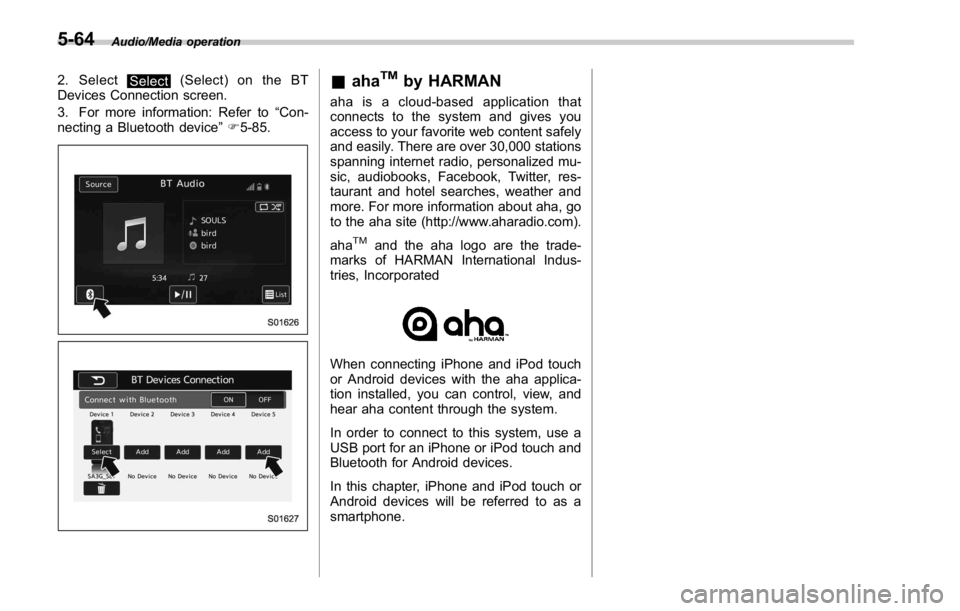
Audio/Media operation
2. Select
Select (Select) on the BT
Devices Connection screen.
3. For more information: Refer to “ Con-
necting a Bluetooth device ” F 5-85.
& aha TM
by HARMAN aha is a cloud-based application that
connects to the system and gives you
access to your favorite web content safely
and easily. There are over 30,000 stations
spanning internet radio, personalized mu-
sic, audiobooks, Facebook, Twitter, res-
taurant and hotel searches, weather and
more. For more information about aha, go
to the aha site (http://www.aharadio.com).
aha TM
and the aha logo are the trade-
marks of HARMAN International Indus-
tries, Incorporated
When connecting iPhone and iPod touch
or Android devices with the aha applica-
tion installed, you can control, view, and
hear aha content through the system.
In order to connect to this system, use a
USB port for an iPhone or iPod touch and
Bluetooth for Android devices.
In this chapter, iPhone and iPod touch or
Android devices will be referred to as a
smartphone.5-64
Page 323 of 594
Audio/Media operation
WARNING. Do not connect or operate the
smartphone while driving.
. Be sure to park the vehicle in a
safe location before connecting
or operating the smartphone.
CAUTION. Do not leave your smartphone in
the car. In particular, high tem-
peratures inside the vehicle may
damage the smartphone.
. Do not push down on or apply
unnecessary pressure to the
smartphone while it is connected
as this may damage the smart-
phone or its terminal.
. Do not insert foreign objects into
the port as this may damage the
smartphone or its terminal.
NOTE . For safety reasons, certain func-
tions are not available while your
vehicle is in motion.
. In order to maximize signal recep-
tion, performance and precision of the
smartphone, please ensure the smart- phone is placed as close to the system
as possible, while ensuring it is stowed
and secure while driving.
. Use USB cables of iPhone/iPod
touch accessories.
. When the ignition switch is in the
“ ACC ” or “ ON ” position, the battery of
the connected iPhone/iPod touch is
charged.
. iPhone/iPod touch may not be re-
cognized when the ignition switch is in
the “ ACC ” or “ ON ” position. In this
case, remove the iPhone/iPod touch
and reconnect it.
. The accuracy of the displayed in-
formation or the signal reception per-
formance depends on the smartphone
or the connected device, and it ’ s wire-
less connection.
. Since the aha application uses sig-
nals from GPS satellites and wireless
communication lines, it may not work
properly in the following locations.
– In a tunnel
– In underground parking lots
– Outside wireless communication
range, such as some countryside
areas
– Where the wireless communica-
tion network is congested, or where
communications are restricted
. Depending on the circumstances and environment, the signal may be
weak or not be received. In such cases,
an error may occur.
. Top 35 entries in the preset station
list on the smartphone are displayed.
When there are more than 35 entries in
the preset station list, change the order
of the entries in the list on the smart-
phone. You can change the priority of
your preset stations within the aha
application (after disconnected from
this system) to modify the station list
shown on the screen. Please see your
smartphone aha application “ Edit Pre-
sets (in Main menu) ” to modify this list.
. For operating the smartphone, see
the instruction manual that comes with
it.
. If there are multiple music files
stored on your iPhone or iPod touch,
it may take some time until playback
starts.
. Playback may be intermittent when
youswitchtostreamingBluetooth
audio from aha on your smartphone
device.
. When connecting the device via
Bluetooth, the communication speed
may become slower than via USB.5-68
Page 326 of 594

For Android device users Android OS Specification Profile
Android Ver. 2.2 or Ver. 2.3 Bluetooth Specification Ver. 1.1 or higher
(Ver. 2.0 + EDR or higher is recommended) . aha Connect Binary API over SPP
. Digital audio by A2DP
NOTE The available functions may vary depending on the type of Android device. Audio/Media operation
– CONTINUED –5-71
Page 327 of 594
Audio/Media operation
! Using aha application
Ifyouconnectasmartphonetothis
system after starting a supported aha
application on the smartphone, you can
display and operate the aha application
displayed on the smartphone on the
system screen.
NOTE . Connect a smartphone to the USB
port before turning the ignition switch
to the “ ACC ” or “ ON ” position.
. When it is not played back normally,
press the POWER/VOLUME knob twice
while a USB cable is connected.
1. Run the aha application on your
smartphone.
2. Connect the iPhone/iPod touch to the
USB port or connect the Android device
by utilizing the Bluetooth connection (SPP
and A2DP profile).
. For details about connecting an
iPhone/iPod touch: Refer to “ Connect-
ing and disconnecting a USB memory/
portable device ” F 5-6.
. For details about registering or con-
necting an Android device: Refer to
“ Registering/connecting Bluetooth ®
device ” F 5-81.
Press AUDIO/TUNE knob twice to switch
between iPhone and Android. 3. Select “ aha ” on the “ Select Audio
Source (Select Audio Source) ” screen.
Refer to “ Basic operation ” F 5-12.
Select “ aha ” on the “ Apps (APPS) ” screen.
Refer to “ STARLINK ” F 5-30.
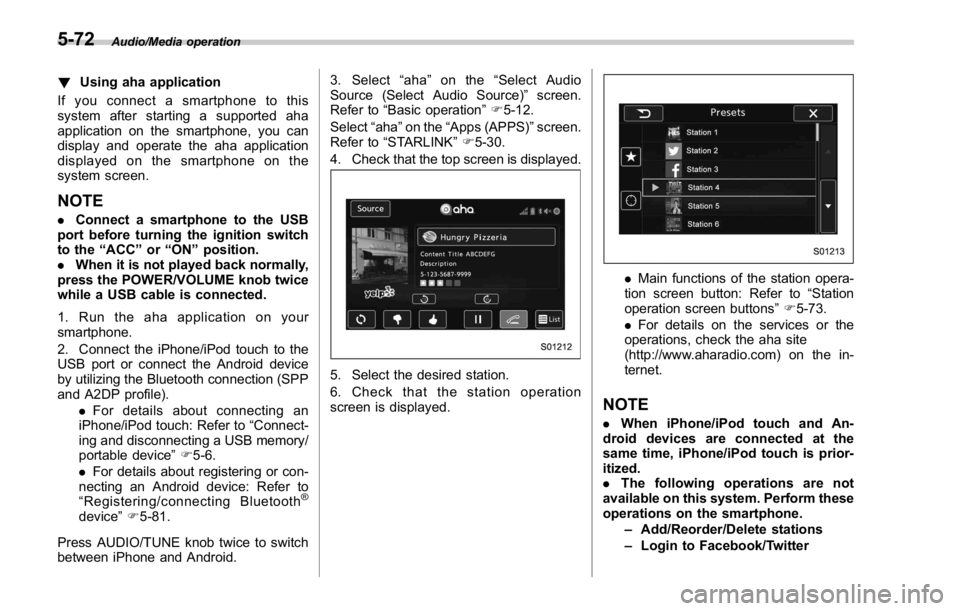
4. Check that the top screen is displayed.
5. Select the desired station.
6. Check that the station operation
screen is displayed. . Main functions of the station opera-
tion screen button: Refer to “ Station
operation screen buttons ” F 5-73.
. For details on the services or the
operations, check the aha site
(http://www.aharadio.com) on the in-
ternet.
NOTE . When iPhone/iPod touch and An-
droid devices are connected at the
same time, iPhone/iPod touch is prior-
itized.
. The following operations are not
available on this system. Perform these
operations on the smartphone.
– Add/Reorder/Delete stations
– Login to Facebook/Twitter5-72
Page 331 of 594
Audio/Media operation
WARNINGDo not operate the player ’ s controls
or connect the portable audio device
while driving.
CAUTION. Do not leave portable audio de-
vice in the vehicle. The tempera-
ture inside the vehicle may be-
come high, resulting in damage
to the player.
. Do not push down on or apply
unnecessary pressure to the por-
table audio device while it is
connected as this may damage
the portable audio device or its
terminal.
. Do not insert foreign objects into
the port as this may damage the
portable audio device or its term-
inal. & Pandora ®
Pandora is an application for a smart-
phone. This can automatically select and
play recommended tracks.
By rating the track currently playing, tracks
that better match your preference will be
recommended.
In order to connect to this system, use a
USB port for an iPhone or iPod touch and
Bluetooth for Android devices.
Depending on differences between mod-
els or software version etc., some models
might be incompatible with this system.
This function is not available if the
Pandora application has not been in-
stalled on the smartphone.
NOTE . Connect a smartphone to the USB
port before turning the ignition switch
to the “ ACC ” or “ ON ” position.
. When it is not played back normally,
press the POWER/VOLUME knob twice
while a USB cable is connected.
! Overview
The Pandora operation screen can be
reached by the following methods:
. Connecting a Pandora device. Refer to
“ Connecting a Bluetooth device ” F 5-85 or “ Connecting and disconnecting a USB
memory/portable device ” F 5-6.
. Select
Pandora (Pandora) on the
“ Select Audio Source (Select Audio
Source) ” screen. Refer to “ Selecting an
audio source ” F 5-13.
. Select
Pandora (Pandora) on the
“ APPS (APPS) ” screen. Refer to
“ STARLINK ” F 5-30.5-76
Page 336 of 594
Bluetooth ®
settings& Registering/connecting
Bluetooth ®
deviceThe Bluetooth ®
word mark and logos are
registered trademarks owned by Bluetooth
SIG, Inc.
! Registering a Bluetooth phone for
the first time
To use the hands-free system, it is
necessary to register a Bluetooth phone
with the system.
Once the phone has been registered, it is
possible to use the hands-free system.
This operation cannot be performed while
driving.
For details about registering a Bluetooth
device: Refer to “ Registering a Bluetooth
device ” F 5-84.
1. Turn the Bluetooth connection setting
of your cellular phone on.
. This function is not available when
Bluetooth connection setting of your
cellular phone is set to off.
2. Select
and select
SETTINGS
(SETTINGS) to display the SETTINGS screen.
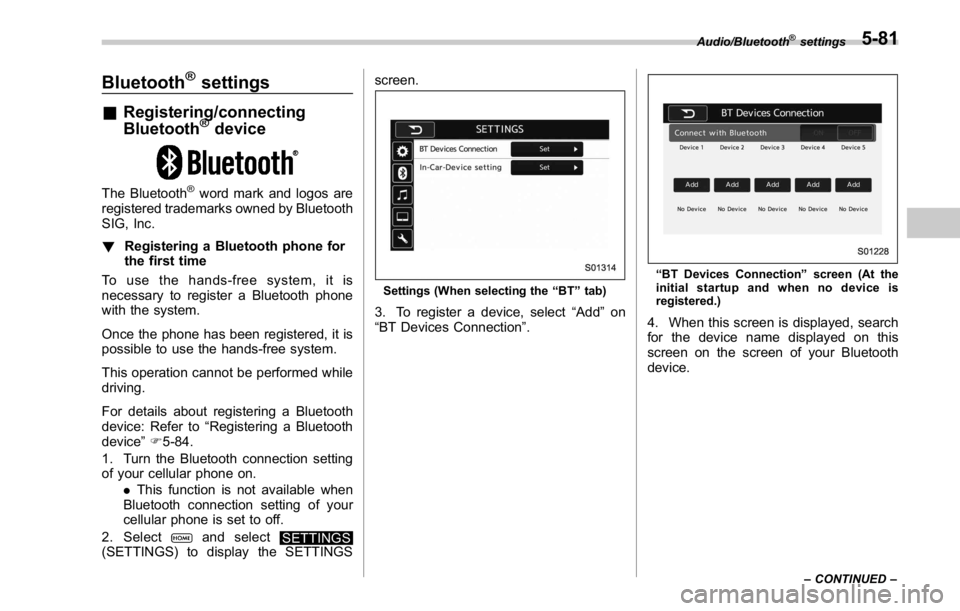
Settings (When selecting the “ BT ” tab)
3. To register a device, select “ Add ” on
“ BT Devices Connection ” . “ BT Devices Connection ” screen (At the
initial startup and when no device is
registered.)
4. When this screen is displayed, search
for the device name displayed on this
screen on the screen of your Bluetooth
device. Audio/Bluetooth ®
settings
– CONTINUED –5-81
Page 337 of 594

Audio/Bluetooth ®
settings
When “ Add ” is selected (Waiting for the
connection request from a device).
. For details about operating the Blue-
tooth device, see the manual that
comes with it.
. To cancel the registration, select
Cancel (Cancel).
5. Register the Bluetooth device using
your Bluetooth device.
. A PIN-code is not required for SSP
(Secure Simple Pairing) compatible
Bluetooth devices. Depending on the
type of Bluetooth device being con-
nected, a message confirming regis-
tration may be displayed on the Blue-
tooth device ’ s screen. Respond and
operate the Bluetooth device accord-
ing to the confirmation message.
6. Check that the screen is displayed when registration is complete.
. The system waits for connection
requests coming from the registered
device.
. At this stage, the Bluetooth func-
tions are not yet available.
! Registering a Bluetooth Audio de-
vice for the first time
To use the Bluetooth Audio, it is necessary
to register an audio device with the
system.
Once the player has been registered, it is
possible to use the Bluetooth Audio.
This operation cannot be performed while
driving.
For details about registering a Bluetooth
device: Refer to “ Registering a Bluetooth
device ” F 5-84.
The device registration procedure is the
same for both the hands-free system and
Bluetooth audio.5-82
Page 338 of 594

! Profiles
This system supports the following services. Bluetooth Device Spec. Function Requirements Recommendations
Bluetooth Phone/Bluetooth
Audio Device Bluetooth Specification Registering a Bluetooth de-
vice Ver. 1.1 Ver. 2.1 + EDR
Bluetooth Device Profile Function Requirements Recommendations
Bluetooth Phone HFP (Hands-Free Profile) Hands-free system Ver. 1.0 Ver. 1.5
OPP (Object Push Profile)
Transferring the contacts Ver. 1.1 Ver. 1.1
PBAP (Phone Book Access
profile) Ver. 1.0 Ver. 1.0
MAP (Message Access
Profile) Bluetooth phone message — Ver. 1.0
SPP (Serial Port Profile) Connecting a Bluetooth
phone — Ver. 1.1
Bluetooth Audio Device A2DP (Advanced Audio
Distribution Profile)
Bluetooth audio system Ver. 1.0 Ver. 1.2
AVRCP (Audio/Video Re-
mote Control Profile) Ver. 1.0 Ver. 1.4
NOTE . If your cellular phone does not support HFP, registering the Bluetooth phone or using OPP, PBAP, MAP or SPP profiles
individually will not be possible.
. If the connected Bluetooth device version is older than recommended or incompatible, the Bluetooth device function may
not work properly.
. For USA customers, please visit www.subaru.com for details. Outside of the USA customers, contact your local dealer to
arrange a demonstration in order to confirm whether or not the device can be paired with the vehicle. Audio/Bluetooth ®
settings
– CONTINUED –5-83