ignition SUBARU WRX 2016 Manual PDF
[x] Cancel search | Manufacturer: SUBARU, Model Year: 2016, Model line: WRX, Model: SUBARU WRX 2016Pages: 594, PDF Size: 19.43 MB
Page 198 of 594
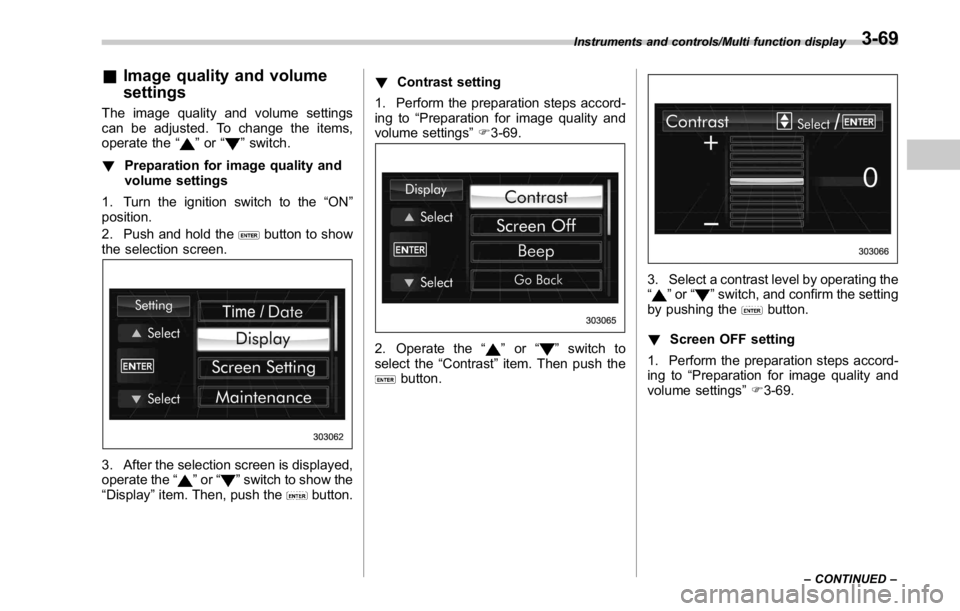
& Image quality and volume
settings The image quality and volume settings
can be adjusted. To change the items,
operate the “
” or “ ” switch.
! Preparation for image quality and
volume settings
1. Turn the ignition switch to the “ ON ”
position.
2. Push and hold the
button to show
the selection screen.
3. After the selection screen is displayed,
operate the “
” or “ ” switch to show the
“ Display ” item. Then, push the
button. ! Contrast setting
1. Perform the preparation steps accord-
ing to “ Preparation for image quality and
volume settings ” F 3-69.
2. Operate the “ ” or “ ” switch to
select the “ Contrast ” item. Then push the
button. 3. Select a contrast level by operating the
“
” or “ ” switch, and confirm the setting
by pushing the
button.
! Screen OFF setting
1. Perform the preparation steps accord-
ing to “ Preparation for image quality and
volume settings ” F 3-69.Instruments and controls/Multi function display
– CONTINUED –3-69
Page 199 of 594
Instruments and controls/Multi function display
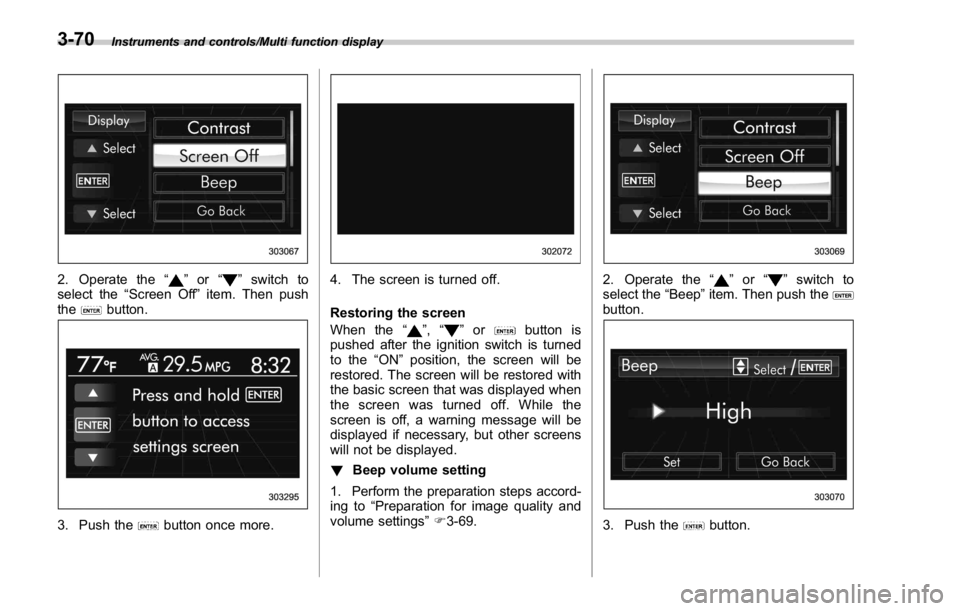
2. Operate the “ ” or “ ” switch to
select the “ Screen Off ” item. Then push
the
button.
3. Push the button once more. 4. The screen is turned off.
Restoring the screen
When the “
” , “ ” or button is
pushed after the ignition switch is turned
to the “ ON ” position, the screen will be
restored. The screen will be restored with
the basic screen that was displayed when
the screen was turned off. While the
screen is off, a warning message will be
displayed if necessary, but other screens
will not be displayed.
! Beep volume setting
1. Perform the preparation steps accord-
ing to “ Preparation for image quality and
volume settings ” F 3-69. 2. Operate the “ ” or “ ” switch to
select the “ Beep ” item. Then push the
button.
3. Push the button.3-70
Page 200 of 594
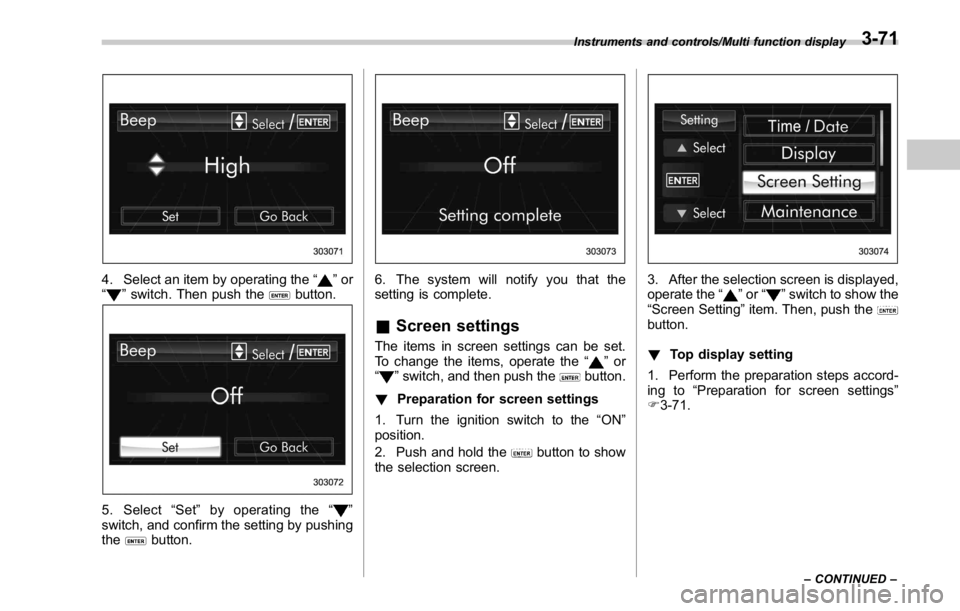
4. Select an item by operating the “ ” or
“
” switch. Then push the button.
5. Select “ Set ” by operating the “ ”
switch, and confirm the setting by pushing
the
button. 6. The system will notify you that the
setting is complete.
& Screen settings The items in screen settings can be set.
To change the items, operate the “
” or
“
” switch, and then push the button.
! Preparation for screen settings
1. Turn the ignition switch to the “ ON ”
position.
2. Push and hold the
button to show
the selection screen. 3. After the selection screen is displayed,
operate the “
” or “ ” switch to show the
“ Screen Setting ” item. Then, push the
button.
! Top display setting
1. Perform the preparation steps accord-
ing to “ Preparation for screen settings ”
F 3-71.Instruments and controls/Multi function display
– CONTINUED –3-71
Page 208 of 594
6. The system will notify you that the
setting is complete.
& Maintenance settings The items in the maintenance settings can
be set. To change the items, operate the
“
” or “ ” switch.
! Preparation for maintenance set-
tings
1. Turn the ignition switch to the “ ON ”
position.
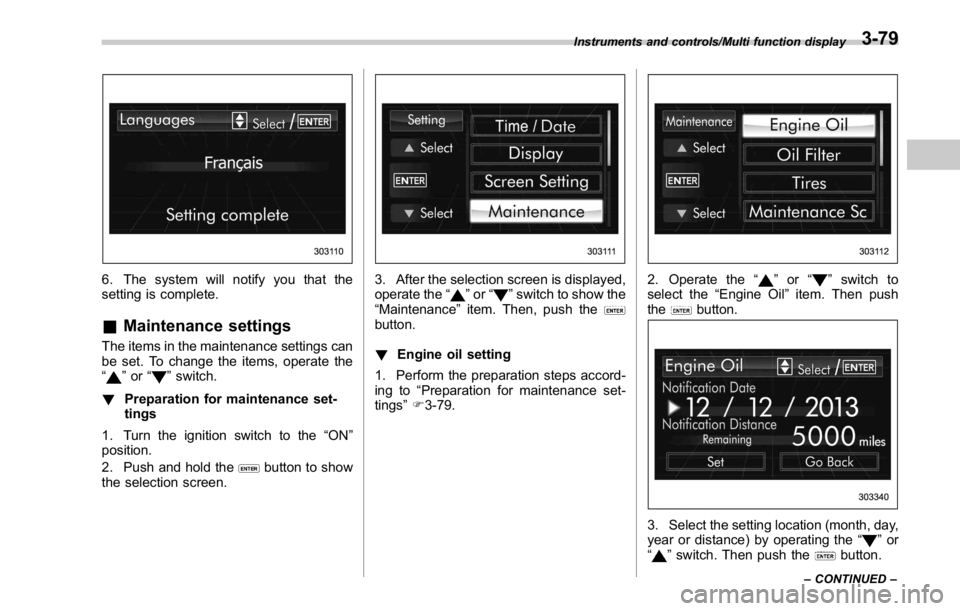
2. Push and hold the
button to show
the selection screen. 3. After the selection screen is displayed,
operate the “
” or “ ” switch to show the
“ Maintenance ” item. Then, push the
button.
! Engine oil setting
1. Perform the preparation steps accord-
ing to “ Preparation for maintenance set-
tings ” F 3-79. 2. Operate the “ ” or “ ” switch to
select the “ Engine Oil ” item. Then push
the
button.
3. Select the setting location (month, day,
year or distance) by operating the “
” or
“
” switch. Then push the button.Instruments and controls/Multi function display
– CONTINUED –3-79
Page 211 of 594
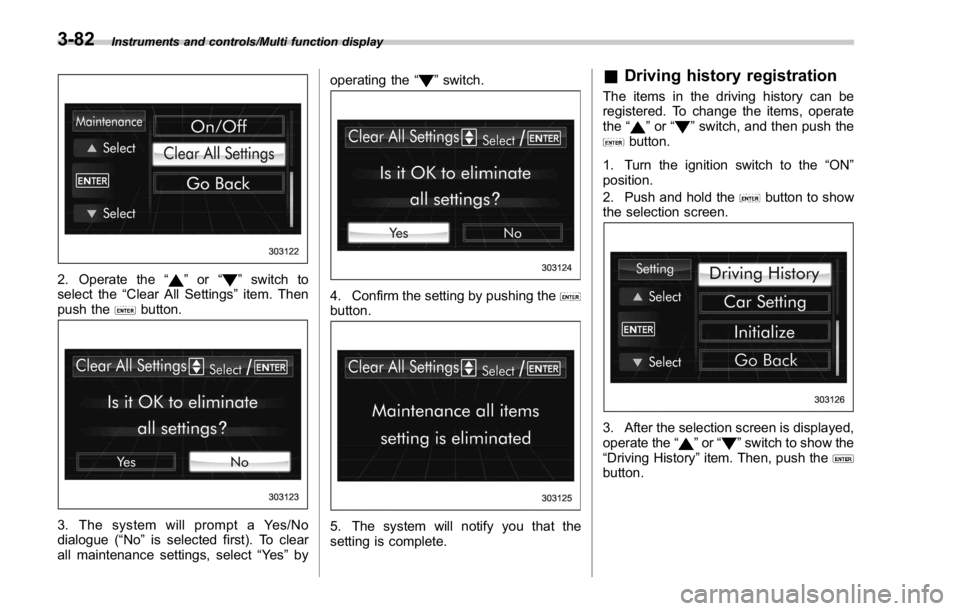
Instruments and controls/Multi function display
2. Operate the “ ” or “ ” switch to
select the “ Clear All Settings ” item. Then
push the
button.
3. The system will prompt a Yes/No
dialogue ( “ No ” is selected first). To clear
all maintenance settings, select “ Ye s ” by operating the “
” switch.
4. Confirm the setting by pushing the
button.
5. The system will notify you that the
setting is complete. & Driving history registration The items in the driving history can be
registered. To change the items, operate
the “
” or “ ” switch, and then push the
button.
1. Turn the ignition switch to the “ ON ”
position.
2. Push and hold the
button to show
the selection screen.
3. After the selection screen is displayed,
operate the “
” or “ ” switch to show the
“ Driving History ” item. Then, push the
button.3-82
Page 212 of 594
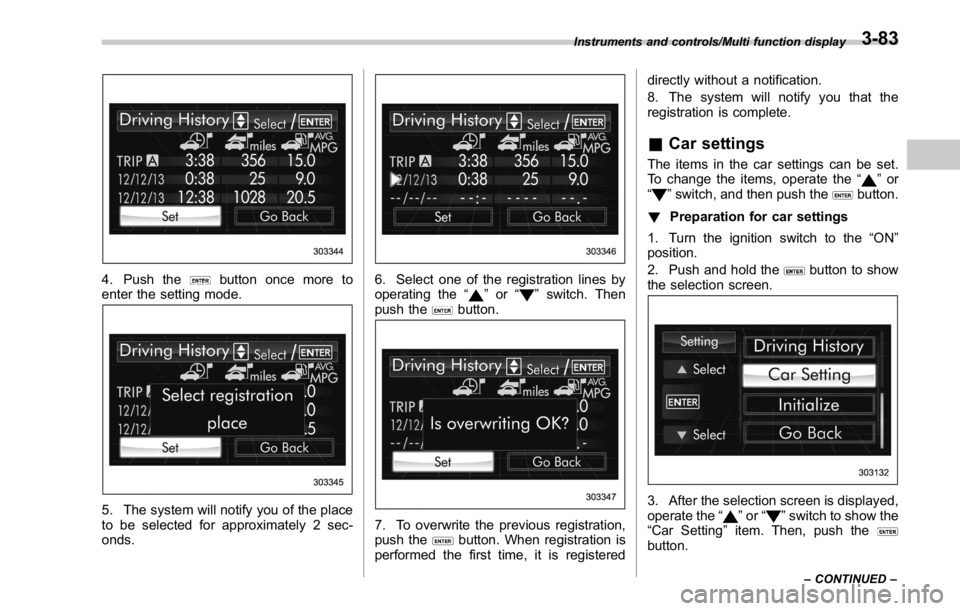
4. Push the button once more to
enter the setting mode.
5. The system will notify you of the place
to be selected for approximately 2 sec-
onds. 6. Select one of the registration lines by
operating the “
” or “ ” switch. Then
push the
button.
7. To overwrite the previous registration,
push the
button. When registration is
performed the first time, it is registered directly without a notification.
8. The system will notify you that the
registration is complete.
& Car settings The items in the car settings can be set.
To change the items, operate the “
” or
“
” switch, and then push the button.
! Preparation for car settings
1. Turn the ignition switch to the “ ON ”
position.
2. Push and hold the
button to show
the selection screen.
3. After the selection screen is displayed,
operate the “
” or “ ” switch to show the
“ Car Setting ” item. Then, push the
button.Instruments and controls/Multi function display
– CONTINUED –3-83
Page 221 of 594
Instruments and controls/Multi function display
! Approaching time setting
The setting procedure is the same as
“ Leaving time setting ” F 3-90, but select
the “ Approaching time set ” item in step 3.
& InitializeItems that have been set to your pre-
ference can be initialized. To select an
initialization menu, operate the “
” or “ ”
switch as follows.
! Preparation for initialization
1. Turn the ignition switch to the “ ON ”
position.
2. Push and hold the
button to show
the selection screen.
3. After the selection screen is displayed,
operate the “
” or “ ” switch to show the
“ Initialize ” item. Then, push the
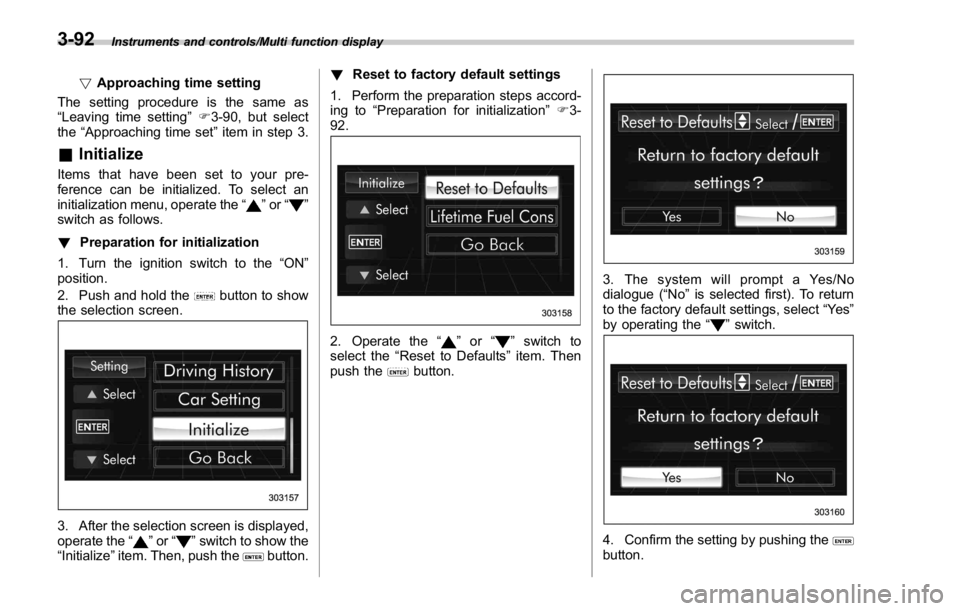
button. ! Reset to factory default settings
1. Perform the preparation steps accord-
ing to “ Preparation for initialization ” F 3-
92.
2. Operate the “ ” or “ ” switch to
select the “ Reset to Defaults ” item. Then
push the
button. 3. The system will prompt a Yes/No
dialogue ( “ No ” is selected first). To return
to the factory default settings, select “ Ye s ”
by operating the “
” switch.
4. Confirm the setting by pushing the
button.3-92
Page 223 of 594
Instruments and controls/Light control switch
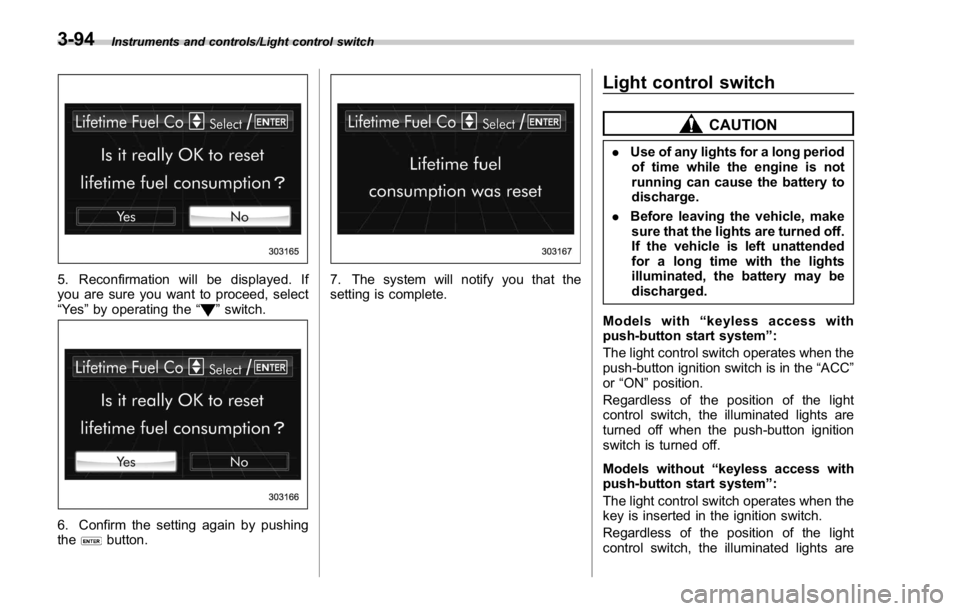
5. Reconfirmation will be displayed. If
you are sure you want to proceed, select
“ Ye s ” by operating the “
” switch.
6. Confirm the setting again by pushing
the
button. 7. The system will notify you that the
setting is complete. Light control switch CAUTION. Use of any lights for a long period
of time while the engine is not
running can cause the battery to
discharge.
. Before leaving the vehicle, make
sure that the lights are turned off.
If the vehicle is left unattended
for a long time with the lights
illuminated, the battery may be
discharged.
Models with “ keyless access with
push-button start system ” :
The light control switch operates when the
push-button ignition switch is in the “ ACC ”
or “ ON ” position.
Regardless of the position of the light
control switch, the illuminated lights are
turned off when the push-button ignition
switch is turned off.
Models without “ keyless access with
push-button start system ” :
The light control switch operates when the
key is inserted in the ignition switch.
Regardless of the position of the light
control switch, the illuminated lights are3-94
Page 224 of 594
turned off when the key is removed from
the ignition switch.
NOTE The light control switch can be oper-
ated (except auto on/off headlights),
even under the following conditions.
. when the key is not inserted into the
ignition switch (models without “ key-
less access with push-button start
system ” )
. when the push-button ignition
switch is turned off (models with “ key-
less access with push-button start
system ” )
If the driver ’ s door is opened while the
headlights are illuminated under such
conditions, the chirp sound will inform
the driver that the lights are illumi-
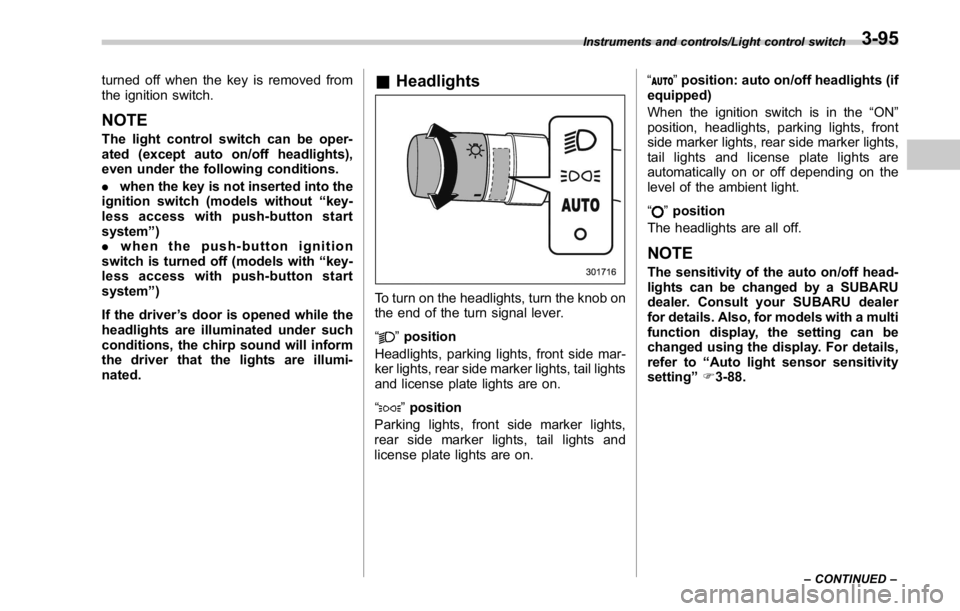
nated. & Headlights
To turn on the headlights, turn the knob on
the end of the turn signal lever.
“ ” position
Headlights, parking lights, front side mar-
ker lights, rear side marker lights, tail lights
and license plate lights are on.
“
” position
Parking lights, front side marker lights,
rear side marker lights, tail lights and
license plate lights are on. “
” position: auto on/off headlights (if
equipped)
When the ignition switch is in the “ ON ”
position, headlights, parking lights, front
side marker lights, rear side marker lights,
tail lights and license plate lights are
automatically on or off depending on the
level of the ambient light.
“
” position
The headlights are all off.
NOTE The sensitivity of the auto on/off head-
lights can be changed by a SUBARU
dealer. Consult your SUBARU dealer
for details. Also, for models with a multi
function display, the setting can be
changed using the display. For details,
refer to “ Auto light sensor sensitivity
setting ” F 3-88.Instruments and controls/Light control switch
– CONTINUED –3-95
Page 227 of 594
Instruments and controls/Illumination brightness control
& One-touch lane changerTo flash the turn signal and turn signal
indicator light three times, push the turn
signal lever up or down slightly and
immediately release it.
The operational/non-operational setting of
the one-touch lane changer ’ s can be
changed by a SUBARU dealer. Contact
the nearest SUBARU dealer for details. Illumination brightness con-
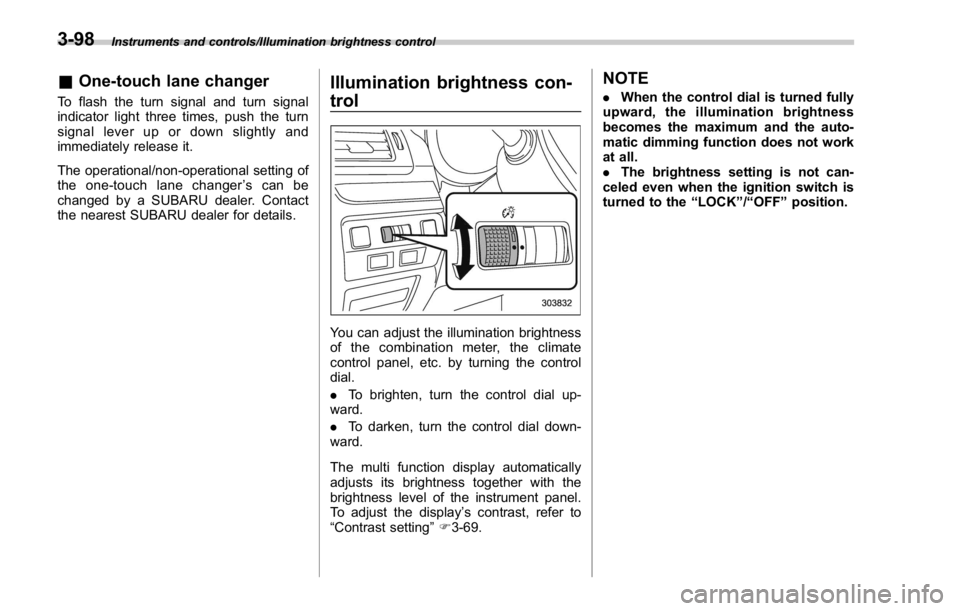
trol
You can adjust the illumination brightness
of the combination meter, the climate
control panel, etc. by turning the control
dial.
. To brighten, turn the control dial up-
ward.
. To darken, turn the control dial down-
ward.
The multi function display automatically
adjusts its brightness together with the
brightness level of the instrument panel.
To adjust the display ’ s contrast, refer to
“ Contrast setting ” F 3-69. NOTE . When the control dial is turned fully
upward, the illumination brightness
becomes the maximum and the auto-
matic dimming function does not work
at all.
. The brightness setting is not can-
celed even when the ignition switch is
turned to the “ LOCK ” / “ OFF ” position.3-98