oil filter SUBARU WRX 2016 Owners Manual
[x] Cancel search | Manufacturer: SUBARU, Model Year: 2016, Model line: WRX, Model: SUBARU WRX 2016Pages: 594, PDF Size: 19.43 MB
Page 180 of 594
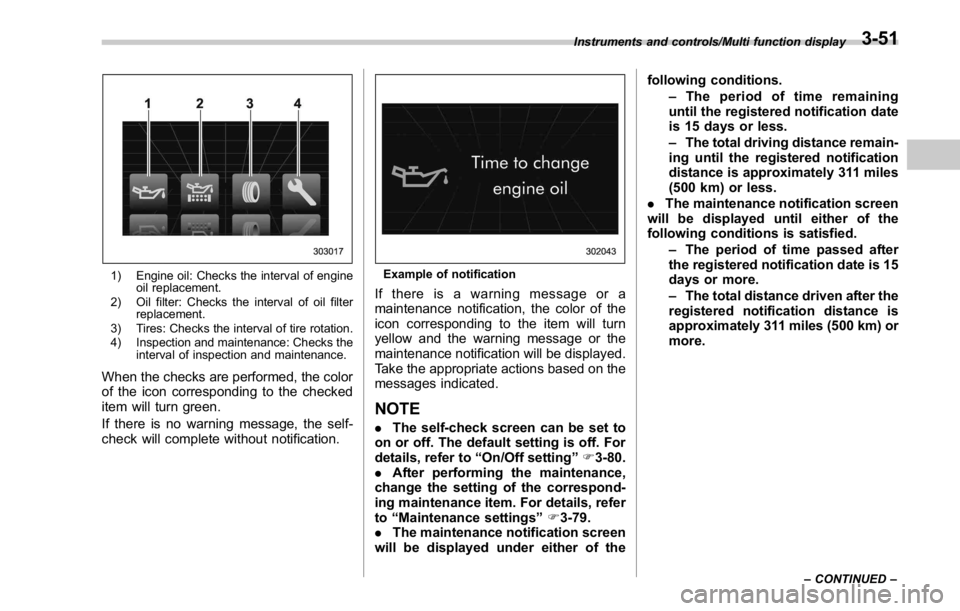
1) Engine oil: Checks the interval of engine
oil replacement.
2) Oil filter: Checks the interval of oil filter
replacement.
3) Tires: Checks the interval of tire rotation.
4) Inspection and maintenance: Checks the
interval of inspection and maintenance.
When the checks are performed, the color
of the icon corresponding to the checked
item will turn green.
If there is no warning message, the self-
check will complete without notification. Example of notification
If there is a warning message or a
maintenance notification, the color of the
icon corresponding to the item will turn
yellow and the warning message or the
maintenance notification will be displayed.
Take the appropriate actions based on the
messages indicated.
NOTE . The self-check screen can be set to
on or off. The default setting is off. For
details, refer to “ On/Off setting ” F 3-80.
. After performing the maintenance,
change the setting of the correspond-
ing maintenance item. For details, refer
to “ Maintenance settings ” F 3-79.
. The maintenance notification screen
will be displayed under either of the following conditions.
– The period of time remaining
until the registered notification date
is 15 days or less.
– The total driving distance remain-
ing until the registered notification
distance is approximately 311 miles
(500 km) or less.
. The maintenance notification screen
will be displayed until either of the
following conditions is satisfied.
– The period of time passed after
the registered notification date is 15
days or more.
– The total distance driven after the
registered notification distance is
approximately 311 miles (500 km) or
more.Instruments and controls/Multi function display
– CONTINUED –3-51
Page 189 of 594

Instruments and controls/Multi function display
Top menu Menu option Description Initial setting Page
Mainte-
nance Engine Oil Set and adjust the oil maintenance notification date.
The default va-
lues for the main-
tenance settings
vary depending
on individual
countries. 3-79
Oil Filter Set and adjust the oil filter maintenance notification date. 3-80
Tires Set and adjust the tire maintenance notification date. 3-80
Maintenance Schedule Set and adjust the vehicle maintenance notification date. 3-80
On/Off Turn on or off the self-check screen that is
activated when the ignition switch is turned to
the “ ON ” position. On or Off Off 3-80
Clear All Settings Clear all items to the factory default settings. Yes or No — 3-81
Go Back Return to the top menu. ——
Driving
History Set Register and overwrite the driving record. — 3-82
Go Back Return to the top menu. ——
Car
Setting Keyless Buzzer Vo-
lume Set the audible signal volume. 0 (OFF) to 7 On 3-84
Hazard Warning
Flasher Set the hazard warning flasher. On or Off On 3-84
Defogger Set and customize the operation of the
defogger. 15 minutes or Continuous 15 minutes 3-85
Interior Light Set and customize the interior light off delay
timer. 10, 20, 30 seconds or Off 30 seconds 3-87
Auto Light Sensor (if
equipped) Set and customize the sensitivity of the auto
light sensor. Low, Mid, High or Max Mid 3-88
Keyless Access
Setting Driver ’ s Door
Unlock (if equipped) Set and customize the keyless access func-
tion. Driver ’ s Door Only, All Driver ’ s Door
Only 3-89
Welcome Lighting Set the leaving time and approaching time. 30, 60, 90 seconds or Off 30 seconds 3-90
Go Back Return to top menu. ——3-60
Page 209 of 594
Instruments and controls/Multi function display
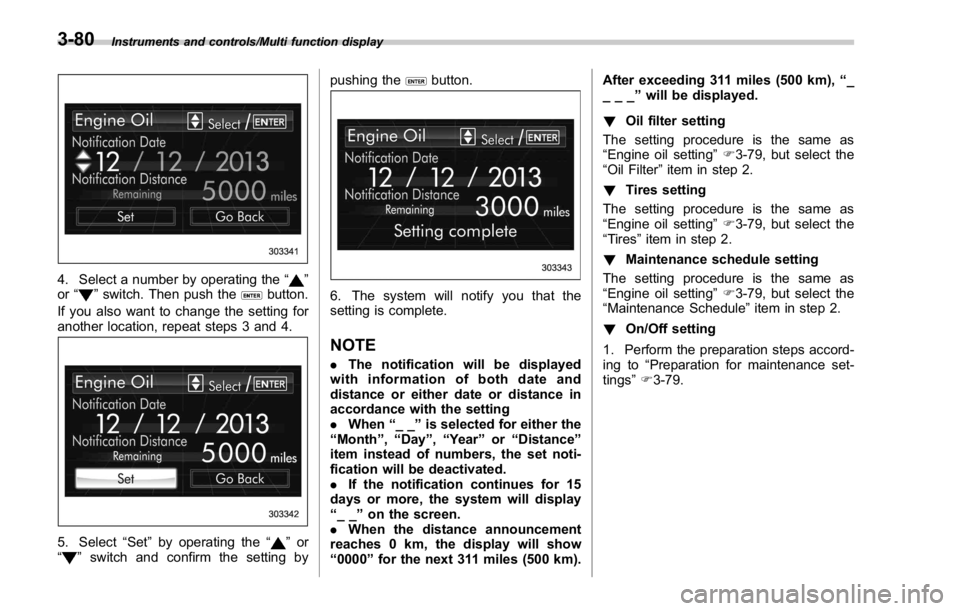
4. Select a number by operating the “ ”
or “
” switch. Then push the button.
If you also want to change the setting for
another location, repeat steps 3 and 4.
5. Select “ Set ” by operating the “ ” or
“
” switch and confirm the setting by pushing the button.
6. The system will notify you that the
setting is complete.
NOTE . The notification will be displayed
with information of both date and
distance or either date or distance in
accordance with the setting
. When “ __ ” is selected for either the
“ Month ” , “ Day ” , “ Year ” or “ Distance ”
item instead of numbers, the set noti-
fication will be deactivated.
. If the notification continues for 15
days or more, the system will display
“ __ ” on the screen.
. When the distance announcement
reaches 0 km, the display will show
“ 0000 ” for the next 311 miles (500 km). After exceeding 311 miles (500 km), “ _
___ ” will be displayed.
! Oil filter setting
The setting procedure is the same as
“ Engine oil setting ” F 3-79, but select the
“ Oil Filter ” item in step 2.
! Tires setting
The setting procedure is the same as
“ Engine oil setting ” F 3-79, but select the
“ Tires ” item in step 2.
! Maintenance schedule setting
The setting procedure is the same as
“ Engine oil setting ” F 3-79, but select the
“ Maintenance Schedule ” item in step 2.
! On/Off setting
1. Perform the preparation steps accord-
ing to “ Preparation for maintenance set-
tings ” F 3-79.3-80
Page 244 of 594

Ventilator control ................................................. 4-2Center and side ventilators .................................. 4-2
Climate control panel .......................................... 4-3Type A ................................................................ 4-3
Type B ................................................................ 4-4
Automatic climate control operation ................. 4-5Sensors .............................................................. 4-5
Manual climate control operation ...................... 4-6Airflow mode selection ........................................ 4-6
Temperature control ............................................ 4-7
Fan speed control ............................................... 4-8
Air conditioner control ........................................ 4-8
Air inlet selection ................................................ 4-8
Defrosting ............................................................ 4-9Type A ................................................................ 4-9
Type B ................................................................ 4-9 Operating tips for heater and air
conditioner ........................................................ 4-9Cleaning ventilation grille ..................................... 4-9
Efficient cooling after parking in direct
sunlight ........................................................... 4-10
Lubrication oil circulation in the refrigerant
circuit .............................................................. 4-10
Checking air conditioning system before summer
season ............................................................ 4-10
Cooling and dehumidifying in high humidity and
low temperature weather conditions ................. 4-10
Air conditioner compressor shut-off when engine
is heavily loaded .............................................. 4-10
Refrigerant for your climate control system ... ..... 4-10
Air filtration system ........................................... 4-11Replacing an air filter ......................................... 4-11Climate control 4
Page 490 of 594

Maintenance schedule ....................................... 11-3
Maintenance precautions ................................... 11-3Before checking or servicing in the engine
compartment .................................................... 11-4
When checking or servicing in the engine
compartment .................................................... 11-5
When checking or servicing in the engine
compartment while the engine is running .......... 11-5
Maintenance tips ................................................ 11-6Removing and reinstalling clips .......................... 11-6
Engine hood ....................................................... 11-9
Engine compartment overview ........................ 11-11STI................................................................... 11-11
Except STI ....................................................... 11-12
Engine oil .......................................................... 11-13Engine oil consumption .................................... 11-13
Checking the oil level ....................................... 11-13
Changing the oil and oil filter ............................ 11-15
Recommended grade and viscosity .................. 11-16
Synthetic oil ..................................................... 11-16
Cooling system ................................................ 11-17Cooling fan, hose and connections ................... 11-17
Engine coolant ................................................. 11-18
Air cleaner element .......................................... 11-19
Replacing the air cleaner element ..................... 11-19
Spark plugs ...................................................... 11-21
Recommended spark plugs .............................. 11-21
Drive belts ........................................................ 11-22
Manual transmission oil .................................. 11-23
Recommended grade and viscosity .................. 11-23 Continuously variable transmission fluid ...... 11-23
Front differential gear oil (CVT models) and
rear differential gear oil ................................ 11-23Recommended grade and viscosity .................. 11-23
Power steering fluid (STI) ............................... 11-24Checking the fluid level .................................... 11-24
Recommended fluid ......................................... 11-24
Brake fluid ........................................................ 11-25Checking the fluid level .................................... 11-25
Recommended brake fluid ............................... 11-25
Clutch fluid (MT models) ................................. 11-26Checking the fluid level .................................... 11-26
Recommended clutch fluid ............................... 11-26
Brake booster .................................................. 11-27
Brake pedal ...................................................... 11-27Checking the brake pedal free play .................. 11-27
Checking the brake pedal reserve distance ....... 1 1-28
Clutch pedal (MT models) ............................... 11-28Checking the clutch function ............................ 11-28
Checking the clutch pedal free play .................. 11-28
Hill start assist system .................................... 11-29
Replacement of brake pad and lining ............ 11-29Breaking-in of new brake pads (models with
electronic parking brake system) .................... 11-29
Breaking-in of new brake pads and linings
(models without electronic parking brake
system) ......................................................... 11-30
Parking brake stroke (models without
electronic parking brake system) ................ 11-30Maintenance and service
11
Page 494 of 594
& When checking or servicing
in the engine compartment
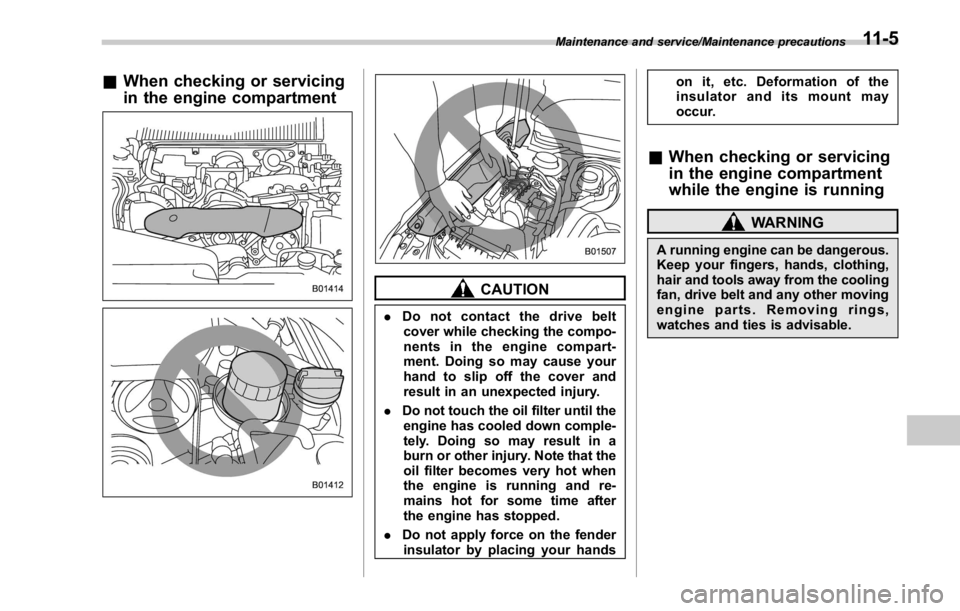
CAUTION. Do not contact the drive belt
cover while checking the compo-
nents in the engine compart-
ment. Doing so may cause your
hand to slip off the cover and
result in an unexpected injury.
. Do not touch the oil filter until the
engine has cooled down comple-
tely. Doing so may result in a
burn or other injury. Note that the
oil filter becomes very hot when
the engine is running and re-
mains hot for some time after
the engine has stopped.
. Do not apply force on the fender
insulator by placing your hands on it, etc. Deformation of the
insulator and its mount may
occur.
& When checking or servicing
in the engine compartment
while the engine is running WARNINGA running engine can be dangerous.
Keep your fingers, hands, clothing,
hair and tools away from the cooling
fan, drive belt and any other moving
engine parts. Removing rings,
watches and ties is advisable.Maintenance and service/Maintenance precautions
11-5
Page 501 of 594
Maintenance and service/Engine compartment overview
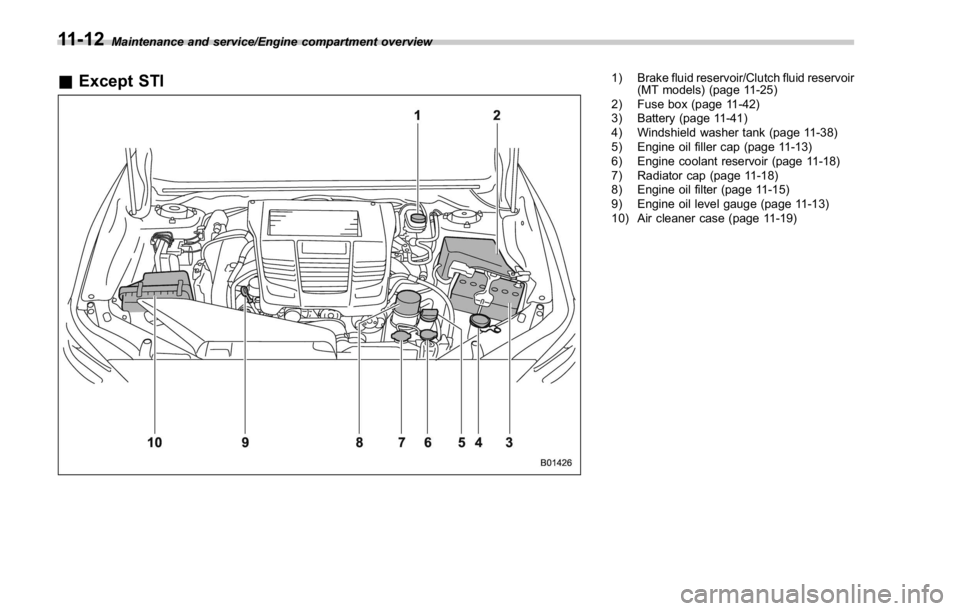
& Except STI 1) Brake fluid reservoir/Clutch fluid reservoir
(MT models) (page 11-25)
2) Fuse box (page 11-42)
3) Battery (page 11-41)
4) Windshield washer tank (page 11-38)
5) Engine oil filler cap (page 11-13)
6) Engine coolant reservoir (page 11-18)
7) Radiator cap (page 11-18)
8) Engine oil filter (page 11-15)
9) Engine oil level gauge (page 11-13)
10) Air cleaner case (page 11-19)
11-12
Page 503 of 594
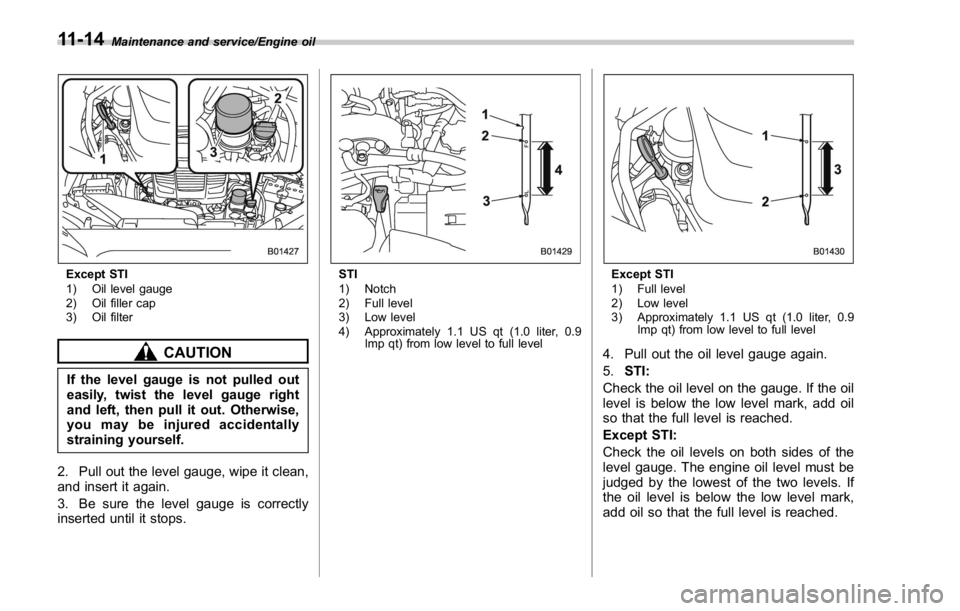
Maintenance and service/Engine oil
Except STI
1) Oil level gauge
2) Oil filler cap
3) Oil filter
CAUTION
If the level gauge is not pulled out
easily, twist the level gauge right
and left, then pull it out. Otherwise,
you may be injured accidentally
straining yourself.
2. Pull out the level gauge, wipe it clean,
and insert it again.
3. Be sure the level gauge is correctly
inserted until it stops. STI
1) Notch
2) Full level
3) Low level
4) Approximately 1.1 US qt (1.0 liter, 0.9
Imp qt) from low level to full level Except STI
1) Full level
2) Low level
3) Approximately 1.1 US qt (1.0 liter, 0.9
Imp qt) from low level to full level
4. Pull out the oil level gauge again.
5. STI:
Check the oil level on the gauge. If the oil
level is below the low level mark, add oil
so that the full level is reached.
Except STI:
Check the oil levels on both sides of the
level gauge. The engine oil level must be
judged by the lowest of the two levels. If
the oil level is below the low level mark,
add oil so that the full level is reached.11-14
Page 504 of 594

CAUTION. For models except STI, be careful
not to touch the engine oil filter
when removing the oil filler cap.
Doing so may result in a burn, a
pinched finger, or may cause
some other injury.
. Use only engine oil with the
recommended grade and vis-
cosity.
. Be careful not to spill engine oil
when adding it. If oil touches the
exhaust pipe, it may cause a bad
smell, smoke, and/or a fire. If
engine oil gets on the exhaust
pipe, be sure to wipe it off.
To add engine oil, remove the engine oil
filler cap and slowly pour engine oil
through the filler neck. After pouring oil
into the engine, you must use the level
gauge to confirm that the oil level is
correct.
For models STI, just after driving or while
the engine is warm, the engine oil level
reading may be in a range between the
upper level and the notch mark. This is
caused by thermal expansion of the
engine oil. NOTE To prevent overfilling the engine oil, do
not add any additional oil above the
upper level when the engine is cold.
& Changing the oil and oil filter Change the oil and oil filter according to
the maintenance schedule in the “ War-
ranty and Maintenance Booklet ” .
NOTE . Changing the engine oil and oil filter
should be performed by a well-trained
expert. Contact your SUBARU dealer
for changing the engine oil and oil filter.
Fully trained mechanics are on standby
at a SUBARU dealer to utilize the
special tools, spare parts and recom-
mended oil for this work, and also,
used oils are properly disposed of.
. If performing oil replacement your-
self, observe the local regulations and
dispose of waste oil properly.
The engine oil and oil filter must be
changed more frequently than listed in
the maintenance schedule when driving
on dusty roads, when short trips are
frequently made, or when driving in
extremely cold weather. ! Changing the oil filter
It may be difficult to change the oil filter.
Have the oil filter changed by your
SUBARU dealer if necessary.
! Changing the oil
1. Warm up the engine by letting the
engine idle for approximately 10 minutes
to ease draining the engine oil.
2. Park the vehicle on a level surface and
stop the engine.
3. Remove the oil filler cap.
STIMaintenance and service/Engine oil
– CONTINUED –11-15
Page 505 of 594
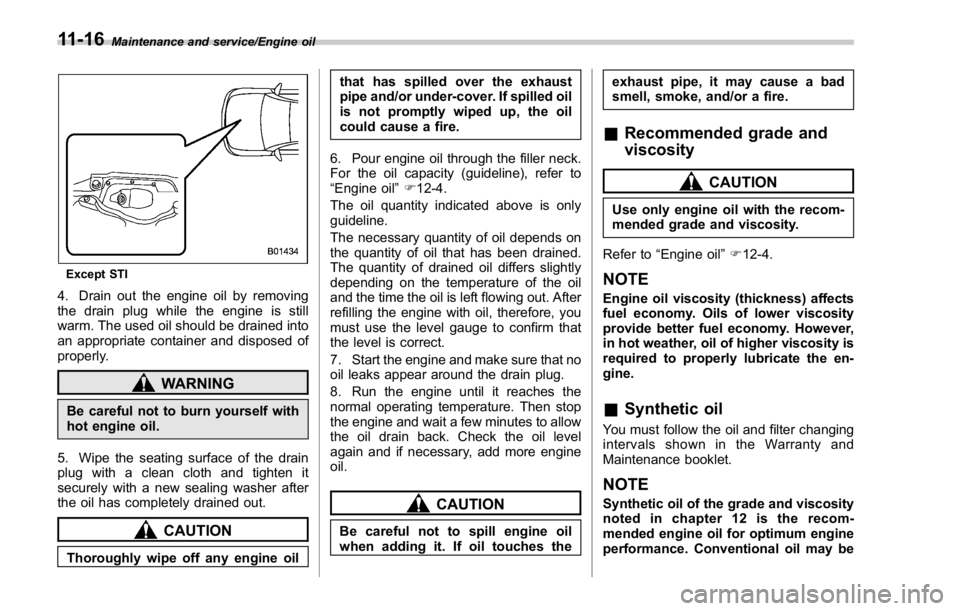
Maintenance and service/Engine oil
Except STI
4. Drain out the engine oil by removing
the drain plug while the engine is still
warm. The used oil should be drained into
an appropriate container and disposed of
properly.
WARNING
Be careful not to burn yourself with
hot engine oil.
5. Wipe the seating surface of the drain
plug with a clean cloth and tighten it
securely with a new sealing washer after
the oil has completely drained out.
CAUTION
Thoroughly wipe off any engine oil that has spilled over the exhaust
pipe and/or under-cover. If spilled oil
is not promptly wiped up, the oil
could cause a fire.
6. Pour engine oil through the filler neck.
For the oil capacity (guideline), refer to
“ Engine oil ” F 12-4.
The oil quantity indicated above is only
guideline.
The necessary quantity of oil depends on
the quantity of oil that has been drained.
The quantity of drained oil differs slightly
depending on the temperature of the oil
and the time the oil is left flowing out. After
refilling the engine with oil, therefore, you
must use the level gauge to confirm that
the level is correct.
7. Start the engine and make sure that no
oil leaks appear around the drain plug.
8. Run the engine until it reaches the
normal operating temperature. Then stop
the engine and wait a few minutes to allow
the oil drain back. Check the oil level
again and if necessary, add more engine
oil.
CAUTION
Be careful not to spill engine oil
when adding it. If oil touches the exhaust pipe, it may cause a bad
smell, smoke, and/or a fire.
& Recommended grade and
viscosity CAUTIONUse only engine oil with the recom-
mended grade and viscosity.
Refer to “ Engine oil ” F 12-4.
NOTE Engine oil viscosity (thickness) affects
fuel economy. Oils of lower viscosity
provide better fuel economy. However,
in hot weather, oil of higher viscosity is
required to properly lubricate the en-
gine.
& Synthetic oil You must follow the oil and filter changing
intervals shown in the Warranty and
Maintenance booklet.
NOTE Synthetic oil of the grade and viscosity
noted in chapter 12 is the recom-
mended engine oil for optimum engine
performance. Conventional oil may be11-16