power steering SUBARU WRX 2018 User Guide
[x] Cancel search | Manufacturer: SUBARU, Model Year: 2018, Model line: WRX, Model: SUBARU WRX 2018Pages: 578, PDF Size: 33.21 MB
Page 312 of 578
(321,1)
北米Model "A1700BE-B" EDITED: 2017/ 10/ 11
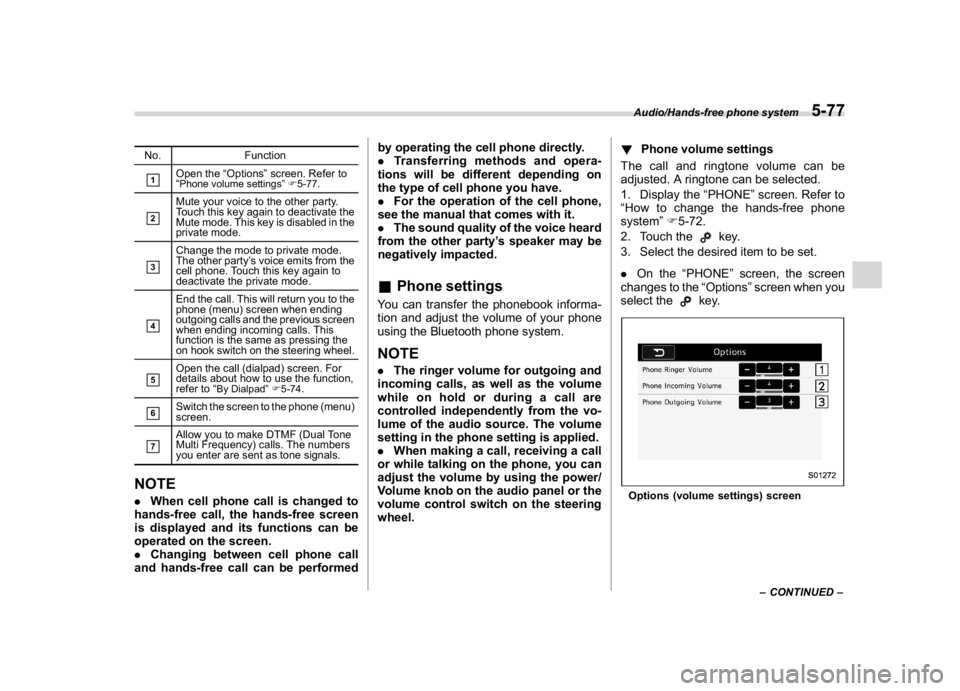
No. Function&1
Open the“Options”screen. Refer to
“Phone volume settings”F5-77.
&2
Mute your voice to the other party.
Touch this key again to deactivate the
Mute mode. This key is disabled in the
private mode.
&3
Change the mode to private mode.
The other party’s voice emits from the
cell phone. Touch this key again to
deactivate the private mode.
&4
End the call. This will return you to the
phone (menu) screen when ending
outgoing calls and the previous screen
when ending incoming calls. This
function is the same as pressing the
on hook switch on the steering wheel.
&5
Open the call (dialpad) screen. For
details about how to use the function,
refer to“
By Dialpad”F5-74.
&6
Switch the screen to the phone (menu)
screen.
&7
Allow you to make DTMF (Dual Tone
Multi Frequency) calls. The numbers
you enter are sent as tone signals.
NOTE.When cell phone call is changed to
hands-free call, the hands-free screen
is displayed and its functions can be
operated on the screen.
.Changing between cell phone call
and hands-free call can be performedby operating the cell phone directly.
.Transferring methods and opera-
tions will be different depending on
the type of cell phone you have.
.For the operation of the cell phone,
see the manual that comes with it.
.The sound quality of the voice heard
from the other party’s speaker may be
negatively impacted.
&Phone settingsYou can transfer the phonebook informa-
tion and adjust the volume of your phone
using the Bluetooth phone system.NOTE.The ringer volume for outgoing and
incoming calls, as well as the volume
while on hold or during a call are
controlled independently from the vo-
lume of the audio source. The volume
setting in the phone setting is applied.
.When making a call, receiving a call
or while talking on the phone, you can
adjust the volume by using the power/
Volume knob on the audio panel or the
volume control switch on the steering
wheel.!Phone volume settings
The call and ringtone volume can be
adjusted. A ringtone can be selected.
1. Display the“PHONE”screen. Refer to
“How to change the hands-free phone
system”F5-72.
2. Touch the
key.
3. Select the desired item to be set.
.On the“PHONE”screen, the screen
changes to the“Options”screen when you
select the
key.
Options (volume settings) screen
–CONTINUED–Audio/Hands-free phone system
5-77
5
Page 350 of 578

(363,1)
北米Model "A1700BE-B" EDITED: 2017/ 10/ 11
Fuel..........................................................................7-3
Fuel requirements.................................................. 7-3
Fuel filler lid and cap............................................. 7-5
State emission testing (U.S.only).........................7-7
Preparing to drive...................................................7-8
Starting and stopping theengine..........................7-9
General precautions when starting/stopping
engine................................................................. 7-9
Models without push-button start systems............7-10
Models with push-button start systems ................. 7-11
Remote engine start system (dealer option)...........7-14
Manual transmission............................................7-16
Shifting speeds.....................................................7-17
Driving tips...........................................................7-18
Driver’s Control Center Differential
(C.DIFF/DCCD) (STI)...........................................7-18
To change mode of driver’s control center
differential..........................................................7-19
Auto mode............................................................7-20
Manual mode........................................................7-21
Temporary release................................................7-22
Continuously variable transmission....................7-23
Select lever...........................................................7-24
Selection of manual mode.....................................7-25
Shift lock function.................................................7-27
Driving tips...........................................................7-28
SI-DRIVE (if equipped)..........................................7-28
Intelligent (I) mode................................................7-28
Sport (S) mode.....................................................7-29
Sport Sharp (S#) mode..........................................7-29SI-DRIVE switch....................................................7-30
Limited slip differential (LSD)(STI).....................7-31
Power steering......................................................7-31
STI .......................................................................7-31
Except STI............................................................7-32
Braking..................................................................7-33
Braking tips..........................................................7-33
Brake system.......................................................7-33
Disc brake pad wear warning indicators................7-34
High performance brake system (STI)...................7-34
Red caliper with sports brake pad (if equipped) .... 7-34
ABS (Anti-lock BrakeSystem).............................7-35
ABS self-check.....................................................7-35
ABS warning light.................................................7-35
Electronic Brake Force Distribution (EBD)
system................................................................7-36
Steps to take if EBD system malfunctions .............7-36
Vehicle Dynamics Controlsystem......................7-37
Vehicle Dynamics Control system monitor ............7-39
Vehicle Dynamics Control OFF switch...................7-39
Tire pressure monitoring system (TPMS)
(U.S.-spec. models)...........................................7-40
Parking your vehicle............................................7-42
Parking brake (models without electronic parking
brake system)....................................................7-42
Electronic parking brake (models with electronic
parking brake system).......................................7-43
Parking tips..........................................................7-45
Auto Vehicle Holdfunction..................................7-46
To turn on/off the Auto Vehicle Hold function........7-47
To operate the Auto Vehicle Hold function ............7-48
Starting and operating
7
Page 360 of 578
(373,1)
北米Model "A1700BE-B" EDITED: 2017/ 10/ 11
!If the engine does not start
CAUTION
For safety, release the accelerator
pedal as soon as the engine starts.
Try the following procedure.
1. Turn the ignition switch to the“LOCK”
position and wait for at least 10 seconds.
2. After checking that the parking brake is
firmly set, turn the ignition switch to the
“START”position while depressing the
accelerator pedal slightly (approximately
a quarter of the full stroke).
3. If this fails to start the engine, turn the
ignition switch back to the“LOCK”position
and wait for at least 10 seconds.
4. Fully depress the accelerator pedal
and turn the ignition switch to the“START”
position.
If this fails to start the engine, try the
following procedure.
1. Turn the ignition switch again to the
“LOCK”position.
2. After waiting for 10 seconds or longer,
turn the ignition switch to the“START”
position without depressing the accelera-
tor pedal.
If the engine still does not start, contactyour nearest SUBARU dealer for assis-
tance.
!Stopping the engine
The ignition switch should be turned off
only when the vehicle is stopped and the
engine is idling.
WARNING
Do not stop the engine when the
vehicle is moving. This will cause
loss of power to the power steering
and the brake booster, making steer-
ing and braking more difficult. It
could also result in accidental acti-
vation of the“LOCK”position on the
ignition switch, causing the steering
wheel to lock.&Models with push-button
start systems!Safety precautions
Refer to“Safety precautions”F2-8.
!Operating range for push-button
start system
Refer to“Operating range”F3-6.!Starting engine
WARNING
If the indicator on the push-button
ignition switch flashes in green after
the engine has started, never drive
the vehicle. The steering is still
locked, and it may result in an
accident. In this case, press the
push-button ignition switch with
the brake pedal depressed and with
the steering wheel turned from the
right to the left.
CAUTION
.When the operation indicator on
the push-button ignition switch is
flashing in orange, there may be a
malfunction with the vehicle.
Contact a SUBARU dealer imme-
diately.
.Do not continue pressing the
push-button ignition switch for
more than 10 seconds. Doing so
could cause a malfunction. If the
engine does not start, stop press-
ing the push-button ignition
switch. Instead, press the push-
buttonignitionswitchwithout
depressing the brake pedal to
–CONTINUED–
Starting and operating/Starting and stopping the engine
7-11
7
Page 361 of 578
(374,1)
北米Model "A1700BE-B" EDITED: 2017/ 10/ 11
switch the power status to“OFF”.
Wait 10 seconds, and then push
the push-button ignition switch
to start the engine.
NOTE.When pressing the push-button igni-
tion switch with the clutch pedal (MT
models) or the brake pedal (CVT mod-
els) depressed:
–The engine starter operates for a
maximum of 10 seconds and after
starting the engine, the starter stops
automatically.
–You can start the engine regard-
less of the power status.
.If the engine does not start, check
the security indicator light. Then press
the push-button ignition switch without
depressing the clutch pedal (MT mod-
els) or the brake pedal (CVT models) to
switch the power to“OFF”.
–If the light had illuminated, try to
start the engine again.
–If the light had been off, press the
push-button ignition switch while
depressing the clutch pedal (MT
models) or the brake pedal (CVT
models) more forcefully.
.The engine may not start depending
on the radio wave conditions aroundthe vehicle. In such a case, refer to
“Starting engine”F9-27.
.If the vehicle battery is discharged,
the steering cannot be unlocked.
Charge the battery.
.Do not shift the shift lever/select
lever while the starter is cranking.
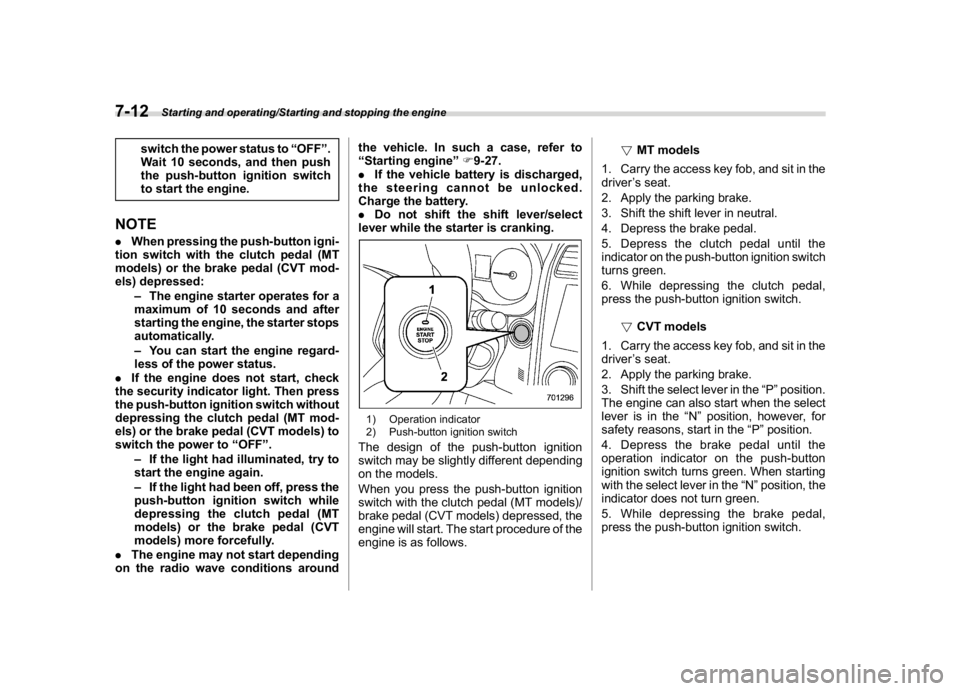
1) Operation indicator
2) Push-button ignition switchThe design of the push-button ignition
switch may be slightly different depending
on the models.
When you press the push-button ignition
switch with the clutch pedal (MT models)/
brake pedal (CVT models) depressed, the
engine will start. The start procedure of the
engine is as follows.!MT models
1. Carry the access key fob, and sit in the
driver’s seat.
2. Apply the parking brake.
3. Shift the shift lever in neutral.
4. Depress the brake pedal.
5. Depress the clutch pedal until the
indicator on the push-button ignition switch
turns green.
6. While depressing the clutch pedal,
press the push-button ignition switch.
!CVT models
1. Carry the access key fob, and sit in the
driver’s seat.
2. Apply the parking brake.
3. Shift the select lever in the“P”position.
The engine can also start when the select
lever is in the“N”position, however, for
safety reasons, start in the“P”position.
4. Depress the brake pedal until the
operation indicator on the push-button
ignition switch turns green. When starting
with the select lever in the“N”position, the
indicator does not turn green.
5. While depressing the brake pedal,
press the push-button ignition switch.
Starting and operating/Starting and stopping the engine
7-12
Page 362 of 578
(375,1)
北米Model "A1700BE-B" EDITED: 2017/ 10/ 11
NOTE.While pressing the select lever but-
ton in, the indicator on the push-button
ignition switch will not turn green even
when the select lever is in the“P”
position.
.When the engine is not started, the
brake pedal may feel stiff. In such a
case, depress the brake pedal more
forcefully than usual. Check that the
operation indicator on the push-button
ignition switch turns green, and press
the push-button ignition switch to start
the engine.
!In case of the engine does not
start by the normal engine start
procedure
1. Move the shift lever to the neutral
position (MT models), or move the select
lever to the“P”position (CVT models).
2. Switch the power status to“ACC”.
3. Press and hold the push-button ignition
switch for at least 15 seconds with the
clutch pedal (MT models)/brake pedal
(CVT models) depressed.
Although the engine may start, only use
this procedure in the case of an emer-
gency. If the engine still does not start,
refer to“Starting engine”F9-27.!Stopping engine
1. Stop the vehicle completely.
2. Move the select lever to the“P”
position (CVT models).
3. Press the push-button ignition switch.
The engine will stop, and the power will be
switched to“OFF”.
WARNING
.Do not touch the push-button
ignition switch while driving.
When you operate the push-but-
ton ignition switch as follows, the
engine will stop.
–Pressing and holding the
switch for 3 seconds or longer.
–Pressing the switch briefly 3
times or more in succession.
When the engine stops, the brake
booster will not function. A great-
er foot pressure will be required
on the brake pedal.
The power steering system will
not operate either. A greater force
will be required to steer, and it
may result in an accident.
.If the engine stops while driving,
do not operate the push-button
ignition switch or open any of thedoors until the vehicle is stopped
in a safe location. It is dangerous
because the steering may be
locked. Stop the vehicle in a safe
location, and contact a SUBARU
dealer immediately.
CAUTION
For CVT models:
.Do not stop the engine while the
select lever is in a position other
than the“P”position.
.If the engine is stopped while the
select lever is in a position other
than the“P”position, the power
will be in“ACC”. If the vehicle is
left in this condition, the battery
may be discharged.NOTEAlthough you can stop the engine by
operating the push-button ignition
switch, do not stop the engine while
driving except in an emergency.
–CONTINUED–
Starting and operating/Starting and stopping the engine
7-13
7
Page 380 of 578
(393,1)
北米Model "A1700BE-B" EDITED: 2017/ 10/ 11
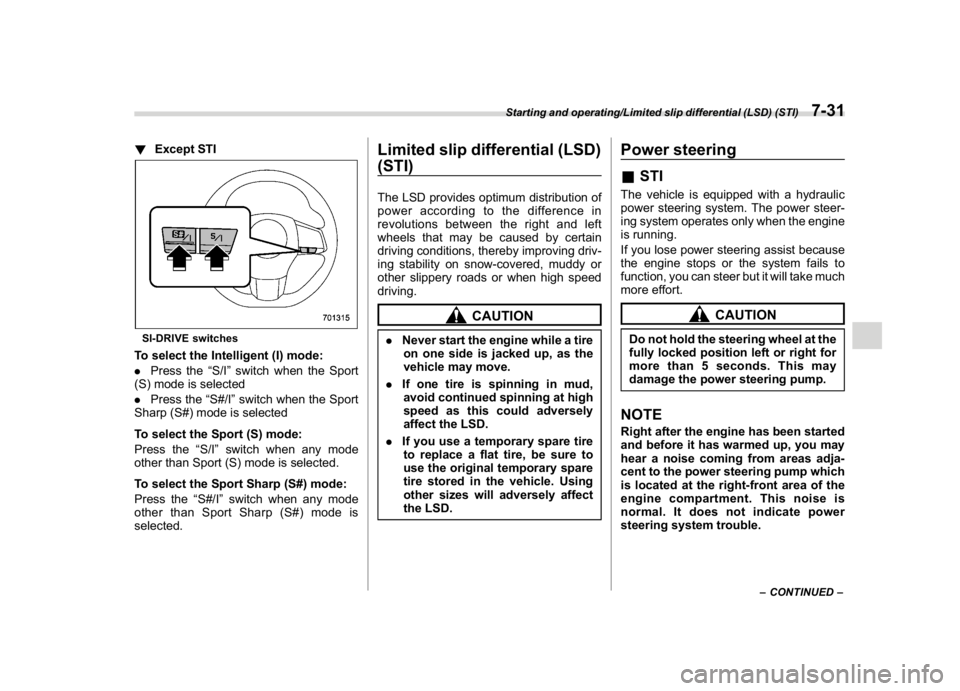
!Except STISI-DRIVE switchesTo select the Intelligent (I) mode:
.Press the“S/I”switch when the Sport
(S) mode is selected
.Press the“S#/I”switch when the Sport
Sharp (S#) mode is selected
To select the Sport (S) mode:
Press the“S/I”switch when any mode
other than Sport (S) mode is selected.
To select the Sport Sharp (S#) mode:
Press the“S#/I”switch when any mode
other than Sport Sharp (S#) mode is
selected.
Limited slip differential (LSD)
(STI)The LSD provides optimum distribution of
power according to the difference in
revolutions between the right and left
wheels that may be caused by certain
driving conditions, thereby improving driv-
ing stability on snow-covered, muddy or
other slippery roads or when high speed
driving.
CAUTION
.Never start the engine while a tire
on one side is jacked up, as the
vehicle may move.
.If one tire is spinning in mud,
avoid continued spinning at high
speed as this could adversely
affect the LSD.
.If you use a temporary spare tire
to replace a flat tire, be sure to
use the original temporary spare
tire stored in the vehicle. Using
other sizes will adversely affect
the LSD.
Power steering&STIThe vehicle is equipped with a hydraulic
power steering system. The power steer-
ing system operates only when the engine
is running.
If you lose power steering assist because
the engine stops or the system fails to
function, you can steer but it will take much
more effort.
CAUTION
Do not hold the steering wheel at the
fully locked position left or right for
more than 5 seconds. This may
damage the power steering pump.NOTERight after the engine has been started
and before it has warmed up, you may
hear a noise coming from areas adja-
cent to the power steering pump which
is located at the right-front area of the
engine compartment. This noise is
normal. It does not indicate power
steering system trouble.
–CONTINUED–
Starting and operating/Limited slip differential (LSD) (STI)
7-31
7
Page 381 of 578
(394,1)
北米Model "A1700BE-B" EDITED: 2017/ 10/ 11
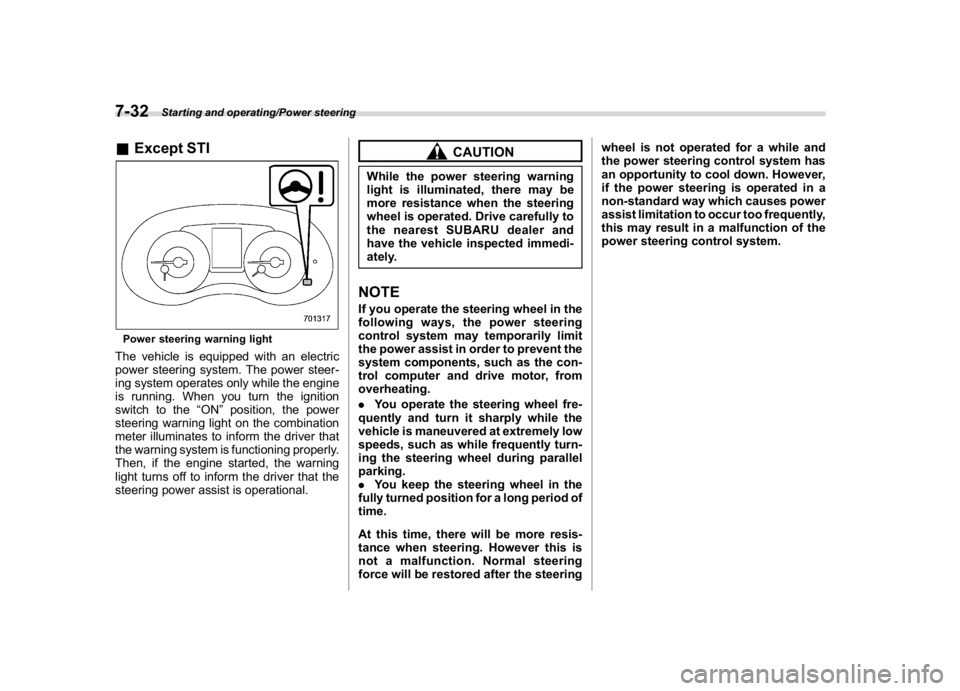
&Except STIPower steering warning lightThe vehicle is equipped with an electric
power steering system. The power steer-
ing system operates only while the engine
is running. When you turn the ignition
switch to the“ON”position, the power
steering warning light on the combination
meter illuminates to inform the driver that
the warning system is functioning properly.
Then, if the engine started, the warning
light turns off to inform the driver that the
steering power assist is operational.
CAUTION
While the power steering warning
light is illuminated, there may be
more resistance when the steering
wheel is operated. Drive carefully to
the nearest SUBARU dealer and
have the vehicle inspected immedi-
ately.NOTEIf you operate the steering wheel in the
following ways, the power steering
control system may temporarily limit
the power assist in order to prevent the
system components, such as the con-
trol computer and drive motor, from
overheating.
.You operate the steering wheel fre-
quently and turn it sharply while the
vehicle is maneuvered at extremely low
speeds, such as while frequently turn-
ing the steering wheel during parallel
parking.
.You keep the steering wheel in the
fully turned position for a long period of
time.
At this time, there will be more resis-
tance when steering. However this is
not a malfunction. Normal steering
force will be restored after the steeringwheel is not operated for a while and
the power steering control system has
an opportunity to cool down. However,
if the power steering is operated in a
non-standard way which causes power
assist limitation to occur too frequently,
this may result in a malfunction of the
power steering control system.
Starting and operating/Power steering
7-32
Page 387 of 578
(400,1)
北米Model "A1700BE-B" EDITED: 2017/ 10/ 11
should be taken into account
when driving the vehicle in
such a condition.
.If you use non-matching tires, the
Vehicle Dynamics Control sys-
tem may not operate correctly.
.The Vehicle Dynamics Control
system helps prevent unstable
vehicle motion such as skidding
using control of the brakes and
engine power. Do not turn off the
Vehicle Dynamics Control sys-
tem unless it is absolutely neces-
sary. If you must turn off the
Vehicle Dynamics Control sys-
tem, drive very carefully accord-
ing to the road surface condition.
In the event of wheelspin and/or skidding
on a slippery road surface and/or during
cornering and/or an evasive maneuver,
the Vehicle Dynamics Control system
adjusts the engine’s output and the
wheels’respective braking forces to help
maintain traction and directional control.
.Traction Control Function
The traction control function is designed to
prevent spinning of the driving wheels on
slippery road surfaces, thereby helping to
maintain traction and directional control.
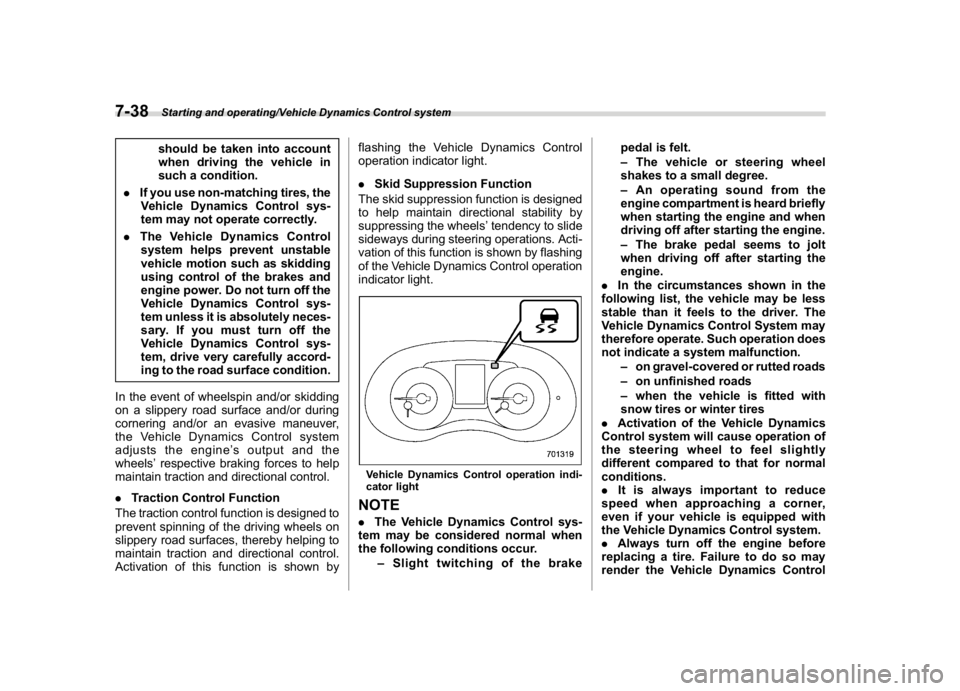
Activation of this function is shown byflashing the Vehicle Dynamics Control
operation indicator light.
.Skid Suppression Function
The skid suppression function is designed
to help maintain directional stability by
suppressing the wheels’tendency to slide
sideways during steering operations. Acti-
vation of this function is shown by flashing
of the Vehicle Dynamics Control operation
indicator light.
Vehicle Dynamics Control operation indi-
cator lightNOTE.The Vehicle Dynamics Control sys-
tem may be considered normal when
the following conditions occur.
–Slight twitching of the brakepedal is felt.
–The vehicle or steering wheel
shakes to a small degree.
–An operating sound from the
engine compartment is heard briefly
when starting the engine and when
driving off after starting the engine.
–The brake pedal seems to jolt
when driving off after starting the
engine.
.In the circumstances shown in the
following list, the vehicle may be less
stable than it feels to the driver. The
Vehicle Dynamics Control System may
therefore operate. Such operation does
not indicate a system malfunction.
–on gravel-covered or rutted roads
–on unfinished roads
–when the vehicle is fitted with
snow tires or winter tires
.Activation of the Vehicle Dynamics
Control system will cause operation of
the steering wheelto feel slightly
different compared to that for normal
conditions.
.It is always important to reduce
speed when approaching a corner,
even if your vehicle is equipped with
the Vehicle Dynamics Control system.
.Always turn off the engine before
replacing a tire. Failure to do so may
render the Vehicle Dynamics Control
Starting and operating/Vehicle Dynamics Control system
7-38
Page 455 of 578
(472,1)
北米Model "A1700BE-B" EDITED: 2017/ 10/ 11
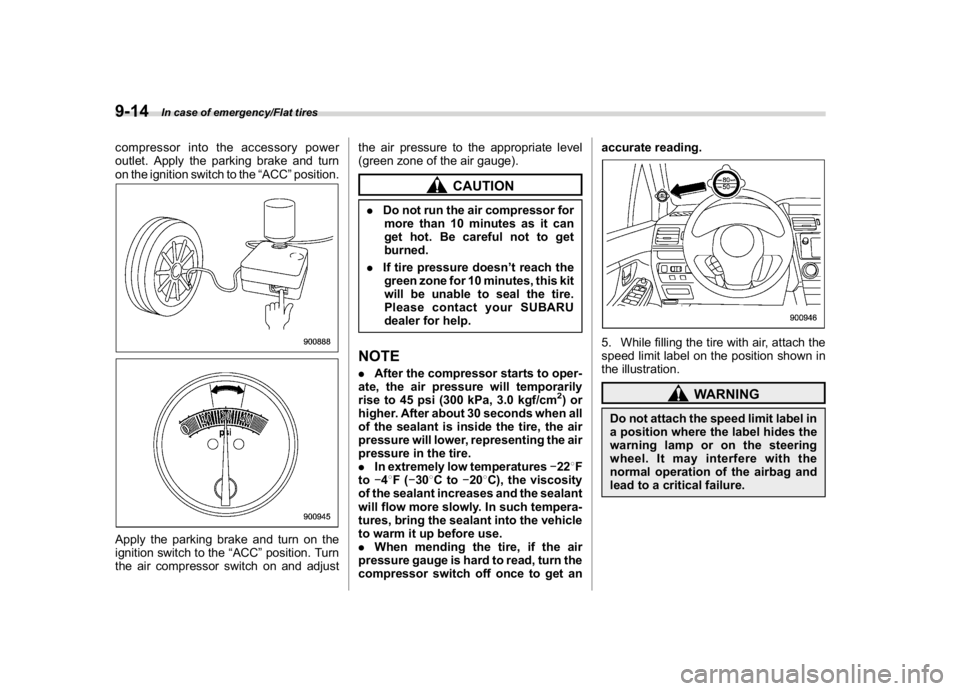
compressor into the accessory power
outlet. Apply the parking brake and turn
on the ignition switch to the“ACC”position.Apply the parking brake and turn on the
ignition switch to the“ACC”position. Turn
the air compressor switch on and adjustthe air pressure to the appropriate level
(green zone of the air gauge).
CAUTION
.Do not run the air compressor for
more than 10 minutes as it can
get hot. Be careful not to get
burned.
.If tire pressure doesn’t reach the
green zone for 10 minutes, this kit
will be unable to seal the tire.
Please contact your SUBARU
dealer for help.NOTE.After the compressor starts to oper-
ate, the air pressure will temporarily
rise to 45 psi (300 kPa, 3.0 kgf/cm
2)or
higher. After about 30 seconds when all
of the sealant is inside the tire, the air
pressure will lower, representing the air
pressure in the tire.
.In extremely low temperatures228F
to48F(308Cto208C), the viscosity
of the sealant increases and the sealant
will flow more slowly. In such tempera-
tures, bring the sealant into the vehicle
to warm it up before use.
.When mending the tire, if the air
pressure gauge is hard to read, turn the
compressor switch off once to get anaccurate reading.
5. While filling the tire with air, attach the
speed limit label on the position shown in
the illustration.
WARNING
Do not attach the speed limit label in
a position where the label hides the
warning lamp or on the steering
wheel. It may interfere with the
normal operation of the airbag and
lead to a critical failure.
In case of emergency/Flat tires
9-14
Page 456 of 578
(473,1)
北米Model "A1700BE-B" EDITED: 2017/ 10/ 11
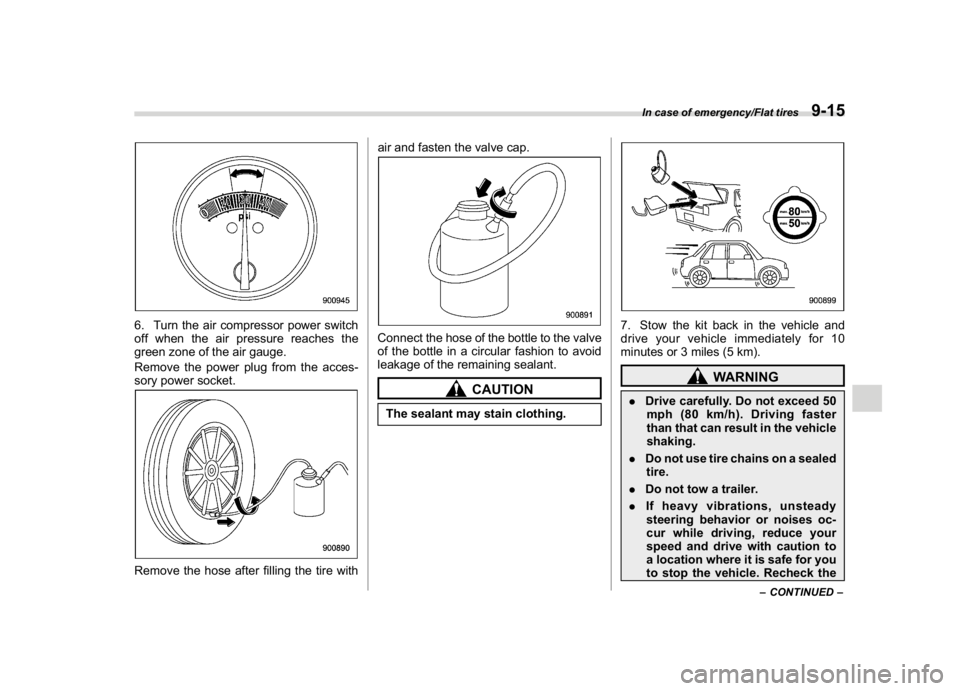
6. Turn the air compressor power switch
off when the air pressure reaches the
green zone of the air gauge.
Remove the power plug from the acces-
sory power socket.Remove the hose after filling the tire withair and fasten the valve cap.
Connect the hose of the bottle to the valve
of the bottle in a circular fashion to avoid
leakage of the remaining sealant.
CAUTION
The sealant may stain clothing.
7. Stow the kit back in the vehicle and
drive your vehicle immediately for 10
minutes or 3 miles (5 km).
WARNING
.Drive carefully. Do not exceed 50
mph (80 km/h). Driving faster
than that can result in the vehicle
shaking.
.Do not use tire chains on a sealed
tire.
.Do not tow a trailer.
.If heavy vibrations, unsteady
steering behavior or noises oc-
cur while driving, reduce your
speed and drive with caution to
a location where it is safe for you
to stop the vehicle. Recheck the
–CONTINUED–
In case of emergency/Flat tires
9-15
9