steering SUBARU WRX 2018 Owner's Guide
[x] Cancel search | Manufacturer: SUBARU, Model Year: 2018, Model line: WRX, Model: SUBARU WRX 2018Pages: 578, PDF Size: 33.21 MB
Page 177 of 578
(182,1)
北米Model "A1700BE-B" EDITED: 2017/ 10/ 11
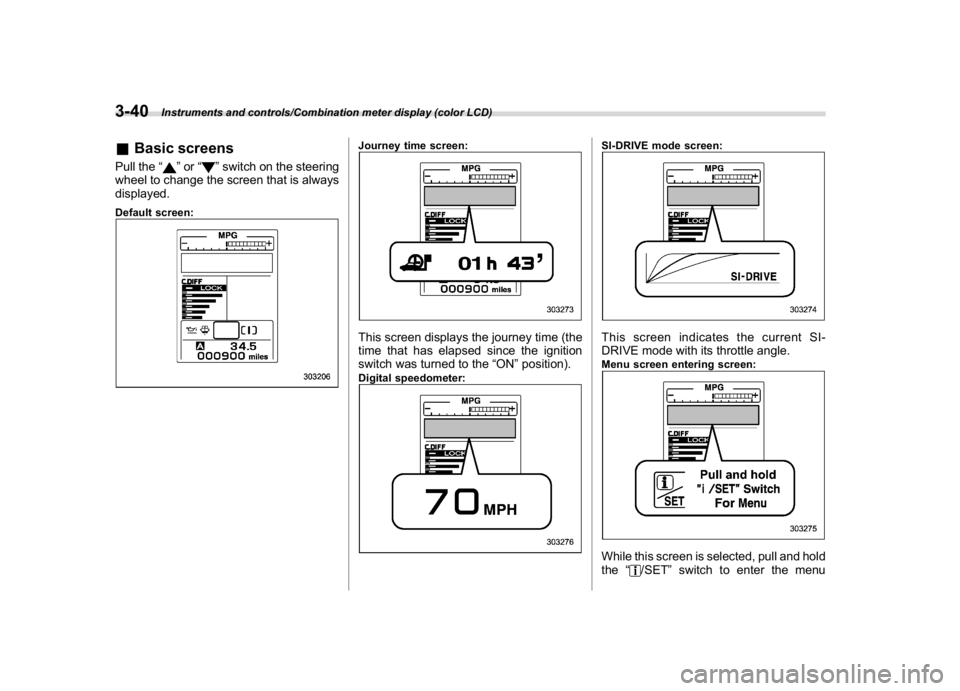
&Basic screensPull the“
”or“
”switch on the steering
wheel to change the screen that is always
displayed.
Default screen:
Journey time screen:This screen displays the journey time (the
time that has elapsed since the ignition
switch was turned to the“ON”position).Digital speedometer:
SI-DRIVE mode screen:This screen indicates the current SI-
DRIVE mode with its throttle angle.Menu screen entering screen:While this screen is selected, pull and hold
the“
/SET”switch to enter the menu
Instruments and controls/Combination meter display (color LCD)
3-40
Page 178 of 578
(183,1)
北米Model "A1700BE-B" EDITED: 2017/ 10/ 11
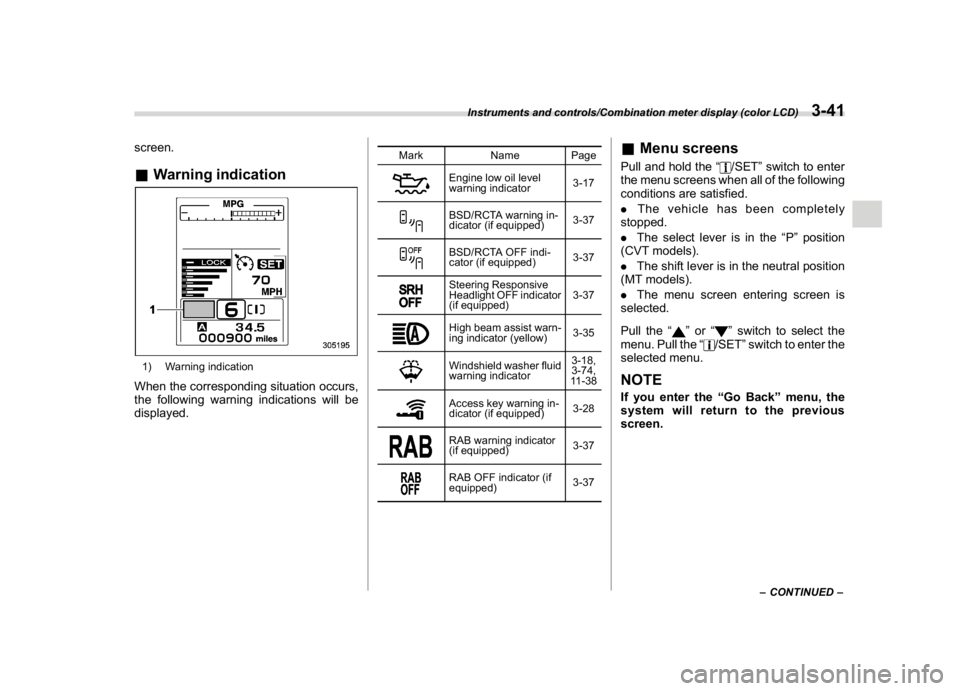
screen.&Warning indication1) Warning indicationWhen the corresponding situation occurs,
the following warning indications will be
displayed.
Mark Name Page
Engine low oil level
warning indicator3-17BSD/RCTA warning in-
dicator (if equipped)3-37BSD/RCTA OFF indi-
cator (if equipped)3-37Steering Responsive
Headlight OFF indicator
(if equipped)3-37High beam assist warn-
ing indicator (yellow)3-35Windshield washer fluid
warning indicator3-18,
3-74,
11-38Access key warning in-
dicator (if equipped)3-28RAB warning indicator
(if equipped)3-37RAB OFF indicator (if
equipped)3-37
&Menu screensPull and hold the“
/SET”switch to enter
the menu screens when all of the following
conditions are satisfied.
.The vehicle has been completely
stopped.
.The select lever is in the“P”position
(CVT models).
.The shift lever is in the neutral position
(MT models).
.The menu screen entering screen is
selected.
Pull the“
”or“
”switch to select the
menu. Pull the“/SET”switch to enter the
selected menu.
NOTEIf you enter the“Go Back”menu, the
system will return to the previous
screen.
–CONTINUED–
Instruments and controls/Combination meter display (color LCD)
3-41
3
Page 180 of 578

(185,1)
北米Model "A1700BE-B" EDITED: 2017/ 10/ 11
!Screen Settings
After entering the“Screen Settings”menu,
select one of the following menus.
!Welcome Good-bye Screen
The welcome screen/good-bye screens
can be activated or deactivated. Select
“On”to activate the screens. Select“Off”to
deactivate the screens.
!Gauge Initial Movement
The movement of the meter needles and
gauge needles that occurs when the
ignition switch is turned to the“ON”
position can be activated or deactivated.
Select“On”to activate. Select“Off”to
deactivate.
!Gear Position Indicator Setting
(MT models)
Display of the shift position indicator can
be activated or deactivated. Select“On”to
activate display of the shift position in-
dicator or“Off”to deactivate it.
!Languages
Operate the“
”or“
”switch on the
steering wheel to display the preferred
language. Then pull the“/SET”switch to
select the displayed language.!SRH (if equipped)
Select“On”to activate the Steering Re-
sponsive Headlight (SRH). Select“Off”to
deactivate the SRH.
!REV settings (STI)
NOTEIf the setting of the REV Indicator Light
is“Off”, the setting menus of the REV
Alarm Level Engine Speed and the REV
Buzzer are not displayed.
After entering the“REV settings”menu,
select any of the following menus.
!REV Indicator Light
Display of the REV indicator light can be
activated or deactivated. Select“On”to
activate display of the REV indicator light
or“Off”to deactivate it.
!REV Alarm Level Engine Speed
The alarm-level engine speed can be set
(in 100 rpm steps) within the range from
2,000 rpm to the red zone.
!REV Buzzer
The REV buzzer can be activated or
deactivated. Select“On”to activate the
REV buzzer or“Off”to deactivate it.!EyeSight (models with the EyeSight
system)
NOTERefer to the Owner’s Manual supple-
ment for the EyeSight system.
!BSD/RCTA (if equipped)
After entering the“BSD/RCTA”menu,
select the“Warning Volume”menu. You
can set the volume of the warning buzzer
for RCTA (Rear Cross Traffic Alert). You
can select“Max”,“Mid”,“Min”or“Off”.
!RAB (models with the EyeSight
system)
After entering the“RAB”menu, select one
of the following menus.NOTEFor details about the Reverse Auto-
matic Braking system, refer to“Re-
verse Automatic Braking System”F7-
66.
!Warning Volume
The volume of the warning sound that is
activated when the Reverse Automatic
Braking system is in operation can be set
in 3 stages (“Max”,“Mid”and“Min”).
–CONTINUED–
Instruments and controls/Combination meter display (color LCD)
3-43
3
Page 186 of 578
(191,1)
北米Model "A1700BE-B" EDITED: 2017/ 10/ 11
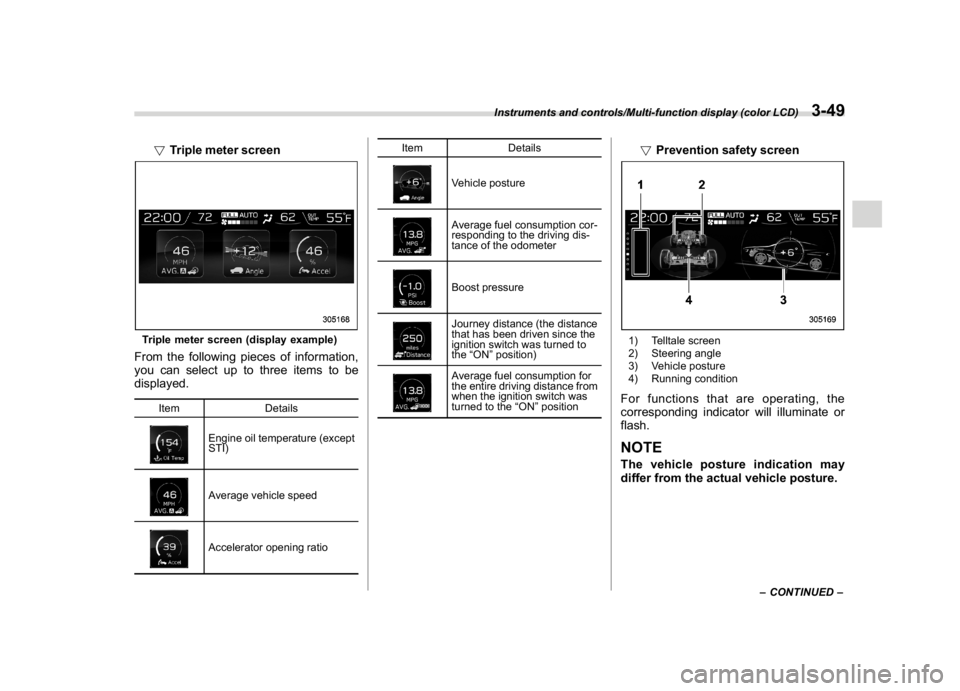
!Triple meter screenTriple meter screen (display example)From the following pieces of information,
you can select up to three items to be
displayed.
Item Details
Engine oil temperature (except
STI)Average vehicle speedAccelerator opening ratioItem Details
Vehicle postureAverage fuel consumption cor-
responding to the driving dis-
tance of the odometerBoost pressureJourney distance (the distance
that has been driven since the
ignition switch was turned to
the“ON”position)Average fuel consumption for
the entire driving distance from
when the ignition switch was
turned to the“ON”position
!Prevention safety screen1) Telltale screen
2) Steering angle
3) Vehicle posture
4) Running conditionFor functions that are operating, the
corresponding indicator will illuminate or
flash.NOTEThe vehicle posture indication may
differ from the actual vehicle posture.
–CONTINUED–
Instruments and controls/Multi-function display (color LCD)
3-49
3
Page 206 of 578
(211,1)
北米Model "A1700BE-B" EDITED: 2017/ 10/ 11
&Daytime running light system
WARNING
When the daytime running lights are
illuminated, the tail lights do not
illuminate. When it becomes dark
outside, turn the light switch to the
“
”position to illuminate the head-
lights and tail lights. This will im-
prove visibility and allow other dri-
vers to see your vehicle more easily.
The daytime running lights will automati-
cally illuminate when the following condi-
tions are fulfilled.
.The engine is running.
.The parking brake is fully released.
.The light control switch is in the“AUTO”
(if equipped),“
”or off position.
.For CVT models, the select lever is in a
position other than the“P”position.
NOTEWhen the light switch is in the“
”
position, the instrument panel illumina-
tion, front side marker lights, tail lights
and license plate lights are also illumi-
nated.
Steering Responsive Head-
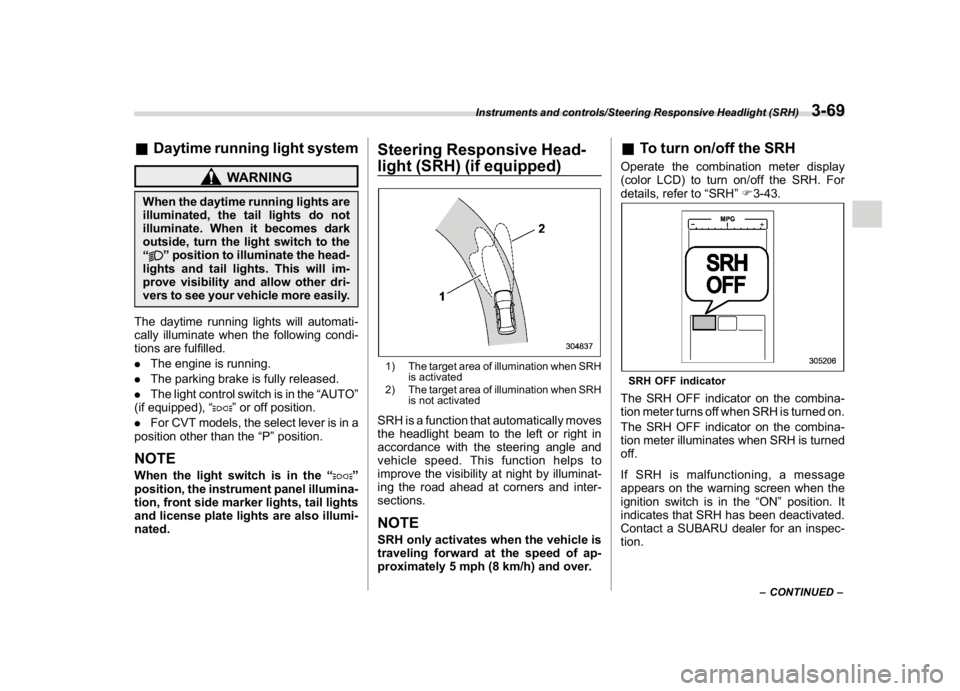
light (SRH) (if equipped)1) The target area of illumination when SRH
is activated
2) The target area of illumination when SRH
is not activatedSRH is a function that automatically moves
the headlight beam to the left or right in
accordance with the steering angle and
vehicle speed. This function helps to
improve the visibility at night by illuminat-
ing the road ahead at corners and inter-
sections.NOTESRH only activates when the vehicle is
traveling forward at the speed of ap-
proximately 5 mph (8 km/h) and over.
&To turn on/off the SRHOperate the combination meter display
(color LCD) to turn on/off the SRH. For
details, refer to“SRH”F3-43.SRH OFF indicatorThe SRH OFF indicator on the combina-
tion meter turns off when SRH is turned on.
The SRH OFF indicator on the combina-
tion meter illuminates when SRH is turned
off.
If SRH is malfunctioning, a message
appears on the warning screen when the
ignition switch is in the“ON”position. It
indicates that SRH has been deactivated.
Contact a SUBARU dealer for an inspec-
tion.
–CONTINUED–
Instruments and controls/Steering Responsive Headlight (SRH)
3-69
3
Page 222 of 578
(227,1)
北米Model "A1700BE-B" EDITED: 2017/ 10/ 11
outside mirrors have been cleared and the
windshield wiper blade rubbers have been
deiced completely before that time, press
the control switch to turn them off. If
defrosting, defogging or deicing is not
complete, you have to press the control
switch to turn them on again.
It is possible for the defogger and deicer
system to be set to continuous operation
mode by a SUBARU dealer. Consult your
SUBARU dealer for details. Also, you can
change the setting using the multi-function
display (color LCD). For details, refer to
“Defogger setting”F3-61.
If the battery voltage drops below the
permissible level, continuous operation of
the defogger and deicer system is can-
celed and the system stops operating.
CAUTION
.To prevent the battery from being
discharged, do not operate the
defogger and deicer system con-
tinuously for any longer than
necessary.
.Do not use sharp instruments or
window cleaner containing abra-
sives to clean the inner surface of
the rear window. They may da-
mage the conductors printed onthe window.
NOTE.Turn on the defogger and deicer
system if the wipers are frozen to the
windshield.
.If the windshield is covered with
snow, remove the snow so that the
windshield wiper deicer works effec-
tively.
.While the defogger and deicer sys-
tem is in the continuous operation
mode:
–If the vehicle speed remains at 9
mph (15 km/h) or lower for 15
minutes, the windshield wiper dei-
cer system automatically stops op-
erating. However, the rear window
defogger system and outside mirror
defogger system maintain continu-
ous operation in this condition.
–If the vehicle battery voltage
drops below the permissible level,
continuous operation of the defog-
ger system and deicer system is
canceled and the system stops
operating.
Tilt/telescopic steering wheel
WARNING
.Do not adjust the steering wheel
tilt/telescopic position while driv-
ing. This may cause loss of
vehicle control and result in per-
sonal injury.
.If the lever cannot be raised to the
fixed position, adjust the steering
wheel again. It is dangerous to
drive without locking the steering
wheel. This may cause loss of
vehicle control and result in per-
sonal injury.
–CONTINUED–
Instruments and controls/Tilt/telescopic steering wheel
3-85
3
Page 223 of 578
(228,1)
北米Model "A1700BE-B" EDITED: 2017/ 10/ 11
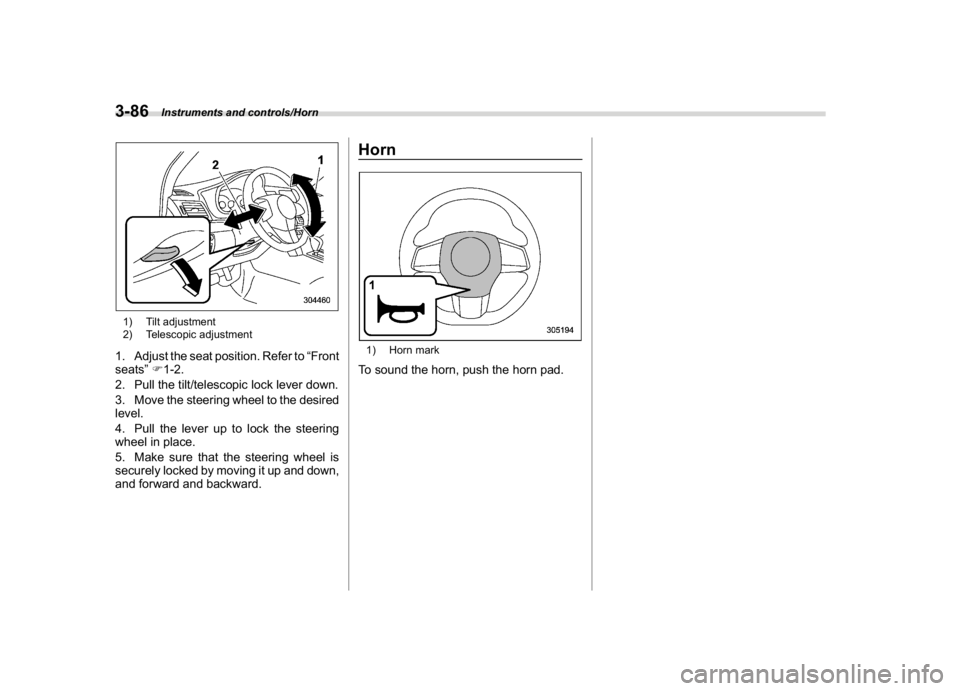
1) Tilt adjustment
2) Telescopic adjustment1. Adjust the seat position. Refer to“Front
seats”F1-2.
2. Pull the tilt/telescopic lock lever down.
3. Move the steering wheel to the desired
level.
4. Pull the lever up to lock the steering
wheel in place.
5. Make sure that the steering wheel is
securely locked by moving it up and down,
and forward and backward.
Horn1) Horn markTo sound the horn, push the horn pad.
Instruments and controls/Horn
3-86
Page 229 of 578
(236,1)
北米Model "A1700BE-B" EDITED: 2017/ 10/ 11
–Solar sensor: beside the windshield
defroster grille
–Interior air temperature sensor: next to
the steering column
–Outside temperature sensor: near the
front bumper opening
These sensors are delicate. If they are not
treated properly and become damaged,
the system may not be able to control the
interior temperature correctly. To avoid
damaging the sensors, observe the follow-
ing precautions.
–Do not subject the sensors to impact.
–Keep water away from the sensors.
–Do not cover the sensors.
Manual climate control op-
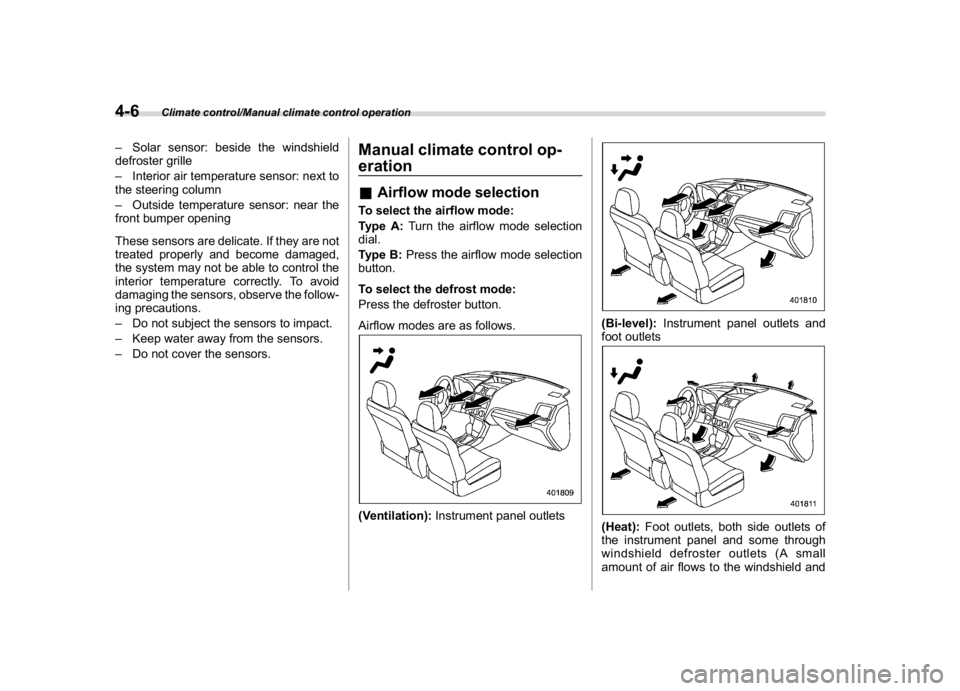
eration&Airflow mode selectionTo select the airflow mode:
Type A:Turn the airflow mode selection
dial.
Type B:Press the airflow mode selection
button.
To select the defrost mode:
Press the defroster button.
Airflow modes are as follows.(Ventilation):Instrument panel outlets
(Bi-level):Instrument panel outlets and
foot outlets(Heat):Foot outlets, both side outlets of
the instrument panel and some through
windshield defroster outlets (A small
amount of air flows to the windshield and
Climate control/Manual climate control operation
4-6
Page 236 of 578

(245,1)
北米Model "A1700BE-B" EDITED: 2017/ 10/ 11
Antenna...................................................................5-2
Roof antenna......................................................... 5-2
Audio set.................................................................5-2
Base display audio set (if equipped)....................... 5-3
SUBARU STARLINK
TM
7.0 Multimedia Plus audio
set (U.S. spec. models only, if equipped).............. 5-5
Tips for operating the audio/visual system............. 5-6
Basic information before use................................5-14
Basic operation.....................................................5-17
Unit settings.........................................................5-18
SUBARU STARLINK (if equipped)..........................5-25
AM/FM radio.........................................................5-27
SiriusXM Satellite Radio (if equipped)....................5-36
aha
TM
by HARMAN................................................5-42
Pandora®(if equipped)..........................................5-48
CD ........................................................................5-51
USB memory........................................................5-53
iPod......................................................................5-54
Bluetooth audio....................................................5-56
AUX ......................................................................5-59
Steering switches foraudio.................................5-61Bluetooth
®settings..............................................5-64
Regulatory information.........................................5-64
Registering/connecting Bluetooth
®device.............5-64
Setting Bluetooth details.......................................5-67
Hands-free phone system....................................5-69
Control screen......................................................5-70
Registering/connecting a Bluetooth phone ............5-71
Using the phone switch/microphone.....................5-71
How to change the hands-free phone system........5-72
Making a call........................................................5-72
Receiving a call....................................................5-75
Talking on the phone............................................5-76
Phone settings.....................................................5-77
Voice commandsystem.......................................5-79
Using the voice command system........................5-79
Voice command system operation.........................5-81
Command list.......................................................5-83
What to doif.........................................................5-87
Troubleshooting...................................................5-87
Appendix...............................................................5-91
Certification..........................................................5-91
Certification for the Hands-free system.................5-91
Certification for Mexico models.............................5-92
Audio
5
Page 296 of 578
(305,1)
北米Model "A1700BE-B" EDITED: 2017/ 10/ 11
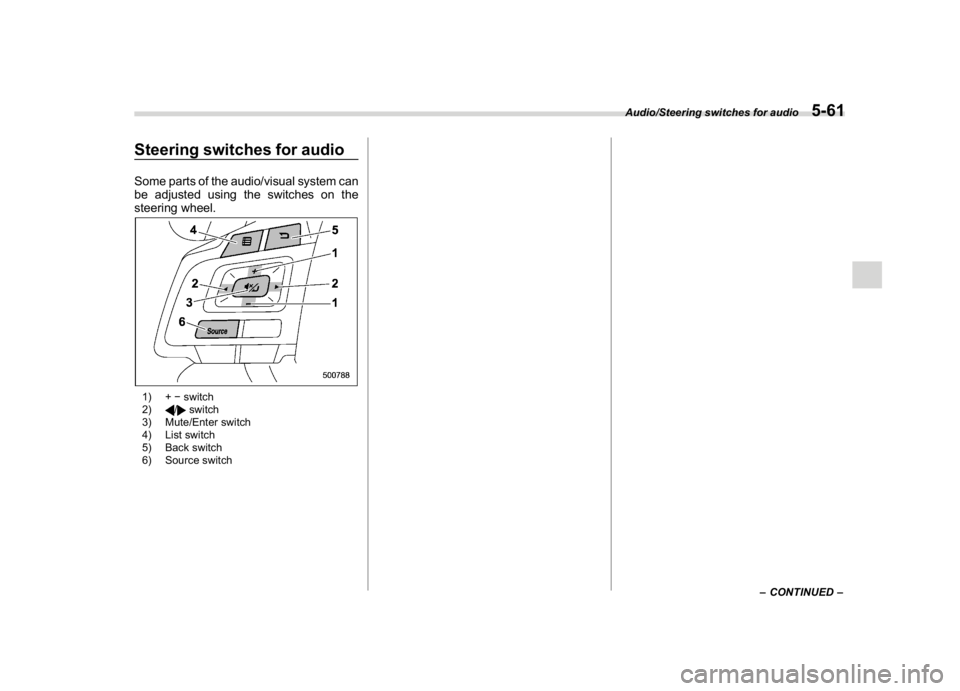
Steering switches for audioSome parts of the audio/visual system can
be adjusted using the switches on the
steering wheel.1) +switch
2)
/
switch
3) Mute/Enter switch
4) List switch
5) Back switch
6) Source switch
–CONTINUED–
Audio/Steering switches for audio
5-61
5