audio SUZUKI AERIO 2007 1.G Owner's Manual
[x] Cancel search | Manufacturer: SUZUKI, Model Year: 2007, Model line: AERIO, Model: SUZUKI AERIO 2007 1.GPages: 232, PDF Size: 3.34 MB
Page 107 of 232
Downloaded from www.Manualslib.com manuals search engine 4-42 INSTRUMENT PANEL
54G27-03E
Scan play
Scan is begun by pressing the scan button
(9) during playback. (Only the contents of
the disc being played are scanned.)
Pressing the scan button (9) will play the
first 10 seconds of the next tracks in suc-
cession. After this is done for the last track,
it will return to the first track, and continue
scanning. Scan mode is canceled once the
scan reaches the first track it scanned. The
unit then resumes normal playback.
Scan mode can be canceled by pressing
the scan button (9) again during a scan,
and playback begins from that point.
Scan mode can also be canceled by fast-
forwarding, rewinding, selecting a different
track, selecting a different disc, or ejecting
the disc. The selected operation is then
performed.
While an MP3/WMA file is played back,
tracks in the current folder are scanned. (If
CD-DA and MP3/WMA files are loaded
and played back, the playback operation is
performed in the same format.)Selecting the display
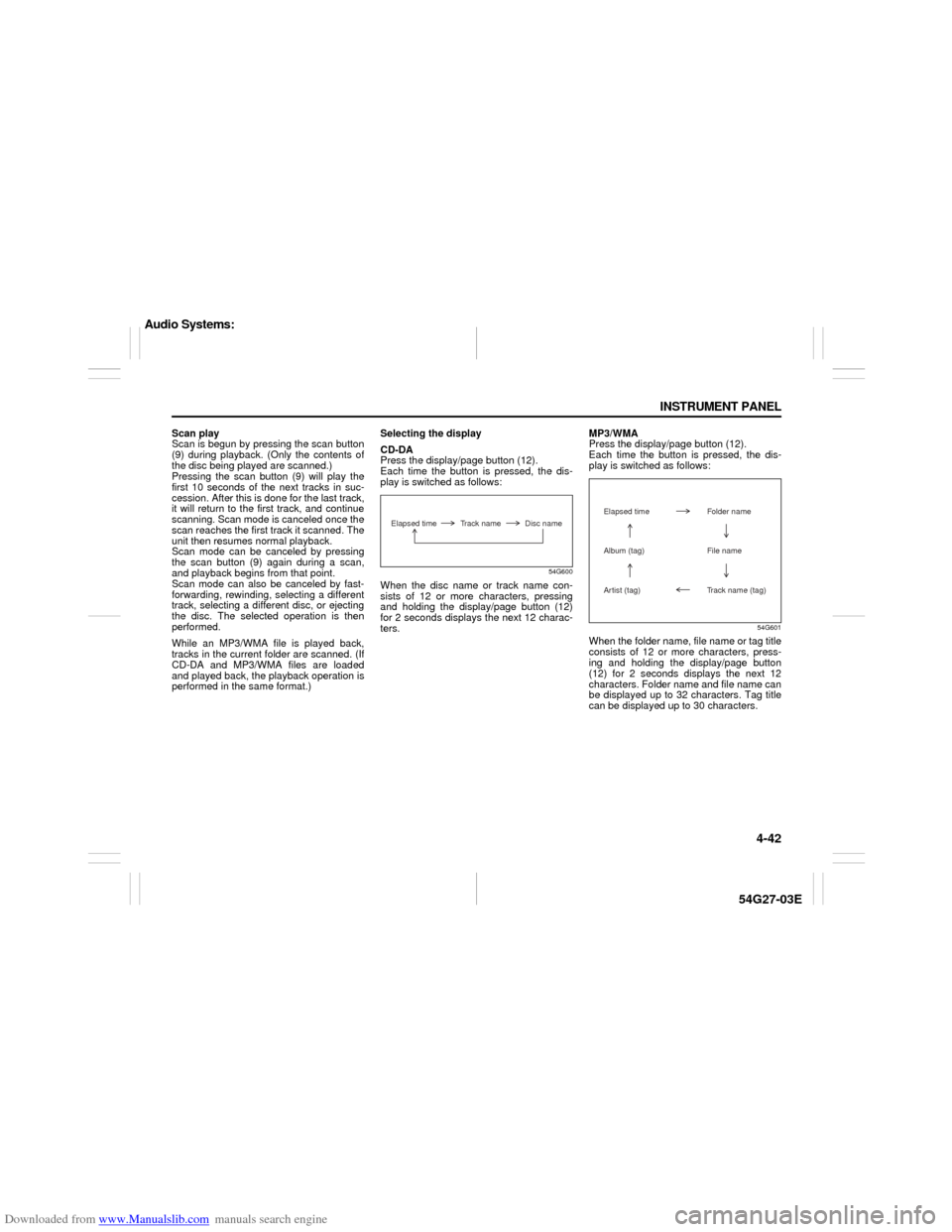
CD-DA
Press the display/page button (12).
Each time the button is pressed, the dis-
play is switched as follows:
54G600
When the disc name or track name con-
sists of 12 or more characters, pressing
and holding the display/page button (12)
for 2 seconds displays the next 12 charac-
ters.MP3/WMA
Press the display/page button (12).
Each time the button is pressed, the dis-
play is switched as follows:
54G601
When the folder name, file name or tag title
consists of 12 or more characters, press-
ing and holding the display/page button
(12) for 2 seconds displays the next 12
characters. Folder name and file name can
be displayed up to 32 characters. Tag title
can be displayed up to 30 characters.
Elapsed time Track name Disc name
Elapsed time Folder nameAlbum (tag) File name
Artist (tag) Track name (tag)
Audio Systems:
Page 108 of 232
Downloaded from www.Manualslib.com manuals search engine 4-43 INSTRUMENT PANEL
54G27-03E
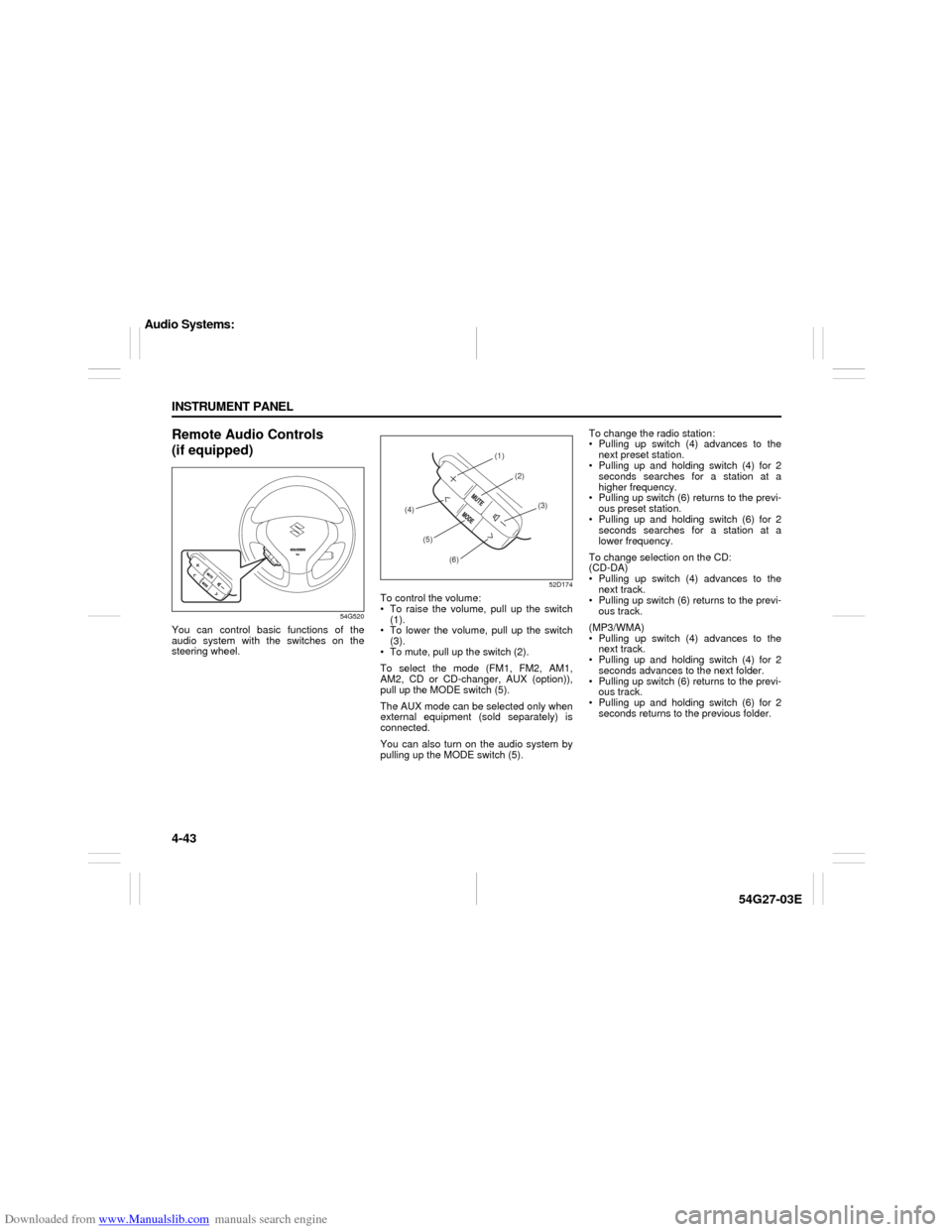
Remote Audio Controls
(if equipped)
54G520
You can control basic functions of the
audio system with the switches on the
steering wheel.
52D174
To control the volume:
To raise the volume, pull up the switch
(1).
To lower the volume, pull up the switch
(3).
To mute, pull up the switch (2).
To select the mode (FM1, FM2, AM1,
AM2, CD or CD-changer, AUX (option)),
pull up the MODE switch (5).
The AUX mode can be selected only when
external equipment (sold separately) is
connected.
You can also turn on the audio system by
pulling up the MODE switch (5).To change the radio station:
Pulling up switch (4) advances to the
next preset station.
Pulling up and holding switch (4) for 2
seconds searches for a station at a
higher frequency.
Pulling up switch (6) returns to the previ-
ous preset station.
Pulling up and holding switch (6) for 2
seconds searches for a station at a
lower frequency.
To change selection on the CD:
(CD-DA)
Pulling up switch (4) advances to the
next track.
Pulling up switch (6) returns to the previ-
ous track.
(MP3/WMA)
Pulling up switch (4) advances to the
next track.
Pulling up and holding switch (4) for 2
seconds advances to the next folder.
Pulling up switch (6) returns to the previ-
ous track.
Pulling up and holding switch (6) for 2
seconds returns to the previous folder.
(1)
(2)
(3)
(4)
(5)
(6)
Audio Systems:
Page 109 of 232
Downloaded from www.Manualslib.com manuals search engine 4-44 INSTRUMENT PANEL
54G27-03E
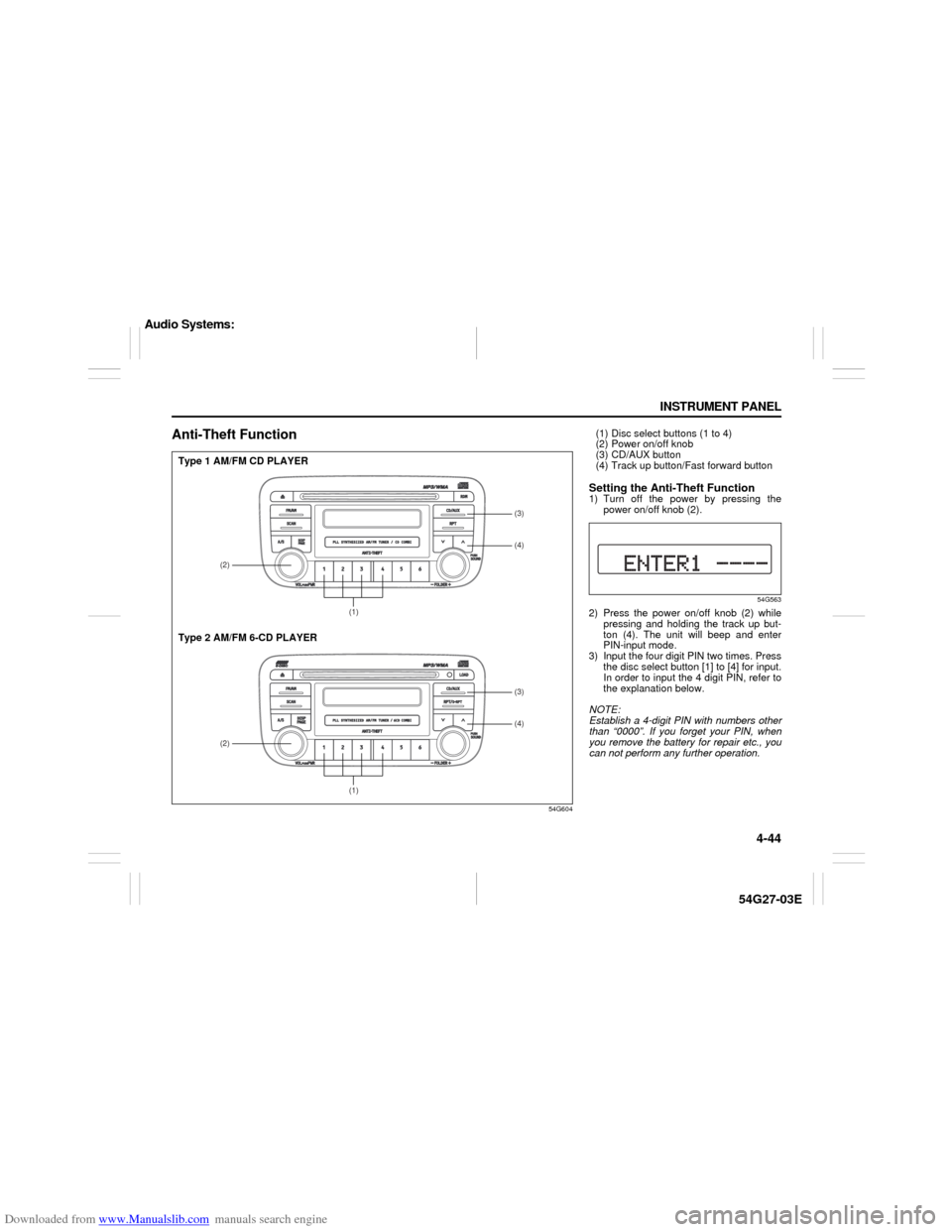
Anti-Theft Function
54G604
(2)
(1)(4) (3)(2)
(1)(4) (3)
Type 1 AM/FM CD PLAYER
Type 2 AM/FM 6-CD PLAYER
(1) Disc select buttons (1 to 4)
(2) Power on/off knob
(3) CD/AUX button
(4) Track up button/Fast forward buttonSetting the Anti-Theft Function1) Turn off the power by pressing the
power on/off knob (2).
54G563
2) Press the power on/off knob (2) while
pressing and holding the track up but-
ton (4). The unit will beep and enter
PIN-input mode.
3) Input the four digit PIN two times. Press
the disc select button [1] to [4] for input.
In order to input the 4 digit PIN, refer to
the explanation below.
NOTE:
Establish a 4-digit PIN with numbers other
than “0000”. If you forget your PIN, when
you remove the battery for repair etc., you
can not perform any further operation.
Audio Systems:
Page 110 of 232
![SUZUKI AERIO 2007 1.G Owners Manual Downloaded from www.Manualslib.com manuals search engine 4-45 INSTRUMENT PANEL
54G27-03E
How to input the code number
(for example “0364”)
54G564
1. Press the disc select button [1] once.
The numb](/img/20/7570/w960_7570-109.png "SUZUKI AERIO 2007 1.G Owners Manual Downloaded from www.Manualslib.com manuals search engine 4-45 INSTRUMENT PANEL
54G27-03E
How to input the code number
(for example “0364”)
54G564
1. Press the disc select button [1] once.
The numb")
Downloaded from www.Manualslib.com manuals search engine 4-45 INSTRUMENT PANEL
54G27-03E
How to input the code number
(for example “0364”)
54G564
1. Press the disc select button [1] once.
The number “0” is displayed.
Every time this button is pressed, the
displayed number changes over in
the order “0” to “9”.
54G565
2. Press the disc select button [2] four
times. The number “3” is displayed.
54G566
3. Manipulate the disc select buttons
[3] and [4] in the same way as
above, and input “0364”.
54G567
4. Press the CD button (3).
Pressing the CD button (3) will
cause the unit to beep and enter PIN
confirmation mode. Re-input the PIN
to confirm it, and press the CD but-
ton (3). If the number entered the
second time is different from the first
number, the unit will beep and go
back to first input mode.
NOTE:
Write down your PIN for the future use.
Cancel Your Established PIN
SettingThis operation is to be done when you
want to cancel the anti-theft code or
change your code number.
1) Turn off the power by pressing the
power on/off knob (2).
54G568
2) Press the power on/off knob (2) while
pressing and holding the track up but-
ton (4).
3) Input your PIN and press the CD button
(3).
Input a four-digit PIN using the disc
select buttons [1] through [4]. If the PIN
matches, the unit will emit a short beep
and the PIN will be erased. The unit will
return to normal operation.
If the PIN does not match, the unit will
emit a long beep and return to normal
position. In this case, the PIN will not be
erased.
To change your PIN, first erase your
current PIN, then set the new one.
Audio Systems:
Page 111 of 232
Downloaded from www.Manualslib.com manuals search engine 4-46 INSTRUMENT PANEL
54G27-03E
Confirming Your Personal Identifi-
cation Number (PIN)When the main power source is uncon-
nected for battery exchange etc. while the
anti-theft code is on, input your PIN.
54G569
1) Turn on ACC.
2) Input your PIN.
Input a four-digit PIN using disc select
buttons [1] through [4].
3) Complete the PIN confirmation.
After inputting the four-digit PIN, press
the CD button (3). If the PIN matches,
the unit will emit a short beep, indicat-
ing PIN confirmation is complete. The
unit will go into radio mode.
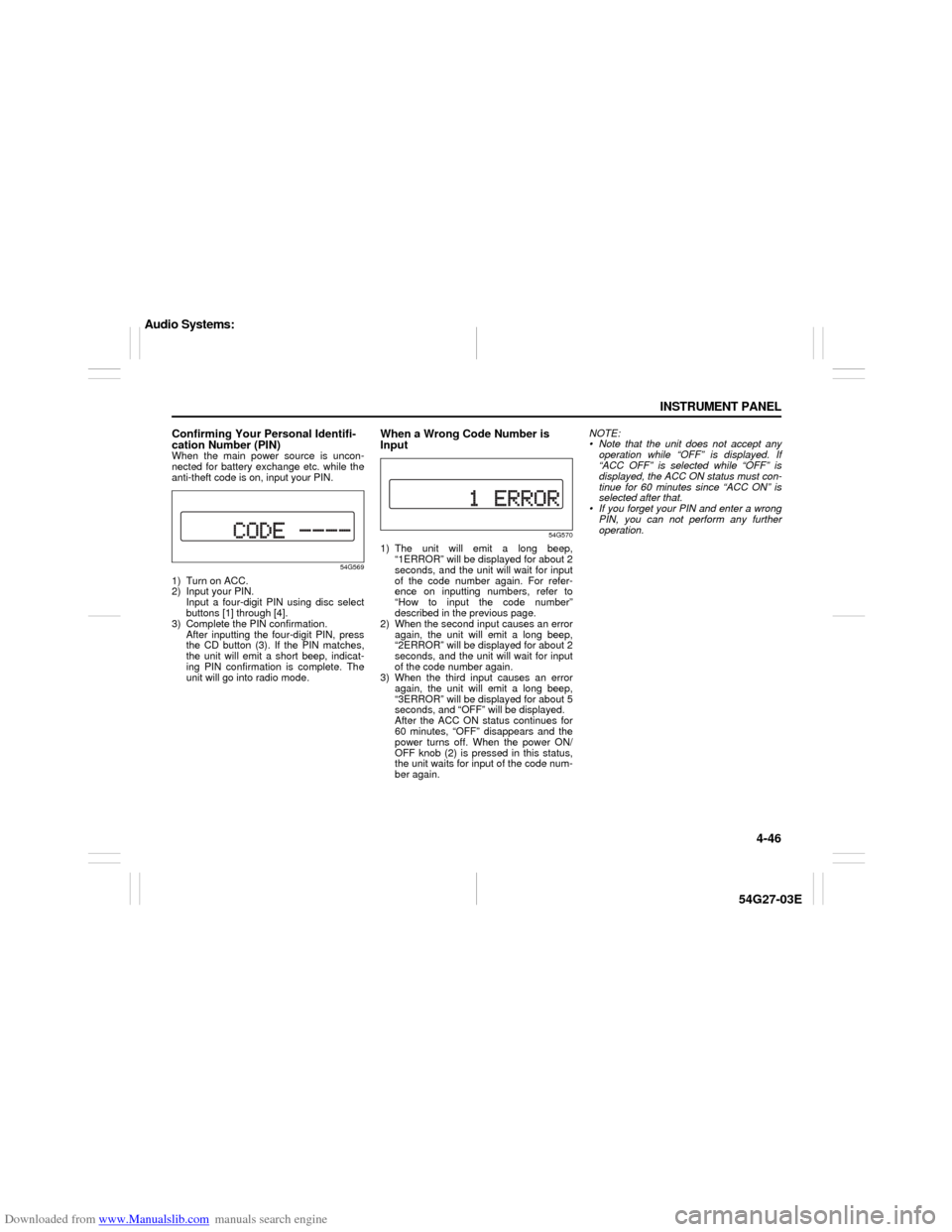
When a Wrong Code Number is
Input
54G570
1) The unit will emit a long beep,
“1ERROR” will be displayed for about 2
seconds, and the unit will wait for input
of the code number again. For refer-
ence on inputting numbers, refer to
“How to input the code number”
described in the previous page.
2) When the second input causes an error
again, the unit will emit a long beep,
“2ERROR” will be displayed for about 2
seconds, and the unit will wait for input
of the code number again.
3) When the third input causes an error
again, the unit will emit a long beep,
“3ERROR” will be displayed for about 5
seconds, and “OFF” will be displayed.
After the ACC ON status continues for
60 minutes, “OFF” disappears and the
power turns off. When the power ON/
OFF knob (2) is pressed in this status,
the unit waits for input of the code num-
ber again.NOTE:
Note that the unit does not accept any
operation while “OFF” is displayed. If
“ACC OFF” is selected while “OFF” is
displayed, the ACC ON status must con-
tinue for 60 minutes since “ACC ON” is
selected after that.
If you forget your PIN and enter a wrong
PIN, you can not perform any further
operation.
Audio Systems:
Page 112 of 232

Downloaded from www.Manualslib.com manuals search engine 4-47 INSTRUMENT PANEL
54G27-03E
TroubleshootingApplicable to every device
Radio
CDPhenomenon Cause Remedy
Power is not turned on.
(No sound is produced)Fuse is blown. Contact your authorized SUZUKI dealer.
Connections are not properly made. Contact your authorized SUZUKI dealer.
Phenomenon Cause Remedy
Too much noises. Not tuned correctly to the frequency of a sta-
tion.Tune the frequency correctly to the station.
Stations cannot be selected by
seek tuning.There is no station with strong radio waves. Select stations by manual tuning.
Phenomenon Cause Remedy
Compact disc cannot be loaded. Another compact disc is already loaded. Eject the compact disc before loading the new
one.
Sound skips or is noisy. Compact disc is dirty. Clean the compact disc with a soft cloth.
Compact disc is heavily scratched or warped. Replace with a compact disc with no scratches.
Sound is bad directly after power
is turned on.Water droplets may form on the internal lens
when the car is parked in a humid place.Let dry for about 1 hour with the power on.
Audio Systems:
Page 113 of 232

Downloaded from www.Manualslib.com manuals search engine 4-48 INSTRUMENT PANEL
54G27-03E
Error Display
An error message may not be displayed quickly depending on the degree of scratches or dirt on the CD.
If sound is not output for a while after a CD is inserted, there may be scratches or dirt on the CD. Eject it, and insert another CD.
Error code Mode Description
E01CD, CD changer Focus error (TOC information cannot be read.)
E02CD, CD changerData cannot be read due to scratches, dirt etc.
A CD-ROM is inserted.
E03CD, CD changer Loading error, eject error or pickup position error.
E HOTCD, CD changerThe high temperature protection function is activated. (Wait until the temperature
decrease.)
NO DISC– No disc is present in the unit.
ECD, CD changer Power supply system error, internal communication error or another error.
Audio Systems:
Page 227 of 232

Downloaded from www.Manualslib.com manuals search engine 15-1 INDEX
15
54G27-03E
INDEXSymbols“AIR BAG” Light
..................................................................4-5
“CRUISE” Indicator Light
...................................................4-6
“O/D OFF” Indicator Light ..................................................4-6
“PANIC” button function
....................................................2-3
“PASS AIRBAG OFF” Indicator
..........................................4-14
“SET” Indicator Light
..........................................................4-6
Numerics4-Speed Automatic Transaxle
............................................6-4
AA/T Selector Position Indicator
..........................................4-7
Accelerator Pedal
................................................................5-2
Accessory Socket ................................................................5-10
Adding Engine Coolant
.......................................................9-18
Adjusting Seat Position ......................................................2-11
Adjusting Seatbacks
...........................................................2-12
Air Cleaner
...........................................................................9-20
Air Conditioning System
.....................................................9-43
All Seat Belts Except Rear Center
.....................................2-16
Anti-Lock Brake System (ABS)
..........................................6-7
Anti-Lock Brake System (ABS) Warning Light
.................4-3
Armrest
.................................................................................5-6
Assist Grips
.........................................................................5-7
Audio Systems .....................................................................4-26
Automatic Heating and Air Conditioning System
(Climate Control) .................................................................4-22
Automatic Locking Retractor (ALR)
..................................2-15
Automatic Transaxle Fluid
..................................................9-16
BBasic Operations
................................................................ 4-29
Battery
.................................................................................. 9-35
Brake Fluid
.......................................................................... 9-22
Brake Pedal ..................................................................5-2
, 9-23
Brake System Warning Light
............................................. 4-3
Brakes
.................................................................................. 9-22
Braking ................................................................................. 6-7
Break-In ................................................................................ 6-9
Brightness Control
............................................................. 4-8
Bulb Replacement ............................................................... 9-38
CCatalytic Converter
............................................................. 6-9
Changing Engine Oil and Filter
......................................... 9-12
Changing Wheels
................................................................ 9-31
Charging Light
.................................................................... 4-4
Child Lock System (rear side doors)
................................ 2-6
Child Restraint Systems
..................................................... 2-22
Cigarette Lighter and Ashtray
........................................... 4-11
Clock
.................................................................................... 4-13
Clutch Pedal
.................................................................5-2
, 9-25
Coat Hooks
.......................................................................... 5-8
Compact Spare Tire
............................................................ 9-30
Corrosion Prevention ......................................................... 11-1
Cruise Control
..................................................................... 3-6
Cup Holder and Storage Area
............................................ 5-9
DDaily Inspection Checklist
................................................. 6-1
Page 230 of 232

Downloaded from www.Manualslib.com manuals search engine 15-4 INDEX
54G27-03E
Rear Window Defroster Switch
..........................................4-10
Rear Window Wiper/Washer Switch
..................................3-5
Refill with Oil and Check for Leaks ....................................9-13
Refilling
................................................................................9-12
Remote Audio Controls
.............................................. 3-8
, 4-43
Replace the Oil Filter
...........................................................9-13
Replacement of the transmitter battery
.............................2-4
Reporting Safety Defects
....................................................12-4
SSafety Certification Label
...................................................12-2
Seat Adjustment
..................................................................2-11
Seat Belt Extender ...............................................................2-30
Seat Belt Hanger
..................................................................2-21
Seat Belt Inspection
............................................................2-22
Seat Belt Pretensioner System
..........................................2-31
Seat Belt Reminder
..............................................................2-19
Seat Belts and Child Restraint Systems
...........................2-13
Selection of Coolant
............................................................9-17
Shoulder Anchor Height Adjuster
......................................2-21
Side Door Locks
..................................................................2-1
Snow Tires
...........................................................................9-31
Spark Plugs ..........................................................................9-21
SPECIFICATIONS
................................................................14-1
Specified Fluid
.....................................................................9-16
Specified Gear Oil ................................................................9-14
Specified Oil
.........................................................................9-11
Speedometer ........................................................................4-7
Spot Light
.............................................................................5-7
Starting the Engine
..............................................................6-2
Steering Wheel
.....................................................................9-24
Stowing Rear Center Lap-Shoulder Belt
...........................2-19Sun Visor
............................................................................. 5-6
Supplemental Restraint System (air bags)
....................... 2-32
TTachometer
.......................................................................... 4-9
Temperature Gauge
............................................................ 4-10
Thermometer
....................................................................... 4-13
Tilt Steering Lock Lever
..................................................... 3-6
Tire Chains
.......................................................................... 7-3
Tire Changing Tools
........................................................... 5-12
Tire Inflation Pressure ........................................................ 9-26
Tire Inspection
.................................................................... 9-27
Tire Rotation
........................................................................ 9-29
Tire Sidewall Labeling
........................................................ 9-25
Tire Size
............................................................................... 9-26
Tires
..................................................................................... 9-25
Towing a Disabled Vehicle
................................................. 10-5
Towing Your Vehicle (recreational towing)
...................... 8-2
Trailer Towing
..................................................................... 8-2
Trip meter
............................................................................ 4-7
Troubleshooting
.................................................................. 4-47
Trunk Lid
.............................................................................. 2-7
Trunk Light .......................................................................... 5-13
Turn Signal Indicators
........................................................ 4-6
Turn Signal Operation ........................................................ 3-4
UUniform Tire Quality Grading
............................................. 9-29
Unlatching and Latching Detachable Connector
............. 2-18
Using the Transaxle
............................................................ 6-4
VVehicle Cleaning
................................................................. 11-3
Vehicle Identification Number
........................................... 12-1