ECU SUZUKI CELERIO 2015 Owner's Manual
[x] Cancel search | Manufacturer: SUZUKI, Model Year: 2015, Model line: CELERIO, Model: SUZUKI CELERIO 2015Pages: 201, PDF Size: 5.82 MB
Page 74 of 201
3-4
OPERATING YOUR VEHICLE
76MH1-74E
76MH1-74E
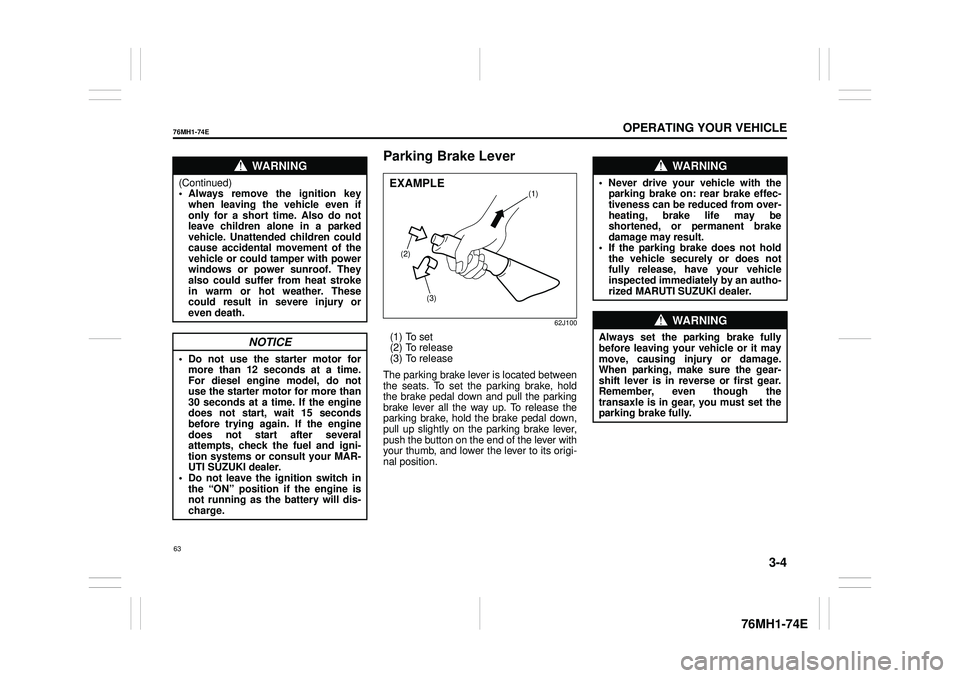
Parking Brake Lever
62J100
(1) To set (2) To release(3) To release
The parking brake lever is located between the seats. To set the parking brake, hold the brake pedal down and pull the parking brake lever all the way up. To release theparking brake, hold the brake pedal down, pull up slightly on the parking brake lever, push the button on the end of the lever withyour thumb, and lower the lever to its origi- nal position.
WA R N I N G
(Continued) • Always remove the ignition keywhen leaving the vehicle even if only for a short time. Also do not leave children alone in a parkedvehicle. Unattended children could cause accidental movement of the vehicle or could tamper with powerwindows or power sunroof. They also could suffer from heat stroke in warm or hot weather. Thesecould result in severe injury or even death.
NOTICE
• Do not use the starter motor for more than 12 seconds at a time.For diesel engine model, do not use the starter motor for more than 30 seconds at a time. If the enginedoes not start, wait 15 seconds before trying again. If the engine does not start after severalattempts, check the fuel and igni- tion systems or consult your MAR- UTI SUZUKI dealer.• Do not leave the ignition switch in the “ON” position if the engine is not running as the battery will dis-charge.
(2)
(3)
(1)EXAMPLE
WA R N I N G
• Never drive your vehicle with theparking brake on: rear brake effec-tiveness can be reduced from over- heating, brake life may be shortened, or permanent brakedamage may result. • If the parking brake does not hold the vehicle securely or does notfully release, have your vehicle inspected immediately by an autho- rized MARUTI SUZUKI dealer.
WA R N I N G
Always set the pa rking brake fully before leaving your vehicle or it may move, causing injury or damage. When parking, make sure the gear-shift lever is in reverse or first gear. Remember, even though the transaxle is in gear, you must set theparking brake fully.
63
Page 98 of 201
5-2
OTHER CONTROLS AND EQUIPMENT
76MH1-74E
76MH1-74E
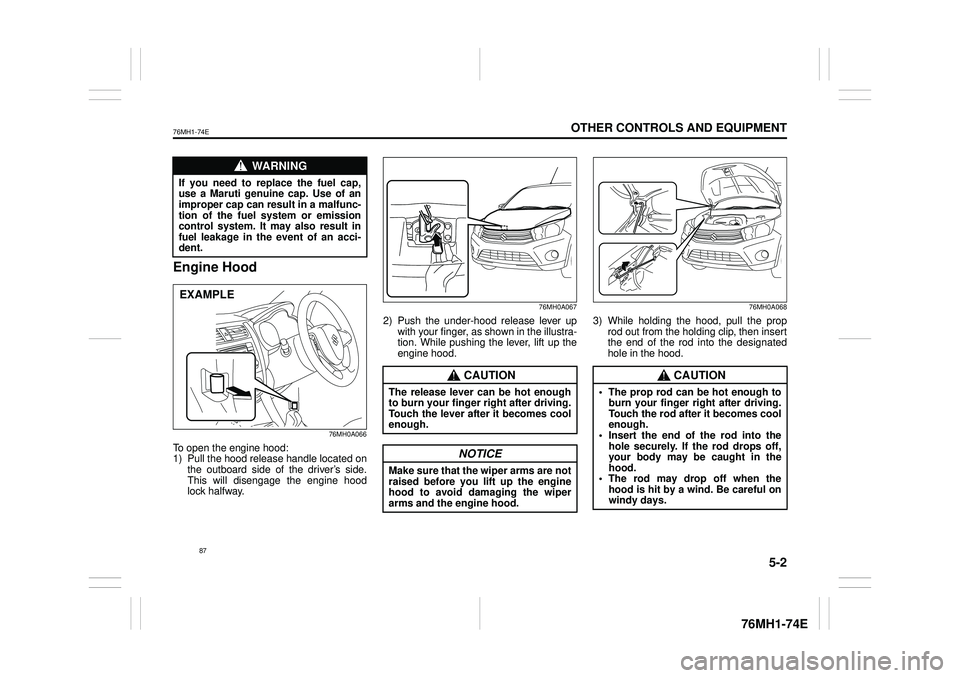
Engine Hood
76MH0A066
To open the engine hood: 1) Pull the hood release handle located onthe outboard side of the driver’s side. This will disengage the engine hood lock halfway.
76MH0A067
2) Push the under-hood release lever up with your finger, as shown in the illustra- tion. While pushing the lever, lift up theengine hood.
76MH0A068
3) While holding the hood, pull the prop rod out from the holding clip, then insert the end of the rod into the designatedhole in the hood.
WA R N I N G
If you need to replace the fuel cap,use a Maruti genuine cap. Use of animproper cap can result in a malfunc- tion of the fuel system or emission control system. It may also result infuel leakage in the event of an acci- dent.
EXAMPLE
CAUTION
The release lever can be hot enough to burn your finger right after driving. Touch the lever after it becomes cool enough.
NOTICE
Make sure that the wiper arms are notraised before you lift up the engine hood to avoid damaging the wiper arms and the engine hood.
CAUTION
• The prop rod can be hot enough toburn your finger right after driving. Touch the rod after it becomes cool enough.• Insert the end of the rod into the hole securely. If the rod drops off, your body may be caught in thehood. • The rod may drop off when the hood is hit by a wind. Be careful onwindy days.
87
Page 99 of 201

5-3
OTHER CONTROLS AND EQUIPMENT
76MH1-74E
76MH1-74E
To close the engine hood: 1) Lift the hood up slightly and remove the prop rod from the hole. Put the prop rodback to the holding clip.
76MS014
2) Lower the hood to about 20 cm abovethe hood latch, then let it drop down. Make sure the hood is securely latched after closing.
Sun Visor
79J161
The sun visors can be pulled down to block glare coming through the windshield, orthey can be unhooked and turned to the side to block glare coming through the side window.
Card holder (if equipped)
67LH064
(1) Card holder
You can put a card in the card holder (1) on the back of the sun visor.
WA R N I N G
Make sure the hood is fully closedand latched before driv ing. If it is not, it can fly up unexpectedly duringdriving, obstructing your view and resulting in an accident.
EXAMPLE
CAUTION
To avoid injury, be sure no part of the occupant’s body such as hands orhead is in the path of the hood when closing it.
NOTICE
Pressing the hood from above may damage the hood.
EXAMPLE
NOTICE
When unhooking and hooking a sunvisor, be sure to handle it by the hardplastic parts or the sun visor can be damaged.
NOTICE
When you park your vehicle outdoorsin direct sunlight or in hot weather, do not leave plastic cards in theholder. The heat may distort them.
(1)
EXAMPLE
88
Page 102 of 201
5-6
OTHER CONTROLS AND EQUIPMENT
76MH1-74E
Glove Box
76MH0A073
To open the glove box, pull the latch lever. To close it, push the lid until it latchessecurely.
WA R N I N G
Never drive with the glove box lidopen. It could cause injury if an acci- dent occurs.
EXAMPLE
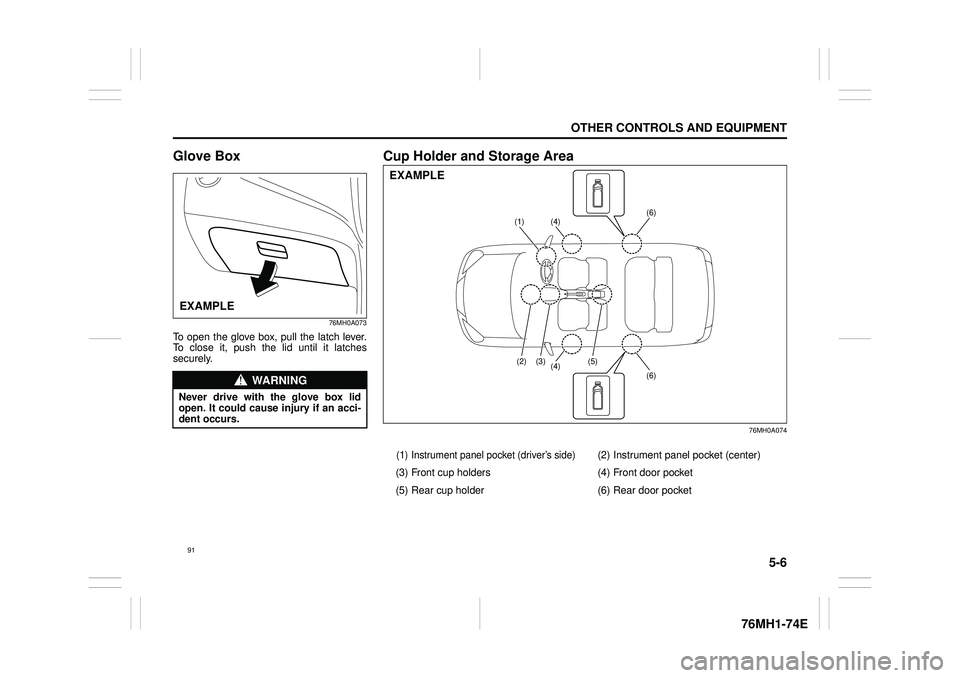
Cup Holder and Storage Area
76MH0A074
(1) Instrument panel pocket (driver’s side)(2) Instrument panel pocket (center)
(3) Front cup holders (4) Front door pocket
(5) Rear cup holder (6) Rear door pocket
(4)(1)
(4) (5)(3)(2)
(6)
(6)
EXAMPLE
91
Page 129 of 201
5-33
OTHER CONTROLS AND EQUIPMENT
76MH1-74E
76MH1-74E
Selection of phone (Select Phone) Follow the instructions below to select a phone to be paired with from the registeredphones. 1) Press the Bluetooth® setup button (4). The Bluetooth® setup menu will be dis-played. 2) Turn the TUNE FOLDER PUSH SOUND knob (1) to select “Setup Blue-tooth”, and press the knob (1) to deter- mine the selection. 3) Turn the TUNE FOLDER PUSHSOUND knob (1) to select “List Phone”, and press the knob (1) to determine the selection.4) Turn the TUNE FOLDER PUSH SOUND knob (1) to select a phone to be paired with, and press the knob (1)to determine the selection. 5) Turn the TUNE FOLDER PUSH SOUND knob (1) to select “Select”, andpress the knob (1) to determine the selection.
NOTE: • When selecting “Go Back”, the previous menu will be displayed.• The Bluetooth® ready audio device will be disconnected when the phone is selected.
List of phones (List Phones) Follow the instructions below to display the names of the registered phones insequence. 1) Press the Bluetooth® setup button (4). The Bluetooth® setup menu will be dis-played. 2) Turn the TUNE FOLDER PUSH SOUND knob (1) to select “Setup Blue-tooth”, and press the knob (1) to deter- mine the selection. 3) Turn the TUNE FOLDER PUSHSOUND knob (1) to select “List Phone”, and press the knob (1) to determine the selection.The names of the registered phones are displayed in sequence.
NOTE: When selecting “Go Back”, the previous menu will be displayed.
Passkey setting (Set Passkey) Follow the instructions below to set thesecurity number (Passkey). 1) Press the Bluetooth® setup button (4). The Bluetooth® setup menu will be dis-played. 2) Turn the TUNE FOLDER PUSH SOUND knob (1) to select “Setup Blue-tooth”, and press the knob (1) to deter- mine the selection. 3) Turn the TUNE FOLDER PUSHSOUND knob (1) to select “Passkey”, and press the knob (1) to determine the selection.
4) Turn the TUNE FOLDER PUSH SOUND knob (1) to select “New Pass- key”, and press the knob (1) to deter-mine the selection. 5) Press or turn the TUNE FOLDER PUSH SOUND knob (1) to select “Con-firm”. 6) Turn the TUNE FOLDER PUSH SOUND knob (1) to select a number forthe first digit, and press the knob (1) to determine the selection. Select and determine numbers for the second,third and fourth digits in order in the same manner. When not entering up to the eighth digit, enter blanks for thesuccessive digits. 7) Turn the TUNE FOLDER PUSH SOUND knob (1) to determine thepasskey setting.
NOTE: When selecting “Go Back”, the previous menu will be displayed.
118
Page 132 of 201
5-36
OTHER CONTROLS AND EQUIPMENT
76MH1-74E
76MH1-74E
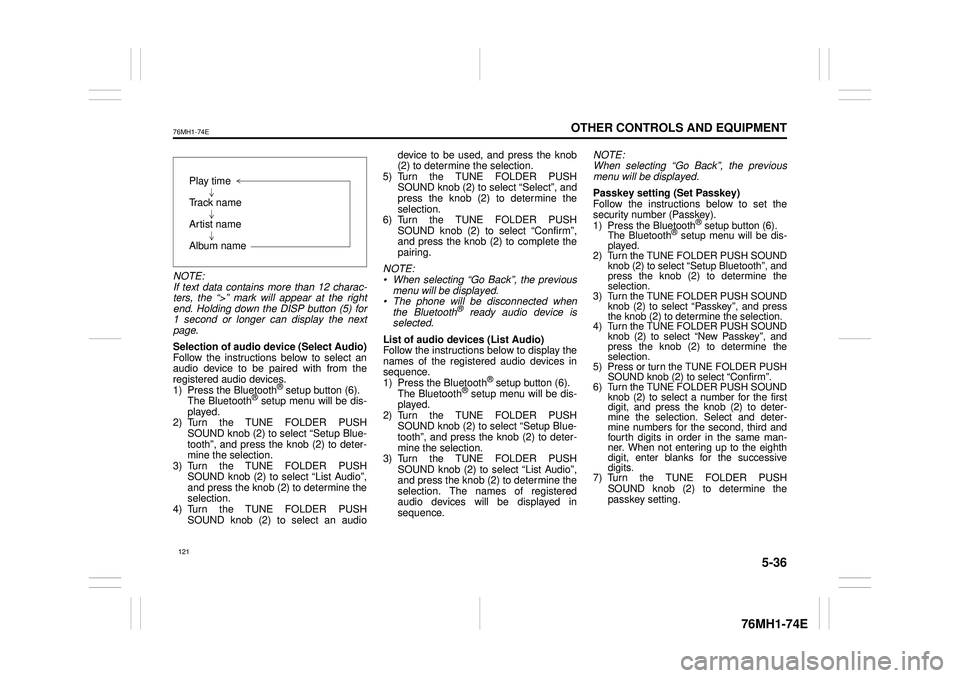
NOTE: If text data contains more than 12 charac- ters, the “>” mark will appear at the rightend. Holding down the DISP button (5) for 1 second or longer can display the next page.
Selection of audio device (Select Audio) Follow the instructions below to select anaudio device to be paired with from the registered audio devices. 1) Press the Bluetooth® setup button (6). The Bluetooth® setup menu will be dis- played. 2) Turn the TUNE FOLDER PUSHSOUND knob (2) to select “Setup Blue- tooth”, and press the knob (2) to deter- mine the selection.3) Turn the TUNE FOLDER PUSH SOUND knob (2) to select “List Audio”, and press the knob (2) to determine theselection. 4) Turn the TUNE FOLDER PUSH SOUND knob (2) to select an audio
device to be used, and press the knob (2) to determine the selection. 5) Turn the TUNE FOLDER PUSHSOUND knob (2) to select “Select”, and press the knob (2) to determine the selection.6) Turn the TUNE FOLDER PUSH SOUND knob (2) to select “Confirm”, and press the knob (2) to complete thepairing.
NOTE: • When selecting “Go Back”, the previous menu will be displayed. • The phone will be disconnected whenthe Bluetooth® ready audio device is selected.
List of audio devices (List Audio) Follow the instructions below to display the names of the registered audio devices insequence. 1) Press the Bluetooth® setup button (6). The Bluetooth® setup menu will be dis-played. 2) Turn the TUNE FOLDER PUSH SOUND knob (2) to select “Setup Blue-tooth”, and press the knob (2) to deter- mine the selection. 3) Turn the TUNE FOLDER PUSHSOUND knob (2) to select “List Audio”, and press the knob (2) to determine the selection. The na mes of registered audio devices will be displayed in sequence.
NOTE: When selecting “Go Back”, the previous menu will be displayed.
Passkey setting (Set Passkey) Follow the instructions below to set thesecurity number (Passkey).1) Press the Bluetooth® setup button (6). The Bluetooth® setup menu will be dis- played. 2) Turn the TUNE FOLDER PUSH SOUND knob (2) to select
Page 134 of 201
5-38
OTHER CONTROLS AND EQUIPMENT
76MH1-74E
76MH1-74E
Selecting the radio station (FM1, FM2, AM mode) To select the next pr eset station, press “ ” of the switch (4) only for a moment. To select the previous preset station, press “ ” of the switch (4) only for amoment. To scan a higher frequency radio station, press “ ” of the switch (4) for 1 secondor longer. To scan a lower frequency radio station, press “ ” of the switch (4) for 1 secondor longer.
Selecting the track (CD, USB (iPod®), Bluetooth® audio mode) To skip to the next track, press “ ” of the switch (4) only for a moment. To skip to the previous track, press “ ” of the switch (4) twice only for a moment. When the switch (4) is pushed downonce only for a moment, the track cur- rently being played will start from the beginning again.
Fast forwarding/Rewinding a track To fast forward, press “ ” of the switch(4) for 1 second or longer. To fast rewind, press “ ” of the switch (4) for 1 second or longer.
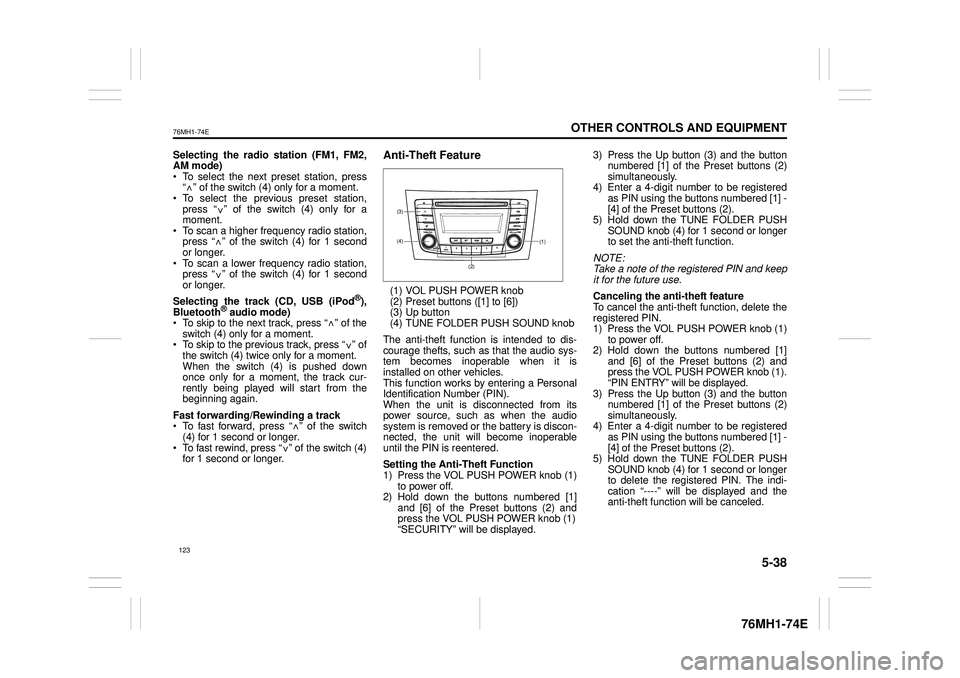
Anti-Theft Feature
(1) VOL PUSH POWER knob(2) Preset buttons ([1] to [6])(3) Up button (4) TUNE FOLDER PUSH SOUND knob
The anti-theft function is intended to dis- courage thefts, such as that the audio sys- tem becomes inoperable when it isinstalled on other vehicles. This function works by entering a Personal Identification Number (PIN).When the unit is disconnected from its power source, such as when the audio system is removed or the battery is discon-nected, the unit will become inoperable until the PIN is reentered.
Setting the Anti-Theft Function 1) Press the VOL PUSH POWER knob (1) to power off.2) Hold down the buttons numbered [1] and [6] of the Preset buttons (2) and press the VOL PUSH POWER knob (1)“SECURITY” will be displayed.
3) Press the Up button (3) and the button numbered [1] of the Preset buttons (2) simultaneously.4) Enter a 4-digit number to be registered as PIN using the buttons numbered [1] - [4] of the Preset buttons (2).5) Hold down the TUNE FOLDER PUSH SOUND knob (4) for 1 second or longer to set the anti-theft function.
NOTE: Take a note of the registered PIN and keepit for the future use.
Canceling the anti -theft feature To cancel the anti-theft function, delete the registered PIN. 1) Press the VOL PUSH POWER knob (1)to power off. 2) Hold down the buttons numbered [1] and [6] of the Preset buttons (2) andpress the VOL PUSH POWER knob (1). “PIN ENTRY” will be displayed. 3) Press the Up button (3) and the buttonnumbered [1] of the Preset buttons (2) simultaneously. 4) Enter a 4-digit number to be registeredas PIN using the buttons numbered [1] - [4] of the Preset buttons (2). 5) Hold down the TUNE FOLDER PUSHSOUND knob (4) for 1 second or longer to delete the registered PIN. The indi- cation “----” will be displayed and theanti-theft function will be canceled.
<
<
<
<
<
<
<
<
(1)(4)
(3)
(2)
123
Page 135 of 201
5-39
OTHER CONTROLS AND EQUIPMENT
76MH1-74E
76MH1-74E
NOTE: To change your PIN, first delete your cur- rent PIN, then set a new one.
Confirming the Personal Identification Number (PIN)When the main power source is discon- nected such as when the battery is replaced, etc, it is required to enter the PINto make the unit operable again. 1) Set the ignition switch to the “ACC” position. “SECURITY” will be displayed. 2) Press the Up button (3) and the button numbered [1] of the Preset buttons (2)simultaneously. 3) Enter a 4-digit number to be registered as PIN using the buttons numbered [1] -[4] of the Preset buttons (2). 4) Hold down TUNE FOLDER PUSH SOUND knob (4) for 1 second or lon-ger. When the PIN same as registered is entered, the power of the audio systemwill be turned off automatically and it will become operable again.
NOTE: If an incorrect PIN is entered, “ERROR” and the total number of incorrect entryattempts will be displayed. If an incorrect PIN is entered 10 times, “HELP” will be displayed and the audiosystem will become inoperable.
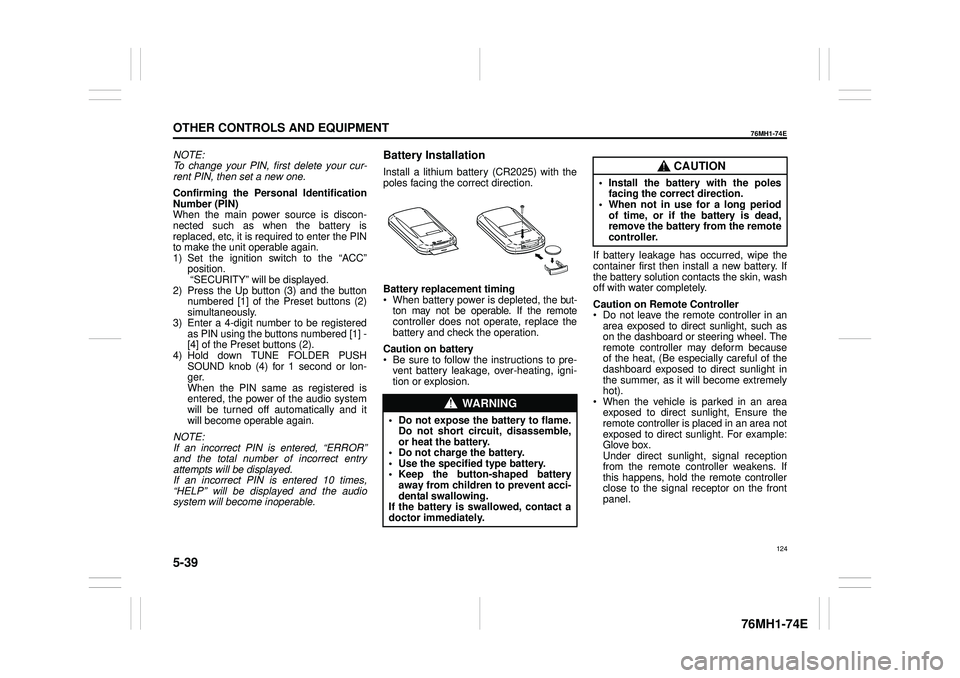
Battery Installation
Install a lithium battery (CR2025) with the poles facing the correct direction.
Battery replacement timing When battery power is depleted, the but-ton may not be operable. If the remote controller does not operate, replace the battery and check the operation.
Caution on battery Be sure to follow the instructions to pre- vent battery leakage, over-heating, igni- tion or explosion.
If battery leakage has occurred, wipe the container first then install a new battery. If the battery solution contacts the skin, wash off with water completely.
Caution on Remote Controller Do not leave the remote controller in anarea exposed to direct sunlight, such as on the dashboard or steering wheel. The remote controller may deform becauseof the heat, (Be especially careful of the dashboard exposed to direct sunlight in the summer, as it will become extremelyhot). When the vehicle is parked in an area exposed to direct sunlight, Ensure theremote controller is placed in an area not exposed to direct sunlight. For example: Glove box.Under direct sunlight , signal reception from the remote controller weakens. If this happens, hold the remote controllerclose to the signal receptor on the front panel.
WA R N I N G
• Do not expose the battery to flame. Do not short circuit, disassemble,or heat the battery. • Do not charge the battery. • Use the specified type battery.• Keep the button-shaped battery away from children to prevent acci- dental swallowing.If the battery is swallowed, contact a doctor immediately.
CAUTION
• Install the battery with the poles facing the correct direction.• When not in use for a long period of time, or if the battery is dead, remove the battery from the remotecontroller.
124
Page 142 of 201
5-46
OTHER CONTROLS AND EQUIPMENT
76MH1-74E
76MH1-74E
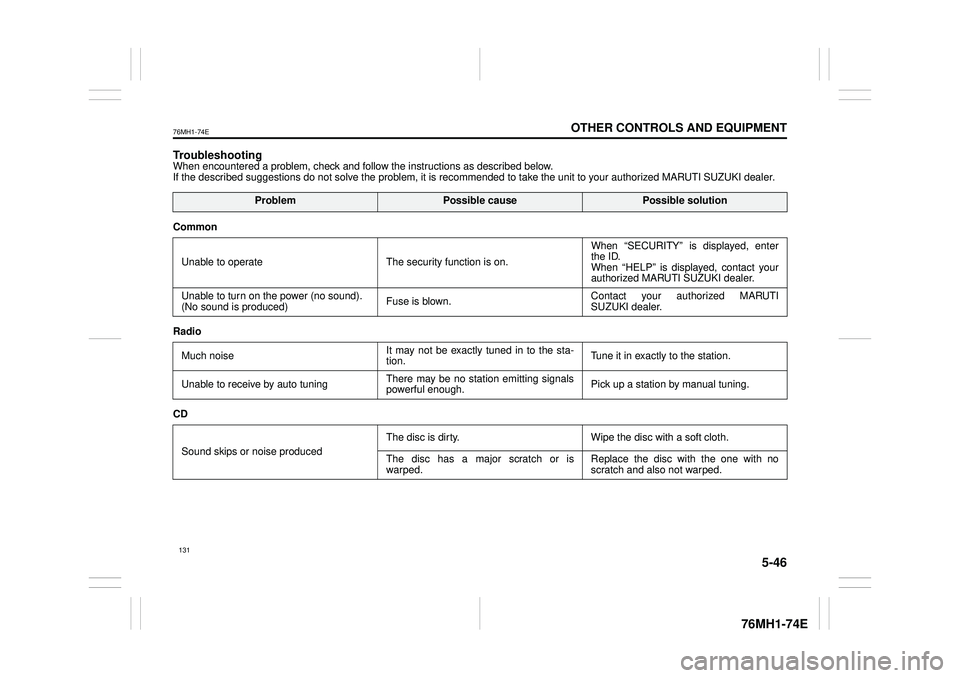
TroubleshootingWhen encountered a problem, check and follow the instructions as described below. If the described suggestions do not solve the problem, it is recommended to take the unit to your authorized MARUTI SUZUKI dealer.
ProblemPossible causePossible solution
Common
Unable to operate The security function is on.
When “SECURITY” is displayed, enter the ID. When “HELP” is displayed, contact yourauthorized MARUTI SUZUKI dealer.
Unable to turn on the power (no sound). (No sound is produced) Fuse is blown.Contact your authorized MARUTI SUZUKI dealer.
Radio
Much noise It may not be exactly tuned in to the sta- tion. Tune it in exactly to the station.
Unable to receive by auto tuning There may be no station emitting signals powerful enough. Pick up a station by manual tuning.
CD
Sound skips or noise produced
The disc is dirty. Wipe the disc with a soft cloth.
The disc has a major scratch or is warped. Replace the disc with the one with no scratch and also not warped.
131
Page 147 of 201
6-1
VEHICLE LOADING AND TOWING
76MH1-74E
76MH1-74E
Vehicle Loading
Your vehicle was designed for specific weight capacities. The weight capacities ofyour vehicle are indicated by the Gross Vehicle Weight Rating (GVWR) and the Permissible maximum Axle Weight (PAW,front and rear). The GVWR and PAW (front and rear) are listed in the “SPECIFICA- TIONS” section.
GVWR – Maximum permissible overall weight of the fully loaded vehicle (includingall the occupants, accessories and cargo plus the trailer nose weight if towing a trailer).PAW – (Front and Rear) Maximum permis- sible weight on an individual axle.
Actual weight of the loaded vehicle and actual loads at the front and rear axles can only be determined by weighing the vehi-cle. Compare these weights to the GVWR and PAW (front and rear). If the gross vehi- cle weight or the load on either axleexceeds these ratings, you must remove enough weight to bring the load down to the rated capacity.
Trailer Towing
Your MARUTI SUZUKI was originallydesigned to carry people and a normal amount of cargo, not to tow a trailer.MAR- UTI SUZUKI does not recommend you useyour vehicle to tow a trailer. Towing a trailer can adversely affect handling, durability, and fuel economy.
Towing Your Vehicle
Your vehicle may be towed behind anothervehicle (such as a motorhome), providedyour vehicle is 2 wheel drive (2WD) and you use the proper towing method speci- fied for your vehicle. The towing methodyou must use depends on the specifica- tions of your vehicle: whether it is a manual transaxle vehicle or an Auto Gear Shiftvehicle.
Use the towing instruction table to select the proper towing method for your vehicle, and carefully follow the corresponding instructions. Be sure to use proper towingequipment designed for recreational tow- ing and make sure that towing speed does not exceed 90 km/h (55 mph).
WA R N I N G
Never overload your vehicle. Thegross vehicle weight (sum of theweights of the vehicle, all the occu- pants, accessories, cargo plus trailer nose weight if towing a trailer) mustnever exceed the Gross Vehicle Weight Rating (GVWR). In addition, never distribute a load so that theweight on either th e front or rear axle exceeds the Permissible maximum Axle Weight (PAW).
WA R N I N G
Always distribute cargo evenly. Toavoid personal injury or damage to your vehicle, always secure cargo to prevent it from shifting if the vehiclemoves suddenly. Place heavier objects on the floor and as far for- ward in the cargo area as possible.Never pile cargo higher than the top of the seat backs.
WA R N I N G
When you tow your vehicle, follow the instructions below to avoid acci-dents and damage to your vehicle. In addition, be sure to observe govern- ment and local requirements regard-ing vehicle lighting and trailer hitches or tow bars.
WA R N I N G
A safety chain should always be used when you tow your vehicle.
136