Control system SUZUKI ERTIGA 2013 1.G User Guide
[x] Cancel search | Manufacturer: SUZUKI, Model Year: 2013, Model line: ERTIGA, Model: SUZUKI ERTIGA 2013 1.GPages: 207, PDF Size: 5.14 MB
Page 56 of 207
Downloaded from www.Manualslib.com manuals search engine 2-41BEFORE DRIVING
60MK0-14E
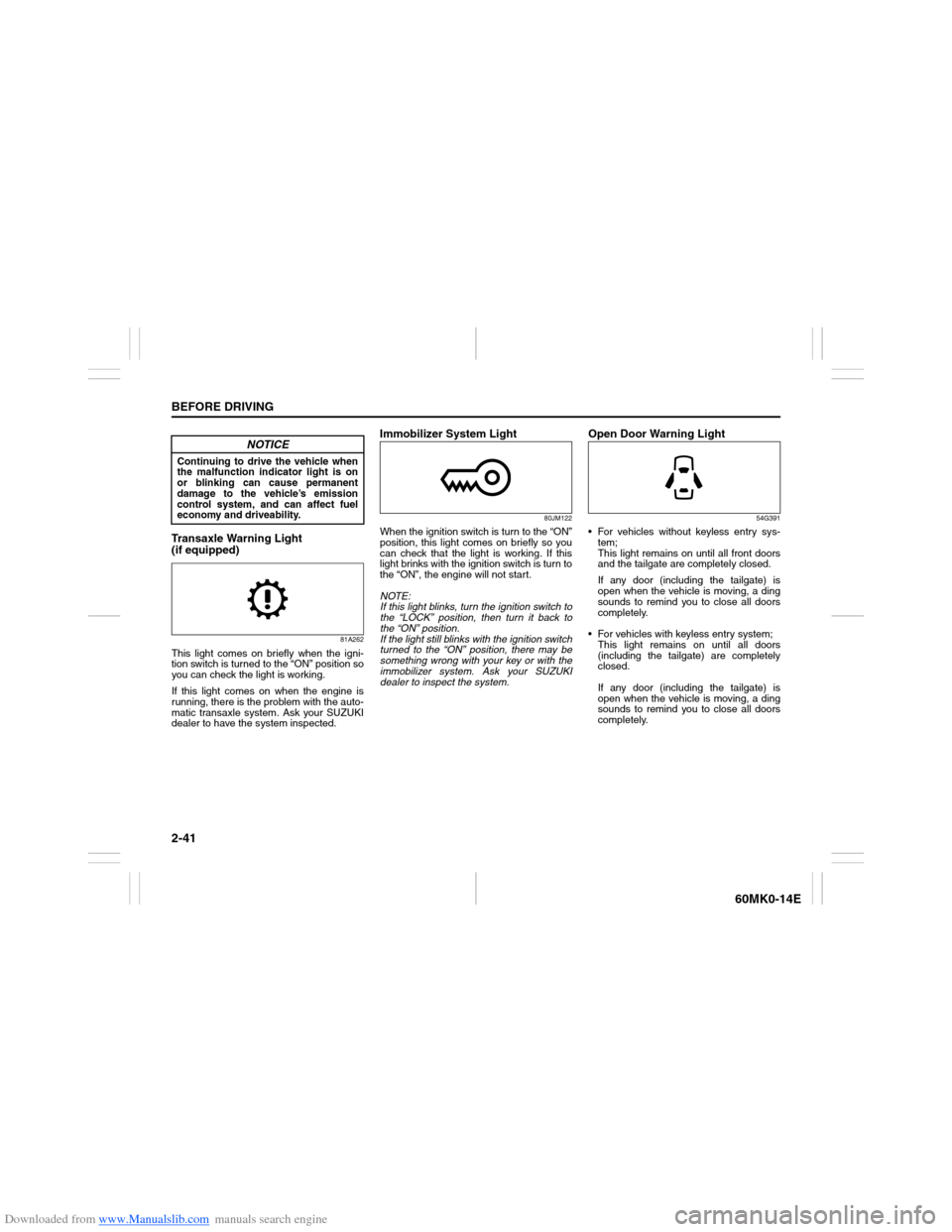
Transaxle Warning Light
(if equipped)
81A262
This light comes on briefly when the igni-
tion switch is turned to the “ON” position so
you can check the light is working.
If this light comes on when the engine is
running, there is the problem with the auto-
matic transaxle system. Ask your SUZUKI
dealer to have the system inspected.
Immobilizer System Light
80JM122
When the ignition switch is turn to the “ON”
position, this light comes on briefly so you
can check that the light is working. If this
light brinks with the ignition switch is turn to
the “ON”, the engine will not start.
NOTE:
If this light blinks, turn the ignition switch to
the “LOCK” position, then turn it back to
the “ON” position.
If the light still blinks with the ignition switch
turned to the “ON” position, there may be
something wrong with your key or with the
immobilizer system. Ask your SUZUKI
dealer to inspect the system.
Open Door Warning Light
54G391
For vehicles without keyless entry sys-
tem;
This light remains on until all front doors
and the tailgate are completely closed.
If any door (including the tailgate) is
open when the vehicle is moving, a ding
sounds to remind you to close all doors
completely.
For vehicles with keyless entry system;
This light remains on until all doors
(including the tailgate) are completely
closed.
If any door (including the tailgate) is
open when the vehicle is moving, a ding
sounds to remind you to close all doors
completely.
NOTICE
Continuing to drive the vehicle when
the malfunction indicator light is on
or blinking can cause permanent
damage to the vehicle’s emission
control system, and can affect fuel
economy and driveability.
Page 60 of 207
Downloaded from www.Manualslib.com manuals search engine 2-45BEFORE DRIVING
60MK0-14E
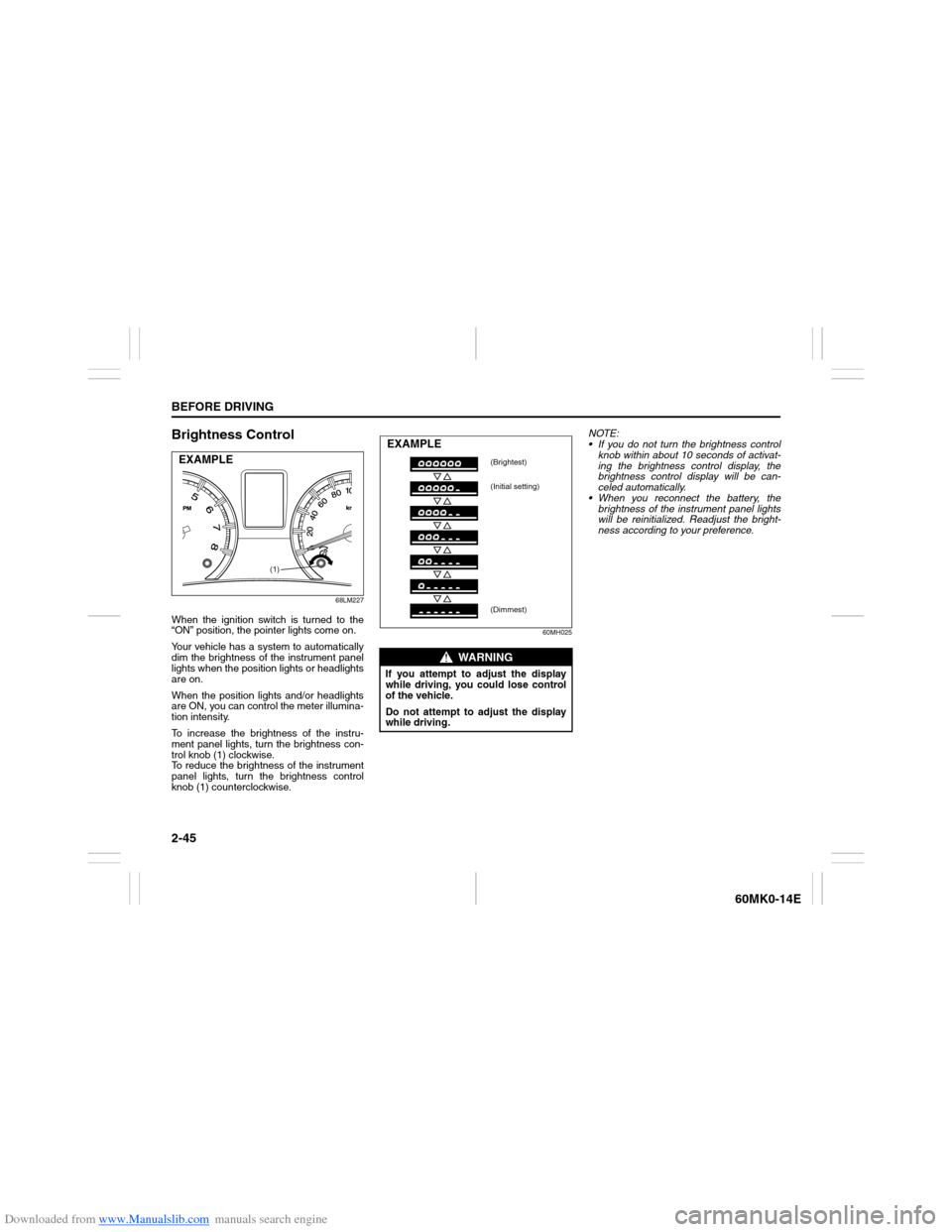
Brightness Control
68LM227
When the ignition switch is turned to the
“ON” position, the pointer lights come on.
Your vehicle has a system to automatically
dim the brightness of the instrument panel
lights when the position lights or headlights
are on.
When the position lights and/or headlights
are ON, you can control the meter illumina-
tion intensity.
To increase the brightness of the instru-
ment panel lights, turn the brightness con-
trol knob (1) clockwise.
To reduce the brightness of the instrument
panel lights, turn the brightness control
knob (1) counterclockwise.
60MH025
NOTE:
If you do not turn the brightness control
knob within about 10 seconds of activat-
ing the brightness control display, the
brightness control display will be can-
celed automatically.
When you reconnect the battery, the
brightness of the instrument panel lights
will be reinitialized. Readjust the bright-
ness according to your preference.
(1)
EXAMPLE
WARNING
If you attempt to adjust the display
while driving, you could lose control
of the vehicle.
Do not attempt to adjust the display
while driving.EXAMPLE
(Brightest)
(Initial setting)
(Dimmest)
Page 86 of 207
Downloaded from www.Manualslib.com manuals search engine 3-13OPERATING YOUR VEHICLE
60MK0-14E
Power-Assisted Brakes Your vehicle has power-assisted brakes. If
power assistance is lost due to a stalled
engine or other failures, the system is still
fully operational on reserve power and you
can bring the vehicle to a complete stop by
pressing the brake pedal once and holding
it down. The reserve power is partly used
up when you depress the brake pedal and
reduces each time the pedal is pressed.
Apply smooth and even pressure to the
pedal. Do not pump the pedal.
Brake Assist System (if equipped)When you slam the brakes on, the brake
assist system judges as an emergency
stop and provides more powerful braking
for a driver who cannot hold down the
brake pedal firmly.
NOTE:
If you quickly and forcefully depress the
brakes, you may hear a clicking sound in
the brake pedal. This is normal and indi-
cates that the brake assist system is acti-
vated properly.Anti-Lock Brake System (ABS)
(if equipped)ABS will help you avoid skidding by elec-
tronically controlling braking pressure. It
will also help you maintain steering control
when braking on slippery surfaces or when
braking hard.
The ABS works automatically, so you do
not need any special braking technique.
Just push the brake pedal down without
pumping. The ABS will operate whenever it
senses that the wheels are locking up. Youmay feel the brake pedal moves a little
while the ABS is operating.
NOTE:
The ABS will not work if vehicle speed is
under about 10 km/h (6mph).
WARNING
If water gets into the brake drums,
brake performance may become poor
and unpredictable. After driving
through water or washing the under-
side of the vehicle, test the brakes
while driving at a slow speed to see if
they have maintained their normal
effectiveness. If the brakes are less
effective than normal, dry them by
repeatedly applying the brakes while
driving slowly until the brakes have
regained their normal effectiveness.
WARNING
Even without reserve power in the
brake system, you can still stop the
vehicle by pressing the brake pedal
harder than normally required. How-
ever, the stopping distance may be
longer.
WARNING
On some types of loose surfaces
(such as gravel, snow-covered
roads, etc.) the stopping distance
required for an ABS-equipped vehi-
cle may be slightly greater than for
a comparable vehicle with a con-
ventional brake system. With a
conventional brake system, skid-
ding tires are able to “plow” the
gravel or snow layer, shortening
the stopping distance. ABS mini-
mizes this resistance effect. Allow
for extra stopping distance when
driving on loose surfaces.
On regular paved roads, some driv-
ers may be able to obtain slightly
shorter stopping distances with
conventional brake systems than
with ABS.
(Continued)
Page 87 of 207
Downloaded from www.Manualslib.com manuals search engine 3-14
OPERATING YOUR VEHICLE
60MK0-14E
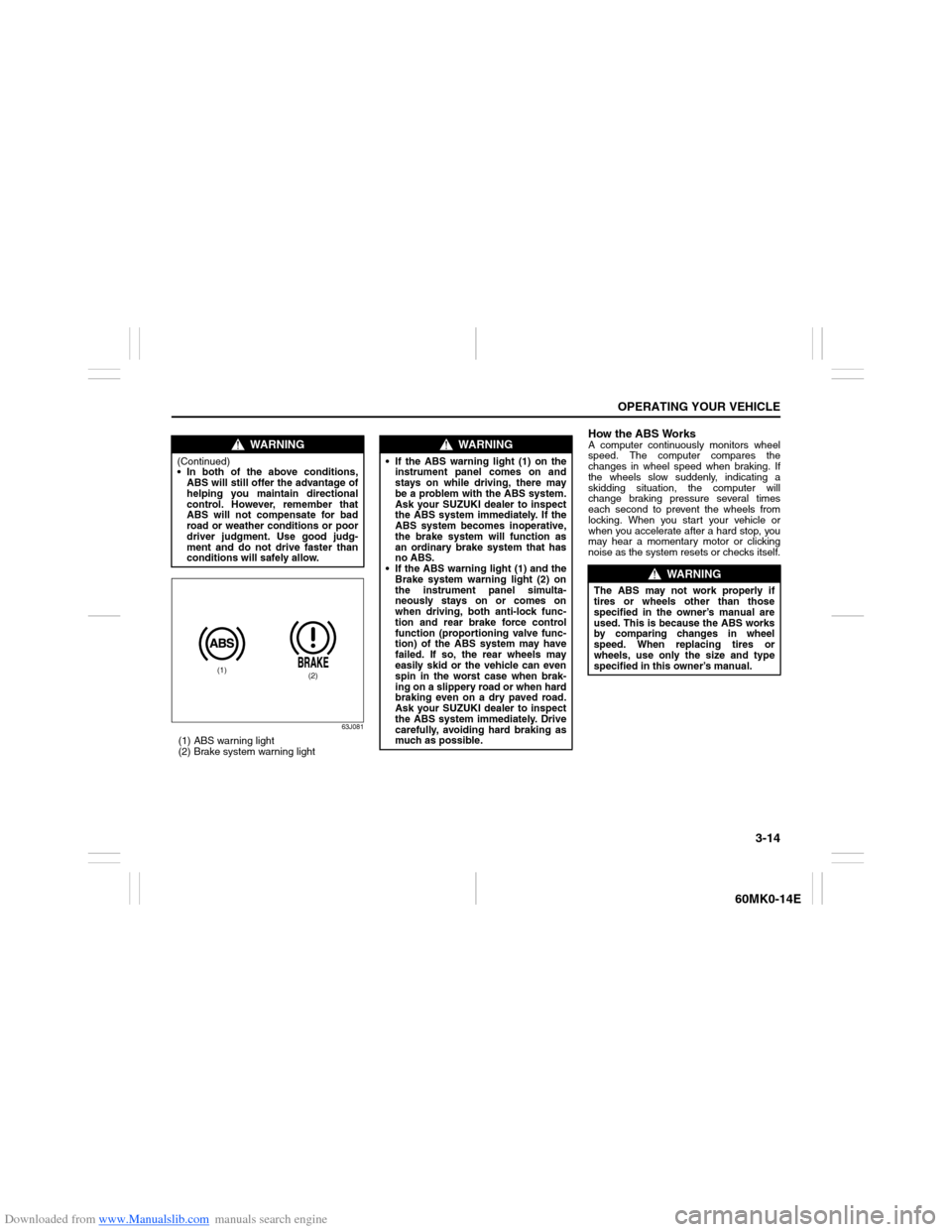
63J081
(1) ABS warning light
(2) Brake system warning light
How the ABS WorksA computer continuously monitors wheel
speed. The computer compares the
changes in wheel speed when braking. If
the wheels slow suddenly, indicating a
skidding situation, the computer will
change braking pressure several times
each second to prevent the wheels from
locking. When you start your vehicle or
when you accelerate after a hard stop, you
may hear a momentary motor or clicking
noise as the system resets or checks itself.
WARNING
(Continued)
In both of the above conditions,
ABS will still offer the advantage of
helping you maintain directional
control. However, remember that
ABS will not compensate for bad
road or weather conditions or poor
driver judgment. Use good judg-
ment and do not drive faster than
conditions will safely allow.
(1)
(2)
WARNING
If the ABS warning light (1) on the
instrument panel comes on and
stays on while driving, there may
be a problem with the ABS system.
Ask your SUZUKI dealer to inspect
the ABS system immediately. If the
ABS system becomes inoperative,
the brake system will function as
an ordinary brake system that has
no ABS.
If the ABS warning light (1) and the
Brake system warning light (2) on
the instrument panel simulta-
neously stays on or comes on
when driving, both anti-lock func-
tion and rear brake force control
function (proportioning valve func-
tion) of the ABS system may have
failed. If so, the rear wheels may
easily skid or the vehicle can even
spin in the worst case when brak-
ing on a slippery road or when hard
braking even on a dry paved road.
Ask your SUZUKI dealer to inspect
the ABS system immediately. Drive
carefully, avoiding hard braking as
much as possible.
WARNING
The ABS may not work properly if
tires or wheels other than those
specified in the owner’s manual are
used. This is because the ABS works
by comparing changes in wheel
speed. When replacing tires or
wheels, use only the size and type
specified in this owner’s manual.
Page 93 of 207
Downloaded from www.Manualslib.com manuals search engine 4-4
DRIVING TIPS
60MK0-14E
Driving on Slippery Roads
60G089S
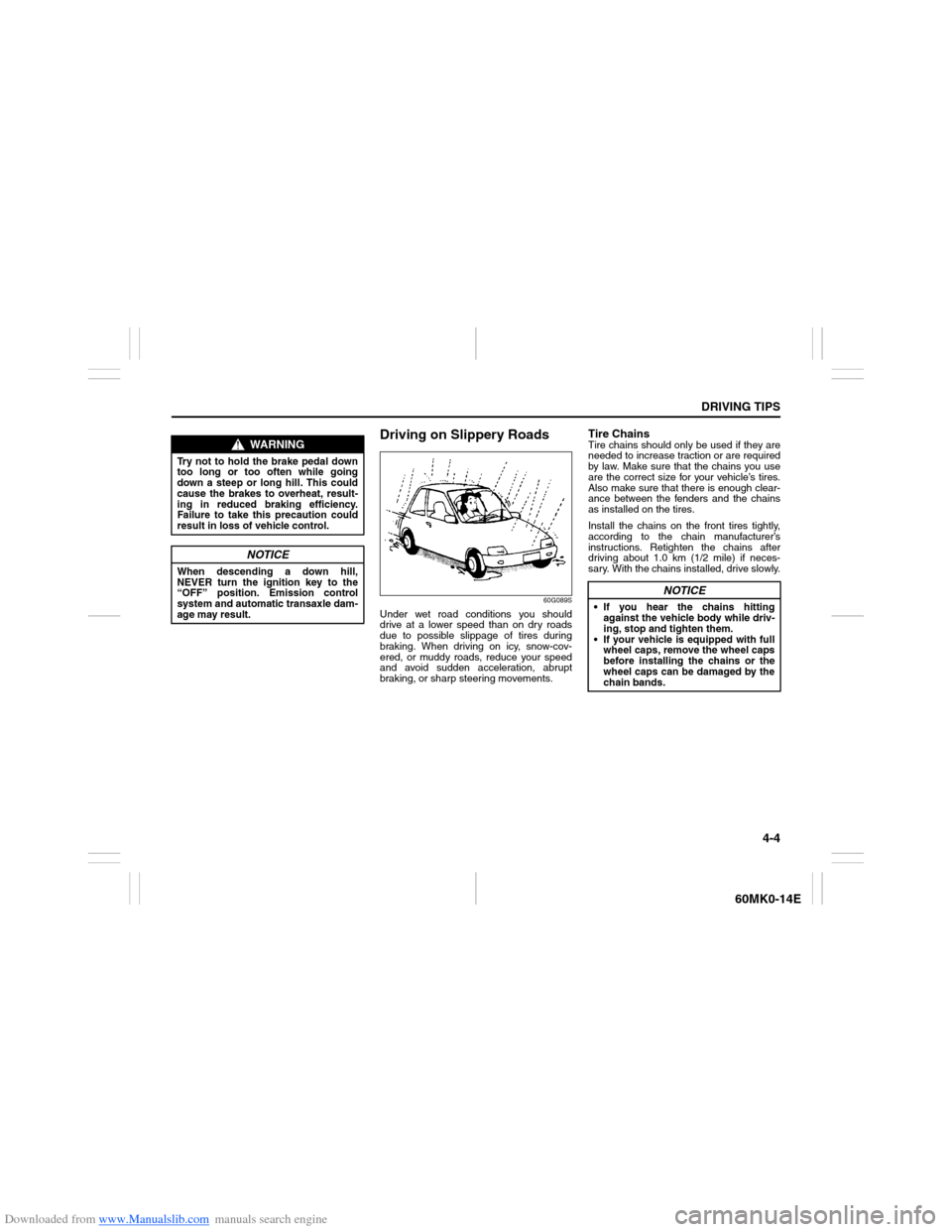
Under wet road conditions you should
drive at a lower speed than on dry roads
due to possible slippage of tires during
braking. When driving on icy, snow-cov-
ered, or muddy roads, reduce your speed
and avoid sudden acceleration, abrupt
braking, or sharp steering movements.
Tire ChainsTire chains should only be used if they are
needed to increase traction or are required
by law. Make sure that the chains you use
are the correct size for your vehicle’s tires.
Also make sure that there is enough clear-
ance between the fenders and the chains
as installed on the tires.
Install the chains on the front tires tightly,
according to the chain manufacturer’s
instructions. Retighten the chains after
driving about 1.0 km (1/2 mile) if neces-
sary. With the chains installed, drive slowly.
WARNING
Try not to hold the brake pedal down
too long or too often while going
down a steep or long hill. This could
cause the brakes to overheat, result-
ing in reduced braking efficiency.
Failure to take this precaution could
result in loss of vehicle control.
NOTICE
When descending a down hill,
NEVER turn the ignition key to the
“OFF” position. Emission control
system and automatic transaxle dam-
age may result.
NOTICE
If you hear the chains hitting
against the vehicle body while driv-
ing, stop and tighten them.
If your vehicle is equipped with full
wheel caps, remove the wheel caps
before installing the chains or the
wheel caps can be damaged by the
chain bands.
Page 95 of 207
Downloaded from www.Manualslib.com manuals search engine OTHER CONTROLS AND EQUIPMENT
5
60MK0-14E
60G407
OTHER CONTROLS AND EQUIPMENTAir Conditioning System .................................................... 5-1
Radio Antenna ..................................................................... 5-6
Audio System (if equipped) ................................................ 5-7
Fuel Filler Cap ..................................................................... 5-37
Engine Hood ........................................................................ 5-38
Sun Visor ............................................................................. 5-39
Interior Light Switch ........................................................... 5-40
Accessory Socket ............................................................... 5-41
Universal Serial Bus (USB) Socket (if equipped) ............. 5-42
Assist Grips ......................................................................... 5-42
Glove Box ............................................................................ 5-42
Cup Holder and Storage Area ............................................ 5-43
Front Seat Back Pocket (if equipped) ............................... 5-44
Armrest (if equipped) .......................................................... 5-44
Footrest (if equipped) ......................................................... 5-45
Floor Mats (if equipped) ..................................................... 5-45
Luggage Box ....................................................................... 5-46
Frame Hooks ....................................................................... 5-46
Page 96 of 207
Downloaded from www.Manualslib.com manuals search engine 5-1OTHER CONTROLS AND EQUIPMENT
60MK0-14E
Air Conditioning System
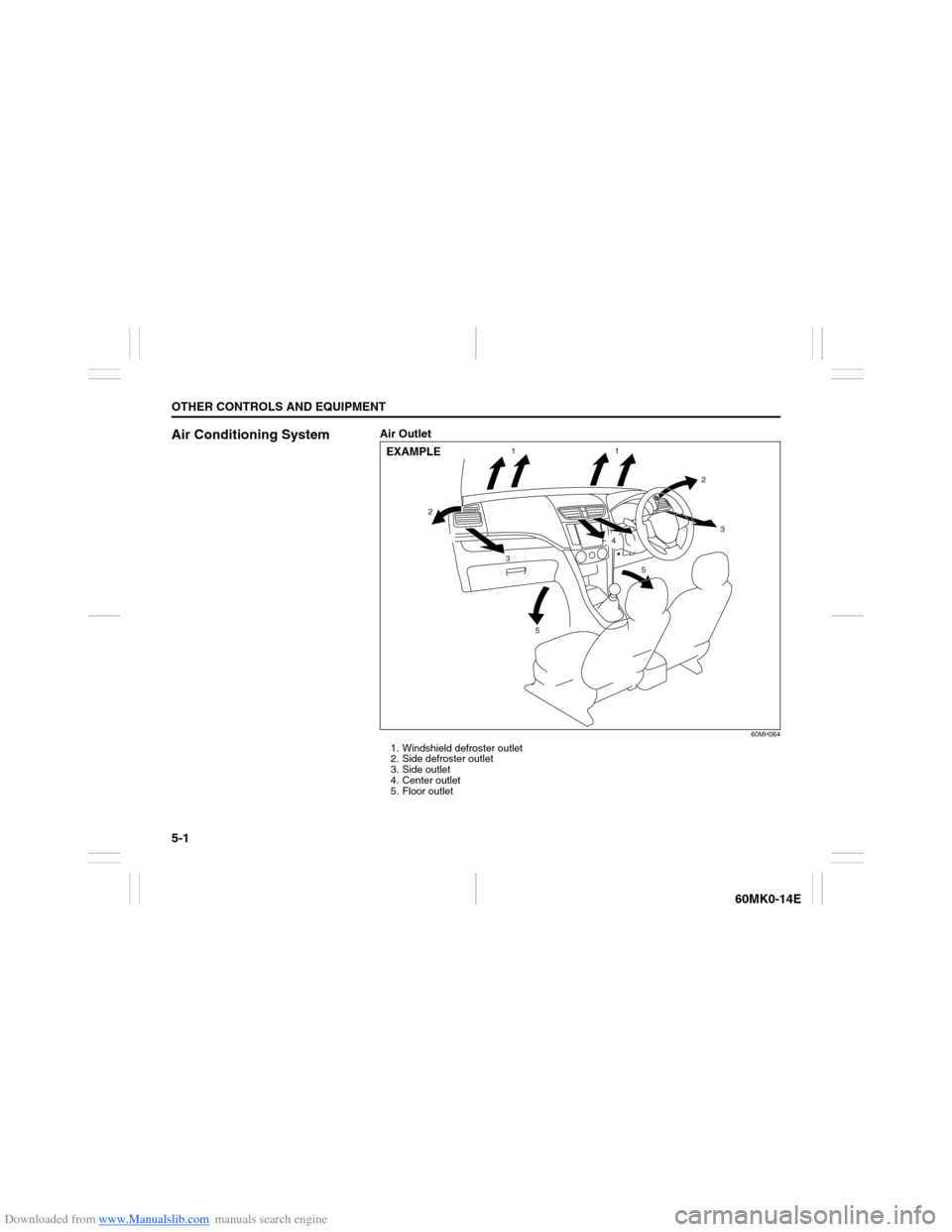
Air Outlet
60MH064
1. Windshield defroster outlet
2. Side defroster outlet
3. Side outlet
4. Center outlet
5. Floor outlet
1
22
3
34
5
51
EXAMPLE
Page 98 of 207
Downloaded from www.Manualslib.com manuals search engine 5-3OTHER CONTROLS AND EQUIPMENT
60MK0-14E
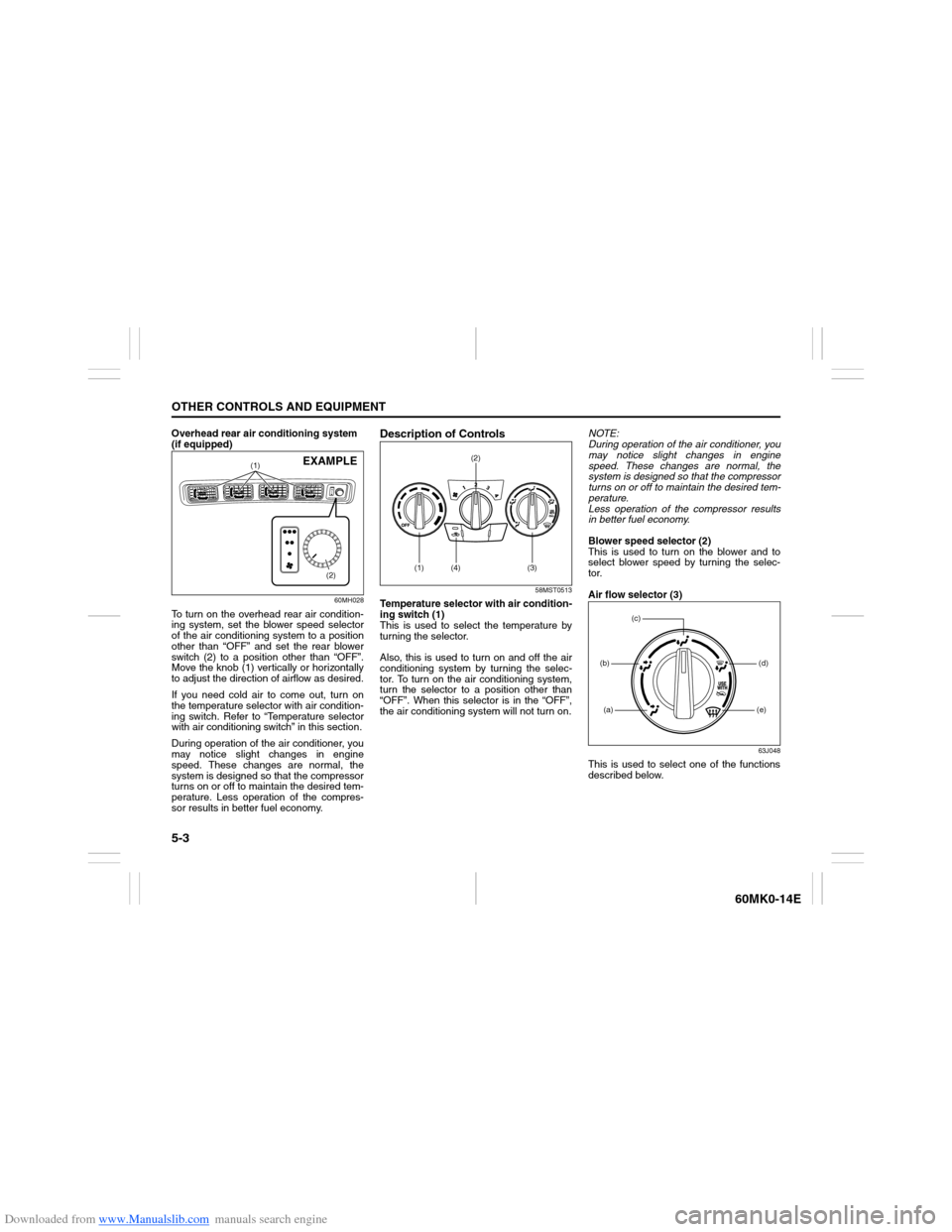
Overhead rear air conditioning system
(if equipped)
60MH028
To turn on the overhead rear air condition-
ing system, set the blower speed selector
of the air conditioning system to a position
other than “OFF” and set the rear blower
switch (2) to a position other than “OFF”.
Move the knob (1) vertically or horizontally
to adjust the direction of airflow as desired.
If you need cold air to come out, turn on
the temperature selector with air condition-
ing switch. Refer to “Temperature selector
with air conditioning switch” in this section.
During operation of the air conditioner, you
may notice slight changes in engine
speed. These changes are normal, the
system is designed so that the compressor
turns on or off to maintain the desired tem-
perature. Less operation of the compres-
sor results in better fuel economy.
Description of Controls
58MST0513
Temperature selector with air condition-
ing switch (1)
This is used to select the temperature by
turning the selector.
Also, this is used to turn on and off the air
conditioning system by turning the selec-
tor. To turn on the air conditioning system,
turn the selector to a position other than
“OFF”. When this selector is in the “OFF”,
the air conditioning system will not turn on.NOTE:
During operation of the air conditioner, you
may notice slight changes in engine
speed. These changes are normal, the
system is designed so that the compressor
turns on or off to maintain the desired tem-
perature.
Less operation of the compressor results
in better fuel economy.
Blower speed selector (2)
This is used to turn on the blower and to
select blower speed by turning the selec-
tor.
Air flow selector (3)
63J048
This is used to select one of the functions
described below.
(1)
(2)
EXAMPLE
(1) (4)(2)
(3)
(a)(b)
(e)(d)
(c)
Page 99 of 207
Downloaded from www.Manualslib.com manuals search engine 5-4
OTHER CONTROLS AND EQUIPMENT
60MK0-14E
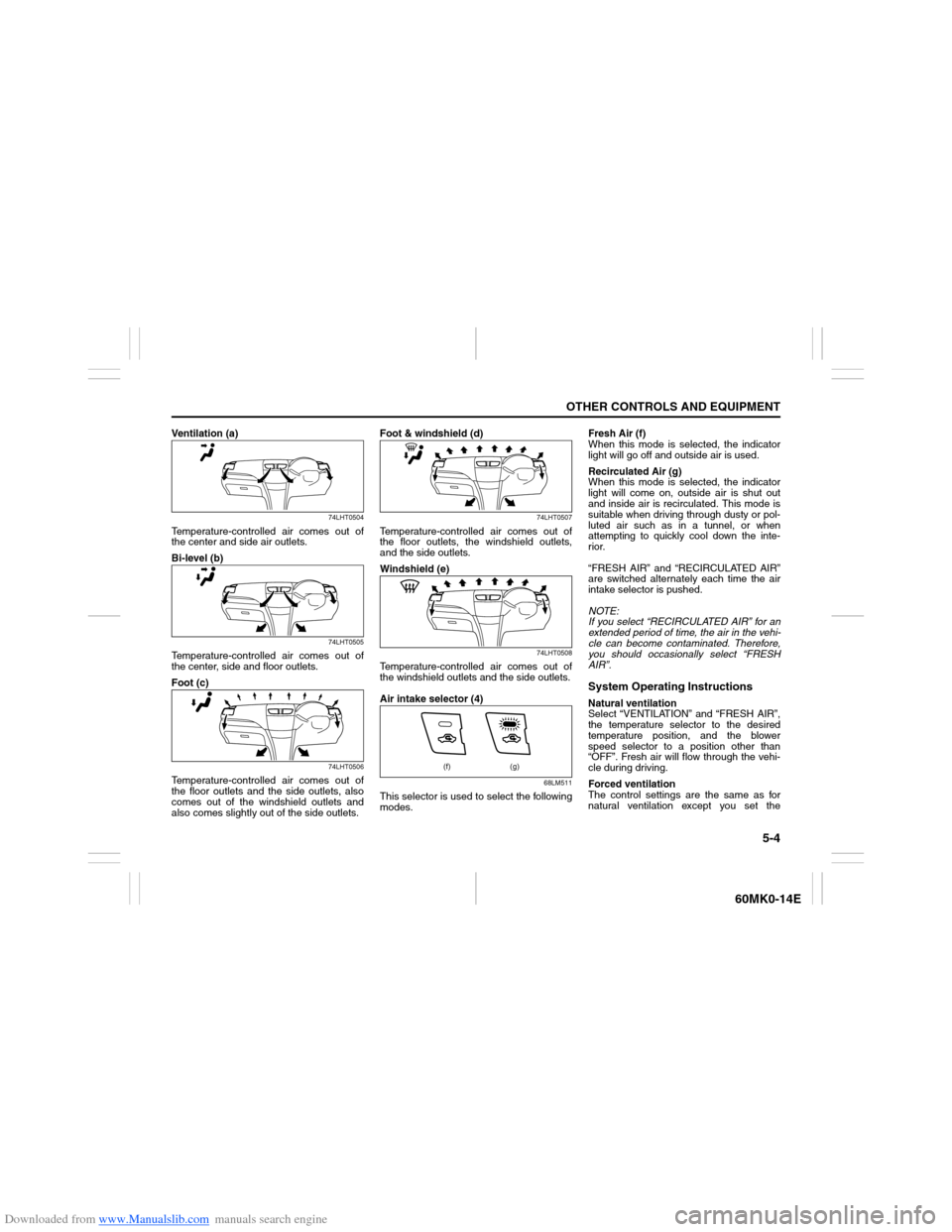
Ventilation (a)
74LHT0504
Temperature-controlled air comes out of
the center and side air outlets.
Bi-level (b)
74LHT0505
Temperature-controlled air comes out of
the center, side and floor outlets.
Foot (c)
74LHT0506
Temperature-controlled air comes out of
the floor outlets and the side outlets, also
comes out of the windshield outlets and
also comes slightly out of the side outlets.Foot & windshield (d)
74LHT0507
Temperature-controlled air comes out of
the floor outlets, the windshield outlets,
and the side outlets.
Windshield (e)
74LHT0508
Temperature-controlled air comes out of
the windshield outlets and the side outlets.
Air intake selector (4)
68LM511
This selector is used to select the following
modes.Fresh Air (f)
When this mode is selected, the indicator
light will go off and outside air is used.
Recirculated Air (g)
When this mode is selected, the indicator
light will come on, outside air is shut out
and inside air is recirculated. This mode is
suitable when driving through dusty or pol-
luted air such as in a tunnel, or when
attempting to quickly cool down the inte-
rior.
“FRESH AIR” and “RECIRCULATED AIR”
are switched alternately each time the air
intake selector is pushed.
NOTE:
If you select “RECIRCULATED AIR” for an
extended period of time, the air in the vehi-
cle can become contaminated. Therefore,
you should occasionally select “FRESH
AIR”.
System Operating InstructionsNatural ventilation
Select “VENTILATION” and “FRESH AIR”,
the temperature selector to the desired
temperature position, and the blower
speed selector to a position other than
“OFF”. Fresh air will flow through the vehi-
cle during driving.
Forced ventilation
The control settings are the same as for
natural ventilation except you set the
(f) (g)
Page 100 of 207
Downloaded from www.Manualslib.com manuals search engine 5-5OTHER CONTROLS AND EQUIPMENT
60MK0-14E
blower speed selector to a position other
than “OFF”.
Normal coolingSet the air flow selector to “VENTILATION”,
the temperature selector to the desired
temperature position (other than “OFF”)
and the blower speed selector to the
desired blower speed position. Setting the
blower speed selector to a higher blower
speed position increases cooling efficiency.You can switch the air intake selector to
either “FRESH AIR” or “RECIRCULATED
AIR” as you desire. Choosing “RECIRCU-
LATED AIR” increases cooling efficiency.
Quick cooling (using recirculated air)
The control settings are the same as for
normal cooling except you select “RECIR-
CULATED AIR” and the highest blower
speed.
NOTE:
If you select “RECIRCULATED AIR” for
an extended period of time, the air in the
vehicle can become contaminated.
Therefore, you should occasionally
select “FRESH AIR”.
If your vehicle has been left in the sun
with the windows closed, it will cool
faster if you open the windows briefly
while you operate the air conditioning
system with the air intake selector at
“FRESH AIR” and the blower at high
speed.Dehumidifying
Set the air flow selector to a desired air
flow selector position, the temperature
selector to the desired temperature posi-
tion (other than “OFF”) and the blower
speed selector to the desired blower speed
position. Also select
“FRESH AIR
”.
NOTE:
Because the air conditioning system dehu-
midifies the air, turning it on will help keep
the windows clear.
MaintenanceIf you do not use the air conditioning sys-
tem for a long period, such as during win-
ter, it may not give the best performance
when you start using it again. To help
maintain optimum performance and dura-
bility of your air conditioning system, it
needs to be run periodically. Operate the
air conditioning system at least once a
month for one minute with the engine
idling. This circulates the refrigerant and oil
and helps protect the internal components.
If your air conditioning system is equipped
with air filters, clean or replace them as
specified in the “Maintenance Schedule” in
the “INSPECTION AND MAINTENANCE”
section. Have this job done by your
SUZUKI dealer as the lower glove box
must be lowered for this job.NOTE:
Your vehicle uses the air conditioning sys-
tem refrigerant HFC-134a, commonly
called “R-134a”. R-134a replaced R-12
around 1993 for automotive applications.
Other refrigerants are available, including
recycled R-12, but only R-134a should be
used in your vehicle.
NOTICE
Using the wrong refrigerant may
damage your air conditioning sys-
tem. Use R-134a only. Do not mix or
replace the R-134a with other refrig-
erants.