display SUZUKI ERTIGA 2013 1.G Owner's Manual
[x] Cancel search | Manufacturer: SUZUKI, Model Year: 2013, Model line: ERTIGA, Model: SUZUKI ERTIGA 2013 1.GPages: 207, PDF Size: 5.14 MB
Page 123 of 207
Downloaded from www.Manualslib.com manuals search engine 5-28
OTHER CONTROLS AND EQUIPMENT
60MK0-14E
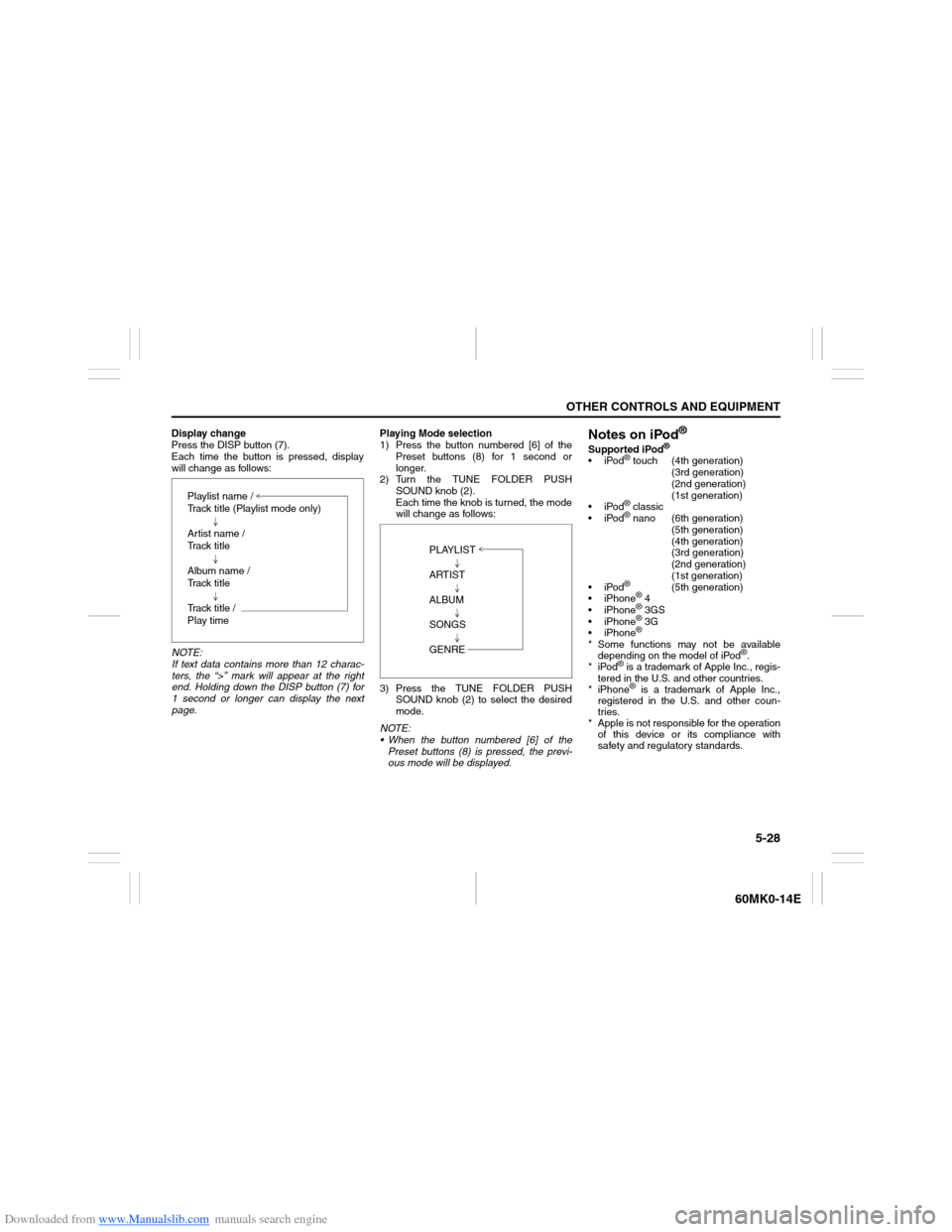
Display change
Press the DISP button (7).
Each time the button is pressed, display
will change as follows:
NOTE:
If text data contains more than 12 charac-
ters, the “>” mark will appear at the right
end. Holding down the DISP button (7) for
1 second or longer can display the next
page.Playing Mode selection
1) Press the button numbered [6] of the
Preset buttons (8) for 1 second or
longer.
2) Turn the TUNE FOLDER PUSH
SOUND knob (2).
Each time the knob is turned, the mode
will change as follows:
3) Press the TUNE FOLDER PUSH
SOUND knob (2) to select the desired
mode.
NOTE:
When the button numbered [6] of the
Preset buttons (8) is pressed, the previ-
ous mode will be displayed.
Notes on iPod
®
Supported iPod
®
iPod
® touch (4th generation)
(3rd generation)
(2nd generation)
(1st generation)
iPod® classic
iPod® nano (6th generation)
(5th generation)
(4th generation)
(3rd generation)
(2nd generation)
(1st generation)
iPod®
(5th generation)
iPhone
® 4
iPhone® 3GS
iPhone® 3G
iPhone®
* Some functions may not be available
depending on the model of iPod
®.
*iPod
® is a trademark of Apple Inc., regis-
tered in the U.S. and other countries.
* iPhone® is a trademark of Apple Inc.,
registered in the U.S. and other coun-
tries.
* Apple is not responsible for the operation
of this device or its compliance with
safety and regulatory standards. Playlist name /
Track title (Playlist mode only)
Artist name /
Track title
Album name /
Track title
Track title /
Play time
PLAYLIST
ARTIST
ALBUM
SONGS
GENRE
Page 127 of 207
Downloaded from www.Manualslib.com manuals search engine 5-32
OTHER CONTROLS AND EQUIPMENT
60MK0-14E
The anti-theft function is intended to dis-
courage thefts, such as that the audio sys-
tem becomes inoperable when it is
installed on other vehicles.
This function works by entering a Personal
Identification Number (PIN).
When the unit is disconnected from its
power source, such as when the audio
system is removed or the battery is discon-
nected, the unit will become inoperable
until the PIN is reentered.Setting the Anti-Theft Function
1) Press the VOL PUSH POWER knob (1)
to power off.
2) Hold down the buttons numbered [1]
and [6] of the Preset buttons (2) and
press the VOL PUSH POWER knob
(1).
“SECURITY” will be displayed.
3) Press the Up button (3) and the button
numbered [1] of the Preset buttons (2)
simultaneously.
4) Enter a 4-digit number to be registered
as PIN using the buttons numbered [1] -
[4] of the Preset buttons (2).
5) Hold down the TUNE FOLDER PUSH
SOUND knob (4) for 1 second or longer
to set the anti-theft function.
NOTE:
Take a note of the registered PIN and keep
it for the future use.Canceling the anti-theft feature
To cancel the anti-theft function, delete the
registered PIN.
1) Press the VOL PUSH POWER knob (1)
to power off.
2) Hold down the buttons numbered [1]
and [6] of the Preset buttons (2) and
press the VOL PUSH POWER knob
(1).
“PIN ENTRY” will be displayed.
3) Press the Up button (3) and the button
numbered [1] of the Preset buttons (2)
simultaneously.
4) Enter a 4-digit number to be registered
as PIN using the buttons numbered [1] -
[4] of the Preset buttons (2).
5) Hold down the TUNE FOLDER PUSH
SOUND knob (4) for 1 second or longer
to delete the registered PIN. The indi-
cation “----” will be displayed and the
anti-theft function will be canceled.
NOTE:
To change your PIN, first delete your cur-
rent PIN, then set a new one.
Page 128 of 207
Downloaded from www.Manualslib.com manuals search engine 5-33OTHER CONTROLS AND EQUIPMENT
60MK0-14E
Confirming the Personal Identification
Number (PIN)
When the main power source is discon-
nected such as when the battery is
replaced, etc, it is required to enter the PIN
to make the unit operable again.
1) Set the ignition switch to the “ACC”
position.
“SECURITY” will be displayed.
2) Press the Up button (3) and the button
numbered [1] of the Preset buttons (2)
simultaneously.
3) Enter a 4-digit number to be registered
as PIN using the buttons numbered [1] -
[4] of the Preset buttons (2).
4) Hold down TUNE FOLDER PUSH
SOUND knob (4) for 1 second or
longer.
When the PIN same as registered is
entered, the power of the audio system
will be turned off automatically and it
will become operable again.
NOTE:
If an incorrect PIN is entered, “ERROR”
and the total number of incorrect entry
attempts will be displayed.
If an incorrect PIN is entered 10 times or
more, “HELP” will be displayed and the
audio system will become inoperable.
Page 129 of 207
Downloaded from www.Manualslib.com manuals search engine 5-34
OTHER CONTROLS AND EQUIPMENT
60MK0-14E
TroubleshootingWhen encountered a problem, check and follow the instructions as described below.
If the described suggestions do not solve the problem, it is recommended to take the unit to your authorized SUZUKI dealer.
Problem
Possible cause
Possible solution
Common
Unable to operate The security function is on.When “SECURITY” is displayed, enter
the ID.
When “HELP” is displayed, contact your
authorized SUZUKI dealer.
Unable to turn on the power (no sound).
(No sound is produced)Fuse is blown. Contact your authorized SUZUKI dealer.
Radio
Much noiseIt may not be exactly tuned in to the sta-
tion.Tune it in exactly to the station.
Unable to receive by auto tuningThere may be no station emitting signals
powerful enough.Pick up a station by manual tuning.
CD
Sound skips or noise producedThe disc is dirty. Wipe the disc with a soft cloth.
The disc has a major scratch or is
warped.Replace the disc with the one with no
scratch and also not warped.
Page 131 of 207
Downloaded from www.Manualslib.com manuals search engine 5-36
OTHER CONTROLS AND EQUIPMENT
60MK0-14E
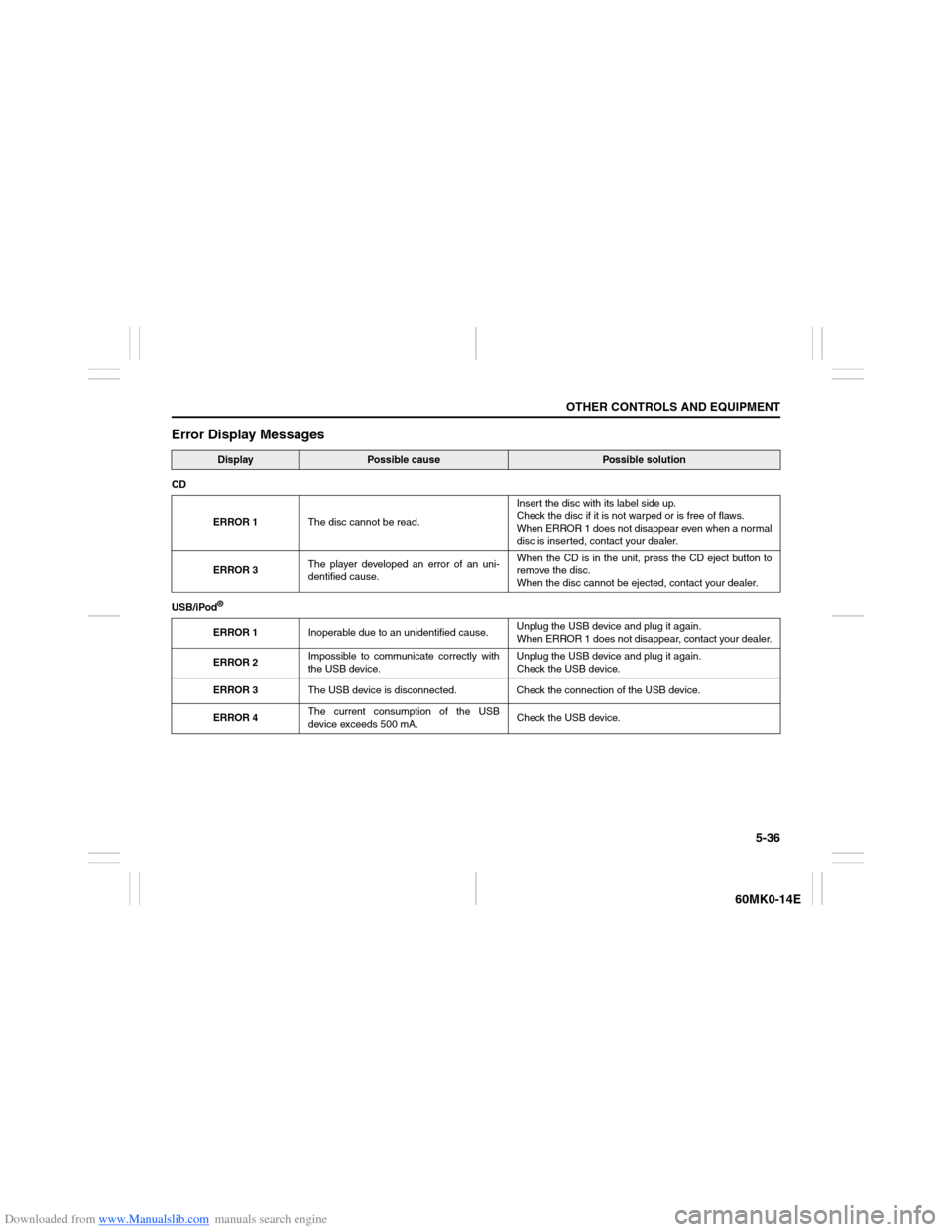
Error Display Messages
Display
Possible cause
Possible solution
CD
ERROR 1The disc cannot be read.Insert the disc with its label side up.
Check the disc if it is not warped or is free of flaws.
When ERROR 1 does not disappear even when a normal
disc is inserted, contact your dealer.
ERROR 3The player developed an error of an uni-
dentified cause.When the CD is in the unit, press the CD eject button to
remove the disc.
When the disc cannot be ejected, contact your dealer.
USB/iPod
®ERROR 1Inoperable due to an unidentified cause.Unplug the USB device and plug it again.
When ERROR 1 does not disappear, contact your dealer.
ERROR 2Impossible to communicate correctly with
the USB device.Unplug the USB device and plug it again.
Check the USB device.
ERROR 3The USB device is disconnected. Check the connection of the USB device.
ERROR 4The current consumption of the USB
device exceeds 500 mA.Check the USB device.
Page 204 of 207
Downloaded from www.Manualslib.com manuals search engine 12-2INDEX
60MK0-14E
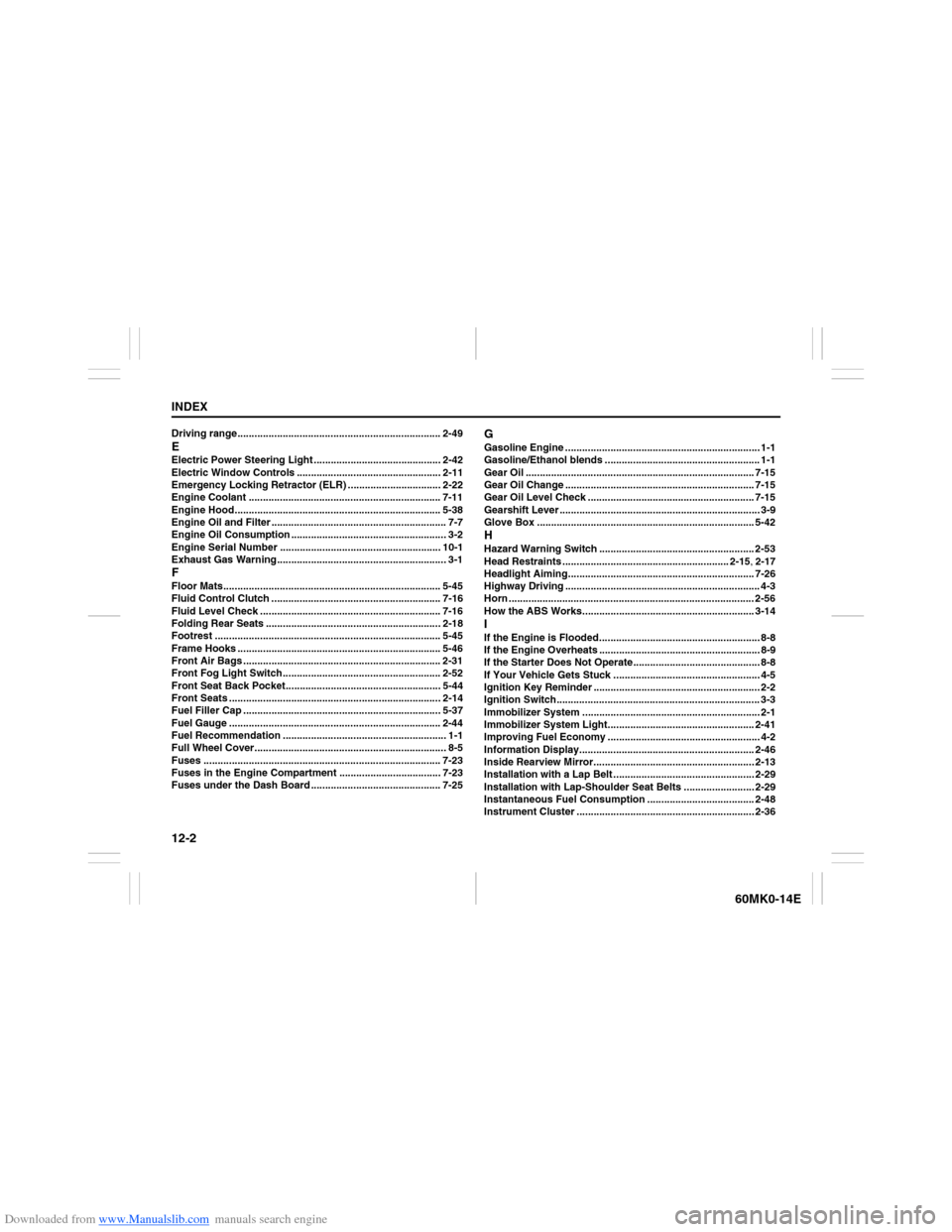
Driving range........................................................................ 2-49EElectric Power Steering Light ............................................. 2-42
Electric Window Controls ................................................... 2-11
Emergency Locking Retractor (ELR) ................................. 2-22
Engine Coolant .................................................................... 7-11
Engine Hood......................................................................... 5-38
Engine Oil and Filter .............................................................. 7-7
Engine Oil Consumption ....................................................... 3-2
Engine Serial Number ......................................................... 10-1
Exhaust Gas Warning............................................................ 3-1FFloor Mats............................................................................. 5-45
Fluid Control Clutch ............................................................ 7-16
Fluid Level Check ................................................................ 7-16
Folding Rear Seats .............................................................. 2-18
Footrest ................................................................................ 5-45
Frame Hooks ........................................................................ 5-46
Front Air Bags ...................................................................... 2-31
Front Fog Light Switch........................................................ 2-52
Front Seat Back Pocket....................................................... 5-44
Front Seats ........................................................................... 2-14
Fuel Filler Cap ...................................................................... 5-37
Fuel Gauge ........................................................................... 2-44
Fuel Recommendation .......................................................... 1-1
Full Wheel Cover.................................................................... 8-5
Fuses .................................................................................... 7-23
Fuses in the Engine Compartment .................................... 7-23
Fuses under the Dash Board .............................................. 7-25
GGasoline Engine ..................................................................... 1-1
Gasoline/Ethanol blends ....................................................... 1-1
Gear Oil ................................................................................. 7-15
Gear Oil Change ................................................................... 7-15
Gear Oil Level Check ........................................................... 7-15
Gearshift Lever ....................................................................... 3-9
Glove Box ............................................................................. 5-42HHazard Warning Switch ....................................................... 2-53
Head Restraints ........................................................... 2-15, 2-17
Headlight Aiming.................................................................. 7-26
Highway Driving ..................................................................... 4-3
Horn ....................................................................................... 2-56
How the ABS Works............................................................. 3-14IIf the Engine is Flooded......................................................... 8-8
If the Engine Overheats ......................................................... 8-9
If the Starter Does Not Operate............................................. 8-8
If Your Vehicle Gets Stuck .................................................... 4-5
Ignition Key Reminder ........................................................... 2-2
Ignition Switch........................................................................ 3-3
Immobilizer System ............................................................... 2-1
Immobilizer System Light.................................................... 2-41
Improving Fuel Economy ...................................................... 4-2
Information Display.............................................................. 2-46
Inside Rearview Mirror......................................................... 2-13
Installation with a Lap Belt .................................................. 2-29
Installation with Lap-Shoulder Seat Belts ......................... 2-29
Instantaneous Fuel Consumption ...................................... 2-48
Instrument Cluster ............................................................... 2-36