switch SUZUKI GRAND VITARA 1999 2.G Owners Manual
[x] Cancel search | Manufacturer: SUZUKI, Model Year: 1999, Model line: GRAND VITARA, Model: SUZUKI GRAND VITARA 1999 2.GPages: 656, PDF Size: 14.31 MB
Page 435 of 656
7B1-26 AUTOMATIC TRANSMISSION (4 A/T)
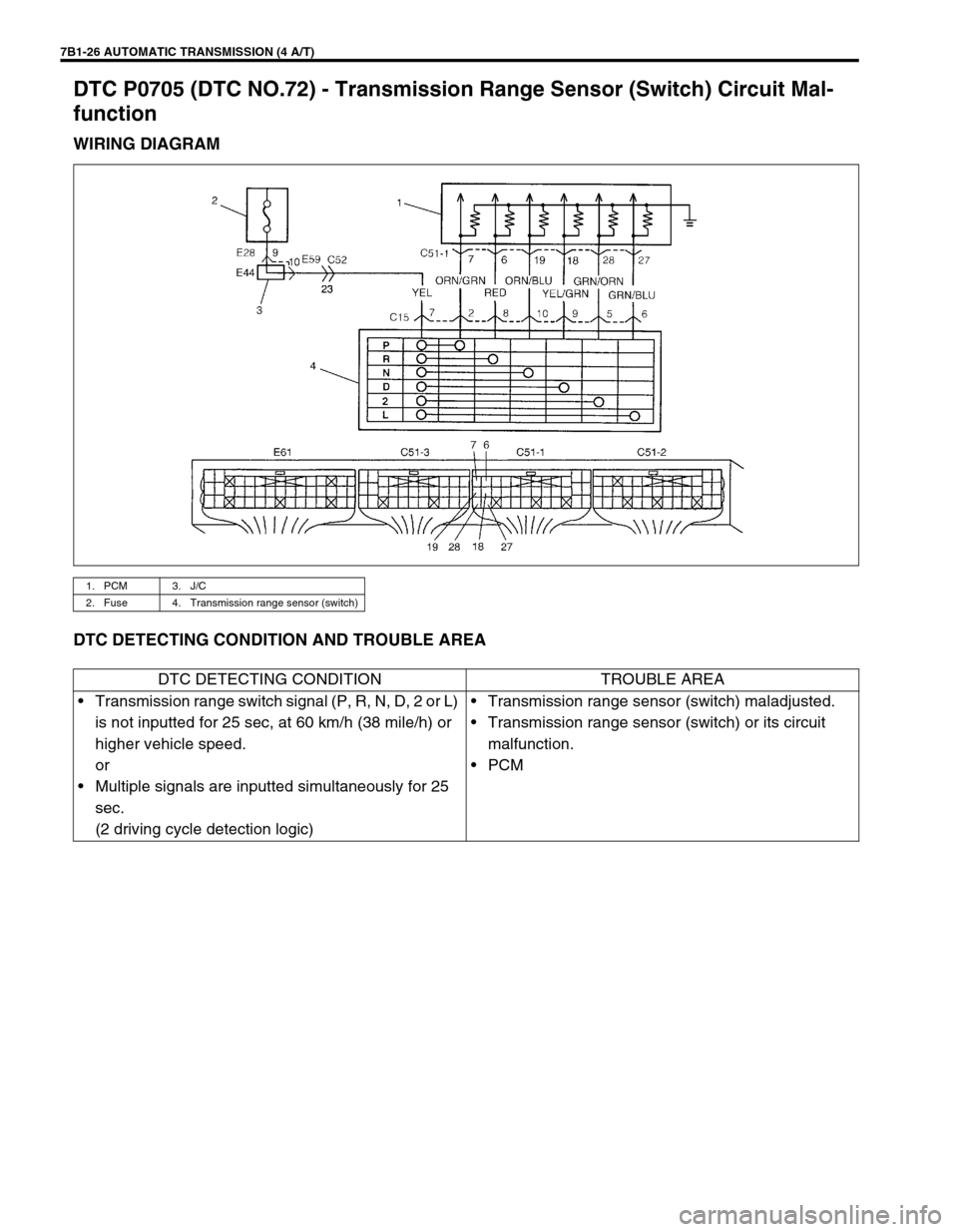
DTC P0705 (DTC NO.72) - Transmission Range Sensor (Switch) Circuit Mal-
function
WIRING DIAGRAM
DTC DETECTING CONDITION AND TROUBLE AREA
1. PCM 3. J/C
2. Fuse 4. Transmission range sensor (switch)
DTC DETECTING CONDITION TROUBLE AREA
•Transmission range switch signal (P, R, N, D, 2 or L)
is not inputted for 25 sec, at 60 km/h (38 mile/h) or
higher vehicle speed.
or
•Multiple signals are inputted simultaneously for 25
sec.
(2 driving cycle detection logic)•Transmission range sensor (switch) maladjusted.
•Transmission range sensor (switch) or its circuit
malfunction.
•PCM
Page 436 of 656
AUTOMATIC TRANSMISSION (4 A/T) 7B1-27
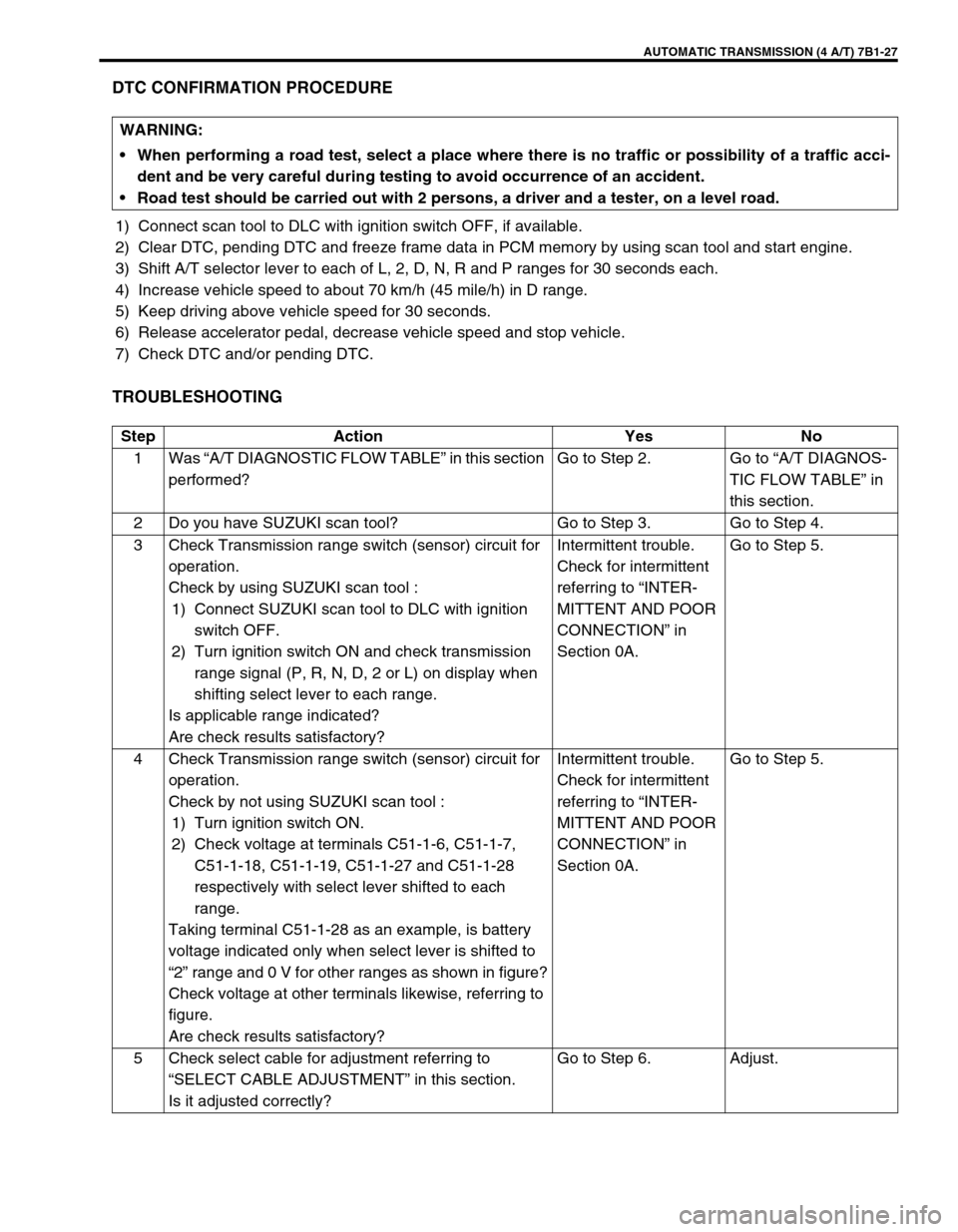
DTC CONFIRMATION PROCEDURE
1) Connect scan tool to DLC with ignition switch OFF, if available.
2) Clear DTC, pending DTC and freeze frame data in PCM memory by using scan tool and start engine.
3) Shift A/T selector lever to each of L, 2, D, N, R and P ranges for 30 seconds each.
4) Increase vehicle speed to about 70 km/h (45 mile/h) in D range.
5) Keep driving above vehicle speed for 30 seconds.
6) Release accelerator pedal, decrease vehicle speed and stop vehicle.
7) Check DTC and/or pending DTC.
TROUBLESHOOTING
WARNING:
When performing a road test, select a place where there is no traffic or possibility of a traffic acci-
dent and be very careful during testing to avoid occurrence of an accident.
Road test should be carried out with 2 persons, a driver and a tester, on a level road.
Step Action Yes No
1Was “A/T DIAGNOSTIC FLOW TABLE” in this section
performed?Go to Step 2. Go to “A/T DIAGNOS-
TIC FLOW TABLE” in
this section.
2 Do you have SUZUKI scan tool? Go to Step 3. Go to Step 4.
3 Check Transmission range switch (sensor) circuit for
operation.
Check by using SUZUKI scan tool :
1) Connect SUZUKI scan tool to DLC with ignition
switch OFF.
2) Turn ignition switch ON and check transmission
range signal (P, R, N, D, 2 or L) on display when
shifting select lever to each range.
Is applicable range indicated?
Are check results satisfactory?Intermittent trouble.
Check for intermittent
referring to “INTER-
MITTENT AND POOR
CONNECTION” in
Section 0A.Go to Step 5.
4 Check Transmission range switch (sensor) circuit for
operation.
Check by not using SUZUKI scan tool :
1) Turn ignition switch ON.
2) Check voltage at terminals C51-1-6, C51-1-7,
C51-1-18, C51-1-19, C51-1-27 and C51-1-28
respectively with select lever shifted to each
range.
Taking terminal C51-1-28 as an example, is battery
voltage indicated only when select lever is shifted to
“2” range and 0 V for other ranges as shown in figure?
Check voltage at other terminals likewise, referring to
figure.
Are check results satisfactory?Intermittent trouble.
Check for intermittent
referring to “INTER-
MITTENT AND POOR
CONNECTION” in
Section 0A.Go to Step 5.
5 Check select cable for adjustment referring to
“SELECT CABLE ADJUSTMENT” in this section.
Is it adjusted correctly?Go to Step 6. Adjust.
Page 437 of 656
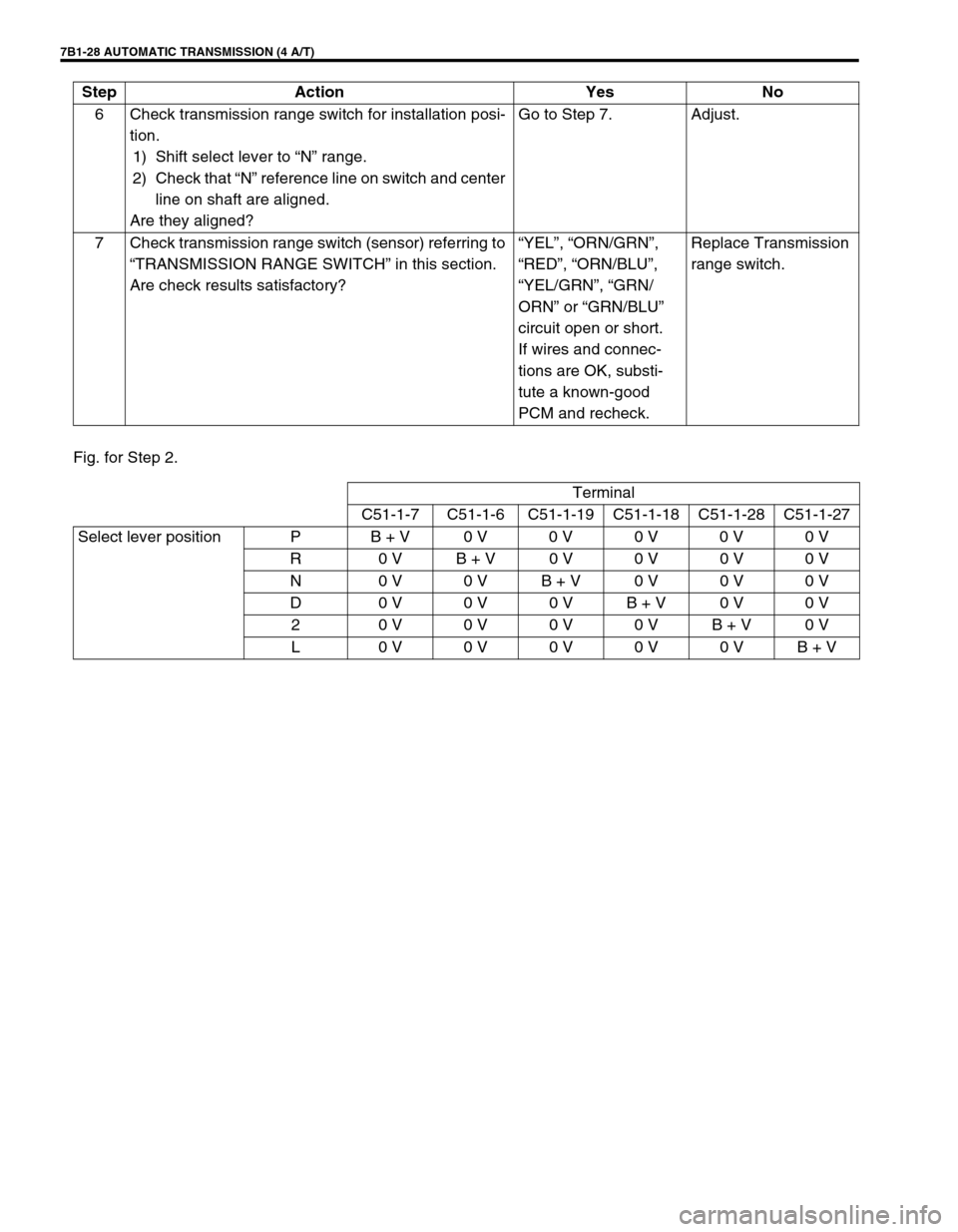
7B1-28 AUTOMATIC TRANSMISSION (4 A/T)
Fig. for Step 2.6 Check transmission range switch for installation posi-
tion.
1) Shift select lever to “N” range.
2) Check that “N” reference line on switch and center
line on shaft are aligned.
Are they aligned?Go to Step 7. Adjust.
7 Check transmission range switch (sensor) referring to
“TRANSMISSION RANGE SWITCH” in this section.
Are check results satisfactory?“YEL”, “ORN/GRN”,
“RED”, “ORN/BLU”,
“YEL/GRN”, “GRN/
ORN” or “GRN/BLU”
circuit open or short.
If wires and connec-
tions are OK, substi-
tute a known-good
PCM and recheck.Replace Transmission
range switch. Step Action Yes No
Terminal
C51-1-7 C51-1-6 C51-1-19 C51-1-18 C51-1-28 C51-1-27
Select lever position P B + V0 V0 V0 V0 V0 V
R 0 VB + V0 V0 V0 V0 V
N 0 V0 VB + V0 V0 V0 V
D 0 V0 V0 VB + V0 V0 V
2 0 V0 V0 V0 VB + V0 V
L 0 V0 V0 V0 V0 VB + V
Page 439 of 656
7B1-30 AUTOMATIC TRANSMISSION (4 A/T)
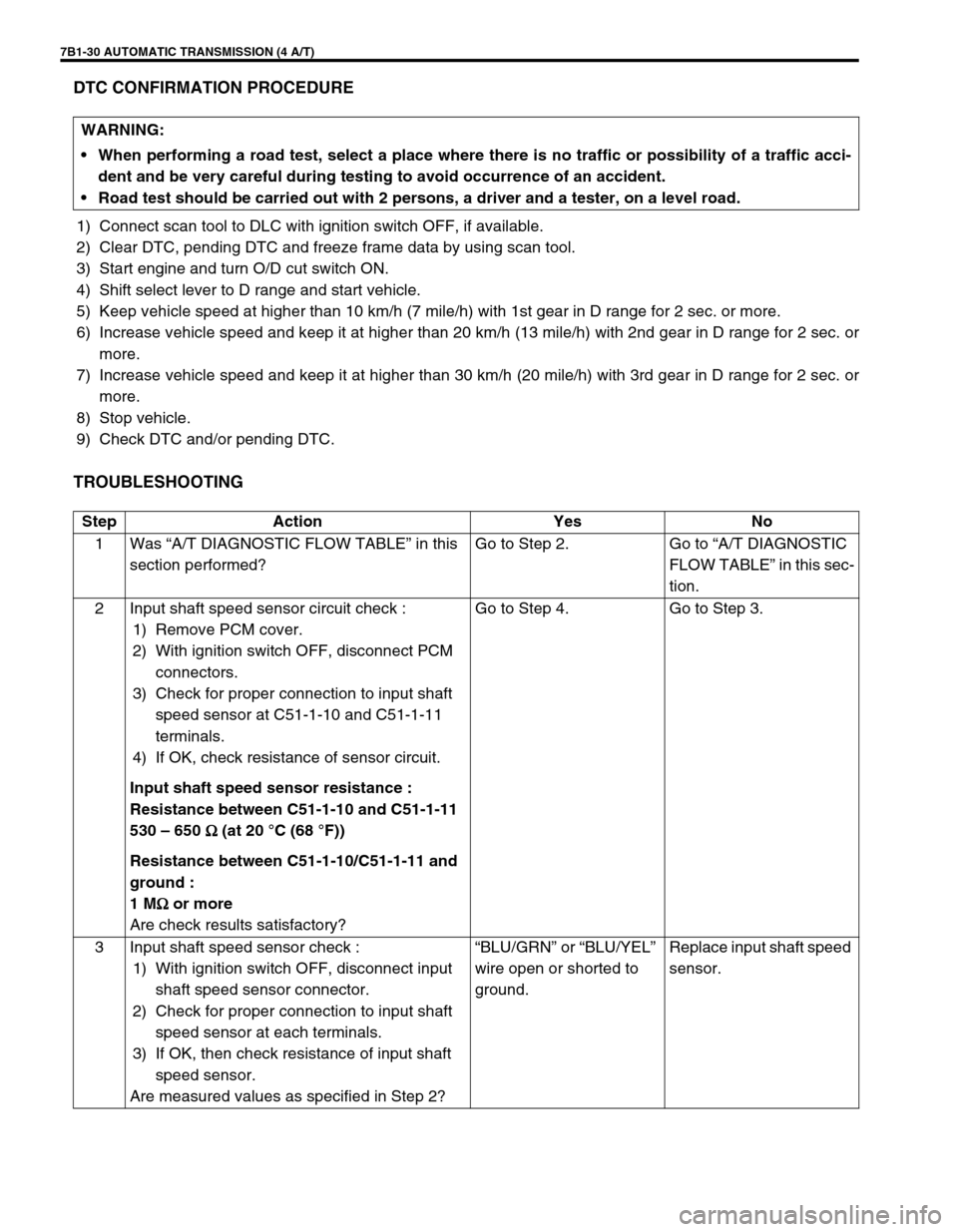
DTC CONFIRMATION PROCEDURE
1) Connect scan tool to DLC with ignition switch OFF, if available.
2) Clear DTC, pending DTC and freeze frame data by using scan tool.
3) Start engine and turn O/D cut switch ON.
4) Shift select lever to D range and start vehicle.
5) Keep vehicle speed at higher than 10 km/h (7 mile/h) with 1st gear in D range for 2 sec. or more.
6) Increase vehicle speed and keep it at higher than 20 km/h (13 mile/h) with 2nd gear in D range for 2 sec. or
more.
7) Increase vehicle speed and keep it at higher than 30 km/h (20 mile/h) with 3rd gear in D range for 2 sec. or
more.
8) Stop vehicle.
9) Check DTC and/or pending DTC.
TROUBLESHOOTING
WARNING:
When performing a road test, select a place where there is no traffic or possibility of a traffic acci-
dent and be very careful during testing to avoid occurrence of an accident.
Road test should be carried out with 2 persons, a driver and a tester, on a level road.
Step Action Yes No
1Was “A/T DIAGNOSTIC FLOW TABLE” in this
section performed?Go to Step 2. Go to “A/T DIAGNOSTIC
FLOW TABLE” in this sec-
tion.
2 Input shaft speed sensor circuit check :
1) Remove PCM cover.
2) With ignition switch OFF, disconnect PCM
connectors.
3) Check for proper connection to input shaft
speed sensor at C51-1-10 and C51-1-11
terminals.
4) If OK, check resistance of sensor circuit.
Input shaft speed sensor resistance :
Resistance between C51-1-10 and C51-1-11
530 – 650 Ω
ΩΩ Ω (at 20 °C (68 °F))
Resistance between C51-1-10/C51-1-11 and
ground :
1 MΩ
ΩΩ Ω or more
Are check results satisfactory?Go to Step 4. Go to Step 3.
3 Input shaft speed sensor check :
1) With ignition switch OFF, disconnect input
shaft speed sensor connector.
2) Check for proper connection to input shaft
speed sensor at each terminals.
3) If OK, then check resistance of input shaft
speed sensor.
Are measured values as specified in Step 2?“BLU/GRN” or “BLU/YEL”
wire open or shorted to
ground.Replace input shaft speed
sensor.
Page 441 of 656
7B1-32 AUTOMATIC TRANSMISSION (4 A/T)
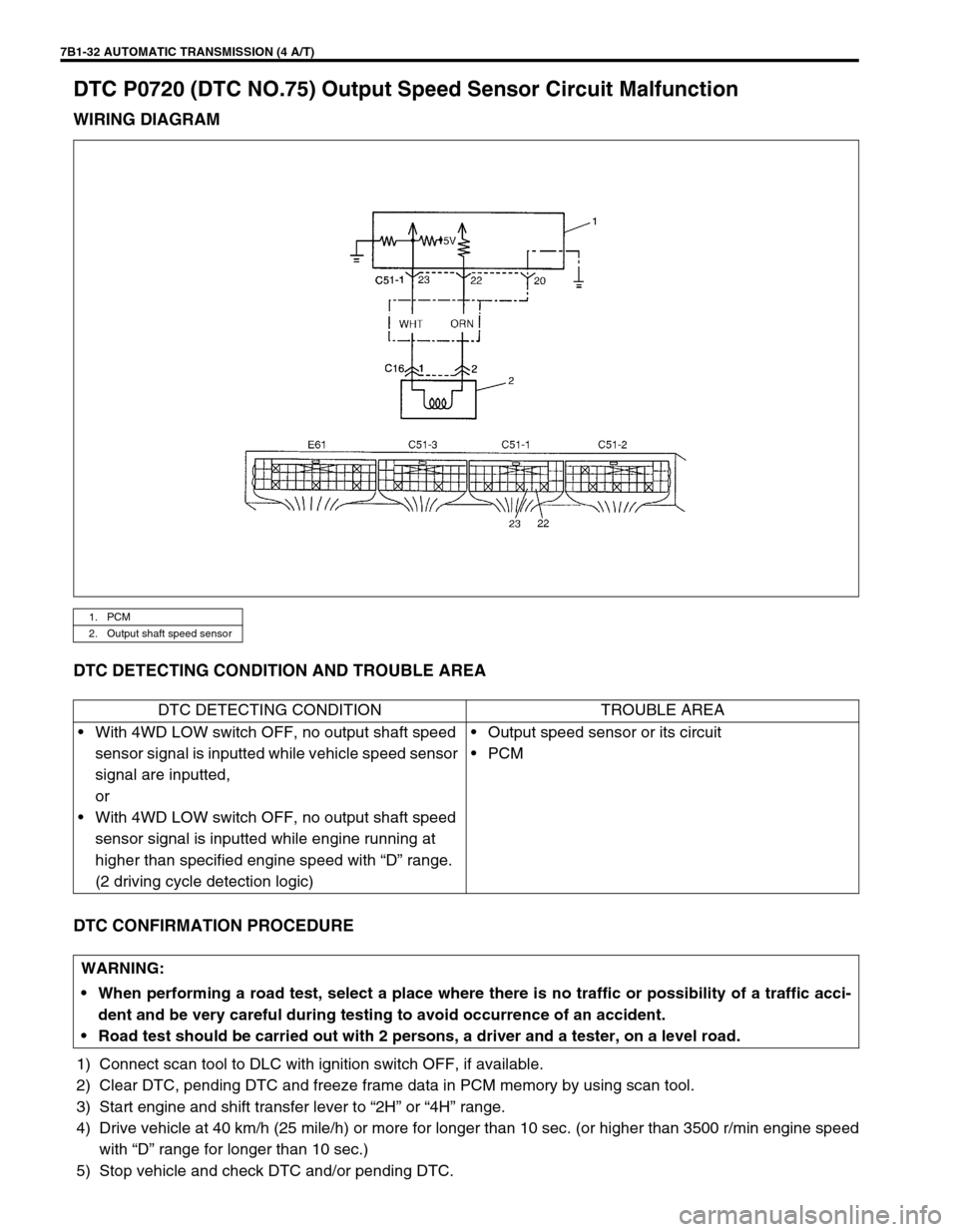
DTC P0720 (DTC NO.75) Output Speed Sensor Circuit Malfunction
WIRING DIAGRAM
DTC DETECTING CONDITION AND TROUBLE AREA
DTC CONFIRMATION PROCEDURE
1) Connect scan tool to DLC with ignition switch OFF, if available.
2) Clear DTC, pending DTC and freeze frame data in PCM memory by using scan tool.
3) Start engine and shift transfer lever to “2H” or “4H” range.
4) Drive vehicle at 40 km/h (25 mile/h) or more for longer than 10 sec. (or higher than 3500 r/min engine speed
with “D” range for longer than 10 sec.)
5) Stop vehicle and check DTC and/or pending DTC.
1. PCM
2. Output shaft speed sensor
DTC DETECTING CONDITION TROUBLE AREA
•With 4WD LOW switch OFF, no output shaft speed
sensor signal is inputted while vehicle speed sensor
signal are inputted,
or
•With 4WD LOW switch OFF, no output shaft speed
sensor signal is inputted while engine running at
higher than specified engine speed with “D” range.
(2 driving cycle detection logic)•Output speed sensor or its circuit
•PCM
WARNING:
When performing a road test, select a place where there is no traffic or possibility of a traffic acci-
dent and be very careful during testing to avoid occurrence of an accident.
Road test should be carried out with 2 persons, a driver and a tester, on a level road.
Page 442 of 656
AUTOMATIC TRANSMISSION (4 A/T) 7B1-33
TROUBLESHOOTING
REFERENCE
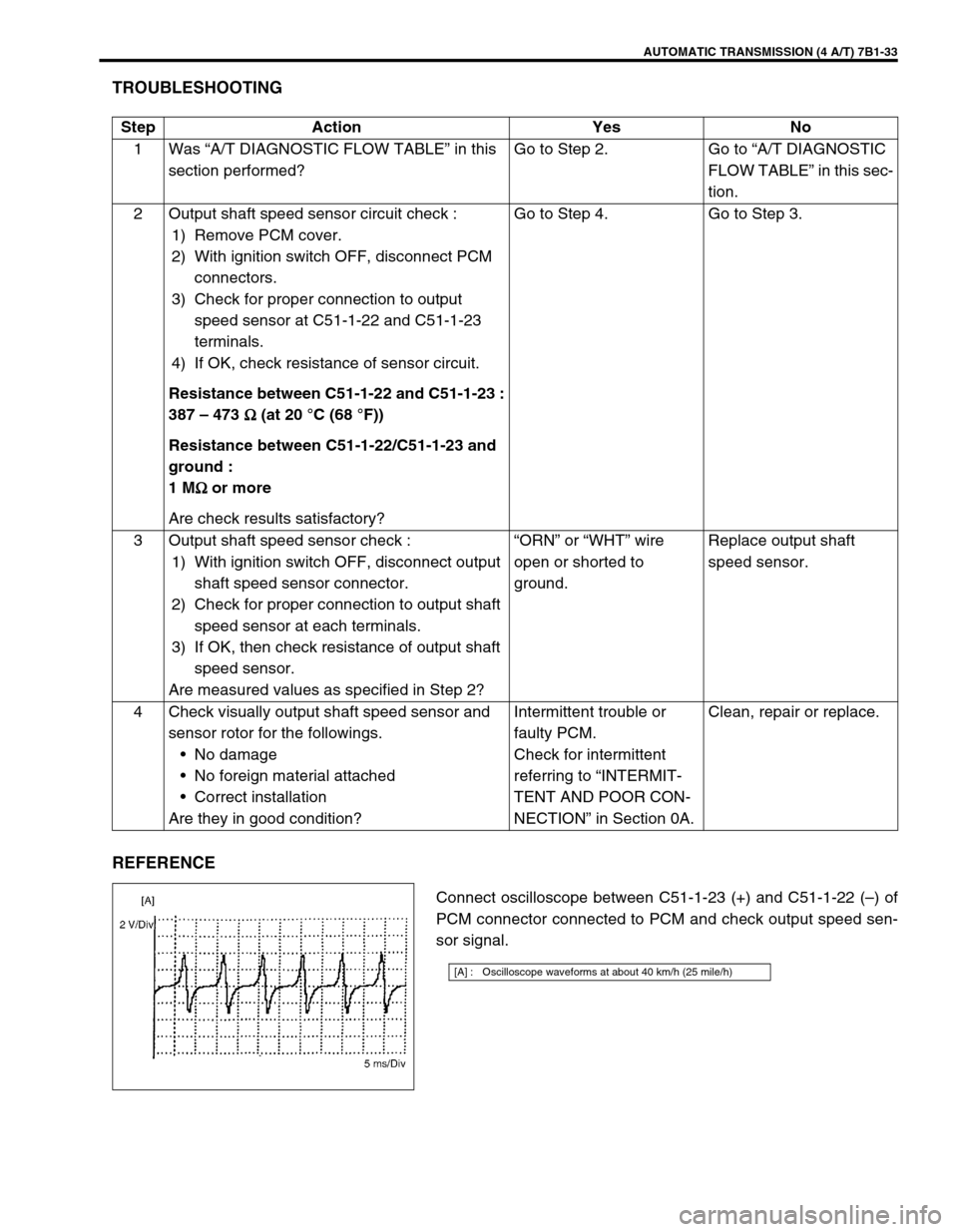
Connect oscilloscope between C51-1-23 (+) and C51-1-22 (–) of
PCM connector connected to PCM and check output speed sen-
sor signal. Step Action Yes No
1Was “A/T DIAGNOSTIC FLOW TABLE” in this
section performed?Go to Step 2. Go to “A/T DIAGNOSTIC
FLOW TABLE” in this sec-
tion.
2 Output shaft speed sensor circuit check :
1) Remove PCM cover.
2) With ignition switch OFF, disconnect PCM
connectors.
3) Check for proper connection to output
speed sensor at C51-1-22 and C51-1-23
terminals.
4) If OK, check resistance of sensor circuit.
Resistance between C51-1-22 and C51-1-23 :
387 – 473 Ω
ΩΩ Ω (at 20 °C (68 °F))
Resistance between C51-1-22/C51-1-23 and
ground :
1 MΩ
ΩΩ Ω or more
Are check results satisfactory?Go to Step 4. Go to Step 3.
3 Output shaft speed sensor check :
1) With ignition switch OFF, disconnect output
shaft speed sensor connector.
2) Check for proper connection to output shaft
speed sensor at each terminals.
3) If OK, then check resistance of output shaft
speed sensor.
Are measured values as specified in Step 2?“ORN” or “WHT” wire
open or shorted to
ground.Replace output shaft
speed sensor.
4 Check visually output shaft speed sensor and
sensor rotor for the followings.
•No damage
•No foreign material attached
•Correct installation
Are they in good condition?Intermittent trouble or
faulty PCM.
Check for intermittent
referring to “INTERMIT-
TENT AND POOR CON-
NECTION” in Section 0A.Clean, repair or replace.
[A] : Oscilloscope waveforms at about 40 km/h (25 mile/h)
Page 444 of 656
AUTOMATIC TRANSMISSION (4 A/T) 7B1-35
DTC CONFIRMATION PROCEDURE
1) Connect scan tool to DLC with ignition switch OFF, if available.
2) Clear DTC, pending DTC and freeze frame data in PCM memory by using scan tool.
3) Start engine, warm it up to normal operating temperature and shift transfer lever to “2H” or “4H” range.
4) Shift selector lever in D range and keep it there for 10 seconds.
5) Increase vehicle speed to about 80 km/h (50 mile/h) in 4th gear and in D range.
6) Keep driving at above speed for 20 seconds.
7) Release accelerator pedal, decrease vehicle speed and stop vehicle.
8) Check DTC and/or pending DTC.
TROUBLESHOOTING
WARNING:
When performing a road test, select a place where there is no traffic or possibility of a traffic acci-
dent and be very careful during testing to avoid occurrence of an accident.
Road test should be carried out with 2 persons, a driver and a tester, on a level road.
Step Action Yes No
1Was “A/T DIAGNOSTIC FLOW TABLE” in this
section performed?Go to Step 2. Go to “A/T DIAGNOSTIC
FLOW TABLE” in this sec-
tion.
2 Check TCC solenoid circuit for short.
1) Turn ignition switch OFF and disconnect
PCM connectors.
2) Check for proper connection to PCM at ter-
minal C51-1-8.
3) If OK, then turn ignition switch ON and mea-
sure voltage between terminal C51-1-8 of
disconnected PCM connector and ground.
Is it about 0 V?Go to Step 3.“GRN/YEL” circuit shorted
to power circuit.
3 Check TCC solenoid circuit for open or short.
1) Turn ignition switch OFF.
2) Measure resistance between terminal C51-
1-8 of disconnected PCM connector and
ground.
Is it 11 – 15 Ω (at 20 °C (68 °F))?Intermittent trouble or
faulty PCM.
Check for intermittent
referring to “INTERMIT-
TENT AND POOR CON-
NECTION” in Section 0A.“GRN/YEL” circuit open or
shorted to ground.
If wire and connections
are OK, replace TCC
solenoid.
Page 446 of 656
AUTOMATIC TRANSMISSION (4 A/T) 7B1-37
DTC CONFIRMATION PROCEDURE
1) Connect scan tool to DLC with ignition switch OFF, if available.
2) Clear DTC, pending DTC and freeze frame data in PCM memory by using scan tool.
3) Start engine and shift transfer lever to “2H” or “4H” range.
4) Shift selector lever in D range and keep it for 10 seconds.
5) Drive vehicle about 30 km/h (20 mile/h) with 2nd gear in “D” range for 10 seconds.
6) Increase vehicle speed to about 80 km/h (50 mile/h) with 4th gear in D range and keep it for 10 seconds.
7) Release accelerator pedal, decrease vehicle speed and stop vehicle.
8) Check DTC and/or pending DTC.
TROUBLESHOOTING
WARNING:
When performing a road test, select a place where there is no traffic or possibility of a traffic acci-
dent and be very careful during testing to avoid occurrence of an accident.
Road test should be carried out with 2 persons, a driver and a tester, on a level road.
Step Action Yes No
1Was “A/T DIAGNOSTIC FLOW TABLE” in this
section performed?Go to Step 2. Go to “A/T DIAGNOSTIC
FLOW TABLE” in this sec-
tion.
2 Check shift solenoid circuit for short.
1) Turn ignition switch OFF and disconnect
PCM connectors.
2) Check for proper connection to PCM at ter-
minals C51-1-2 or C51-1-1.
3) If OK, then turn ignition switch ON and mea-
sure voltage between terminal C51-1-2 or
C51-1-1 of disconnected PCM connector
and ground.
Is it about 0 V?Go to Step 3.“GRN” or “GRN/RED“ cir-
cuit shorted to power cir-
cuit.
3 Check shift solenoid circuit for open or short.
1) Turn ignition switch OFF.
2) Measure resistance between terminal C51-
1-2 or C51-1-1 of disconnected PCM con-
nector and ground.
Is it 11 – 15 Ω (at 20 °C (68 °F))?Intermittent trouble or
faulty PCM.
Check for intermittent
referring to “INTERMIT-
TENT AND POOR CON-
NECTION” in Section 0A.“GRN” or “GRN/RED“ cir-
cuit open or shorted to
ground.
If wire and connections
are OK, replace malfunc-
tion shift solenoid.
Page 450 of 656
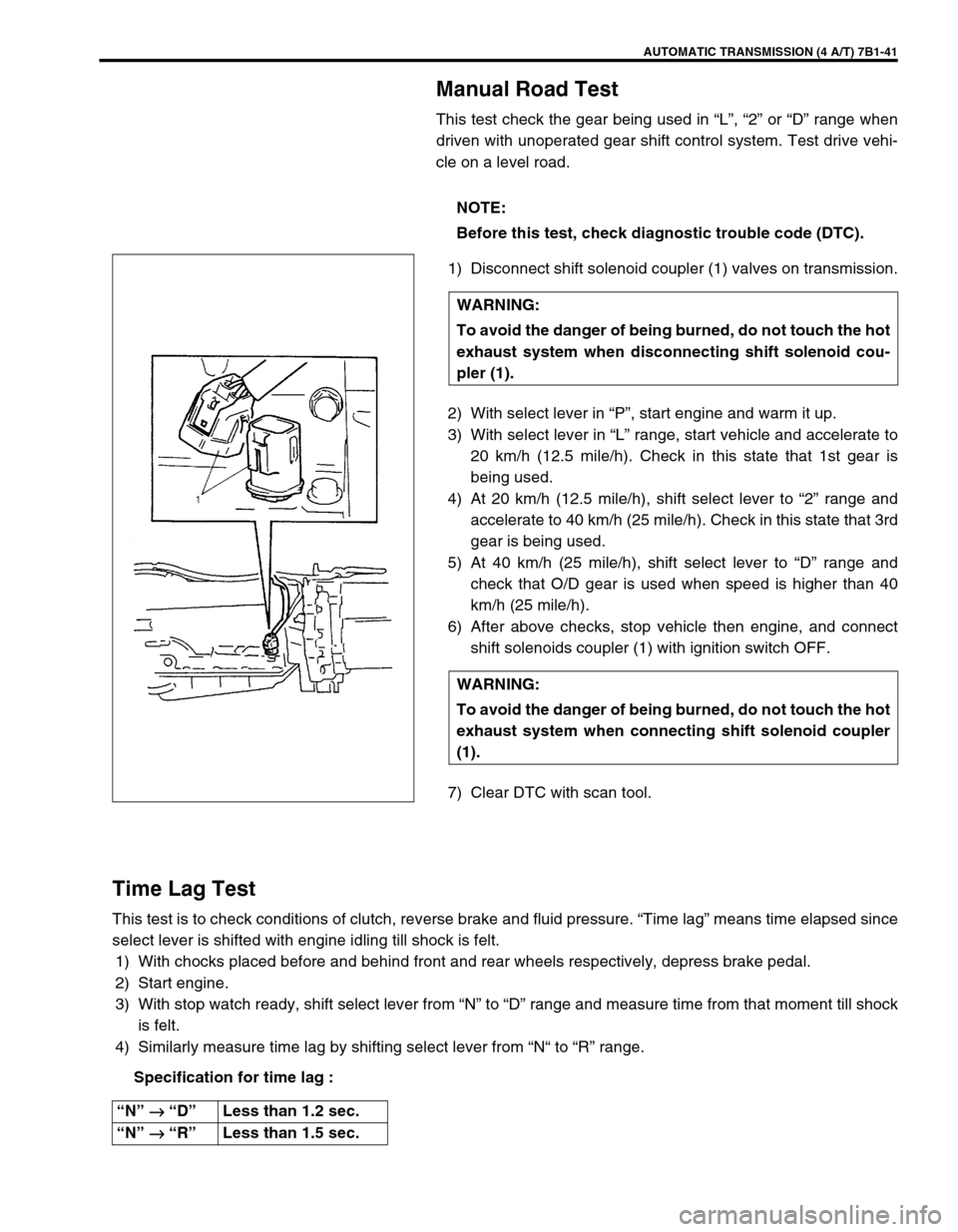
AUTOMATIC TRANSMISSION (4 A/T) 7B1-41
Manual Road Test
This test check the gear being used in “L”, “2” or “D” range when
driven with unoperated gear shift control system. Test drive vehi-
cle on a level road.
1) Disconnect shift solenoid coupler (1) valves on transmission.
2) With select lever in “P”, start engine and warm it up.
3) With select lever in “L” range, start vehicle and accelerate to
20 km/h (12.5 mile/h). Check in this state that 1st gear is
being used.
4) At 20 km/h (12.5 mile/h), shift select lever to “2” range and
accelerate to 40 km/h (25 mile/h). Check in this state that 3rd
gear is being used.
5) At 40 km/h (25 mile/h), shift select lever to “D” range and
check that O/D gear is used when speed is higher than 40
km/h (25 mile/h).
6) After above checks, stop vehicle then engine, and connect
shift solenoids coupler (1) with ignition switch OFF.
7) Clear DTC with scan tool.
Time Lag Test
This test is to check conditions of clutch, reverse brake and fluid pressure. “Time lag” means time elapsed since
select lever is shifted with engine idling till shock is felt.
1) With chocks placed before and behind front and rear wheels respectively, depress brake pedal.
2) Start engine.
3) With stop watch ready, shift select lever from “N” to “D” range and measure time from that moment till shock
is felt.
4) Similarly measure time lag by shifting select lever from “N“ to “R” range.
Specification for time lag :NOTE:
Before this test, check diagnostic trouble code (DTC).
WARNING:
To avoid the danger of being burned, do not touch the hot
exhaust system when disconnecting shift solenoid cou-
pler (1).
WARNING:
To avoid the danger of being burned, do not touch the hot
exhaust system when connecting shift solenoid coupler
(1).
“N” →
→→ → “D”Less than 1.2 sec.
“N” →
→→ → “R”Less than 1.5 sec.
Page 455 of 656
7B1-46 AUTOMATIC TRANSMISSION (4 A/T)
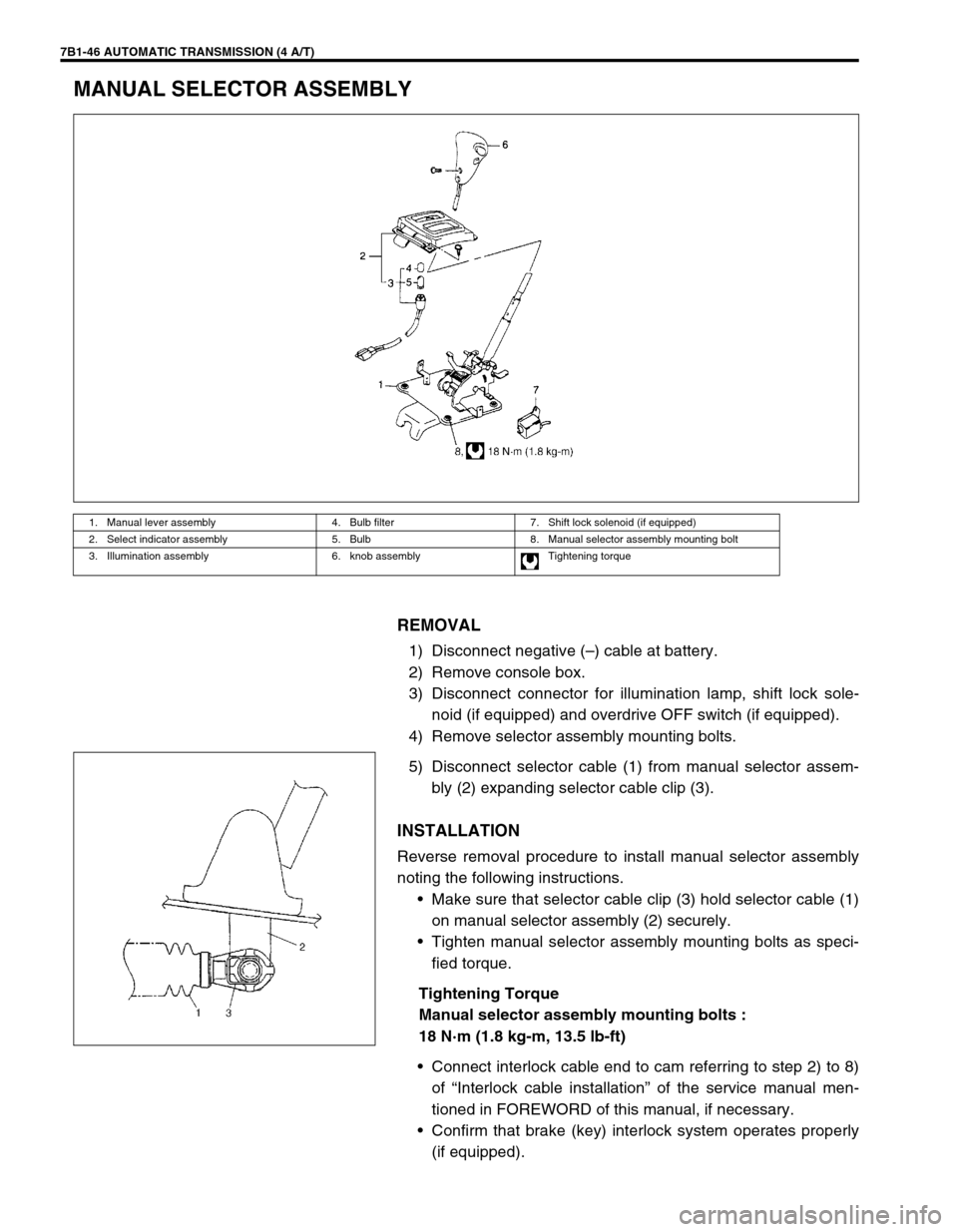
MANUAL SELECTOR ASSEMBLY
REMOVAL
1) Disconnect negative (–) cable at battery.
2) Remove console box.
3) Disconnect connector for illumination lamp, shift lock sole-
noid (if equipped) and overdrive OFF switch (if equipped).
4) Remove selector assembly mounting bolts.
5) Disconnect selector cable (1) from manual selector assem-
bly (2) expanding selector cable clip (3).
INSTALLATION
Reverse removal procedure to install manual selector assembly
noting the following instructions.
•Make sure that selector cable clip (3) hold selector cable (1)
on manual selector assembly (2) securely.
•Tighten manual selector assembly mounting bolts as speci-
fied torque.
Tightening Torque
Manual selector assembly mounting bolts :
18 N·m (1.8 kg-m, 13.5 lb-ft)
•Connect interlock cable end to cam referring to step 2) to 8)
of “Interlock cable installation” of the service manual men-
tioned in FOREWORD of this manual, if necessary.
•Confirm that brake (key) interlock system operates properly
(if equipped).
1. Manual lever assembly 4. Bulb filter 7. Shift lock solenoid (if equipped)
2. Select indicator assembly 5. Bulb 8. Manual selector assembly mounting bolt
3. Illumination assembly 6. knob assembly Tightening torque