display SUZUKI GRAND VITARA 2001 2.G User Guide
[x] Cancel search | Manufacturer: SUZUKI, Model Year: 2001, Model line: GRAND VITARA, Model: SUZUKI GRAND VITARA 2001 2.GPages: 656, PDF Size: 14.31 MB
Page 216 of 656
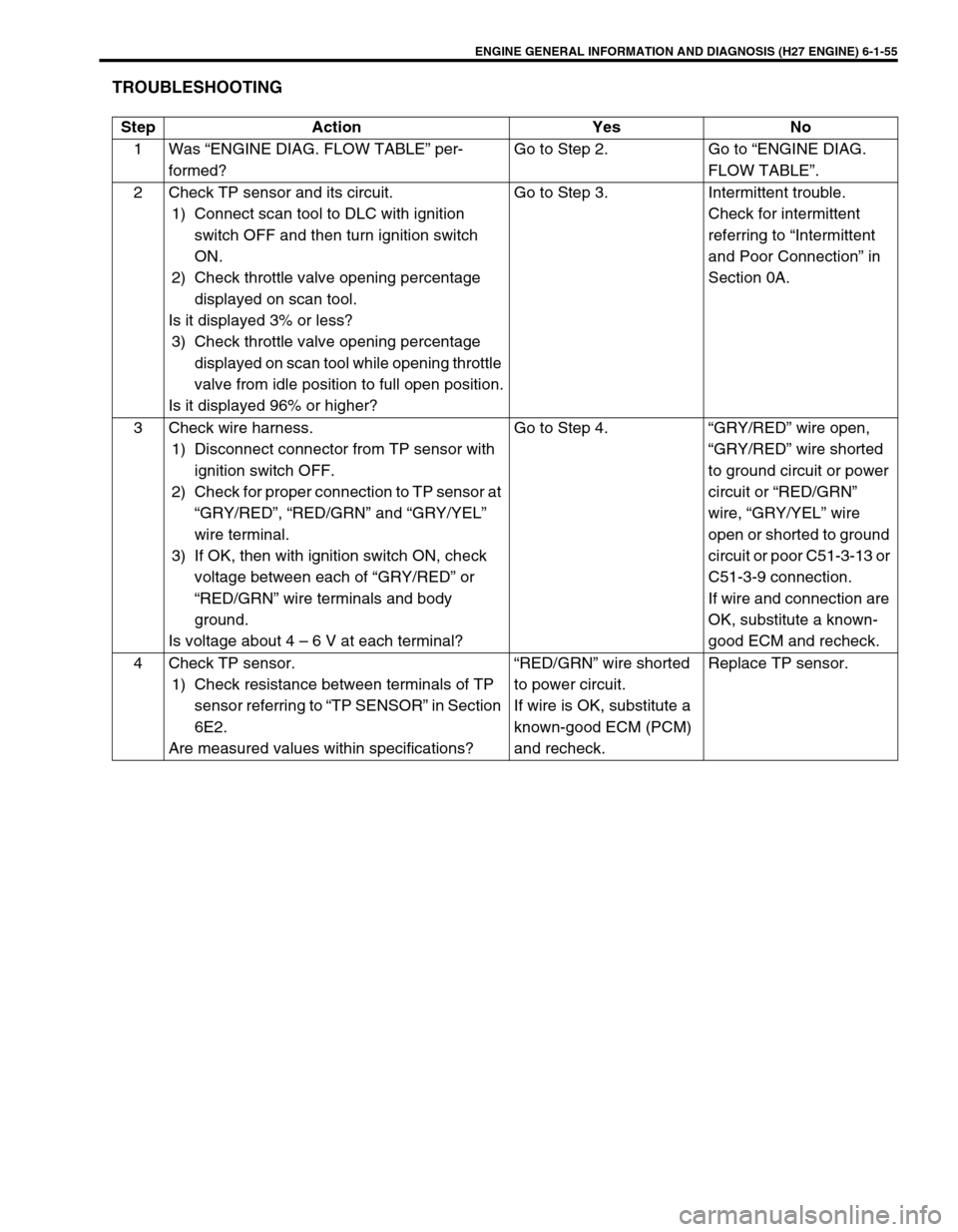
ENGINE GENERAL INFORMATION AND DIAGNOSIS (H27 ENGINE) 6-1-55
TROUBLESHOOTING
Step Action Yes No
1 Was “ENGINE DIAG. FLOW TABLE” per-
formed?Go to Step 2. Go to “ENGINE DIAG.
FLOW TABLE”.
2 Check TP sensor and its circuit.
1) Connect scan tool to DLC with ignition
switch OFF and then turn ignition switch
ON.
2) Check throttle valve opening percentage
displayed on scan tool.
Is it displayed 3% or less?
3) Check throttle valve opening percentage
displayed on scan tool while opening throttle
valve from idle position to full open position.
Is it displayed 96% or higher?Go to Step 3. Intermittent trouble.
Check for intermittent
referring to “Intermittent
and Poor Connection” in
Section 0A.
3 Check wire harness.
1) Disconnect connector from TP sensor with
ignition switch OFF.
2) Check for proper connection to TP sensor at
“GRY/RED”, “RED/GRN” and “GRY/YEL”
wire terminal.
3) If OK, then with ignition switch ON, check
voltage between each of “GRY/RED” or
“RED/GRN” wire terminals and body
ground.
Is voltage about 4 – 6 V at each terminal?Go to Step 4. “GRY/RED” wire open,
“GRY/RED” wire shorted
to ground circuit or power
circuit or “RED/GRN”
wire, “GRY/YEL” wire
open or shorted to ground
circuit or poor C51-3-13 or
C51-3-9 connection.
If wire and connection are
OK, substitute a known-
good ECM and recheck.
4 Check TP sensor.
1) Check resistance between terminals of TP
sensor referring to “TP SENSOR” in Section
6E2.
Are measured values within specifications?“RED/GRN” wire shorted
to power circuit.
If wire is OK, substitute a
known-good ECM (PCM)
and recheck.Replace TP sensor.
Page 220 of 656
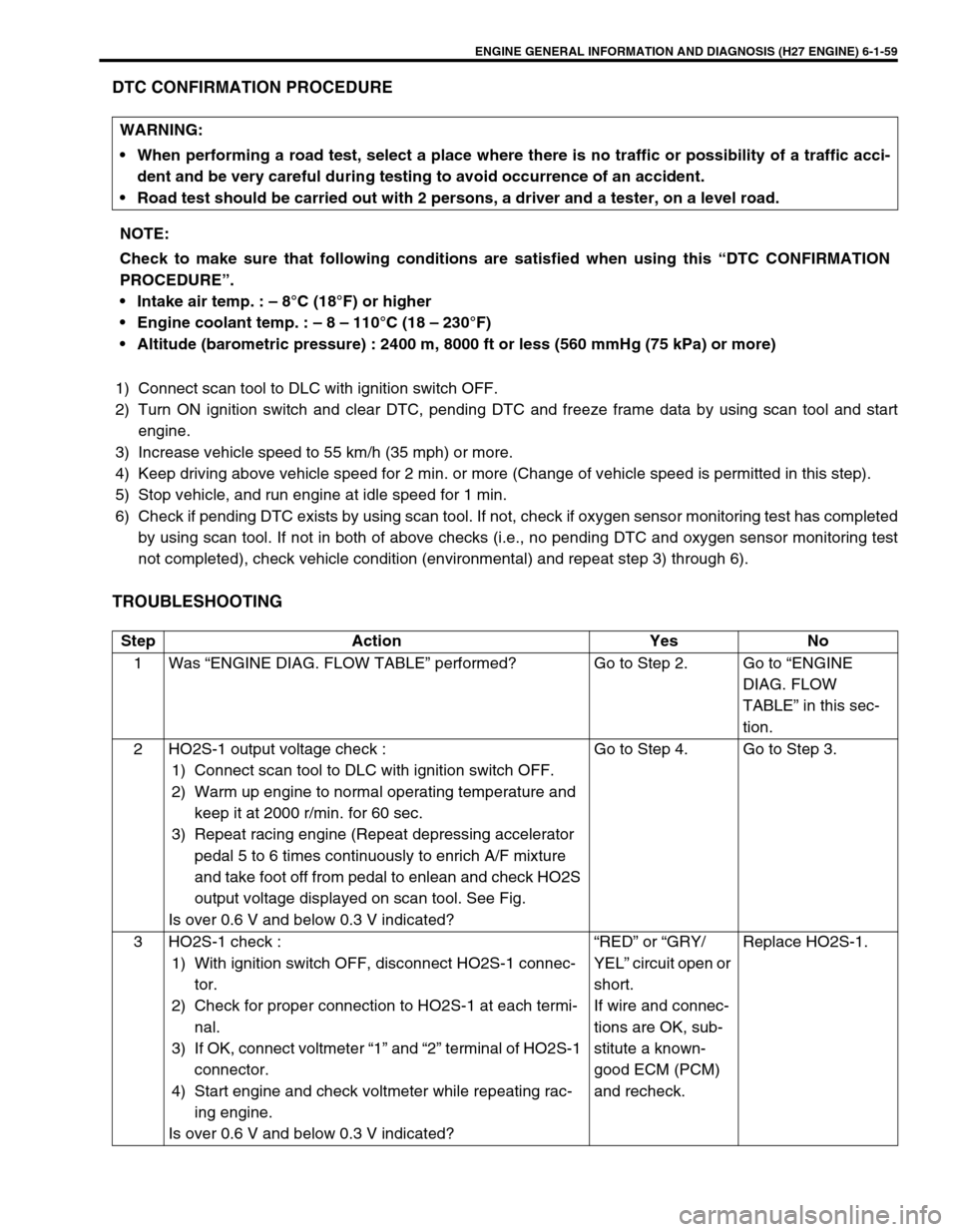
ENGINE GENERAL INFORMATION AND DIAGNOSIS (H27 ENGINE) 6-1-59
DTC CONFIRMATION PROCEDURE
1) Connect scan tool to DLC with ignition switch OFF.
2) Turn ON ignition switch and clear DTC, pending DTC and freeze frame data by using scan tool and start
engine.
3) Increase vehicle speed to 55 km/h (35 mph) or more.
4) Keep driving above vehicle speed for 2 min. or more (Change of vehicle speed is permitted in this step).
5) Stop vehicle, and run engine at idle speed for 1 min.
6) Check if pending DTC exists by using scan tool. If not, check if oxygen sensor monitoring test has completed
by using scan tool. If not in both of above checks (i.e., no pending DTC and oxygen sensor monitoring test
not completed), check vehicle condition (environmental) and repeat step 3) through 6).
TROUBLESHOOTING
WARNING:
When performing a road test, select a place where there is no traffic or possibility of a traffic acci-
dent and be very careful during testing to avoid occurrence of an accident.
Road test should be carried out with 2 persons, a driver and a tester, on a level road.
NOTE:
Check to make sure that following conditions are satisfied when using this “DTC CONFIRMATION
PROCEDURE”.
Intake air temp. : – 8°C (18°F) or higher
Engine coolant temp. : – 8 – 110°C (18 – 230°F)
Altitude (barometric pressure) : 2400 m, 8000 ft or less (560 mmHg (75 kPa) or more)
Step Action Yes No
1 Was “ENGINE DIAG. FLOW TABLE” performed? Go to Step 2. Go to “ENGINE
DIAG. FLOW
TABLE” in this sec-
tion.
2 HO2S-1 output voltage check :
1) Connect scan tool to DLC with ignition switch OFF.
2) Warm up engine to normal operating temperature and
keep it at 2000 r/min. for 60 sec.
3) Repeat racing engine (Repeat depressing accelerator
pedal 5 to 6 times continuously to enrich A/F mixture
and take foot off from pedal to enlean and check HO2S
output voltage displayed on scan tool. See Fig.
Is over 0.6 V and below 0.3 V indicated?Go to Step 4. Go to Step 3.
3 HO2S-1 check :
1) With ignition switch OFF, disconnect HO2S-1 connec-
tor.
2) Check for proper connection to HO2S-1 at each termi-
nal.
3) If OK, connect voltmeter “1” and “2” terminal of HO2S-1
connector.
4) Start engine and check voltmeter while repeating rac-
ing engine.
Is over 0.6 V and below 0.3 V indicated?“RED” or “GRY/
YEL” circuit open or
short.
If wire and connec-
tions are OK, sub-
stitute a known-
good ECM (PCM)
and recheck.Replace HO2S-1.
Page 221 of 656
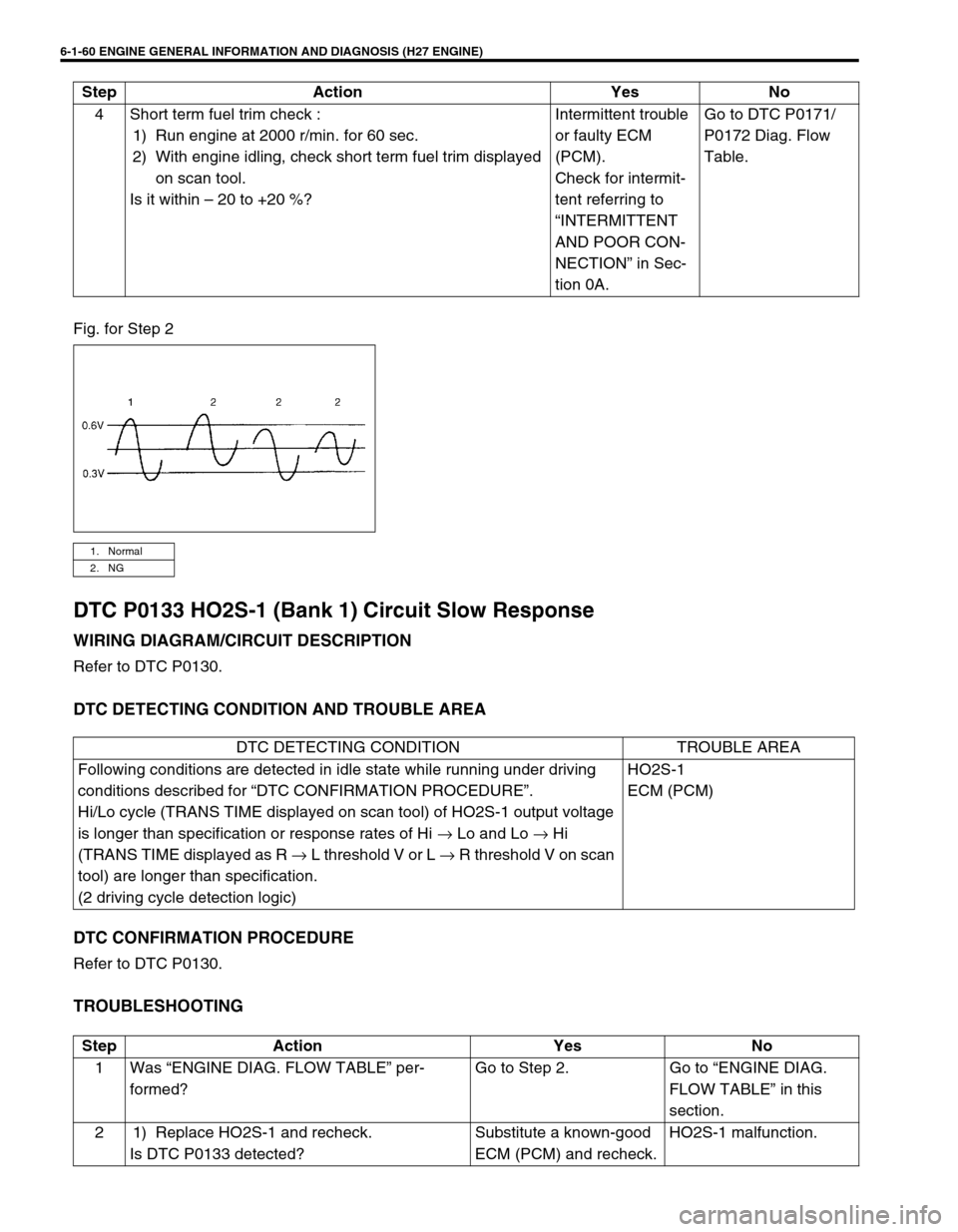
6-1-60 ENGINE GENERAL INFORMATION AND DIAGNOSIS (H27 ENGINE)
Fig. for Step 2
DTC P0133 HO2S-1 (Bank 1) Circuit Slow Response
WIRING DIAGRAM/CIRCUIT DESCRIPTION
Refer to DTC P0130.
DTC DETECTING CONDITION AND TROUBLE AREA
DTC CONFIRMATION PROCEDURE
Refer to DTC P0130.
TROUBLESHOOTING
4 Short term fuel trim check :
1) Run engine at 2000 r/min. for 60 sec.
2) With engine idling, check short term fuel trim displayed
on scan tool.
Is it within – 20 to +20 %?Intermittent trouble
or faulty ECM
(PCM).
Check for intermit-
tent referring to
“INTERMITTENT
AND POOR CON-
NECTION” in Sec-
tion 0A.Go to DTC P0171/
P0172 Diag. Flow
Table. Step Action Yes No
1. Normal
2. NG
DTC DETECTING CONDITION TROUBLE AREA
Following conditions are detected in idle state while running under driving
conditions described for “DTC CONFIRMATION PROCEDURE”.
Hi/Lo cycle (TRANS TIME displayed on scan tool) of HO2S-1 output voltage
is longer than specification or response rates of Hi → Lo and Lo → Hi
(TRANS TIME displayed as R → L threshold V or L → R threshold V on scan
tool) are longer than specification.
(2 driving cycle detection logic)HO2S-1
ECM (PCM)
Step Action Yes No
1 Was “ENGINE DIAG. FLOW TABLE” per-
formed?Go to Step 2. Go to “ENGINE DIAG.
FLOW TABLE” in this
section.
2 1) Replace HO2S-1 and recheck.
Is DTC P0133 detected?Substitute a known-good
ECM (PCM) and recheck.HO2S-1 malfunction.
Page 225 of 656
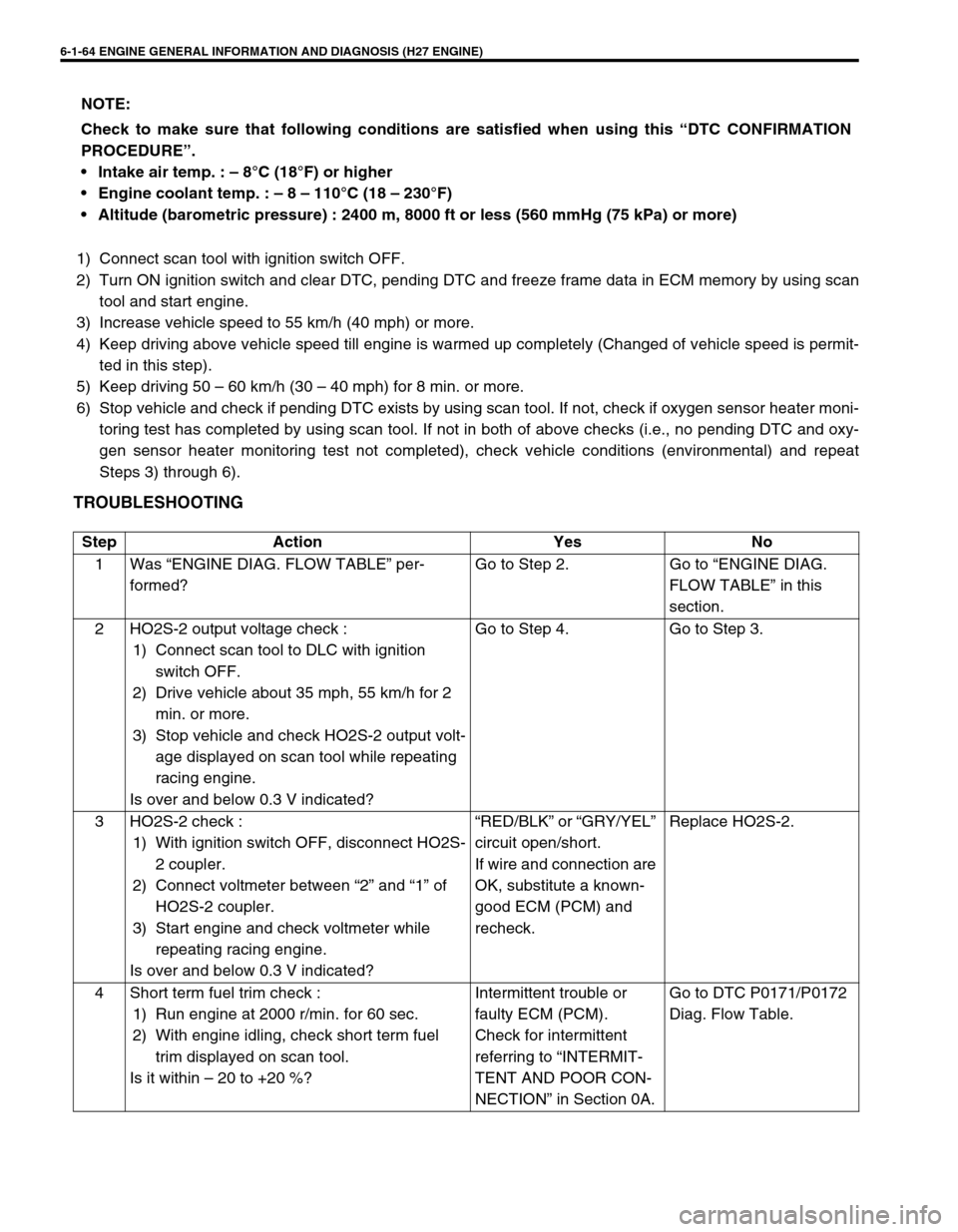
6-1-64 ENGINE GENERAL INFORMATION AND DIAGNOSIS (H27 ENGINE)
1) Connect scan tool with ignition switch OFF.
2) Turn ON ignition switch and clear DTC, pending DTC and freeze frame data in ECM memory by using scan
tool and start engine.
3) Increase vehicle speed to 55 km/h (40 mph) or more.
4) Keep driving above vehicle speed till engine is warmed up completely (Changed of vehicle speed is permit-
ted in this step).
5) Keep driving 50 – 60 km/h (30 – 40 mph) for 8 min. or more.
6) Stop vehicle and check if pending DTC exists by using scan tool. If not, check if oxygen sensor heater moni-
toring test has completed by using scan tool. If not in both of above checks (i.e., no pending DTC and oxy-
gen sensor heater monitoring test not completed), check vehicle conditions (environmental) and repeat
Steps 3) through 6).
TROUBLESHOOTING
NOTE:
Check to make sure that following conditions are satisfied when using this “DTC CONFIRMATION
PROCEDURE”.
Intake air temp. : – 8°C (18°F) or higher
Engine coolant temp. : – 8 – 110°C (18 – 230°F)
Altitude (barometric pressure) : 2400 m, 8000 ft or less (560 mmHg (75 kPa) or more)
Step Action Yes No
1 Was “ENGINE DIAG. FLOW TABLE” per-
formed?Go to Step 2. Go to “ENGINE DIAG.
FLOW TABLE” in this
section.
2 HO2S-2 output voltage check :
1) Connect scan tool to DLC with ignition
switch OFF.
2) Drive vehicle about 35 mph, 55 km/h for 2
min. or more.
3) Stop vehicle and check HO2S-2 output volt-
age displayed on scan tool while repeating
racing engine.
Is over and below 0.3 V indicated?Go to Step 4. Go to Step 3.
3 HO2S-2 check :
1) With ignition switch OFF, disconnect HO2S-
2 coupler.
2) Connect voltmeter between “2” and “1” of
HO2S-2 coupler.
3) Start engine and check voltmeter while
repeating racing engine.
Is over and below 0.3 V indicated?“RED/BLK” or “GRY/YEL”
circuit open/short.
If wire and connection are
OK, substitute a known-
good ECM (PCM) and
recheck.Replace HO2S-2.
4 Short term fuel trim check :
1) Run engine at 2000 r/min. for 60 sec.
2) With engine idling, check short term fuel
trim displayed on scan tool.
Is it within – 20 to +20 %?Intermittent trouble or
faulty ECM (PCM).
Check for intermittent
referring to “INTERMIT-
TENT AND POOR CON-
NECTION” in Section 0A.Go to DTC P0171/P0172
Diag. Flow Table.
Page 229 of 656
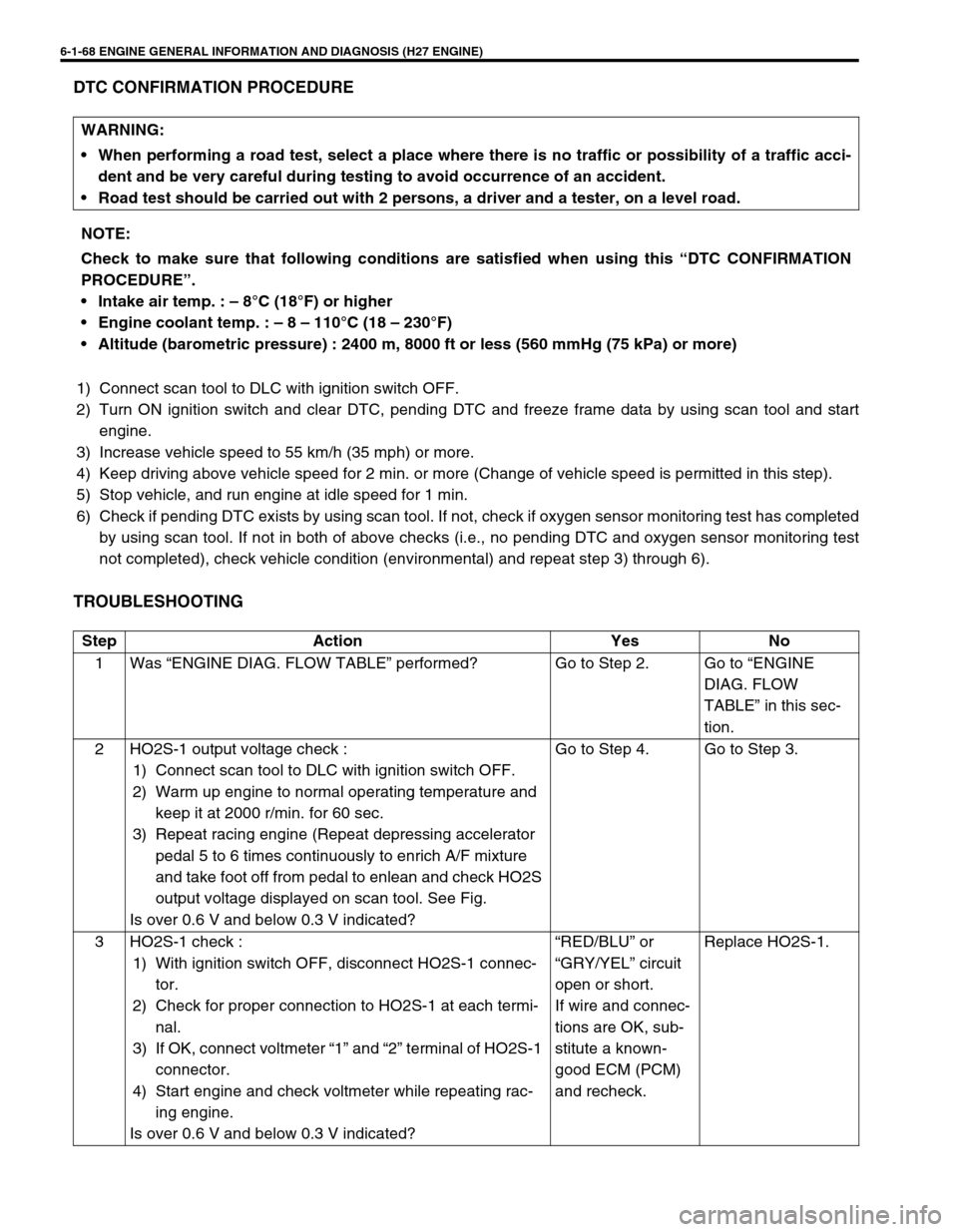
6-1-68 ENGINE GENERAL INFORMATION AND DIAGNOSIS (H27 ENGINE)
DTC CONFIRMATION PROCEDURE
1) Connect scan tool to DLC with ignition switch OFF.
2) Turn ON ignition switch and clear DTC, pending DTC and freeze frame data by using scan tool and start
engine.
3) Increase vehicle speed to 55 km/h (35 mph) or more.
4) Keep driving above vehicle speed for 2 min. or more (Change of vehicle speed is permitted in this step).
5) Stop vehicle, and run engine at idle speed for 1 min.
6) Check if pending DTC exists by using scan tool. If not, check if oxygen sensor monitoring test has completed
by using scan tool. If not in both of above checks (i.e., no pending DTC and oxygen sensor monitoring test
not completed), check vehicle condition (environmental) and repeat step 3) through 6).
TROUBLESHOOTING
WARNING:
When performing a road test, select a place where there is no traffic or possibility of a traffic acci-
dent and be very careful during testing to avoid occurrence of an accident.
Road test should be carried out with 2 persons, a driver and a tester, on a level road.
NOTE:
Check to make sure that following conditions are satisfied when using this “DTC CONFIRMATION
PROCEDURE”.
Intake air temp. : – 8°C (18°F) or higher
Engine coolant temp. : – 8 – 110°C (18 – 230°F)
Altitude (barometric pressure) : 2400 m, 8000 ft or less (560 mmHg (75 kPa) or more)
Step Action Yes No
1 Was “ENGINE DIAG. FLOW TABLE” performed? Go to Step 2. Go to “ENGINE
DIAG. FLOW
TABLE” in this sec-
tion.
2 HO2S-1 output voltage check :
1) Connect scan tool to DLC with ignition switch OFF.
2) Warm up engine to normal operating temperature and
keep it at 2000 r/min. for 60 sec.
3) Repeat racing engine (Repeat depressing accelerator
pedal 5 to 6 times continuously to enrich A/F mixture
and take foot off from pedal to enlean and check HO2S
output voltage displayed on scan tool. See Fig.
Is over 0.6 V and below 0.3 V indicated?Go to Step 4. Go to Step 3.
3 HO2S-1 check :
1) With ignition switch OFF, disconnect HO2S-1 connec-
tor.
2) Check for proper connection to HO2S-1 at each termi-
nal.
3) If OK, connect voltmeter “1” and “2” terminal of HO2S-1
connector.
4) Start engine and check voltmeter while repeating rac-
ing engine.
Is over 0.6 V and below 0.3 V indicated?“RED/BLU” or
“GRY/YEL” circuit
open or short.
If wire and connec-
tions are OK, sub-
stitute a known-
good ECM (PCM)
and recheck.Replace HO2S-1.
Page 230 of 656
ENGINE GENERAL INFORMATION AND DIAGNOSIS (H27 ENGINE) 6-1-69
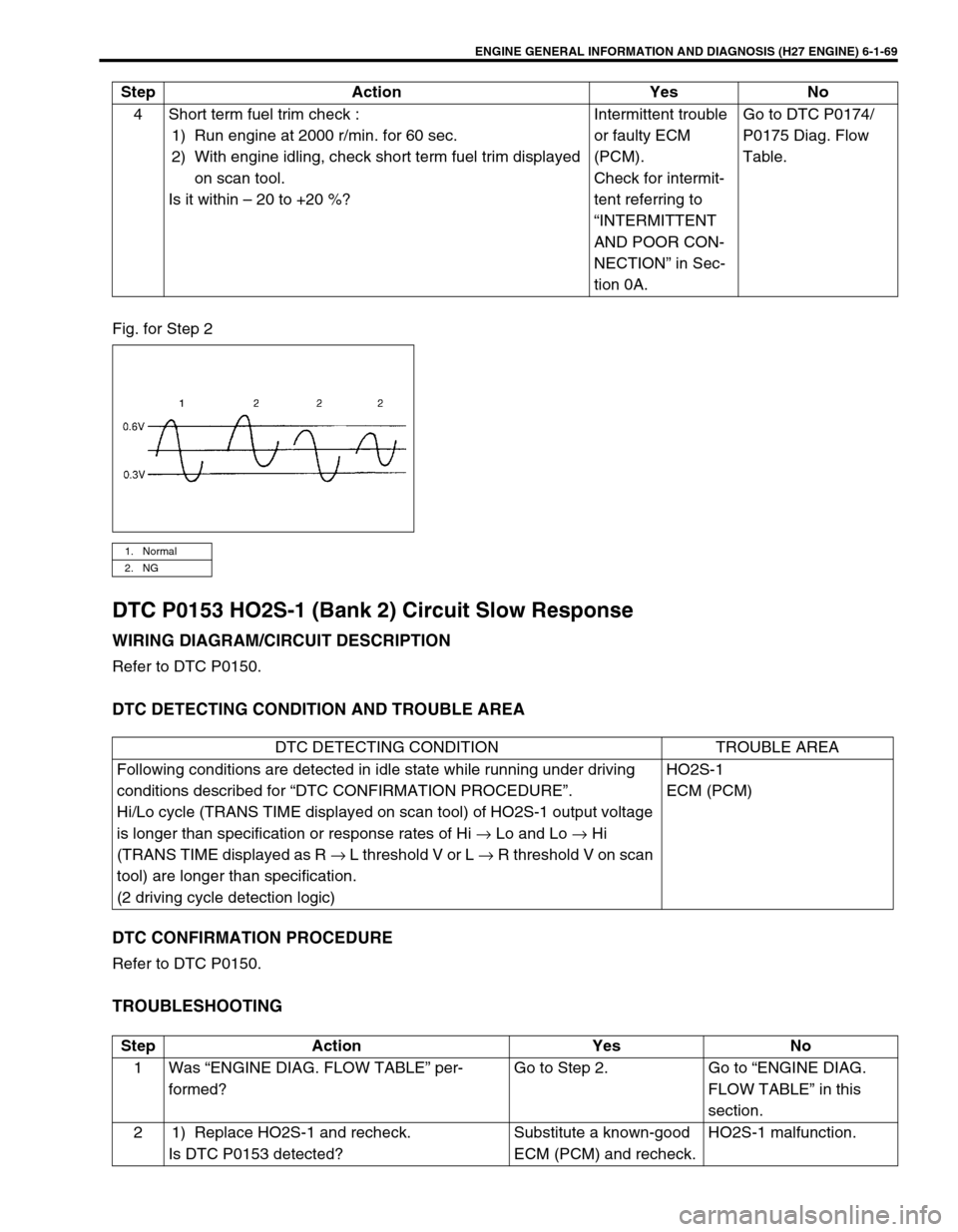
Fig. for Step 2
DTC P0153 HO2S-1 (Bank 2) Circuit Slow Response
WIRING DIAGRAM/CIRCUIT DESCRIPTION
Refer to DTC P0150.
DTC DETECTING CONDITION AND TROUBLE AREA
DTC CONFIRMATION PROCEDURE
Refer to DTC P0150.
TROUBLESHOOTING
4 Short term fuel trim check :
1) Run engine at 2000 r/min. for 60 sec.
2) With engine idling, check short term fuel trim displayed
on scan tool.
Is it within – 20 to +20 %?Intermittent trouble
or faulty ECM
(PCM).
Check for intermit-
tent referring to
“INTERMITTENT
AND POOR CON-
NECTION” in Sec-
tion 0A.Go to DTC P0174/
P0175 Diag. Flow
Table. Step Action Yes No
1. Normal
2. NG
DTC DETECTING CONDITION TROUBLE AREA
Following conditions are detected in idle state while running under driving
conditions described for “DTC CONFIRMATION PROCEDURE”.
Hi/Lo cycle (TRANS TIME displayed on scan tool) of HO2S-1 output voltage
is longer than specification or response rates of Hi → Lo and Lo → Hi
(TRANS TIME displayed as R → L threshold V or L → R threshold V on scan
tool) are longer than specification.
(2 driving cycle detection logic)HO2S-1
ECM (PCM)
Step Action Yes No
1 Was “ENGINE DIAG. FLOW TABLE” per-
formed?Go to Step 2. Go to “ENGINE DIAG.
FLOW TABLE” in this
section.
2 1) Replace HO2S-1 and recheck.
Is DTC P0153 detected?Substitute a known-good
ECM (PCM) and recheck.HO2S-1 malfunction.
Page 234 of 656
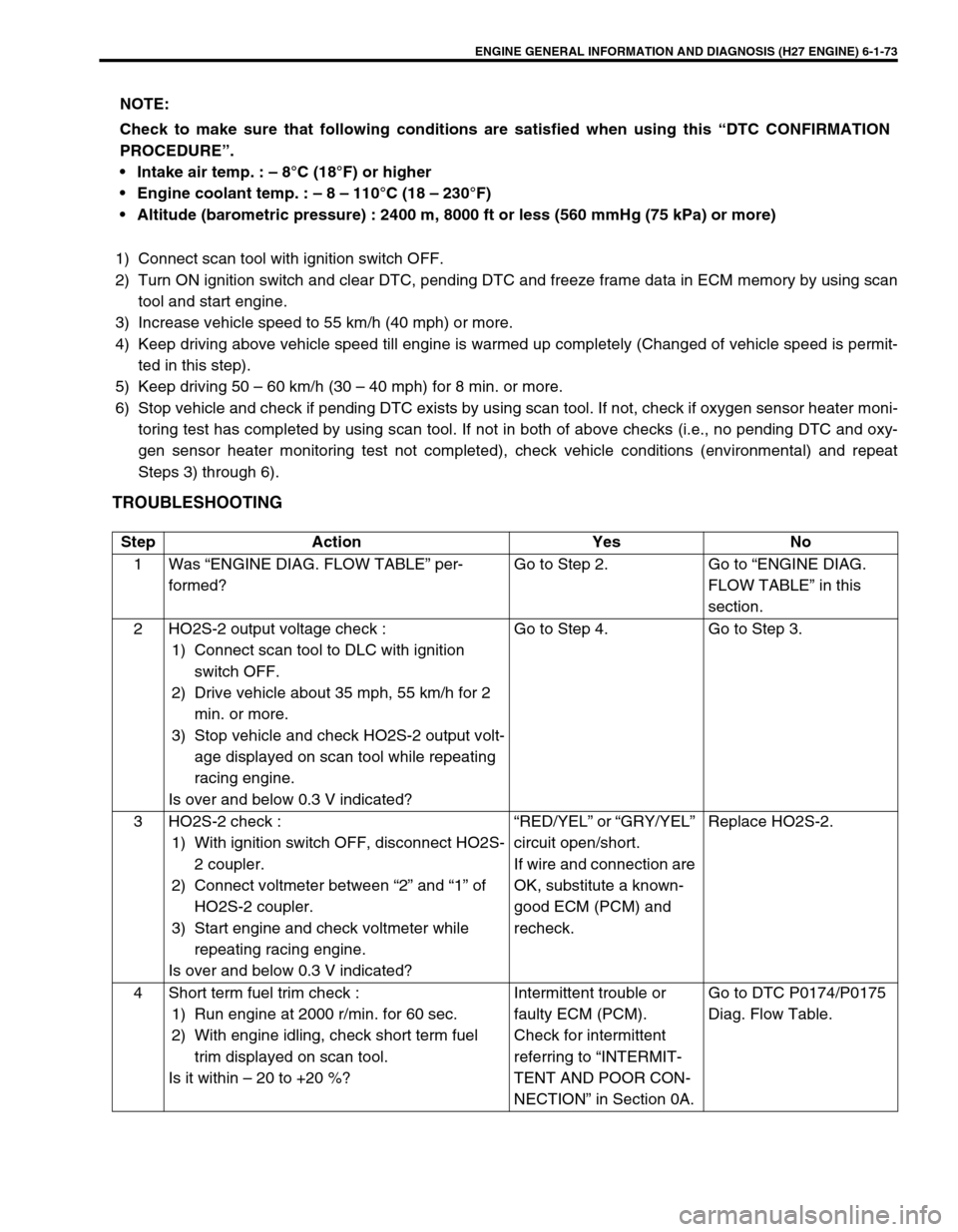
ENGINE GENERAL INFORMATION AND DIAGNOSIS (H27 ENGINE) 6-1-73
1) Connect scan tool with ignition switch OFF.
2) Turn ON ignition switch and clear DTC, pending DTC and freeze frame data in ECM memory by using scan
tool and start engine.
3) Increase vehicle speed to 55 km/h (40 mph) or more.
4) Keep driving above vehicle speed till engine is warmed up completely (Changed of vehicle speed is permit-
ted in this step).
5) Keep driving 50 – 60 km/h (30 – 40 mph) for 8 min. or more.
6) Stop vehicle and check if pending DTC exists by using scan tool. If not, check if oxygen sensor heater moni-
toring test has completed by using scan tool. If not in both of above checks (i.e., no pending DTC and oxy-
gen sensor heater monitoring test not completed), check vehicle conditions (environmental) and repeat
Steps 3) through 6).
TROUBLESHOOTING
NOTE:
Check to make sure that following conditions are satisfied when using this “DTC CONFIRMATION
PROCEDURE”.
Intake air temp. : – 8°C (18°F) or higher
Engine coolant temp. : – 8 – 110°C (18 – 230°F)
Altitude (barometric pressure) : 2400 m, 8000 ft or less (560 mmHg (75 kPa) or more)
Step Action Yes No
1 Was “ENGINE DIAG. FLOW TABLE” per-
formed?Go to Step 2. Go to “ENGINE DIAG.
FLOW TABLE” in this
section.
2 HO2S-2 output voltage check :
1) Connect scan tool to DLC with ignition
switch OFF.
2) Drive vehicle about 35 mph, 55 km/h for 2
min. or more.
3) Stop vehicle and check HO2S-2 output volt-
age displayed on scan tool while repeating
racing engine.
Is over and below 0.3 V indicated?Go to Step 4. Go to Step 3.
3 HO2S-2 check :
1) With ignition switch OFF, disconnect HO2S-
2 coupler.
2) Connect voltmeter between “2” and “1” of
HO2S-2 coupler.
3) Start engine and check voltmeter while
repeating racing engine.
Is over and below 0.3 V indicated?“RED/YEL” or “GRY/YEL”
circuit open/short.
If wire and connection are
OK, substitute a known-
good ECM (PCM) and
recheck.Replace HO2S-2.
4 Short term fuel trim check :
1) Run engine at 2000 r/min. for 60 sec.
2) With engine idling, check short term fuel
trim displayed on scan tool.
Is it within – 20 to +20 %?Intermittent trouble or
faulty ECM (PCM).
Check for intermittent
referring to “INTERMIT-
TENT AND POOR CON-
NECTION” in Section 0A.Go to DTC P0174/P0175
Diag. Flow Table.
Page 377 of 656
6E2-44 ENGINE AND EMISSION CONTROL SYSTEM (SEQUENTIAL MULTIPORT FUEL INJECTION FOR H27 ENGINE)
Emission Control System
EGR system (if equipped)
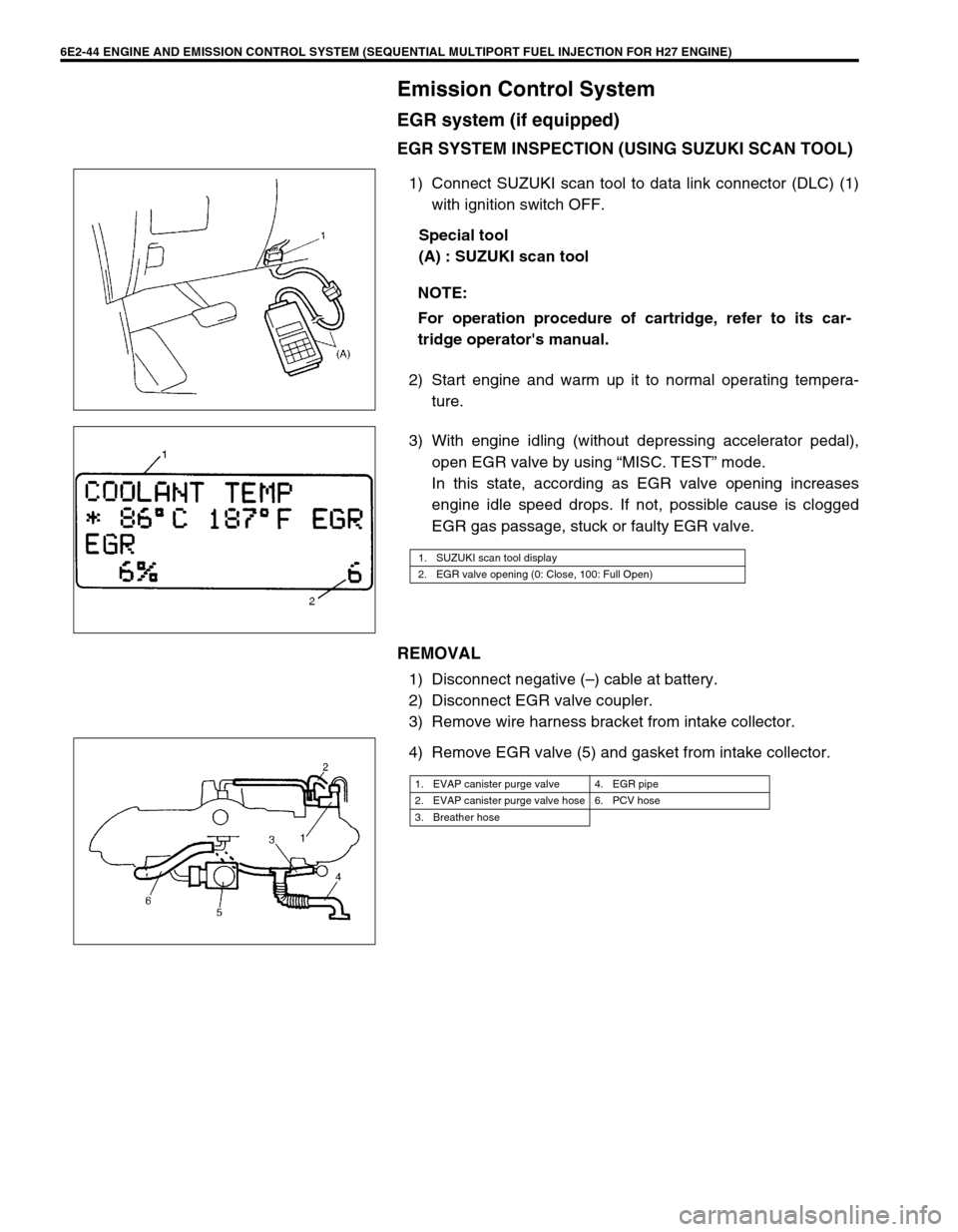
EGR SYSTEM INSPECTION (USING SUZUKI SCAN TOOL)
1) Connect SUZUKI scan tool to data link connector (DLC) (1)
with ignition switch OFF.
Special tool
(A) : SUZUKI scan tool
2) Start engine and warm up it to normal operating tempera-
ture.
3) With engine idling (without depressing accelerator pedal),
open EGR valve by using “MISC. TEST” mode.
In this state, according as EGR valve opening increases
engine idle speed drops. If not, possible cause is clogged
EGR gas passage, stuck or faulty EGR valve.
REMOVAL
1) Disconnect negative (–) cable at battery.
2) Disconnect EGR valve coupler.
3) Remove wire harness bracket from intake collector.
4) Remove EGR valve (5) and gasket from intake collector.NOTE:
For operation procedure of cartridge, refer to its car-
tridge operator's manual.
1. SUZUKI scan tool display
2. EGR valve opening (0: Close, 100: Full Open)
1. EVAP canister purge valve 4. EGR pipe
2. EVAP canister purge valve hose 6. PCV hose
3. Breather hose
Page 436 of 656
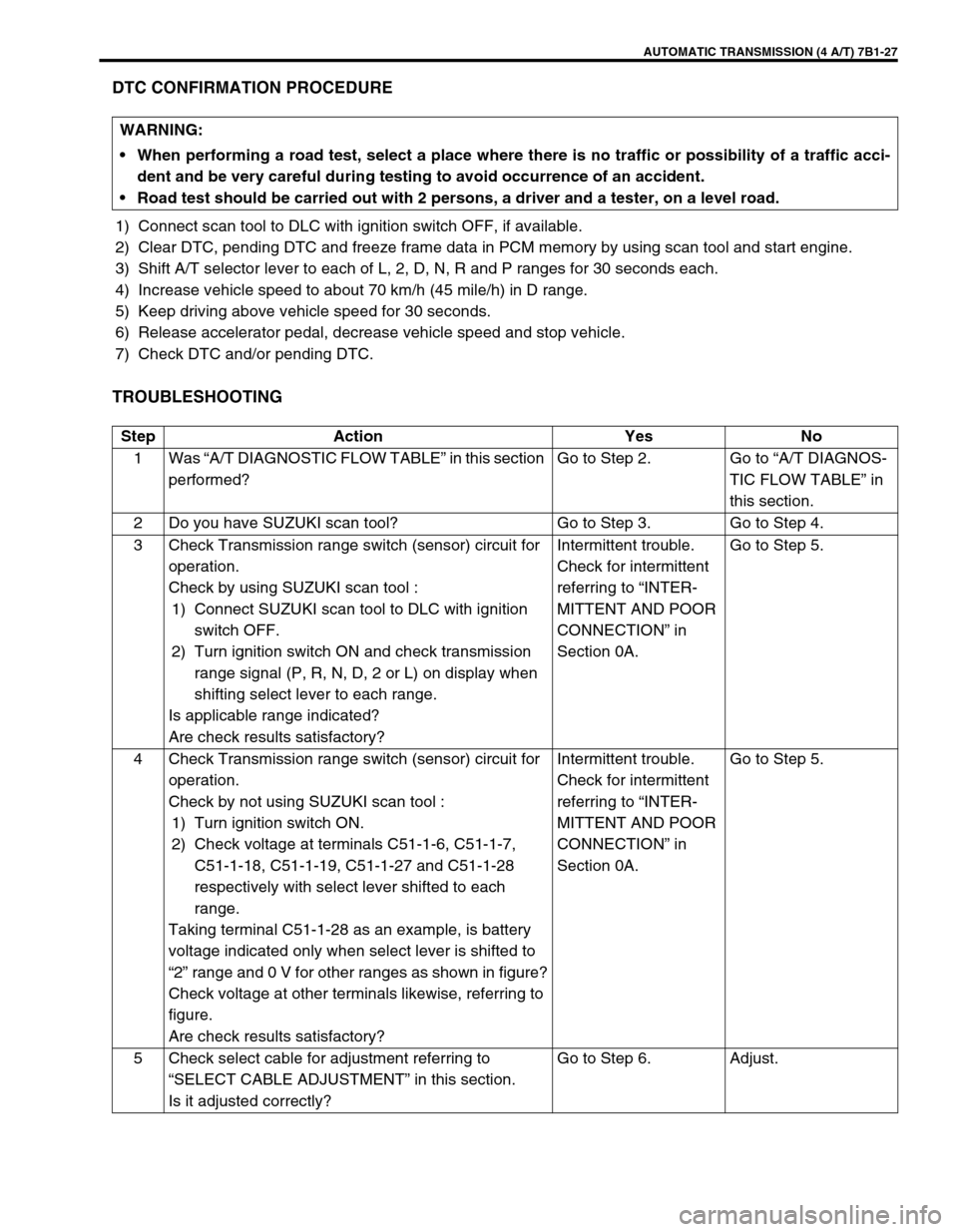
AUTOMATIC TRANSMISSION (4 A/T) 7B1-27
DTC CONFIRMATION PROCEDURE
1) Connect scan tool to DLC with ignition switch OFF, if available.
2) Clear DTC, pending DTC and freeze frame data in PCM memory by using scan tool and start engine.
3) Shift A/T selector lever to each of L, 2, D, N, R and P ranges for 30 seconds each.
4) Increase vehicle speed to about 70 km/h (45 mile/h) in D range.
5) Keep driving above vehicle speed for 30 seconds.
6) Release accelerator pedal, decrease vehicle speed and stop vehicle.
7) Check DTC and/or pending DTC.
TROUBLESHOOTING
WARNING:
When performing a road test, select a place where there is no traffic or possibility of a traffic acci-
dent and be very careful during testing to avoid occurrence of an accident.
Road test should be carried out with 2 persons, a driver and a tester, on a level road.
Step Action Yes No
1Was “A/T DIAGNOSTIC FLOW TABLE” in this section
performed?Go to Step 2. Go to “A/T DIAGNOS-
TIC FLOW TABLE” in
this section.
2 Do you have SUZUKI scan tool? Go to Step 3. Go to Step 4.
3 Check Transmission range switch (sensor) circuit for
operation.
Check by using SUZUKI scan tool :
1) Connect SUZUKI scan tool to DLC with ignition
switch OFF.
2) Turn ignition switch ON and check transmission
range signal (P, R, N, D, 2 or L) on display when
shifting select lever to each range.
Is applicable range indicated?
Are check results satisfactory?Intermittent trouble.
Check for intermittent
referring to “INTER-
MITTENT AND POOR
CONNECTION” in
Section 0A.Go to Step 5.
4 Check Transmission range switch (sensor) circuit for
operation.
Check by not using SUZUKI scan tool :
1) Turn ignition switch ON.
2) Check voltage at terminals C51-1-6, C51-1-7,
C51-1-18, C51-1-19, C51-1-27 and C51-1-28
respectively with select lever shifted to each
range.
Taking terminal C51-1-28 as an example, is battery
voltage indicated only when select lever is shifted to
“2” range and 0 V for other ranges as shown in figure?
Check voltage at other terminals likewise, referring to
figure.
Are check results satisfactory?Intermittent trouble.
Check for intermittent
referring to “INTER-
MITTENT AND POOR
CONNECTION” in
Section 0A.Go to Step 5.
5 Check select cable for adjustment referring to
“SELECT CABLE ADJUSTMENT” in this section.
Is it adjusted correctly?Go to Step 6. Adjust.
Page 587 of 656
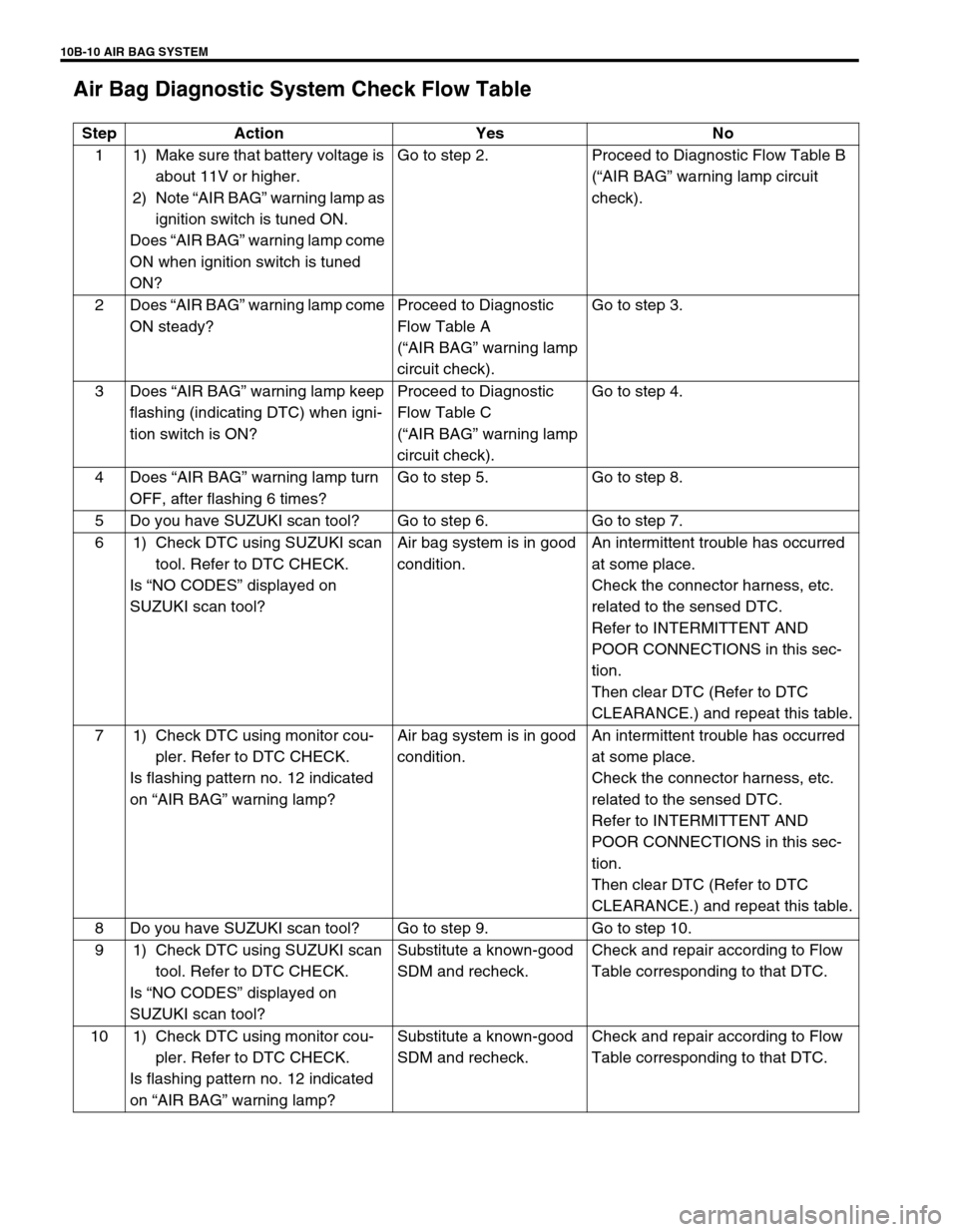
10B-10 AIR BAG SYSTEM
Air Bag Diagnostic System Check Flow Table
Step Action Yes No
1 1) Make sure that battery voltage is
about 11V or higher.
2) Note “AIR BAG” warning lamp as
ignition switch is tuned ON.
Does “AIR BAG” warning lamp come
ON when ignition switch is tuned
ON?Go to step 2. Proceed to Diagnostic Flow Table B
(“AIR BAG” warning lamp circuit
check).
2Does “AIR BAG” warning lamp come
ON steady?Proceed to Diagnostic
Flow Table A
(“AIR BAG” warning lamp
circuit check).Go to step 3.
3Does “AIR BAG” warning lamp keep
flashing (indicating DTC) when igni-
tion switch is ON?Proceed to Diagnostic
Flow Table C
(“AIR BAG” warning lamp
circuit check).Go to step 4.
4Does “AIR BAG” warning lamp turn
OFF, after flashing 6 times?Go to step 5. Go to step 8.
5 Do you have SUZUKI scan tool? Go to step 6. Go to step 7.
6 1) Check DTC using SUZUKI scan
tool. Refer to DTC CHECK.
Is “NO CODES” displayed on
SUZUKI scan tool?Air bag system is in good
condition.An intermittent trouble has occurred
at some place.
Check the connector harness, etc.
related to the sensed DTC.
Refer to INTERMITTENT AND
POOR CONNECTIONS in this sec-
tion.
Then clear DTC (Refer to DTC
CLEARANCE.) and repeat this table.
7 1) Check DTC using monitor cou-
pler. Refer to DTC CHECK.
Is flashing pattern no. 12 indicated
on “AIR BAG” warning lamp?Air bag system is in good
condition.An intermittent trouble has occurred
at some place.
Check the connector harness, etc.
related to the sensed DTC.
Refer to INTERMITTENT AND
POOR CONNECTIONS in this sec-
tion.
Then clear DTC (Refer to DTC
CLEARANCE.) and repeat this table.
8 Do you have SUZUKI scan tool? Go to step 9. Go to step 10.
9 1) Check DTC using SUZUKI scan
tool. Refer to DTC CHECK.
Is “NO CODES” displayed on
SUZUKI scan tool?Substitute a known-good
SDM and recheck.Check and repair according to Flow
Table corresponding to that DTC.
10 1) Check DTC using monitor cou-
pler. Refer to DTC CHECK.
Is flashing pattern no. 12 indicated
on “AIR BAG” warning lamp?Substitute a known-good
SDM and recheck.Check and repair according to Flow
Table corresponding to that DTC.