ron SUZUKI GRAND VITARA 2012 Manual Online
[x] Cancel search | Manufacturer: SUZUKI, Model Year: 2012, Model line: GRAND VITARA, Model: SUZUKI GRAND VITARA 2012Pages: 337, PDF Size: 6.21 MB
Page 187 of 337
5-34
OTHER CONTROLS AND EQUIPMENT
79K21-03E
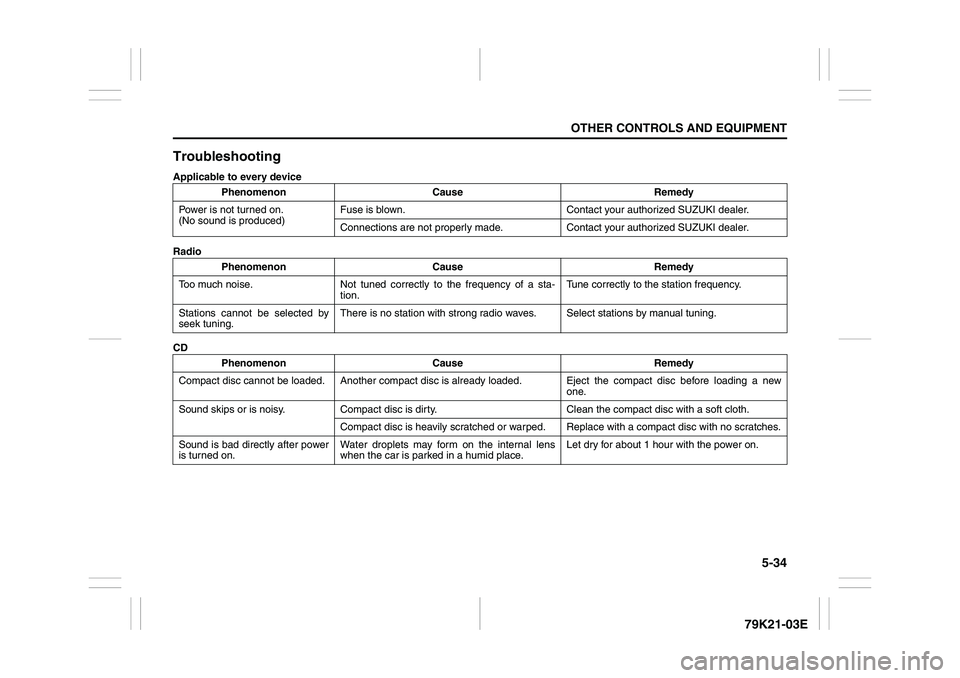
TroubleshootingApplicable to every device
Radio
CDPhenomenon Cause Remedy
Power is not turned on.
(No sound is produced)Fuse is blown. Contact your authorized SUZUKI dealer.
Connections are not properly made. Contact your authorized SUZUKI dealer.
Phenomenon Cause Remedy
Too much noise. Not tuned correctly to the frequency of a sta-
tion.Tune correctly to the station frequency.
Stations cannot be selected by
seek tuning.There is no station with strong radio waves. Select stations by manual tuning.
Phenomenon Cause Remedy
Compact disc cannot be loaded. Another compact disc is already loaded. Eject the compact disc before loading a new
one.
Sound skips or is noisy. Compact disc is dirty. Clean the compact disc with a soft cloth.
Compact disc is heavily scratched or warped. Replace with a compact disc with no scratches.
Sound is bad directly after power
is turned on.Water droplets may form on the internal lens
when the car is parked in a humid place.Let dry for about 1 hour with the power on.
Page 195 of 337
5-42
OTHER CONTROLS AND EQUIPMENT
79K21-03E
Radio ReceptionRadio reception can be affected by envi-
ronment, atmospheric conditions, or radio
signal’s power and distance from the sta-
tion. Nearby mountains and buildings may
interfere or deflect radio reception, causing
poor reception. Poor reception or radio
static can also be caused by electric cur-
rent from overhead wires or high voltage
power lines.
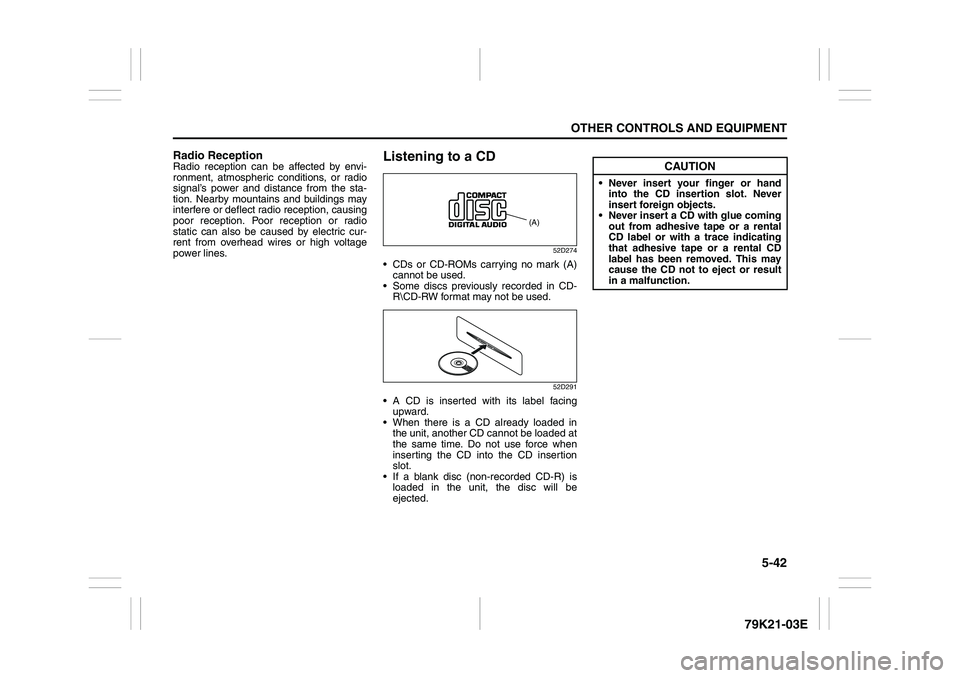
Listening to a CD
52D274
CDs or CD-ROMs carrying no mark (A)
cannot be used.
Some discs previously recorded in CD-
R\CD-RW format may not be used.
52D291
A CD is inserted with its label facing
upward.
When there is a CD already loaded in
the unit, another CD cannot be loaded at
the same time. Do not use force when
inserting the CD into the CD insertion
slot.
If a blank disc (non-recorded CD-R) is
loaded in the unit, the disc will be
ejected.
(A)
CAUTION
Never insert your finger or hand
into the CD insertion slot. Never
insert foreign objects.
Never insert a CD with glue coming
out from adhesive tape or a rental
CD label or with a trace indicating
that adhesive tape or a rental CD
label has been removed. This may
cause the CD not to eject or result
in a malfunction.
Page 203 of 337
5-50
OTHER CONTROLS AND EQUIPMENT
79K21-03E
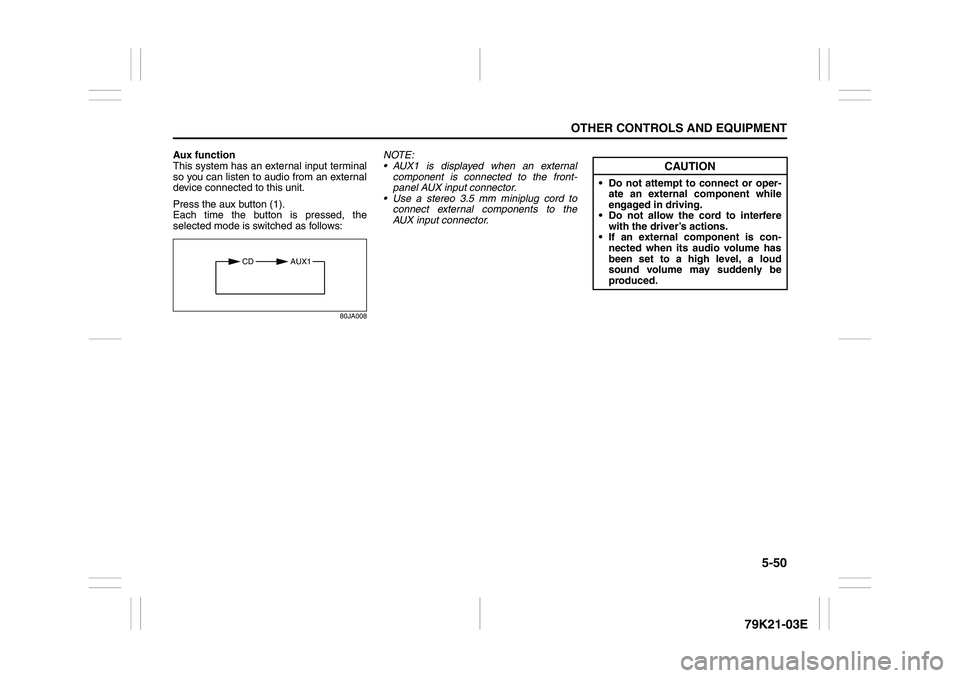
Aux function
This system has an external input terminal
so you can listen to audio from an external
device connected to this unit.
Press the aux button (1).
Each time the button is pressed, the
selected mode is switched as follows:
80JA008
NOTE:
AUX1 is displayed when an external
component is connected to the front-
panel AUX input connector.
Use a stereo 3.5 mm miniplug cord to
connect external components to the
AUX input connector.
CD AUX1
CAUTION
Do not attempt to connect or oper-
ate an external component while
engaged in driving.
Do not allow the cord to interfere
with the driver’s actions.
If an external component is con-
nected when its audio volume has
been set to a high level, a loud
sound volume may suddenly be
produced.
Page 212 of 337
5-59OTHER CONTROLS AND EQUIPMENT
79K21-03E
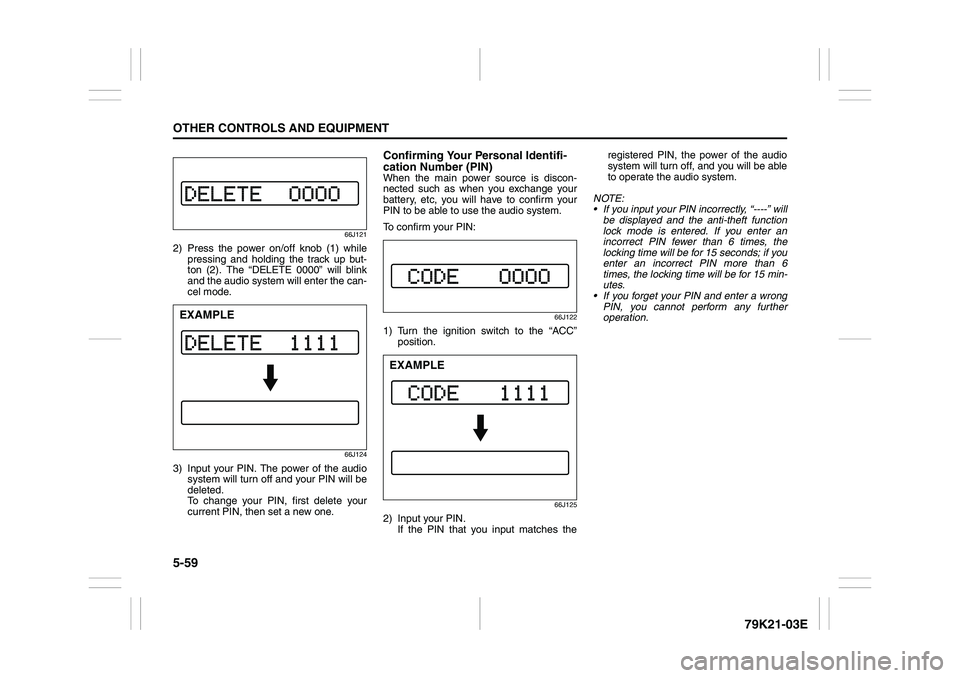
66J121
2) Press the power on/off knob (1) while
pressing and holding the track up but-
ton (2). The “DELETE 0000” will blink
and the audio system will enter the can-
cel mode.
66J124
3) Input your PIN. The power of the audio
system will turn off and your PIN will be
deleted.
To change your PIN, first delete your
current PIN, then set a new one.
Confirming Your Personal Identifi-
cation Number (PIN)When the main power source is discon-
nected such as when you exchange your
battery, etc, you will have to confirm your
PIN to be able to use the audio system.
To confirm your PIN:
66J122
1) Turn the ignition switch to the “ACC”
position.
66J125
2) Input your PIN.
If the PIN that you input matches theregistered PIN, the power of the audio
system will turn off, and you will be able
to operate the audio system.
NOTE:
If you input your PIN incorrectly, “----” will
be displayed and the anti-theft function
lock mode is entered. If you enter an
incorrect PIN fewer than 6 times, the
locking time will be for 15 seconds; if you
enter an incorrect PIN more than 6
times, the locking time will be for 15 min-
utes.
If you forget your PIN and enter a wrong
PIN, you cannot perform any further
operation.
EXAMPLE
EXAMPLE
Page 213 of 337
5-60
OTHER CONTROLS AND EQUIPMENT
79K21-03E
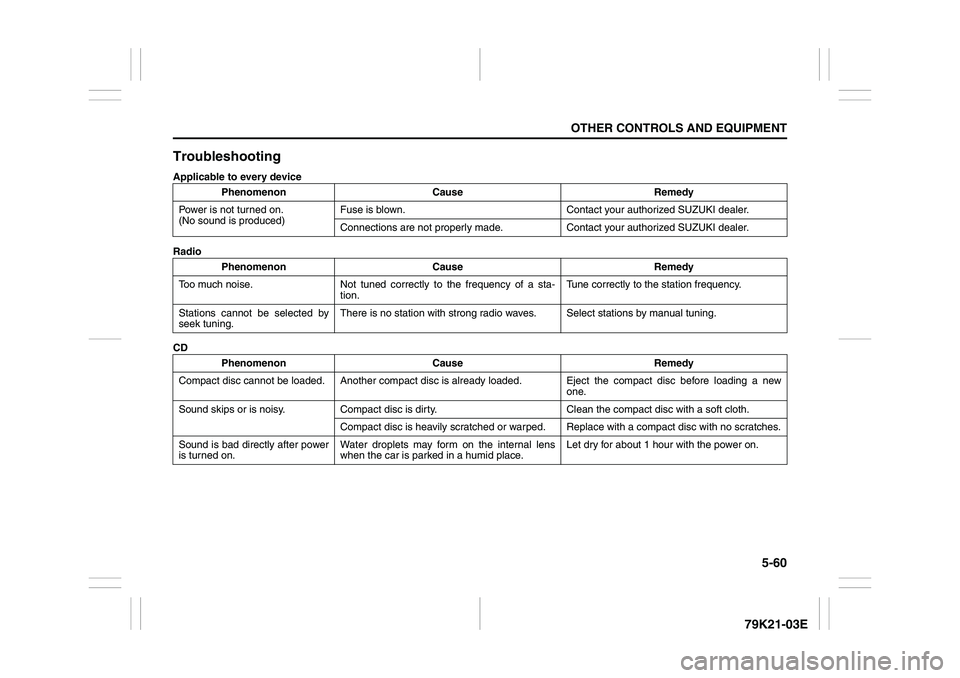
TroubleshootingApplicable to every device
Radio
CDPhenomenon Cause Remedy
Power is not turned on.
(No sound is produced)Fuse is blown. Contact your authorized SUZUKI dealer.
Connections are not properly made. Contact your authorized SUZUKI dealer.
Phenomenon Cause Remedy
Too much noise. Not tuned correctly to the frequency of a sta-
tion.Tune correctly to the station frequency.
Stations cannot be selected by
seek tuning.There is no station with strong radio waves. Select stations by manual tuning.
Phenomenon Cause Remedy
Compact disc cannot be loaded. Another compact disc is already loaded. Eject the compact disc before loading a new
one.
Sound skips or is noisy. Compact disc is dirty. Clean the compact disc with a soft cloth.
Compact disc is heavily scratched or warped. Replace with a compact disc with no scratches.
Sound is bad directly after power
is turned on.Water droplets may form on the internal lens
when the car is parked in a humid place.Let dry for about 1 hour with the power on.
Page 224 of 337
5-71OTHER CONTROLS AND EQUIPMENT
79K21-03E
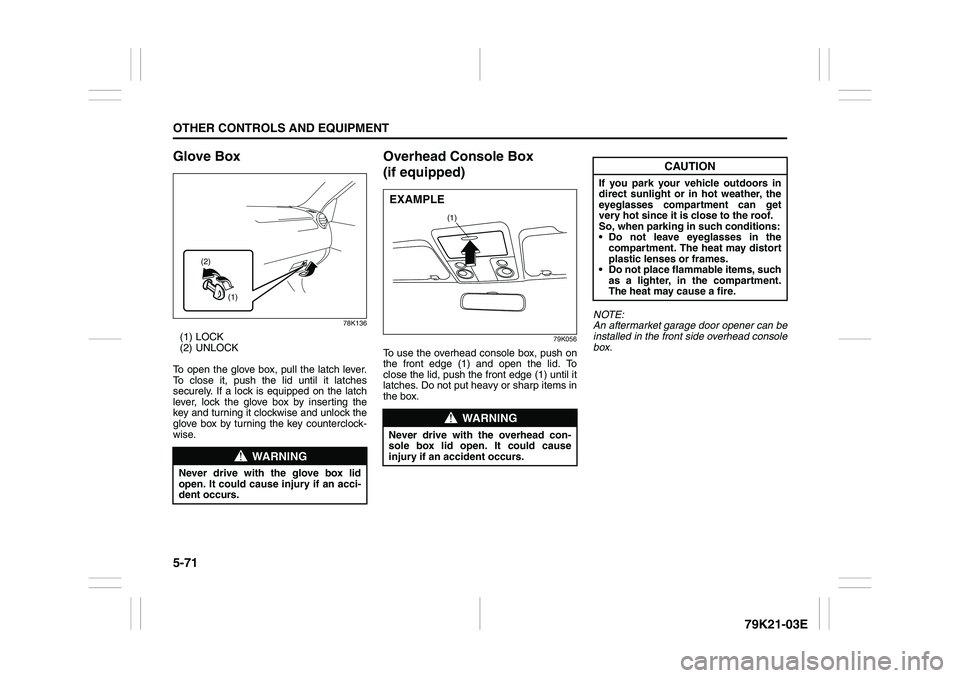
Glove Box
78K136
(1) LOCK
(2) UNLOCK
To open the glove box, pull the latch lever.
To close it, push the lid until it latches
securely. If a lock is equipped on the latch
lever, lock the glove box by inserting the
key and turning it clockwise and unlock the
glove box by turning the key counterclock-
wise.
Overhead Console Box
(if equipped)
79K056
To use the overhead console box, push on
the front edge (1) and open the lid. To
close the lid, push the front edge (1) until it
latches. Do not put heavy or sharp items in
the box.NOTE:
An aftermarket garage door opener can be
installed in the front side overhead console
box.
WARNING
Never drive with the glove box lid
open. It could cause injury if an acci-
dent occurs.
(1) (2)
WARNING
Never drive with the overhead con-
sole box lid open. It could cause
injury if an accident occurs.
(1)
EXAMPLE
CAUTION
If you park your vehicle outdoors in
direct sunlight or in hot weather, the
eyeglasses compartment can get
very hot since it is close to the roof.
So, when parking in such conditions:
Do not leave eyeglasses in the
compartment. The heat may distort
plastic lenses or frames.
Do not place flammable items, such
as a lighter, in the compartment.
The heat may cause a fire.
Page 226 of 337
5-73OTHER CONTROLS AND EQUIPMENT
79K21-03E
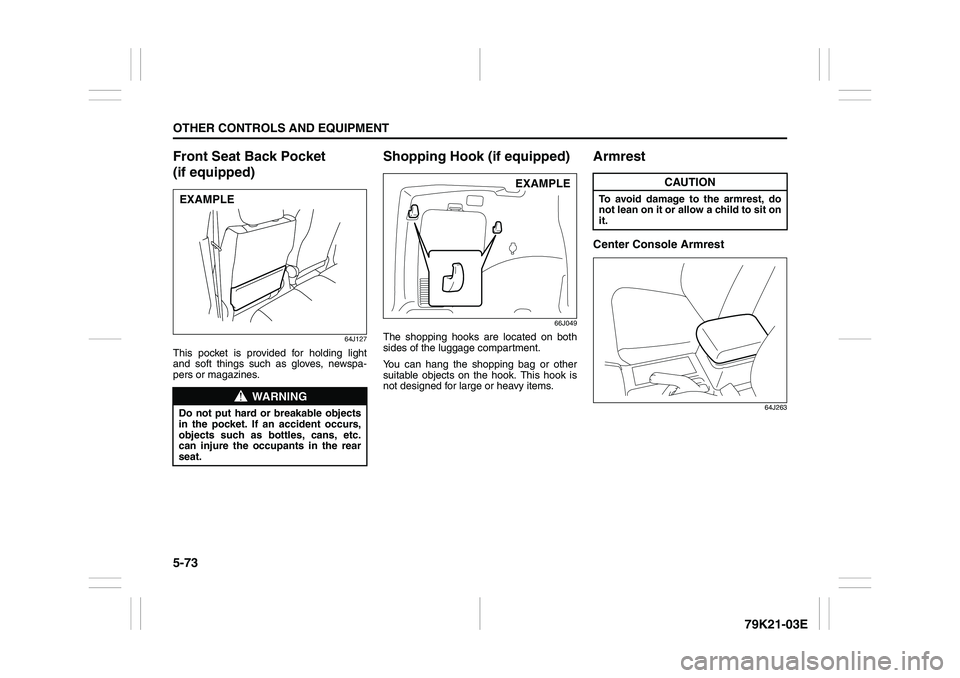
Front Seat Back Pocket
(if equipped)
64J127
This pocket is provided for holding light
and soft things such as gloves, newspa-
pers or magazines.
Shopping Hook (if equipped)
66J049
The shopping hooks are located on both
sides of the luggage compartment.
You can hang the shopping bag or other
suitable objects on the hook. This hook is
not designed for large or heavy items.
ArmrestCenter Console Armrest
64J263
WARNING
Do not put hard or breakable objects
in the pocket. If an accident occurs,
objects such as bottles, cans, etc.
can injure the occupants in the rear
seat.EXAMPLE
EXAMPLE
CAUTION
To avoid damage to the armrest, do
not lean on it or allow a child to sit on
it.
Page 228 of 337
5-75OTHER CONTROLS AND EQUIPMENT
79K21-03E
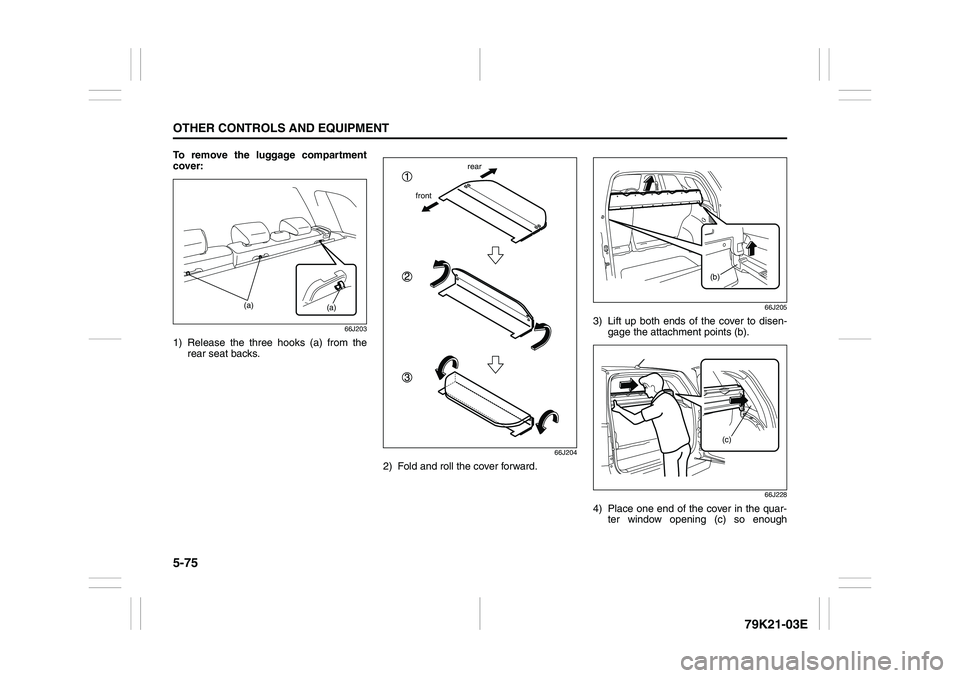
To remove the luggage compartment
cover:
66J203
1) Release the three hooks (a) from the
rear seat backs.
66J204
2) Fold and roll the cover forward.
66J205
3) Lift up both ends of the cover to disen-
gage the attachment points (b).
66J228
4) Place one end of the cover in the quar-
ter window opening (c) so enough
(a)
(a)
frontrear
(b)
(c)
Page 232 of 337
5-79OTHER CONTROLS AND EQUIPMENT
79K21-03E
You can use the roof rails or the roof rack
anchors to attach the optional roof rack
which is available at your SUZUKI dealer. If
you use a roof rack, observe the instruc-
tions and precautions in this section and
provided with the roof rack.
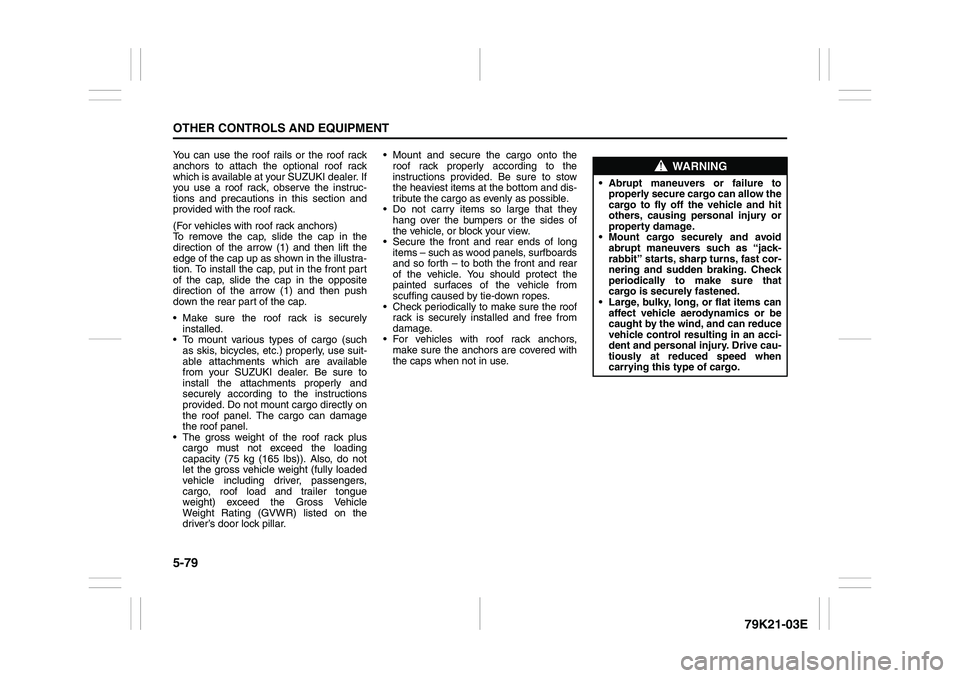
(For vehicles with roof rack anchors)
To remove the cap, slide the cap in the
direction of the arrow (1) and then lift the
edge of the cap up as shown in the illustra-
tion. To install the cap, put in the front part
of the cap, slide the cap in the opposite
direction of the arrow (1) and then push
down the rear part of the cap.
Make sure the roof rack is securely
installed.
To mount various types of cargo (such
as skis, bicycles, etc.) properly, use suit-
able attachments which are available
from your SUZUKI dealer. Be sure to
install the attachments properly and
securely according to the instructions
provided. Do not mount cargo directly on
the roof panel. The cargo can damage
the roof panel.
The gross weight of the roof rack plus
cargo must not exceed the loading
capacity (75 kg (165 lbs)). Also, do not
let the gross vehicle weight (fully loaded
vehicle including driver, passengers,
cargo, roof load and trailer tongue
weight) exceed the Gross Vehicle
Weight Rating (GVWR) listed on the
driver’s door lock pillar. Mount and secure the cargo onto the
roof rack properly according to the
instructions provided. Be sure to stow
the heaviest items at the bottom and dis-
tribute the cargo as evenly as possible.
Do not carry items so large that they
hang over the bumpers or the sides of
the vehicle, or block your view.
Secure the front and rear ends of long
items – such as wood panels, surfboards
and so forth – to both the front and rear
of the vehicle. You should protect the
painted surfaces of the vehicle from
scuffing caused by tie-down ropes.
Check periodically to make sure the roof
rack is securely installed and free from
damage.
For vehicles with roof rack anchors,
make sure the anchors are covered with
the caps when not in use.
WARNING
Abrupt maneuvers or failure to
properly secure cargo can allow the
cargo to fly off the vehicle and hit
others, causing personal injury or
property damage.
Mount cargo securely and avoid
abrupt maneuvers such as “jack-
rabbit” starts, sharp turns, fast cor-
nering and sudden braking. Check
periodically to make sure that
cargo is securely fastened.
Large, bulky, long, or flat items can
affect vehicle aerodynamics or be
caught by the wind, and can reduce
vehicle control resulting in an acci-
dent and personal injury. Drive cau-
tiously at reduced speed when
carrying this type of cargo.
Page 236 of 337
5-83OTHER CONTROLS AND EQUIPMENT
79K21-03E
Frame HooksFront
78K052
Rear
78K149
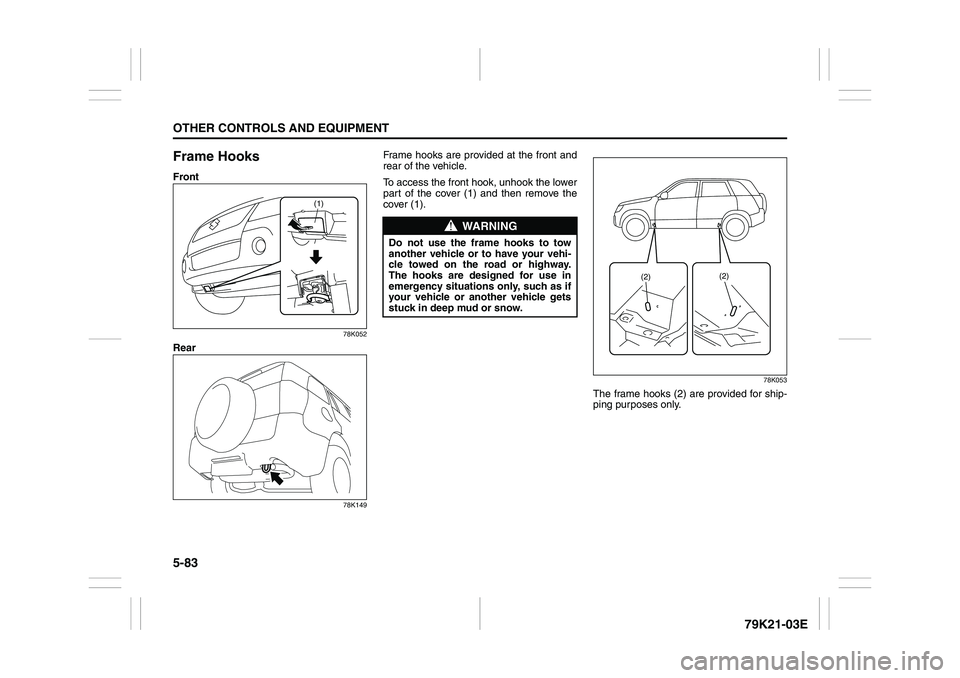
Frame hooks are provided at the front and
rear of the vehicle.
To access the front hook, unhook the lower
part of the cover (1) and then remove the
cover (1).
78K053
The frame hooks (2) are provided for ship-
ping purposes only.
(1)
WARNING
Do not use the frame hooks to tow
another vehicle or to have your vehi-
cle towed on the road or highway.
The hooks are designed for use in
emergency situations only, such as if
your vehicle or another vehicle gets
stuck in deep mud or snow.
(2)(2)