Sound SUZUKI GRAND VITARA 2013 Owner's Manual
[x] Cancel search | Manufacturer: SUZUKI, Model Year: 2013, Model line: GRAND VITARA, Model: SUZUKI GRAND VITARA 2013Pages: 337, PDF Size: 6.21 MB
Page 122 of 337
3-21OPERATING YOUR VEHICLE
79K21-03E
Transfer Switch OperationOperate the transfer switch according to
the appropriate procedure described
below:
From N to 4H
Stop the vehicle completely, place the
transmission in “N” (Neutral) and depress
the brake pedal and the clutch pedal fully
(if equipped), then push in and turn the
switch to shift into “4H”.
From 4H to 4H LOCK
You can operate the transfer switch either
when the vehicle is stopped or while the
vehicle is moving.
Position the front wheels straight ahead
and turn the switch to shift into “4H LOCK”.
If the vehicle is moving, we recommend
that the speed be less than 100 km/h (60
mph) during this operation.
NOTE:
If it is difficult to shift between “4H” and “4H
LOCK” while the vehicle is moving, try
accelerating and decelerating your vehicle
several times after turning the transfer
switch. Be sure to wait until traffic condi-
tions allow you to accelerate and deceler-
ate safety before using this procedure.From 4H LOCK to 4L LOCK
Stop the vehicle completely, place the
transmission in “N” (Neutral) and depress
the brake pedal and the clutch pedal fully
(if equipped), then push in and turn the
switch to shift into “4L LOCK”.
From 4L LOCK to 4H LOCK
Stop the vehicle completely, place the
transmission in “N” (Neutral) and depress
the brake pedal and the clutch pedal fully
(if equipped), then push in and turn the
switch to shift into “4H LOCK”.
From 4H LOCK to 4H
You can operate the transfer switch either
when the vehicle is stopped or while the
vehicle is moving.
Position the front wheels straight ahead
and turn the switch to shift into “4H”. If the
vehicle is moving, we recommend that the
speed be less than 100 km/h (60 mph) dur-
ing this operation.
NOTE:
If it is difficult to shift between “4H” and “4H
LOCK” while the vehicle is moving, try
accelerating and decelerating your vehicle
several times after turning the transfer
switch. Be sure to wait until traffic condi-
tions allow you to accelerate and deceler-
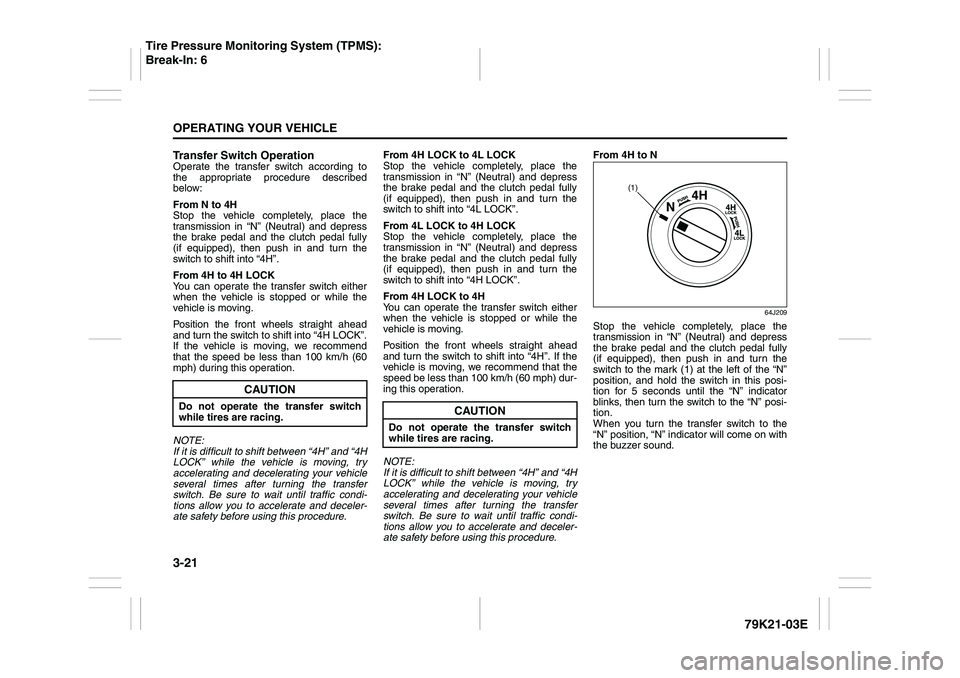
ate safety before using this procedure.From 4H to N
64J209
Stop the vehicle completely, place the
transmission in “N” (Neutral) and depress
the brake pedal and the clutch pedal fully
(if equipped), then push in and turn the
switch to the mark (1) at the left of the “N”
position, and hold the switch in this posi-
tion for 5 seconds until the “N” indicator
blinks, then turn the switch to the “N” posi-
tion.
When you turn the transfer switch to the
“N” position, “N” indicator will come on with
the buzzer sound.
CAUTION
Do not operate the transfer switch
while tires are racing.
CAUTION
Do not operate the transfer switch
while tires are racing.
(1)
Tire Pressure Monitoring System (TPMS):
Break-In: 6
Page 123 of 337
3-22
OPERATING YOUR VEHICLE
79K21-03E
NOTE:
The information display shows the warning
and indicator message when the transfer
system is operated, or has a problem.
CAUTION
Be sure to stop the vehicle com-
pletely before operating the trans-
fer switch to shift between “N” and
“4H”, or between “4H LOCK” and
“4L LOCK”.
Do not shift between “4H” and “4H
LOCK” unless the front wheels are
in the straight-ahead position and
we recommend that the vehicle
speed be less than 100 km/h (60
mph).
Do not operate the transfer switch
while tires are racing.
Do not operate your vehicle in “4H
LOCK” or “4L LOCK” on dry, hard
surfaces.
(Continued)
CAUTION
(Continued)
Do not operate the vehicle while a
4WD mode indicator is blinking
except when shifting between “4H”
and “4L LOCK”.
If you operate the vehicle while a
4WD mode indicator is blinking, a
buzzer will sound and the transfer
will shift to “N” (Neutral) to prevent
transfer case damage.
In this case, use the following pro-
cedure.
1) Release your foot from the accel-
erator pedal and depress the
brake pedal to stop the vehicle
completely.
2) Depress the clutch pedal fully (if
equipped) or shift the automatic
transmission gearshift lever to the
“N” position.
3) If the transfer does not shift from
“N” although you perform 1) and
2), turn the transfer switch to the
position previously selected and
operate the switch again.
Catalytic Converter: NO
Page 125 of 337
3-24
OPERATING YOUR VEHICLE
79K21-03E
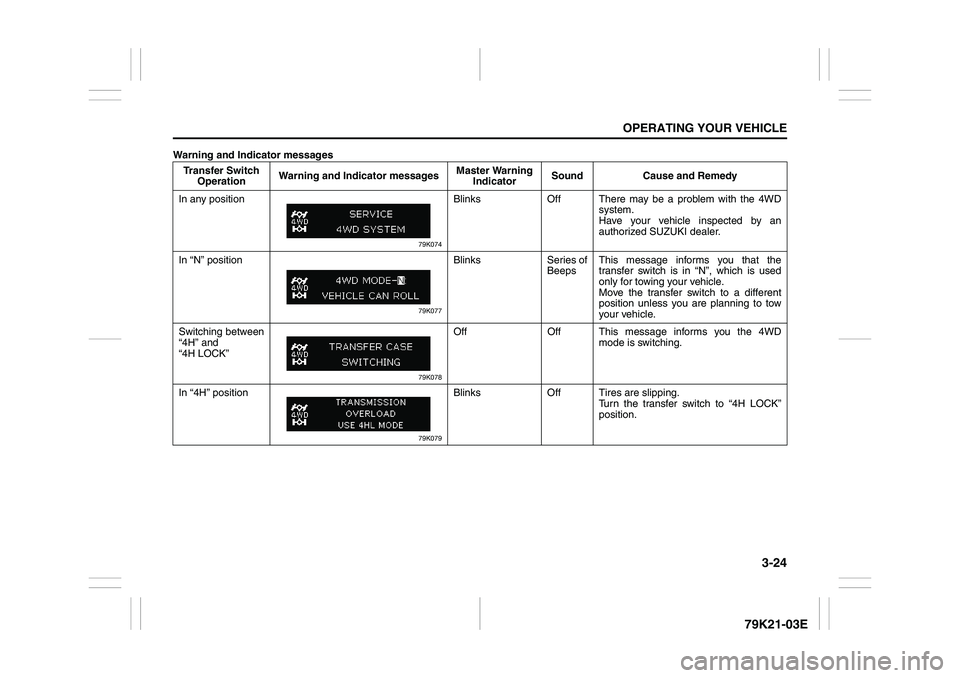
Warning and Indicator messages
Transfer Switch
OperationWarning and Indicator messagesMaster Warning
IndicatorSound Cause and Remedy
In any position
79K074
Blinks Off There may be a problem with the 4WD
system.
Have your vehicle inspected by an
authorized SUZUKI dealer.
In “N” position
79K077
Blinks Series of
BeepsThis message informs you that the
transfer switch is in “N”, which is used
only for towing your vehicle.
Move the transfer switch to a different
position unless you are planning to tow
your vehicle.
Switching between
“4H” and
“4H LOCK”
79K078
Off Off This message informs you the 4WD
mode is switching.
In “4H” position
79K079
Blinks Off Tires are slipping.
Turn the transfer switch to “4H LOCK”
position.
Page 126 of 337
3-25OPERATING YOUR VEHICLE
79K21-03E
Transfer Switch
OperationWarning and Indicator messagesMaster Warning
IndicatorSound Cause and Remedy
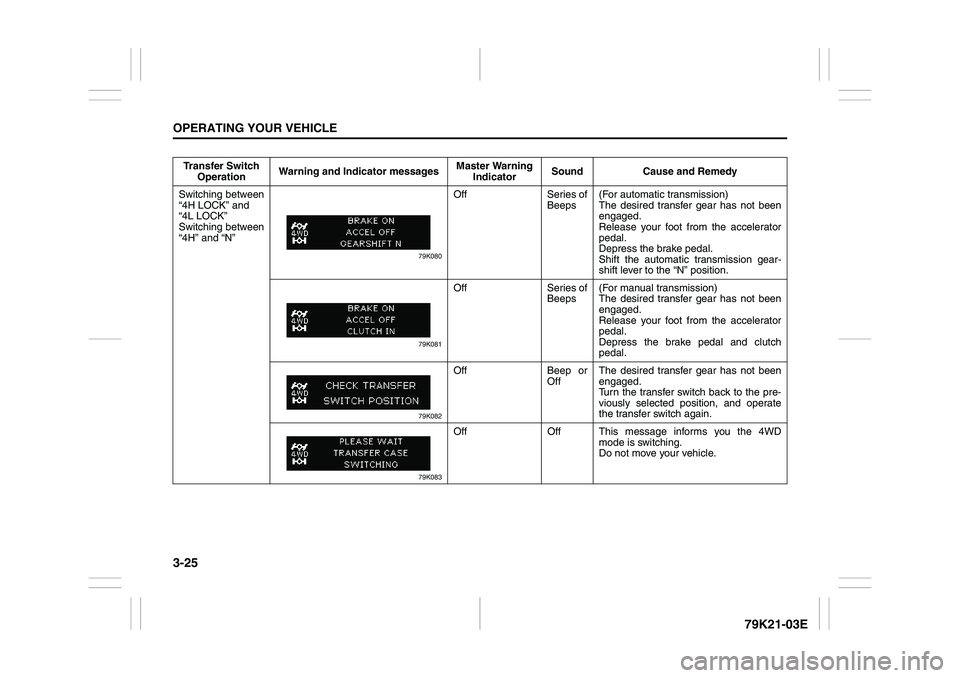
Switching between
“4H LOCK” and
“4L LOCK”
Switching between
“4H” and “N”
79K080
Off Series of
Beeps(For automatic transmission)
The desired transfer gear has not been
engaged.
Release your foot from the accelerator
pedal.
Depress the brake pedal.
Shift the automatic transmission gear-
shift lever to the “N” position.
79K081
Off Series of
Beeps(For manual transmission)
The desired transfer gear has not been
engaged.
Release your foot from the accelerator
pedal.
Depress the brake pedal and clutch
pedal.
79K082
Off Beep or
OffThe desired transfer gear has not been
engaged.
Turn the transfer switch back to the pre-
viously selected position, and operate
the transfer switch again.
79K083
Off Off This message informs you the 4WD
mode is switching.
Do not move your vehicle.
Page 130 of 337
3-29OPERATING YOUR VEHICLE
79K21-03E
Power-Assisted BrakesYour vehicle has power-assisted brakes. If
power assistance is lost due to a stalled
engine or other failures, the system is still
fully operational on reserve power and you
can bring the vehicle to a complete stop by
pressing the brake pedal once and holding
it down. The reserve power is partly used
up when you depress the brake pedal and
reduces each time the pedal is pressed.
Apply smooth and even pressure to the
pedal. Do not pump the pedal.
Brake Assist SystemWhen you slam the brakes on, the brake
assist system judges as an emergency
stop and provides more powerful braking
for a driver who cannot hold down the
brake pedal firmly.
NOTE:
If you quickly and forcefully depress the
brakes, you may hear a clicking sound in
the brake pedal. This is normal and indi-
cates that the brake assist system is acti-
vated properly.
Anti-Lock Brake System (ABS)ABS will help you avoid skidding by elec-
tronically controlling braking pressure. It
will also help you maintain steering control
when braking on slippery surfaces or when
braking hard.
The ABS works automatically, so you do
not need any special braking technique.
Just push the brake pedal down without
pumping. The ABS will operate whenever it
senses that the wheels are locking up.
You may feel the brake pedal pulsate while
the ABS is operating.
NOTE:
The ABS will not work if vehicle speed is
under about 6 km/h (4 mph).
WARNING
If water gets into the brake drums,
brake performance may become poor
and unpredictable. After driving
through water or washing the under-
side of the vehicle, test the brakes
while driving at a slow speed to see if
they have maintained their normal
effectiveness. If the brakes are less
effective than normal, dry them by
repeatedly applying the brakes while
driving slowly until the brakes have
regained their normal effectiveness.
WARNING
Even without reserve power in the
brake system, you can still stop the
vehicle by pressing the brake pedal
harder than normally required. How-
ever, the stopping distance may be
longer.
Page 132 of 337
3-31OPERATING YOUR VEHICLE
79K21-03E
How the ABS WorksA computer continuously monitors wheel
speed. The computer compares the
changes in wheel speed when braking. If
the wheels slow suddenly, indicating a
skidding situation, the computer will
change braking pressure several times
each second to prevent the wheels from
locking. When you start your vehicle or
when you accelerate after a hard stop, you
may hear a momentary motor or clicking
sound as the system resets or checks
itself.
Electronic Stability Program
(ESP
®)
ESP
® is a registered trademark of Daimler
AG.
The Electronic Stability Program (ESP
®)
helps to control the vehicle during corner-
ing if front wheels or rear wheels skid. It
also assists you in maintaining traction
while accelerating on loose or slippery
road surfaces. It does this by regulating the
engine’s output, and by selectively apply-
ing the brakes. In addition, ESP
® helps to
avoid skidding by controlling braking pres-
sure.The ESP
® has the following three systems:
Stability Control SystemThe vehicle stability control system helps
provide integrated control of systems such
as anti-lock brakes, traction control, engine
control, etc. This system automatically
controls the brakes and engine to help pre-
vent the vehicle from skidding when cor-
nering on a slippery road surface or when
turning the steering wheel abruptly.Traction Control SystemThe traction control system automatically
helps prevent the spinning of wheels when
the vehicle is started or accelerated on
slippery road surfaces. The system oper-
ates only if it senses that some of the
wheels are spinning or beginning to lose
traction. When this happens, the system
operates the front or rear brakes and
reduces engine power to limit wheel spin.
NOTE:
You may hear a clicking sound in the
engine compartment for a few seconds
when you start the engine or just after the
vehicle begins to move. This means that
the above systems are in the self-check
mode. This sound does not indicate a mal-
function.
WARNING
The ABS may not work properly if
tires or wheels other than those
specified in the owner’s manual are
used. This is because the ABS works
by comparing changes in wheel
speed. When replacing tires or
wheels, use only the size and type
specified in this owner’s manual.
WARNING
The ESP
® cannot enhance the vehi-
cle’s driving stability in all situations
and does not control your vehicle’s
entire braking system. The ESP
® can-
not prevent accidents, including
those resulting from excessive speed
in turns, or hydroplaning. Only a safe
and attentive driver can prevent acci-
dents. The capabilities of an ESP
®-
equipped vehicle must never be used
as a substitute for careful driving.
Page 137 of 337
3-36
OPERATING YOUR VEHICLE
79K21-03E
NOTE:
You may hear a sound coming from the
engine when the hill descent control sys-
tem is activated. This sound is normal and
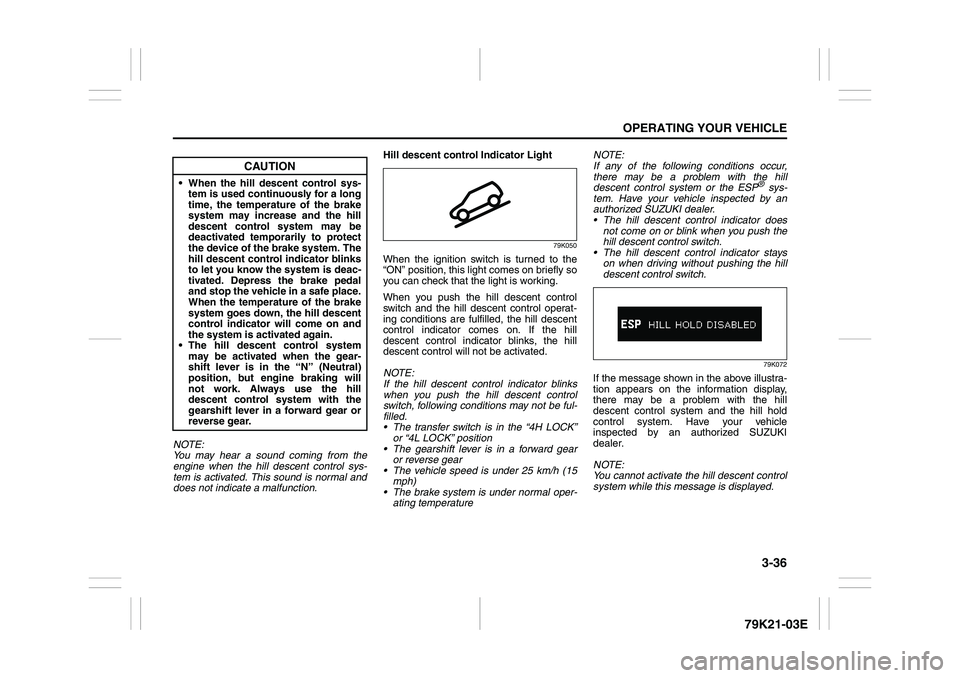
does not indicate a malfunction.Hill descent control Indicator Light
79K050
When the ignition switch is turned to the
“ON” position, this light comes on briefly so
you can check that the light is working.
When you push the hill descent control
switch and the hill descent control operat-
ing conditions are fulfilled, the hill descent
control indicator comes on. If the hill
descent control indicator blinks, the hill
descent control will not be activated.
NOTE:
If the hill descent control indicator blinks
when you push the hill descent control
switch, following conditions may not be ful-
filled.
The transfer switch is in the “4H LOCK”
or “4L LOCK” position
The gearshift lever is in a forward gear
or reverse gear
The vehicle speed is under 25 km/h (15
mph)
The brake system is under normal oper-
ating temperatureNOTE:
If any of the following conditions occur,
there may be a problem with the hill
descent control system or the ESP
® sys-
tem. Have your vehicle inspected by an
authorized SUZUKI dealer.
The hill descent control indicator does
not come on or blink when you push the
hill descent control switch.
The hill descent control indicator stays
on when driving without pushing the hill
descent control switch.79K072
If the message shown in the above illustra-
tion appears on the information display,
there may be a problem with the hill
descent control system and the hill hold
control system. Have your vehicle
inspected by an authorized SUZUKI
dealer.
NOTE:
You cannot activate the hill descent control
system while this message is displayed.
CAUTION
When the hill descent control sys-
tem is used continuously for a long
time, the temperature of the brake
system may increase and the hill
descent control system may be
deactivated temporarily to protect
the device of the brake system. The
hill descent control indicator blinks
to let you know the system is deac-
tivated. Depress the brake pedal
and stop the vehicle in a safe place.
When the temperature of the brake
system goes down, the hill descent
control indicator will come on and
the system is activated again.
The hill descent control system
may be activated when the gear-
shift lever is in the “N” (Neutral)
position, but engine braking will
not work. Always use the hill
descent control system with the
gearshift lever in a forward gear or
reverse gear.
Page 138 of 337
3-37OPERATING YOUR VEHICLE
79K21-03E
Hill hold control System
(if equipped)The hill hold control system is designed to
assist you in starting to move up steep or
slippery hills. When you start to move up a
hill, the system helps to prevent the vehicle
from rolling downward temporarily (for
approximately 2 seconds) while you move
your foot from the brake pedal to the accel-
erator pedal.
The hill hold control system activates for
approximately 2 seconds if your foot is
moved from the brake pedal when the fol-
lowing condition are all fulfilled.
1) The transfer switch is in a position other
than “N”.
2) The gearshift lever is in a forward gear
or reverse gear.
3) The parking brake is released.
NOTE:
You may hear a sound coming from the
engine when the hill hold control system is
activated. This sound is normal and does
not indicate a malfunction.
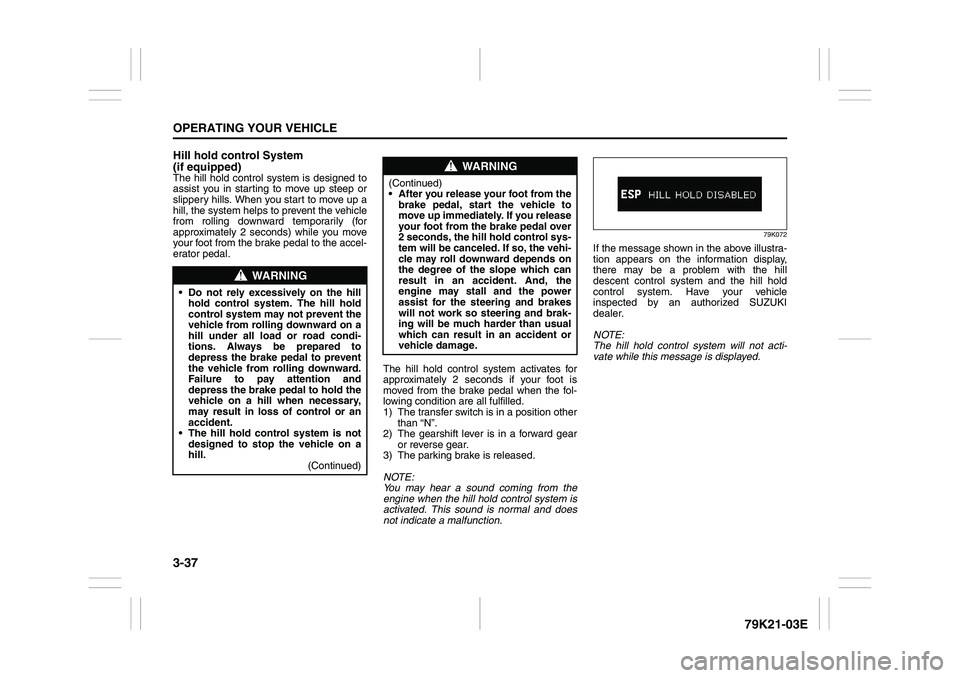
79K072
If the message shown in the above illustra-
tion appears on the information display,
there may be a problem with the hill
descent control system and the hill hold
control system. Have your vehicle
inspected by an authorized SUZUKI
dealer.
NOTE:
The hill hold control system will not acti-
vate while this message is displayed.
WARNING
Do not rely excessively on the hill
hold control system. The hill hold
control system may not prevent the
vehicle from rolling downward on a
hill under all load or road condi-
tions. Always be prepared to
depress the brake pedal to prevent
the vehicle from rolling downward.
Failure to pay attention and
depress the brake pedal to hold the
vehicle on a hill when necessary,
may result in loss of control or an
accident.
The hill hold control system is not
designed to stop the vehicle on a
hill.
(Continued)
WARNING
(Continued)
After you release your foot from the
brake pedal, start the vehicle to
move up immediately. If you release
your foot from the brake pedal over
2 seconds, the hill hold control sys-
tem will be canceled. If so, the vehi-
cle may roll downward depends on
the degree of the slope which can
result in an accident. And, the
engine may stall and the power
assist for the steering and brakes
will not work so steering and brak-
ing will be much harder than usual
which can result in an accident or
vehicle damage.
Page 162 of 337
5-9OTHER CONTROLS AND EQUIPMENT
79K21-03E
Precautions When the inside of the car is very cold
and the player is used soon after switch-
ing on the heater, moisture may form on
the disc or the optical parts of the player
and proper playback may not be possi-
ble. If moisture forms on the disc, wipe it
off with a soft cloth. If moisture forms on
the optical parts of the player, do not use
the player for about one hour. This will
allow the condensation to disappear nor-
mally.
Driving on extremely bumpy roads which
cause severe vibrations may cause
sound to skip.
This unit uses a precision mechanism.
Even in the event that trouble arises,
never open the case, disassemble the
unit, or lubricate the rotating parts.
Please bring the unit to an authorized
SUZUKI dealer or a Clarion service
Department.
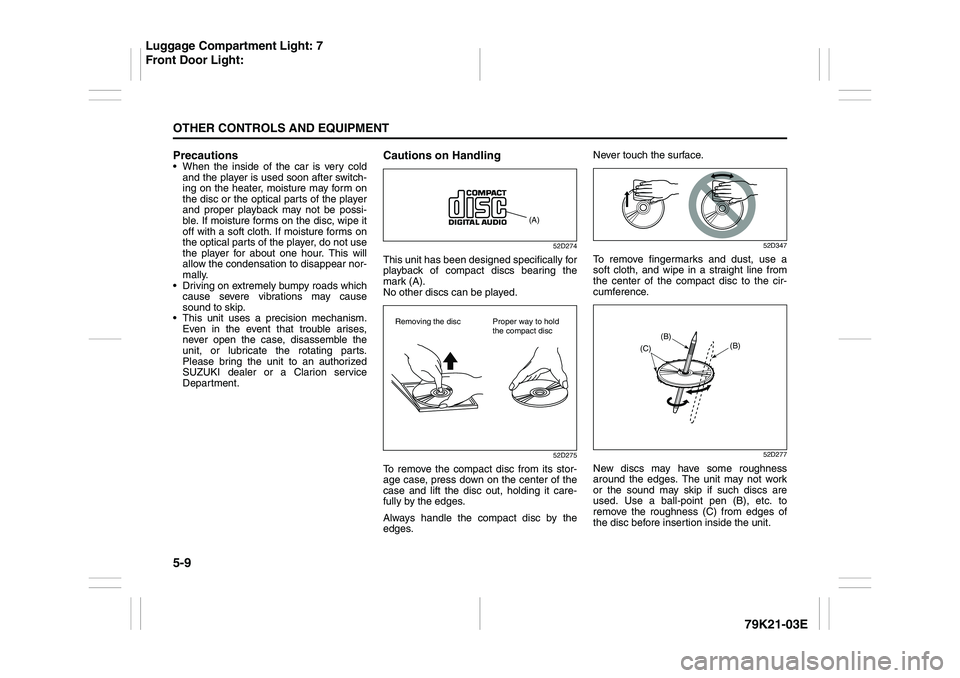
Cautions on Handling
52D274
This unit has been designed specifically for
playback of compact discs bearing the
mark (A).
No other discs can be played.
52D275
To remove the compact disc from its stor-
age case, press down on the center of the
case and lift the disc out, holding it care-
fully by the edges.
Always handle the compact disc by the
edges.Never touch the surface.
52D347
To remove fingermarks and dust, use a
soft cloth, and wipe in a straight line from
the center of the compact disc to the cir-
cumference.
52D277
New discs may have some roughness
around the edges. The unit may not work
or the sound may skip if such discs are
used. Use a ball-point pen (B), etc. to
remove the roughness (C) from edges of
the disc before insertion inside the unit.
(A)
Removing the disc Proper way to hold
the compact disc
(B)
(B)
(C)
Luggage Compartment Light: 7
Front Door Light:
Page 165 of 337
5-12
OTHER CONTROLS AND EQUIPMENT
79K21-03E
Turning power on/off
Press the power on/off knob (1).
The unit starts in the function mode it was
in when the power was turned off last.
Adjusting the volume
Turn the volume control knob (1).
Turning it clockwise increases the volume;
turning it counterclockwise decreases the
volume.
NOTE:
While driving, adjust the volume to an
extent that sound and/or noise coming
from outside the car can be heard.
Adjusting the clock
1) Press the clock button H (5) to adjust
the hours.
Press the clock button M (6) to adjust
the minutes.
2) Hold the button depressed to automati-
cally increment the number.
3) To reset the clock to an hour signal,
press the clock button H (5) while hold-
ing the clock button M (6) depressed.
NOTE:
When the clock has not been set, the time
“12:00” will flash in the display.
Clock reset is effected as follows:
When minutes are between 00 and 29,
the clock will reset to the current hour.
(example: 12:23 ➔ 12:00) When minutes are between 30 and 59,
the clock will reset to the next hour.
(example: 12:38 ➔ 1:00)
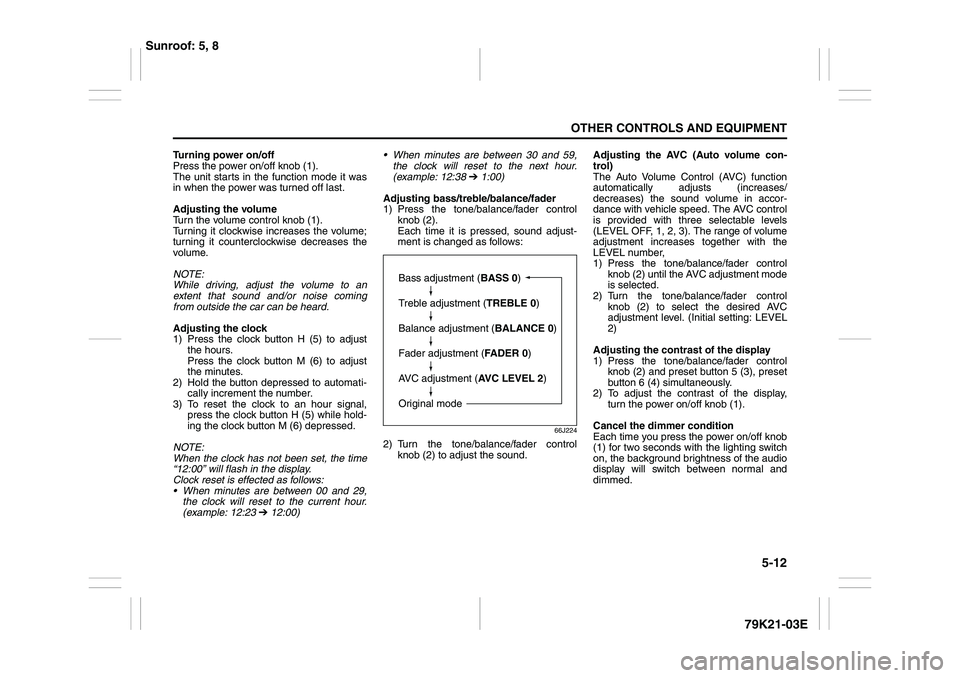
Adjusting bass/treble/balance/fader
1) Press the tone/balance/fader control
knob (2).
Each time it is pressed, sound adjust-
ment is changed as follows:
66J224
2) Turn the tone/balance/fader control
knob (2) to adjust the sound.Adjusting the AVC (Auto volume con-
trol)
The Auto Volume Control (AVC) function
automatically adjusts (increases/
decreases) the sound volume in accor-
dance with vehicle speed. The AVC control
is provided with three selectable levels
(LEVEL OFF, 1, 2, 3). The range of volume
adjustment increases together with the
LEVEL number,
1) Press the tone/balance/fader control
knob (2) until the AVC adjustment mode
is selected.
2) Turn the tone/balance/fader control
knob (2) to select the desired AVC
adjustment level. (Initial setting: LEVEL
2)
Adjusting the contrast of the display
1) Press the tone/balance/fader control
knob (2) and preset button 5 (3), preset
button 6 (4) simultaneously.
2) To adjust the contrast of the display,
turn the power on/off knob (1).
Cancel the dimmer condition
Each time you press the power on/off knob
(1) for two seconds with the lighting switch
on, the background brightness of the audio
display will switch between normal and
dimmed.
Bass adjustment (BASS 0)
Treble adjustment (TREBLE 0)
Balance adjustment (BALANCE 0)
Fader adjustment (FADER 0)
AVC adjustment (AVC LEVEL 2)
Original mode
Sunroof: 5, 8