ESP SUZUKI GRAND VITARA 2017 Owner's Manual
[x] Cancel search | Manufacturer: SUZUKI, Model Year: 2017, Model line: GRAND VITARA, Model: SUZUKI GRAND VITARA 2017Pages: 482, PDF Size: 21 MB
Page 148 of 482
3-8
OPERATING YOUR VEHICLE
54P00-01E
NOTE:
When selecting the ignition modes, the
information display in the instrument clus-
ter shows certain messages. Refer to
“Information display” in “BEFORE DRIV-
ING” section for details.
If the master warning indicator light
blinks and the ignition modes cannot
be selected
Your keyless push start system remote con-
troller may not be sensed as being within the
interior workable area (refer to the related
explanation in this section). Try again after
checking that you have the remote controller
with you. If the ignition modes still cannot be
selected, the battery of the remote controller
may be discharged. To select an ignition
mode, you must then use the following
method:
58MST0302
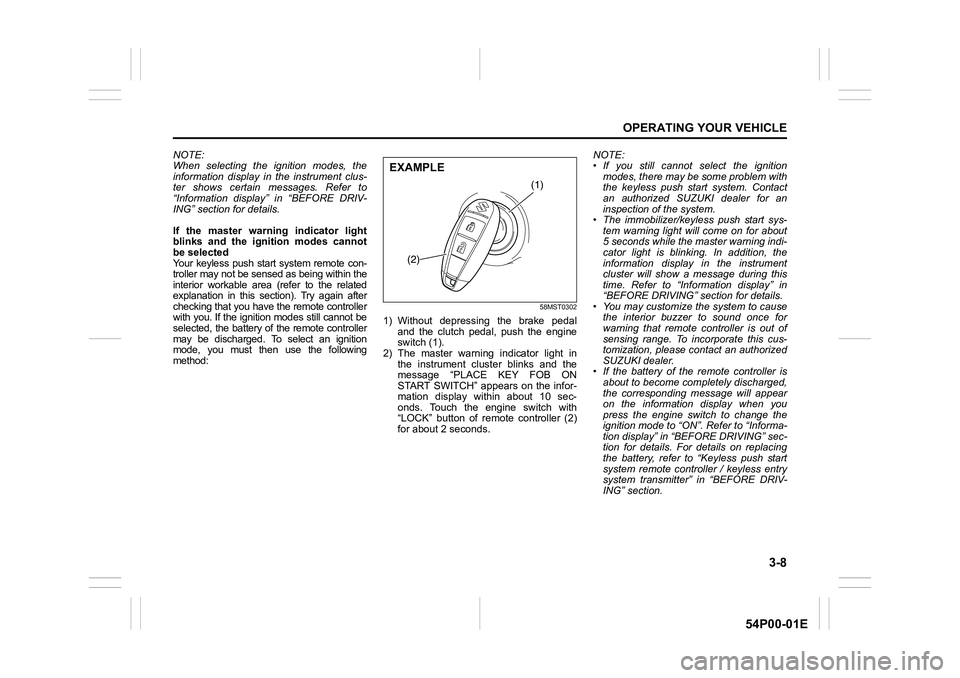
1) Without depressing the brake pedal
and the clutch pedal, push the engine
switch (1).
2) The master warning indicator light in
the instrument cluster blinks and the
message “PLACE KEY FOB ON
START SWITCH” appears on the infor-
mation display within about 10 sec-
onds. Touch the engine switch with
“LOCK” button of remote controller (2)
for about 2 seconds.NOTE:
• If you still cannot select the ignition
modes, there may be some problem with
the keyless push start system. Contact
an authorized SUZUKI dealer for an
inspection of the system.
• The immobilizer/keyless push start sys-
tem warning light will come on for about
5 seconds while the master warning indi-
cator light is blinking. In addition, the
information display in the instrument
cluster will show a message during this
time. Refer to “Information display” in
“BEFORE DRIVING” section for details.
• You may customize the system to cause
the interior buzzer to sound once for
warning that remote controller is out of
sensing range. To incorporate this cus-
tomization, please contact an authorized
SUZUKI dealer.
• If the battery of the remote controller is
about to become completely discharged,
the corresponding message will appear
on the information display when you
press the engine switch to change the
ignition mode to “ON”. Refer to “Informa-
tion display” in “BEFORE DRIVING” sec-
tion for details. For details on replacing
the battery, refer to “Keyless push start
system remote controller / keyless entry
system transmitter” in “BEFORE DRIV-
ING” section.
(1)
(2)
EXAMPLE
Page 155 of 482
3-15
OPERATING YOUR VEHICLE
54P00-01E
NOTE:
• You do not need to keep the engine
switch pressed to start the engine.
• The engine will not start unless the
clutch pedal is depressed.
• During the engine starting procedure,
messages on the information display will
help you. Refer to “Information display”
in “BEFORE DRIVING” section for
details.
• You should turn off such loads as the
headlights and air conditioning system to
facilitate starting of the engine.
• Even if you fail to start the engine, the
starter motor will stop turning automati-
cally after a short time. After the starter
motor has stopped or if there is some
problem with the system, the starter
motor will rotate only while the engine
switch is being pressed.
Stopping engine
• Depress the engine switch to stop the
engine after the vehicle stopped com-
pletely.
• In case of emergency, you can stop the
engine by quickly pushing the engine
switch more than 3 times, or pushing
and holding the engine switch for more
than 2 seconds while the vehicle is in
motion.
NOTE:
Except in cases of emergency, do not stop
the engine while the vehicle is in motion.
The steering and braking operation will
require more effort when the engine is
stopped.
Refer to “Braking” in this section.
• If the engine remains stopped for while
after it was stopped unexpectedly or was
raced before stopping, a clicking sound
may be heard from around the engine
when it is restarted. This is not a mal-
function. Always let the engine idle
before stopping it.
Starting a cold and warm engine
(For gasoline engine model)
With your foot taken off the accelerator
pedal, crank the engine by pressing the
engine switch to change the ignition mode
to “START”.
After pressing the engine switch to change
the ignition mode to “START”, the starter
cranks the engine for about 12 seconds
before it can start the engine. If the engine
fails to start at the first attempt, wait about
15 seconds, and then try again while keep-
ing the engine switch pressed while press-
ing down the accelerator pedal 1/3 of full
capacity. Release the accelerator pedal
when the engine starts.
If the engine still does not start, try holding
the accelerator pedal all the way to the
floor while cranking. This should clear the
engine if it is flooded.
If you are unable to start the engine using
this procedure, consult your SUZUKI
dealer.NOTICE
• Do not depress the accelerator
during the engine starting proce-
dure.
• If the engine does not respond
when you try to start it with the
engine switch or if the engine
switch repeats cycling through
“LOCK” (OFF) - “ACC” - “ON”
mode, the vehicle battery may be
discharged. Check the voltage of
the vehicle battery before trying
again.
NOTICE
Do not crank the engine for more
than 12 seconds at a time.
If the engine does not start on the
first try, wait about 15 seconds before
trying again.
Page 157 of 482
3-17
OPERATING YOUR VEHICLE
54P00-01E
NOTE:
• If you still cannot start the engine after
several attempts using the above
method, there may be a problem else-
where, such as a low battery. Contact
your SUZUKI dealer for inspection.
• The immobilizer/keyless push start sys-
tem warning light will come on for about
5 seconds while the master warning indi-
cator light is blinking. In addition, the
information display will show a certain
message during this time. Refer to
“Information display” in “BEFORE DRIV-
ING” section for details.
• You may customize the system to cause
the interior buzzer to sound once for
warning that remote controller is out of
sensing range. Please contact an autho-
rized SUZUKI dealer for the customiza-
tion.
• If the battery of the remote controller is
about to become completely discharged,
the corresponding message will appear
on the information display when you
press the engine switch to change the
ignition mode to “ON”. For details on
replacing the battery, refer to “Keyless
push start system remote controller /
keyless entry system transmitter” in
“BEFORE DRIVING” section.Returning ignition mode to “LOCK” (OFF)
NOTE:
Certain problems such as a fault in engine
system may prevent the engine switch
from going back to “LOCK” (OFF) mode. If
this happens, have the vehicle inspected
by an authorized SUZUKI dealer after
doing the following:
• Lock the doors using the key to prevent
theft. (The request switches and the key-
less push start system remote controller
cannot be used to lock them.)
• Disconnect the negative cable from the
battery to prevent discharge.“LOCK” (OFF) mode reminder buzzer
The buzzer will stop sounding if you then
push the engine switch twice, thus bringing
back the ignition mode to “LOCK” (OFF).
• If you open the driver’s door after press-
ing the engine switch to change the igni-
tion mode to “ACC”, the interior buzzer
beeps intermittently.
• The buzzer will stop sounding if you then
push the engine switch twice, thus bring-
ing it back the ignition mode to “LOCK”
(OFF).
NOTE:
Whenever you leave the vehicle, check
that you have returned the ignition mode to
“LOCK” (OFF) using the engine switch and
then lock the doors. Without returning the
ignition mode to “LOCK” (OFF), you can-
not use a request switch or keyless push
start system remote controller to lock the
doors.
Steering lock warning buzzer
If the steering lock fails to engage due to a
fault in the system when the ignition mode
is turned to “LOCK” (OFF) by pressing the
engine switch and any door (including the
tailgate) is opened or closed, the interior
buzzer will warn you of this condition with
repeated short beeps. If this happens,
have the vehicle inspected by an autho-
rized SUZUKI dealer.
Page 161 of 482
3-21
OPERATING YOUR VEHICLE
54P00-01E
Gearshift indicator
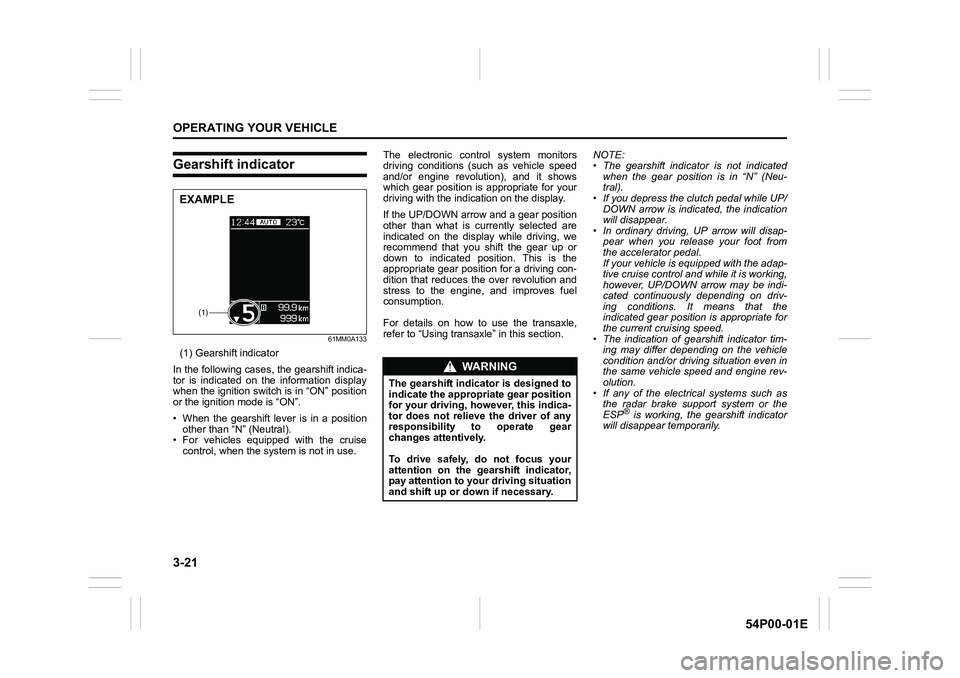
61MM0A133
(1) Gearshift indicator
In the following cases, the gearshift indica-
tor is indicated on the information display
when the ignition switch is in “ON” position
or the ignition mode is “ON”.
• When the gearshift lever is in a position
other than “N” (Neutral).
• For vehicles equipped with the cruise
control, when the system is not in use.The electronic control system monitors
driving conditions (such as vehicle speed
and/or engine revolution), and it shows
which gear position is appropriate for your
driving with the indication on the display.
If the UP/DOWN arrow and a gear position
other than what is currently selected are
indicated on the display while driving, we
recommend that you shift the gear up or
down to indicated position. This is the
appropriate gear position for a driving con-
dition that reduces the over revolution and
stress to the engine, and improves fuel
consumption.
For details on how to use the transaxle,
refer to “Using transaxle” in this section.NOTE:
• The gearshift indicator is not indicated
when the gear position is in “N” (Neu-
tral).
• If you depress the clutch pedal while UP/
DOWN arrow is indicated, the indication
will disappear.
• In ordinary driving, UP arrow will disap-
pear when you release your foot from
the accelerator pedal.
If your vehicle is equipped with the adap-
tive cruise control and while it is working,
however, UP/DOWN arrow may be indi-
cated continuously depending on driv-
ing conditions. It means that the
indicated gear position is appropriate for
the current cruising speed.
• The indication of gearshift indicator tim-
ing may differ depending on the vehicle
condition and/or driving situation even in
the same vehicle speed and engine rev-
olution.
• If any of the electrical systems such as
the radar brake support system or the
ESP
® is working, the gearshift indicator
will disappear temporarily.
(1)
EXAMPLE
WA R N I N G
The gearshift indicator is designed to
indicate the appropriate gear position
for your driving, however, this indica-
tor does not relieve the driver of any
responsibility to operate gear
changes attentively.
To drive safely, do not focus your
attention on the gearshift indicator,
pay attention to your driving situation
and shift up or down if necessary.
Page 170 of 482
3-30
OPERATING YOUR VEHICLE
54P00-01E
Automatically stopping engine
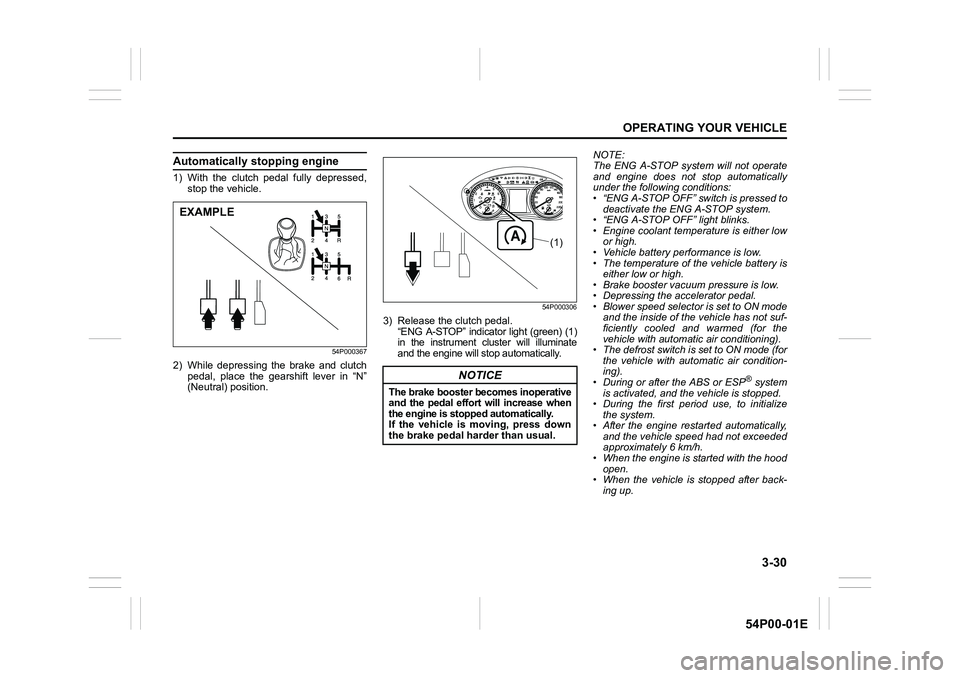
1) With the clutch pedal fully depressed,
stop the vehicle.
54P000367
2) While depressing the brake and clutch
pedal, place the gearshift lever in “N”
(Neutral) position.
54P000306
3) Release the clutch pedal.
“ENG A-STOP” indicator light (green) (1)
in the instrument cluster will illuminate
and the engine will stop automatically.NOTE:
The ENG A-STOP system will not operate
and engine does not stop automatically
under the following conditions:
• “ENG A-STOP OFF” switch is pressed to
deactivate the ENG A-STOP system.
• “ENG A-STOP OFF” light blinks.
• Engine coolant temperature is either low
or high.
• Vehicle battery performance is low.
• The temperature of the vehicle battery is
either low or high.
• Brake booster vacuum pressure is low.
• Depressing the accelerator pedal.
• Blower speed selector is set to ON mode
and the inside of the vehicle has not suf-
ficiently cooled and warmed (for the
vehicle with automatic air conditioning).
• The defrost switch is set to ON mode (for
the vehicle with automatic air condition-
ing).
• During or after the ABS or ESP
® system
is activated, and the vehicle is stopped.
• During the first period use, to initialize
the system.
• After the engine restarted automatically,
and the vehicle speed had not exceeded
approximately 6 km/h.
• When the engine is started with the hood
open.
• When the vehicle is stopped after back-
ing up.
EXAMPLE
NOTICE
The brake booster becomes inoperative
and the pedal effort will increase when
the engine is stopped automatically.
If the vehicle is moving, press down
the brake pedal harder than usual.
(1)
Page 172 of 482
3-32
OPERATING YOUR VEHICLE
54P00-01E
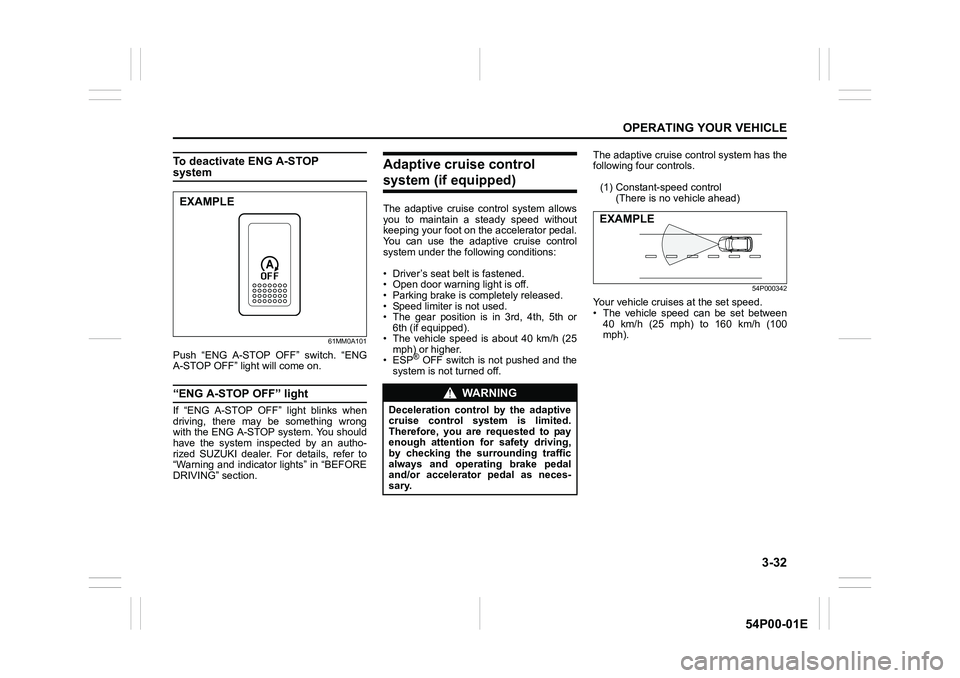
To deactivate ENG A-STOP system
61MM0A101
Push “ENG A-STOP OFF” switch. “ENG
A-STOP OFF” light will come on.
“ENG A-STOP OFF” light
If “ENG A-STOP OFF” light blinks when
driving, there may be something wrong
with the ENG A-STOP system. You should
have the system inspected by an autho-
rized SUZUKI dealer. For details, refer to
“Warning and indicator lights” in “BEFORE
DRIVING” section.
Adaptive cruise control
system (if equipped)
The adaptive cruise control system allows
you to maintain a steady speed without
keeping your foot on the accelerator pedal.
You can use the adaptive cruise control
system under the following conditions:
• Driver’s seat belt is fastened.
• Open door warning light is off.
• Parking brake is completely released.
• Speed limiter is not used.
• The gear position is in 3rd, 4th, 5th or
6th (if equipped).
• The vehicle speed is about 40 km/h (25
mph) or higher.
• ESP
® OFF switch is not pushed and the
system is not turned off.The adaptive cruise control system has the
following four controls.
(1) Constant-speed control
(There is no vehicle ahead)
54P000342
Your vehicle cruises at the set speed.
• The vehicle speed can be set between
40 km/h (25 mph) to 160 km/h (100
mph).
EXAMPLE
WA R N I N G
Deceleration control by the adaptive
cruise control system is limited.
Therefore, you are requested to pay
enough attention for safety driving,
by checking the surrounding traffic
always and operating brake pedal
and/or accelerator pedal as neces-
sary.
EXAMPLE
Page 178 of 482
3-38
OPERATING YOUR VEHICLE
54P00-01E
NOTE:
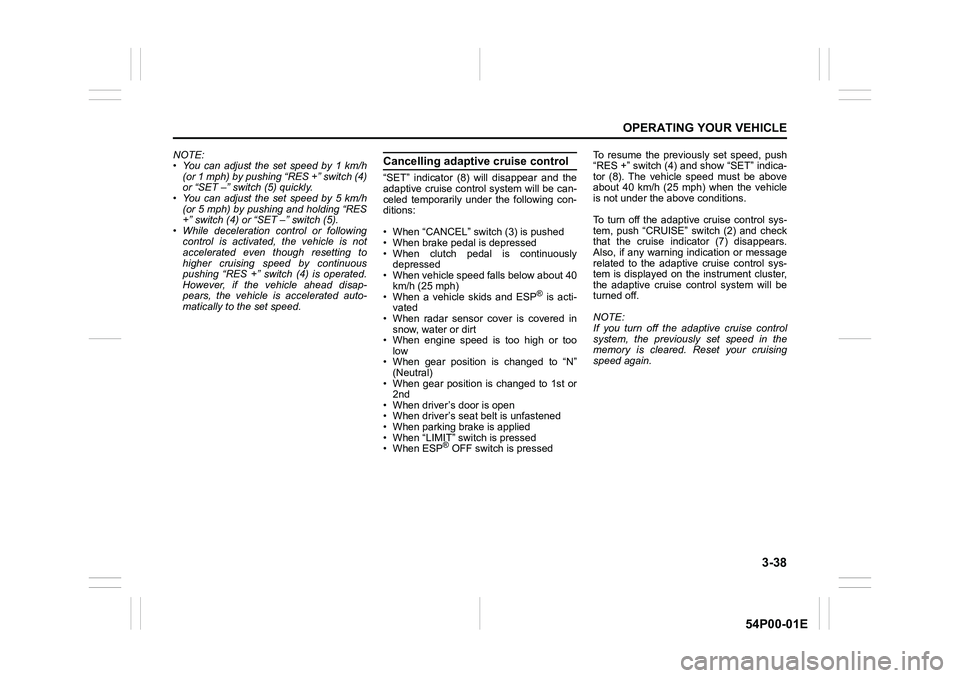
• You can adjust the set speed by 1 km/h
(or 1 mph) by pushing “RES +” switch (4)
or “SET –” switch (5) quickly.
• You can adjust the set speed by 5 km/h
(or 5 mph) by pushing and holding “RES
+” switch (4) or “SET –” switch (5).
• While deceleration control or following
control is activated, the vehicle is not
accelerated even though resetting to
higher cruising speed by continuous
pushing “RES +” switch (4) is operated.
However, if the vehicle ahead disap-
pears, the vehicle is accelerated auto-
matically to the set speed.Cancelling adaptive cruise control
“SET” indicator (8) will disappear and the
adaptive cruise control system will be can-
celed temporarily under the following con-
ditions:
• When “CANCEL” switch (3) is pushed
• When brake pedal is depressed
• When clutch pedal is continuously
depressed
• When vehicle speed falls below about 40
km/h (25 mph)
• When a vehicle skids and ESP
® is acti-
vated
• When radar sensor cover is covered in
snow, water or dirt
• When engine speed is too high or too
low
• When gear position is changed to “N”
(Neutral)
• When gear position is changed to 1st or
2nd
• When driver’s door is open
• When driver’s seat belt is unfastened
• When parking brake is applied
• When “LIMIT” switch is pressed
• When ESP
® OFF switch is pressedTo resume the previously set speed, push
“RES +” switch (4) and show “SET” indica-
tor (8). The vehicle speed must be above
about 40 km/h (25 mph) when the vehicle
is not under the above conditions.
To turn off the adaptive cruise control sys-
tem, push “CRUISE” switch (2) and check
that the cruise indicator (7) disappears.
Also, if any warning indication or message
related to the adaptive cruise control sys-
tem is displayed on the instrument cluster,
the adaptive cruise control system will be
turned off.
NOTE:
If you turn off the adaptive cruise control
system, the previously set speed in the
memory is cleared. Reset your cruising
speed again.
Page 184 of 482
3-44
OPERATING YOUR VEHICLE
54P00-01E
Changing cruising speed
Using the accelerator pedal
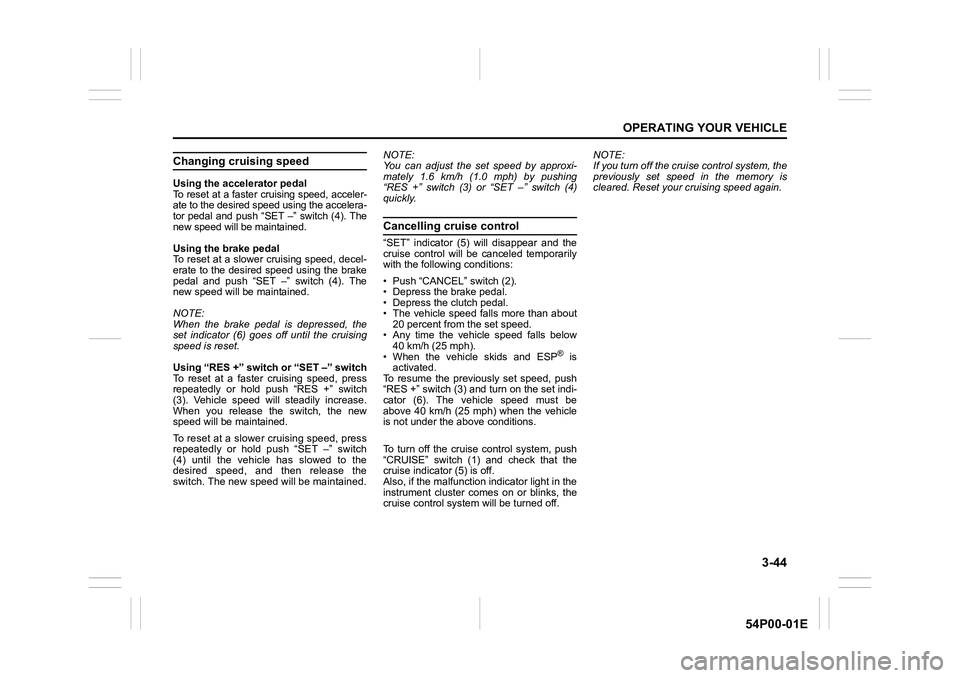
To reset at a faster cruising speed, acceler-
ate to the desired speed using the accelera-
tor pedal and push “SET –” switch (4). The
new speed will be maintained.
Using the brake pedal
To reset at a slower cruising speed, decel-
erate to the desired speed using the brake
pedal and push “SET –” switch (4). The
new speed will be maintained.
NOTE:
When the brake pedal is depressed, the
set indicator (6) goes off until the cruising
speed is reset.
Using “RES +” switch or “SET –” switch
To reset at a faster cruising speed, press
repeatedly or hold push “RES +” switch
(3). Vehicle speed will steadily increase.
When you release the switch, the new
speed will be maintained.
To reset at a slower cruising speed, press
repeatedly or hold push “SET –” switch
(4) until the vehicle has slowed to the
desired speed, and then release the
switch. The new speed will be maintained.NOTE:
You can adjust the set speed by approxi-
mately 1.6 km/h (1.0 mph) by pushing
“RES +” switch (3) or “SET –” switch (4)
quickly.
Cancelling cruise control
“SET” indicator (5) will disappear and the
cruise control will be canceled temporarily
with the following conditions:
• Push “CANCEL” switch (2).
• Depress the brake pedal.
• Depress the clutch pedal.
• The vehicle speed falls more than about
20 percent from the set speed.
• Any time the vehicle speed falls below
40 km/h (25 mph).
• When the vehicle skids and ESP
® is
activated.
To resume the previously set speed, push
“RES +” switch (3) and turn on the set indi-
cator (6). The vehicle speed must be
above 40 km/h (25 mph) when the vehicle
is not under the above conditions.
To turn off the cruise control system, push
“CRUISE” switch (1) and check that the
cruise indicator (5) is off.
Also, if the malfunction indicator light in the
instrument cluster comes on or blinks, the
cruise control system will be turned off.NOTE:
If you turn off the cruise control system, the
previously set speed in the memory is
cleared. Reset your cruising speed again.
Page 192 of 482
3-52
OPERATING YOUR VEHICLE
54P00-01E
Situations where radar will not acti-vate properly
Under the following situations, there is a
high possibility that the system will not acti-
vate.
• When the engine is off (except when the
engine is automatically stopped by the
ENG A-STOP system)
• When the gearshift lever is in the reverse
gear
• When facing an oncoming vehicle
• When the following switches are pushed
and the system is turned off:
– Radar brake support OFF switch
– ESP
® OFF switch
• When the system is temporarily stopped
or malfunctioning, some of the following
indicator and messages will come on:
– The radar brake support system warn-
ing light
– “RADAR BRAKE SUPPORT SYS
INSPECTION REQUIRED” message
– “RADAR BRAKE SUPPORT FCN
TEMPORARILY DISABLED” message
– “RADAR BRAKE SUPPORT: NOT
ACTIVE BY SENSOR.” message
Situations where radar may not activate properly
Under the following situations, the radar
may not detect a vehicle in front of you cor-
rectly and the system may not activate.
• When the radar sensor cover is covered
in snow, water or dirt
• When there is bad weather such as
heavy rain or fog, a blizzard or sand-
storm or when the vehicle in front of you
is surrounded by water, snow or sand
• When you are operating on a narrow
road
• When another vehicle jumps out sud-
denly
• When you suddenly accelerate and
approach the vehicle in front of you,
such as when you overtake the vehicle
in front of you
• When swerving
• When the vehicle cannot move in a
straight manner without consistently
steering, due to an accident or break-
down
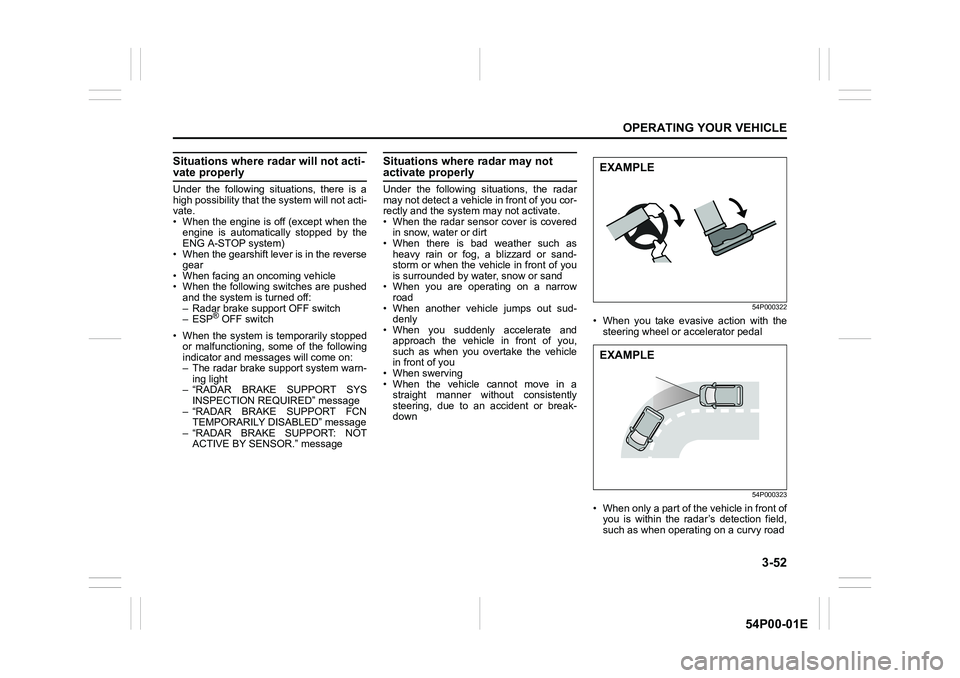
54P000322
• When you take evasive action with the
steering wheel or accelerator pedal
54P000323
• When only a part of the vehicle in front of
you is within the radar’s detection field,
such as when operating on a curvy road
EXAMPLE
EXAMPLE
Page 195 of 482
3-55
OPERATING YOUR VEHICLE
54P00-01E
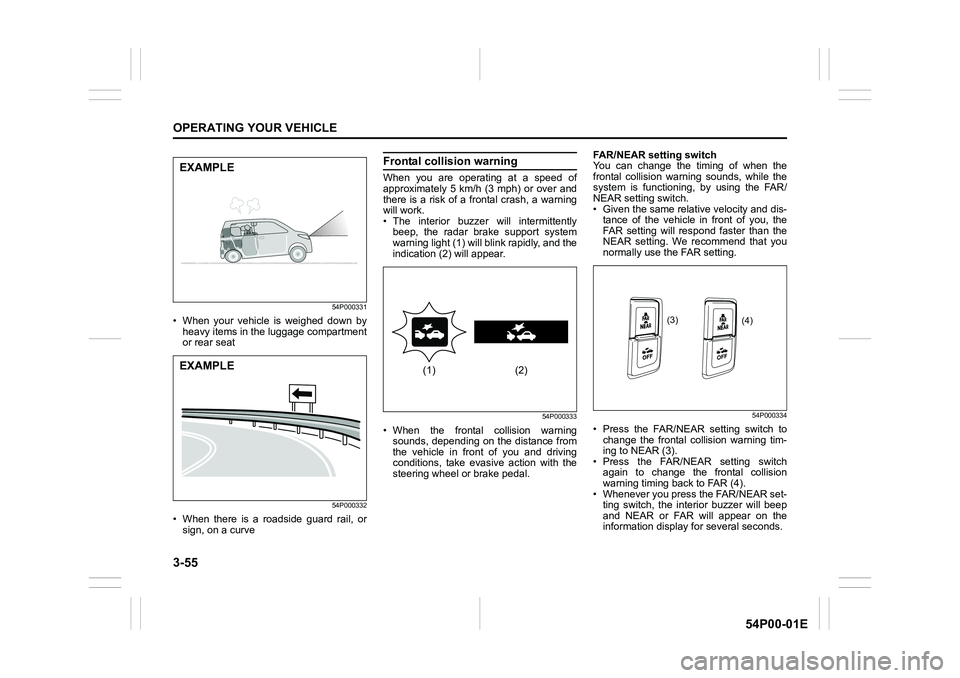
54P000331
• When your vehicle is weighed down by
heavy items in the luggage compartment
or rear seat
54P000332
• When there is a roadside guard rail, or
sign, on a curve
Frontal collision warning
When you are operating at a speed of
approximately 5 km/h (3 mph) or over and
there is a risk of a frontal crash, a warning
will work.
• The interior buzzer will intermittently
beep, the radar brake support system
warning light (1) will blink rapidly, and the
indication (2) will appear.
54P000333
• When the frontal collision warning
sounds, depending on the distance from
the vehicle in front of you and driving
conditions, take evasive action with the
steering wheel or brake pedal.FAR/NEAR setting switch
You can change the timing of when the
frontal collision warning sounds, while the
system is functioning, by using the FAR/
NEAR setting switch.
• Given the same relative velocity and dis-
tance of the vehicle in front of you, the
FAR setting will respond faster than the
NEAR setting. We recommend that you
normally use the FAR setting.
54P000334
• Press the FAR/NEAR setting switch to
change the frontal collision warning tim-
ing to NEAR (3).
• Press the FAR/NEAR setting switch
again to change the frontal collision
warning timing back to FAR (4).
• Whenever you press the FAR/NEAR set-
ting switch, the interior buzzer will beep
and NEAR or FAR will appear on the
information display for several seconds.
EXAMPLE
EXAMPLE(1) (2)
(3)
(4)