Eco SUZUKI GRAND VITARA 2022 User Guide
[x] Cancel search | Manufacturer: SUZUKI, Model Year: 2022, Model line: GRAND VITARA, Model: SUZUKI GRAND VITARA 2022Pages: 482, PDF Size: 21 MB
Page 30 of 482
2-8
BEFORE DRIVING
54P00-01E
To release this system:
• To unlock only the driver’s door, push
UNLOCK button (2) once.
• To unlock other doors, push UNLOCK
button (2) once again.
NOTE:
You can switch the function that unlocks all
doors from requiring two pushes to requir-
ing one push, and vice versa, via the infor-
mation display setting mode. For details on
how to use the information display, refer to
“Information display” in this section.
The turn signal lights will flash once and
the exterior buzzer will sound once when
the doors are locked, and then the turn sig-
nal lights will flash once and the exterior
buzzer will sound once again when the
doors are locked with the dead lock sys-
tem.
With the remote controller inside the vehi-
cle, if you push LOCK button on the
remote controller, the exterior buzzer will
sound and doors cannot be locked.
When the doors are unlocked:
• The turn signal lights will flash twice and
the exterior buzzer will sound twice.• If the interior light switch is in DOOR
position, the interior light will turn on for
about 15 seconds and then fade out. If
you press the engine switch during this
time, the light will start to fade out imme-
diately.
Check that the doors are locked after you
operate LOCK button (1).
If no door is opened within about 30 sec-
onds after UNLOCK button (2) is operated,
the doors will automatically lock again.
NOTE:
• The maximum operating distance of the
remote controller is about 5 m (16 ft.),
but this can vary depending on the sur-
roundings, especially near other trans-
mitting devices such as radio towers or
CB (Citizen’s Band) radios.
• The door locks cannot be operated with
the remote controller if the ignition mode
is in any other mode than “LOCK” (OFF).
• When any door is open, if you push
LOCK button on the remote controller,
the exterior buzzer will sound and doors
cannot be locked.
• If you lose one of the remote controllers,
ask your SUZUKI dealer as soon as pos-
sible for replacement. Have your dealer
program the new remote controller code
in your vehicle’s memory so that the old
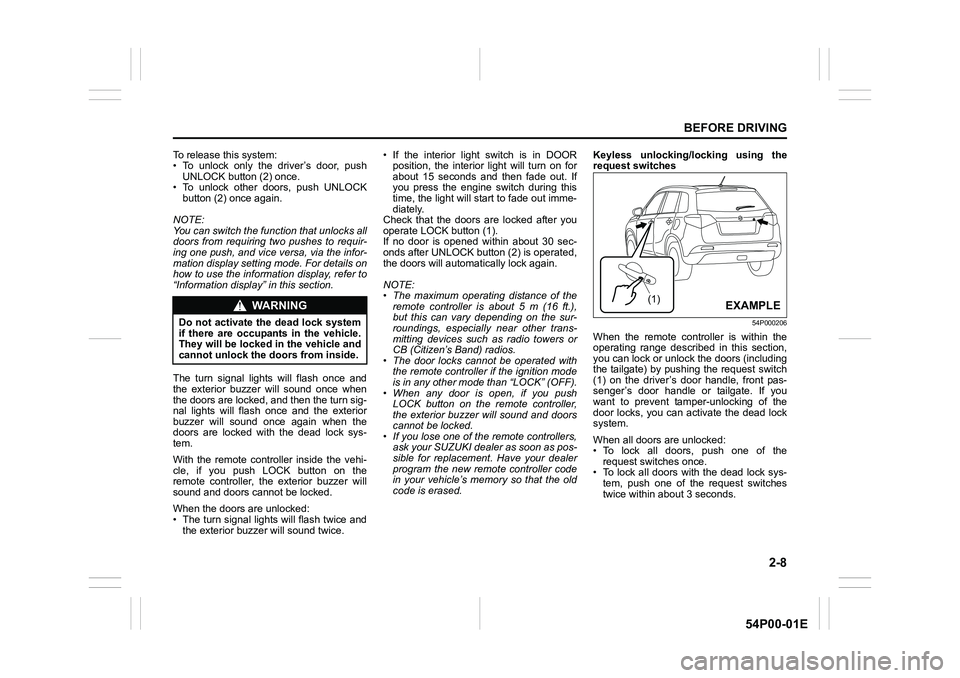
code is erased.Keyless unlocking/locking using the
request switches
54P000206
When the remote controller is within the
operating range described in this section,
you can lock or unlock the doors (including
the tailgate) by pushing the request switch
(1) on the driver’s door handle, front pas-
senger’s door handle or tailgate. If you
want to prevent tamper-unlocking of the
door locks, you can activate the dead lock
system.
When all doors are unlocked:
• To lock all doors, push one of the
request switches once.
• To lock all doors with the dead lock sys-
tem, push one of the request switches
twice within about 3 seconds.
WA R N I N G
Do not activate the dead lock system
if there are occupants in the vehicle.
They will be locked in the vehicle and
cannot unlock the doors from inside.
(1)EXAMPLE
Page 31 of 482
2-9
BEFORE DRIVING
54P00-01E
The turn signal lights will flash once and
the exterior buzzer will sound once when
the doors are locked, and then the turn sig-
nal lights will flash once and the exterior
buzzer will sound once again when the
doors are locked with the dead lock sys-
tem.
To unlock a door or all doors:
• Push one of the request switches once
to unlock only one door.
• Push one of the request switches twice
to unlock all doors.
NOTE:
You can switch the function that unlocks all
doors from requiring two pushes to requir-
ing one push, and vice versa, via the infor-
mation display setting mode. For details on
how to use the information display, refer to
“Information display” in this section.
When the doors are unlocked:
• The turn signal lights will flash twice and
the exterior buzzer will sound twice.
• If the interior light switch is in DOOR
position, the interior light will turn on for
about 15 seconds and then fade out. If
you press the engine switch during thistime, the light will start to fade out imme-
diately.
Check that the doors are locked after you
operate the request switch to lock the
doors.
NOTE:
• The door locks cannot be operated by
the request switch under the following
conditions:
– If any door is open or is not completely
closed.
– If the ignition mode is in any other
mode than “LOCK” (OFF).
• If no doors are opened within about 30
seconds after unlocking the doors by
pushing the request switch, the doors
will be locked again automatically.
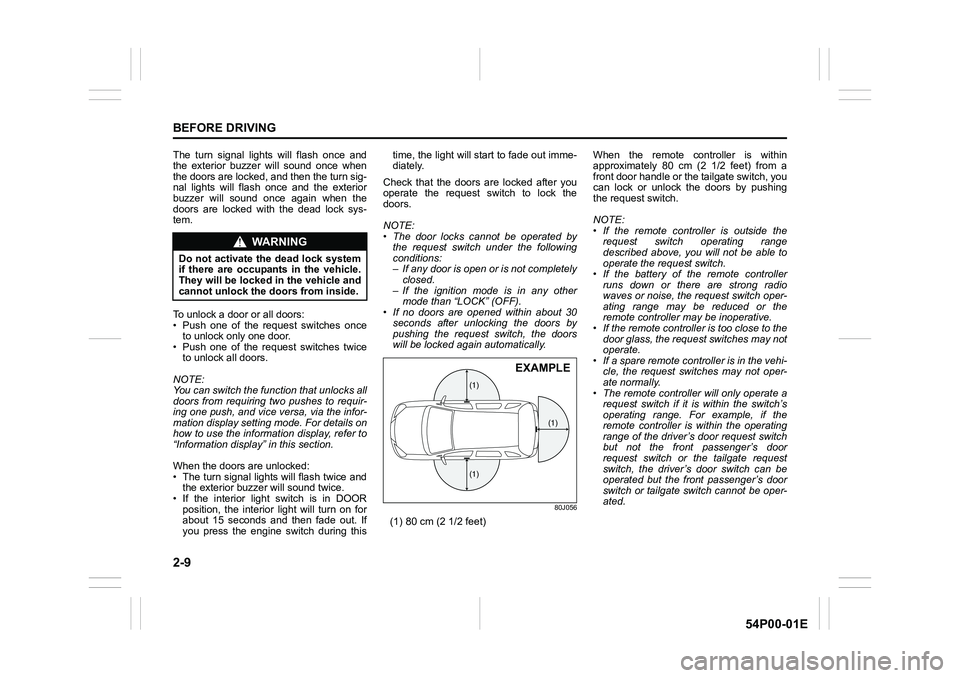
80J056
(1) 80 cm (2 1/2 feet)When the remote controller is within
approximately 80 cm (2 1/2 feet) from a
front door handle or the tailgate switch, you
can lock or unlock the doors by pushing
the request switch.
NOTE:
• If the remote controller is outside the
request switch operating range
described above, you will not be able to
operate the request switch.
• If the battery of the remote controller
runs down or there are strong radio
waves or noise, the request switch oper-
ating range may be reduced or the
remote controller may be inoperative.
• If the remote controller is too close to the
door glass, the request switches may not
operate.
• If a spare remote controller is in the vehi-
cle, the request switches may not oper-
ate normally.
• The remote controller will only operate a
request switch if it is within the switch’s
operating range. For example, if the
remote controller is within the operating
range of the driver’s door request switch
but not the front passenger’s door
request switch or the tailgate request
switch, the driver’s door switch can be
operated but the front passenger’s door
switch or tailgate switch cannot be oper-
ated.
WA R N I N G
Do not activate the dead lock system
if there are occupants in the vehicle.
They will be locked in the vehicle and
cannot unlock the doors from inside.
(1)
(1)
(1)
EXAMPLE
Page 32 of 482
2-10
BEFORE DRIVING
54P00-01E
NOTE:
The keyless push start system may not
function correctly in certain environments
or under certain operating conditions such
as the following:
• When there are strong signals coming
from a television, power station or a cel-
lular phone.
• When the remote controller is in contact
with or covered by a metal object.
• When a radio wave type remote keyless
entry is used nearby.
• When the remote controller is placed
near an electronic device such as per-
sonal computer.
Some additional precautions you should
take and information you should be aware
of are:
• Check that the key is stowed in the
remote controller. If the remote controller
becomes unreliable, you will not be able
to lock or unlock the doors.• Check that the driver always carries the
remote controller.
• If you lose one of the remote controllers,
ask your SUZUKI dealer as soon as pos-
sible for a replacement. Have your
dealer program the new remote control-
ler code in your vehicle’s memory so that
the old code is erased.
• You can use up to four remote control-
lers and the keys for your vehicle. Ask
your SUZUKI dealer for details.
• The battery life of the remote controller
is about two years, but it can vary
depending on usage conditions.
57L21016
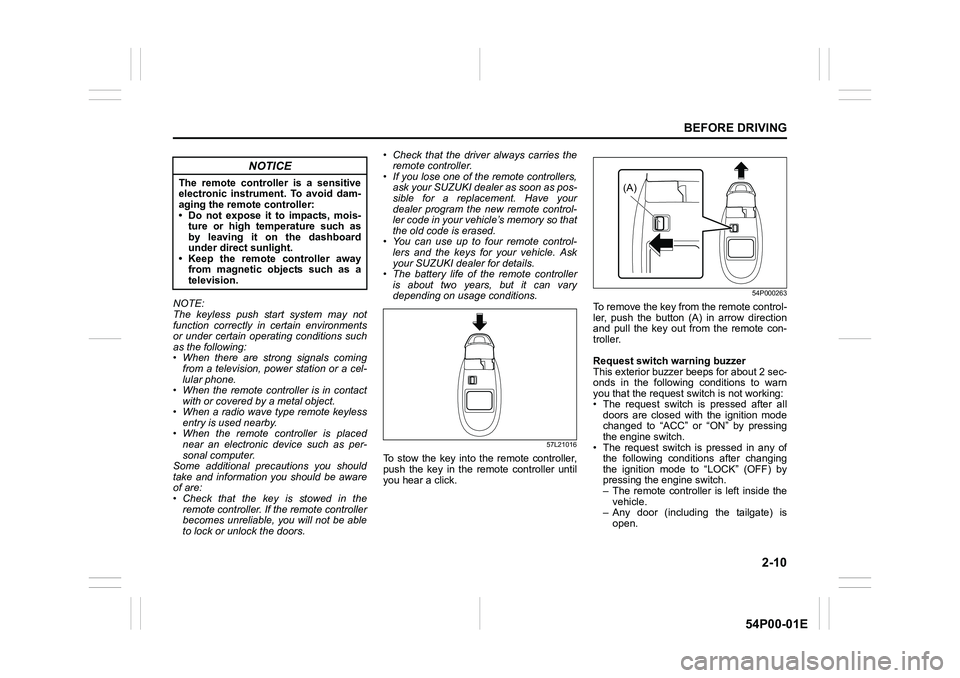
To stow the key into the remote controller,
push the key in the remote controller until
you hear a click.
54P000263
To remove the key from the remote control-
ler, push the button (A) in arrow direction
and pull the key out from the remote con-
troller.
Request switch warning buzzer
This exterior buzzer beeps for about 2 sec-
onds in the following conditions to warn
you that the request switch is not working:
• The request switch is pressed after all
doors are closed with the ignition mode
changed to “ACC” or “ON” by pressing
the engine switch.
• The request switch is pressed in any of
the following conditions after changing
the ignition mode to “LOCK” (OFF) by
pressing the engine switch.
– The remote controller is left inside the
vehicle.
– Any door (including the tailgate) is
open.
NOTICE
The remote controller is a sensitive
electronic instrument. To avoid dam-
aging the remote controller:
• Do not expose it to impacts, mois-
ture or high temperature such as
by leaving it on the dashboard
under direct sunlight.
• Keep the remote controller away
from magnetic objects such as a
television.(A)
Page 33 of 482
2-11
BEFORE DRIVING
54P00-01E
Press the request switch again after doing
the following:
With the ignition mode changed to “LOCK”
(OFF) by pressing the engine switch, bring
out the remote controller if it is inside the
vehicle and check that all doors are com-
pletely closed.
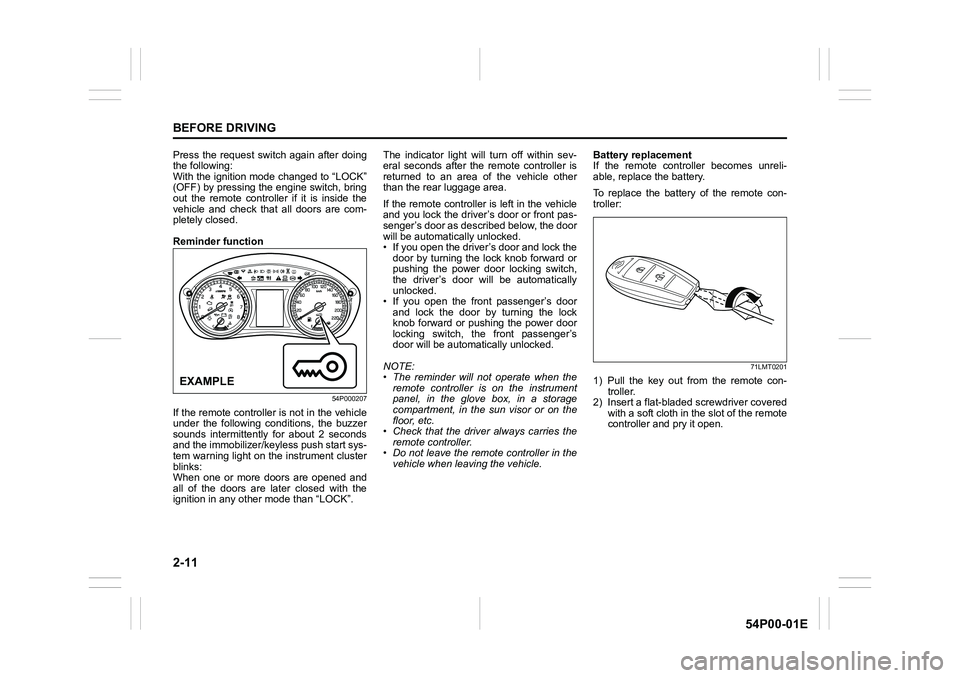
Reminder function
54P000207
If the remote controller is not in the vehicle
under the following conditions, the buzzer
sounds intermittently for about 2 seconds
and the immobilizer/keyless push start sys-
tem warning light on the instrument cluster
blinks:
When one or more doors are opened and
all of the doors are later closed with the
ignition in any other mode than “LOCK”.The indicator light will turn off within sev-
eral seconds after the remote controller is
returned to an area of the vehicle other
than the rear luggage area.
If the remote controller is left in the vehicle
and you lock the driver’s door or front pas-
senger’s door as described below, the door
will be automatically unlocked.
• If you open the driver’s door and lock the
door by turning the lock knob forward or
pushing the power door locking switch,
the driver’s door will be automatically
unlocked.
• If you open the front passenger’s door
and lock the door by turning the lock
knob forward or pushing the power door
locking switch, the front passenger’s
door will be automatically unlocked.
NOTE:
• The reminder will not operate when the
remote controller is on the instrument
panel, in the glove box, in a storage
compartment, in the sun visor or on the
floor, etc.
• Check that the driver always carries the
remote controller.
• Do not leave the remote controller in the
vehicle when leaving the vehicle.Battery replacement
If the remote controller becomes unreli-
able, replace the battery.
To replace the battery of the remote con-
troller:
71LMT0201
1) Pull the key out from the remote con-
troller.
2) Insert a flat-bladed screwdriver covered
with a soft cloth in the slot of the remote
controller and pry it open.EXAMPLE
Page 35 of 482
2-13
BEFORE DRIVING
54P00-01E
Ty p e A
The keyless push start system, controller
model S79M0 and key model R64M0 are
in compliance with the essential require-
ments and other provisions of Directive
1999/5/EC.Keyless entry system transmitter (Type B)
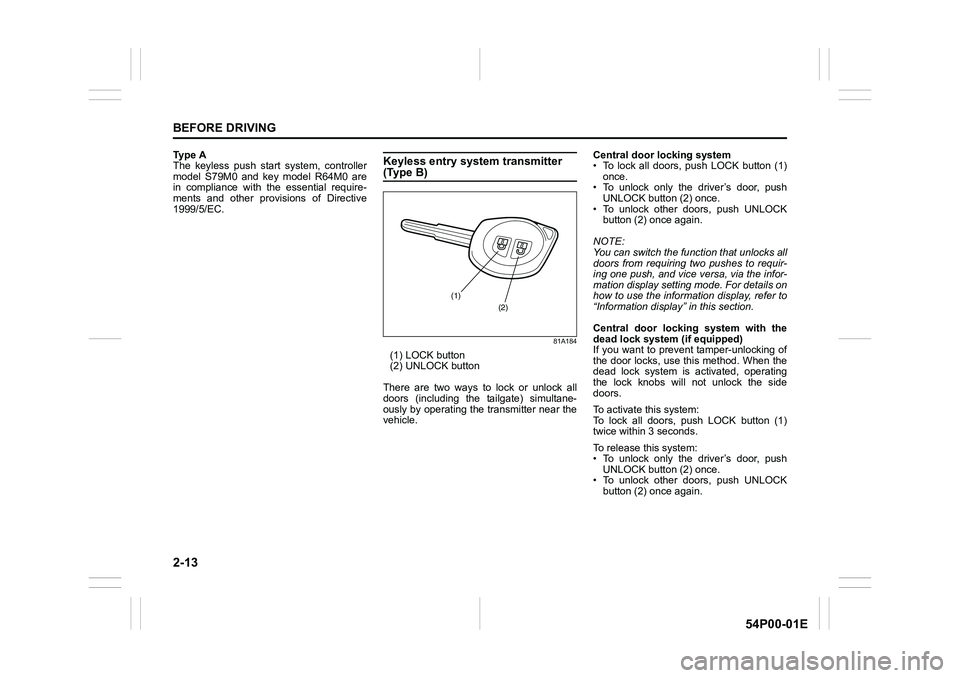
81A184
(1) LOCK button
(2) UNLOCK button
There are two ways to lock or unlock all
doors (including the tailgate) simultane-
ously by operating the transmitter near the
vehicle.Central door locking system
• To lock all doors, push LOCK button (1)
once.
• To unlock only the driver’s door, push
UNLOCK button (2) once.
• To unlock other doors, push UNLOCK
button (2) once again.
NOTE:
You can switch the function that unlocks all
doors from requiring two pushes to requir-
ing one push, and vice versa, via the infor-
mation display setting mode. For details on
how to use the information display, refer to
“Information display” in this section.
Central door locking system with the
dead lock system (if equipped)
If you want to prevent tamper-unlocking of
the door locks, use this method. When the
dead lock system is activated, operating
the lock knobs will not unlock the side
doors.
To activate this system:
To lock all doors, push LOCK button (1)
twice within 3 seconds.
To release this system:
• To unlock only the driver’s door, push
UNLOCK button (2) once.
• To unlock other doors, push UNLOCK
button (2) once again.
(1)
(2)
Page 36 of 482
2-14
BEFORE DRIVING
54P00-01E
NOTE:
You can switch the function that unlocks all
doors from requiring two pushes to requir-
ing one push, and vice versa, via the infor-
mation display setting mode. For details on
how to use the information display, refer to
“Information display” in this section.
The turn signal lights will flash once when
the doors are locked and then the turn sig-
nal lights will flash once again when the
doors are locked with the dead lock sys-
tem.
When the doors are unlocked:
• The turn signal lights will flash twice.
• If the interior light switch is in DOOR
position, the interior light will turn on for
about 15 seconds and then fade out. If
you insert the key into the ignition switch
during this time, the light will start to fade
out immediately.
Check that the doors are locked after you
operate LOCK button (1).
NOTE:
If no door is opened within about 30 sec-
onds after UNLOCK button (2) is operated,
the doors will automatically lock again.NOTE:
• The maximum operating distance of the
keyless entry system transmitter is about
5 m (16 ft.), but this can vary depending
on the surroundings, especially near
other transmitting devices such as radio
towers or CB (Citizen’s Band) radios.
• The door locks cannot be operated with
the transmitter, if the ignition key is
inserted in the ignition switch.
• When any door is open, the door locks
can only be unlocked with the transmit-
ter, and the turn signal light will not flash.
• If you lose one of the transmitters, ask
your SUZUKI dealer as soon as possible
for a replacement. Have your dealer pro-
gram the new transmitter code in your
vehicle’s memory so that the old code is
erased.Battery replacement
If the transmitter becomes unreliable,
replace the battery.
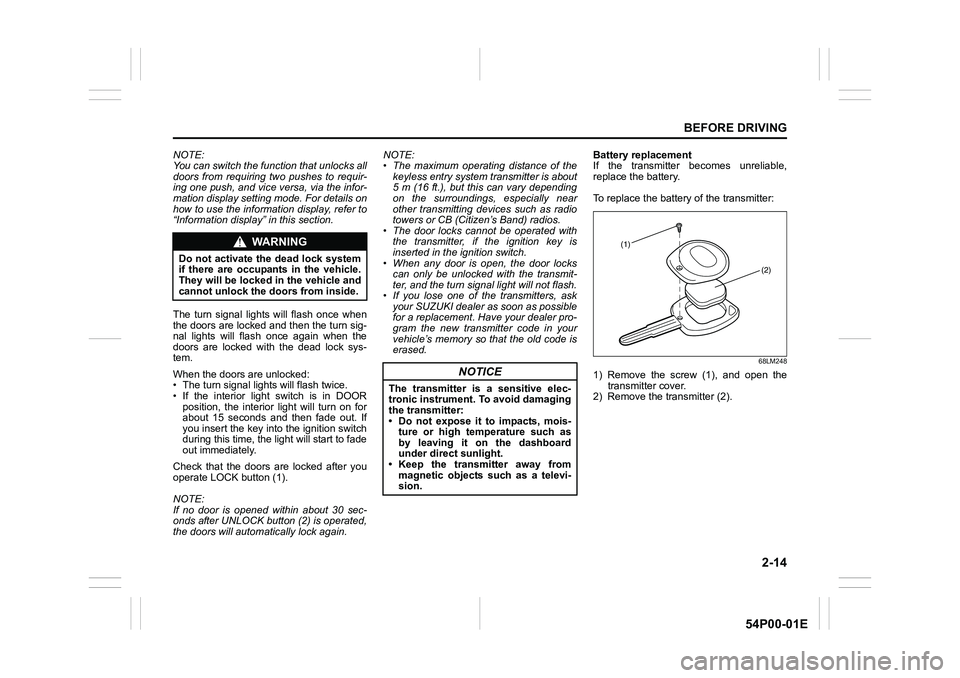
To replace the battery of the transmitter:
68LM248
1) Remove the screw (1), and open the
transmitter cover.
2) Remove the transmitter (2).
WA R N I N G
Do not activate the dead lock system
if there are occupants in the vehicle.
They will be locked in the vehicle and
cannot unlock the doors from inside.
NOTICE
The transmitter is a sensitive elec-
tronic instrument. To avoid damaging
the transmitter:
• Do not expose it to impacts, mois-
ture or high temperature such as
by leaving it on the dashboard
under direct sunlight.
• Keep the transmitter away from
magnetic objects such as a televi-
sion.
(1)
(2)
Page 41 of 482

2-19
BEFORE DRIVING
54P00-01E
Pinching prevention function
The driver’s window is equipped with a
pinching prevention function. This function
detects a foreign object that is caught in
the window as it is being closed by AUTO-
UP feature, which allows you to close the
window without holding the window switch
in UP position, and stops the window from
closing to prevent damage.
NOTE:
Even if you cannot close the window by the
AUTO-UP feature because there may be
something wrong with the pinching preven-
tion function, you can close the window by
holding the window switch in UP position.
If you drive in extreme off-road condition,
the pinching prevention function may oper-
ate accidentally because the window
reacts to vehicle jolting.
Pinching prevention function initializa-
tion
When you disconnect and reconnect the
battery or replace the fuse, the function will
be deactivated. In this condition, the
AUTO-DOWN feature will be deactivated,
while the AUTO-UP feature may remain
activated. The pinching prevention function
needs to be initialized.To initialize the pinching prevention func-
tion, use the following procedure:
1) Turn the ignition switch to “ON” position
or press the engine switch to change
the ignition mode to “ON”.
2) Open the driver’s window fully by hold-
ing the window switch in DOWN posi-
tion.
3) Close the driver’s window by holding
the switch in UP position, and keep
holding the switch for 2 seconds after
the window is fully closed.
4) Check the driver’s window to see if the
AUTO-DOWN/UP feature works.
If the AUTO-DOWN/UP feature will not
work after initialization, there might be
something wrong with the pinching preven-
tion function. Have your vehicle inspected
by an authorized SUZUKI dealer.
WA R N I N G
To avoid injuring an occupant by win-
dow entrapment, check that no part
of the occupant’s body such as
hands or head is in the path of the
electric window when closing it.
This function may not detect an
object due to the size, hardness, or
position of the object being caught in
the closing window.
CAUTION
• The pinching prevention function
does not operate while you are
holding the window switch in UP
position.
• The pinching prevention function
may not detect an object caught in
the window just before the window
is fully closed.
WA R N I N G
Whenever you disconnect and recon-
nect the battery or replace the fuse,
the pinching prevention function
needs to be initialized.
The pinching prevention function will
not be activated until the initialization
is completed.
Page 51 of 482
2-29
BEFORE DRIVING
54P00-01E
65D199
WA R N I N G
(Continued)
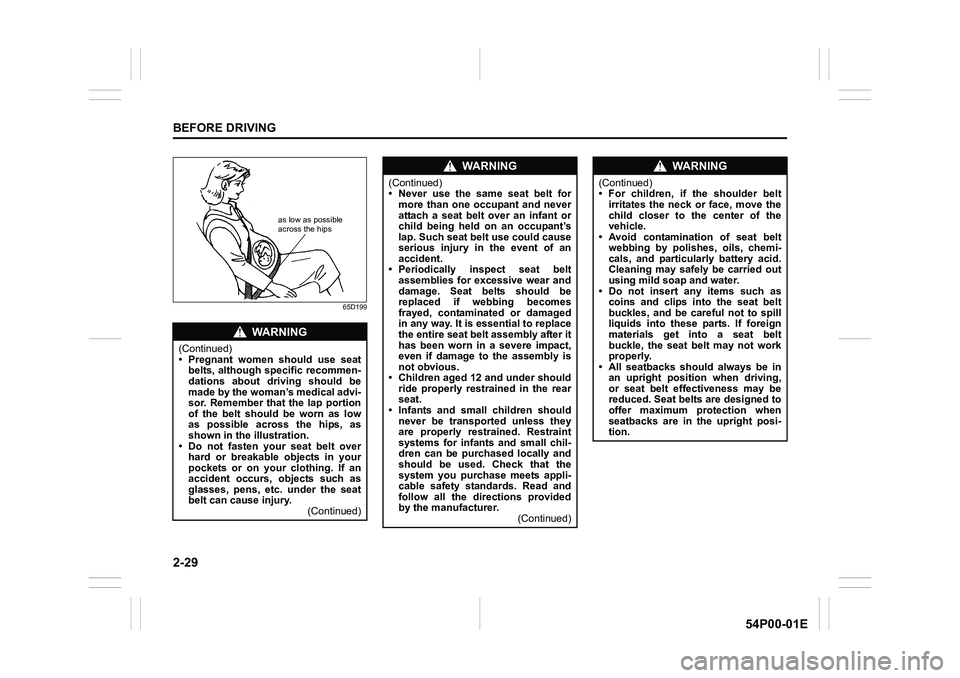
• Pregnant women should use seat
belts, although specific recommen-
dations about driving should be
made by the woman’s medical advi-
sor. Remember that the lap portion
of the belt should be worn as low
as possible across the hips, as
shown in the illustration.
• Do not fasten your seat belt over
hard or breakable objects in your
pockets or on your clothing. If an
accident occurs, objects such as
glasses, pens, etc. under the seat
belt can cause injury.
(Continued)
as low as possible
across the hips
WA R N I N G
(Continued)
• Never use the same seat belt for
more than one occupant and never
attach a seat belt over an infant or
child being held on an occupant’s
lap. Such seat belt use could cause
serious injury in the event of an
accident.
• Periodically inspect seat belt
assemblies for excessive wear and
damage. Seat belts should be
replaced if webbing becomes
frayed, contaminated or damaged
in any way. It is essential to replace
the entire seat belt assembly after it
has been worn in a severe impact,
even if damage to the assembly is
not obvious.
• Children aged 12 and under should
ride properly restrained in the rear
seat.
• Infants and small children should
never be transported unless they
are properly restrained. Restraint
systems for infants and small chil-
dren can be purchased locally and
should be used. Check that the
system you purchase meets appli-
cable safety standards. Read and
follow all the directions provided
by the manufacturer.
(Continued)
WA R N I N G
(Continued)
• For children, if the shoulder belt
irritates the neck or face, move the
child closer to the center of the
vehicle.
• Avoid contamination of seat belt
webbing by polishes, oils, chemi-
cals, and particularly battery acid.
Cleaning may safely be carried out
using mild soap and water.
• Do not insert any items such as
coins and clips into the seat belt
buckles, and be careful not to spill
liquids into these parts. If foreign
materials get into a seat belt
buckle, the seat belt may not work
properly.
• All seatbacks should always be in
an upright position when driving,
or seat belt effectiveness may be
reduced. Seat belts are designed to
offer maximum protection when
seatbacks are in the upright posi-
tion.
Page 57 of 482
2-35
BEFORE DRIVING
54P00-01E
Driver’s seat belt reminder
If the driver’s seat belt remains unbuckled
when the ignition switch is turned to “ON”
position or the engine switch is pressed to
change the ignition mode to “ON”, the
reminder works as follows:
1) The driver’s seat belt reminder light will
come on. The front passenger’s seat
belt reminder light (if equipped) will also
come on if a front passenger does not
fasten his/her seat belt.
2) After the vehicle’s speed has reached
about 15 km/h, the driver’s seat belt
reminder light will blink and a buzzer
will sound for about 95 seconds.
3) The reminder light will remain on until
the driver’s seat belt is buckled.
If the driver has buckled his or her seat belt
and later unbuckles the seat belt, the
reminder system will be activated from
Step 1) or 2) according to the vehicle’s
speed. When the vehicle’s speed is less
than 15 km/h, the reminder will start from
Step 1). When the vehicle’s speed is more
than 15 km/h, the reminder will start from
Step 2).
The reminder will be automatically can-
celed when the driver’s seat belt is buckled
or the ignition switch is turned off, or the
engine switch is pressed to change the
ignition mode to “LOCK” (OFF).Front passenger’s seat belt reminder (if
equipped)
The front passenger’s seat belt reminder
will activate only when there is a passen-
ger sitting in the front seat. In some situa-
tions, however, such as when you place
heavy objects in the front seat, the seat
belt reminder can be activated as if a pas-
senger was present. The front passenger’s
seat belt reminder works in the same man-
ner as the driver’s seat belt reminder.
Rear passenger’s seat belt reminder (if
equipped)
If a rear seat belt is not fastened when the
engine is started, all the rear passenger’s
seat belt reminder lights will come on for
about 35 seconds and then go out. Within
this 35 seconds, the corresponding
reminder is highlighted. The reminder
fades when the seat belt is fastened.
The rear passenger’s seat belt reminder
lights will also come on for about 35 sec-
onds in the following conditions.
• If a seat belt is unfastened when the
vehicle speed is less than 15 km/h, the
corresponding light will be highlighted.
• If a seat belt is unfastened when the
vehicle speed is more than 15 km/h, the
corresponding light will be highlighted
and a buzzer will sound.The reminder will be automatically can-
celed when the rear seat belt is buckled or
the ignition switch is turned off, or the
engine switch is pressed to change the
ignition mode to “LOCK” (OFF).
Page 60 of 482
2-38
BEFORE DRIVING
54P00-01E
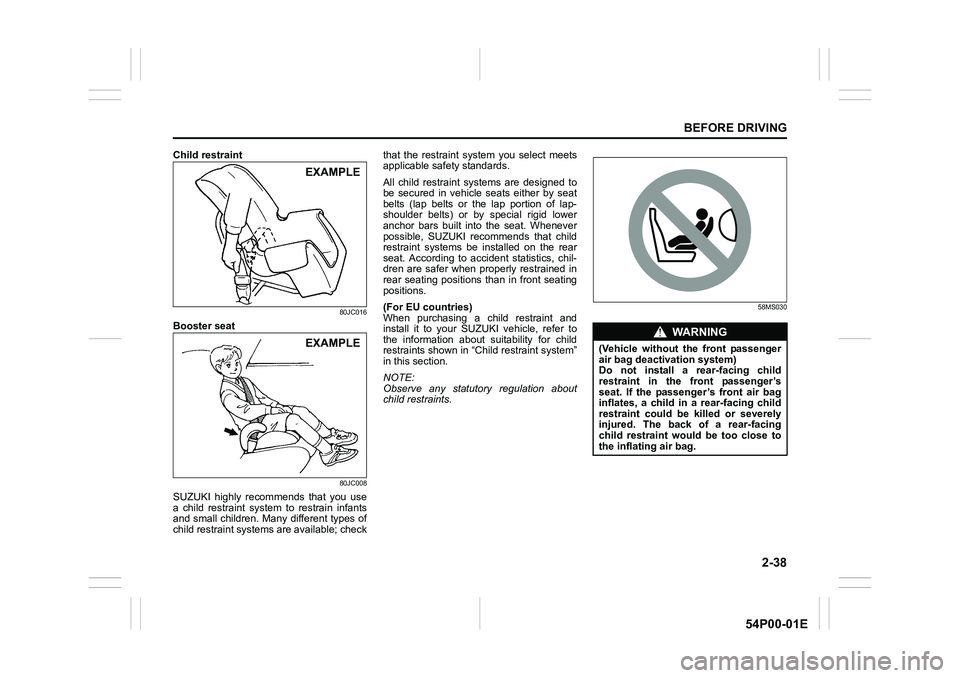
Child restraint
80JC016
Booster seat
80JC008
SUZUKI highly recommends that you use
a child restraint system to restrain infants
and small children. Many different types of
child restraint systems are available; checkthat the restraint system you select meets
applicable safety standards.
All child restraint systems are designed to
be secured in vehicle seats either by seat
belts (lap belts or the lap portion of lap-
shoulder belts) or by special rigid lower
anchor bars built into the seat. Whenever
possible, SUZUKI recommends that child
restraint systems be installed on the rear
seat. According to accident statistics, chil-
dren are safer when properly restrained in
rear seating positions than in front seating
positions.
(For EU countries)
When purchasing a child restraint and
install it to your SUZUKI vehicle, refer to
the information about suitability for child
restraints shown in “Child restraint system”
in this section.
NOTE:
Observe any statutory regulation about
child restraints.
58MS030
EXAMPLE
EXAMPLEWA R N I N G
(Vehicle without the front passenger
air bag deactivation system)
Do not install a rear-facing child
restraint in the front passenger’s
seat. If the passenger’s front air bag
inflates, a child in a rear-facing child
restraint could be killed or severely
injured. The back of a rear-facing
child restraint would be too close to
the inflating air bag.