ready SUZUKI GRAND VITARA 2022 User Guide
[x] Cancel search | Manufacturer: SUZUKI, Model Year: 2022, Model line: GRAND VITARA, Model: SUZUKI GRAND VITARA 2022Pages: 482, PDF Size: 21 MB
Page 318 of 482
5-76
OTHER CONTROLS AND EQUIPMENT
54P00-01E
Selection of phone (Select Phone)
Follow the instructions below to select a
phone to be paired with from the registered
phones.
1) Press the Bluetooth
® setup button (4).
The Bluetooth® setup menu will be dis-
played.
2) Turn “TUNE/FLD PUSH SOUND” knob
(1) to select “Setup Bluetooth”, and
press the knob (1) to determine the
selection.
3) Turn “TUNE/FLD PUSH SOUND” knob
(1) to select “List Phone”, and press the
knob (1) to determine the selection.
4) Turn “TUNE/FLD PUSH SOUND” knob
(1) to select a phone to be paired with,
and press the knob (1) to determine the
selection.
5) Turn “TUNE/FLD PUSH SOUND” knob
(1) to select “Select”, and press the
knob (1) to determine the selection.
NOTE:
• When selecting “Go Back”, the previous
menu will be displayed.
• The Bluetooth
® ready audio device will
be disconnected when the phone is
selected.List of phones (List Phones)
Follow the instructions below to display the
names of the registered phones in
sequence.
1) Press the Bluetooth
® setup button (4).
The Bluetooth® setup menu will be dis-
played.
2) Turn “TUNE/FLD PUSH SOUND” knob
(1) to select “Setup Bluetooth”, and
press the knob (1) to determine the
selection.
3) Turn “TUNE/FLD PUSH SOUND” knob
(1) to select “List Phone”, and press the
knob (1) to determine the selection.
The names of the registered phones
are displayed in sequence.
NOTE:
When selecting “Go Back”, the previous
menu will be displayed.
Passkey setting (Set Passkey)
Follow the instructions below to set the
security number (passkey).
1) Press the Bluetooth
® setup button (4).
The Bluetooth® setup menu will be dis-
played.
2) Turn “TUNE/FLD PUSH SOUND” knob
(1) to select “Setup Bluetooth”, and
press the knob (1) to determine the
selection.
3) Turn “TUNE/FLD PUSH SOUND” knob
(1) to select “Passkey”, and press the
knob (1) to determine the selection.4) Turn “TUNE/FLD PUSH SOUND” knob
(1) to select “New Passkey”, and press
the knob (1) to determine the selection.
5) Press or turn “TUNE/FLD PUSH
SOUND” knob (1) to select “Confirm”.
6) Turn “TUNE/FLD PUSH SOUND” knob
(1) to select a number for the first digit,
and press the knob (1) to determine the
selection. Select and determine num-
bers for the second, third and fourth
digits in order in the same manner.
When not entering up to the eighth
digit, enter blanks for the successive
digits.
7) Turn “TUNE/FLD PUSH SOUND” knob
(1) to determine the passkey setting.
NOTE:
When selecting “Go Back”, the previous
menu will be displayed.
Page 321 of 482
5-79
OTHER CONTROLS AND EQUIPMENT
54P00-01E
Registration of audio devices
NOTE:
• To set up a new audio player, disconnect
the phone from the unit. Connect the
phone after audio player setup is com-
pleted if necessary.
• When attempts to establish the pairing
fail within 120 seconds, the connecting
operation will be canceled. Try to estab-
lish the pairing again or refer to the audio
player manual for assistance with the
pairing process.
1) Press the Bluetooth
® setup button (6).
The Bluetooth® setup menu will be dis-
played.
2) Turn “TUNE/FLD PUSH SOUND” knob
(2) to select “Setup Bluetooth”, and
press the knob (2) to determine the
selection.
3) Turn “TUNE/FLD PUSH SOUND” knob
(2) to select “Pairing”, and press the
knob (2) to determine the selection.
4) Select “CAR AUDIO” from the Blue-
tooth
® menu of the audio player and
establish the pairing.
Refer to the manual of the audio player
in use for further information.
5) Enter the passkey displayed on the unit
to the audio player.NOTE:
• When selecting “Go Back”, the previous
menu will be displayed.
• When registering additional audio
devices, repeat Step from 1).
Selecting the Bluetooth
® audio mode
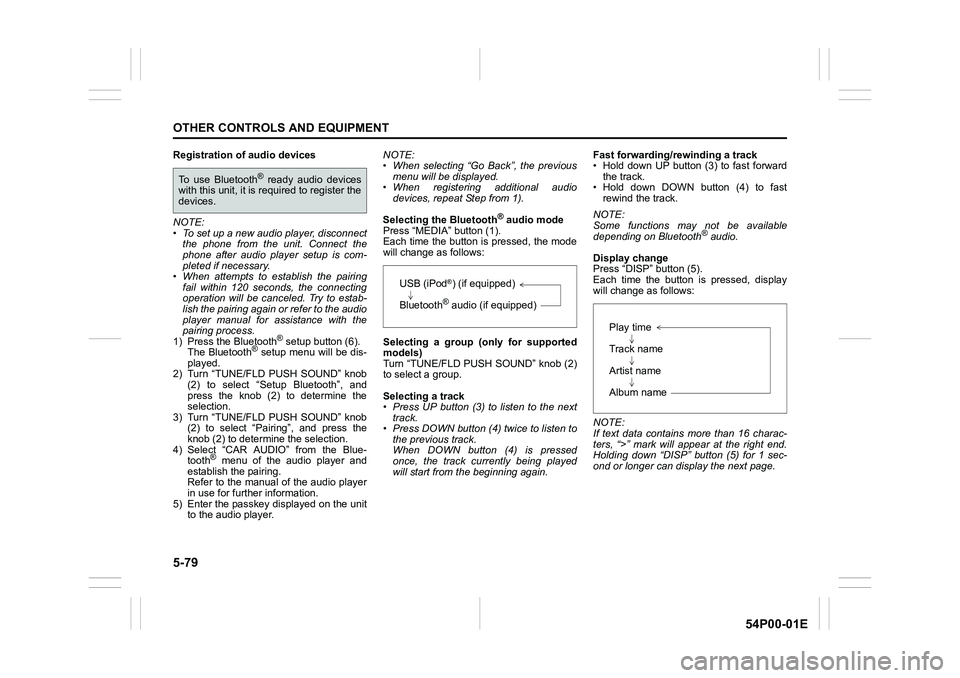
Press “MEDIA” button (1).
Each time the button is pressed, the mode
will change as follows:
Selecting a group (only for supported
models)
Turn “TUNE/FLD PUSH SOUND” knob (2)
to select a group.
Selecting a track
• Press UP button (3) to listen to the next
track.
• Press DOWN button (4) twice to listen to
the previous track.
When DOWN button (4) is pressed
once, the track currently being played
will start from the beginning again.Fast forwarding/rewinding a track
• Hold down UP button (3) to fast forward
the track.
• Hold down DOWN button (4) to fast
rewind the track.
NOTE:
Some functions may not be available
depending on Bluetooth
® audio.
Display change
Press “DISP” button (5).
Each time the button is pressed, display
will change as follows:
NOTE:
If text data contains more than 16 charac-
ters, “>” mark will appear at the right end.
Holding down “DISP” button (5) for 1 sec-
ond or longer can display the next page.
To use Bluetooth® ready audio devices
with this unit, it is required to register the
devices.
USB (iPod®) (if equipped)
Bluetooth
® audio (if equipped)
Play time
Track name
Artist name
Album name
Page 322 of 482
5-80
OTHER CONTROLS AND EQUIPMENT
54P00-01E
Selection of audio device (Select Audio)
Follow the instructions below to select an
audio device to be paired with from the
registered audio devices.
1) Press the Bluetooth
® setup button (6).
The Bluetooth® setup menu will be dis-
played.
2) Turn “TUNE/FLD PUSH SOUND” knob
(2) to select “Setup Bluetooth”, and
press the knob (2) to determine the
selection.
3) Turn “TUNE/FLD PUSH SOUND” knob
(2) to select “List Audio”, and press the
knob (2) to determine the selection.
4) Turn “TUNE/FLD PUSH SOUND” knob
(2) to select an audio device to be
used, and press the knob (2) to deter-
mine the selection.
5) Turn “TUNE/FLD PUSH SOUND” knob
(2) to select “Select”, and press the
knob (2) to determine the selection.
6) Turn “TUNE/FLD PUSH SOUND” knob
(2) to select “Confirm”, and press the
knob (2) to complete the pairing.
NOTE:
• When selecting “Go Back”, the previous
menu will be displayed.
• The phone will be disconnected when
the Bluetooth
® ready audio device is
selected.List of audio devices (List Audio)
Follow the instructions below to display the
names of the registered audio devices in
sequence.
1) Press the Bluetooth
® setup button (6).
The Bluetooth® setup menu will be dis-
played.
2) Turn “TUNE/FLD PUSH SOUND” knob
(2) to select “Setup Bluetooth”, and
press the knob (2) to determine the
selection.
3) Turn “TUNE/FLD PUSH SOUND” knob
(2) to select “List Audio”, and press the
knob (2) to determine the selection.
The names of registered audio devices
will be displayed in sequence.
NOTE:
When selecting “Go Back”, the previous
menu will be displayed.
Passkey setting (Set Passkey)
Follow the instructions below to set the
security number (Passkey).
1) Press the Bluetooth
® setup button (6).
The Bluetooth® setup menu will be dis-
played.
2) Turn “TUNE/FLD PUSH SOUND” knob
(2) to select “Setup Bluetooth”, and
press the knob (2) to determine the
selection.
3) Turn “TUNE/FLD PUSH SOUND” knob
(2) to select “Passkey”, and press the
knob (2) to determine the selection.4) Turn “TUNE/FLD PUSH SOUND” knob
(2) to select “New Passkey”, and press
the knob (2) to determine the selection.
5) Press or turn “TUNE/FLD PUSH
SOUND” knob (2) to select “Confirm”.
6) Turn “TUNE/FLD PUSH SOUND” knob
(2) to select a number for the first digit,
and press the knob (2) to determine the
selection. Select and determine num-
bers for the second, third and fourth
digits in order in the same manner.
When not entering up to the eighth
digit, enter blanks for the successive
digits.
7) Turn “TUNE/FLD PUSH SOUND” knob
(2) to determine the passkey setting.
NOTE:
When selecting “Go Back”, the previous
menu will be displayed.
Page 323 of 482
5-81
OTHER CONTROLS AND EQUIPMENT
54P00-01E
Deletion of audio device information
(Delete Audio)
Follow the instructions below to delete the
registered audio device information.
1) Press the Bluetooth
® setup button (6).
The Bluetooth® setup menu will be dis-
played.
2) Turn “TUNE/FLD PUSH SOUND” knob
(2) to select “Setup Bluetooth”, and
press the knob (2) to determine the
selection.
3) Turn “TUNE/FLD PUSH SOUND” knob
(2) to select “List Audio”, and press the
knob (2) to determine the selection.
4) Turn “TUNE/FLD PUSH SOUND” knob
(2) to select an audio device to be
deleted, and press the knob (2) to
determine the selection.
5) Turn “TUNE/FLD PUSH SOUND” knob
(2) to select “Delete”, and press the
knob (2) to determine the selection.
6) Turn “TUNE/FLD PUSH SOUND” knob
(2) to select “Delete?”, and press the
knob (2) to determine the selection.
7) Turn “TUNE/FLD PUSH SOUND” knob
(2) to select “Confirm”, and press the
knob (2) to complete the deletion.
NOTE:
When selecting “Go Back”, the previous
menu will be displayed.
Disclaimer for Bluetooth® function
• Depending on compatibility of mobile
phone models, no Bluetooth® function
can be used, or some Bluetooth® func-
tions may be restricted.
• Connectivity or voice quality may get
affected depending on circumstances.
• After the ignition switch is turned to “ON”
position or the engine switch is pressed
to change the ignition mode to “ON”, the
audio system takes few seconds to
detect and connect to the Bluetooth
®
device (if already paired).
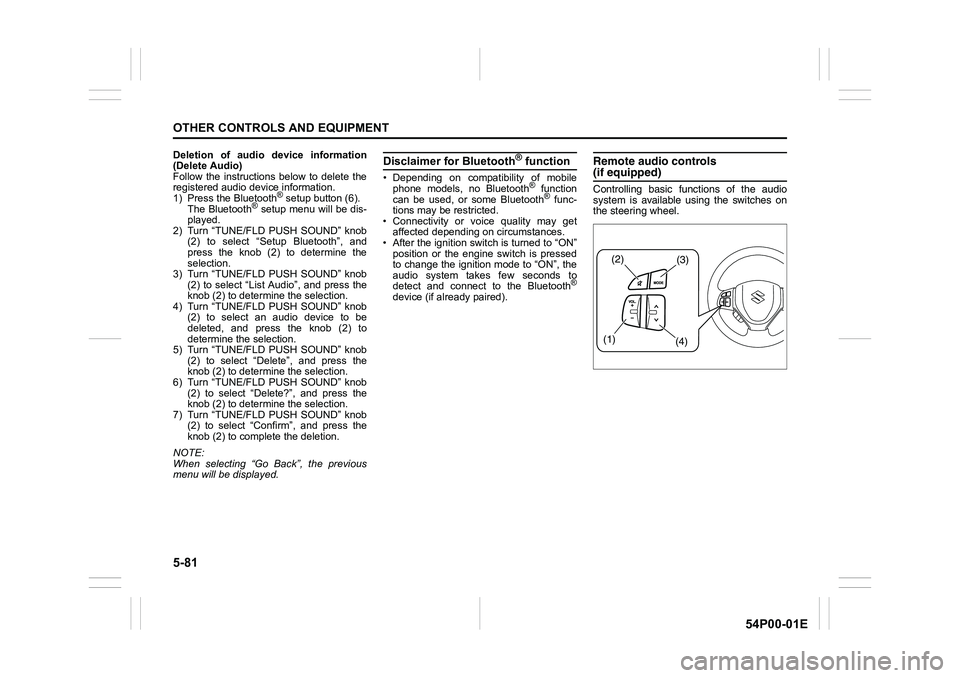
Remote audio controls(if equipped)
Controlling basic functions of the audio
system is available using the switches on
the steering wheel.
(2)(3)
(1)
(4)
Page 329 of 482
5-87
OTHER CONTROLS AND EQUIPMENT
54P00-01E
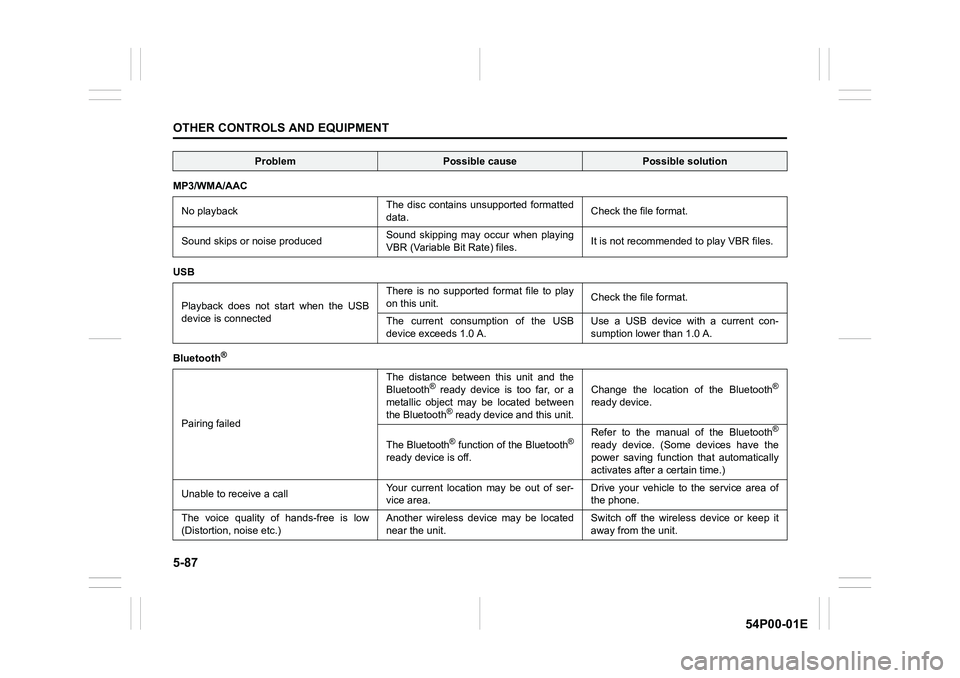
MP3/WMA/AAC
No playbackThe disc contains unsupported formatted
data. Check the file format.
Sound skips or noise producedSound skipping may occur when playing
VBR (Variable Bit Rate) files.It is not recommended to play VBR files.
USB
Playback does not start when the USB
device is connectedThere is no supported format file to play
on this unit.Check the file format.
The current consumption of the USB
device exceeds 1.0 A.Use a USB device with a current con-
sumption lower than 1.0 A.
Bluetooth
®
Pairing failedThe distance between this unit and the
Bluetooth
® ready device is too far, or a
metallic object may be located between
the Bluetooth
® ready device and this unit.Change the location of the Bluetooth
®
ready device.
The Bluetooth
® function of the Bluetooth®
ready device is off. Refer to the manual of the Bluetooth
®
ready device. (Some devices have the
power saving function that automatically
activates after a certain time.)
Unable to receive a callYour current location may be out of ser-
vice area. Drive your vehicle to the service area of
the phone.
The voice quality of hands-free is low
(Distortion, noise etc.)Another wireless device may be located
near the unit.Switch off the wireless device or keep it
away from the unit.
ProblemPossible causePossible solution
Page 331 of 482
5-89
OTHER CONTROLS AND EQUIPMENT
54P00-01E
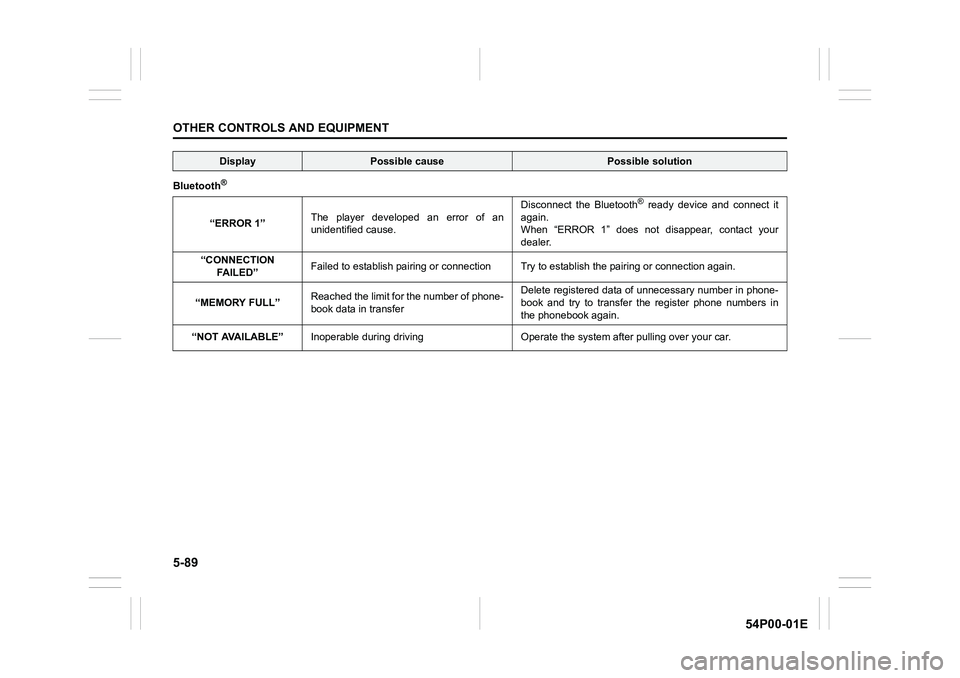
Bluetooth®
“ERROR 1”The player developed an error of an
unidentified cause.Disconnect the Bluetooth
® ready device and connect it
again.
When “ERROR 1” does not disappear, contact your
dealer.
“CONNECTION
FA I L E D ”Failed to establish pairing or connection Try to establish the pairing or connection again.
“MEMORY FULL”Reached the limit for the number of phone-
book data in transferDelete registered data of unnecessary number in phone-
book and try to transfer the register phone numbers in
the phonebook again.
“NOT AVAILABLE”Inoperable during driving Operate the system after pulling over your car.
DisplayPossible causePossible solution
Page 364 of 482
7-26
INSPECTION AND MAINTENANCE
54P00-01E
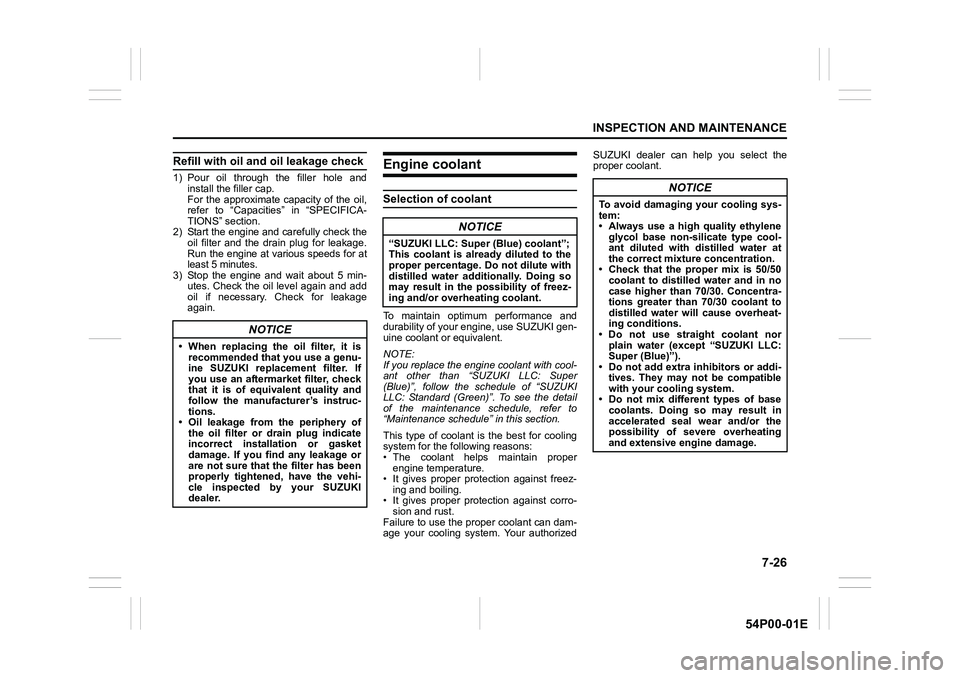
Refill with oil and oil leakage check
1) Pour oil through the filler hole and
install the filler cap.
For the approximate capacity of the oil,
refer to “Capacities” in “SPECIFICA-
TIONS” section.
2) Start the engine and carefully check the
oil filter and the drain plug for leakage.
Run the engine at various speeds for at
least 5 minutes.
3) Stop the engine and wait about 5 min-
utes. Check the oil level again and add
oil if necessary. Check for leakage
again.
Engine coolant
Selection of coolant
To maintain optimum performance and
durability of your engine, use SUZUKI gen-
uine coolant or equivalent.
NOTE:
If you replace the engine coolant with cool-
ant other than “SUZUKI LLC: Super
(Blue)”, follow the schedule of “SUZUKI
LLC: Standard (Green)”. To see the detail
of the maintenance schedule, refer to
“Maintenance schedule” in this section.
This type of coolant is the best for cooling
system for the following reasons:
• The coolant helps maintain proper
engine temperature.
• It gives proper protection against freez-
ing and boiling.
• It gives proper protection against corro-
sion and rust.
Failure to use the proper coolant can dam-
age your cooling system. Your authorizedSUZUKI dealer can help you select the
proper coolant.
NOTICE
• When replacing the oil filter, it is
recommended that you use a genu-
ine SUZUKI replacement filter. If
you use an aftermarket filter, check
that it is of equivalent quality and
follow the manufacturer’s instruc-
tions.
• Oil leakage from the periphery of
the oil filter or drain plug indicate
incorrect installation or gasket
damage. If you find any leakage or
are not sure that the filter has been
properly tightened, have the vehi-
cle inspected by your SUZUKI
dealer.
NOTICE
“SUZUKI LLC: Super (Blue) coolant”;
This coolant is already diluted to the
proper percentage. Do not dilute with
distilled water additionally. Doing so
may result in the possibility of freez-
ing and/or overheating coolant.
NOTICE
To avoid damaging your cooling sys-
tem:
• Always use a high quality ethylene
glycol base non-silicate type cool-
ant diluted with distilled water at
the correct mixture concentration.
• Check that the proper mix is 50/50
coolant to distilled water and in no
case higher than 70/30. Concentra-
tions greater than 70/30 coolant to
distilled water will cause overheat-
ing conditions.
• Do not use straight coolant nor
plain water (except “SUZUKI LLC:
Super (Blue)”).
• Do not add extra inhibitors or addi-
tives. They may not be compatible
with your cooling system.
• Do not mix different types of base
coolants. Doing so may result in
accelerated seal wear and/or the
possibility of severe overheating
and extensive engine damage.
Page 365 of 482
7-27
INSPECTION AND MAINTENANCE
54P00-01E
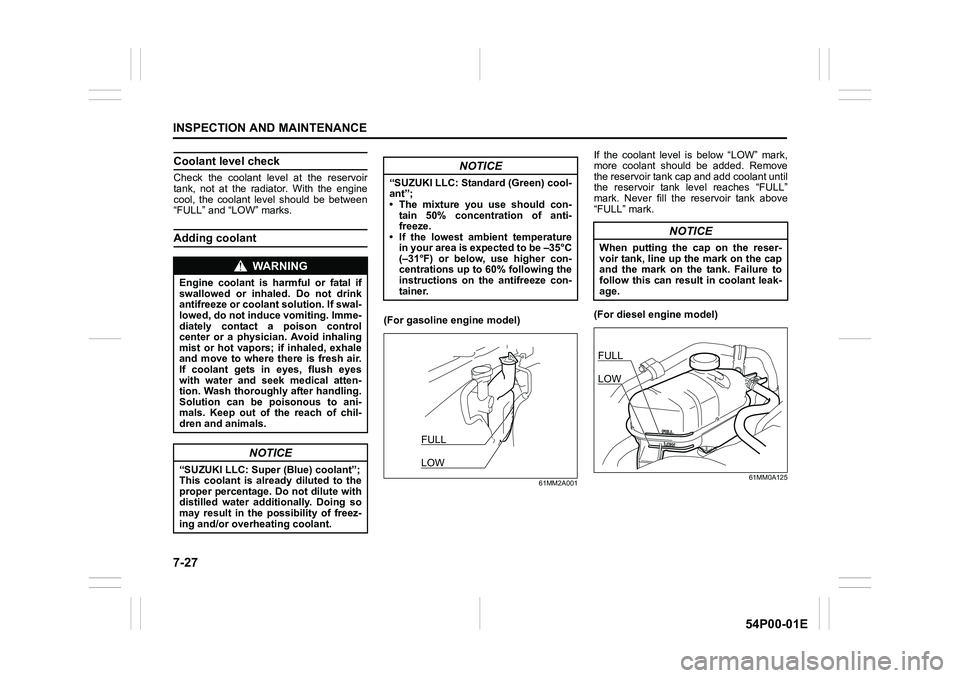
Coolant level check
Check the coolant level at the reservoir
tank, not at the radiator. With the engine
cool, the coolant level should be between
“FULL” and “LOW” marks.
Adding coolant
(For gasoline engine model)
61MM2A001
If the coolant level is below “LOW” mark,
more coolant should be added. Remove
the reservoir tank cap and add coolant until
the reservoir tank level reaches “FULL”
mark. Never fill the reservoir tank above
“FULL” mark.
(For diesel engine model)
61MM0A125
WA R N I N G
Engine coolant is harmful or fatal if
swallowed or inhaled. Do not drink
antifreeze or coolant solution. If swal-
lowed, do not induce vomiting. Imme-
diately contact a poison control
center or a physician. Avoid inhaling
mist or hot vapors; if inhaled, exhale
and move to where there is fresh air.
If coolant gets in eyes, flush eyes
with water and seek medical atten-
tion. Wash thoroughly after handling.
Solution can be poisonous to ani-
mals. Keep out of the reach of chil-
dren and animals.
NOTICE
“SUZUKI LLC: Super (Blue) coolant”;
This coolant is already diluted to the
proper percentage. Do not dilute with
distilled water additionally. Doing so
may result in the possibility of freez-
ing and/or overheating coolant.
NOTICE
“SUZUKI LLC: Standard (Green) cool-
ant”;
• The mixture you use should con-
tain 50% concentration of anti-
freeze.
• If the lowest ambient temperature
in your area is expected to be –35°C
(–31°F) or below, use higher con-
centrations up to 60% following the
instructions on the antifreeze con-
tainer.
FULL
LOW
NOTICE
When putting the cap on the reser-
voir tank, line up the mark on the cap
and the mark on the tank. Failure to
follow this can result in coolant leak-
age.
FULL
LOW