handle SUZUKI IGNIS 2017 User Guide
[x] Cancel search | Manufacturer: SUZUKI, Model Year: 2017, Model line: IGNIS, Model: SUZUKI IGNIS 2017Pages: 505, PDF Size: 8.36 MB
Page 55 of 505
2-32
BEFORE DRIVING
75RM4-01E
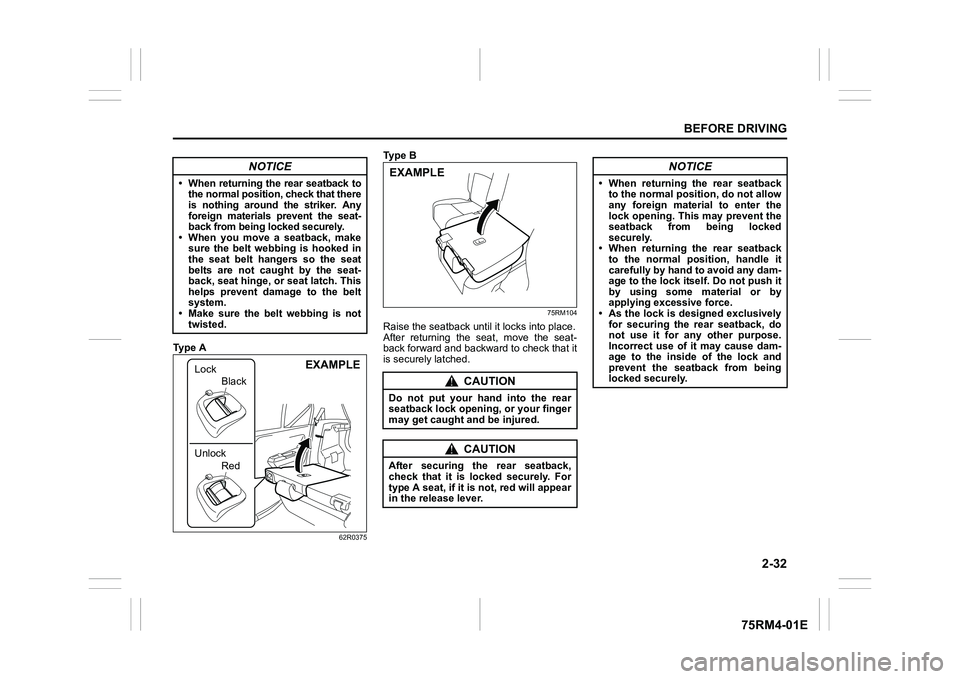
Ty p e A
62R0375
Ty p e B
75RM104
Raise the seatback until it locks into place.
After returning the seat, move the seat-
back forward and backward to check that it
is securely latched.
NOTICE
• When returning the rear seatback to the normal position, check that there
is nothing around the striker. Any
foreign materials prevent the seat-
back from being locked securely.
• When you move a seatback, make sure the belt webbing is hooked in
the seat belt hangers so the seat
belts are not caught by the seat-
back, seat hinge, or seat latch. This
helps prevent damage to the belt
system.
• Make sure the belt webbing is not
twisted.
EXAMPLE
Lock
Unlock
Red
Black
CAUTION
Do not put your hand into the rear
seatback lock opening, or your finger
may get caught and be injured.
CAUTION
After securing the rear seatback,
check that it is locked securely. For
type A seat, if it is not, red will appear
in the release lever.EXAMPLE
NOTICE
• When returning the rear seatback
to the normal position, do not allow
any foreign materi al to enter the
lock opening. This may prevent the
seatback from being locked
securely.
• When returning the rear seatback to the normal position, handle it
carefully by hand to avoid any dam-
age to the lock itself. Do not push it
by using some material or by
applying excessive force.
• As the lock is designed exclusively
for securing the rear seatback, do
not use it for any other purpose.
Incorrect use of it may cause dam-
age to the inside of the lock and
prevent the seatback from being
locked securely.
Page 155 of 505
3-2
OPERATING YOUR VEHICLE
75RM4-01E
NOTE:
It is normal for water to drip from the air
conditioning system after use.
4) Check that the hood is fully closed andlatched.
5) Check the headlights, turn signal lights, brake lights and horn for proper opera-
tion.
6) Adjust the seat and head restraint.
7) Check the brake pedal and the parking brake lever.
8) Adjust the mirrors.
9) Check that you and all passengers have properly fastened your seat belts.
10)Check that all warning lights come on as the ignition switch is turned to “ON”
position or the engine switch is pressed
to change the ignition mode to ON.
11)Check all gauges.
12)Check that the brake system warning light turns off when the parking brake is
released.
Once a week, or each time you fill your fuel
tank, perform the following under-hood
checks:
1) Engine oil level
2) Coolant level
3) Brake fluid level
4) Lead-acid battery solution level
5) Windshield washer fluid level
6) Hood latch operation Pull the hood release handle inside the
vehicle. Check that you cannot open the hood all the way without releasing
the secondary latch. Close the hood
securely after checking for proper latch
operation. See the item “All latches,
hinges and locks” of “Chassis, body
and others” in “Maintenance schedule”
in the “INSPECTION AND MAINTE-
NANCE” section for lubrication sched-
ule.
Once a month, or each time you fill your
fuel tank, check the tire pressure using a
tire pressure gauge. Also check the tire
pressure of the spare tire.
Engine oil consumptionIt is normal for the engine to consume
some engine oil during normal vehicle
operation.
The amount of engine oil consumption
depends on viscosity and quality of the oil
and your driving conditions.
More oil is consumed during high-speed
driving and when there is frequent acceler-
ation and deceleration. Under high loads,
your engine also will consume more oil.
A new engine also consumes more oil,
since its pistons, piston rings and cylinder
walls have not yet become conditioned.
New engines reach the normal level of oil
consumption only after approximately
5000 km (3000 miles) driving.
Oil consumption:
Max. 1.0 L per 1000 km
(1 Qt. per 600 miles)
When judging the amount of oil consump-
tion, note that the oil may become diluted
and it is difficult to judge the accurate oil
level.
As an example, if a vehicle is used for
repeated short trips, and consumes a nor-
mal amount of oil, the dipstick may not
show any drop in the oil level at all, even
after 1000 km (600 miles) or more of driv-
ing. This is because the oil gradually
becomes diluted with fuel or moisture,
WA R N I N G
Check that the hood is fully closed
and latched before d riving. If it is not,
it can fly up unexpectedly during
driving, obstructing your view and
resulting in an accident.
Page 216 of 505

3-63OPERATING YOUR VEHICLE
75RM4-01E
Handling stereo camera
62R0114
(1) Stereo camera
(1)
WA R N I N G
The detection performance of the ste-
reo camera has limits and the stereo
camera cannot detect all vehicles,
obstacles or partition lines. Do not
rely excessively on the system and
always drive in a safe manner.
• Observe the following instructionsin order to keep the stereo camera
functioning properly. If mishandled,
the stereo camera cannot accu-
rately detect an obstacle or parti-
tion lines in front of you, the
system will not fu nction properly
and unexpected accidents may
occur.
– Do not touch the lens of the ste- reo camera.
– Do not clean the lens of the ste- reo camera by yourself.
– Do not strike the body of, or any surrounding parts of the stereo
camera.
– Do not remove or disassemble the stereo camera.
– Do not stick or affix anything to
the lens of the stereo camera, not
even clear items. (Continued)
WA R N I N G
(Continued)
• When the surrounding parts of the
stereo camera are deformed or
damaged, or the windshield in front
of the stereo camera is cracked
because of an accident, the stereo
camera cannot detect the front
obstacles or partition lines prop-
erly. If driving with these damaged
parts, the dual camera brake sup-
port will not function properly and
unexpected accidents may occur.
Operate the dual camera brake
support OFF switch to turn off the
dual camera brake support, and
ask your SUZUKI dealer to have
them inspected. (Continued)
Page 236 of 505
3-83OPERATING YOUR VEHICLE
75RM4-01E
Grip control system (if equipped)When one side of the tires is slipping on
slippery road surfaces such as a snow-cov-
ered road and it is difficult to start the vehi-
cle, the grip control system controls the
driving force and brake force through the
ESP
® system, and assists you in smooth
starting.
In such cases as when both of the tires are
slipping, the system may also assist start-
ing.
NOTE:
• When both of the tires are slipping, thegrip control system may work, however,
it works especially effective when one
side of the tires is slipping.
• You may hear an operation sound when you start the engine or after the vehicle
begins to move. This means that the grip
control system is in the self-check mode.
This sound does not indicate a malfunc-
tion.
• When the grip control system is working with high engine revolutions, you may
feel changing the engine speed or vehi-
cle pulsating. This is normal. Grip control switch
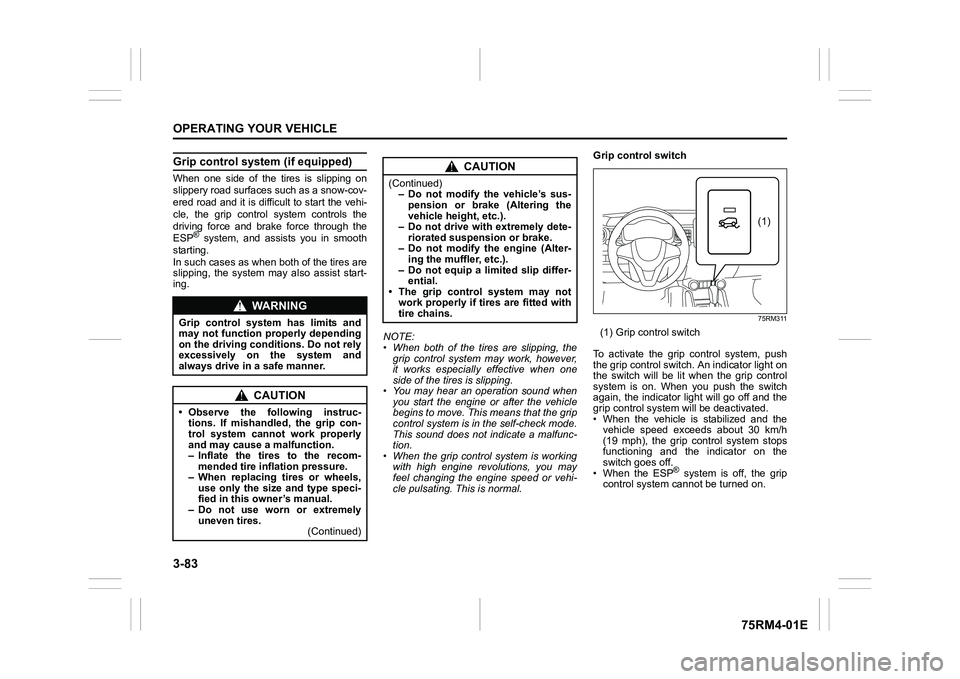
75RM311
(1) Grip control switch
To activate the grip control system, push
the grip control switch. An indicator light on
the switch will be lit when the grip control
system is on. When you push the switch
again, the indicator light will go off and the
grip control system will be deactivated.
• When the vehicle is stabilized and the vehicle speed exceeds about 30 km/h
(19 mph), the grip control system stops
functioning and the indicator on the
switch goes off.
• When the ESP
® system is off, the grip
control system cannot be turned on.
WA R N I N G
Grip control system has limits and
may not function properly depending
on the driving conditions. Do not rely
excessively on the system and
always drive in a safe manner.
CAUTION
• Observe the following instruc- tions. If mishandled, the grip con-
trol system cannot work properly
and may cause a malfunction.
– Inflate the tires to the recom-mended tire inflation pressure.
– When replacing tires or wheels, use only the size and type speci-
fied in this owner’s manual.
– Do not use worn or extremely uneven tires. (Continued)
CAUTION
(Continued)– Do not modify the vehicle’s sus-
pension or brake (Altering the
vehicle heig ht, etc.).
– Do not drive with extremely dete-
riorated suspension or brake.
– Do not modify the engine (Alter- ing the muffler, etc.).
– Do not equip a limited slip differ- ential.
• The grip control system may not
work properly if tires are fitted with
tire chains.
(1)
Page 257 of 505
5-2
OTHER CONTROLS AND EQUIPMENT
75RM4-01E
To reinstall the fuel filler cap:
1) Turn the cap clockwise until you hearseveral clicks.
2) Close the fuel filler door.
Engine hood
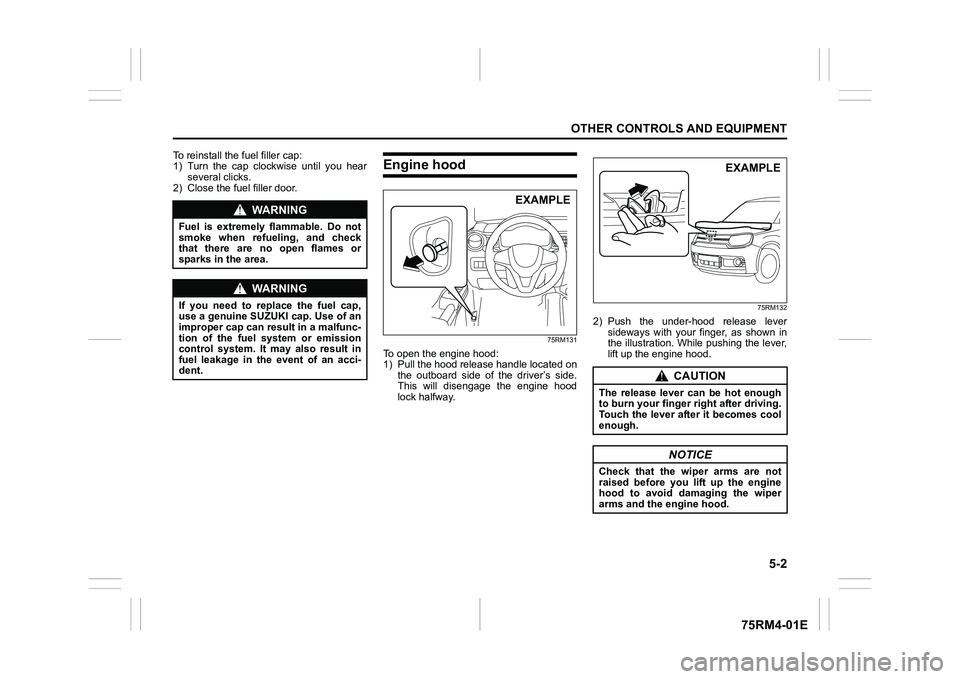
75RM131
To open the engine hood:
1) Pull the hood release handle located on the outboard side of the driver’s side.
This will disengage the engine hood
lock halfway.
75RM132
2) Push the under-hood release leversideways with your finger, as shown in
the illustration. While pushing the lever,
lift up the engine hood.
WA R N I N G
Fuel is extremely flammable. Do not
smoke when refueling, and check
that there are no open flames or
sparks in the area.
WA R N I N G
If you need to replace the fuel cap,
use a genuine SUZUKI cap. Use of an
improper cap can result in a malfunc-
tion of the fuel system or emission
control system. It may also result in
fuel leakage in the event of an acci-
dent.
EXAMPLE
CAUTION
The release lever can be hot enough
to burn your finger right after driving.
Touch the lever after it becomes cool
enough.
NOTICE
Check that the wiper arms are not
raised before you lift up the engine
hood to avoid damaging the wiper
arms and the engine hood.
EXAMPLE
Page 259 of 505
5-4
OTHER CONTROLS AND EQUIPMENT
75RM4-01E
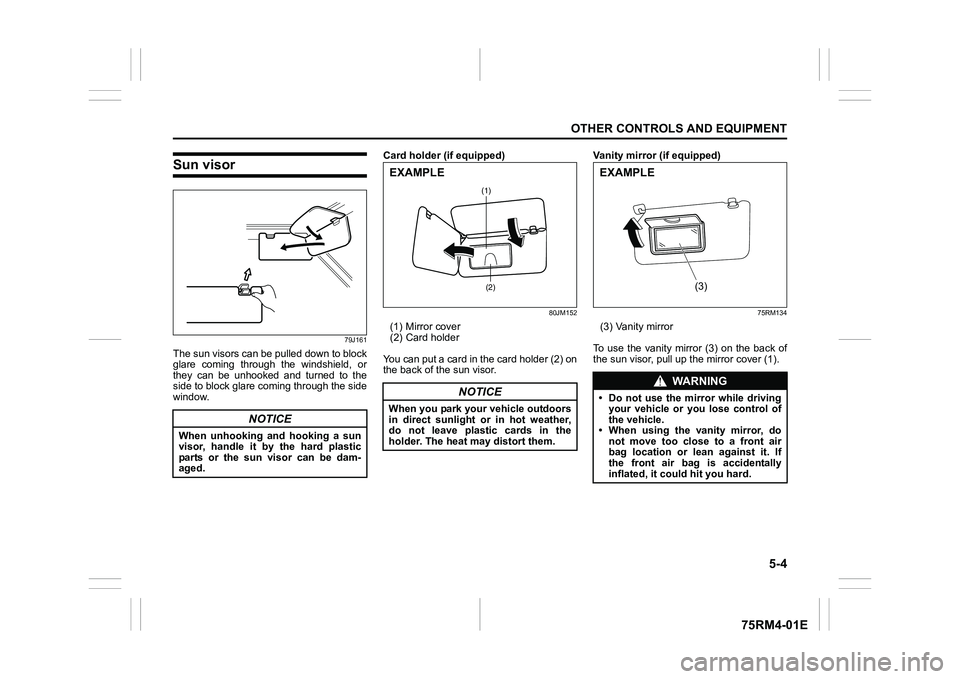
Sun visor
79J161
The sun visors can be pulled down to block
glare coming through the windshield, or
they can be unhooked and turned to the
side to block glare coming through the side
window.Card holder (if equipped)
80JM152
(1) Mirror cover
(2) Card holder
You can put a card in the card holder (2) on
the back of the sun visor. Vanity mirror (if equipped)
75RM134
(3) Vanity mirror
To use the vanity mirror (3) on the back of
the sun visor, pull up the mirror cover (1).
NOTICE
When unhooking and hooking a sun
visor, handle it by the hard plastic
parts or the sun visor can be dam-
aged.
NOTICE
When you park your vehicle outdoors
in direct sunlight or in hot weather,
do not leave plastic cards in the
holder. The heat may distort them.
(1)
(2)
EXAMPLE
WA R N I N G
• Do not use the mirror while driving your vehicle or you lose control of
the vehicle.
• When using the vanity mirror, do not move too close to a front air
bag location or lean against it. If
the front air bag is accidentally
inflated, it could hit you hard.
(3)
EXAMPLE
Page 268 of 505
5-13OTHER CONTROLS AND EQUIPMENT
75RM4-01E
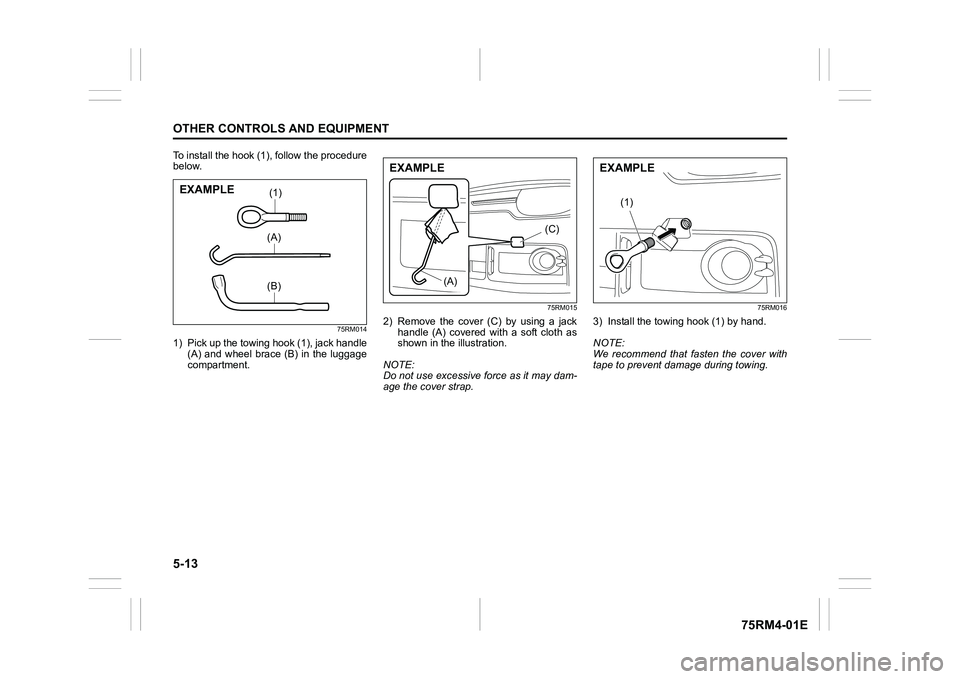
To install the hook (1), follow the procedure
below.
75RM014
1) Pick up the towing hook (1), jack handle(A) and wheel brace (B) in the luggage
compartment.
75RM015
2) Remove the cover (C) by using a jackhandle (A) covered with a soft cloth as
shown in the illustration.
NOTE:
Do not use excessive force as it may dam-
age the cover strap.
75RM016
3) Install the towing hook (1) by hand.
NOTE:
We recommend that fasten the cover with
tape to prevent damage during towing.
(1)(A)(B)
EXAMPLE
(A) (C)
EXAMPLE
(1)
EXAMPLE
Page 290 of 505
5-35OTHER CONTROLS AND EQUIPMENT
75RM4-01E
52D275
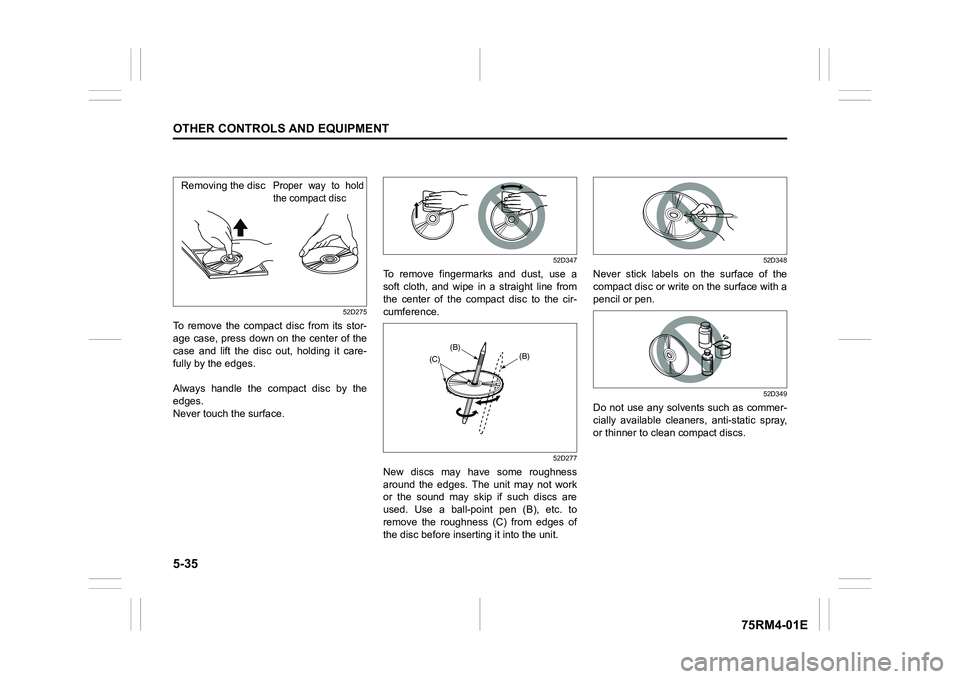
To remove the compact disc from its stor-
age case, press down on the center of the
case and lift the disc out, holding it care-
fully by the edges.
Always handle the compact disc by the
edges.
Never touch the surface.
52D347
To remove fingermarks and dust, use a
soft cloth, and wipe in a straight line from
the center of the compact disc to the cir-
cumference.
52D277
New discs may have some roughness
around the edges. The unit may not work
or the sound may skip if such discs are
used. Use a ball-point pen (B), etc. to
remove the roughness (C) from edges of
the disc before inserting it into the unit.
52D348
Never stick labels on the surface of the
compact disc or write on the surface with a
pencil or pen.
52D349
Do not use any solvents such as commer-
cially available cleaners, anti-static spray,
or thinner to clean compact discs.
Removing the disc
Proper way to hold
the compact disc
(B)(B)
(C)
Page 345 of 505
6-4
VEHICLE LOADING AND TOWING
75RM4-01E
Additional trailer towing warnings
WA R N I N G
Connect trailer lights and hook up
safety chains every time you tow.
NOTICE
Because towing a trailer puts addi-
tional stress on your vehicle, more
frequent maintenance will be
required than under normal driving
conditions. Follow the schedule in
“Maintenance recommended under
severe driving conditions”.
WA R N I N G
Your vehicle should be handled in a
different way when towing a trailer.
For the safety of yourself and others,
observe the following precautions:
• Practice turning, stopping, andreversing before you begin towing
a trailer in traffi c. Do not tow a
trailer in traffic until you are confi-
dent that you can handle the vehi-
cle and trailer safely.
• Never exceed towing speed limits
or 80 km/h (50 mph), whichever is
lower.
• Never drive at a speed that causes shaking or swaying of the trailer. If
you notice even the slightest sign
of shaking or sw aying, slow down.
• When roads are wet, slippery or rough, drive at a slower speed than
you would on dry or smooth roads.
Failure to slow down when road
conditions are bad can result in
loss of control.
• Always have someone guide you when reversing.
(Continued)
WA R N I N G
(Continued)
• Allow adequate stopping distance.Stopping distance is increased
when you tow a trailer. For each 16
km/h (10 mph) of speed, allow at
least one vehicle and trailer length
between you and the vehicle
ahead. Allow a greater stopping
distance if roads are wet or slip-
pery.
• If the trailer has over-run brakes,
apply the brakes gradually to avoid
snatching caused by the trailer
wheels locking.
• Slow down before corners and maintain a steady speed while cor-
nering. Deceleration or accelera-
tion while cornering can result in
loss of control. Remember that a
larger than normal turning radius is
needed because the trailer wheels
will be closer than vehicle wheels
to the inside of the turn.
• Avoid sudden acceleration and stopping of the vehicle. Do not
make quick maneuvers unless they
are necessary.
• Slow down in cross winds and be
prepared for gusts of wind from
large passing vehicles. (Continued)
Page 374 of 505
7-25INSPECTION AND MAINTENANCE
75RM4-01E
It is important to keep the engine oil at the
correct level for proper lubrication of your
vehicle’s engine. Check the oil level with
the vehicle on a level surface. The oil level
indication may be inaccurate if the vehicle
is on a slope. The oil level should be
checked either before starting the engine
or at least 5 minutes after stopping the
engine.
The handle of the engine oil dipstick is col-
ored with yellow for ea sy identification.
Pull out the oil dipstick, wipe oil off with a
clean cloth, insert the dipstick all the way
into the engine, and then remove it again.
The oil on the stick should be between the
upper and lower limits shown on the stick.
If the oil level indication is near the lower
limit, add enough oil to raise the level to
the upper limit.
Refilling
81A147
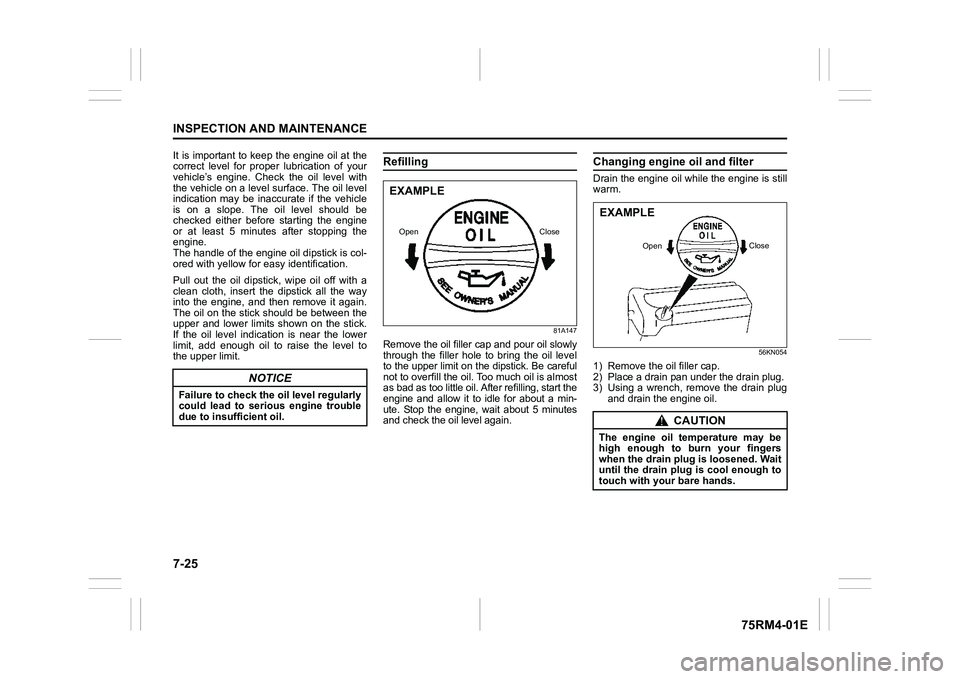
Remove the oil filler cap and pour oil slowly
through the filler hole to bring the oil level
to the upper limit on the dipstick. Be careful
not to overfill the oil. Too much oil is almost
as bad as too little oil. A fter refilling, start the
engine and allow it to idle for about a min-
ute. Stop the engine, wait about 5 minutes
and check the oil level again.
Changing engine oil and filterDrain the engine oil while the engine is still
warm.
56KN054
1) Remove the oil filler cap.
2) Place a drain pan under the drain plug.
3) Using a wrench, remove the drain plug and drain the engine oil.
NOTICE
Failure to check the oil level regularly
could lead to serious engine trouble
due to insufficient oil.
EXAMPLEOpen Close
CAUTION
The engine oil temperature may be
high enough to burn your fingers
when the drain plug is loosened. Wait
until the drain plug is cool enough to
touch with your bare hands.EXAMPLE
Open Close