CAB SUZUKI IGNIS 2018 User Guide
[x] Cancel search | Manufacturer: SUZUKI, Model Year: 2018, Model line: IGNIS, Model: SUZUKI IGNIS 2018Pages: 505, PDF Size: 8.36 MB
Page 201 of 505
3-48
OPERATING YOUR VEHICLE
75RM4-01E
Eco-Cool (if equipped)When driving while using the air condi-
tioner, cold air is stored in the cooling stor-
age medium of the air conditioner unit.
Since stored cold air will be blown into the
vehicle when the engine has been stopped
automatically by the ENG A-STOP system,
the rise of the inside temperature can be
reduced when the air conditioner is not
running.
For the automatic heating and air condi-
tioning system, reducing the rise of the
inside temperature increases the length of
time that the engine is stopped automati-
cally, leading to improved fuel economy.
NOTE:
Sufficient cold air may not be stored if the
vehicle has not been running for very long
or in a traffic jam. The effect varies
depending on the outside temperature and
the air conditioner settings.
I/S AC Settings (if equipped)• When using the automatic heating andair conditioning system (if equipped),
you can select one of the following set-
tings via the setting mode of the informa-
tion display.
– Standard
– Economy
–Comfort
For details on how to use the information
display, refer to “Information display” in
the “BEFORE DRIVING” section.
• When “Economy” is selected, engine auto stop condition is eased, compared
with “Standard”. Engine auto stop condi-
tion will occur more f requently, the stop
time will be longer, leading to reduction
of fuel consumption.
• When “Comfort” is sel ected, engine auto
stop condition becomes severe, com-
pared with “Standard”. Engine auto stop
condition will occur less frequently, the
stop time will be shorter, leading to more
comfortable cabin condition by air condi-
tioner.
Cruise control (if equipped)The cruise control system allows you to
maintain a steady speed without keeping
your foot on the accelerator pedal. The
controls for operating the cruise control
system are on the steering wheel.
You can use the cruise control system
under the following conditions:
• For manual transaxle vehicle, the gear position is in 3rd, 4th or 5th.
• For CVT vehicle, the select lever is in “D” position, or the gear position is in 3rd,
4th, 5th, 6th or 7th in the manual mode
(if equipped).
• For Auto Gear Shift vehicle, the select lever is in “D” position, or the gear posi-
tion is in 3rd, 4th or 5th in the manual
mode.
• The vehicle speed is about 45 km/h (28
mph) or higher.
WA R N I N G
To help avoid loss of vehicle control,
do not use the cruise control system
when driving in heavy traffic, on slip-
pery or winding roads, or on steep
downhills.
Page 252 of 505
4-5DRIVING TIPS
75RM4-01E
Tire chainsTire chains should only be used if they are
needed to increase traction or are required
by law. Check that the chains you use are
the correct size for your vehicle’s tires.
Also check that there is enough clearance
between the fenders and the chains as
installed on the tires.
Install the chains on the front tires tightly,
according to the chain manufacturer’s
instructions. Retighten the chains after
driving about 1.0 km (1/2 mile) if neces-
sary. With the chains installed, drive slowly.
Stuck vehicleIf your vehicle gets stuck in snow, mud or
sand, follow the directions below:
1) Shift the transaxle back and forthbetween a forward range (or first gear
for manual transaxle/Auto Gear Shift)
and reverse. This will create a rocking
motion which may give you enough
momentum to free the vehicle. Press
gently on the accelerator to keep wheel
spinning to a minimum wheel rpm.
Remove your foot from the accelerator
while shifting.
Do not race the engine. Excessive
wheel spin will cause the tires to dig
deeper, making it more difficult to free
the vehicle.
NOTE:
If your vehicle is equipped with the ESP
®
and/or grip control system, you may have
to turn the systems off in order to spin the
wheels. 2) If your vehicle rema
ins stuck after a few
minutes of rocking, we recommend you
to consult your SUZUKI dealer or a road-
side assistance service. If a towing ser-
vice is not available in an emergency,
your vehicle may be temporarily towed by
a towing cable or chain secured to the
towing hook either on the front of the
vehicle or on the rear of the vehicle. Refer
to “Frame hooks” in the “OTHER CON-
TROLS AND EQUIPMENT” section.
NOTICE
• If you hear the chains hitting against the vehicle body while driv-
ing, stop and tighten them.
• If your vehicle is equipped with full wheel caps, remove the wheel caps
before installing the chains or the
wheel caps can be damaged by the
chain bands.
WA R N I N G
Do not allow anyone to stand near
the vehicle when you are rocking it,
and do not spin the wheels faster
than an indicated 40 km/h (25 mph)
on the speedometer. Personal injury
and/or vehicle damage may result
from spinning the wheels too fast.
NOTICE
Do not continue rocking the vehicle
for more than a few minutes. Pro-
longed rocking can cause engine
overheating or transaxle damage.
Page 293 of 505
5-38
OTHER CONTROLS AND EQUIPMENT
75RM4-01E
Information on disposal for users of waste electrical & electronic equip-ment (private households)
This symbol on the products and/or accompanying documents
means that used electrical and el ectronic products should not be
mixed with general household waste.
For proper treatment, recovery and recycling, please take these
products to designated collection points, where they will be ac cepted
on a free of charge basis. Alter natively, in some countries you may
be able to return your products to your local retailer upon the pur-
chase of an equivalent new product.
Disposing of this product correctly will help to save valuable
resources and prevent any potent ial negative effects on human
health and the environment which could otherwise arise from inap-
propriate waste handling. Please contact your local authority for fur-
ther details of your nearest d esignated collection point.
Penalties may be applicable for incorrect disposal of this wast e, in
accordance with national legislation.
For business users in the European Union
If you wish to discard electrical and electronic equipment, ple ase contact your dealer or
supplier for furt her information.
Information on disposal in other countries outside the European Union
This symbol is only vali d in the European Union.
If you wish to discard this product, please contact your local authorities or dealer and ask
for the correct met hod of disposal.
68LM560
Page 294 of 505
5-39OTHER CONTROLS AND EQUIPMENT
75RM4-01E
Part 15 of the FCC Rules
FCC ID: ACJ932AZ1601
NOTE:
Properly shielded and grounded cables
and connectors must be used for connec-
tion to host computers and/or peripherals
in order to meet FCC emission limits.The Bluetooth
® word mark and logo are
registered trademarks and are owned by
the Bluetooth SIG, Ink.
NOTE:
This equipment complies with FCC radia-
tion exposure limits set forth for uncon-
trolled equipment and meets the FCC
radio frequency (RF) Exposure Guidelines
in Supplement C to OET65. This equip-
ment has very low level of RF energy
which does not comply with maximum per-
missive exposure (MPE) evaluation. But it
is desirable that it should be installed and
operated with at least 20cm and more
between the radiator and person’s body
(excluding extremities: hands, wrists, feet
and ankles).
WA R N I N G
RF Exposure
This equipment complies with FCC
radiation exposure limits set forth for
an uncontrolled environment and
meets the FCC radio frequency (RF)
Exposure Guidelines. This equipment
has very low levels of RF energy that
it deemed to comply without maxi-
mum permissive exposure evaluation
(MPE). [But it is desirable that it
should be installed and operated
keeping the radiator at least 20 cm or
more away from person’s body.]
CAUTION
Changes or modifications not
expressly approved by the party
responsible for compliance could
void the user’s authority to operate
the equipment.
WA R N I N G
This is a class I laser product. Use of
controls or adjustments or perfor-
mance of procedures other than
those specified herein may result in
hazardous radiation exposure.
Do not open covers and do not
attempt to repair this unit by yourself.
Ask an authorized dealer for the
repair.
Page 314 of 505
5-59OTHER CONTROLS AND EQUIPMENT
75RM4-01E
Notes on USB deviceCompatible USB devices
• USB mass storage classFor details as to whether your USB
memory/USB audio is compatible with
USB mass storage class, please contact
the USB memory/USB audio manufac-
turer.
• USB standard compatibility 1.1/2.0 full
speed
• File system FAT12/16/32, VFAT
• Maximum current less than 1.0 A
• If devices such as USB hub, extension cable are connected to the audio sys-
tem, it may not be recognized. In such
case, connect the USB device directly to
the audio system.
• Devices such as MP3 player/mobile
phone/digital camera may not be recog-
nized by the audio system for playing
music. USB device connection
• When connecting a USB device, check
that the connector is pushed all the way
into the port.
• Do not leave the USB device for long periods of time inside the vehicle where
the temperature can rise too high.
• Back up any important data beforehand. We cannot accept responsibility for any
lost data.
• It is recommended not to connect a USB device that contains data files other than
MP3/WMA/AAC format.
Recording MP3/WMA/AAC files on a
USB device
• Playback or display may not be possible depending on the type of USB device in
use or the condition of the recording.
• Depending on the connected USB mem-
ory, the files may be played in different
order from the stored one. Compression formats
MP3
• Bit rate
:
MPEG1 Audio Layer III: 32 k - 320 kbps
MPEG2 Audio Layer III: 8 k - 160 kbps
MPEG2.5 Audio Layer III: 8 k - 160 kbps
• Sampling frequency
:
MPEG1 Audio Layer III: 32 k/44.1 k/48 kHz
MPEG2 Audio Layer III: 16 k/22.05 k/24 kHz
MPEG2.5 Audio Layer III: 8 k/11.025 k/12 kHzWMA (Ver. 7, Ver. 8, Ver. 9*)
• Bit rate: CBR 32 k - 320 kbps
• Sampling frequency: 32 k/44.1 k/48 kHz
* WMA 9 Professional/LossLess/Voice are
not supported.
AAC*
• Bit rate: ABR 16 k - 320 kbps
• Sampling frequency: 32 k/44.1 k/48 kHz
* Apple Lossless is not supported.
Maximum number o f files/folders
• Maximum number of files: 2500
• Maximum number of files in a folder: 255
• Maximum depth of tree structure: 8
• Maximum number of folders: 255 (Root folder is included.)
Page 318 of 505
5-63OTHER CONTROLS AND EQUIPMENT
75RM4-01E
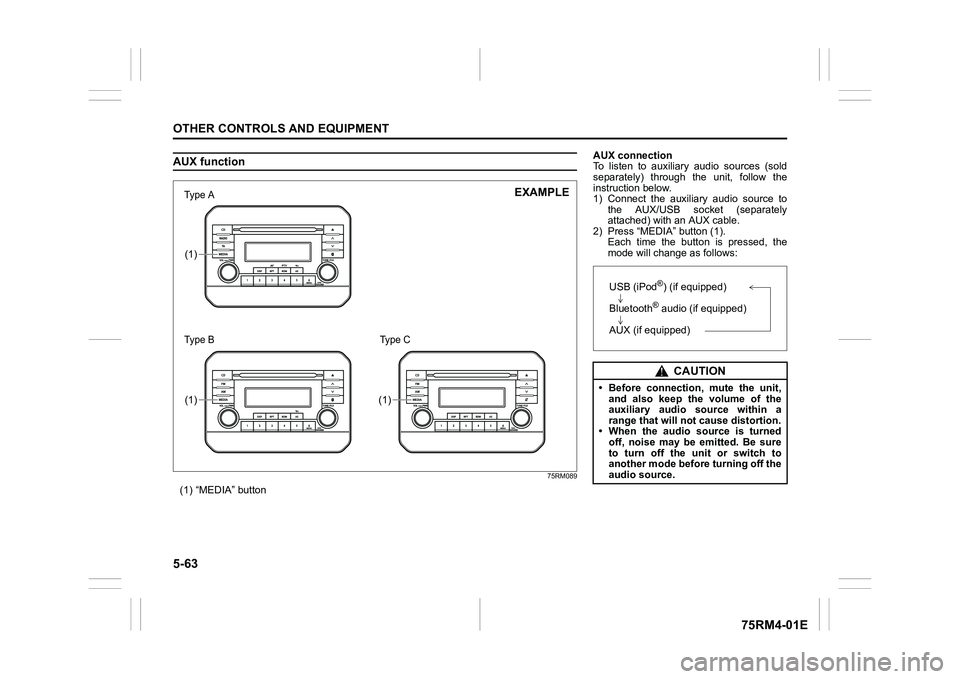
AUX function
75RM089
(1) “MEDIA” button(1)(1)
(1)
7śSHаΝ
7śSHаΠ
EXAMPLE
Type C
AUX connection
To listen to auxiliary audio sources (sold
separately) through the unit, follow the
instruction below.
1) Connect the auxiliary audio source tothe AUX/USB socket (separately
attached) with an AUX cable.
2) Press “MEDIA” button (1). Each time the button is pressed, the
mode will change as follows:
CAUTION
• Before connection, mute the unit,and also keep the volume of the
auxiliary audio source within a
range that will not cause distortion.
• When the audio source is turned
off, noise may be emitted. Be sure
to turn off the unit or switch to
another mode before turning off the
audio source.USB (iPod
®) (if equipped)
Bluetooth® audio (if equipped)
AUX (if equipped)
Page 355 of 505
7-6
INSPECTION AND MAINTENANCE
75RM4-01E
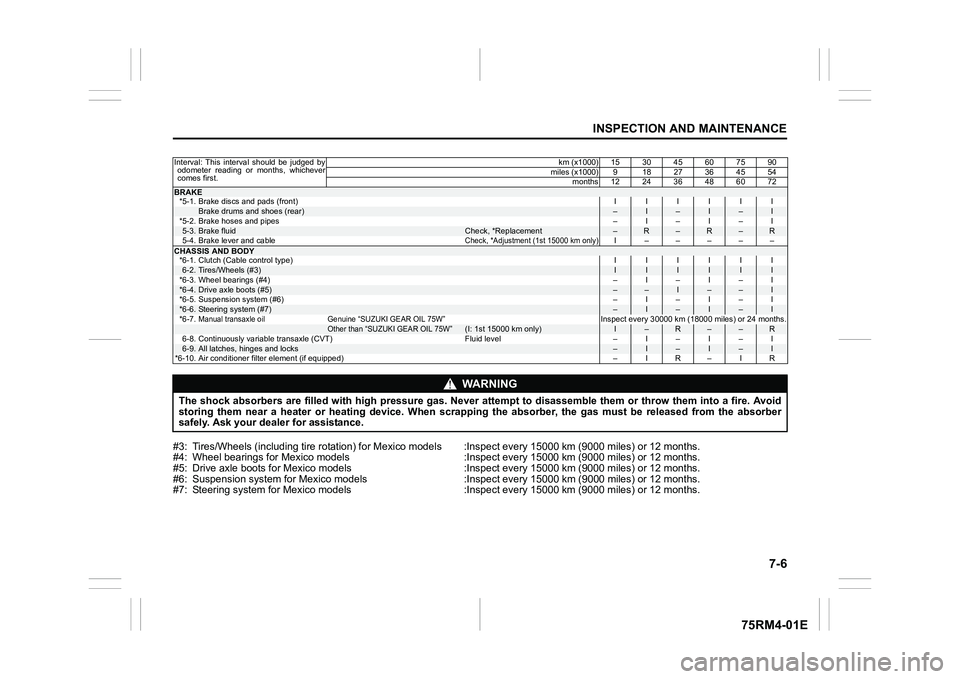
#3: Tires/Wheels (including tire rotation) for Mexico models :Inspect every 15000 km (9000 miles) or 12 months.
#4: Wheel bearings for Mexico models :Inspect every 15000 km (900 0 miles) or 12 months.
#5: Drive axle boots for Mexico models :Inspect every 15000 km (9 000 miles) or 12 months.
#6: Suspension system for Mexico models :Inspect every 15000 km ( 9000 miles) or 12 months.
#7: Steering system for Mexico m odels :Inspect every 15000 km (90 00 miles) or 12 months.Interval: This interval should be judged by
odometer reading or months, whichever
comes first. km (x1000) 15 30 45 60 75 90
miles (x1000) 9 18 27 36 45 54 months 12 24 36 48 60 72BRAKE*5-1. Brake discs and pads (front) IIIIII
Brake drums and shoes (rear)
–
I
–
I
–
I
*5-2. Brake hoses and pipes –I–I–I
5-3.
Brake fluid
Check, *Replacement
–
R
–
R
–
R
5-4. Brake lever and cable
Check, *Adjustment (1st 15000 km only)
I –––––
CHASSIS AND BODY *6-1. Clutch (Cable control type) IIIIII6-2.
Tires/Wheels (#3)
I
I
I
I
I
I
*6-3. Wheel bearings (#4) –I–I–I
*6-4.
Drive axle boots (#5)
–
–
I
–
–
I
*6-5. Suspension system (#6) –I–I–I
*6-6.
Steering system (#7)
–
I
–
I
–
I
*6-7.
Manual transaxle oil Genuine “SUZUKI GEAR OIL 75W”
Inspect every 30000 km (18000 miles) or 24 months.
Other than “SUZUKI GEAR OIL 75W”
(I: 1st 15000 km only)
I
–
R
–
–
R
6-8. Continuously variable transaxle (CVT) Fluid level – I – I – I
6-9.
All latches, hinges and locks
–
I
–
I
–
I
*6-10. Air conditioner filter element (if equipped) –IR–IR
WA R N I N G
The shock absorbers are filled with high pressure gas. Never attempt to disassemble them or throw them into a fire. Avoid
storing them near a heater or heating device. When scrapping th e absorber, the gas must be released from the absorber
safely. Ask your deal er for assistance.
Page 356 of 505
7-7INSPECTION AND MAINTENANCE
75RM4-01E
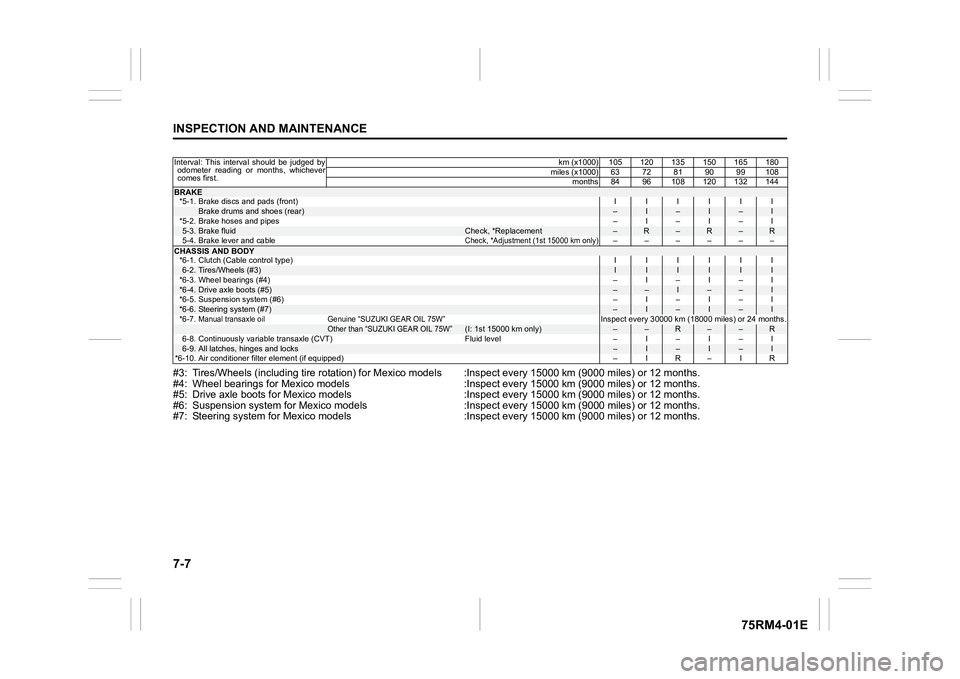
#3: Tires/Wheels (including tire rotation) for Mexico models :Inspect every 15000 km (9000 miles) or 12 months.
#4: Wheel bearings for Mexico models :Inspect every 15000 km (900 0 miles) or 12 months.
#5: Drive axle boots for Mexico models :Inspect every 15000 km (9 000 miles) or 12 months.
#6: Suspension system for Mexico models :Inspect every 15000 km ( 9000 miles) or 12 months.
#7: Steering system for Mexico m odels :Inspect every 15000 km (90 00 miles) or 12 months.Interval: This interval should be judged by
odometer reading or months, whichever
comes first. km (x1000) 105 120 135 150 165 180
miles (x1000) 63 72 81 90 99 108 months 84 96 108 120 132 144BRAKE*5-1. Brake discs and pads (front) IIIIII
Brake drums and shoes (rear)
–
I
–
I
–
I
*5-2. Brake hoses and pipes –I–I–I
5-3.
Brake fluid
Check, *Replacement
–
R
–
R
–
R
5-4. Brake lever and cable
Check, *Adjustment (1st 15000 km only)
––––––
CHASSIS AND BODY *6-1. Clutch (Cable control type) IIIIII6-2.
Tires/Wheels (#3)
I
I
I
I
I
I
*6-3. Wheel bearings (#4) –I–I–I
*6-4.
Drive axle boots (#5)
–
–
I
–
–
I
*6-5. Suspension system (#6) –I–I–I
*6-6.
Steering system (#7)
–
I
–
I
–
I
*6-7.
Manual transaxle oil Genuine “SUZUKI GEAR OIL 75W”
Inspect every 30000 km (18000 miles) or 24 months.
Other than “SUZUKI GEAR OIL 75W”
(I: 1st 15000 km only)
–
–
R
–
–
R
6-8. Continuously variable transaxle (CVT) Fluid level – I – I – I
6-9.
All latches, hinges and locks
–
I
–
I
–
I
*6-10. Air conditioner filter element (if equipped) –IR–IR
Page 360 of 505
7-11INSPECTION AND MAINTENANCE
75RM4-01E
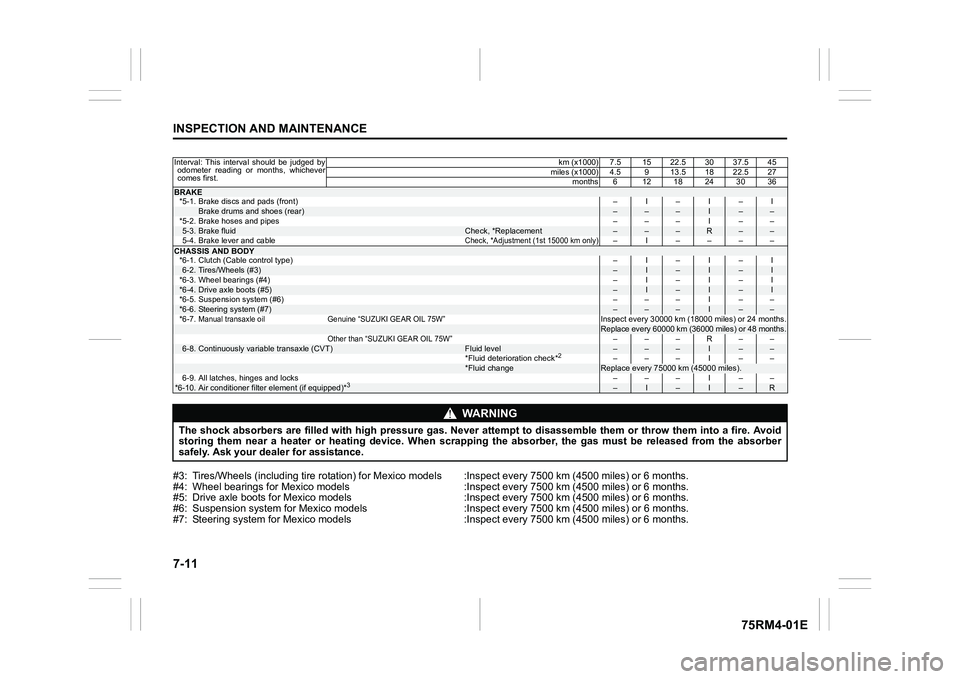
#3: Tires/Wheels (including tire rotation) for Mexico models :Inspect every 7500 km (4500 miles) or 6 months.
#4: Wheel bearings for Mexico models :Inspect every 7500 km (4500 miles) or 6 months.
#5: Drive axle boots for Mexico models :Inspect every 7500 km (45 00 miles) or 6 months.
#6: Suspension system for Mexico models :Inspect every 7500 km (4 500 miles) or 6 months.
#7: Steering system for Mexico m odels :Inspect every 7500 km (450 0 miles) or 6 months.Interval: This interval should be judged by
odometer reading or months, whichever
comes first. km (x1000) 7.5 15 22.5 30 37.5 45
miles (x1000) 4.5 9 13.5 18 22.5 27 months6 1218243036BRAKE*5-1. Brake discs and pads (front) –I–I–I
Brake drums and shoes (rear)
–
–
–
I
–
–
*5-2. Brake hoses and pipes ––– I ––
5-3.
Brake fluid
Check, *Replacement
–
–
–
R
–
–
5-4. Brake lever and cable
Check, *Adjustment (1st 15000 km only)
– I ––––
CHASSIS AND BODY *6-1. Clutch (Cable control type) –I–I–I6-2.
Tires/Wheels (#3)
–
I
–
I
–
I
*6-3. Wheel bearings (#4) –I–I–I
*6-4.
Drive axle boots (#5)
–
I
–
I
–
I
*6-5. Suspension system (#6) ––– I ––
*6-6.
Steering system (#7)
–
–
–
I
–
–
*6-7.
Manual transaxle oil Genuine “SUZUKI GEAR OIL 75W”
Inspect every 30000 km (18000 miles) or 24 months.Replace every 60000 km (36000 miles) or 48 months.
Other than “SUZUKI GEAR OIL 75W”
–––R––
6-8.
Continuously variable transaxle (CVT)
Fluid level
–
–
–
I
–
–
*Fluid deterioration check*
2 –––I––
*Fluid change
Replace every 75000 km (45000 miles).
6-9. All latches, hinges and locks ––– I ––
*6-10.
Air conditioner filter element (if equipped)*
3
–
I
–
I
–
R
WA R N I N G
The shock absorbers are filled with high pressure gas. Never attempt to disassemble them or throw them into a fire. Avoid
storing them near a heater or heating device. When scrapping th e absorber, the gas must be released from the absorber
safely. Ask your deal er for assistance.
Page 361 of 505
7-12
INSPECTION AND MAINTENANCE
75RM4-01E
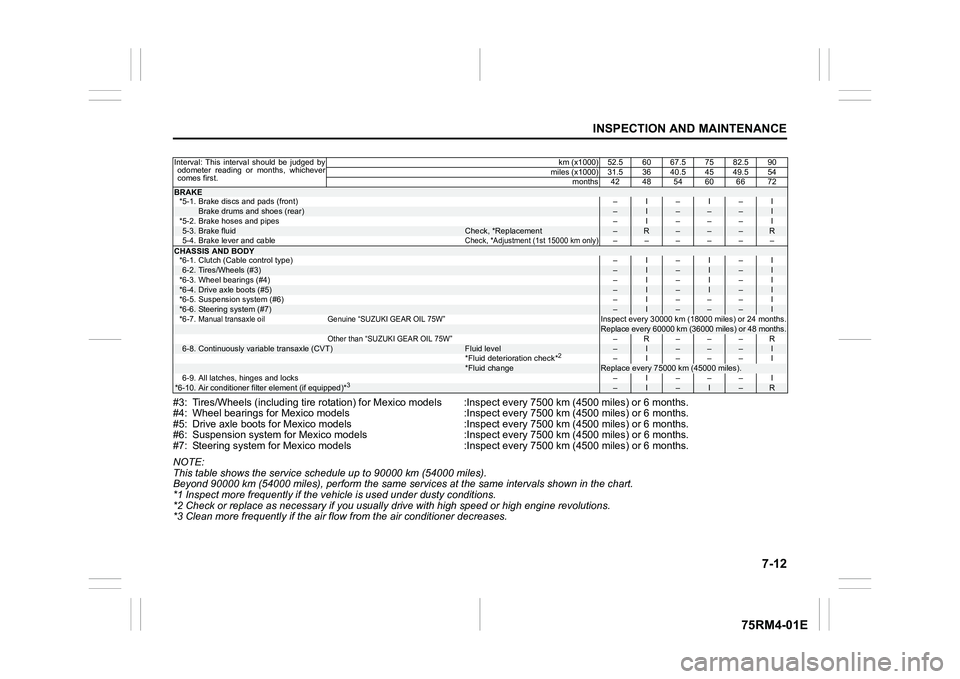
#3: Tires/Wheels (including tire rotation) for Mexico models :Inspect every 7500 km (4500 miles) or 6 months.
#4: Wheel bearings for Mexico models :Inspect every 7500 km (4500 miles) or 6 months.
#5: Drive axle boots for Mexico models :Inspect every 7500 km (45 00 miles) or 6 months.
#6: Suspension system for Mexico models :Inspect every 7500 km (4 500 miles) or 6 months.
#7: Steering system for Mexico m odels :Inspect every 7500 km (450 0 miles) or 6 months.
NOTE:
This table shows the service schedule up to 90000 km (54000 miles).
Beyond 90000 km (54000 miles), perform the same serv ices at the same intervals shown in the chart.
*1 Inspect more frequently if the v ehicle is used under dusty conditions.
*2 Check or replace as necessary if you usually drive with high speed or high engine revolutions.
*3 Clean more frequently if the air flow from the air conditioner decreases.Interval: This interval should be judged by odometer reading or months, whichever
comes first. km (x1000) 52.5 60 67.5 75 82.5 90
miles (x1000) 31.5 36 40.5 45 49.5 54 months 42 48 54 60 66 72BRAKE*5-1. Brake discs and pads (front) –I–I–I
Brake drums and shoes (rear)
–
I
–
–
–
I
*5-2. Brake hoses and pipes –I–––I
5-3.
Brake fluid
Check, *Replacement
–
R
–
–
–
R
5-4. Brake lever and cable
Check, *Adjustment (1st 15000 km only)
––––––
CHASSIS AND BODY *6-1. Clutch (Cable control type) –I–I–I6-2.
Tires/Wheels (#3)
–
I
–
I
–
I
*6-3. Wheel bearings (#4) –I–I–I
*6-4.
Drive axle boots (#5)
–
I
–
I
–
I
*6-5. Suspension system (#6) –I–––I
*6-6.
Steering system (#7)
–
I
–
–
–
I
*6-7.
Manual transaxle oil Genuine “SUZUKI GEAR OIL 75W”
Inspect every 30000 km (18000 miles) or 24 months.Replace every 60000 km (36000 miles) or 48 months.
Other than “SUZUKI GEAR OIL 75W”
–R– – –R
6-8.
Continuously variable transaxle (CVT)
Fluid level
–
I
–
–
–
I
*Fluid deterioration check*
2
–I–––I
*Fluid change
Replace every 75000 km (45000 miles).
6-9. All latches, hinges and locks –I–––I
*6-10.
Air conditioner filter element (if equipped)*
3
–
I
–
I
–
R