AVE speed SUZUKI IGNIS 2018 Owner's Guide
[x] Cancel search | Manufacturer: SUZUKI, Model Year: 2018, Model line: IGNIS, Model: SUZUKI IGNIS 2018Pages: 505, PDF Size: 8.36 MB
Page 285 of 505
5-30
OTHER CONTROLS AND EQUIPMENT
75RM4-01E
You can use the air conditioning switch (6)
to manually turn the air conditioner on or off
according to your preference. When you
turn the air conditioning switch off, the cli-
mate control system cannot lower the inside
temperature below outside temperature.
To turn the climate control system off, push
“OFF” switch (7).
NOTE:
If “AUTO” on the display blinks, there is a
problem in the heating system and/or air
conditioning system. Yo u should have the
system inspected by an authorized
SUZUKI dealer.
NOTE:
• To find the temperature at which you are
most comfortable, start with the 22°C
(72°F) or 25°C (75°F) setting. (the tem-
perature vary depending on vehicle
specifications.).
• If you push the temperature selector (1) until “HI” or “LO” appears on the display,
the climate control system will operate at
maximum heating or cooling and the
blower will run at full speed.
• To avoid blowing cold air in cold weather or hot air in hot weather, the system will
delay turning on the blower until warmed
or chilled air is available.
• If your vehicle has been left in the sun with the windows closed, it will cool
faster if you open the windows briefly.
• Even under the automat ic operation, you
can set individual selectors to the manual mode. The manually selected functions
are maintained, and the other functions
remain under automatic operation.
• If the windshield and/or the front door windows are fogged, push the defrost
switch (5) to turn on the defroster, or
push the air flow selector (4) to change
the air flow to HEAT & DEFROST posi-
tion to defog the windows.
• To return the blower speed selector (2), air intake selector (3 ), and air flow selec-
tor (4) to automatic operation, push
“AUTO” switch (8).
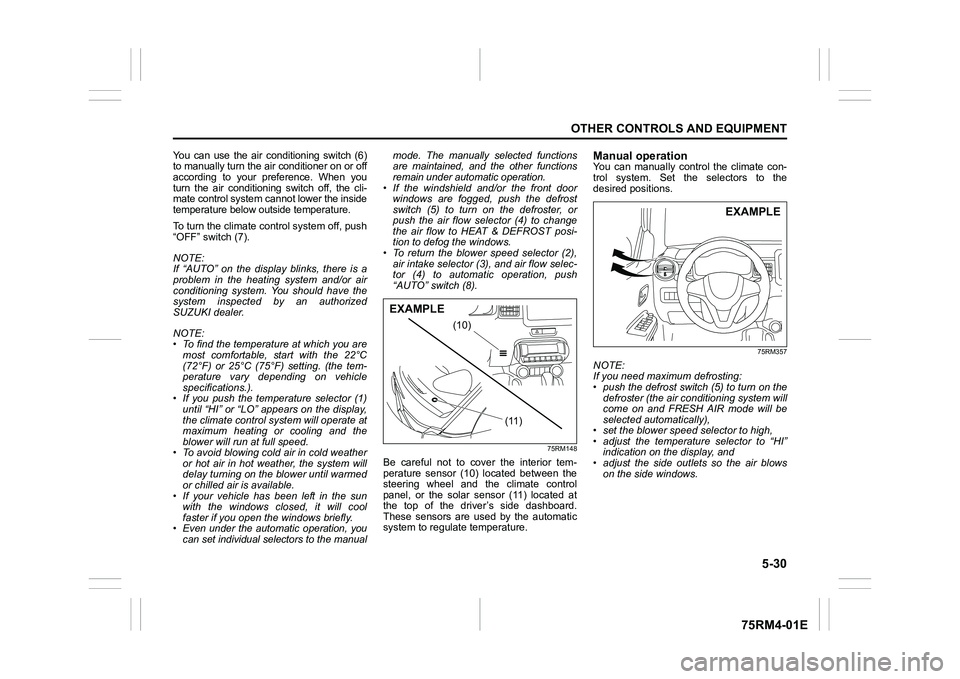
75RM148
Be careful not to cover the interior tem-
perature sensor (10) located between the
steering wheel and the climate control
panel, or the solar sensor (11) located at
the top of the driver’s side dashboard.
These sensors are used by the automatic
system to regula te temperature.
Manual operationYou can manually control the climate con-
trol system. Set the selectors to the
desired positions.
75RM357
NOTE:
If you need maximum defrosting:
• push the defrost switch (5) to turn on the
defroster (the air conditioning system will
come on and FRESH AIR mode will be
selected automatically),
• set the blower speed selector to high,
• adjust the temperature selector to “HI” indication on the display, and
• adjust the side outlets so the air blows on the side windows.
(10)
(11)
EXAMPLE
EXAMPLE
Page 314 of 505
5-59OTHER CONTROLS AND EQUIPMENT
75RM4-01E
Notes on USB deviceCompatible USB devices
• USB mass storage classFor details as to whether your USB
memory/USB audio is compatible with
USB mass storage class, please contact
the USB memory/USB audio manufac-
turer.
• USB standard compatibility 1.1/2.0 full
speed
• File system FAT12/16/32, VFAT
• Maximum current less than 1.0 A
• If devices such as USB hub, extension cable are connected to the audio sys-
tem, it may not be recognized. In such
case, connect the USB device directly to
the audio system.
• Devices such as MP3 player/mobile
phone/digital camera may not be recog-
nized by the audio system for playing
music. USB device connection
• When connecting a USB device, check
that the connector is pushed all the way
into the port.
• Do not leave the USB device for long periods of time inside the vehicle where
the temperature can rise too high.
• Back up any important data beforehand. We cannot accept responsibility for any
lost data.
• It is recommended not to connect a USB device that contains data files other than
MP3/WMA/AAC format.
Recording MP3/WMA/AAC files on a
USB device
• Playback or display may not be possible depending on the type of USB device in
use or the condition of the recording.
• Depending on the connected USB mem-
ory, the files may be played in different
order from the stored one. Compression formats
MP3
• Bit rate
:
MPEG1 Audio Layer III: 32 k - 320 kbps
MPEG2 Audio Layer III: 8 k - 160 kbps
MPEG2.5 Audio Layer III: 8 k - 160 kbps
• Sampling frequency
:
MPEG1 Audio Layer III: 32 k/44.1 k/48 kHz
MPEG2 Audio Layer III: 16 k/22.05 k/24 kHz
MPEG2.5 Audio Layer III: 8 k/11.025 k/12 kHzWMA (Ver. 7, Ver. 8, Ver. 9*)
• Bit rate: CBR 32 k - 320 kbps
• Sampling frequency: 32 k/44.1 k/48 kHz
* WMA 9 Professional/LossLess/Voice are
not supported.
AAC*
• Bit rate: ABR 16 k - 320 kbps
• Sampling frequency: 32 k/44.1 k/48 kHz
* Apple Lossless is not supported.
Maximum number o f files/folders
• Maximum number of files: 2500
• Maximum number of files in a folder: 255
• Maximum depth of tree structure: 8
• Maximum number of folders: 255 (Root folder is included.)
Page 325 of 505

5-70
OTHER CONTROLS AND EQUIPMENT
75RM4-01E
NOTE:
When selecting “Go Back” or pressing
BACK button (4), the previous menu will
be displayed.
Registration in speed dial
Follow the instructions below to assign a
number to one of PRESET buttons (3) to
use as the speed dial.
1) Press the Bluetooth
® setup button (5)
or (6).
The Bluetooth
® setup menu will be dis-
played.
2) Turn “TUNE/FLD PUSH SOUND” knob (1) to select “Setup Telephone”, and
press the knob (1) to determine the
selection.
3) Turn “TUNE/FLD PUSH SOUND” knob (1) to select “Setup Phonebook”, and
press the knob (1) to determine the
selection.
4) Turn “TUNE/FLD PUSH SOUND” knob (1) to select “Add Speed Dial”, and
press the knob (1) to determine the
selection.
5) Turn “TUNE/FLD PUSH SOUND” knob
(1) to select the initial of the name you
would like to register in speed dial, and
press the knob (1) to determine the
selection.
The registered numbers will be dis-
played in sequence. If names have
been registered tog ether with numbers,
the names will be displayed.
Turn “TUNE/FLD PUSH SOUND” knob
(1) to select the name you would like to register in speed dial, and press the
knob (1) to determine the selection.
6) Turn “TUNE/FLD PUSH SOUND” knob
(1) to select “Choose Preset”, and
press one of PRESET buttons (3) to
which the selected number is to be
assigned. If a number is already
assigned to the selected button, a con-
firmation message will be displayed.
Turn “TUNE/FLD PUSH SOUND” knob
(1) to select a confirmation message,
and press the knob (1) to complete the
assignment.
Turn “TUNE/FLD PUSH SOUND” knob
(1) to select “Confirm”, and press the
knob (1) to complete the assignment.
When the assignment is completed, the
“Setup Phonebook” will be displayed.
NOTE:
When selecting “Go Back” or pressing
BACK button (4), the previous menu will
be displayed. One-touch call (Speed dial)
Follow the instructions below to dial the
number assigned to each of the PRESET
buttons (3).
1) Press OFF HOOK
button (7).
The Bluetooth
® phonebook menu will
be displayed.
Pressing one of PRESET buttons (3)
can skip step 2) and the 1st line of step
3).
2) Turn “TUNE/FLD PUSH SOUND” knob (1) to select “Speed Dials”, and press
the knob (1) to dete rmine the selection.
3) Press one of PRESET buttons (3). The assigned number will be displayed.
If no number is assigned, “No Entry” is
displayed.
4) Press OFF HOOK button (7).
The selected num ber will be dialed.
Page 345 of 505
6-4
VEHICLE LOADING AND TOWING
75RM4-01E
Additional trailer towing warnings
WA R N I N G
Connect trailer lights and hook up
safety chains every time you tow.
NOTICE
Because towing a trailer puts addi-
tional stress on your vehicle, more
frequent maintenance will be
required than under normal driving
conditions. Follow the schedule in
“Maintenance recommended under
severe driving conditions”.
WA R N I N G
Your vehicle should be handled in a
different way when towing a trailer.
For the safety of yourself and others,
observe the following precautions:
• Practice turning, stopping, andreversing before you begin towing
a trailer in traffi c. Do not tow a
trailer in traffic until you are confi-
dent that you can handle the vehi-
cle and trailer safely.
• Never exceed towing speed limits
or 80 km/h (50 mph), whichever is
lower.
• Never drive at a speed that causes shaking or swaying of the trailer. If
you notice even the slightest sign
of shaking or sw aying, slow down.
• When roads are wet, slippery or rough, drive at a slower speed than
you would on dry or smooth roads.
Failure to slow down when road
conditions are bad can result in
loss of control.
• Always have someone guide you when reversing.
(Continued)
WA R N I N G
(Continued)
• Allow adequate stopping distance.Stopping distance is increased
when you tow a trailer. For each 16
km/h (10 mph) of speed, allow at
least one vehicle and trailer length
between you and the vehicle
ahead. Allow a greater stopping
distance if roads are wet or slip-
pery.
• If the trailer has over-run brakes,
apply the brakes gradually to avoid
snatching caused by the trailer
wheels locking.
• Slow down before corners and maintain a steady speed while cor-
nering. Deceleration or accelera-
tion while cornering can result in
loss of control. Remember that a
larger than normal turning radius is
needed because the trailer wheels
will be closer than vehicle wheels
to the inside of the turn.
• Avoid sudden acceleration and stopping of the vehicle. Do not
make quick maneuvers unless they
are necessary.
• Slow down in cross winds and be
prepared for gusts of wind from
large passing vehicles. (Continued)
Page 376 of 505
7-27INSPECTION AND MAINTENANCE
75RM4-01E
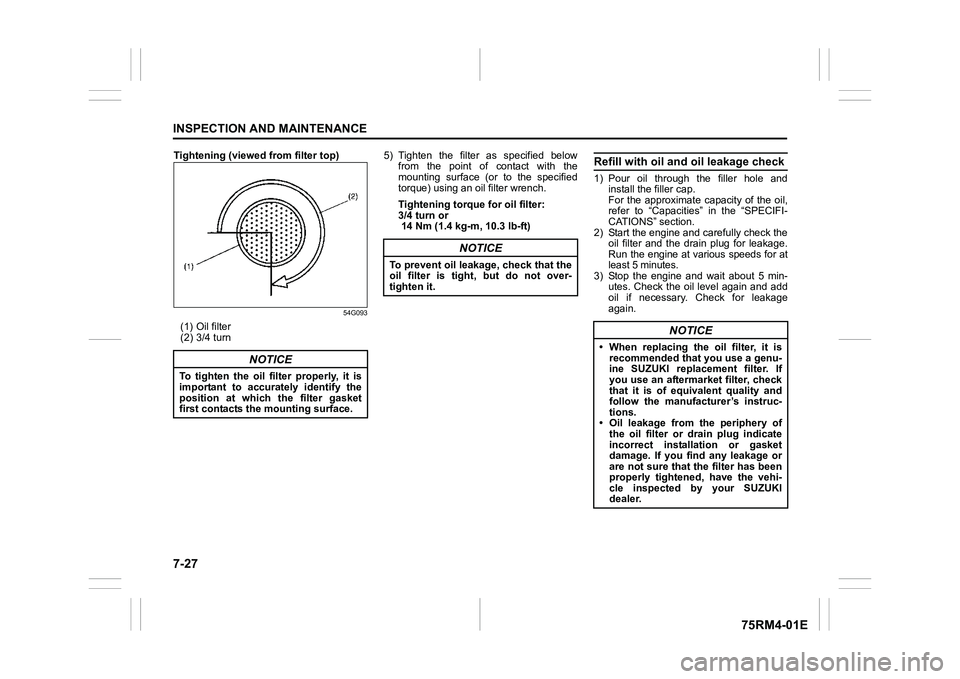
Tightening (viewed from filter top)
54G093
(1) Oil filter
(2) 3/4 turn5) Tighten the filter as specified below
from the point of contact with the
mounting surface (or to the specified
torque) using an oil filter wrench.
Tightening torque for oil filter:
3/4 turn or
14 Nm (1.4 kg -m, 10.3 lb-ft)
Refill with oil and oil leakage check1) Pour oil through the filler hole and
install the filler cap.
For the approximate capacity of the oil,
refer to “Capacities” in the “SPECIFI-
CATIONS” section.
2) Start the engine and carefully check the oil filter and the drain plug for leakage.
Run the engine at various speeds for at
least 5 minutes.
3) Stop the engine and wait about 5 min- utes. Check the oil level again and add
oil if necessary. Check for leakage
again.
NOTICE
To tighten the oil filter properly, it is
important to accurately identify the
position at which the filter gasket
first contacts the mounting surface.
NOTICE
To prevent oil leakage, check that the
oil filter is tight, but do not over-
tighten it.
NOTICE
• When replacing the oil filter, it is recommended that you use a genu-
ine SUZUKI replacement filter. If
you use an aftermarket filter, check
that it is of equi valent quality and
follow the manufacturer’s instruc-
tions.
• Oil leakage from the periphery of the oil filter or drain plug indicate
incorrect installation or gasket
damage. If you find any leakage or
are not sure that the filter has been
properly tightened, have the vehi-
cle inspected by your SUZUKI
dealer.
Page 381 of 505
7-32
INSPECTION AND MAINTENANCE
75RM4-01E
54G106
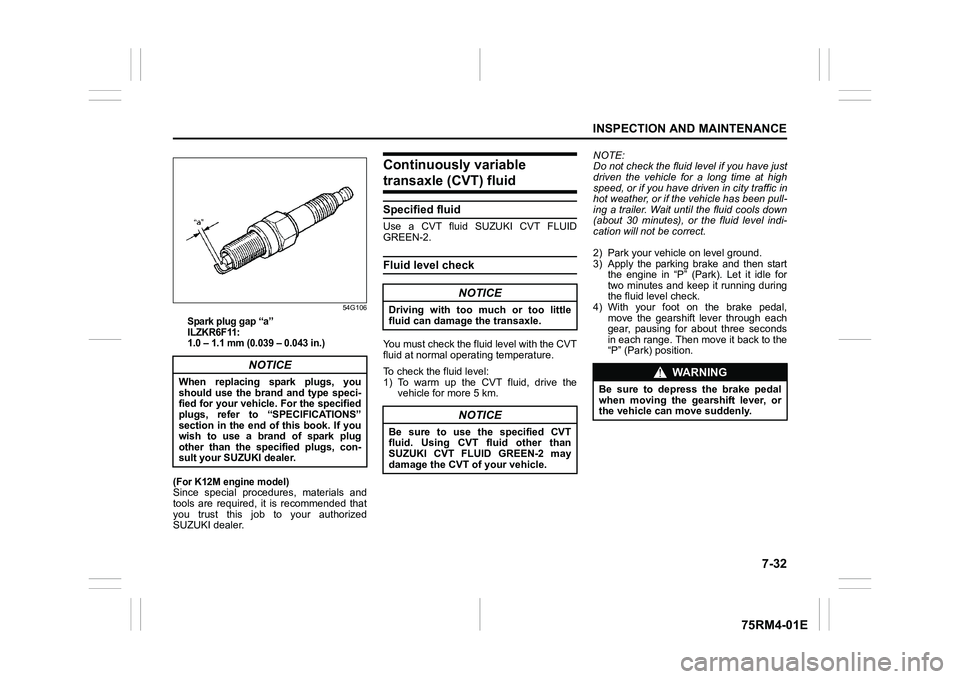
Spark plug gap “a”
ILZKR6F11:
1.0 – 1.1 mm (0.039 – 0.043 in.)
(For K12M engine model)
Since special procedures, materials and
tools are required, it is recommended that
you trust this job to your authorized
SUZUKI dealer.
Continuously variable transaxle (CVT) fluidSpecified fluidUse a CVT fluid SUZUKI CVT FLUID
GREEN-2.Fluid level checkYou must check the fluid level with the CVT
fluid at normal ope rating temperature.
To check the fluid level:
1) To warm up the CVT fluid, drive the vehicle for more 5 km. NOTE:
Do not check the fluid level if you have just
driven the vehicle for a long time at high
speed, or if you have driven in city traffic in
hot weather, or if the vehicle has been pull-
ing a trailer. Wait until the fluid cools down
(about 30 minutes), or the fluid level indi-
cation will not be correct.
2) Park your vehicle on level ground.
3) Apply the parking brake and then start
the engine in “P” (Park). Let it idle for
two minutes and keep it running during
the fluid level check.
4) With your foot on the brake pedal,
move the gearshift lever through each
gear, pausing for about three seconds
in each range. Then move it back to the
“P” (Park) position.
NOTICE
When replacing spark plugs, you
should use the brand and type speci-
fied for your vehicle. For the specified
plugs, refer to “SPECIFICATIONS”
section in the end of this book. If you
wish to use a brand of spark plug
other than the specified plugs, con-
sult your SUZUKI dealer.
NOTICE
Driving with too much or too little
fluid can damage the transaxle.
NOTICE
Be sure to use the specified CVT
fluid. Using CVT fluid other than
SUZUKI CVT FLUID GREEN-2 may
damage the CVT of your vehicle.
WA R N I N G
Be sure to depress the brake pedal
when moving the gearshift lever, or
the vehicle can move suddenly.
Page 389 of 505
7-40
INSPECTION AND MAINTENANCE
75RM4-01E
52KM110
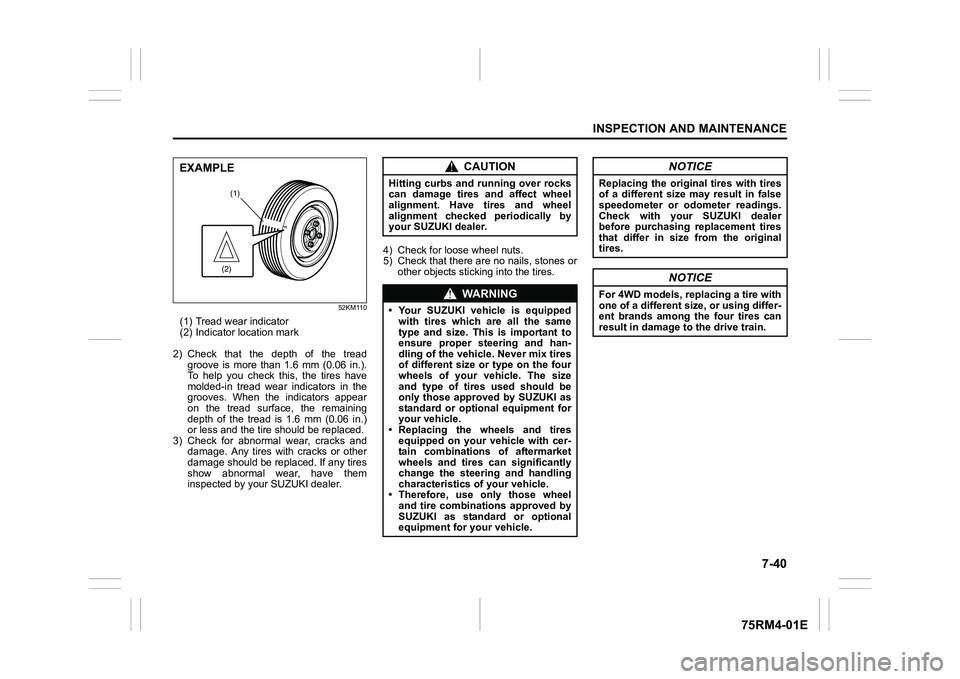
(1) Tread wear indicator
(2) Indicator location mark
2) Check that the depth of the tread groove is more than 1.6 mm (0.06 in.).
To help you check this, the tires have
molded-in tread wear indicators in the
grooves. When the indicators appear
on the tread surface, the remaining
depth of the tread is 1.6 mm (0.06 in.)
or less and the tire should be replaced.
3) Check for abnormal wear, cracks and damage. Any tires with cracks or other
damage should be replaced. If any tires
show abnormal wear, have them
inspected by your SUZUKI dealer. 4) Check for loose wheel nuts.
5) Check that there are no nails, stones or
other objects sticki ng into the tires.
(1)(2)
EXAMPLE
CAUTION
Hitting curbs and running over rocks
can damage tires and affect wheel
alignment. Have tires and wheel
alignment checked periodically by
your SUZUKI dealer.
WA R N I N G
• Your SUZUKI vehicle is equipped
with tires which are all the same
type and size. This is important to
ensure proper steering and han-
dling of the vehicle. Never mix tires
of different size or type on the four
wheels of your vehicle. The size
and type of tires used should be
only those approved by SUZUKI as
standard or optional equipment for
your vehicle.
• Replacing the wheels and tires
equipped on your vehicle with cer-
tain combinations of aftermarket
wheels and tires can significantly
change the steering and handling
characteristics of your vehicle.
• Therefore, use only those wheel
and tire combinations approved by
SUZUKI as standard or optional
equipment for your vehicle.
NOTICE
Replacing the original tires with tires
of a different size may result in false
speedometer or odometer readings.
Check with your SUZUKI dealer
before purchasing replacement tires
that differ in size from the original
tires.
NOTICE
For 4WD models, replacing a tire with
one of a different size, or using differ-
ent brands among the four tires can
result in damage to the drive train.
Page 418 of 505
8-9EMERGENCY SERVICE
75RM4-01E
81PN249
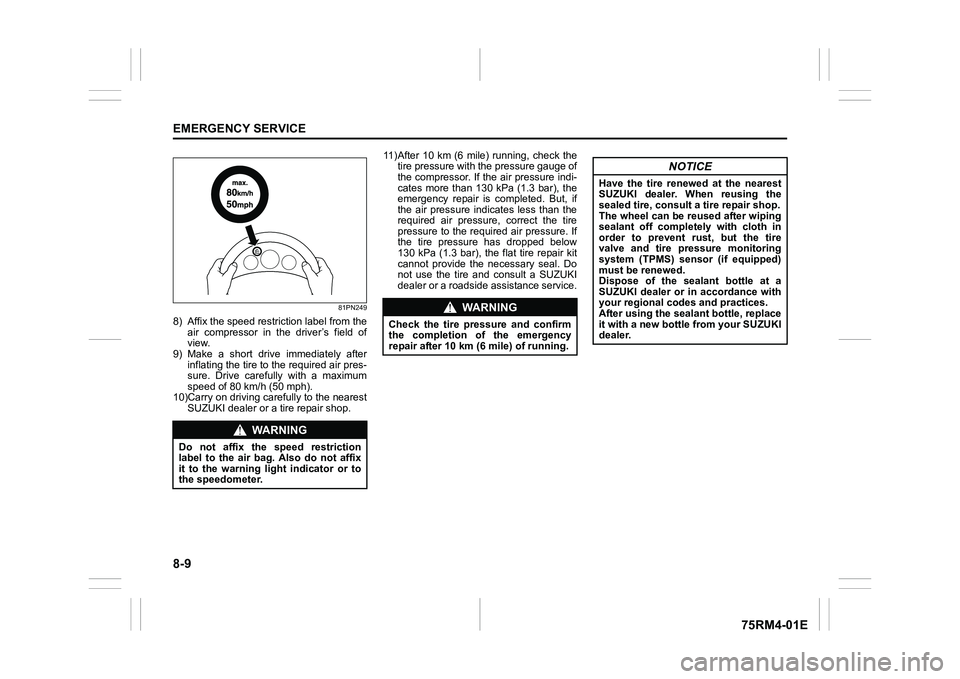
8) Affix the speed restriction label from theair compressor in the driver’s field of
view.
9) Make a short drive immediately after inflating the tire to the required air pres-
sure. Drive carefully with a maximum
speed of 80 km/h (50 mph).
10)Carry on driving carefully to the nearest
SUZUKI dealer or a tire repair shop. 11)After 10 km (6 mile) running, check the
tire pressure with the pressure gauge of
the compressor. If the air pressure indi-
cates more than 130 kPa (1.3 bar), the
emergency repair is completed. But, if
the air pressure indicates less than the
required air pressure, correct the tire
pressure to the required air pressure. If
the tire pressure has dropped below
130 kPa (1.3 bar), the flat tire repair kit
cannot provide the necessary seal. Do
not use the tire and consult a SUZUKI
dealer or a roadside assistance service.
WA R N I N G
Do not affix the speed restriction
label to the air bag. Also do not affix
it to the warning light indicator or to
the speedometer.
WA R N I N G
Check the tire pressure and confirm
the completion o f the emergency
repair after 10 km (6 mile) of running.
NOTICE
Have the tire renewed at the nearest
SUZUKI dealer. When reusing the
sealed tire, consult a tire repair shop.
The wheel can be reused after wiping
sealant off completely with cloth in
order to prevent rust, but the tire
valve and tire pressure monitoring
system (TPMS) sensor (if equipped)
must be renewed.
Dispose of the sealant bottle at a
SUZUKI dealer or in accordance with
your regional codes and practices.
After using the seal ant bottle, replace
it with a new bottle from your SUZUKI
dealer.
Page 420 of 505
8-11EMERGENCY SERVICE
75RM4-01E
54P000804
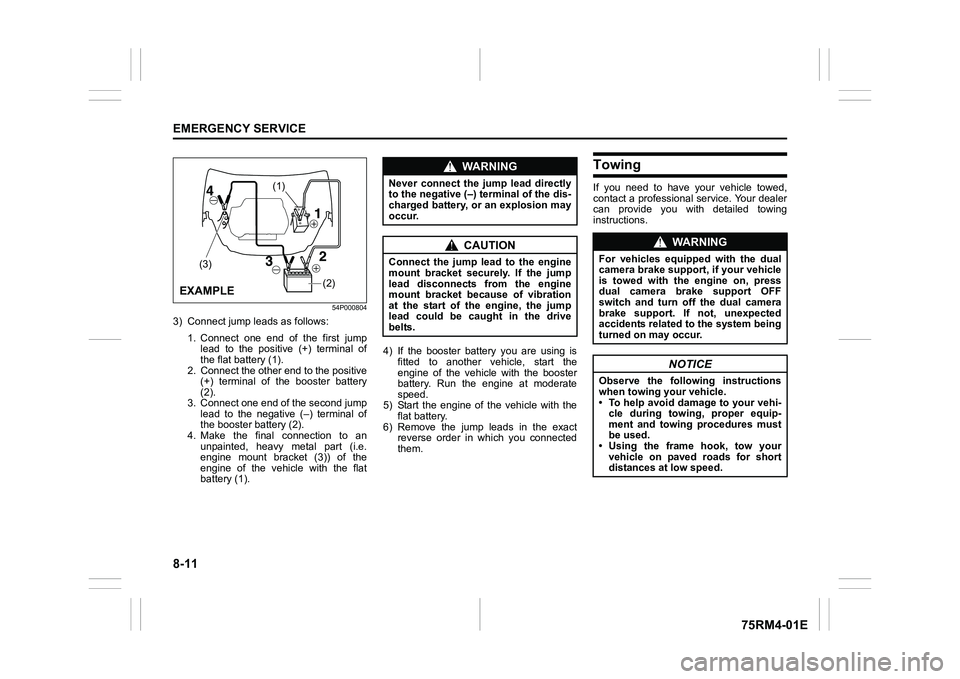
3) Connect jump leads as follows:1. Connect one end of the first jumplead to the positive (+) terminal of
the flat battery (1).
2. Connect the other end to the positive (+) terminal of the booster battery
(2).
3. Connect one end of the second jump lead to the negative (–) terminal of
the booster battery (2).
4. Make the final connection to an unpainted, heavy metal part (i.e.
engine mount bracket (3)) of the
engine of the vehicle with the flat
battery (1). 4) If the booster battery you are using is
fitted to another vehicle, start the
engine of the vehicle with the booster
battery. Run the engine at moderate
speed.
5) Start the engine of the vehicle with the flat battery.
6) Remove the jump leads in the exact reverse order in which you connected
them.
TowingIf you need to have your vehicle towed,
contact a professional service. Your dealer
can provide you with detailed towing
instructions.
(2)
(1)
(3)
EXAMPLE
WA R N I N G
Never connect the jump lead directly
to the negative (–) terminal of the dis-
charged battery, or an explosion may
occur.
CAUTION
Connect the jump l ead to the engine
mount bracket securely. If the jump
lead disconnects from the engine
mount bracket because of vibration
at the start of the engine, the jump
lead could be caught in the drive
belts.
WA R N I N G
For vehicles equipped with the dual
camera brake support, if your vehicle
is towed with the engine on, press
dual camera brake support OFF
switch and turn off the dual camera
brake support. If not, unexpected
accidents related to the system being
turned on may occur.
NOTICE
Observe the following instructions
when towing your vehicle.
• To help avoid damage to your vehi- cle during towing, proper equip-
ment and towing procedures must
be used.
• Using the frame hook, tow your
vehicle on paved roads for short
distances at low speed.
Page 422 of 505
8-13EMERGENCY SERVICE
75RM4-01E
Engine trouble: Starter does not operate1) Try turning the ignition switch to“START” position or try pressing the
engine switch to change the ignition
mode to START with the headlights
turned on to determine the lead-acid
battery condition. If the headlights go
excessively dim or go off, it usually
means that either the lead-acid battery
is flat or the battery terminal contact is
poor. Recharge the lead-acid battery or
correct battery terminal contact as nec-
essary.
2) If the headlights remain bright, check the fuses. If the reas on for failure of the
starter is not obvious, there may be a
major electrical problem. Have the vehi-
cle inspected by your authorized
SUZUKI dealer.
Engine trouble: Flooded engine(Vehicle without keyless push start sys-
tem)
If the engine is flooded with gasoline, it
may be hard to start. If this happens, press
the accelerator pedal all the way to the
floor and hold it there while cranking the
engine.
• Do not operate the starter motor for more than 12 seconds.
(Vehicle with keyless push start system)
If the engine is flooded with gasoline, it
may be hard to start. If this happens, press
the accelerator pedal all the way to the
floor and hold it there while cranking the
engine.
• Do not operate the starter motor for more than 12 seconds.
NOTE:
If the engine refuses to start, the starter
motor automatically stops after a certain
period of time. After the starter motor has
automatically stopped or if there is any-
thing abnormal in the engine starting sys-
tem, the starter motor runs only while the
engine switch is held pressed.
Engine trouble: OverheatingThe engine could overheat temporarily
under severe driving conditions. If the high
engine coolant temperature warning light
comes on as overheating during driving:
1) Turn off the air conditioner, if equipped.
2) Take the vehicle to a safe place and park.
3) Let the engine run at the normal idle speed for a few minutes until the high
engine coolant temperature warning
light goes off.
WA R N I N G
If you see or hear escaping steam,
stop the vehicle in a safe place and
immediately turn off the engine to
cool it. Do not open the hood when
steam is present. When the steam
can no longer be seen or heard, open
the hood to see if the coolant is still
boiling. If it is, you must wait until it
stops boiling before you proceed.