Warning on display SUZUKI IGNIS 2018 Owners Manual
[x] Cancel search | Manufacturer: SUZUKI, Model Year: 2018, Model line: IGNIS, Model: SUZUKI IGNIS 2018Pages: 505, PDF Size: 8.36 MB
Page 17 of 505
ILLUSTRATED TABLE OF CONTENTS
75RM4-01E
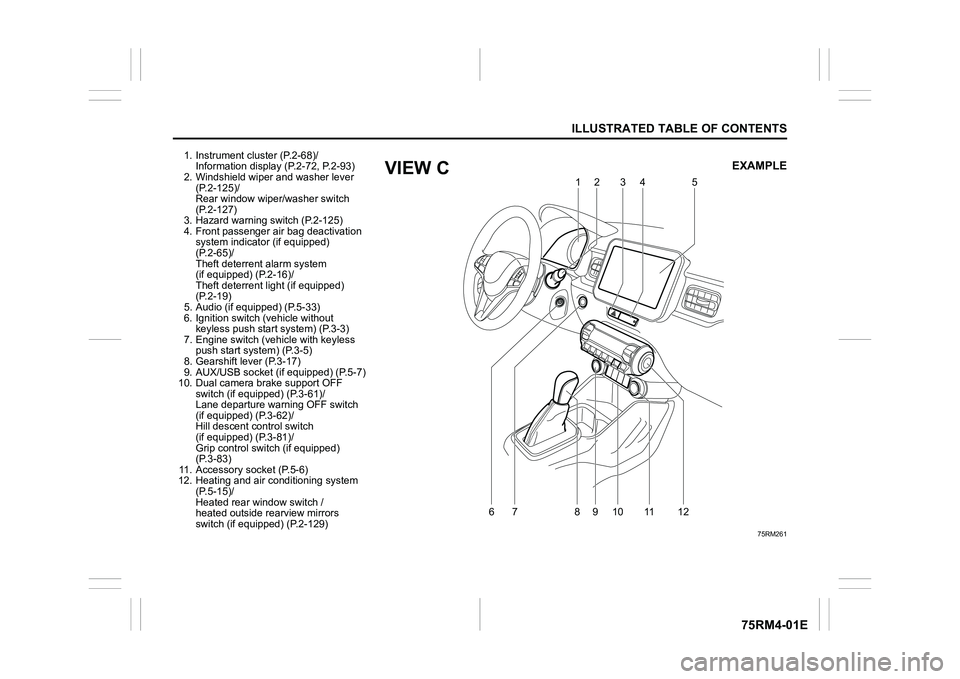
1. Instrument cluster (P.2-68)/Information display (P.2-72, P.2-93)
2. Windshield wiper and washer lever
(P.2-125)/
Rear window wiper/washer switch
(P.2-127)
3. Hazard warning switch (P.2-125)
4. Front passenger air bag deactivation system indicator (if equipped)
(P.2-65)/
Theft deterren t alarm system
(if equipped) (P.2-16)/
Theft deterrent light (if equipped)
(P.2-19)
5. Audio (if equipped) (P.5-33)
6. Ignition switch (vehicle without keyless push start system) (P.3-3)
7. Engine switch (v ehicle with keyless
push start system) (P.3-5)
8. Gearshift lever (P.3-17)
9. AUX/USB socket (if equipped) (P.5-7)
10. Dual camera brake support OFF switch (if equipped) (P.3-61)/
Lane departure warning OFF switch
(if equipped) (P.3-62)/
Hill descent control switch
(if equipped) (P.3-81)/
Grip control switch (if equipped)
(P.3-83)
11. Accessory socket (P.5-6)
12. Heating and air co nditioning system
(P.5-15)/
Heated rear window switch /
heated outside rearview mirrors
switch (if equipped) (P.2-129)
75RM261
6
79
10 11
812 12
5
34
EXAMPLE
VIEW C
Page 23 of 505
BEFORE DRIVING
2
75RM4-01E
60G404
Keys ......................................................................................2-1
Door locks .................................................... ........................2-2
Keyless push start system remote controller /
Keyless entry system transmitte r (if equipped) ................2-7
Theft deterrent alarm system (if equipped) .................... ...2-16
Theft deterrent light (if equipped) ........................... ...........2-19
Windows ....................................................... ........................2-20
Mirrors ....................................................... ...........................2-23
Front seats ................................................... ........................2-27
Rear seats .................................................... .........................2-29
BEFORE DRIVINGSeat belts and child restraint systems ........................ ...... 2-33
Child restraint system f or countries applied for
UN Regulation No.16 ........................................... ................ 2-43
Supplemental restraint system (air bags) ...................... ... 2-54
Instrument cluster ............................................ ................... 2-68
Speedometer ................................................... .................... 2-69
Tachometer (if equipped) ...................................... ............. 2-69
Fuel gauge .................................................... ....................... 2-70
Brightness control ............................................ .................. 2-70
Information display
(instrument clus ter with tachometer) .......................... ...... 2-72
Information display
(instrument clus ter without tachometer) ....................... ... 2-93
Warning and indicator lights .................................. .......... 2-101
Lighting control lever ........................................ ............... 2-116
Headlight leveling switch (if equipped) ....................... .... 2-123
Turn signal control lever ..................................... ............. 2-123
Hazard warning switch ......................................... ............ 2-125
Windshield wiper and washer lever ............................. ... 2-125
Tilt steering lock lever ... ................................................... 2-128
Horn .......................................................... .......................... 2-128
Heated rear window switch /
heated outside rearview mirror switch (if equipped) ..... 2-129
Page 24 of 505
2-1BEFORE DRIVING
75RM4-01E
Keys
54G489
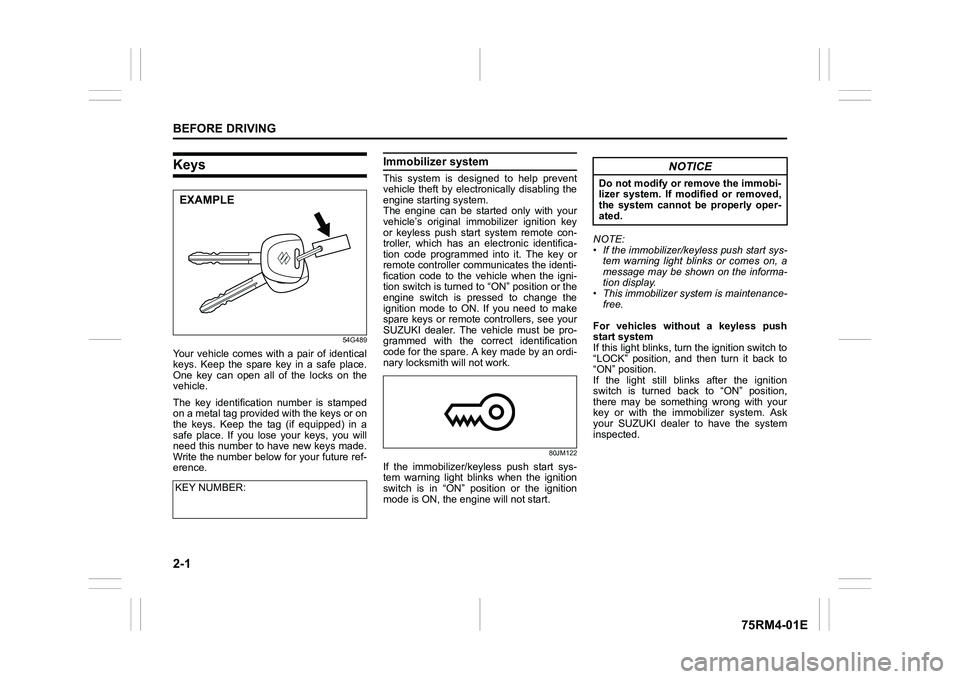
Your vehicle comes with a pair of identical
keys. Keep the spare key in a safe place.
One key can open all of the locks on the
vehicle.
The key identification number is stamped
on a metal tag provided with the keys or on
the keys. Keep the tag (if equipped) in a
safe place. If you lose your keys, you will
need this number to have new keys made.
Write the number below for your future ref-
erence.
Immobilizer system This system is designed to help prevent
vehicle theft by electronically disabling the
engine starting system.
The engine can be started only with your
vehicle’s original immobilizer ignition key
or keyless push start system remote con-
troller, which has an electronic identifica-
tion code programmed into it. The key or
remote controller communicates the identi-
fication code to the vehicle when the igni-
tion switch is turned to “ON” position or the
engine switch is pressed to change the
ignition mode to ON. If you need to make
spare keys or remote controllers, see your
SUZUKI dealer. The vehicle must be pro-
grammed with the correct identification
code for the spare. A key made by an ordi-
nary locksmith will not work.
80JM122
If the immobilizer/keyless push start sys-
tem warning light blinks when the ignition
switch is in “ON” position or the ignition
mode is ON, the engine will not start. NOTE:
• If the immobilizer/keyless push start sys-
tem warning light blinks or comes on, a
message may be shown on the informa-
tion display.
• This immobilizer system is maintenance-
free.
For vehicles without a keyless push
start system
If this light blinks, tur n the ignition switch to
“LOCK” position, and then turn it back to
“ON” position.
If the light still blinks after the ignition
switch is turned back to “ON” position,
there may be something wrong with your
key or with the immobilizer system. Ask
your SUZUKI dealer to have the system
inspected.
KEY NUMBER:
EXAMPLE
NOTICE
Do not modify or remove the immobi-
lizer system. If modified or removed,
the system cannot be properly oper-
ated.
Page 91 of 505
2-68
BEFORE DRIVING
75RM4-01E
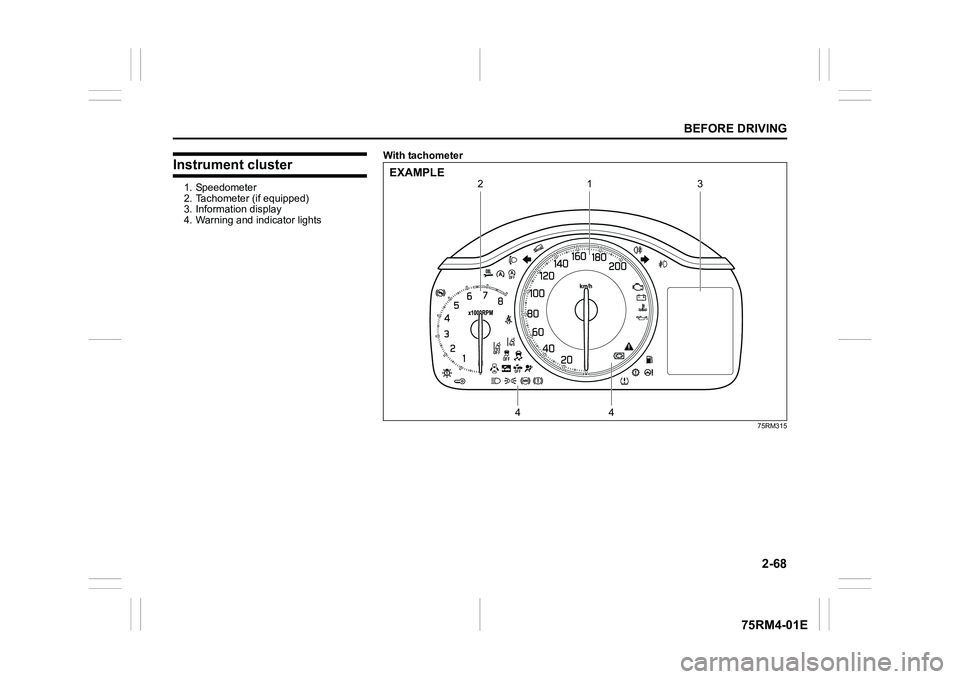
Instrument cluster1. Speedometer
2. Tachometer (if equipped)
3. Information display
4. Warning and indicator lightsWith tachometer
75RM315
1
4
4
2
3
EXAMPLE
Page 93 of 505
2-70
BEFORE DRIVING
75RM4-01E
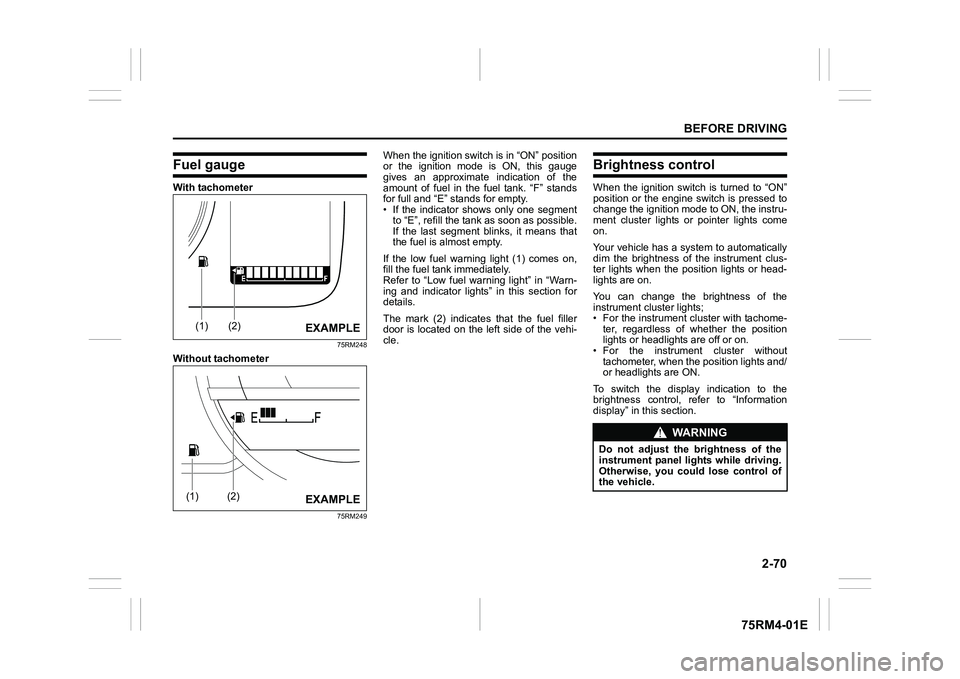
Fuel gaugeWith tachometer
75RM248
Without tachometer
75RM249
When the ignition switch is in “ON” position
or the ignition mode is ON, this gauge
gives an approximate indication of the
amount of fuel in the fuel tank. “F” stands
for full and “E” stands for empty.
• If the indicator shows only one segmentto “E”, refill the tank as soon as possible.
If the last segment blinks, it means that
the fuel is almost empty.
If the low fuel warning light (1) comes on,
fill the fuel tank immediately.
Refer to “Low fuel warning light” in “Warn-
ing and indicator lights” in this section for
details.
The mark (2) indicates that the fuel filler
door is located on the left side of the vehi-
cle.
Brightness controlWhen the ignition switch is turned to “ON”
position or the engine switch is pressed to
change the ignition mode to ON, the instru-
ment cluster lights or pointer lights come
on.
Your vehicle has a system to automatically
dim the brightness of the instrument clus-
ter lights when the position lights or head-
lights are on.
You can change the brightness of the
instrument cluster lights;
• For the instrument c luster with tachome-
ter, regardless of whether the position
lights or headlights are off or on.
• For the instrum ent cluster without
tachometer, when the position lights and/
or headlights are ON.
To switch the display indication to the
brightness control, re fer to “Information
display” in this section.
(1)
(2)
EXAMPLE
(1)
(2)
EXAMPLE
WA R N I N G
Do not adjust the brightness of the
instrument panel lights while driving.
Otherwise, you could lose control of
the vehicle.
Page 96 of 505
2-73BEFORE DRIVING
75RM4-01E
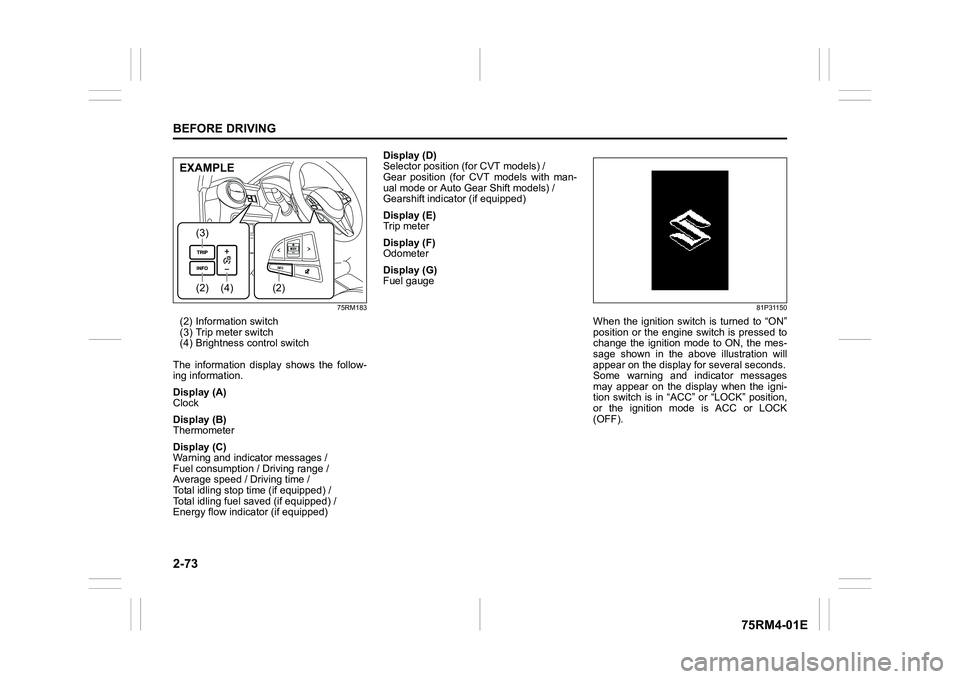
75RM183
(2) Information switch
(3) Trip meter switch
(4) Brightness control switch
The information display shows the follow-
ing information.
Display (A)
Clock
Display (B)
Thermometer
Display (C)
Warning and indicator messages /
Fuel consumption / Driving range /
Average speed / Driving time /
Total idling stop time (if equipped) /
Total idling fuel saved (if equipped) /
Energy flow indicator (if equipped) Display (D)
Selector position (for CVT models) /
Gear position (for CVT models with man-
ual mode or Auto Gear Shift models) /
Gearshift indicator (if equipped)
Display (E)
Trip meter
Display (F)
Odometer
Display (G)
Fuel gauge
81P31150
When the ignition switch is turned to “ON”
position or the engine switch is pressed to
change the ignition mode to ON, the mes-
sage shown in the above illustration will
appear on the display
for several seconds.
Some warning and indicator messages
may appear on the display when the igni-
tion switch is in “ACC” or “LOCK” position,
or the ignition mode is ACC or LOCK
(OFF).
(4)
(2)(3)
(2)
EXAMPLE
Page 97 of 505
2-74
BEFORE DRIVING
75RM4-01E
ClockThe display (A) shows the time.
To set the clock, follow “Setting mode”
instructions in this section.ThermometerThe display (B) show s the thermometer.
The thermometer indicates the outside
temperature.
75RM210
If the outside temperature nears freezing,
the message shown in the above illustra-
tion will appear on the display.
NOTE:
The outside temperature indication is not
the actual outside temperature when driv-
ing at low speed, or when stopped.
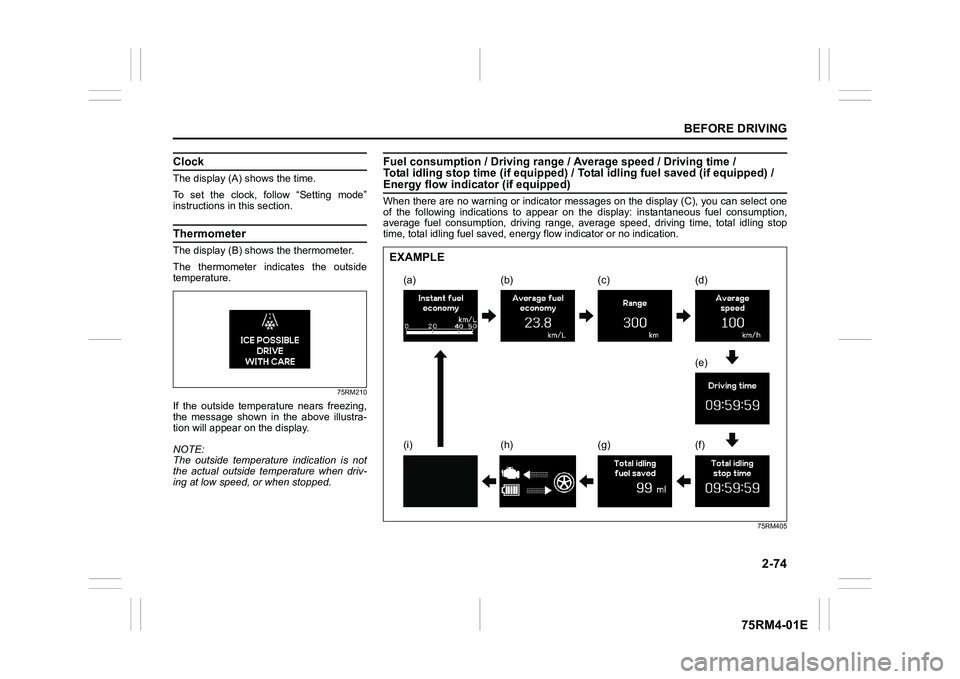
Fuel consumption / Driving range / Average speed / Driving time /
Total idling stop time (if equi pped) / Total idling fuel saved (if equipped) / Energy flow indicator (if equipped)When there are no warning or indicator messages on the display (C), you can select one
of the following indications to appear on the display: instanta neous fuel consumption,
average fuel consumption, driving range, average speed, driving time, total idling stop
time, total idling fuel saved, energy flow indicator or no indi cation.
75RM405
(a) (d)
(e)
(f)
(c)
(b)
(g)
(h)
(i)
EXAMPLE
Page 99 of 505
2-76
BEFORE DRIVING
75RM4-01E
To change when the value of average fuel
consumption is reset, refer to “Setting
mode” in this section.
NOTE:
If you add only a small amount of fuel
when you select “Reset after refuel”, the
average fuel consumption value may not
be reset.
Driving range
If you selected driving range the last time
you drove the vehicle, the display indicates
“---” for a few seconds and then indicates
the current driving range when the ignition
switch is turned to “ON” position or the
engine switch is pressed to change the
ignition mode to ON.
The driving range shown in the display is
the approximate distance you can drive
until the fuel gauge indicates “E”, based on
current driving conditions.
When the low fuel warning light comes on,
the display “---” will appear.
If the low fuel warning light comes on, fill
the fuel tank immediately regardless of the
value of driving range shown in the display.
As the driving range after refueling is cal-
culated based on the most recent driving
condition, the value is different each time
you refuel. NOTE:
• If you refuel when the ignition switch is in
“ON” position or the i gnition mode is ON,
the driving range may not indicate the
correct value.
• When you reconnect the negative (–)
terminal to the lead-acid battery, the
value of driving range will be shown after
driving for a period of time.
Average Speed
If you selected average speed the last time
you drove the vehicle, the display indicates
the last value of average speed from previ-
ous driving when the ignition switch is
turned to “ON” position or the engine
switch is pressed to change the ignition
mode to ON. Unless you reset the value of
average speed, the display indicates the
value of average speed which includes
average speed during previous driving.
To reset the value of average speed, push
and hold the information switch (2) for a
while when the display indicates an aver-
age speed. The display shows “---” and
then indicates a new average speed after
driving for a short time.
NOTE:
When you reconnect the negative (–) ter-
minal to the lead-acid battery, the value of
average speed will be shown after driving
for a period of time. Driving time
The display shows the total amount of driv-
ing time since the indication was reset.
• To reset the driving time to zero, push
and hold the information switch (2) for a
while when the display shows the driving
time.
NOTE:
When you reset the indication or reconnect
the negative (–) terminal to the lead-acid
battery, the driving time will be shown after
driving for a while.
Total idling stop time (if equipped)
The display shows the total length (in
hours, minutes and seconds) of engine
stopping time by ENG A-STOP system
since the indication was reset.
• To reset the total idling stop time to zero, push and hold the information switch (2)
for a while when the display shows the
total idling stop time.
NOTE:
• The indicated maximum value of the total idling stop time is 99:59:59.
• When you reconnect the negative (–) terminal to the lead-acid battery, the
value of the total idling stop time will be
reset.
Page 104 of 505
2-81BEFORE DRIVING
75RM4-01E
NOTE:
For the theft deterrent alarm system of
other than Australia, Israel, Germany and
Taiwan models, refer to “Theft deterrent
alarm system” in this section.
Oil change
(Oil life monitoring system reset setting)
(if equipped)
The oil life monitoring system must be
reset after changing the engine oil and oil
filter.
IS A/C (ENG A-STOP system setting)
(if equipped)
• When using the automatic heating and air conditioning system (if equipped),
you can select one of the following
engine auto stop settings.
– Standard
– Economy
–Comfort
• When “Economy” is selected, engine
auto stop condition is eased, compared
with “Standard”. Engine auto stop condi-
tion will occur more f requently, the stop
time will be longer, leading to reduction
of fuel consumption.
• When “Comfort” is sel ected, engine auto
stop condition becomes severe, com-
pared with “Standard”. Engine auto stop
condition will occur less frequently, the
stop time will be shorter, leading to more
comfortable cabin condition by air condi-
tioner. TPMS
(Tire pressure monitoring system set-
ting) (if equipped)
• You can check the current tire inflation
pressure on the information display.
• You can set one of the initial values of
tire pressure below that are indicated on
the tire information label.
– Comfort Mode
– Load Mode
Refer to “Tire pressure monitoring system
(TPMS)” in the “OPERATING YOUR VEHI-
CLE” section for details.
Display item (if equipped)
(Idling stop setting)
You can switch whether the information
display shows the engine stopping time by
the ENG A-STOP system.
(Idling disp setting)
You can switch whether the information
display shows the Eco-driving display
when the ignition switch is turned to
“LOCK” position or the ignition mode is
changed to LOCK (OFF).
(Idling warn setting)
You can switch whether the information
display shows the warning and indicator
messages related on the ENG A-STOP
system.
(Regen disp setting)
You can choose that the deceleration
energy regenerating indicator light comes
on or does not come on. Default (initialization setting)
If you select “YES” and push the informa-
tion switch (2), all settings will be reinitial-
ized.
Page 105 of 505

2-82
BEFORE DRIVING
75RM4-01E
Warning and indicator messagesThe display shows warning and indicator
messages to let you know about certain
vehicle problems.
A tone may also sound to alert you.
If warning and indicator messages appear
on the display, follow the messages.
Master warning indicator light
80P0382
When the display shows warning and indi-
cator messages, the master warning indi-
cator light may also blink.
NOTE:
• When the problem that causes a mes- sage to appear is corrected, the mes-
sage will disappear.
• If a message is displayed, and other
problems requiring a message occur, the
message for each of the problems will
be alternately displayed about every 5
seconds. • When you push and hold the information
switch (2) for about 2 seconds while a
message is displayed, the message will
disappear temporarily. If the problem
that caused the message is not cor-
rected, the message will appear again
after 5 seconds.